-
Wow Who Knew? Or V4 & M4 Clothing Conversions Thread
Clothing
A
Adventurer Genesis - Render
Alruna Armour - Genesis - Render
Avalon Adventure Genesis - Render
Arthurian Genesis 2 Female - Render - This shows how easily you can transfer clothing from female to male across generations
C
Casual Male M5 - Render - the shirt and vest did not convert well at all, but the pants are gorgeous.
Centurion V4 - You can see the top & bottom here.
D
Dragon Gear for V4 -You can see it here Render
E
Effortless Cool Genesis - Render -Don't forget, you can use male clothing on females with the right tools.
Elfin for V4 - Render Comes with some beautiful textures - the skirt handles will show in your render even if they don't show in the viewport unless you go into the scene list and drill down to the list under each skirt handle and turn the eye off as well.
Elven Dress Genesis - Render
G
Gypsies and Genies for V1, V2 and SP3 - Render
H
Highlander for Genesis - Render
J
Jack of Hearts for Genesis - Render
M
Maharani - Victoria 3 - Render
S
Spanish Rose/Matador V3 & M3- Render
Starlight Dress Genesis - Render
V
Victorias Changing Fantasy Suit Victoria 1 & 2 - Render
Victoria's Historic Gowns V1 and V2 - Render
W
Warrioress for V4 - Render - I don't think I can share a direct link but this one is by XNem over at the other place
Wow Who Knew? Or V4 & M4 Clothing Conversions ThreadClothing Utilities - The stuff used to make it easier to move things from one generation to the next
V4 clone for G2F - gives you a path to use your existing Victoria 4 accessories and textures on your Genesis 2 Female characters. Use the AutoFit clone to access your favorite outfits, the Victoria 4 UV set to use your favorite textures and the Victoria 4 figure shape to see a familiar face. note: Due to a limitation in how DAZ Studio handles presets, only material presets which are in DUF format can be directly applied. Any existing material presets must be re-saved in DUF format from the original Victoria 4.
Sickle Dress Rig Genesis 2 Female - This is what I use the most often to get things up to Genesis 2 Females. I still use this generation a lot so its been a priceless tool. Make sure you read the directions that come with this, its important as there are two different ways of using it. It looks like you can use this on V4 to Genesis and on up through the generations as long as you have clones for the originating generations. See my comment HERE
Wear Them All - Autofitting Clones and Clothing Smoothers for Genesis 3 Female(s) autofitting clones are created to smoothly fit any Genesis 2 Male, Genesis, Victoria 4 and Michael 4 conforming clothes to Genesis 3 Female(s) using the Autofit feature in DAZ Studio. Make sure you read the read me/directions on these two they are important!
Wear Them All - Autofitting Clones and Clothing Smoothers for Genesis 3 Male(s) - autofitting clones are created to smoothly fit any Genesis 2 Female, Genesis, Victoria 4 and Michael 4 conforming clothes to Genesis 3 Male(s) using the Autofit feature in Daz Studio.
Clothing Smoothers for Genesis 2 Females - This should help a great deal for those problem spots on the longer tunics and dresses where it can distort or stretch oddly.
Novica & Forum Members Tips & Product Reviews Pt 9Would this be of interest to anyone? While searching for something else, I found this and again, not trying it right now- but so clearly explained by SnowSultan!
Iray Shadow / Reflection Catcher Canvas Tutorial Neat!For folks new to the thread, the tips will be in the Reference post, which will be the second post of this thread. (And we do product render showcasing, it's a mix of tips and products like the thread name suggests.)
Also, just getting online- be sure and check for the orange banner for the up to 85% of V4/M4 items. Victoria 8 should be coming VERY soon with all this going on.
I haven't even looked at the V4 stuff yet, but I got to thinking. We covered it (wow, years ago now!) and keep in mind- the pose converter products for V4 and M4 worked quite well, there's a slew of converters.
One of the V4 ones is V4 Pose Converter for Genesis and Genesis 2 Female(s)
Also some of the ones I have are Pose Builder (Mixing poses from Genesis/G2/G3) In this bundle: Pose Builder Genesis 3 Bundle I like that it's for both male and female, very handy.If I recall correctly, you can use the V4 pose converter to get them to G2F, then use the next product to take them to G3- right? I'm curious now, and looking- is there a direct pose product going V4 to G3? My mind is getting confused with all these. (Back in a few.)
Victoria 8 Launch This month?Perhaps I've been here too long, but it does seem a discussion such as this starts every time there's a new base model about to or has been released.

Well, it is June, and it has been two years since Victoria 7 was released...
I've just realized what my strategy for purchasing G4 figures/characters/utilities/wardrobe/poses is going to be... Wait two years until G5 is, (presumably,) imminent and clean up with the stack up sales. Oh, and grab any figure that Daz makes free with a qualifying purchase, assuming the qualifying product isn't specifically for G4...
In case it isn't obvious, I'm one of the many who aren't the least bit excited about a possible G4 release this month.
 Skin colours guide
Hi everyone!
I used a guide on different skin colours, colour settings for reflective, glossiness and diffuse. It worked great in DAZ 3, but DAZ 4 has more colour settings and seemed to rearrange things a bit. I cannot seem to get the same results. Does anyone have a guide on how to achieve different skin tones ?
My main character I am using is Victoria 4. She is supposed to have dark skin, her parents are from Jamaica and Indonesia.
Kids 7
I've said this once. I'll say it again.. Low sells on kids stuff has nothing to do with the fact that nobody buys it or likes to render child like figures. It has everything to do with the cheap, generic, toonish people.. When you stack a K4 next to a V4... They arnt compatable because the K4 is a hidious little monster, and unrealistic... and just straight creepy looking... it ruins the render... If a K4 was on the same level of quality as a V4.. sells would increase dramaticly.. When you half ass a product.. Expect half assed sells.
Actually I'm rather amazed at the number of people who will post a shot of a Victoria 7 Gen 3 character next to a K4 kid, and say, "see they look completely compatible", when the results looks like Bob Hoskins in a scene with Roger Rabbit. So one has to take into account that some people simply don't have the artistic eye to tell the difference; even though they can spot when a hair product looks photoshoped and not realistic because it doesn't have the requisite amount of sheen, or gravity isn't affecting a spit curl in just the right way.
Daz characters and system resources?I do not think that Daz's HD morphs work in Carrara at all. As far as I know, it doesn't matter which resolution of smoothness is used in Carrara, the Daz HD morphs do not work. Smilarly, geograft does not work, although Misty may have found a limited work around involving some UV references in the file structures.
I use Geneses 2 often - but I also use other figures at will, including older figures such as Victoria 3 and Poser 7 Simon. When using Genesis 2, I tend to save the components of the scene rather than the entire scene. This economizes on time. In case that did not make sense, if I have the foreground figures the way I want, I can save them, bite the bullet on the time, but then not include them in the save when I am tweaking the lights, or adjusting the stuff in the background. Not appropriate for every project, to be sure. But then again, I don't always use G2. There is another recent thread on Genesis and Genesis 2 file sizes and save times. Worth skimming.
Novica & Forum Members Tips & Product Reviews Pt 9Because we can't list a product more than once as a favorite, I'm doing this so we'll keep it straight. I'll alphabetize it for each of you so you can quickly scan and see if your product you want to mention is already there.
THIS LIST NOW INCLUDES YOUR PICKS FROM July. (the *July is to help tell me I've got your most up to date choices)
Here's the link to the current post that has their July Picks It lists the artist, and a link to their post which has the product link and their render links.
Barbult:
200 Plus Head and Face Morphs for Genesis 3 Male(s)
Ceridwen
Dale for Genesis 3 Male(s)
Darius 7
Diesel for Elijah 7
Elijah 7
Fern Lake
FWSA Halina for Kalea 7
Hair Lustre Shaders for Iray
Harpsburg for Daz Studio
Harpwood Trail
Nyarai for Genesis 3 Female
Taylor for Stephanie 6
Toon Generations Toon Mega Bundle (Gen3M/F)
Victoria 8
Deathbycanon:
Diesel
Dominator Planet
Staff Pack
Divamakeup:
Gwennili HD (V7)
Minnie Bow Hair
SF Ball Joint Doll (Gen3F)
Star 2.0
Urban Sprawl 2 The Big City
DonovanColbert:
Aiko 3 Pro Bundle
Big Bill Truck
Melody for A3
Rundown Bedroom
Ultragenesis Faces of GDreamfarmer (*July)
BOSS Pro Light Set for Portraits and Promos
DA Blue Bell Woods
Heath Hair for Genesis 3 Males And Females
LIE Makeup Presets (Gen3M)
Realistic Grass Evolution
SC Rain For Genesis 3 Female(s)Ice Dragon Art: (*July)
A Touch of Dirt For Iray
Ahmad For Genesis 3 Male
Alien Metals-Iray Shaders
Aran (Gen3F)
BOSS Pro Light Set for Portraits and Promos
Creech Evolution
Damon (Gen3M)
Death Stalker
DM's Fantasy Bath
Epic Skydome Mystical Island Cave
Forest Daphni (V4)
FSL Elements of Magic
Iray Ghost Light Kit
Iray HDR Space
iReal Animated Butterflies and Wisps
Jepes Body Jewels 3 (Gen2F)
Legends Altar (Note the link is legends-alter. Daz screwed it up)
Medieval Study
Millenium Dragon 2
Minotaur 6
Muelsfell Atlantis Armour
Raptor Dragon
Robbus Goblin
Sickleyield's Dress Rig
Skin Builder 3 For Genesis 3 Females
Sorceress (Gen3F)
SY Rigged Waterfalls Iray
The Pharoahs of the Sun Dress Children of Aten 2 Texture
V4 Skins Batch Converter to Genesis 2 Female(s)
Water Dragon
Wild Dreads for V4Isidorn: (*July)
Arkangel
Benita for Victoria 8
Careless Braid (Gen3F)
Droid
Easy Environments: Snowy Mountains
EJ Narumi (Gen3F)
Fast Fog Iray
IDG Iray FX Props and Shaders
Impossible Objects
Kawaii Dreams Outfit (Gen3F)
Kimo 7
Kobold Woodlands Spirit
Lethal Rogue Outfit for Genesis 8 Female(s)
Mullet Hair 80's Style
Nail Polish for Genesis 3 Female
Solitaire by Meipe
SY Confetti and Nature Effects
Tube Socks (Gen3F)
Z Creepy Manner-Morph Dial Expressions for Clarice
Zombie WalkerJakiblue: (*July)
Bad Girl Textures for Genesis 3 Females Super Bodysuit
Beddy Bear
Bridget Hair for Genesis 3 Female(s)
Ceridwen and Fantasy Skins (Gen3F)
Eva 7
GDN Kelly (Gen3F)
Go Go Outfit (Gen3F)
Modern Bathroom
Mst Mai (Gen3F)
Myrtle for Star 2.0
Razor ONE Hair for Genesis 3 Female(s)
Sand Serpent Outfit (Gen3F)
Slide3D Goth Boots
Star 2.0
Super Sleeky Hair
Tail Gunner V3
Toon Generations 2 Essentials for Genesis 3
Vagabond (G3F)
Knittingmommy
FirstBastions Highland Lakeside Cabin and Dock
Iray Clouds
iReal Animated Butterflies and Wisps
Mariposa for Genesis 3 Female and Genevieve 7
Sketchy- Toon Edge and Art Style Shaders for Iray
Tonal Rage- Tone Mapping Kit for Iray
War Bird Outfit and Poses
L'Adair (*July)
Centaur 7 For Genesis 3 Female(s)
DA Stonework and Masonry Shaders
DG Toon Style Hair Shaders
Double Trouble Braids for Genesis 3 Female(s)
Esha's Modern Chinese Bedroom
IDG Portrait Studio
Iray Ghost Light Kit
Kids Play Area Texture Add On
Party Gown Outfit for G3F
SF Unicorn for Daz Horse 2
Skin Builder 3
TerraLUNA 3
UltraScatter Advanced Instancing for Daz StudioLlynara:
Body of Light
BOSS Pro Light Set for Portraits and Promos
Centaur 7 (G3M)
DA Real World Lighting
Digivault's Stardomes
Elijah 7
Evan (G3M)
First Light Skydome and HDRI
FW Noah HD (Dante 7)
FWSA Taia HD for Victoria 7
Iain (M7)
Legends (Gen3M)
M3 High Fantasy Character and Clothing Bundle
Mariposa for Genesis 3 Female and Genevieve 7
Skadi for V4
The Shader Plan - Iray Satined Textiles
Toon Generations 2 Megabundle (Gen3)
V3 High Fantasy Character and Clothing Bundle
Vega for V3
Wear Them All Autofit Clones Expansion (G3M/F)Luci45: (*July)
Fantasy Creature Creator HD Morph Pack (Gen3F)
i13 Sandwiches
IDG Iray FX- Props and Shaders
Legacy UVs for Genesis 3: Michael 4
Low Poly Lightning Bugs
M3D Coen Shapes HD for Genesis 3 Male
Morpheus
N.G.S Anagenesis 2 Revolution
Portals- Tuscany
Post Apocalyptic Shelter
Raoul for Ivan 7 HD
Raw Dwarfology
Rock My World- Iray Boulders
Skies of iRadiance- Sunset HDRIs for Iray
What A Character for Lee 6
Wild Borders
Wyzaerds TooMelanieL:
Brett (Dante 7)
Country Ford
Dale (G3M)Novica: (*July)
Ancient Temple Courtyard
Bella Donna Poses Chaise, & Shaders
Clown Wigs (Gen3M/F)
Costume Jewelry Shaders for Iray
Desert Villa
Dmitri
Esprit d'Autrefois
Fantasy Hair for Genesis 3 Female(s)
FW Carson HD for Michael 7 and LI Carson Whiskers
FWSA Grace HD (V7)
Galene Hair for Genesis 3 Female(s)
Gentle Paladin
Greek Houses
Hat and Hair Helper for Genesis 3
Hidden Burial Ground
Hinata Dress (and Textures)
Honey Bolt
Honey for Genesis 8 Female(s)
Iray Converter for Generation 4
Iray Converter for Genesis
Iray Ghost Light Kit 2
Iray Glassworx
Isidora Dress
Mace for Genesis 3 Male
Makoa for Kimo 7
Molly HD for Genesis 3 Female(s)
P3D Duffy HD for Victoria 8
Rialto Glasswork Shaders and Props for Iray
Rundown School Classroom
SC Alice for Genesis 3 Female
Sexy Skinz Lace Bodysuits (Gen3F)
Wasteground Vignette
Woodman House: The Bathroom
YK Faith (Gen3F / Josie 7)
VYK Raine for Genesis 8 FemaleRGcincy: (*June)
1stBastion's Mid Forest Vale
1stBastion's Neighbours: Front Drive
Ancient Ruins
Animation Four Wheeler Template
Coast Guard Cutter
Collective3D Baseball Field
Ecomantics- Efficient Ecosytems
Factory Warehouse
Iray Ghost Light Kit
Iray Ghost Light Kit 2
Job Site Scaffolding
Medina Cityscape Generator
Nimos Coach
Nimos Transit Bus
Nyarai for Genesis 3 Female
Old Beach Pavilion
On The Shore
Peaceful House
Sawmill
SC Alice for Genesis 3 Female
Shaded Sanctuary
Single Homes Bundle One
Step Van Bundle
The Briefing Room
Tithe Barn
Tramp SteamerSueya (*July)
Bikini Set A for Genesis 2 Female(s)
FW Dan Megapack
FW Monie for Genesis 2 Female(s)
FWSA Gabriel for Tween Ryan 7
Paige Dress
Scarf Braid Hair
Xmasrose (*July)
A Curious Tea
Beach Pod
Belle 6
Classical Pool
iRadiance Light Probe HDR Lighting For Iray Exp 1
Jewelry Basics for Genesis 3 Female(s)
Noodle the Toon Cat
Scarves for Genesis 3 Female(s)
V4 Cuore di Moda
Novica & Forum Members Tips & Product Reviews Pt 9This is the References post
The most used other thread I started is Free Backgrounds. Head over and grab a few, contribute a few, and enjoy!
**********References / Of Interest**********
Books, Digital: RScotJohns (Author) helped us with ebook (did a chat one evening)
Characters: I showcased Odelle, an older character from Rendo (that Daz rejected!)
Expressions: Here's some with sliders that are really fluid and usable. And Poses (scroll for both of these, numerous posts)
Hair: One of the funniest things showcased- vendor's names in hair!
HDRIs: Fishtales showing you some HRDI's
Free Infinity Cove 3 sets
Mountain Valley: Take a tour of this product as we drive around town!
See Nath's Elegant Swan- the ACTUAL PHOTOS from the museum, and the render. This car spewed steam and pooped yogurt, and was banned from the streets due to being a nuisance. (Ya think?) Now at HiveWire.
Special Honor: Rabbicus fun with RGcincy. It all started with a cactus on a shelf and I said it looked like a rabbit.
********** Programs **********
Special note: Script: David GB's G3 To G8 Pose Fixer To correct G3 Poses and get them to work with G8
Infinito: Infinito Experiments: If you have questions about Infinito, ask them here
iClone: iClone6 (I'll have to get back to it) Here's a nice video by Bigh and Bigh's thread on Iclone and Reallusions Thread The Path To iClone
Livebrush Pro (FREE) Livebrush Pro- link, it's now free
Mixamo How To Use (by Firewarden)
Motion Capture in general: Motion Capture products/ discussion linked from the Octane FaceShift question
Senosoft: Convert .rsr file types to pngs (P3DO Explorer)
ShapeMagic 2 ShapeMagic 2 By our very own RGcincy
Silo: Silo Modeling
Zbrush For Beginners: Zbrush for Beginners
********** TIPS **********
Tip: Bloom Filter- Settings
Tip: Characters- Where To Load From Loading Characters- does it matter if you load it from icons, the Genesis figure + Character List, or the Figure (Aiko 7, Girl 7, etc) + the Character List? YES IT DOES.
Tip: Charlotte Hair Tweaks- Turn fluffy into sleek and modern! New May 2017
Tip: Custom Categories for Sets Here's some suggestions and additions
Tip: Delete Items in Scene: Grouped items giving you fits? How to delete those polygons!
Tip: DIM download problems? Try this.
Tip: DIM downloading product to use with products from other sites
Tip: Dreamland Models in DS Learn how to work with Dreamland Models (Poser) in DS
Tip: Doors and windows that open, flat roof to add, pane of glass, good kit bashing items
Tip: Dome Orientation Results My experiments/settings for rotating the dome by changing the XYZ Dome Orientation. All settings given/ shown.
Tip: Fern Lake Instances and Water Instances in Fern Lake and Through The Woods And clearer water tip for it. My example.
Tip: Finding products in these threads, using Google NEW April 2017
Tip: Focal Length
Tip: Furries: How To Find Files and Pose (Llynara) And Capsces posted this for a few tips.
Tip: Gemology Shaders for Iray: Settings for best results, by vendor
Tip: Generation Tools: List of products which help you cross generations
Tip: Greek Houses: Fixing the water, landscape, and stone edge materials. All settings provided!
Tip: Growing Up: Making Chest look good
Tip: Hair: Different Settings To Increase Shine Also here
Tip: Harpsburg Night Lights Best way to apply them
Tip: Iray Organized References This thread links to the threads, but also categorized some of the topics within the thread so you can look things up quicker.
Tip: Iray Section Plane TabascoJack shows you how to use the Iray Section Plane
Tip: Madelyn Ears- How to remove those elf ears.
Tip: Manual Downloads in Product Library How to find them ultra-quick
Tip:/Info: Materials and Shaders: Difference in Materials and Shaders (from Commons)
Tip: Mermaid Top Family friendly suggestion.
Tip: Millenium Cat- Free Persian Head
Tip: Mocap Animations FREE Here (Mixamo)
Tip: Nobiax Free Iray Daz Textures
Tip: OOT Hair Steps
Tip: Photoshop Postwork Postwork Photoshop Tips (Laticis) and my example
Tip: Photoshop Plugins From Thread 6: Examples
Tip: Portrait Lighting Novica's XYZ Dome Orientation Quick Guide (Portrait Tweaks)
Tip: Pose Converter (Genesis 2 to Genesis 3) Where to find files (Scroll for discussion)
Tip: Combining Poses by locking body parts
Tip: Postwork The Postwork thread has a lot of good information!
Tip: RDNA How to find your purchases
Tip: Rigging How to import OBJ and rig in Daz Studio
Tip: Rigging Basic Rigging Preparation then Adding Bones for Rigging
Tip: Section Planes How To Use (by TabascoJack)
Tip: So Wet Bundle Examples
Tip: Skies of iRadiance Which are for high / low altitudes? Answer
Tip: Spectural Rendering tests for the studio
Tip: SubD: How To Add It (Darwins Mishap)
Tip: Texturing With DestinysGarden (DestinysGarden) New June 2017
Tip: The Briefing Room Lighting with Iray (V3Digitimes)
Tip: Ultragenesis: Faces of G has a variety of older faces.
Tip: Weight Maps: How To Remove or Change (Thomas Windar)
Tip: White Point Changing it- Examples
Tip: Walls- Sets Which Are Easier To Use- or Not. Sets that don't have separate walls and handy notes on a few sets
********** TUTORIALS**********
Tutorial: Bus, Noggins- Converting from Bryce to Daz Studio (RGcincy) Here
Tutorial: Breast Gone- In Hexagon (Smoothing Zev0s Grow Up product even more)
Tutorial: Clothing, Making in Blender SickleYield's tutorial on Deviant Art.
Tutorial: Create Categories Using Gen2F, I showed how to Create Categories and Export to save your custom categories. (Here's WHY you may want to do that with your characters.)
Tutorial: Custom Actions In Toolbar How to Create Custom Actions In Toolbar
Tutorial: D Former D Former Tutorial D Former tutorial and links
Tutorial: Depth of Field Flipmode provides a good depth of field tutorial for you.
Tutorial: Fisty's Shaders & Getting Rid of Gooey Lips This one shows you Fisty's shaders. Get rid of the overly gooey lips.
Tutorial: Fur Brushes Download and Video (Kathryn Loch)
Tutorial: Garibaldi Hair Doing a cat with Garibaldi Hair- Tutorial
Tutorial: GenX links on "how to use."
Tutorial: Generation 4 Materials on Genesis 2 This one put Generation 4 materials on Genesis 2 using Victoria 4 for Genesis 2 Female.
Tutorial: Geometry Shells How to do Geometry Shells (video tutorial the3dwizard) and doing makeup for different characters
Tutorial: Hair Shaders (Slosh, his product) explaining how to use them.
Tutorial: Iclone Iclone videos
Tutorial: Images- How To Put Them In Forum Posts Here's Putting Images in Posts
Tutorial: Instances: Using Ultrascatter
Iray Canvases- How To Do Lighting
Iray Ghost Lights 2: Portrait Setup in 13 Steps, All Settings Given
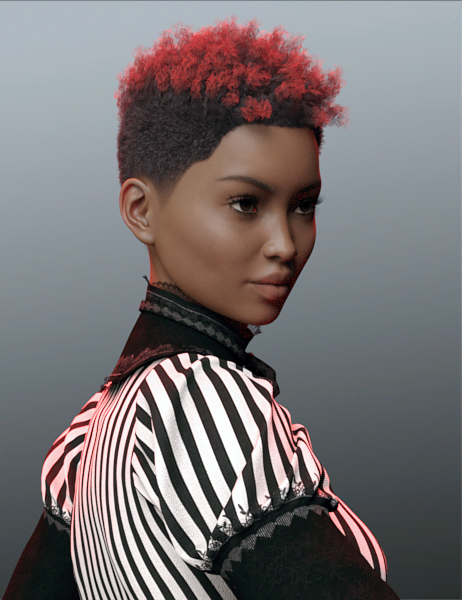
Tutorial: Iray Light Manager Pro Step by step screenshots
Tutorial: Iray For Beginners- Do A Scene Step By Step The Wanna Render? Iray tutorial walks you through Iray lighting for total newbies- including Crush Blacks, Burn Highlights, how the sliders work together and why in Tone Mapping, and Environment Intensity.
Tutorial: Iray Lighting- A Night Lantern Doing a night time lantern with Emissive Lighting.
Tutorial: Iray- Portrait Light Setup With Point Lights Portrait Lights: 3 Point Lights and a Spotlight- Settings Provided

Tutorial: Iray Skydome Super Pak The Explanation to use (magix101)
Tutorial: Iray Worlds Skydome Explanation on using it (rgcincy)
Tutorial: Maps for Iray and 3DL / Albedo Explanation Texture Maps: (Saba Taru) ALBEDO explanation, and where to put the maps for Iray and 3DL
Tutorial: Material Zones
Tutorial: Metadata- How To Make It Video Here (Slosh) and Here (3D Almanc)
Tutorial: Rigging and Weight Mapping- Beginners Through Advanced
Tutorial: Rigging Static Doors So They Open (RGcincy) How To Rig A Prop
Tutorial: Shaders- Mec4D's PBR Shaders Mec4D's PBR shaders: How to use
Tutorial: Tears by SereneNight NEW JUNE 2017
Tutorial: Teeth, Getting Realistic Shapes Getting realistic teeth shapes was here and slight tweaks here.
Tutorial: Texturing Texturing With DestinysGarden is a good thread- let a pro show you how!
Tutorial: UltraScatter Advanced Instancing UltraScatter Advanced Instancing: RGcincy's handy notes, how-to.
Victoria 4 for Genesis 2 Female: How to use the product.
Tutorial: Weight Mapping: How To Smooth All Face Groups At Once (By SickleYield)
Tutorial: Windows, Making Them From Planes And Cubes Realistically Making Windows using planes and cubes, with glass panes and images!

Fun / Interesting Threads
Photoshop Playtime! Where we showed you some really neat plug-ins to get cartoon, oil, watercolor effects.
Scripts: A one click solution to put things on your ground plane, under things, etc
Novica & Forum Members Tips & Product Reviews Pt 9The previous threads / views as of June 9th, compared to January. I track this to show contributors how their contributions are continually viewed/helping people. The threads FOUR YEARS AGO are still being actively surfed. This is for only five months!
Thread 1 81, 805 (+557)
Thread 2 66, 316 (+543)
Thread 3 77, 281 (+702)
Thread 4 57, 095 (+703)
Thread 5 51, 603 (+457)
Thread 6 70, 937 (+2,693)
Thread 7 48, 944 (+3,287)
Thread 8 42,300
Total new views, excluding Thread 8: +8,942
TOTAL POSTS/VIEWS: 496,278 Only 3,722 short of half a million! Woot!Edit: As of early August, we have over half a million views! See the current contest to celebrate, also here in the Art Studio thread.
This deserves mentioning- it's from one of my older threads- but if you don't know how to back up your content, SereneNight gives you a step by step. It's in the second half of the post.
If you want to post your images in a thread and not have them clunkily attached below your post, here's where you can post them!! (Note one problem with that- you won't be able to get the name of your original image by clicking on it, it's mumblymuck code. But you can always download it and rename it.)
Want to see some examples of older content? @Kerya , @Llanara , and @icedragonart have you covered! Thanks, ladies!
Examples of Generations 2 and 3 are here.
Older sets are here.
V4 and M4 Clothing Conversion to Iray is here
Can someone identify the G3F model and hair used in promo image for mystical poses for G3F?Z Mystical - Poses for the Genesis 3 Female(s):
Thanks
Maybe Josina for V7 by P3D?
Victoria 8 Launch This month?Nope. Not one bit excited. Genesis 4 and Victoria/Michael 8 would have to be absolutely mind blowing for me to even consider them. And as others said, unless there are some nice conversion tools available right off the bat; I don't care how amazing they are, I wont bother. The investment is just too high. I don't think I am alone in thinking this way. People will want their past purchased content to work seamlessly.
Nope you're not alone.
Laurie
Site Banner GirlThe scale skin is Dayanara, not Laguna Mermaid https://www.daz3d.com/fwsa-dayanara-hd-for-victoria-7
Is G2 dead?WOW,and here I am still using Genesis 1. I really need to get caught up and at least buy the G2 and G3 basic bundles before G4 hits.
Based on the recent sales where they are putting deep discounts on Genesis 3 female stuff, I am assuming Genesis 4 is going to drop any day now.
Don't forget the 10% off Gift Cards offer from today. DAZ frequently puts gift cards on sale the week before a new figure is released... So I'm thinking Victoria 8 will be released next Tuesday. But I'm one of the crowd that doesn't want to see a new generation yet and won't be buying into it.
As for G2... G2 was the current generation when I got started with DS. I signed up for PC+ membership as the PA Festival was winding down and was thrust into the PC Anniversary sale with no real understanding of what I was doing. I spent an insane amount of money on V4 and M4 products, mostly with 80% discounts, because I also had bought the Victoria 4 for Genesis 2 Female and Michael 4 for Genesis 2 Male products and had the naive idea all that old content would work perfectly on G2. (Not to malign the products. I've just since learned that these tools are a good starting point, not the end result...) I found G2 much easier to work with than generation 4, in all respects. I didn't totally skip G1, but I don't use it nearly as much. Now I use G3 more than G2, but I still use G2 quite a lot.
In one way, I'm looking forward to Genesis 4 coming out... products I've wanted, but were too expensive for my budget, will start getting the deeper discounts. And I'll have more money to buy the higher priced sets, (but worth every penny,) from such excellent PAs as Stonemason and SloshWerks. (Did you see the bathroom Slosh released today? I'd like to have a bathroom like that in real life! I'm about to be officially jealous of my 3D characters!)
Which DAZ Genesis 3 M and F characters are the most realistic?I'm just curious to hear your opinions and see which Genesis 3 character other people think are the most realistic... no wrong answers.
I would say Victoria 7 was a milestone character, in terms of her realism, body tone, and skin. There is something about her skin that picks up light very well, especially in darker/single-light scenes. To my knowledge, I don't think any character before her stood out as she did. And she is still the top ranking seller even today (her bundle is always in the "What's Hot" section).
-P
ZDG random Daz Studio discoveries and questions.apparently not, tho I did just get that hair style. Also, I didn't notice the ears in the bow till after doing all the former renders.

I will presume there is at least some adjustment morphs for the hair. (and there are, some dials)

ok, the 'Adj Ear up' an 'Adj Ear back' dial is not exactly it. There are a few other bow style dials, tho I'm not sure they would help either. I'll look at them, tho I suspect elf ears was not considered when this hair style was made from the looks of it. (and why does Grammarly keep crashing, brb)
That's, well, shall we say, What is the "Bow Hide" dial for if it does nothing at all?
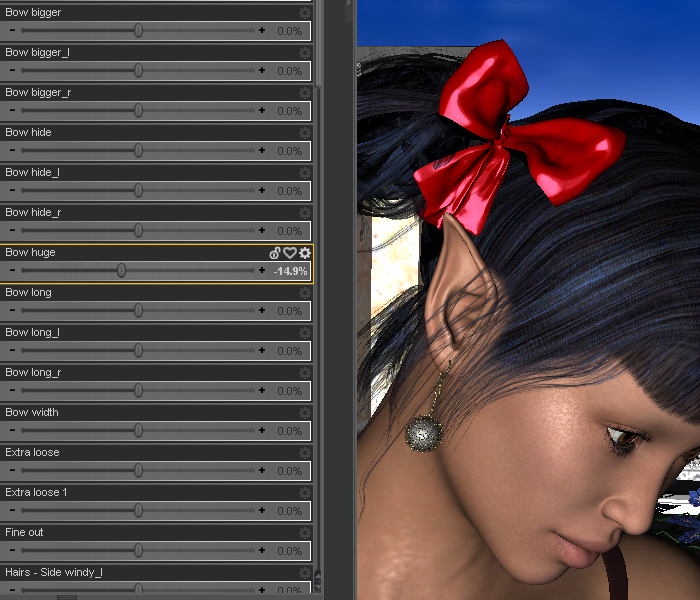
ok, that gets the bow out of the ear, and into the hair.
 Oh, I should check to see what zips I have for her, tho I don't think that will make a difference for Vanessa's elf ears.
ok, that sort of works, make the lower ribbon part shorter.
HelpNonesuch is correct. If you have downloaded the V4 Powerloader and "installed" it in your content folder (it is a separate download from the V4 figure), then it should open the dialogue referred to each time you load V4 in a scene. All the V4 morph packages that you have (with the exception of some 3rd party packages) should show in the dialogue.
Alternatively, if you do not have the Powerloader installed, you can still access and apply the morphs from the Content Library tab. Since V4 and associated content are usually Poser format, you should look in the Poser Format category. The morph packages may be found under Poser Formats > 3DContent > Pose > DAZ's Victoria 4 > Morph Injections. With V4 loaded and selected in your scene, just double-click on any or all of the morphs listed to apply them. The corresponding sliders for the morphs should now appear under the parameters tab. Again, some third party morph packages may not show up there (Morphia comes to mind), but they should also be found separately under the Pose category (although anything is possible).
HelpSo I've used Daz to make some very basic models. I've been asked to make an elderly lady. I've downloaded Victoria 4.2 (and morphs) as well as two different aging morph packages. I just can't seem to find them or use them? Any help for this newbie? All I want is an elderly lady!! Is that too much to ask ? :P
Thanks in advance
I have used V4 & M4 maybe less than a dozen times but I think you need to first use the Power Looader for Victoria 4 and ensure when you load V4.2 /she'll be in 'Smart Content tab' under Figures or she'll be in the 'Content Library tab' under DAZ Content - 'Library' - 'People' - Victoria 4 (I think Victoria but maybe just Victoria 4 or v4). When you click the icon it should bring up a dialogue that is the 'Power Loader' which a bunch of morph products - you need to go through that list and put check marks in all the morphs you want to load. Then after it loads you will find the morph adjustment sliders in the 'Shaping' tab. or the 'Parameters' tab.
I think I'm right but not 100% as I typed this from memory.
HelpSo I've used Daz to make some very basic models. I've been asked to make an elderly lady. I've downloaded Victoria 4.2 (and morphs) as well as two different aging morph packages. I just can't seem to find them or use them? Any help for this newbie? All I want is an elderly lady!! Is that too much to ask ? :P
Thanks in advance
I tried yet again...Correct, and I re-use a lot of stuff: Once I have the sizing, shaping, and morphs in, it's a helluva lot easier than reloading all that stuff all over again. An example: I don't load Victoria 4 from my \figures\DAZ\people directory: I have a scene saved named V4_2_default, with all the morphs and Morphs++ already loaded. If Studio can't find the metadata, then it loads with error, missing morphs/textures.etc. With V3/A3/M3 etc., it's even tougher, because it was out earlier, and the metadata can be in a LOT of different places.
..Joe
Daz 3D is part of

Connect
DAZ Productions, Inc.
7533 S Center View Ct #4664
West Jordan, UT 84084Licensing Agreement | Terms of Service | Privacy Policy | EULA
© 2026 Daz Productions Inc. All Rights Reserved.