-
The best Manga like model
I've used the morph for G3 "Anime head" by Tofusan. Then I mixed that up with MDD Anabelle by Maddelirium (100% body, 75% head) + Victoria 7 (50% head). Then I use the Growing Up for Genesis 3 Female(s) by @Zev0 to tweak the body and make her look younger and less curvy. Here are some example renders. Might've been better to use the non-make up version, but you get the point :).
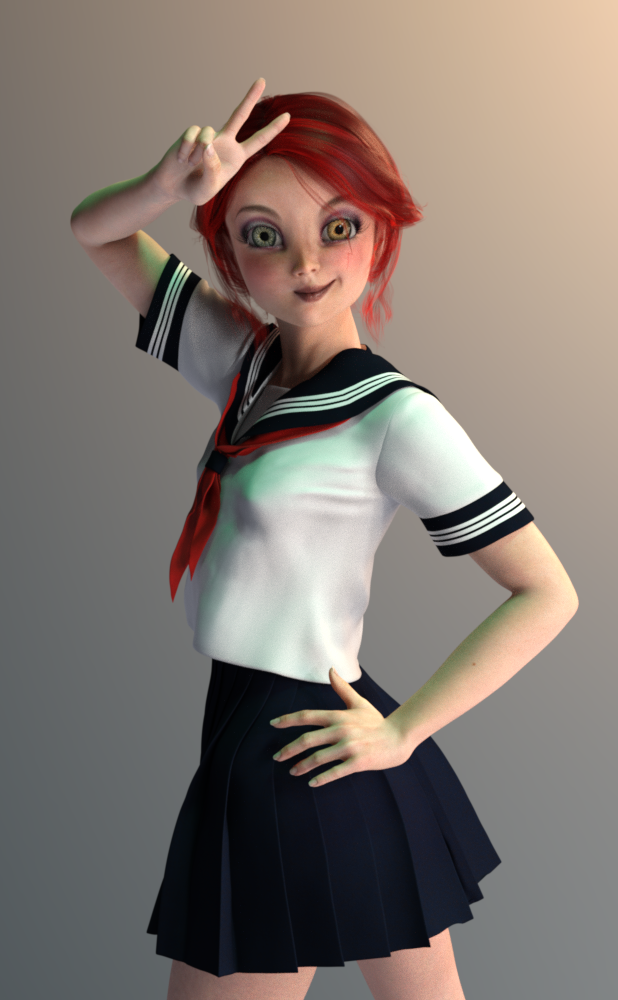
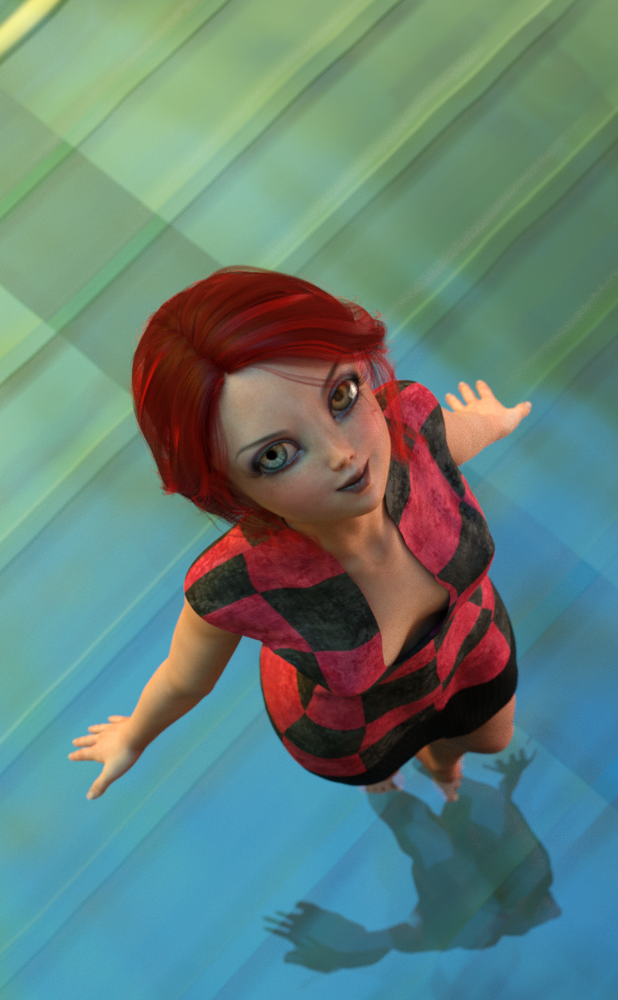
PS: Did this one below for a competition over at the rendo but couldn't get it done in time.
 Here's my problem with DAZ Pro Bundles
Thanks, everyone, for responding. Chohole, I hear you. Perhaps it would be a better idea for DAZ to setup some sort of deal which included the morphs along with the characters, as addons.
I seem to recall that head and body morphs were released on the same day as Victoria/Michael, at least in the last couple of generations, and had an extra discount if purchased at the same time.
How do you switch between orbit and pan in the perspective cam?In the viewport when I am positioning an object, the camera rotational orientation switches between orbiting while pointing at the highlighted object, and rotating where the camera spins in a circle on its axis in one place. In Bryce choosing camera navigation was definate and defined, reverting to pan only if there was no object selected. In D|S There used to be a pop up that said to the effect of "hold LMB for orbit, RMB for pan" while spinning the cube. That does not work, and i don't see any camera navigational controls to replace it. Moving the object, using the 'point at' control helps me find the object, but I have no idea of its spatial orientation relative to another object- found only by orbiting the camera around the object- like positioning a null on an object. I'm getting irritated not being able to work as quickly because I have to move +/- x; move +/ -z; click point at, rinse and repeat.When you create an object, the camera has no eyes but for the object, but when there are multiple items in a scene the camera can't seem to decide which to focus on, even if one item is highlighted, and looks around the scene in utter confusion. It's amusing how big and bad DAZ Studio has become, with Iray and this new cloth deformer feature just introduced, and genesis models giving birth to a new generation every few years (did you know that Victoria 4 in less than five years has become, with Genesis, G2, G3 and now G8, a great-great-great grandmother? Only rabbits can breed that quickly), that a program ten years dead and gone does a better job with something so basic as navigating the workspace. Okay, I've had my comic rant... now, about that camera? How can I get that perspective cam to do what I want it to do when I want it to do it?
Animal onesies, anywhere?There is one for Lil Bit: https://www.renderosity.com/mod/bcs/lil-bit-onesie/100690 and Cross Dresser can convert it to other figures such as Victoria 4.There are also some additional styles for it: https://www.renderosity.com/mod/bcs/adorable/100691
Edited to add: Cross Dresser can also convert the Aiko 3 one that is mentioned above to other figures.
What Figure's FACE is the most EXPRESSIVE?If they are Genesis 3 they are all the same and if they are Genesis 8 those have been improved from Genesis 3 and the Genesis 8 are all the same to. Your use the Power Poser to access more easily all the expression bones in Genesis 8. For that you need DAZ Studio 4.10.x. Careful though it is easy to make a face too distored with the Power Poser. Really need some sort of IK chain expression solver for the face I think.
Honestly, I think there are some issues with the G8s that make them inferior to the G3 rigs, especially when it comes to smiling. M8's smile is just creepy. That said, if you've got a good collection of second party morph dials, the G2 facial expressions can be excellent and for exagerated emotions, especially comic ones, the original Genesis seems to trump all the others.
If you really want to tweak expressions, though, I think DS's real secret weapon is Puppeteer. I'll frequently create a one or two more extreme variations of an expression as points in Puppeteer and place them in a triangle along with a more neutral one and just mouse around between the three of them until I get something that feels more random and natural.
You're right about Puppeteer, I think I said Power Poser or something like that.
But for the rest, that's strictly opinion when you use words like 'creepy'. The fact is technically in Genesis 8 compared to Genesis 3 there are more bones deforming more skinned mesh surfaces and that makes them more expressive.
Genesis 2, Genesis, and prior DAZ models use morph shapes for expressions and that technically can do less.
I do agree though it is sill difficult to get a nice and believeable expression for any of the morphs or face rigs without a lot of work. I'd try to personally create a lot if I wasn't CPU rendering. That's the other thing - in DAZ a openGL texture preview isn't indicative of a good pose & good expression - you have to render to evaluation and CPU rendering takes far too long.
Ideally, if the OP has an nVidia video card they should setup their aux viewport to show only the head and set the aux viewport in nVidia iRay rendered preview mode and the Puueteer/Power Poser to keep tweeking expressions until the OP finds them believable (and original enough to think 'oh, that's Victoria 8 Smile or Michael 7 Smirk...'
Holiday Sale Add-On Items discounts not rightWhen adding an already discounted item in the Holiday Sale Add-On sale items the discount doesn't seem correct. Non-discounted items in the group (when added to the cart) end up at 72% discount (60% add-on discount, 30% holiday loyalty for me) which is correct. But adding an already discounted item ends up with a discount that is missing something.
DO item (list shows at 58% discount) ends in the cart at 75%. If it's not getting the 60% group discount, it should be 71%. If it's not getting the 30% loyalty, it should be (0.42 * 0.60) = 74.8% discount. If the 60% discount replaces the listed discount it should be (0.4 * 0.7) = 72% discount. DOs look like they aren't getting the loyalty discount?
PA items (list showing at 40% discount) ends in the cart at 65% off. If it's not getting the 60% group discount, it should be 58% off. If it's not getting the loyalty discount, it would be (0.60 * 0.40) = 76% discount. if the 60% discount replaces the listed discount it should also be 72% off.
It isn't any of these.
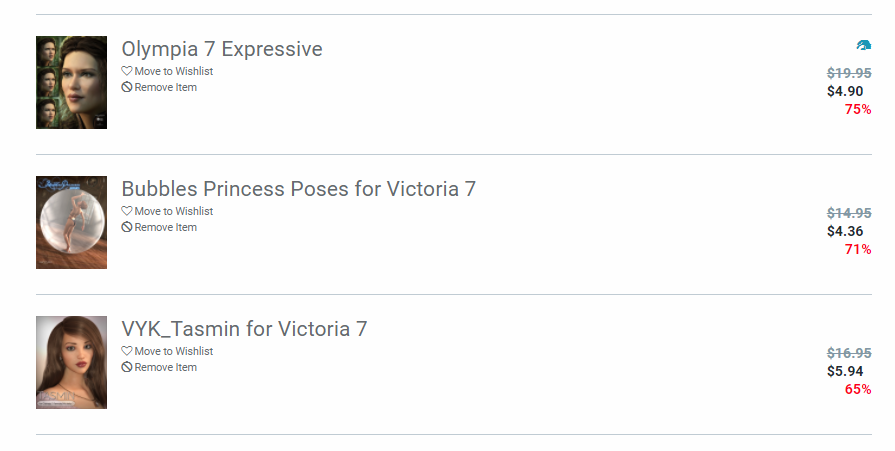
Olympia 7 Expressive (DO) added to my cart shows 75% off. Bubble Princess Poses for Victoria 7 (PA, starts at 40% off) added to my cart shows 71% off. VYK_Tasmin for Victoria 7 (PA, starts at 40% off) added to my cart shows 65% off.
Yes, I have a new release in the cart as well.
 genesis 3 male anatomical elements
For clarity, you only really need to buy ONE Genesis 8 female pro bundle (ie Victoria 8) and ONE Genesis 8 male pro bundle (ie Michael 8) to get the genitals. Those same genitals are used for every other Daz base figure in the Genesis 8 line and all the texture sets that have genital maps will fit them. Hope that made sense.
Laurie
NB Every other Daz adult base figure
Hehe...correct. Every ADULT figure ;) As chohole has pointed out, the tween and teen figures don't have the anatomical elements in their bundles for obvious reasons.
Laurie
genesis 3 male anatomical elementsFor clarity, you only really need to buy ONE Genesis 8 female pro bundle (ie Victoria 8) and ONE Genesis 8 male pro bundle (ie Michael 8) to get the genitals. Those same genitals are used for every other Daz base figure in the Genesis 8 line and all the texture sets that have genital maps will fit them. Hope that made sense.
Laurie
NB Every other Daz adult base figure
Finding Clothing Morphs for Genesis 8 ClothesHello,
So I just recently started using Daz Studio after using poser for a long time and have some questions regarding the morphs for the clothing on Genesis 8.
In Poser clothing would come with a bunch of preset morphs and then once it was conformed to a figure it would match with the values on the figure. If you wanted to you could adjust the morph values ether increasing or decreasing them to get the clothing to fit better. At least that is how it worked with Victoria 4.
With Genesis 8 clothing it seems to copy the morphs directly from the figure in order to get it to fit the Genesis shape. When I view the parameters of the clothing I see some custom morphs the vendor included on the clothing but none of the morphs it probably copied from Genesis 8. I cannot tweek the morph values on the clothing of say "Hip Width" or "Breast Diameter" like I could with Victoria 4 in poser.
Am I doing something wrong? Should I be able to see those morphs and values on the clothing or is the way it works different for Genesis 8 figures compared to something like Victoria 4? Thank you very much for your time and help.
HEY DAZ!Ok, so I caved... and joined Platinum Club.

You were right Carrie! With the Sale and the Coupons... I got quite a good deal.

I decided to wait on the Male morphs for a bit, but I kinda went all out on coming back in! LOL
This was my haul...heehee
https://www.daz3d.com/hfs-ultimate-shapes-bundle
https://www.daz3d.com/genesis-8-female-body-morphs
https://www.daz3d.com/genesis-8-female-head-morphs
https://www.daz3d.com/fwsa-libby-hd-for-victoria-8
https://www.daz3d.com/casual-dayz-for-genesis-8-females
https://www.daz3d.com/somewhat-essential-iray-shaders
I'll probabally be back with lots of questions as I play...LOL Thanks for the help Everyone!!
Gen 7 Legacy Morphs?Mei Lin & Lee are already confirmed, Aiko and Girl are given, Gia & Gianni are expected, as is Lilith, and not sure about Julie. Maybe you can bundle characters like David, Lucian and Elijah as "Lucas' Friends" or something? And of course, last but not least would be what I'm going to call the "don't hold your breath" line including:
Legacy Shapes Generations - Anime Hero (Kenji 7, Hiro 5, Hiro 4, Hiro 3)
Legacy Shapes Generations - Sci-Fi Tank (Ivan 7, Freak 5, Freak 4, Freak 3)
Legacy Shapes Generations - Teen Boy (Teen Jayden, Tween Ryan, Brodie)There are some wild assumptions here that are completely unsubstantiated.
We can guess at certain ones but there is no guarantee that those will be made. Things change.
Mei Lin & Lee have already been revealed in product FBMs. Aiko is the second most popular character next to Victoria, Girl only missed one generation so far, and Gia, Gianni, and Lilith have made the post-generation top sellers lists twice now along with all the others that keep coming back. Of course it's no garentee they will appear, but after three solid rounds of Genesis characters, I like to think that we've come to a point where we can observe patterns and make some confident predictions.
How to get the Optitex Burque Victoria 4 to fit to Genesis 8 Female?Hey,
OK so I downloaded the item Burqua Victoria 4 from:
http://www.optitex-dynamiccloth.com/FreebieDownload14.php
and I want to make the dress fit, not the actual burqua, & drape via dForce. The trouble is when I set the dress to be a dynamic object at level 2 for simulation the dress is in a T-pose at the start of the simulation but Genesis 8 Female goes to an A-pose and so the fitting and draping never fit properly to drape properly.
How do I change this to work. I do have the full version of the optitex plugin available if that will help but it only ever frustrated me trying to use it.
Thanks.
genesis 3 male anatomical elementsFor clarity, you only really need to buy ONE Genesis 8 female pro bundle (ie Victoria 8) and ONE Genesis 8 male pro bundle (ie Michael 8) to get the genitals. Those same genitals are used for every other Daz base figure in the Genesis 8 line and all the texture sets that have genital maps will fit them. Hope that made sense.
Laurie
dForce Verified Functional Clothing [Out of the Box]Moroccan Dreams for V4: Used a version I'd converted to G3F a while back. Underdress and Overdress work okay, under the usual conditions (self collide off, animated drape, smoothing modifier). I couldn't get the belt and sash to work, and I think poses with the hands close to the body are going to be problematic because of the big sleeves. Converted version suffered from mesh distortion (the back, hem, and lower skirt) that I was prepared to live with because there is nothing quite like this outfit for the newer characters, and those distortions mostly remained after using dForce, although the hem of the dresses and lower skirt seemed somewhat improved. You will want to set the smoothing modifier on the outer dress to collide with inner dress, not the character wearing the outfit.
All the GenesisesesWith G8 they have separated out the eye, eyelash and eyebrow geometry into a different system -- which may pay dividends down the road, but it's still at the point of causing confusion.
This has already paid dividends to character makers :D The eyes are now one mesh between the iris, sclera and pupil. Previously on G3, they were all separate. This made morphing eyes very difficult/tedious. The tear and eyelashes are a separate geometry in G8 (though together) which again, helps with character/morph making because they autofollow morphs now instead of having to be hand adjusted. This means it's easier to reshape eyes, and you will be able to get some more unique eye shapes that were previously difficult to make. The eyebrow isn't a separate geometry per say. A separate fibermesh eyebrow set is being offered in addition to the painted/texture based eyebrows with some characters and figures. The base G8 does not have separate eyebrows (though Victoria, Michael and the other Daz shapes I believe do).
I don't see it mentioned elsewhere (though I could have missed it), but there was a huge improvement in rigging from G2 to G3 (and now G8) other than the system used. Previously, all expressions on characters were morphs. This meant that, depending on the character, the look could vary vastly. Expressions were not universal to characters. From G3 on, expressions are rigging based. There is a facial rig on G3 and G8 and expressions (at least the ones at Daz) are all based on bones and not mesh. If a character is rerigged facially properly (which is tested for at Daz at least), any expression for that generation will work for it. You don't have to morph smiles or winks anymore. It's awesome :D
Something else that came along the time of G3 was the Iray renderer. Most of the promos you see in the store now will be done in Iray. It's a PBR renderer and utilizes the GPU for much faster renders (if you have a GPU with cuda cores). It can also use the cpu, but it will be much slower if it uses the cpu only. You can read a little more about it here.
Last note-- G3 is over 2 years old now. It came out in the summer of 2015. G8 just came out this past summer. Clothing transfers very nicely from G3 to G8, but heeled shoes are a little more tricky. Keep in mind that more and more will be coming out for G8 and, most likely, less and less for G3.
All the GenesisesesAs to the head and body morphs, since Genesis 1 the base set of head and body morphs are for each generations's base figure, *not* for Michael and Victoria. Michael and Victoria are no longer the base figures. They are just base character morphs.
Also, if you're just getting back in the pool, we're only just now beginning to move past a veritable bog of proprietary UV Maps. This has the potential to be a definite issue to have to take into consideration for moving forward.
Genesis 1 used V4's UVs by default, but came with support for M4 and K4 as well. All you needed to do was effectively flip a switch in the surfaces tab.
However. Victoria 5 (who was a major character base morph for Genesis 1) had her own UVs. So did Michael. So did just about all the named base character morphs. This set the pattern for pretty much all of the named DAZ character base morphs for the Genesis series up to the end of G3. *Every one* of them had their own unique UV. And that adds up to *dozens* of them over Genesis 1, 2, and 3. Which means that skins built for a specific base morph can't necessarily be used on any of the others, unless you also own *that* character base because the only way to get support for that UV is to get at least the base figure which introduced it.
PAs played into this for most of the development period of G1 and G2. However, by the end of G2's development cycle, the plethora of unique UVs floating around was already getting ridiculous. And then with G3 DAZ changed the whole UV layout, so *nothing* for *any* older figure would work with G3 out of the box. Cayman Studios came up with a viable work-around by using geografts. You are probably going to want to look into those if you want to reuse any of your older skins on G3 or G8 (or later) figures. However, there are a few UVs that weren't spported so widely that he's considered them enough of a return for the investment of the work it would take to create a set to make those portable to G3. K4 is still MiA, and possibly a few of the Genesis series bases.
However, once G3 was released, and it was plain that DAZ was going to continue to introduce unique UVs for every different character base morph (and the number of those base morphes had ramped up to something like 2 in an average month), a lot of the PAs decided that they were not going to play that game any more. As G3's development cycle progressed, more and more G3 characters came out which were built on the base G3F and G3M base UVs, only. And nobody had to pay extra to get those, since those bases came with the program.
DAZ got the message. G8 uses the G3 base UVs by default. With G8 they have separated out the eye, eyelash and eyebrow geometry into a different system -- which may pay dividends down the road, but it's still at the point of causing confusion.
However, the UV issue is a really good reason to consider concentrating on G3 and later if you are getting back into Studio. All your older stuff should still work in the program, but the skins are not going to be transferable outside their own generation without add-ons, and may not even be all that usable on other figures within their own generation if the skin was built for a different character base. And at the start of G3's development cycle, there were still PAs who supported the unique UVs so you need to watch for which one a given skin was built for -- unless you are picking up a characcter base which wll bring its UV with it.
G3 also abandoned Triax rigging in favor for dual quaternion. So the bones will be different. But that is the standard going forward, so there's no point in avoiding it. Pose sets for G2 don't always work that well with G3 and vice-versa. There are utilities for converting poses, bt those are more add-ons. G8 went from the T-pose to an A-pose for its zero position, which throws some pose sets off, but the fix for that doesn't require a purchased add-on, for most thigs.
Not To Worry, Friend, "There's Always Another Sale™"Just to understand how the Genesis Add-ons category should work, cause some people seem to have issues here.
At the moment not discounted and 'pure' DO discounted items seem to work for me with -60 % (for owning a Gen 8 character) and -30 % for loyalty reward.
Everthing already featured PA discounted (and also these + DO discounted) is only loyalty discounted, except PC+ which is -60% discounted.
So e.g.
https://www.daz3d.com/timeless-outfit-for-victoria-7 and https://www.daz3d.com/i13-elation-poses-for-victoria-6 (both in this category sale) have nearly the same price in cart for me.
All the GenesisesesGenesis 3 characters include Victoria 7, Michael 7, etc. (because there had been 4-ish generations of Victoria/;Michael before there was a Genesis). What should have been Genesis 4 was instead named Genesis 8, to avoid such confusions or create new ones, take your pick. Genesis8/Victoria 8/Michael 8 are the latest iteration.
For me personally, Genesis 3 hits a sweet spot in terms of reasonably realistic, wide variety of content and fairly good backward compability, thanks to Valzheimer's Wear Them All and Sickleyield's Ultratemplates. But we're at that transitional phase where a lot of content supports both Genesis 3 and 8, and we can tell which one is going to get the support going forward, so it's hard for me to recommend 3 at this point.
Genesis 2 has somewhat more imaginative clothes and base characters, including a lizard man, minotaur, and multiple toons, and I am told that it and Genesis 8 work better for animation.
I haven't bought Genesis 8 stuff (except for some things that were for both 3 and 8); my impression from the forums is that it's more difficult to get the skins to look good, and the female base characters have VERY samey faces (males are pretty good, though, and the PA created characters for both are on par with their output for Genesis 3). To my mind it's too early to tell how the clothing and backward-compatibility addons will stack up compared to Genesis 1-3.
Basically it comes down to what you want out of your characters. For toons, children and "classical" creatures, I feel like Genesis 1 and 2 are better. For effectively using V4/M4 clothes, Genesis 3 with the tools mentioned above is better, although not infallible. For "realistic" (or realistically disgusting) zombies, werewolves and alien monsters, Genesis 3 is better. For "almost photoreal", the very best of Genesis 8 seems slightly better than the best of Genesis 3, but the rest of Genesis 8 falls off into uncanny valley more sharply than Genesis 3, IMO.
All the GenesisesesThe only Genesis after Genesis 3 is Genesis 8. It goes like this:
Genesis - has Victoria 5
Genesis 2 - has Victoria 6
Genesis 3 - has Victoria 7
Genesis 8 - has Victoria 8
The reason for the change was to align the Genesis base number with the Victoria/Michael generation number. As far as what generation you should use, that is up to you. Genesis 8 is the latest with new advances, but some people don't like the base figures appearance. Genesis 3 has lots of options and the textures and clothes transfer well to Genesis 8. I would suggest looking at figures from both G3 and G8 to see which you prefer. Also, if you do fantasy renders, Genesis 3 has centaur figures.
Not To Worry, Friend, "There's Always Another Sale™"I see I'm not the only one having an issue with the pricing on the Holiday Loyality Rewards Sale.
The issue I am having is that under the Genesis Add-On sale, anything marked with a discount indicator (i.e. -40%) does not apply the 60% discount. It does apply my Loyalty Rewards amount, but that's it. This is actually causing any of these products marked with a discount to be more expensive than if not marked.
For example, the Michi HD for Victoria 7 is a base price of $19.95 currently marked down 40% to $11.97. At checkout the final price after Loyalty Discount is showing at $8.98. Now I've also got the Gwenbleiz HD and Beard for Michael 7 in the cart also, which also has a base price of $19.95 but no markdown indicator. At checkout this item is showing a final price, after the 60% and then the Loyalty Discount, of $5.98. So the marked down item is actually showing up to be MORE expensive than if it wasn't marked down 40%!
I'm not sure if it is intended that an additional 60% be taken off of the already marked down 40%, but in any case it is still showing a higher price at checkout than if they just took the 60% off the base price.
I submitted a help desk ticket about 10 hours ago, which they did reply to. But they just told me to clear my cache/cookies and make sure I'm logged into my account. I had already done that, I informed them of such in the original ticket. I tried again and also on a different computer. Still no fix.
I wasn't necessarily planning on purchasing any of these items. But if the 60% were to additionally be taken off the already reduced 40% off, that would be a good deal worth considering.
Two additional things to note. Yes, I do own Victoria 8 (base) so the 60% should apply (as it does correctly on the Gwenbleiz item and other non-marked discount items in this category.) Also, unlike the other Loyalty Sale categories, the Genesis Add-On Sale clearly states that "Discount applies in shopping cart."
Hopefully they get it fixed, but be sure to keep an eye on your cart to make sure the final prices at checkout are correct!
Maria is having the same problem.
Daz 3D is part of

Connect
DAZ Productions, Inc.
7533 S Center View Ct #4664
West Jordan, UT 84084Licensing Agreement | Terms of Service | Privacy Policy | EULA
© 2026 Daz Productions Inc. All Rights Reserved.