-
Novica & Forum Members Tips & Product Reviews Pt 13
********** TUTORIALS**********
Tutorial: Bus, Noggins- Converting from Bryce to Daz Studio (RGcincy) Here
Tutorial: Breast Gone- In Hexagon (Smoothing Zev0s Grow Up product even more)
Tutorial: Clothing, Making in Blender SickleYield's tutorial on Deviant Art.
Tutorial: Content Package Assist
Tutorial: Converting G3 and G8 Clothing by SickleYield on Deviant Art
Tutorial: Create Categories Using Gen2F, I showed how to Create Categories and Export to save your custom categories. (Here's WHY you may want to do that with your characters.)
Tutorial: Custom Actions In Toolbar How to Create Custom Actions In Toolbar
Tutorial: Customizing Morphs Using Morph Loader Pro
Tutorial: D Former D Former Tutorial D Former tutorial and links
Tutorial: Depth of Field Flipmode provides a good depth of field tutorial for you.
Tutorial: Expressions: How To Make Them As A Dial
Tutorial: Face Control (Knittingmommy) Use on cartoon characters
Tutorial: Fisty's Shaders & Getting Rid of Gooey Lips This one shows you Fisty's shaders. Get rid of the overly gooey lips.
Tutorial: Fur Brushes Download and Video (Kathryn Loch)
Tutorial: Garibaldi Hair Doing a cat with Garibaldi Hair- Tutorial
Tutorial: GenX links on "how to use."
Tutorial: Generation 4 Materials on Genesis 2 This one put Generation 4 materials on Genesis 2 using Victoria 4 for Genesis 2 Female.
Tutorial: Geometry Shells How to do Geometry Shells (video tutorial the3dwizard) and doing makeup for different characters
Tutorial: Hair Shaders (Slosh, his product) explaining how to use them.
Tutorial: Hay Bales Take a freebie and make the hay straws thicker. Here's what you get.

Tutorial: Iclone Iclone videos
Tutorial: Images- How To Put Them In Forum Posts Here's Putting Images in Posts
Tutorial: Instances: Using Ultrascatter
Novica & Forum Members Tips & Product Reviews Pt 13*******TIPS I-W *********
Tip: Images, Gallery How to hide them to use in threads
Tip: Iray Organized References This thread links to the threads, but also categorized some of the topics within the thread so you can look things up quicker.
Tip: Iray Section Plane TabascoJack shows you how to use the Iray Section Plane
Tip: Lighting: When you have the end of the room open, and stuck with three walls, how to get even lighting with HDRI and avoid that obvious light pouring in from one end of the room.
Tip: Lighting: Lampshades TobascoJack shows you how to prevent losing detail when lighting lampshades
Tip: Madelyn Ears- How to remove those elf ears.
Tip: Manual Downloads in Product Library How to find them ultra-quick
Tip:/Info: Materials and Shaders: Difference in Materials and Shaders (from Commons)
Tip: Mermaid Top Family friendly suggestion.
Tip: Metallicity and Metallic Flakes Add More Sheen to your characters
Tip: Millenium Cat- Free Persian Head
Tip: Mocap Animations FREE Here (Mixamo)
Tip: MT5 to PZ2 Converter Script
Tip: Multiplane Cyclorama Use Modern Museum Lighting for realistic results!
Tip: Nobiax Free Iray Daz Textures
Tip: OOT Hair Steps
Tip: PBR Shader thread in Commons
Tip: Photoshop Postwork Postwork Photoshop Tips (Laticis) and my example
Tip: Photoshop Plugins From Thread 6: Examples
Tip: Photoshop Quick Fill Ins (Good for Plug Ins)
Tip: Portrait Lighting Novica's XYZ Dome Orientation Quick Guide (Portrait Tweaks)
Tip: Pose Converter (Genesis 2 to Genesis 3) Where to find files (Scroll for discussion)
Tip: Combining Poses by locking body parts
TIP: Poser CF and Studio CF Explained (Richard Haseltine)
Tip: Postwork The Postwork thread has a lot of good information!
Tip: Putting Prop On Top Of Prop (Align Pane)
Tip: Checking your available RAM
Tip: RDNA How to find your purchases
Tip: Render Settings In Script Menu at top of Studio (L'Adair)
Tip: Rigging How to import OBJ and rig in Daz Studio
Tip: Rigging Basic Rigging Preparation then Adding Bones for Rigging
Tip: Section Planes How To Use (by TabascoJack)
Tip: Signatures- how to put a banner and do a clickable link
Tip: Skies of iRadiance Which are for high / low altitudes? Answer
Tip: So Wet Bundle Examples
Tip: Spectural Rendering tests for the studio
Tip: Spotlights: (Iray) How to Hide Them and Still Emit Light
Tip: Studio Crashing: Script by Taoz to save last render
Tip: SubD: How To Add It (Darwins Mishap)
Tip: Texturing With DestinysGarden (DestinysGarden)
Tip: The Briefing Room Lighting with Iray (V3Digitimes)
Tip: Ultragenesis: Faces of G has a variety of older faces.
Tip: Weight Maps: How To Remove or Change (Thomas Windar)
Tip: White Point Changing it- Examples
Tip: Walls- Sets Which Are Easier To Use- or Not. Sets that don't have separate walls and handy notes on a few sets
HeadShop 12 HelpI don't have HeadShop, but what I can determin from your attached image, is that HeadShop assumes that there is a full head on the picture. So when you have cut the top part off, it reduces the rest proportionally.
My suggestion is to try with another picture where all her head is visible.
Felis, Thank You for your reply, but its not that, I have attached another pic, I put bought my daughters in there to morph them into one, when that happens you can see the results, it cuts off the top half and the bottom half, and if I only use one of there pictures it does the same DAM THING !!!!!!!!,
OH, it also has that top piece in the middle that you can adjust and move higher or lower, but your taking a guess at it, an d if your not right which is like IMPOSSIBLE to guess where your Genesis 8 Morphs eyes and mouth will be, and once you hit Apply it brings you to the picture on my last post and there is no way to go back, so you need to start all over,
How do these people have the nerve to sell this stuff !!!!!!!!!!!!
HeadShop 12 HelpAll these Face transfer Softwares are just horrible, I buy them all and they have no good tutorials Video or reading, Like WTF !!! for a newbie like me I am just wasting money and tons of time, if they come out with new stuff shouldn't they have "GOOD" reading material tutorials to learn about the software, they show these video's on youtube with very little about the software and thats it, I bought the Unlimted and upgrade to Face Transfer that came with Daz 4.12, then I bought FaceGen, everyone looks like a Monster in there, cant figure it out, no good tutorials to learn, now a new HeadShop 12 comes outr, I buy that , one again no Good Tutorials to learn, for a newbie to the PC world like me this is horrible, I don't mind reading and learning but THERE IS NOTHING TO READ !!!!!!!!
so I use this new HeadShop 12, and this is what I get, Take a look at the pic..... no where in the Help section, no where in tutorials no where at all does it tell you how to adjust getting the eyes to match up with the Morph on the right, so you export the morph and you have this FREAK LOOKING MORPH !!!!!!!!
So, Please tell me people, ...is it me, ...?? I mean should I not be doing this type of stuff, or should this stuff come with more directions and tutorials, am I just to dam stupid and can't find how to adjust this stuff..??
I am wasting so much time trying to figure this stuff out, I JUST WANT TO MAKE A F#$KING MORPH OF MY DAUGHTER SO I CAN PUT HER IN COOL FUN OUTFITS AND PRINT PICS OUT AND MAKE HER HAPPY !!!!!!!!!!!!
No it's not just you. I did not buy Headshop 12. There are tutorials on the product pages and sometimes over at Youtube.com. It used to be called Faceshop.
The photograph used appears to be a double take, the unexpected additional info may have confused the calculations. I edited the image and tried a few things to see how Face Transfer could handle it. The eyes do not match up ... my thoughts are that because these programs are expecting adult images, the eyes of a child are larger.
You've purchased 2 of those programs inside of 30 days so if you cannot make them work for your project, you could put in for a store refund/credit, at least for one or the other of them, or both, your call.
n.b. that it is not unusual to make some texture improvements to match the face to the model. The eyes themselves do not need to cover the eyeballs for example, one can use any one of the myriad of eye presets that came with all those delightful characters we've been collecting. The eyelashes normally get erased off of the image too as the models come with eyelashes and we do not normally require 2 sets ;-)
Another way of getting a character to look specific is to find some characters that look close and dial in various percentages of their morphs. Then there are the 'growing up' series of morphs [for example] which assist to bring the adult figure down to a child figure.
...................
Face Transfer IMHO does the fastest best job to align images to the model. You have that one ... it's helper is this product:
Novica & Forum Members Tips & Product Reviews Pt 12Hey folks- when you repost, please don't repost all those renders. Makes it a lot easier for people on mobile devices. Just cut and paste a small reference of the post. :) Thanks! (Since we're posting a LOT of photos in one post, it really will help. I looked at the thread on my iphone and ugh!)
Okay, I finished up with Khepri last night, and not pleased with the infinitesimal difference some characters by the same vendor. IMO it was definitely not worth buying them unless it's for the textures, and there's other characters textures so similar I wouldn't even go that route. I'm putting these in the order which makes sense, with the ones with very little change next to each other.
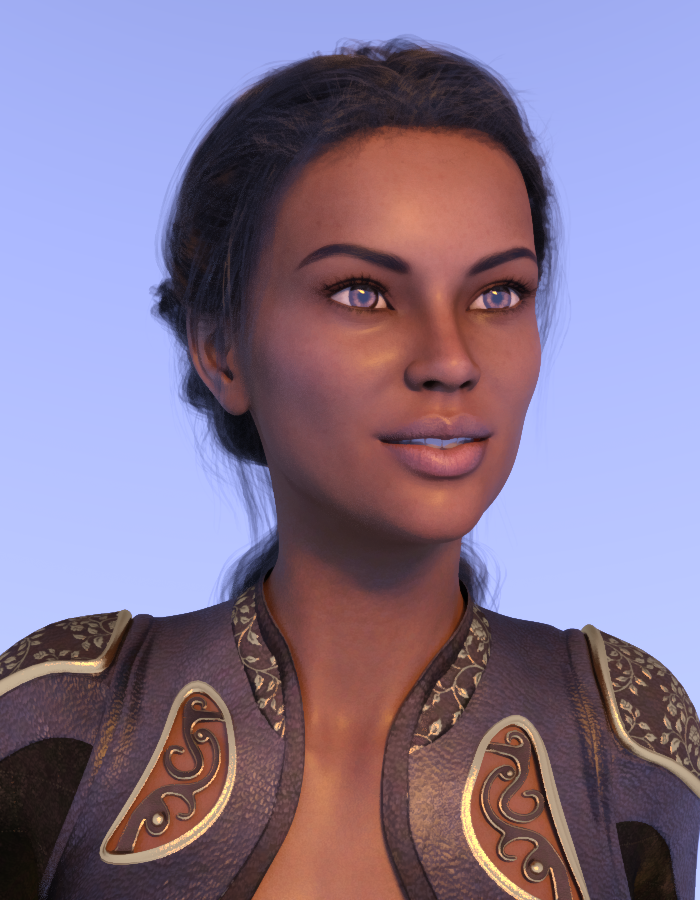
Khepri is the base character who got added to by all the others. This is with Latonya 8. All of these are Option A, with 50 / 50 percents. I'm adding the vendors' names so you can see who really goes the distance with making unique morphs. And of course, even if there is a little change, the morphs could still be really different when added to the Genesis 8 character, but they may be similar to THIS character so it appears there aren't many morphs.
However, if there is very little change between two characters added to this one, IMO it means the vendor didn't do much IF IT'S THE SAME VENDOR FOR BOTH THOSE CHARACTERS BEING ADDED. But here's the question- if you are using the SHAPING PANE and that character is for another one (let's say for Latonya 8) is other character (Latonya) also built in to the shaping pane or is it just a Genesis 8?
Click to open and click back and forth, each is in a separate window.
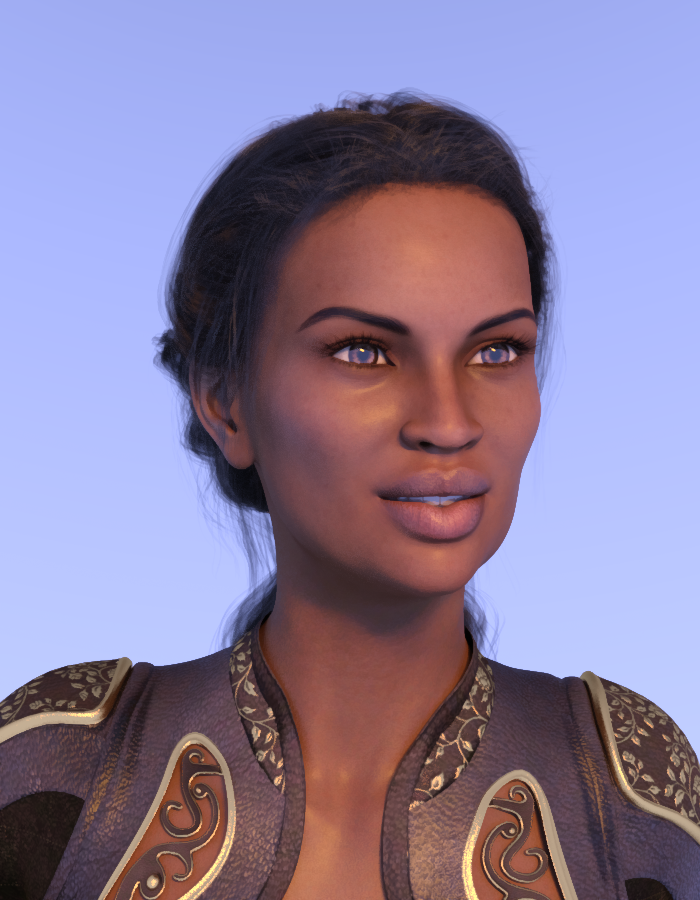
Khepri / Morgana (Cherubit)
I just had to use her again, she's so dainty! Compare her to 3DU's Amber, coming next.
Khepri / Amber (3d Universe)
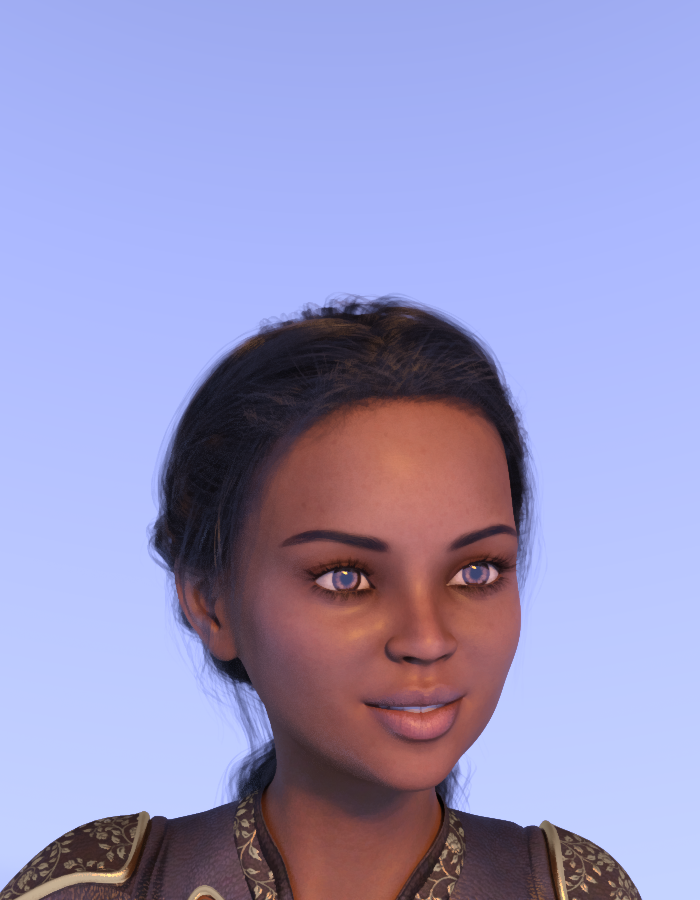
Khepri / Edie 8 (Daz Originals) If there's anyone who doesn't own this gal, you may want to add to your gene pool! Compare Edie and Elgin. Nice differences. Elgin gives you the elongated face, sallow.

Khepri / P3D Elgin - Mabel 8 HD Enhanced Morph Package I own most or all of those packages, SO worth the money. You'll see Orion further down.

Khepri / HP Vaeri (Hinkypunk) Let's toss an alien in here.
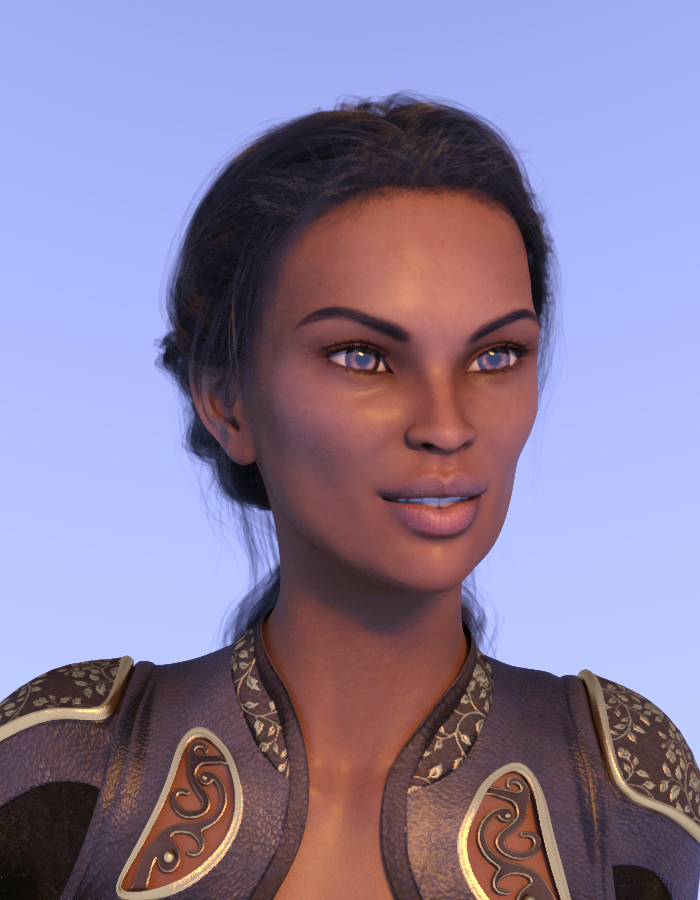
Khepri / Raquel (Mousso) Here's where it gets disappointing, with regards to Raquel and Elliandra. Click back and forth between the two.

Khepri / Elliandra (Mousso)

Khepri / Aakash (Mousso)
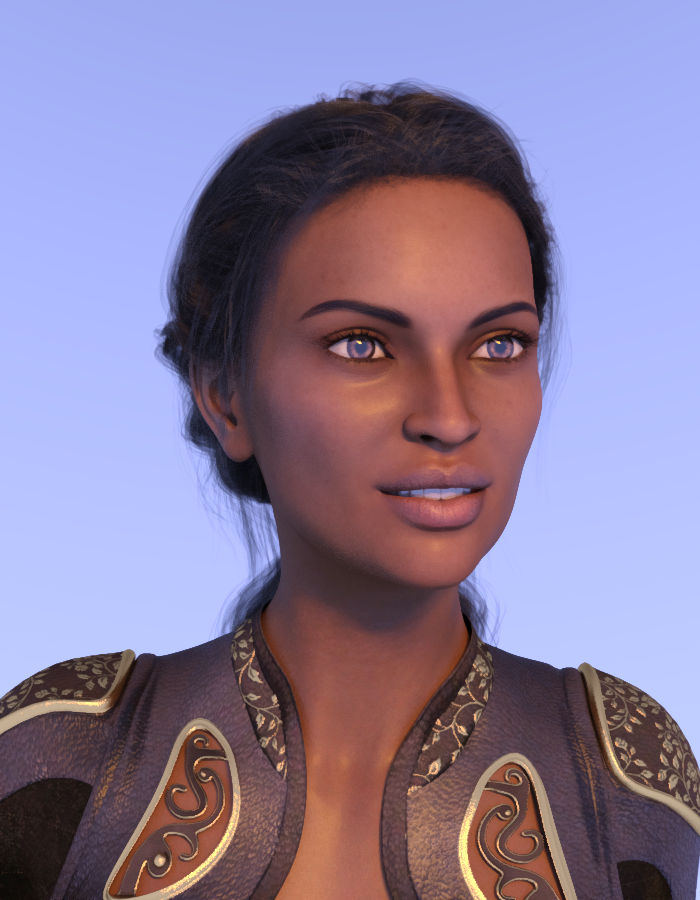
Khepri / Alessandra for Leisa 8 (Emrys)
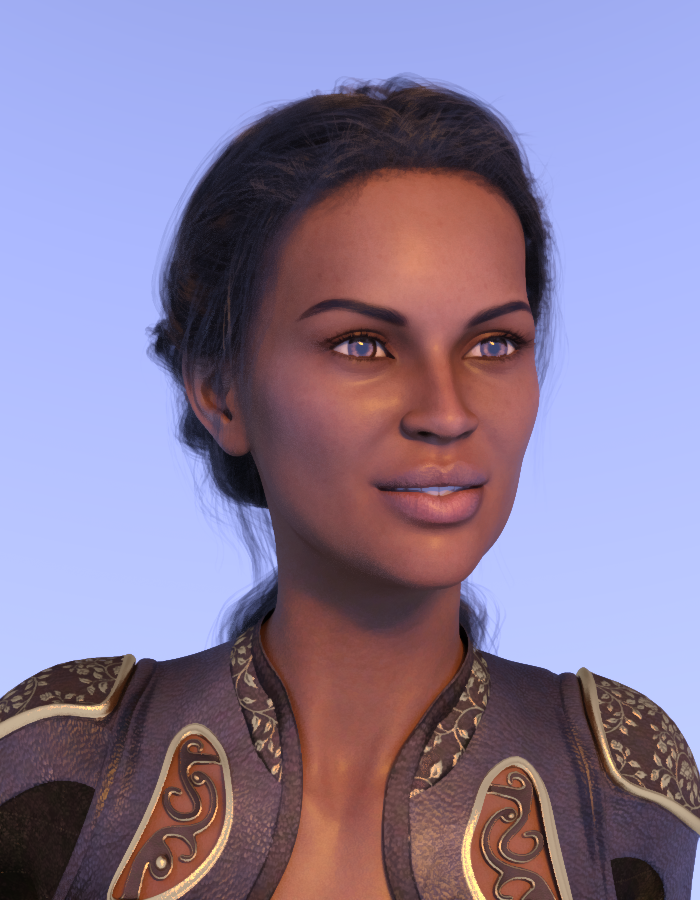
Khepri / P3D Orion- Zelara 8 HD Enhanced Morph Package
 Error Creating G3 Morph
I get the error message Geometry did not match, failed to create morph when using morph loader pro to create a morph for genesis 3. The morph is based on a genesis 8 Character. The eyelashes are removed, resolution set to base and sub-d to 0 before I export the genesis 8 character as an obj. Any other suggestions?
How to apply morph group changes to other scenes?The morph is saved as a morph asset. If its a new morph for example, that new morph shows up in all the old scenes as desired. But the issue seems to be that if its just updating an existing saved morph instead of making a new one, that group change doesn't seem to get updated in the old scenes.
The "Dial Them Out" ThreadI've found that most PA characters look perfectly fine without the base, just more generic. They don't have the quirky thing that makes them more interesting but sometimes they even look better depending on how extreme the DO morph is. In this case, Karma without Josephene looks to me just like a typical G2 character. Very pretty but more like a cute fairy character whereas Josephene gives her a bit more personality.
How to apply morph group changes to other scenes?You could load a new figure, using the new grouping, and copy the actual settings from the old figure across - I can't think of way to reset the older figures if the moprh with grouping was npot saved as a morph asset but was instead saved in the scene.
HeadShop 12 HelpAll these Face transfer Softwares are just horrible, I buy them all and they have no good tutorials Video or reading, Like WTF !!! for a newbie like me I am just wasting money and tons of time, if they come out with new stuff shouldn't they have "GOOD" reading material tutorials to learn about the software, they show these video's on youtube with very little about the software and thats it, I bought the Unlimted and upgrade to Face Transfer that came with Daz 4.12, then I bought FaceGen, everyone looks like a Monster in there, cant figure it out, no good tutorials to learn, now a new HeadShop 12 comes outr, I buy that , one again no Good Tutorials to learn, for a newbie to the PC world like me this is horrible, I don't mind reading and learning but THERE IS NOTHING TO READ !!!!!!!!
so I use this new HeadShop 12, and this is what I get, Take a look at the pic..... no where in the Help section, no where in tutorials no where at all does it tell you how to adjust getting the eyes to match up with the Morph on the right, so you export the morph and you have this FREAK LOOKING MORPH !!!!!!!!
So, Please tell me people, ...is it me, ...?? I mean should I not be doing this type of stuff, or should this stuff come with more directions and tutorials, am I just to dam stupid and can't find how to adjust this stuff..??
I am wasting so much time trying to figure this stuff out, I JUST WANT TO MAKE A F#$KING MORPH OF MY DAUGHTER SO I CAN PUT HER IN COOL FUN OUTFITS AND PRINT PICS OUT AND MAKE HER HAPPY !!!!!!!!!!!!
Fireflies in my hairThankfully I don't share that experience. My only beef with hairs rendered in Iray are those skull caps some use to cover the foreheads which render out as black marks. Skull caps should cover the skull, not the forehead.
If you are getting the skullcap issue you can bump the overall general scale of the hair up to 100.1 % and that usually takes care of it. This is something you get when HD Morphs are applied that have no projection morph with them.
ElliOkay thank you, I'll try that :-)
Zavira 8? Or a way to use Zavira on G8F?There are 2 converters that will make the G8 version for you
Okay I could only find one morph converter from G3 to G8? what was the other one?
How to apply morph group changes to other scenes?I have a custom morph that was created and saved on the G8F that is categorized in GroupA. I changed the group for that morph to GroupB and resaved the morph. That worked fine. However when I open up older scenes that have that character in it, that morph is still listed under GroupA. How can apply that group change to a morph without having to open up and manually change the group for each scene? I have dozens of scenes with that char in it so the manual way isn't feasible.
Thanks.
Fireflies in my hairThankfully I don't share that experience. My only beef with hairs rendered in Iray are those skull caps some use to cover the foreheads which render out as black marks. Skull caps should cover the skull, not the forehead.
If you are getting the skullcap issue you can bump the overall general scale of the hair up to 100.1 % and that usually takes care of it. This is something you get when HD Morphs are applied that have no projection morph with them.
ElliMissing File - "studio/my library/people/genesis 8 female/characters/genesis8female.dsf"As an update I have found that there is a DAZ 3D folder in my "documents" directory that contains a "Studio" sub-folder. If I install a pathway in the "Studio" sub-folder of "My Library/People/Genesis 8 Female/Characters/Genesis8female.dsf" the error appears to be fixed, All I can think of is that the morph data is not generic in that a non-standard library installation requires this adjustment.
John
G8 body Morph for G3I'm looking for genesis 8 morph for genesis 3. I remember seeing it a while back but cannot find it.
Jessi HD without Josephene?You will get an 'error' message when loading the character but all it will tell you is the missing morph files from Josephene. Just click OK in the window and the character of Jessi (or whoever) will still load into your scene.
What I usually do to not receive that message is load a basic genesis 8 character and dial in the morph I want. No error then. And you also get to see how she looks at less than 100%, maybe combine her with other chars for an even better look. Possibilities are endless.Yes, that works too if you want to avoid the error. I only mentioned the error because lana_lass was concerned about them. :-)
And thank you for doing so @Iwaves :)
Jessi HD without Josephene?You will get an 'error' message when loading the character but all it will tell you is the missing morph files from Josephene. Just click OK in the window and the character of Jessi (or whoever) will still load into your scene.
What I usually do to not receive that message is load a basic genesis 8 character and dial in the morph I want. No error then. And you also get to see how she looks at less than 100%, maybe combine her with other chars for an even better look. Possibilities are endless.Yes, that works too if you want to avoid the error. I only mentioned the error because lana_lass was concerned about them. :-)
hair and elven type earsif it's a part body morph the easy fix is show hidden and dial it down on the hair
full body morphs are more of an issue
meow?? come again? i need detailed info ^^ - i'm not the brightest in tech terms
if your morph is just an ear morph
tick the show hidden box in parameters on the hair and dial it down
aaah now i get it. wouldn't have crossed my mind to look under hidden. thanks a lot :)
EDIT: yay! worked like a charm! thx again!
 [Released] Fashion Editorial Poses and Expressions for Genesis 8 Females [Commercial]
FEP Pose 003 Mirror used to test out Soft Curls on a G8F morph mix.

Gorgeous render. I see a bit of Babina 8 in her.
Yes, and Babina's skin, too.Thanks for continuing to comment on user-submitted renders in your thread. I picked up another of your products in the recent sale.

Oh man, I love user-submitted renders.
Daz 3D is part of

Connect
DAZ Productions, Inc.
7533 S Center View Ct #4664
West Jordan, UT 84084Licensing Agreement | Terms of Service | Privacy Policy | EULA
© 2026 Daz Productions Inc. All Rights Reserved.