-
FBM doesn't affect GeoGraft's extra bones
Richard Haseltine said:
Well, make a custom morph for the GeoGraft and hook it up in the usual way.
It's the only method? I mean, I got about 1000 FBMs, I have to create a morph for the graft for each one?
i thoght there was another way, I see many Geograft with extra bones that works fine with everything with no specific morph involved.
[Released] Turbo Loader Booster Utilities [Commercial]RiverSoftArt said:
aaráribel caađo said:
RiverSoftArt said:
You could be running into the Daz Studio cache. I can load the exact same figure (not using TLBU) and the first time can take twice or more longer. EDIT: It also depends on how the character was saved. If the character preset has every morph in it for some stupid reason, it WILL be slower. But that is a mistake of the PA who saved the character, not TLBU.
That said, it should not be pulling in all morphs. What is your "Enable Morph Detected Behavior?" The fastest will be to pull in only the "Detected Morphs." How many morphs do you have total (enabled and disabled?) What is the figure? And what does the log say?
I appear to have this problem with my own characters that I dialed from presets, existing characters and my own sculpting work. How can I save the character without it thinking every morph on my system belongs to it?
I am no expert on that stuff. Are you saving as Character Presets?
Character preset, but mostly I hope the characers via a scene subset with thier hair, jewelry, etc., loaded.
Cat ZeusSo here it is with tongue licking chin morph which I think looks a little weird because the tongue out morph doesn't work (see above.) Also the tongue color is off, at least compared to my cat's tongue. I widened the head a little bit through bones but really hoping for a lot more morphs! I might work on some new fur textures in PS. I really want lots more morphs and a kitten morph though!
I also also realized that you have to freeze the simulation on the whiskers first because they move with the fur. The whiskers don't really need to be dForce because cat's whiskers stay sticking straight out, don't bend with gravity.
 AOBB's Freebies
Lovely Kirsten has created a video on Youtube on how to install my morphs! Thank you so much Kirsten. That is so generous and thoughtful of you!

 Here is the link: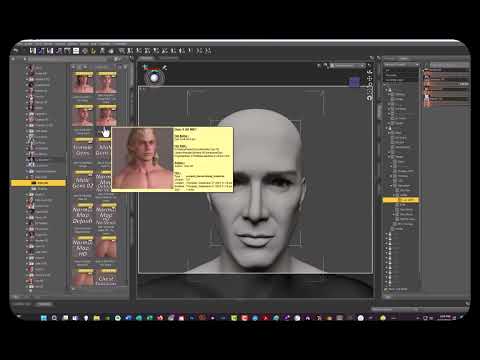
The Classic Movie Stars G9 19 head morph mega bundle freebie is finally available! You will find it here:
Enjoy!
This list contains links to head morphs for G8.1F, G8.1M and G9. There are head morphs I made for V4 and M4 but I am not including those here as I consider them not good enough.
NONCOMMERCIAL USE ONLY:
https://www.daz3d.com/forums/discussion/575716/aobb-s-sweetheart-head-morph-for-g8-1f-inspired-by-marilyn-monroe-no-materials-or-textures/p1 ;- this link contains now the new and improved Sweetheart v2!
Links to my head morphs from the CyberNoir collection (original “Blade Runner” characters for G8.1 and G9 - noncommercial use):
COMMERCIAL AND NONCOMMERCIAL USE:
Here you will find the same head morphs as in some of the links below but with problem areas fixed :
I am posting the links below only because they contain images of the head morphs posted in an updated (fixed) version in the link above. The head morphs from the “Hollywood Glamour” series are grouped there together in one zip file.
“Hollywood Glamour” series:
Other head morphs:
https://www.daz3d.com/forums/discussion/558986/aobb-s-debutante-for-g8-1f-head-morph-no-textures/p1 (Teeth problems in this one. Please refer to the link with fixed morphs for the updated version.)
https://www.daz3d.com/forums/discussion/557076/astronaut-for-g8-1m-head-morph-without-textures/p1 (For the fixed version check out the link with updated morph versions above.)
Cheers,
AOBB
Face transfer turns red in Nvidia viewarrjee74 said:
I'm on day 3 of using Daz, so I assume there's a setting somewhere that I've missed. I have a character created using face transfer, who looks appropriate in texture shaded view but turns red when I switch to Nvidia view. Any Idea how I messed this up?
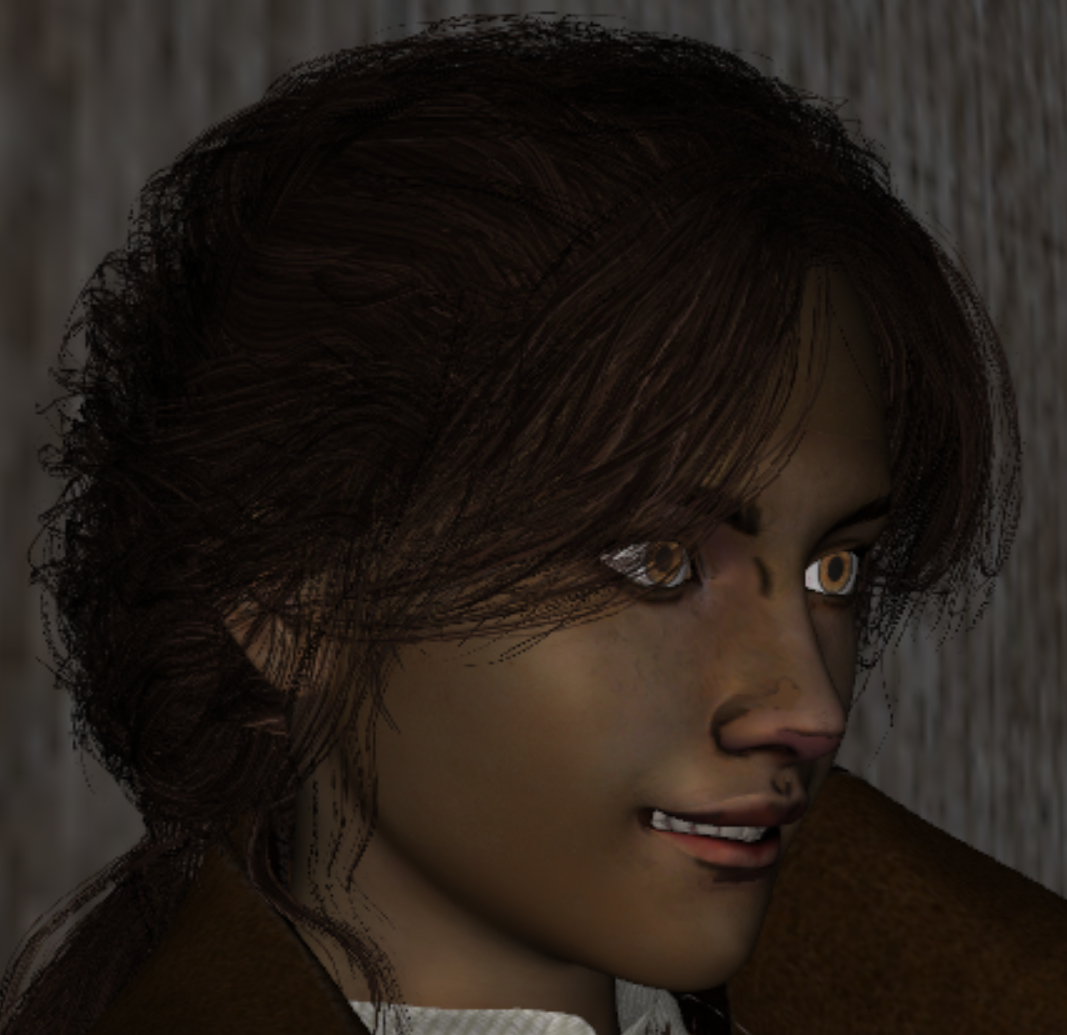
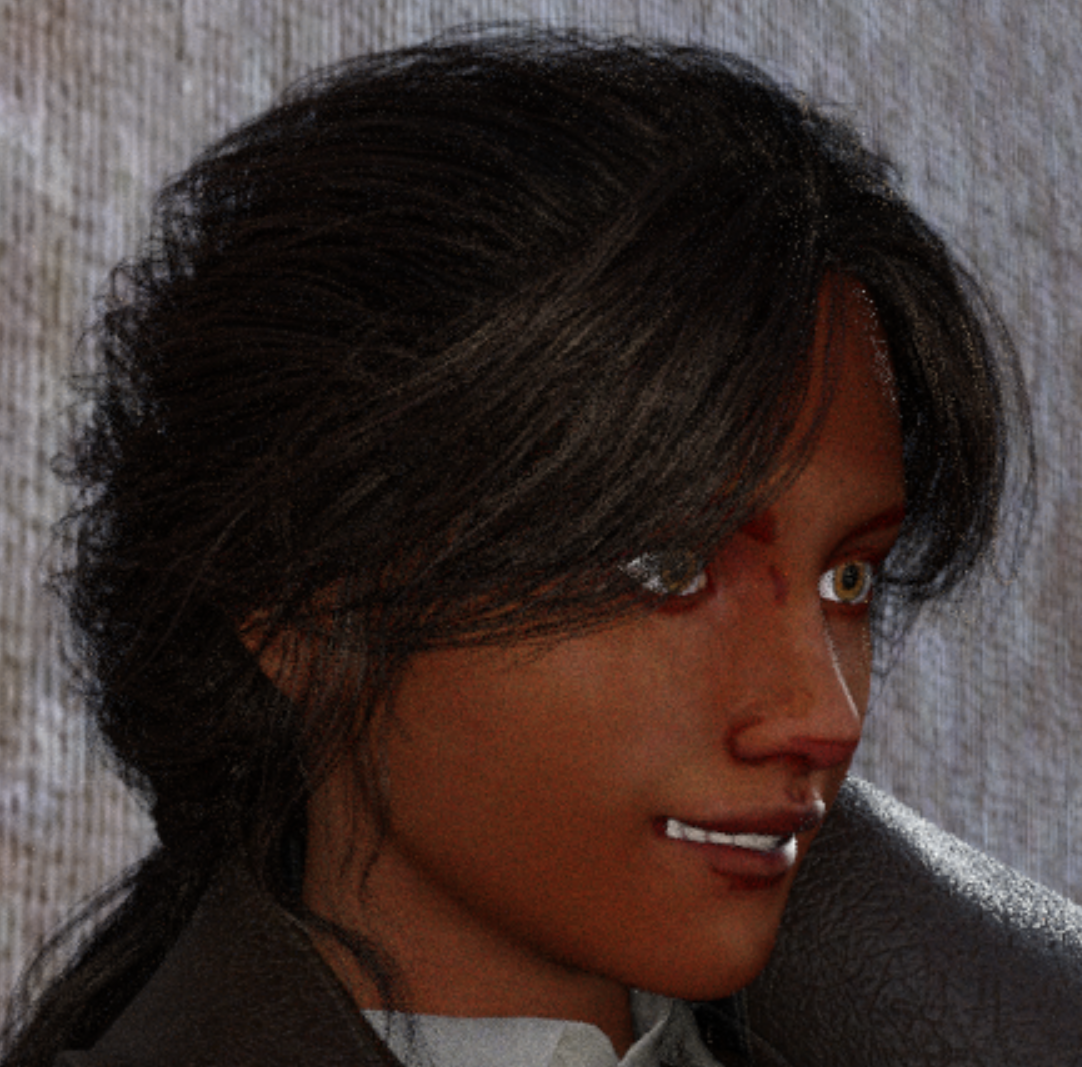
Hi and welcome to Daz Studio! I would suggest applying a materials preset from an existing character [even the base Genesis 8 figure for example]. Face Transfer is what makes the figures off colour a little, one can change the various settings on the Surfaces Panel but it's a lot faster just to apply another material preset, esp. for eyes.
Default surface for primitivesRichard Haseltine said:
WendyLuvsCatz said:
on a related problem not worth starting a new thread over
assigning a new surface does it too which makes copying a bespoke shader on the other surfaces over a right Pita if for an outfit for example, you get the materials but even applying iray uber the parameters and extra slots won't match.
I find it a lot creating areas to Dforce at 100% with 0% on the rest of an outfit with extra shader functions
Copy and paste handles settings, not the actual shader used, so if the new surface is not using the same base shader as the original that will need to be applied first (or a shader preset used to transfer both shader and settings).
yes I know, I have to often save a shader preset from the other surface to do it
Cat ZeusI discovered an issue @Vyusur The tongue in/out dial actually just opens the mouth and doesn't affect the tongue. Also the tongue lick nose pose has the tongue too close to the mouth so some fur sticks through.
Also I really hope you add the ability to change eye size and shape, more face shapes, and a kitten morph! Also a way to make the fur longer around the face & ruff for a Maine Coon look.
I really like Zeus but feel it still needs lots of additions.
My custom hijab always explode in DforceNot only is the mesh far too dense as felis pointed out, the edge flow is wrong and it's not going to let the cloth bend realisticlly around the face. I would weight paint out the influence around that area and instead let the transfer tool do its thing, fitted to the base G8F.
Honestly, I'd retopo the whole model. Luckily, it is nice, but simple, and you can start with it perfectly left/right symmetrical so you have half as much work, and then add in variation with morphs later.
Also, consider that not everything needs to be simmed, or even lends itself well to simulating. It seems like you could get a nice result by rigging it.
Default surface for primitivesWendyLuvsCatz said:
on a related problem not worth starting a new thread over
assigning a new surface does it too which makes copying a bespoke shader on the other surfaces over a right Pita if for an outfit for example, you get the materials but even applying iray uber the parameters and extra slots won't match.
I find it a lot creating areas to Dforce at 100% with 0% on the rest of an outfit with extra shader functions
Copy and paste handles settings, not the actual shader used, so if the new surface is not using the same base shader as the original that will need to be applied first (or a shader preset used to transfer both shader and settings).
[Released] Unofficial DTU Bridge v1.2 (2021-10-31)Hey daniel there's a problem with UDTUBridge . when you try to send a character that was made with multiple body shapes like a combination of 2 and say a AllMuscleVolumes morph.....the clothing you choose (shirts) will not allow you to successfullly create an FBX when in Unity with UDTU..Only with specific shirts.
So it's very limited in what you can wear. So you either have to keep your character without any body morphs or something, or elese you wont be able to send him to unity with any of your desired clothing.
Some combinations it does't like is Bernard + Silas.
Or Just even adding Bernard to the base G8 Male, then it won't allow you to select from many clothes...the fbx will not becreated correctly nor the prefab.
Should i just not use these morph body shape and use another one?
Face transfer turns red in Nvidia viewI'm on day 3 of using Daz, so I assume there's a setting somewhere that I've missed. I have a character created using face transfer, who looks appropriate in texture shaded view but turns red when I switch to Nvidia view. Any Idea how I messed this up?
FBM doesn't affect GeoGraft's extra bonesWell, make a custom morph for the GeoGraft and hook it up in the usual way.
M4 to G2, G3, or G8 pose converter?richardandtracy said:
I don't agree with you 100%, Havos. I do agree that the bone names are the same for V4 and M4, but the 'Zero' positions for V4 and M4 bones are not the same. They are not far different, but not exactly the same. As a result, the limbs won't be at the same angle as the original after the pose transfer if only one script is used. If you use the correct script for V4 or M4, the limbs will be in as close a position as possible to the original after transfer (provided the limits are not reached etc. etc.). I did go back and forth a good few times when writing my scripts checking this, and used the V4 script as the start to be edited for the M4 one, but the results were not good enough to accept without editing specifically for M4. The paid script has a big advantage of doing batch conversion, while the freebies' advantage is that they cost nothing. Regards, Richard.
You are correct of course, the bones are naturally different lengths, which will make a difference, all though less so when that converted pose is used on a male, rather than a female.
Since I have literally thousands of M4 and V4 poses to convert I really need a batch facility, doing things one pose at a time would be very tedious, and I might as well use that time tweaking the final batch converted pose when I use it. For me any pose, even ones designed for the figure I am using is just a start point, I am highly unlikely to want to use the pose unedited.
FBM doesn't affect GeoGraft's extra bonesI'm working on a GeoGraft for Genesis that has extra bones in it, a sort of short tail with four bones.
This is the hierarchy:
Hip-
-Pelvis-
Bone1-
-Bone2-
-Bone3-
-Bone4
-LThigh
-RThighI managed to have everything working properly but the extra bones when applying Morphs to the Genesis model. The tail works, bends and morphs correctly and the bones works fine with the ERC Freeze of the tail's inner morphs, but when I apply a FBM the extra bones attached to the Pelvis node of the GeoGraft doesn't follow the gelmetry like the rest of the rig, they "stay still" in their place while the tail's geometry moves away following the morph. I can fix it using the Edit-> Adjust Rigging to figure but I can't figure out how to ERC freeze that to save it.
I tried transferring the Genesis morph to the GeoGraft and ERC Freezing it, but the result isn't consistent, when reloading the graft the bones aren't properly aligned, forcing me to redo the rig adjustement.How can I fix it?
Octagonal GlassesPleased you like them.
I am currently working on an octagonal glass bowl & contents. The bowl has a size morph to go from 116mm wide to 250mm and height from 50mm to 125mm iirc.
I have only modelled contents for the 116mm size at the moment. For some reason I picked on a 'Fruit Salad' as one of the contents, which may not be the best thing to do. There are peach slices, pineapple, and pear chunks as well as complete & halved cherries & green grapes all in a slightly cloudy version of my white wine material. All the fruits are also avalable as separate models to drop in to your scene if you feel the urge populate a spoon while the character is eating.
Another contents I have planned is a packet 'Instant Whip' type thing, colours being cow pat butterscotch, chocolate, pink (strawberry/raspberry) and yellow (banana). I am not sure if it'll be possible to model half eaten versions, if it is, I'll do so.
Regards,
Richard
Create Property GroupHello,
I would like, when I want to save a Morph, to create my own "Property Group".
I know how to do it with Morph Loader Pro: Property Group > "Create Property Group" > Actor/Head/MyName/Name Of Serial Morphs/( For Example).
But I don't know how to do it when I save with "Morph Asset(s) Save Options"...I don't see a "Create Property Group" function.
Please advise me.M4 to G2, G3, or G8 pose converter?I don't agree with you 100%, Havos. I do agree that the bone names are the same for V4 and M4, but the 'Zero' positions for V4 and M4 bones are not the same. They are not far different, but not exactly the same. As a result, the limbs won't be at the same angle as the original after the pose transfer if only one script is used. If you use the correct script for V4 or M4, the limbs will be in as close a position as possible to the original after transfer (provided the limits are not reached etc. etc.). I did go back and forth a good few times when writing my scripts checking this, and used the V4 script as the start to be edited for the M4 one, but the results were not good enough to accept without editing specifically for M4. The paid script has a big advantage of doing batch conversion, while the freebies' advantage is that they cost nothing. Regards, Richard.Cat ZeusJOdel said:
Just saw that Vysur has released a Cat Mars over on Rendo. Looks like Zeus with the Siberian texture. Uses Strand-based fur. Cat Zeus's store page here just says dForce fur. Are we talking two different fur systems?
Mars looks like he has a longer coat.
Looks to me like Mars IS the Siberian or a mix of the two (and Zeus) - morph and coat. I wonder what's going on...
[Released] Turbo Loader Booster Utilities [Commercial]aaráribel caađo said:
RiverSoftArt said:
You could be running into the Daz Studio cache. I can load the exact same figure (not using TLBU) and the first time can take twice or more longer. EDIT: It also depends on how the character was saved. If the character preset has every morph in it for some stupid reason, it WILL be slower. But that is a mistake of the PA who saved the character, not TLBU.
That said, it should not be pulling in all morphs. What is your "Enable Morph Detected Behavior?" The fastest will be to pull in only the "Detected Morphs." How many morphs do you have total (enabled and disabled?) What is the figure? And what does the log say?
I appear to have this problem with my own characters that I dialed from presets, existing characters and my own sculpting work. How can I save the character without it thinking every morph on my system belongs to it?
I am no expert on that stuff. Are you saving as Character Presets?
How to make shirts drape properly on large-chested girls?I also have been finding this to be a great help with lots of issues like these...
https://www.daz3d.com/projection-morph-manager
It basically lets you dial out (or crank up even more) any morphs that are projected onto a garment from the character's shape which is super useful (probably helps that I use it in tandem with Fit Control) to fix issues as well as change the style of garments to make them more unique/realistic.
Daz 3D is part of

Connect
DAZ Productions, Inc.
7533 S Center View Ct #4664
West Jordan, UT 84084Licensing Agreement | Terms of Service | Privacy Policy | EULA
© 2026 Daz Productions Inc. All Rights Reserved.