-
What inspired you to start purchasing 3D content?
My oldest purchase at DAZ is the Victoria 1 clothing pack, which means I got Vicky 1 while this site was still Zygote. I purchased a CD as I recall with the buck and bass and a few other things on it. Before that I was buying products for Posette and The Dork (they were the best thing going at the time). Sometimes I forget just how long I've been doing this. I was a young woman when I started wtih this stuff ;).
Laurie
What inspired you to start purchasing 3D content?My start in 3d was Poser 4 complete with "Dork and Posette". It was reccomended by my life drawing teacher while I was at community college back in 1999 as a drawing aid.
My first actual content purchase was from back in 2004... "The Dress for Victoria 3.0"
The thing that inspired me to purchase content was more just that it was a fun toy to play with.
More recently with Daz Studio, now with GPU based Iray rendering I create full scenes and render a bunch (and spend way too much on content)What inspired you to start purchasing 3D content?OMG, I just went to look and it looks like my first product here was Victoria 1 Reduced Resolution, and Victoria Sample Maps in 2002. LOL.
I came from a demo version of Bryce 2, followed by Poser 4. I was a vendor for a while, but dropped out of 3d around Poser 9. Recently I wanted to get back into it, but I have a limited budget. Rather than buy the latest Poser, I went with free. So now I'm learning DS.Banner image on DAZ homepageThe dirty skin could be post work, a geo shell, or even some characters come with dirty skin options like the Leony character. I'm not sure what they did there to get the dirty look, it could be any number of things they did to get it to look dirty.
There are quite a few wet skin products, so there's no telling which of those they used (if any, as it could also be post work): https://www.daz3d.com/catalogsearch/result/?q=wet+skin
What inspired you to start purchasing 3D content?I started with Poser 3 ages ago and there wasn’t much you could do with it besides pose and morphs, can’t even remember there being skins! I loved creating my own paper dolls as a kid and this was like that but in 3D. I don’t think I even rendered back then, just a lot of posing and morphing, mostly exaggerated skinny models. Then I really got into the Sims and liked creating my own textures for them. Then I got Poser 7 as a gift from a friend and was thrilled but couldn’t afford much at Daz and asked my parents for Millennial Girls for my birthday and back then for that product you had to apply the skin manually with nodes and I was trying to put on a freckle texture and had no idea how. I called Daz and they answered the phone and explained to me step by step how to do it! How times have changed!
Whao! They personally took person to person customer calls? Yeah, they must have had a MUCH smaller customer base back then. I'm sure they'd probably need a TON of people just answering calls all day if they still did that. lol
Mellennial Girls - that's pre-Victoria 4 correct? You've been doing this for quite some time. :) Awesome!
Do you still use mainly Poser, or are you a Daz woman now? lol Or do you use both?
V4 had just started but I didn’t understand the difference between generations. I thought the Millenial girls were cute and I think the only kids at the time. I started using DS (well trying out at first!) during March Madness 2016 when they gave out V7 for free, which I still think is the most beautiful DO model, but way too recognizable unfortunately. Since then I’ve been still learning DS and doubt I will ever know its full capabilities! I love IRay but then end up doing a lot of postwork to make things look more arty and less realistic, but sometimes like to do realism too. I haven’t used Poser in a while since it doesn’t support newer figures. But I still like V4 for her face and may still use it for that because it’s so much easier and more intuitive. But I do like DS now too although I fought it a long time because it drove me crazy and still does at times lol!
What inspired you to start purchasing 3D content?I was browsing the web and saw an image by Guitta Bertaud about 1996 or 97 that was done in Vue d'Esprit. I knew I had to have it. So, I bought Vue 2 and knew I wanted to add people and animals to my scenes, so I bought Poser 4. Somewhere along the line, Poser took over and I used it for many, many years. About 4 years ago I switched over to DS out of sheer frustration with the company that owns Poser and here we are :).
My first purchase was..oh geeze....way too long ago. My first DAZ purchase that sticks in my mind was Millennium Woman, otherwise known as Victoria 1
Laurie
What inspired you to start purchasing 3D content?I started with Poser 3 ages ago and there wasn’t much you could do with it besides pose and morphs, can’t even remember there being skins! I loved creating my own paper dolls as a kid and this was like that but in 3D. I don’t think I even rendered back then, just a lot of posing and morphing, mostly exaggerated skinny models. Then I really got into the Sims and liked creating my own textures for them. Then I got Poser 7 as a gift from a friend and was thrilled but couldn’t afford much at Daz and asked my parents for Millennial Girls for my birthday and back then for that product you had to apply the skin manually with nodes and I was trying to put on a freckle texture and had no idea how. I called Daz and they answered the phone and explained to me step by step how to do it! How times have changed!
Whao! They personally took person to person customer calls? Yeah, they must have had a MUCH smaller customer base back then. I'm sure they'd probably need a TON of people just answering calls all day if they still did that. lol
Mellennial Girls - that's pre-Victoria 4 correct? You've been doing this for quite some time. :) Awesome!
Do you still use mainly Poser, or are you a Daz woman now? lol Or do you use both?
Sydney 8 ... Chest morphs... Really?!I understand the frustration and wanting more flexibility, but it is one of the trade offs of offering the base figure (in this case Genesis 8 Female) for free. DAZ has been selling head and body morphs as separate products from the base since at least Victoria 3.
What inspired you to start purchasing 3D content?Physical disability. Couldn't stand at easel, hold paint brushes etc for long enough, not to mention dropping stuff, knocking stuff over and generally making a mess that exhausted me to clean up.
Yeah, I can see why 3D art would be preferable - definitely a lot less messy. lol At least when you spill your runtime the only mess that gets made is when the various generations of Victoria brawl over who's prettier. :P
How long have you been doing 3D art? And what program do you use? If you don't mind me asking. :)
Novica & Forum Members Tips & Product Reviews Pt 11@L'Adair Don't worry you're are a wonderful lady! And it is good to be a perfectionist!
One that I don't regret purchasing is Shawna (got her for 1.43!). Used Altern8 and render Studio 2 on this one :

I almost skipped her when looking at the promos, but thought what the heck, lets give it a try, I've been positively surprised before. Which I also got this time, actually.
V4 clone to G8F clothing questionsI really wouldn't try going Victoria 3 to Victoria 4, then AutoFitting that - goign from one figue with Parametric Rigging to another you potentially have to tweak the fall-off spheres, which is a pain - going straight to a weight-mapped figure you don't have that (though there may be other issues, of course)
Slimmest, tallest G8F BaseThanks for all the recommendations, I think the confusion comes where I say ‘base’, I’m talking about official Daz releases, like Eva 8, Victoria 8 etc
of course I can use the many morphs to make them taller and longer, but I find it becomes very difficult with posing. When working on projects with extremely tight turn around I’ve found using Daz official morphs for the body cut my lead times.
Novica & Forum Members Tips & Product Reviews Pt 11@L'Adair Don't worry you're are a wonderful lady! And it is good to be a perfectionist!
One that I don't regret purchasing is Shawna (got her for 1.43!). Used Altern8 and render Studio 2 on this one :
CARRARA CHALLENGE 46: Get your Retro onShader Tutorials/Forum Questions & Answers-
wgdjohn's Thread: https://www.daz3d.com/forums/discussion/113511/shader-creating-settings-for-carrara-q-a-come-one-come-all
Carrara Walk Through: Shaders – Pt1: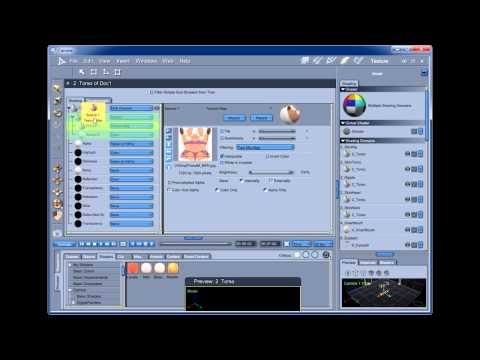
Basic Textures and Shading in Carrara: http://carraracafe.com/tutorials/basic-textures-and-shading-in-carrara/
Optimizing Your Content – Shader Basics: http://carraracafe.com/articles/optimizing-your-content-shader-basics/
Setting up Basic Materials for Genesis Figures: https://www.daz3d.com/forums/discussion/307266/setting-up-basic-materials-for-genesis-figures
Load and save shaders: http://carraracafe.com/tutorials/load-and-save-shaders/
Save shader channels: http://carraracafe.com/tutorials/save-shader-channels/
PhilW's excellent training videos Now available by Subscription at O'Reillys: https://www.daz3d.com/forums/discussion/165331/changes-to-infinite-skills-carrara-training
Displacement Mapping: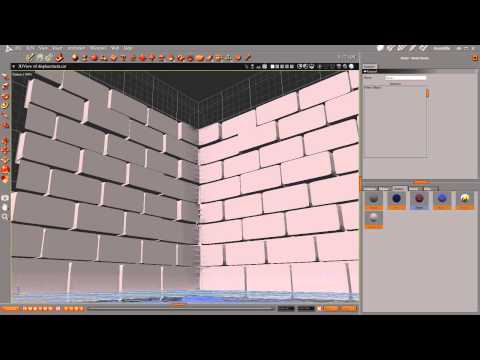
DAZ Studio displacement in Carrara 8: https://karl3d.wordpress.com/2011/08/16/ds-displacement-in-carrara-8/
Normal Map in Carrara 8: http://carraracafe.com/tutorials/normal-map-in-carrara-8/
Bump and Normal Map Comparison Examples in Carrara: https://www.daz3d.com/forums/discussion/144721/bump-and-normal-map-comparison-examples-in-carrara/p1
Advice for setting displacement and SSS: https://www.daz3d.com/forums/discussion/141746/advice-for-setting-displacement-and-sss
Carrara Multi-Channel Mixer Tutorial: http://carraracafe.com/tutorials/carrara-multi-channel-mixer-tutorial/
Shaders with multiple domains: http://carraracafe.com/tutorials/shaders-with-multiple-domains/
Add Shader Layers: http://carraracafe.com/tutorials/add-shader-layers/
Shader operations: https://www.daz3d.com/forums/discussion/216246/shader-operations
Any chance there are shader folders? https://www.daz3d.com/forums/discussion/177136/any-chance-there-are-shader-folders
Terrain Shading: http://carraracafe.com/tutorials/terrain-shading/
Landscape Tutorial by Johannes Rosenberg (In Pack 1-Misc_tutorials): https://www.daz3d.com/forums/discussion/234011/forgotten-carrara-tutorials-and-videos
Building Carrara Terrains Intro: https://www.daz3d.com/forums/discussion/37867/building-carrara-terrains-intro
Texturing terrain: https://www.daz3d.com/forums/discussion/188021/texturing-terrain
Terrain Bump Shader Question: https://www.daz3d.com/forums/discussion/10674/shader-question
Anything Goos (DCG)-Get started with Anything Goos for Carrara: http://www.digitalcarversguild.com/tutorial.php?TutorialId=23
Anything Goos and Octane: https://www.daz3d.com/forums/discussion/195631/anything-goos-and-octane
Anything Grooves (DCG)-Get started with Anything Grooves: http://www.digitalcarversguild.com/tutorial.php?TutorialId=15
Anything Grooves (DCG)-Make the most of Adaptive Mesh: http://www.digitalcarversguild.com/tutorial.php?TutorialId=17
Anything Grooves (DCG)-Smooth text lines with Anything Grooves: http://www.digitalcarversguild.com/tutorial.php?TutorialId=18
Anything Grooves (DCG)-Stone wall: http://www.digitalcarversguild.com/tutorial.php?TutorialId=16
SHADER GEL AND STROBE (DCG)-Crosshair spotlight: http://www.digitalcarversguild.com/tutorial.php?TutorialId=5
SHADER GEL AND STROBE (DCG)-Flickering neon signs: http://www.digitalcarversguild.com/tutorial.php?TutorialId=7
SHADER GEL AND STROBE (DCG)-Psychedelic light show: http://www.digitalcarversguild.com/tutorial.php?TutorialId=6
SHADER OPS (DCG)-Shader Ops sample shader: http://www.digitalcarversguild.com/tutorial.php?TutorialId=25
SHADER OPS 2 (DCG)-Camera Mapping: http://www.digitalcarversguild.com/tutorial.php?TutorialId=35
SHADER OPS 2 (DCG)-Explore Light Mangler: http://www.digitalcarversguild.com/tutorial.php?TutorialId=34
whatever shader ops2 camera view shader: https://www.daz3d.com/forums/discussion/249/whatever-shader-ops2-camera-view-shader
SHADERS PLUS (DCG)-Get started with GI Shadow Catcher: http://www.digitalcarversguild.com/tutorial.php?TutorialId=2
TERRAIN TOOLS (DCG): http://www.digitalcarversguild.com/tutorial.php?TutorialId=29
TOON! PRO (DCG)-Get started with Toon! Pro: http://www.digitalcarversguild.com/tutorial.php?TutorialId=36
Digital Carvers Guild - WIreframe Pro/ToonPro: https://www.daz3d.com/forums/discussion/42907/digital-carvers-guild-wireframe-pro
ENHANCE:C -Getting started with Enhance:C : http://www.digitalcarversguild.com/tutorial.php?TutorialId=28
ShoeString Shaders - CBR Preview: http://www.des-web.net/html/cbr_preview.html
ShoeString Shaders - MultiCh Mixer: http://www.des-web.net/html/multich_mixer.html
Scaling shaders in Carrara: http://www.holyforest-shaders.com/page26/page31/page31.html
Is there a simple way to scale a shader?: https://www.daz3d.com/forums/discussion/309276/is-there-a-simple-way-to-scale-a-shader
Scaling Texture maps: https://www.daz3d.com/forums/discussion/173181/scaling-texture-maps
How to convert Carrara Shaders to Octane Materials FAST. Tutorial.:
Transparency Shader tour: http://carraracafe.com/tutorials/transparency-shader-tour/
How to create Transparency and Glass: http://carraracafe.com/tutorials/how-to-create-transparency-and-glass/
Frosted Glass: http://carraracafe.com/tutorials/frosted-glass/
Model a bottle: http://carraracafe.com/tutorials/model-a-bottle/
Natural Shaders tour: http://carraracafe.com/tutorials/natural-shaders-tour/
Making windows shader for a distant skyline: http://carraracafe.com/tutorials/making-windows-shader-for-a-distant-skyline/
Electrical Effect animated shader: http://carraracafe.com/tutorials/electrical-effect-animated-shader/
Create Specular Skin Effects in CARRARA: http://carraracafe.com/tutorials/create-specular-skin-effects-in-carrara/
Glowing lips in Carrara: http://carraracafe.com/tutorials/glowing-lips-in-carrara/
Real eyes for Victoria 4: http://carraracafe.com/tutorials/real-eyes-for-victoria-4/
Eye Caramba for V4 and M4: https://direct.daz3d.com/forums/discussion/169816/eye-caramba-for-v4
black eye: https://www.daz3d.com/forums/discussion/50941/carrera-black-eye-it-must-be-me-it-can-t-be-designed-this-way
Eyes in Carrara: https://www.daz3d.com/forums/discussion/comment/4267291/#Comment_4267291
skin presets for luxus carrara?: https://www.daz3d.com/forums/discussion/314216/skin-presets-for-luxus-carrara
A SSSlight discusssion about SSS in Carrara...: https://www.daz3d.com/forums/discussion/279551/a-ssslight-discusssion-about-sss-in-carrara
SSS shaders on Poser models: https://www.daz3d.com/forums/discussion/8075/sss-shaders-on-poser-models
Subsurface Scattering: http://carraracafe.com/tutorials/subsurface-scattering/SSS vs Glow Channel for Skin: http://carraracafe.com/tutorials/sss-vs-glow-channel-for-skin/
How to apply a shader on a Hair in Carrara?: http://www.holyforest-shaders.com/page26/page28/page28.html
Hair in Carrara: https://www.daz3d.com/forums/discussion/comment/4357981/#Comment_4357981
How To - Use an Height Map as a Distribution Shader: https://www.daz3d.com/forums/discussion/270961/how-to-use-an-height-map-as-a-distribution-shader
replicator not honoring shader map distribution: https://www.daz3d.com/forums/discussion/138951/replicator-not-honoring-shader-map-distribution
Stones in a Stream Bed: http://carraracafe.com/tutorials/stones-in-a-stream-bed/
Trees on Terrain: http://carraracafe.com/tutorials/trees-on-terrain/
Mapping and Shading in Carrara ¼: http://www.sharecg.com/v/30040/related/3/Video-Tutorial/Mapping-and-Shading-in-Carrara-1-4
Mapping and Shading in Carrara 2/4: http://www.sharecg.com/v/30042/related/3/Video-Tutorial/Mapping-and-Shading-in-Carrara-2-4
Applying Photorealistic Shaders in Carrara ¾: http://www.sharecg.com/v/30043/related/3/Video-Tutorial/Applying-Photorealistic-Shaders-in-Carrara-3-4
Displacement Maps and Projection Channels 4/4: http://www.sharecg.com/v/30045/related/3/Video-Tutorial/Displacement-Maps-and-Projection-Channels-4-4
Wrecked Cars Tutorial, Applying Rust Shaders to Awkward Models: http://carraracafe.com/tutorials/tutorial-wrecked-cars-tutorial-applying-rust-shaders-to-awkward-models/
Rust: http://carraracafe.com/tutorials/rust/
One way to make a planet: https://www.renderosity.com/mod/tutorial/?tutorial_id=2024
following a Tutorial about Planet in Carrara: https://www.daz3d.com/forums/discussion/30284/following-a-tutorial-about-planet-in-carrara
How to Make a Fake Planet: http://carraracafe.com/tutorials/how-to-make-a-fake-planet/
Make a Hologram effect in Carrara: http://carraracafe.com/tutorials/make-a-hologram-effect-in-carrara/
Applying Grunge/Blood textures in Carrara: http://carraracafe.com/tutorials/grunge-blood-textures-in-carrara-i/
Using shaders in Carrara - the Age case: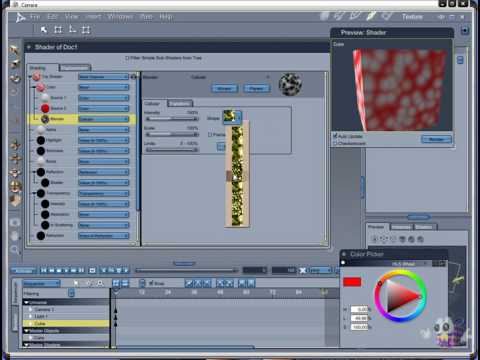
Fixing Poser shaders: http://carraracafe.com/tutorials/fixing-poser-shaders/
Translucency: http://carraracafe.com/tutorials/translucency/
fresnel: https://www.daz3d.com/forums/discussion/276471/fresnel
Making Graffiti: http://carraracafe.com/tutorials/making-graffiti/
Bryce to Carrara: https://www.daz3d.com/forums/discussion/314246/bryce-to-carrara
Bryce Textures In Carrara: http://carraracafe.com/tutorials/bryce-textures-in-carrara/
Materials question... re: parametric mapping: https://www.daz3d.com/forums/discussion/295026/materials-question-re-parametric-mapping
Apply a jpg image to an object: https://www.daz3d.com/forums/discussion/284276/apply-a-jpg-image-to-an-object
Shadering: https://www.daz3d.com/forums/discussion/268321/shadering
How to get shapes in shaders?: https://www.daz3d.com/forums/discussion/203806/how-to-get-shapes-in-shaders
Help building a CEL shader: https://www.daz3d.com/forums/discussion/150931/help-building-a-shader
Obtain shader name in exported OBJ file: https://www.daz3d.com/forums/discussion/148521/obtain-shader-name-in-exported-obj-file
Any suggestions for a good plywood shader: https://www.daz3d.com/forums/discussion/144241/any-suggestions-for-a-good-plywood-shader
Particle - shader question: https://www.daz3d.com/forums/discussion/1426/particle-shader-questionSlimmest, tallest G8F BaseFor the original question, it's probably Tasha:
Height: 6'0" (183.1 cm)
Bust Circumference: 35.8" (91.0 cm)
Waist Circumference: 26.5" (67.4 cm)
Low Hip Circumference: 35.6" (90.4 cm)Victoria is 6'0", and both Zelara and Gia are 5'11", but they have wider hips.
V4 clone to G8F clothing questionsYou can actually convert your Victoria 3 clothing - there are clones for Genesis in the store, allowing the items to be AutoFitted to Genesis, then you can AutoFit those to Genesis 8 female (or Male) using the supplied clones.
There's also a pack with clones to convert from V3/M3 to Genesis 3.
V4 clone to G8F clothing questionsYou can actually convert your Victoria 3 clothing - there are clones for Genesis in the store, allowing the items to be AutoFitted to Genesis, then you can AutoFit those to Genesis 8 female (or Male) using the supplied clones.
V4 clone to G8F clothing questionsSo a little back story I guess makes sense.
I'm an old poser user who is trying to consolidate my poser content into one great big resource for DAZ, (i'm trying to drop Poser, no particular gripe, I like the program just don't see a reason for 2 applications that do the same thing.) ((I know I know, Poser does things that Studeo doesn't and visa versa, really just not going there, I decided to switch to Studeo for now so that where this is all comming from.))
Anyway, I have Victoria 3 content that there was nothing wrong with, works great, and then Victoria 4 came along, and it took a while but everyone dropped Vicky 3 like a hot potato, there being essentially no more updates or progression with her or the various items made for her. And then (tada sound) Clothes and texture converters... yay!
But these only took things up to Vicktoria 4.
Enter Genisis, and the progression becomes much quicker, but is basically the same story... Older items, huge sellers or not, get dropped as soon as the new characters come out, there is a mad rush to get product out for them, but the OLDER content is just left behind. I am well aware of and understand the marketting aspects behind this, but somewhere someone needs to recognise that I as a user have spend 100s if not thousands of dollars on content over the years, all of which is more or less useless because Everything is off of G8F now. I mean let's face it, even Victoria is no longer anything more than a G8F morph character.
Please understand I am NOT knocking any of the previous characters, nor the current ones. I am simply trying to figure out how to consolidate my DAZ/Poser directories, get all my content into one drive and potentially start making images again...
Instructions for using the texture atlasWith a bit fumbeling around I once figured out how Texture Atlas works.
Unfortunatly there is an issue with the "new" - how it is called? UDIM UV layout if you try to use it on Genesis 3 and 8 figures but this coudn't stop me from using it.
Richard explained a good workaround it in this thread: https://www.daz3d.com/forums/discussion/217276/texture-atlas
I didn't know but as descriped its sounds easy: you export the genesis 3 or 8 figure once as OBJ with the "Collapse UV Tiles" option checked. This eleminates the UDIM UV layout issue once you load this Collapse UV Tiles OBJ as a new UV Set on that you can use the Texture Atlas as usual. Then in the end you just need to remember to only save the UV Set Asset that Texture Atlas has generated.
Lately I've used it on genesis 8, made screenshots and planed a tutorial on how I managed to workaround the issues I had. I've used Blender to fix the mess Texture Atlas did with the UDIM UVs at first.
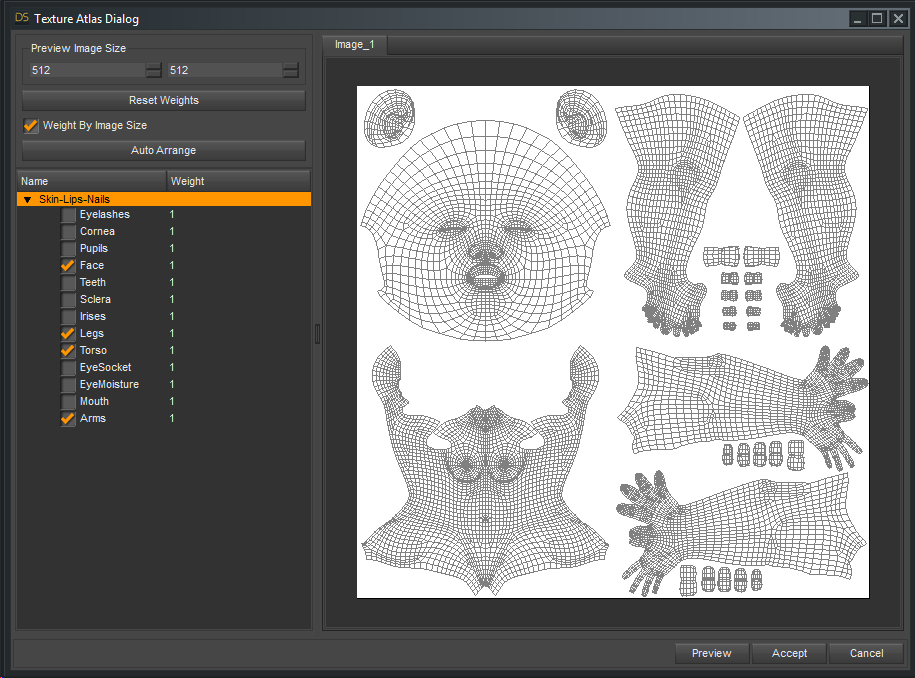
Since Genesis 2 I've used Texture Atlas for one thing, to turn the character textures into what I called Low-Res UVs. With the Face and Torso, Legs and Arms Surfaces all on one texture map. See the attached screenshot.
Or Skin-Lips-Nails Low-Res UVs for Genesis 3 and 8 because only those surfaces are affected by the rearrangement. Actualy I've invented this method to tweak skin colors all in one go in an image editor like Photoshop.
I called it Low-Res UVs because I wanted to reduce the texture resolution by using a 4k map so every surface like Face and Torso gets 2k resolution. What I haven't tried yet is to use 8k maps on these UVs, in theory you wouldn't loose any detail with the 8k texture resolution.
So finaly I thought using Texture Atlas would be best showen in a video and here it is. This is not realy a tutorial like seen elsewhere because I don't explain everything and I work fast. Maybe its more for advanced users but hey its an advanced issue anyway. In the end I realize I made the mistake and forget to add the EyeSocket surface keep that in mind if you try it yourself. Because of the nature of skin textures this video containes nudity.
DazStudio LowResUVs G3F - Youtube
This video shows how I used the Texture Atlas to create all-in-one texture maps and UVs for Genesis 3 Female.
I start with a character texture set Ronya HD for Victoria 7. https://www.daz3d.com/ronya-hd-for-victoria-7
I show the whole process how Texture Atlas will create the new UV Set and convert the textures. Then I save the UV Asset and a Material Preset of the result.
In the second part I show you how to use the Map Transfer to convert other character textures to the new UV set. This time I used the character GND Darla from this other site.
I hope this is useful information to you.
Syrus_Dante
Who's Next to Join the G8 Family?To continue on L'Adair's list.... (edited as suggested by per Noah LGP)
- 40. Mr. Woo 8 2019-04-04
- 39. Mrs. Chow 8 2019-03-19
- 38. Bridget 8 2019-03-05
- 37. Landon 8 2019-02-19
- 36. Tasha 8 2019-02-05
- 35. Sydney 8 2019-01-15
- 34. Christian 8 2019-01-02
- 33. Nix 8 2018-12-18
- 32. Eva 8 2018-12-04
- 31. Lee 8 2018-11-22
- 30. Mei Lin 8 2018-11-06
- 29. Vladimir 8 2018-10-18
- 28. Gia 8 2018-10-01
- 27. The Brute 8 2018-09-18
- 26. Latonya 8 2018-09-04
- 25. Toon Dwayne 8 2018-08-21
- 24. Zelara 8 2018-08-10
- 23. Mabel 8 2018-07-17
- 22. Teen Kaylee 8 2018-07-03
- --. Daz Dog 8 2018-06-18
- 21. The Girl 8 2018-06-05
- 20. Floyd 8 2018-05-23
- 19. Mika 8 2018-05-09
- 18. Edie 8 2018-04-24
- 17. Penny 8 2018-04-11
- 16. Ollie 8 2018-03-27
- 15. Aiko 8 2018-03-13
- 14. Edward 8 2018-02-22
- 13. Alexandra 8 2018-02-13
- 12. Karyssa 8 2018-01-23
- 11. Owen 8 2018-01-09
- 10. Sakura 8 2017-12-26
- 09. Charlotte 8 2017-12-12
- 08. Darius 8 2017-11-28
- 07. Monique 8 2017-11-14
- 06. Lucas 8 2017-10-17
- 05. Stephanie 8 2017-10-03
- 04. Teen Josie 8 2017-09-19
- 03. Michael 8 2017-08-22
- 02. Olympia 8 2017-07-25
- 01. Victoria 8 2017-06-15
Daz 3D is part of

Connect
DAZ Productions, Inc.
7533 S Center View Ct #4664
West Jordan, UT 84084Licensing Agreement | Terms of Service | Privacy Policy | EULA
© 2026 Daz Productions Inc. All Rights Reserved.