-
Morphs from G3 to G8
If you create a custom character AND save the shape as in the video AND reload the figure in a new scene the script will transfer it like any other morph.
The script doesn't care where the data come from. It only needs the files to be saved and the figure to be properly connected to the files (that is why new scene. It clears the cache).
Remember, a custom dialspun character converted to a morph can't be distributed. You can't share the shape, only the dail settings and products you used to make it. Edit: Obviously, that limitation doesn't apply to products that say you can use them to make morphs. Check your licenses.
Thank you, as always, for your fast answer! :D
I have no interest at all in selling products. I refuse every commission they ask me, I only want to make my stories, since this won't be my main job!
Thanks, I'll learn that stuff then! :D
One thing: would it transfer that morph directly to 100%, or would I be able to slowly apply it with steps along the way? With a slider?Lola FreebiesLalo Summer
I made Lalo fit of M4Summer clothes which I made. Conforming T-Shirt, Surf pants and Thongs for Lalo (Toon Grrl Lola’s Male morph) I regret these clothes don't suit well for other Morphs of Lola. I am not good at the refit works. The textures by mmalbert may be useful for these:
Summer Casual M4 Textures for DS and Poser by mmalbert https://www.renderosity.com/mod/freestuff/?item_id=73982
https://www.renderosity.com/mod/freestuff/lalo-summer/82459Morphs from G3 to G8Were M5 based morphs tested on the previous GitHub iteration? Every M5 morph I've attempted looks like it's missing something, and dialing in the separate M5 shape almost gets it there but still not there.
Attached file is SAV Alpha Male M5, Conversion to G8M, and Conversion to G8M with M5 added. Non-Daz, I know.
did you add/convert the M5 Base SHapes ?
Were M5 based morphs tested on the previous GitHub iteration? Every M5 morph I've attempted looks like it's missing something, and dialing in the separate M5 shape almost gets it there but still not there.
Attached file is SAV Alpha Male M5, Conversion to G8M, and Conversion to G8M with M5 added. Non-Daz, I know.
I suspect the CNTRL morphs aren't activating. As khorneV2 said you will probably need to transfer the base M5 Genesis morphs, if you haven't already, as when you dial in Michael 5 on Genesis it activates a lot of those.
A lot of the G3 to G8, and vice versa, work because the base morph packages are very similar in content and naming.
Sorry for late reply, back from vacation.
I wouldn't think I would have to convert the shapes if I already had the shapes... Besides I mentioned I was dialling in the M5 shape.
Anyway, I think I found the problem. Once I dialed in both M5 AND M4 I got the shape. Wouldn't have thought I would have needed to since the M4 shape wasn't showing under Currently Used.
Morphs from G3 to G8If you create a custom character AND save the shape as in the video AND reload the figure in a new scene the script will transfer it like any other morph.
The script doesn't care where the data come from. It only needs the files to be saved and the figure to be properly connected to the files (that is why new scene. It clears the cache).
Remember, a custom dialspun character converted to a morph can't be distributed. You can't share the shape, only the dail settings and products you used to make it. Edit: Obviously, that limitation doesn't apply to products that say you can use them to make morphs. Check your licenses.
3D Art Freebie Challenge-June 2019-"Summertime Pin-Ups" -Main Thread OnlyHm, no... I'm still confused, sorry. I'm asking about what happens after those two months. Do those items become purchased (max. 5) or no-counts (like G8M Body Morphs, for example)
Daz Bi-Weekly Freebies will be allowed throughout the entire month in which they are free as well as the month following their release as a freebie (For a total of 2 months)
Will be allowed... as a 'Countable Freebie'. After that period (and actually sooner) you have to pay for the item so it becomes a 'Purchased/Paid For' item. (Any Morph set that is not included with the base figure should be a 'Purchased/Paid For' item too in my opinion.)
G3 characters on G8?One very long thread on the matter, fortunately with some positive recent developments:
https://www.daz3d.com/forums/discussion/176271/morphs-from-g3-to-g8
(Still, even though it's showing promise, it's not perfect, and cannot fully transfer any characters that use HD morphs).
G3 characters on G8?Look at this thread for morph transfers:
https://www.daz3d.com/forums/discussion/176271/morphs-from-g3-to-g8
Most skins for G3 characters work on G8 just fine, and vice versa.
Looking for bottle with pouring morphthese morphs don't show the liquid going into the neck of the bottle like you would if you were pouring something into a glass.
I doubt such a product exists, at least as a morph. It doesn't really suit the way that morphs work.
A subtle tip morph is just a case of moving a few vertices linearly up and down the side of the bottle. A morph where it goes into the neck of the bottle however results in the liquid having an entirely different shape, and would thus require a completely different geometry to fit that new shape. (Bear in mind, morphs can only move existing vertices, they cannot add more).
If I were trying to model something like that, I'd choose to do liquid tilted into the neck as a separate prop in order to avoid the headache of trying to do it with morphs.
Unfortunately, until we master CG technology that lets us get away from the tyranny of polygons, there are a lot of things that aren't very practical to achieve.
Looking for bottle with pouring morphThanks AlmightyQUEST and Leana. I will keep these in mind. They would work for liquid coming out of the bottle but I still have to find something that would push the liquid into the neck and ideally have a tilt and level morph for the bottom to show that the bottle is emptying.
Looking for bottle with pouring morphHello,
I am looking for a whiskey or wine bottle with a poring morph. I have several bottles with level and tilt morphs but these morphs don't show the liquid going into the neck of the bottle like you would if you were pouring something into a glass. Any help or suggestions would be appreciated.
Thanks in advance for any replies.
nabob21
Morphs from G3 to G8As far as explaining how you go about transfering "gender," you don't. The products that say "shapes for G#F" aren't "female" shaped. outside Genesis, no morph is (I'm sure there are exceptions, but that's beside the point). Transfering a female morph set to a male figure will not feminize that figure much at all. Narrowing the waist and making the hips rounder won't be as effective as you might think because the basic shape it is being applied to is incorrect. You need to have a female shape on the male figure, already, to make that work (Rigging the transfer clones won't work as well as you might think, but it is one way to do it on Genesis 8--Edit: rigging the clones themselves is another bad idea, but you can make a new shape by dailing in the clone, exporting it, and importing it as a morph).
The way you go about making a female version of a male shape is to transfer the male shape to a female figure, without baking. Male shapes tend to be buff and defined, so expect that to happen to your female reproduction.I have G8F rigged for G8M and viceversa, so adding that to the other morphs should do the trick.
Now I've managed to see a long list of morphs, transfering the shape presets of the characters I wanted to transfer on a base G8 figure.
The problem is that my characters use hundreds of morphs, and from what I've understood, this way I would have to check each one of them one by one, and the all transfer would take hours, am I right?
In any case, that wouldn't create a single slider with all the morphs, right?So, I was thinking (I don't want to go off topic, but you seem the best people for this stuff), what if I created a custom character from a set of morphs, and then I applied it on the figure of the other genre?
I'm talking about the instructions contained in this video:
Do you think it would work right away?
Would I need to rig them afterwards? Could that be done with Shape Rigger Plus? (https://www.daz3d.com/shape-rigger-plus)Basically, what I'd like to obtain in the end, is a single slider containing those hundreds of morphs that I could use to create slow transgender transformations...this is so hard
 Morphs from G3 to G8
GenNext doesn't support Generation 1-4 at all. That's completely different technology from Genesis, and I haven't even begun to figure out how it works. After the last clones are done, it will support every Genesis (hopefully correctly, but I suspect issue with Genesis. Stupid curled fingers ruining everything). Any figure it supports, can transfer to any other figure it supports. It does not transfer HD morphs, but it will transfer the LowD morphs that control HD morphs, so you might see sliders for "whateverHD" and those sliders might make the figure shape change a bit, but they won't be HD.
As far as explaining how you go about transfering "gender," you don't. The products that say "shapes for G#F" aren't "female" shaped. outside Genesis, no morph is (I'm sure there are exceptions, but that's beside the point). Transfering a female morph set to a male figure will not feminize that figure much at all. Narrowing the waist and making the hips rounder won't be as effective as you might think because the basic shape it is being applied to is incorrect. You need to have a female shape on the male figure, already, to make that work (Rigging the transfer clones won't work as well as you might think, but it is one way to do it on Genesis 8--Edit: rigging the clones themselves is another bad idea, but you can make a new shape by dailing in the clone, exporting it, and importing it as a morph).
The way you go about making a female version of a male shape is to transfer the male shape to a female figure, without baking. Male shapes tend to be buff and defined, so expect that to happen to your female reproduction.Why do you do it this way, you ask? Because transferring morph packages is generally a bad idea. If you know you will never get the version of that package that was made for that figure, it might be okay, but it will be an issue, otherwise. From what I can see, the base sets for all the figures have the same names. 200+ seems to be similar. Vendors tend to just remake the old version with a few new tricks. Having both installed on a figure can lead to bad things. (Edit: To be clear, Package X for G8F and Package X for G8M will have many of the same morphs names, as well. It may be safe to transfer gender specific morphs, individually, but you need to check and make sure you aren't creating a conflict.)
interesting, well i wanted to means "genesis" not generation, my bad, well i will keep testing, well for me at last it's for game development, i will give some tests later.
then a good way would be:
let's say get the minotaur 6 male, dail it into female, export it then get the exported one then import back to daz as a "morph to female", then use it right?
Morphs from G3 to G8GenNext doesn't support Generation 1-4 at all. That's completely different technology from Genesis, and I haven't even begun to figure out how it works. After the last clones are done, it will support every Genesis (hopefully correctly, but I suspect issue with Genesis. Stupid curled fingers ruining everything). Any figure it supports, can transfer to any other figure it supports. It does not transfer HD morphs, but it will transfer the LowD morphs that control HD morphs, so you might see sliders for "whateverHD" and those sliders might make the figure shape change a bit, but they won't be HD.
As far as explaining how you go about transfering "gender," you don't. The products that say "shapes for G#F" aren't "female" shaped. outside Genesis, no morph is (I'm sure there are exceptions, but that's beside the point). Transfering a female morph set to a male figure will not feminize that figure much at all. Narrowing the waist and making the hips rounder won't be as effective as you might think because the basic shape it is being applied to is incorrect. You need to have a female shape on the male figure, already, to make that work (Rigging the transfer clones won't work as well as you might think, but it is one way to do it on Genesis 8--Edit: rigging the clones themselves is another bad idea, but you can make a new shape by dailing in the clone, exporting it, and importing it as a morph).
The way you go about making a female version of a male shape is to transfer the male shape to a female figure, without baking. Male shapes tend to be buff and defined, so expect that to happen to your female reproduction.Why do you do it this way, you ask? Because transferring morph packages is generally a bad idea. If you know you will never get the version of that package that was made for that figure, it might be okay, but it will be an issue, otherwise. From what I can see, the base sets for all the figures have the same names. 200+ seems to be similar. Vendors tend to just remake the old version with a few new tricks. Having both installed on a figure can lead to bad things. (Edit: To be clear, Package X for G8F and Package X for G8M will have many of the same morphs names, as well. It may be safe to transfer gender specific morphs, individually, but you need to check and make sure you aren't creating a conflict.)
Morphs from G3 to G8SB, I've had this running for over thirty minutes now, and it remains stuck at 33% on "Geometry Imported:BaseShp.obj"
EDIT: When I installed v0.6.2.2b I simply overwrote the the old files. Should I have deleted the old files first? In any case, I'll leave this running. In an hour I have to go out, but when I return home I'll try and see what I can find.
EDIT 2: I closed the script and Studio after the script was still stuck at 33% after 1 hour and 10 minutes. Will try again later.
The biggest change from the last version (that was not motivated by legal issues) is error catch. When the process errors out, it still doesn't notify you, but when you cancel, the error message no longer says check logs. But has the actual error. I have learned that this is stopping the error message being logged. So that needs fixing. One thing I should have reactivated before shipping is likely the cause of the hang up. If it doesn't finish correctly load a new scene. The objects left behind interfere with the process.
Yes, if you don't bake the source shape of a morph, it will do pretty much that. But keep in mind, this typically causes the male figure's nipples to track downward and contract. (Exactly why, I dunno. I suspect I've only tested shapes that cause that effect.
Also keep in mind that this overall effect is most reliable when transfering between M/F of the same Genesis, and won't work well at all with G1 (it can still work, but you need to add the male/female base shape manually, and I won't warrant the results.ALSO keep in mind, the script only transefers by product. so if you want to transfer, for example, whymsically misspelled name for V7 (hereafter WMNV7) to G3M, you need to also transfer V7, and in both cases, unbaked. (in fact, you should never bake a shape that depends on and shape. Baking prevents the differences between the base figures' shapes from distorting the final morph. So, when baking, V7 sent to G3M will look nearly exactly like V7 on G3F. If you bake WMNV7 AND V7, when you dial the final shape on G3m, it will, essentially, add G3F's based shape to the result twice. Once from being baked into V7 and once from WMNV7. So shapes "for" other shapes should not be baked. If you mean to send a shape "for" another cross gender to create a Rule 63 version of that shape, then you have to send both the shape you want and the shape it depends on across unbaked.
ALSO keep in mind, the current way the script runs involves creating a copy of the source figure with twice the mesh density or a bit over 3 times the number of verts. So it takes it a while to get started. Not a super long while, but a couple of minutes, maybe. All I can say is, if you think it's hung, you can cancel out, but if you don't get an error messages after closing all of the script windows, the script is still running. You just have no means to see what it's doing. And you can interface with Studio while this is going on, which will make the whole thing unstable and crash both, eventually. So if you think it hung, close it and don't get an error message, your best bet is to force stop Studio.yeah i would love to do some test on characters like reptilian and minotaur 6
but here what i'm say, this is the catguy from catworld 8 from rawart, this is just his base and enabling the hidden options, you can see the dials to both genesis male and female for genesis 2, 3 and 8 to change the character shape
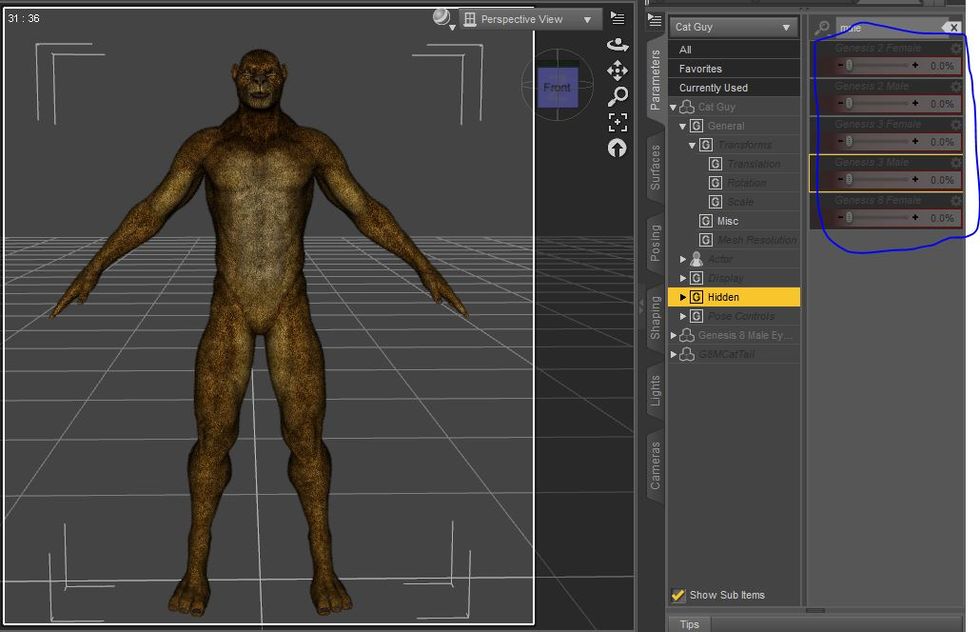
this is not using your addon just the hidden dials for old body clones
now when i use the genesis 8 female dial:
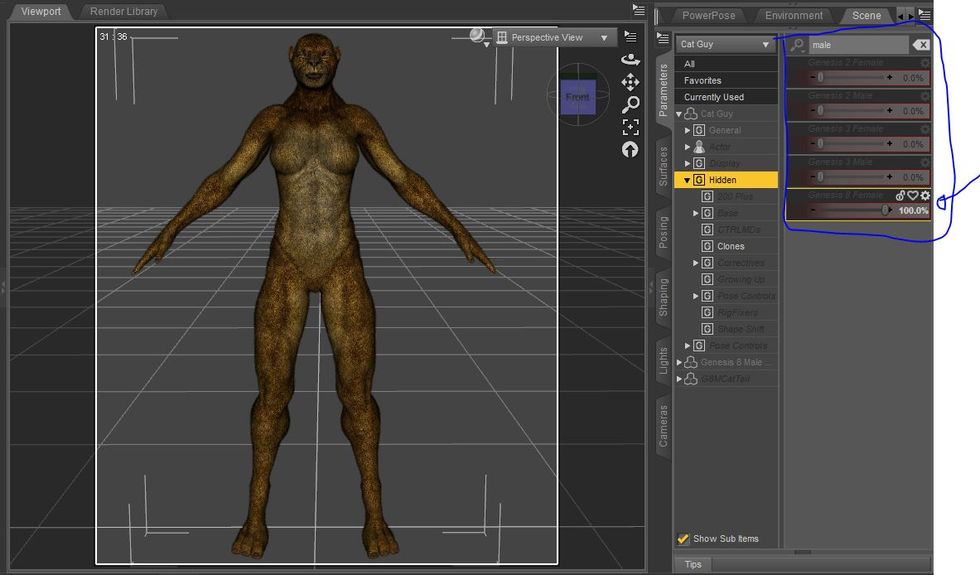
now comparing with the original catworld female.
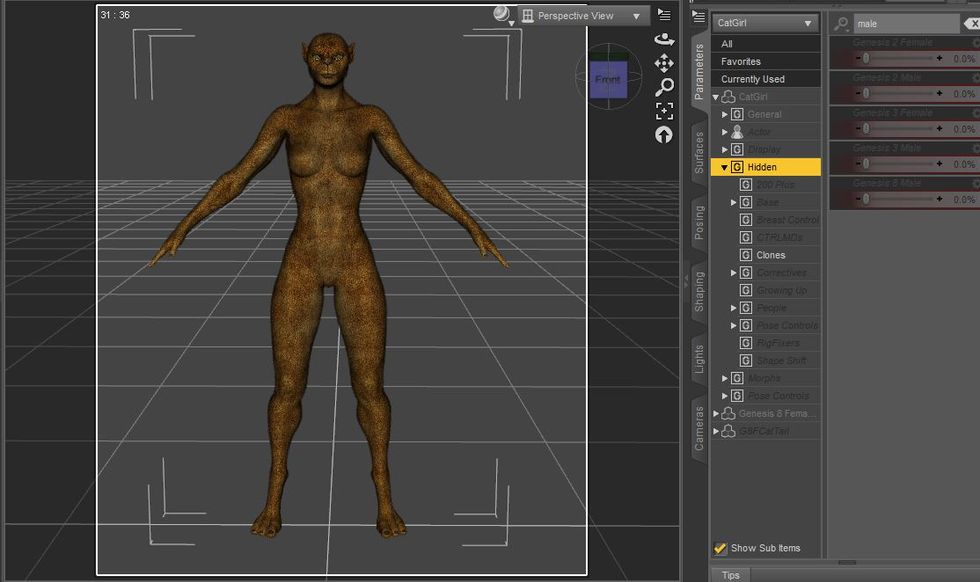
not a really big difference, the only thing i would say that dial does a little weird is niples position which normally ending a little in the borders rater than more centered.
then if your addon allow me to transfer morphs like this:
https://www.daz3d.com/genesis-8-female-body-morphs
to be applied on the male then it could means which we could work a way to allow allow characters like that:
https://www.daz3d.com/reptilian-6-hd-bundle
to have a female version without need to create a new one, by just using the default one and transfering female morphs to him, that could turn this addon in one of the best addons ever made, because of the power of the compatibility could easy go crazy allowing basically any character from genesis 1 to genesis 8 be "anything"(as long it have proper support).
You can have a female version of anything, but that is not how you would do that. I'll explain more later. For now, just trust that the process you have in mind is flawed .
For any characters that require the Genesis 3 Head Morphs, do they also need to be selected in addition to the character itself?
Basically, yes. And it gets worse. The process seems to take about 20 seconds per morph, now. Allow 2.5 minutes to set up and shut down and you hit a small snag when transferring hundreds of morphs. 200 Plus sent as a whole, will take 4000 seconds plus setup and shut down time (4 kiloseconds is 1 hour 6 minutes 40 seconds). Call that about an hour and 10 minutes total.
Sending a basic character can be done in less than 5 minutes. But a complex character takes a lot of time. This is why transferring whole products is not the default setting any longer. It eats too much time, and the jcms may not be needed. This way. You can test adding jams when you see the need rather than lose 40 minutes to each transfer.
Any changelog for the differences between the old (nuked) and new GenNext at github?
Not really, other than it does not presently work with g1/2. I didn't make any user facing changes. Not will I be making any soon. I will try to keep track of that going forward.
I'm sorry for my stupid questions, but I really am a newbie regarding scripts.
The thread is pretty long and I can't manage to find instructions.First of all, thanks for your hard work! The interface is much more clear than I was expecting too!
I've loaded 2 G8 (one F and one M) characters into the scene, then I've opened the script.
The problem is that I can't select them in the menu of the script. I see "Genesis 8 Male/Female etc.", but if I select them (but the figures are not named that way), no morph appears.What am I doing ...(accidental snip I don't want to fix because typing on phone - - SB)
The script doesn't do characters. It does morphs. Most characters are labeled as characters when launched as a character preset. While the script identifies the figure by name, it accesses them by label expressly to prevent presets being used. Transfers should be between unmorphed base figures, or it will not work correctly. What you call "not named that way" Daz calls changing the label. Since the labels are changed, the script can't see the figures.
thanks i would really love a a good explanation and would be really good have some "tutorials in future in how to use it" and i know it flawed it was just what come to my mind without using your tool as base, this was just a basic mind blow, if you tool alone would do all the process alone and better that would be perfect and really the best thing ever.
One question, the tool is just to export any genesis(1, 2, 3) and gender to G8, like G2F to G8F&M or G3M to G8F&M or it can be used to transfer morphs in any Generation?? like from G2F to G2M or G3M to G3F or like G3M to G2M&F??? if like that then it really is a big mindblow in the mixmatch you can do with it.
How to make a favorites list of morphs to transfer into clothingYou can click the heart icon on the slider to set the morph as favourit or you could right-click the Parameters pane select Edit Mode and now you can select multible morphs with Ctrl+click or Shift+click, then right-click on one of the selected and choose Mark As Favourit from the menu to mark all selected at once.
Next if not already unfit the clothing: Scene pane right-click Fit To: None. Then open the Transfer Utility, I am used to use a toolbar icon but I think it is also found somewhere in the main menu Edit>Figure.
In the Transfer Utility dialog select Source: genesis figure and Target: clothes, uncheck all General Options but check Morph Targets and as you select it there will be Extended Options showing on the right select From Source: Favourits and Sub-Components. Keep the both checkmarks From Projection Template and Overwrite Existing checked as they are. I would leave the Projenction Options at their defaults. Post Transfer Options are optional. Finaly press accept - done. The screenshot below is just for reference and not showing the settings as desciped.
 Morphs from G3 to G8
SB, I've had this running for over thirty minutes now, and it remains stuck at 33% on "Geometry Imported:BaseShp.obj"
EDIT: When I installed v0.6.2.2b I simply overwrote the the old files. Should I have deleted the old files first? In any case, I'll leave this running. In an hour I have to go out, but when I return home I'll try and see what I can find.
EDIT 2: I closed the script and Studio after the script was still stuck at 33% after 1 hour and 10 minutes. Will try again later.
The biggest change from the last version (that was not motivated by legal issues) is error catch. When the process errors out, it still doesn't notify you, but when you cancel, the error message no longer says check logs. But has the actual error. I have learned that this is stopping the error message being logged. So that needs fixing. One thing I should have reactivated before shipping is likely the cause of the hang up. If it doesn't finish correctly load a new scene. The objects left behind interfere with the process.
Yes, if you don't bake the source shape of a morph, it will do pretty much that. But keep in mind, this typically causes the male figure's nipples to track downward and contract. (Exactly why, I dunno. I suspect I've only tested shapes that cause that effect.
Also keep in mind that this overall effect is most reliable when transfering between M/F of the same Genesis, and won't work well at all with G1 (it can still work, but you need to add the male/female base shape manually, and I won't warrant the results.ALSO keep in mind, the script only transefers by product. so if you want to transfer, for example, whymsically misspelled name for V7 (hereafter WMNV7) to G3M, you need to also transfer V7, and in both cases, unbaked. (in fact, you should never bake a shape that depends on and shape. Baking prevents the differences between the base figures' shapes from distorting the final morph. So, when baking, V7 sent to G3M will look nearly exactly like V7 on G3F. If you bake WMNV7 AND V7, when you dial the final shape on G3m, it will, essentially, add G3F's based shape to the result twice. Once from being baked into V7 and once from WMNV7. So shapes "for" other shapes should not be baked. If you mean to send a shape "for" another cross gender to create a Rule 63 version of that shape, then you have to send both the shape you want and the shape it depends on across unbaked.
ALSO keep in mind, the current way the script runs involves creating a copy of the source figure with twice the mesh density or a bit over 3 times the number of verts. So it takes it a while to get started. Not a super long while, but a couple of minutes, maybe. All I can say is, if you think it's hung, you can cancel out, but if you don't get an error messages after closing all of the script windows, the script is still running. You just have no means to see what it's doing. And you can interface with Studio while this is going on, which will make the whole thing unstable and crash both, eventually. So if you think it hung, close it and don't get an error message, your best bet is to force stop Studio.yeah i would love to do some test on characters like reptilian and minotaur 6
but here what i'm say, this is the catguy from catworld 8 from rawart, this is just his base and enabling the hidden options, you can see the dials to both genesis male and female for genesis 2, 3 and 8 to change the character shape
this is not using your addon just the hidden dials for old body clones
now when i use the genesis 8 female dial:
now comparing with the original catworld female.
not a really big difference, the only thing i would say that dial does a little weird is niples position which normally ending a little in the borders rater than more centered.
then if your addon allow me to transfer morphs like this:
https://www.daz3d.com/genesis-8-female-body-morphs
to be applied on the male then it could means which we could work a way to allow allow characters like that:
https://www.daz3d.com/reptilian-6-hd-bundle
to have a female version without need to create a new one, by just using the default one and transfering female morphs to him, that could turn this addon in one of the best addons ever made, because of the power of the compatibility could easy go crazy allowing basically any character from genesis 1 to genesis 8 be "anything"(as long it have proper support).
You can have a female version of anything, but that is not how you would do that. I'll explain more later. For now, just trust that the process you have in mind is flawed .
For any characters that require the Genesis 3 Head Morphs, do they also need to be selected in addition to the character itself?
Basically, yes. And it gets worse. The process seems to take about 20 seconds per morph, now. Allow 2.5 minutes to set up and shut down and you hit a small snag when transferring hundreds of morphs. 200 Plus sent as a whole, will take 4000 seconds plus setup and shut down time (4 kiloseconds is 1 hour 6 minutes 40 seconds). Call that about an hour and 10 minutes total.
Sending a basic character can be done in less than 5 minutes. But a complex character takes a lot of time. This is why transferring whole products is not the default setting any longer. It eats too much time, and the jcms may not be needed. This way. You can test adding jams when you see the need rather than lose 40 minutes to each transfer.
Any changelog for the differences between the old (nuked) and new GenNext at github?
Not really, other than it does not presently work with g1/2. I didn't make any user facing changes. Not will I be making any soon. I will try to keep track of that going forward.
I'm sorry for my stupid questions, but I really am a newbie regarding scripts.
The thread is pretty long and I can't manage to find instructions.First of all, thanks for your hard work! The interface is much more clear than I was expecting too!
I've loaded 2 G8 (one F and one M) characters into the scene, then I've opened the script.
The problem is that I can't select them in the menu of the script. I see "Genesis 8 Male/Female etc.", but if I select them (but the figures are not named that way), no morph appears.What am I doing ...(accidental snip I don't want to fix because typing on phone - - SB)
The script doesn't do characters. It does morphs. Most characters are labeled as characters when launched as a character preset. While the script identifies the figure by name, it accesses them by label expressly to prevent presets being used. Transfers should be between unmorphed base figures, or it will not work correctly. What you call "not named that way" Daz calls changing the label. Since the labels are changed, the script can't see the figures.
GenX not transferring morphsHi all
I'm trying to transfer as many of my character morphs from Genesis 3 to Genesis 2 as I can using GenX.
Most work fine, but some don't. Specifically I'm trying to transfer Victoria 7 to G2F. The morph appears on G2F, but when I dial it in, there's no change.
Can anyone suggest why this may be happening?
Morphs from G3 to G8I'm sorry for my stupid questions, but I really am a newbie regarding scripts.
The thread is pretty long and I can't manage to find instructions.First of all, thanks for your hard work! The interface is much more clear than I was expecting too!
I've loaded 2 G8 (one F and one M) characters into the scene, then I've opened the script.
The problem is that I can't select them in the menu of the script. I see "Genesis 8 Male/Female etc.", but if I select them (but the figures are not named that way), no morph appears.What am I doing wrong?
Daz Studio Pro BETA - version 4.11.0.383! (*UPDATED*)Hi,
i can’t save or cancel render if the ”new window” is maximazied...
anyone else?
BR // Daniel
It's fine for me. When you maximize the render window, what do you get?
Looks normal, but nothing happens when i press the buttons...
If i make the render window not maximazed the buttons work as normal.
Which Layout/Style are you using?
It’s a new conputer just for renders, so i haven’t change anything.
I make my scene on a laptop and transfer/render on this new one.
It use a rtx 2080ti so i never had the 4.10 ver installed. Just this beta and the one before.
Layout as standard, haven’t change any settings at all except some rendersetings.
BR //Daniel
Morphs from G3 to G8I've downloaded the git and had a quick poke at converting RawArt's Lekkulion Female to G8F - a challenging shape (including morphing away fingers and toes), but it took a very good stab at it. (Although obviously minus the HD portion of the morph).
I'll need to do a tiny bit of tidying up in Blender to get the results perfect, but it's a massive improvement over some of my previous attempts to transfer even much simpler shapes (which frequently resulted in character's fingers tearing off or the like).
Very impressive - many thanks for all the effort you've put in to this project; this is going to be a really useful tool for so many people.
Daz 3D is part of

Connect
DAZ Productions, Inc.
7533 S Center View Ct #4664
West Jordan, UT 84084Licensing Agreement | Terms of Service | Privacy Policy | EULA
© 2026 Daz Productions Inc. All Rights Reserved.