-
Blacksmith3D
Ever since I read that Blacksmith3D can port older texture maps to newer figures, I've been wanting to grab it when it goes on sale next. I have a handful of characters that I've portied to Genesis 3/8 using Morph Loader, and it would be nice to port their textures too. For my own use of course! I just like having more posing regions.
MD->Daz->ZBrush->Daz For clothing help?Yes, once you have the final OBJ use the Transfer Utility to rig it to the figure.
Thanks!
Morphing Genesis 3 character into Toon Generations 2?I am transitioning from using Poser to starting to use Daz Studio. I bought Toon Generations 2 Mega Bundle for Genesis 3, as well as Growing up Bundle for Genesis 8. I cannot figure out how to morph the respective Genesis figures into the Toon Character?.
Could someone please help me with this? As I am a total newbie, please explain in simple terms!
Thank you, thank you, thank you!
Anne
MD->Daz->ZBrush->Daz For clothing help?If you are literally editing the item then no, because using GoZ removes grouping (and surfaces). GoZ is mainly set up for morph creation, which should not create a new model in the scene but just add a property to the existing model. More substantial editing is better handled via OBJ export/import.
Thanks! So, in my case a better option would be to modify in ZBrush and the generate an OBJ file which I would later import into my scene right? My question with that approach is how can I place the clothes in my figure with it? Using transfer utility?
Thanks a lot for your help
or you mean exporting my whole figure with clothes and everything, editing in Zbrush and then importing back to daz as 1 obj?
MD->Daz->ZBrush->Daz For clothing help?Yes, once you have the final OBJ use the Transfer Utility to rig it to the figure.
MD->Daz->ZBrush->Daz For clothing help?If you are literally editing the item then no, because using GoZ removes grouping (and surfaces). GoZ is mainly set up for morph creation, which should not create a new model in the scene but just add a property to the existing model. More substantial editing is better handled via OBJ export/import.
Thanks! So, in my case a better option would be to modify in ZBrush and the generate an OBJ file which I would later import into my scene right? My question with that approach is how can I place the clothes in my figure with it? Using transfer utility?
Thanks a lot for your help
Buy Something That Doesn't Work in Carrara? Post your Questions and Workarounds here. (please)it looks like those other vertices are welded to some of the ones you select
the only way you could move parts of it is using magnets or rigging, or reweld the whole thing which could destroy the UV mapping.
Thanks for answering.
I don't think it's that, because if I use "grow selection", it works perfectly. The problem is only with "soft selection".
I just found a way: I tried the various settings for the reimport of the obj file and found that selecting "Create a Polymesh per Material" solves the pb. There's only one material so it creates only one mesh, as with the default setting ("Create a single polymesh"), but this way the soft selection works. Don't ask me why ...
Of course there's no rigging anymore, but I think I know how to put it back with DazStudio. And UV mapping is still here !
you could load it in DAZ studio on the top via morphloader and save it as a morph asset
make sure is base resolution
check with an obj import if it's the same scale and position
I used the figure transfer utility with the original item as a model and I got back the rigging, and it seems to work well, and the soft selection also works now !
There was an additionnal step though as if I imported directly the mesh in studio I got the problem back in Carrara at the end (the option that makes it work in Carrara doesn't exist in studio). So I had first to export the obj in dae format (in Carrara) and import that dae in studio. I had to alter the scale and very slightly the position.
Thank you for your time and suggestions.
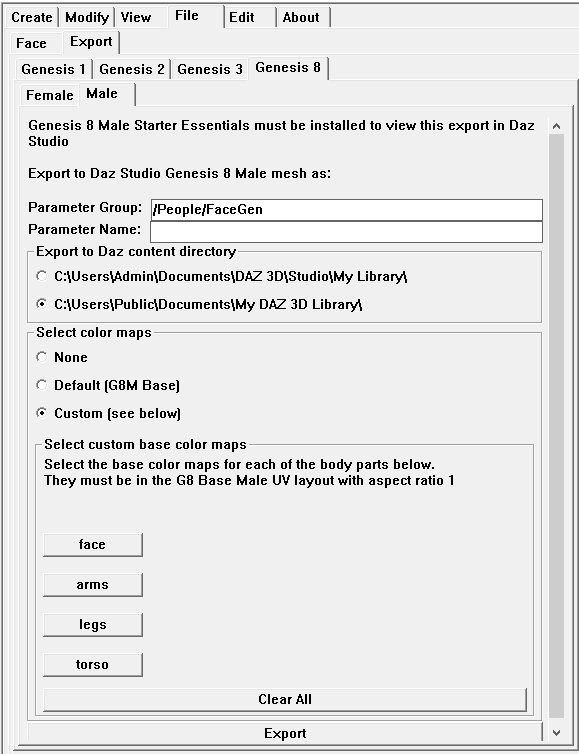
Facegen 2.0 Released- Now 2.1thanks for updating us about this just installed and started it up and just looking at the menus looks like we have a lot more options even remembers shows where I've saved to on my other drive. Got a question there is a custom section that has seperate? options for besides face, arms, legs and torso I clicked the buttons and it looks like you can do something to those textures?
You can load up any texture you want now! So you can use Victoria 8 textures instead of base Genesis 8. Or Greylien. Whatever you want, as long as the UV matches the base. I have not experimented much with this yet myself. FG still seems to work best with the base textures. But now you can edit the base textures to your liking and have FG use them instead.
Does this mean i first load victoria 8. Then set the uv to base. The save it. Then load up FG with the face i want then set it to custom and load victoria textures and export then open the file i saved and load in the face dail and tExtures? Or is there another way? I find that if i use the genesis 8 basis model and load in FG textures the face loses its general sructure of the pores... so when you zoom in there is less detail then normalNo, what happens is you can link to whatever texture you want to use before you export the morph/texture settings.
 MD->Daz->ZBrush->Daz For clothing help?
If you are literally editing the item then no, because using GoZ removes grouping (and surfaces). GoZ is mainly set up for morph creation, which should not create a new model in the scene but just add a property to the existing model. More substantial editing is better handled via OBJ export/import.
Render crashes to CPUBased on what I've observed, it seems like the process is something like this. If somebody knows better please enlighten me:
- When you hit Render, raw scene data is read from disk into system RAM. On my 64GB system I've loaded multiple scenes until this value gets over 30GB in order to stress my system.
- Once it's all in system RAM, the CPU gets busy, and the Iray code within Studio starts converting that raw scene data into Iray calculations (light bounces and stuff). This Iray data ends up being a fraction of the memory requirement of the raw scene data. In my case, with a total of 19GB VRAM capacity across two GPU's (11 plus 8), the VRAM fills to around 17GB, or 1GB below each GPU's capacity. So VRAM usage is roughly half of the raw scene usage in system RAM.
- Once it's converted to Iray, the code checks to see what memory is available by summing all the available GPU VRAM. This number varies based on stuff like:
- Whether other apps are using some portion of the VRAM on any card (like running a monitor, etc.), making the available VRAM on that card less
- Some overhead required for the GPU driver and other stuff needed to run and schedule each GPU
- The total VRAM requirement. Maybe it doesn't need all available VRAM from all cards for the particular scene
- Other stuff
- Once it sees what's available it allocates/grabs the VRAM, then starts sending the iray calculation code via PCI to the GPU's, using all available VRAM as one big chunk.
- Once the entire scene is loaded into the GPU's and ready to be calculated, the user sees the first grainy Iray render in the preview window.
- After that, the GPU's just keep cranking, with no more transfer into or out of VRAM.
- When enough calcs have been done to make an updated preview image, a new image is sent to Studio and to the monitor.
I'm especially unclear on the first couple of steps above, since when you load a big scene, before you hit Render, the scene is visible, but doesn't load up system RAM very much. Not sure how that happens...
Interesting theory. I have 32 gig of RAM, and like you say, when I'm doing a large scene, my RAM loads to around 20 gig, or 2 gig less than the combined VRAM of my 1080 Ti's. However, when I run 3 cards, it still only loads to 20 gig, and by your theory it should load to 25 gig. On this particular scene, the 980 Ti ran for a while then crashed. On a smaller scene, that allows the 980 Ti to run to completion, the RAM only filled to 11.9 gig. The cards are seeing 5.5 gig, 5.1 gig and 4.1 gig respectively. So 14.7 gig all told. Minus 3 gig, 1 for each card, is around the 11.9 gig of RAM ... so it seems that there are other calculations that the system is doing. In the first case, something is telling the system that the scene is too large for the 980 Ti, and so the RAM loads to accomodate the 1080 Ti's. Why the 980 Ti runs at all for a while is still a mystery. It should have been precluded from running at all, and maybe it would have been if the scene was a gig larger. When it's allowed to run, sometimes it finishes...but when it runs for a bit and then fails, all 3 cards crash to CPU. When it's not allowed to run at all, the 2 bigger cards finish the render. That may answer my crashing question. The scenes were in that in between place that almost allows all 3 cards to run, but not quite.
It is noteworthy that my RAM stays at whtever the load size was until the render is done. I would have thought it would flush itself but it doesn't do that until the scene is completed. I batch render, and when the scene finishes, the RAM flushes and then loads up again for the next scene.
dog 8 dog 8 woof woof we finally have a dog 8Sculpted morphs are actually pretty easy with more modern meshes/rigging... but not the Millennium Dog, which may be why folks have had trouble in the past.
All you have to do is export JUST the dog (not whiskers) zeroed out, base resolution.
Then you do Morph Loader Pro to bring it back, and that... pretty much does it. If you are using the base dog, you don't have to do anything special. Then turn on the morph (may want to change the location in Parameters from Morph Loader to something nicer, like Actor/Breed or something), Edit mode, ERC Freeze the morph, then save the morph as a Figure/Morph asset.
If you are starting from a dog with actual morphs dialed in already, at the Morph Loader Pro stage you want to expand the options and click 'reverse deformations' to, well, reverse deformations.
There might be a detail or two I'm missing, but that should do it. You can go look up how to use Morph Loader Pro elsewhere for a more rigorous description with screenshots.
But Millennium Dog... woof. I actually had this elaborate alien dog morph made up for MilDog at one point, but trying to share the morphs for it was next to impossible.
GenX2 doesn't show up in Shape tabIn GenX2 "Morphs" tab , is your new morph listed ?
exporting all vertices using a functionHello,
I am writing a script which needs to get all the vertices of a geometry.
This action can be done by writing a loop using a myGeometry.getVertex(i).
This loop takes 5 seconds when the mesh has 350,000 vertices.
Is there a function like myGeometry.getVertices() which would be able to transfer all the vertices in only one function and which would make this action faster.
I thank you for your replies.
Render crashes to CPUIray doesn't care about rigging or morphs - and sends that to the GPU.
Ahhh...thanks...That's what I was trying to figure out, what scene stuff was unnecessary to transfer when rendering.
BTW, I'm trying to figure out what "uncompressed" means when it comes to textures. Presumably most are JPGs, which by definition are compressed. And I'd think the renderer needs high-res textures to calculate the image. So if you compress the already-compressed JPG textures you're losing definition in your image.
Hmmm.....
Iray has its own compression routines, the thresholds at which they are applied are set in the Advanced tab of Render Settings.
Comics - A connected universe in look and feelSomeone else needs to fill in the gap of my memory.
I have a slider in my list of Parameter settings that slides between male and female.
I've turned creatures that were missing a male/female character into the opposite gender.
I can't remember what I bought or how it got there and I don't remember it always being there.
Which is why I think it's attached to an actual item in the store.
Someone clued me in before, but damn, I'm blank.

Oh man, someone has to know about that, but that's my suggestion -> turn the females into males.
That should do it.
----------
And there's a UV Swap product(s) that lets you transfer the "skins" or textures.
That should get you a consistent material(s) look for your characters.
Someone should chime in shortly with the exact stuff cause my brain is fogged right now and I can't recall.
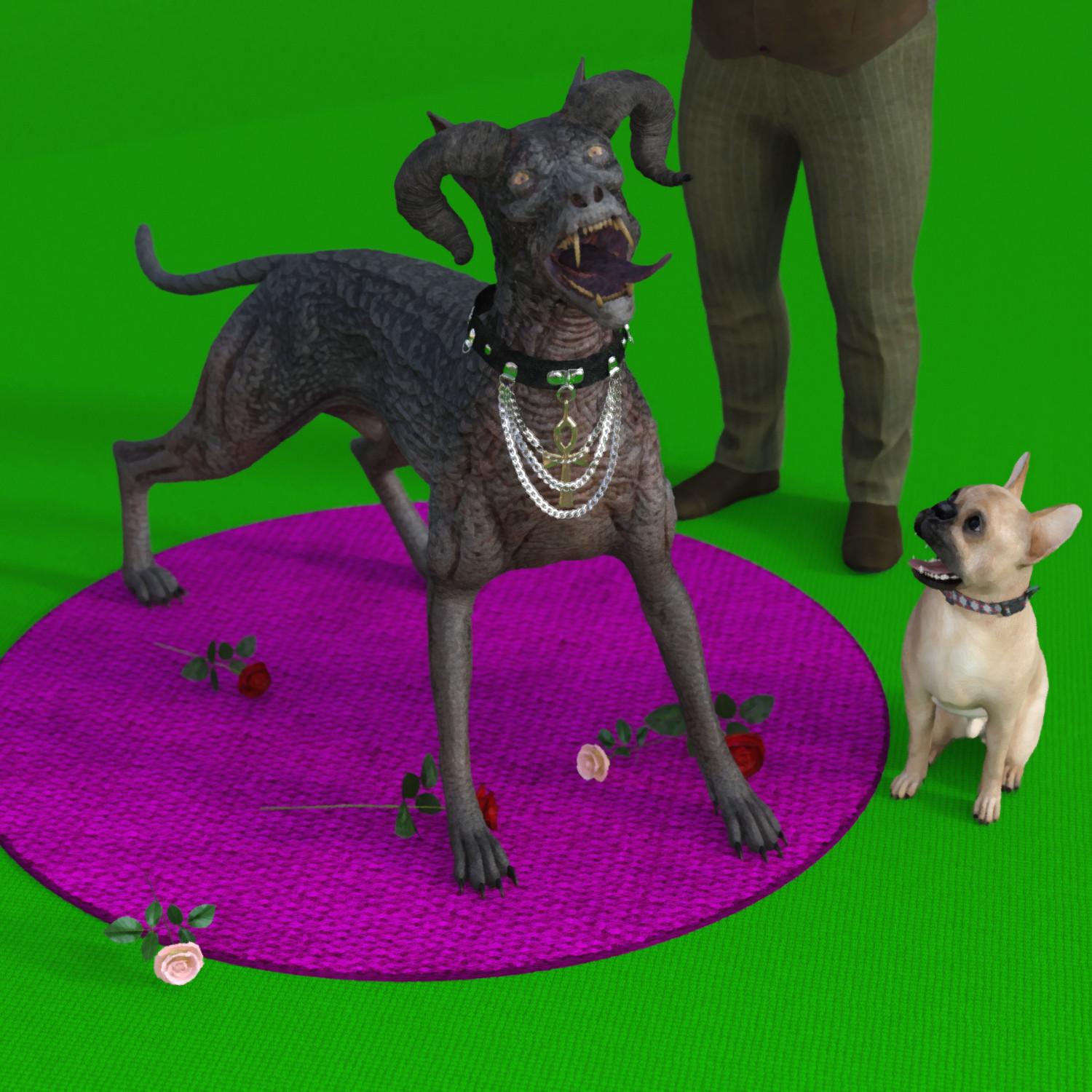
dog 8 dog 8 woof woof we finally have a dog 8Here's a quickie. Nothing too fancy with lights and setup... I just wanted an excuse to put the Hellhound next to the French Bulldog.
The Hellhound could have been a great ugly dog morph, but the horns are something you'd have to deal with. Maybe a head of hair would help (if you took out the horns)...
 Buy Something That Doesn't Work in Carrara? Post your Questions and Workarounds here. (please)
it looks like those other vertices are welded to some of the ones you select
the only way you could move parts of it is using magnets or rigging, or reweld the whole thing which could destroy the UV mapping.
Thanks for answering.
I don't think it's that, because if I use "grow selection", it works perfectly. The problem is only with "soft selection".
I just found a way: I tried the various settings for the reimport of the obj file and found that selecting "Create a Polymesh per Material" solves the pb. There's only one material so it creates only one mesh, as with the default setting ("Create a single polymesh"), but this way the soft selection works. Don't ask me why ...
Of course there's no rigging anymore, but I think I know how to put it back with DazStudio. And UV mapping is still here !
you could load it in DAZ studio on the top via morphloader and save it as a morph asset
make sure is base resolution
check with an obj import if it's the same scale and position
dog 8 dog 8 woof woof we finally have a dog 8Best I can do with the Doberman with the tools inside DS. :) Had to take a d-former to the neck because there's no morph to make the neck more slender...only longer. There's a lot of scaling around the body too.
Laurie
Looks good but i'm not an expert. Looks like it might be easy to morph into a collie.
If I could get a grip on the morph imports and stuff inside DS, I'd take it into Hexagon and just go nuts. But where I always had an easy time in Poser with morphs, DS seems to be more of a challenge for me (I've had some really crazy accidents....lol). Things just aren't as straight forward ;).
Laurie
dog 8 dog 8 woof woof we finally have a dog 8Best I can do with the Doberman with the tools inside DS. :) Had to take a d-former to the neck because there's no morph to make the neck more slender...only longer. There's a lot of scaling around the body too.
Laurie
Looks good but i'm not an expert. Looks like it might be easy to morph into a collie.
dog 8 dog 8 woof woof we finally have a dog 8Best I can do with the Doberman with the tools inside DS. :) Had to take a d-former to the neck because there's no morph to make the neck more slender...only longer. There's a lot of scaling around the body too.
Laurie
Daz 3D is part of

Connect
DAZ Productions, Inc.
7533 S Center View Ct #4664
West Jordan, UT 84084Licensing Agreement | Terms of Service | Privacy Policy | EULA
© 2026 Daz Productions Inc. All Rights Reserved.