-
What Happend to Game Developer License?
Ok Thanks!
Im Created my Hair, and my Cloth On my Self, and Created my Own Morph Libary,
So as i Said i Only Need the Gen3 Female Base Mesh, ,last Question (Sorry)
When im Buy it, im Able to use it on More Games, or are they Licenses per Each Project?
So i Need to Rebuy the Licenses on Each Game/Project im Create
KS
Where are the creature creator Add-ons for Genesis 3?Sadly, they only ever made tails for furry creatures, rather than smooth-skinned, which made that aspect useless for most purposes in Genesis 2, too.
Genesis 3 seemed to get the Creature Creator stuff split up into multiple episodes, rather than a single product. Was hoping for the alien shaping morph stuff, which came with the rest, but it never got released for Genesis 3, which struck me as quite odd.
What Happend to Game Developer License?First Thanks!
Oh WoW.. now im Happy that i took Time to Create my Own Morph Libary for Gen3 F, So now its Cheaper than 500 $ but when You Use a lot Stuff from Marketplace, The Price for all would Explode.
Each item 100$ when you Just Want the Basemesh, its Cheap, but when you Want a lot of Stuff its Expensive.
So the Only Thing i Need now is this Interactive License, and thats all for Publish a Game?
Previously there was an Indie and Normal License, are they now Combined?
What Happend to Game Developer License?Wait, that Means there are no Way to get Licenses for a Game?
Im Developing now 2 Years at my Game with Gen3 , and with my Own Morph Libary, a Huge Ammount of Characteres have them already,
im just Wanted to Buy the License Later, and NOW itS GONE; and im not ABLE to Use my Characters?!SERIOUSLY?!
Teen/Pre-teens for other ethnicitiesDo you have Growing Up? I've always done this sort of thing by starting with the adult character, then dialling the body morph down a bit and applying the appropriate Growing Up age preset. (The dialling down is to reduce the "adult" look of the body.) I've discovered that some character body morphs don't play nice with the Growing Up body morphs, especially the female ones or anything with lots of muscles, so you might need to almost or completely remove the character body. You might also need to do a lot of tweaking with the various individual Growing Up morphs if there are any weird wrinkles and glitches left over.
Note that G8 only has the female Growing Up so far, the male one isn't out yet, but it's expected soon.
(That's real soon, not DAZ Soon™...)
Carrara CharactersJust my 2 cents
The main issue with a "carrara native" character is that it will only be useful to Carrara users,. .. it can't be used in Poser or DS
whereas,. a figure made for use in Poser or DS ..can be used in Carrara.
that's why most Carrara users load a premade DS/Poser figure,.. it's easier than making your own.
You can choose to Model the figure in Carrara, Hexagon, Z-Brush, 3D-Coat, or any other modeling software you'd like
Poser and DS don't have any modeling capabilities, so,.. ALL models for those programs are made in some other modelling software. (modo, silo, z-brush etc,..)
those models are then exported as OBJ, ..then imported into either Poser or DS and rigged, weighted etc. and saved as Figures (Preset characters).
As far as clothing ,. that's the same process, using the same Rig from the figure.
Carrara has all the tools to Create unique figures, and create conforming clothing which follows the figure, as well as having the advantages of dynamic hair, and a full set of 3D tools to create buildings environments props etc,.. everything you need to create either a still image or an animation.
You may as well ask why there are no Premade figures for Lightwave, 3D-Max, Maya, Blender etc...
it's because those programs,.. Like Carrara, are full 3D suites,. where the users have all the tools to Model, Rig, Texture, and animate their own creations, whether that's a human or a monster, a space ship or a house,.
Fortunately,. or Unfortunately,. (depending on your perspective) most full 3D suites don't have the ability to load and work with Poser or DS figures.
Carrara does,. and as far as i'm aware,. it's the only one which can do that.
If you use a program like Poser or DS,. you're "limited" to purchasing premade content,. since they don't have the ability to do anything else.
if you use a program like Maya, or Cinema4D etc,. then it's "expected" that you'll be making your own, at some point.
As for premade "Poses" for Carrara figures,. ..the concept of premade poses comes from Poser and DS,. where the emphasis is on making it simple and quick for the user to jump in and have fun,. without understanding how it all works, or learning anything.
the opposite is true for full 3D suites,. you need to learn how to use them,. learn how to model,. how to light, how to animate etc..
anyone who has spent time selecting and posing individual finger joints will understand that the process isn't as instantly rewarding as applying a "premade" pose.
If the goal is to sell users on the concept that they can be 3D artists or animators, (if they purchase enough stuff). then, instant gratifications is a must.
Carrara "can" save NLA poses, or animations, but it's not the same as Poser or DS , which create a nice thumbnail image, and can save "Partial" poses,. Hands, feet, face, etc..
As far as "parameters"
Parameters are a list of Morphs and/or Transforms,. or mixed Morph-forms,. which uses ERC to combine a morph and transform.
Carrara doesn't have that ability natively , although there is the ERC plugin from Fenric, as has been mentioned previously,.
Any "Carrara" character which used that function would require the user to have the ERC plugin,. and possibly understand how to use that plugin,. to get the best results out of any ERC enabled figure,. much like Mimic for Carrara,. it can be used "as is" on a Mimic enabled DS figure,. or customised by the user to work better, or with a custom Carrara created figure with facial morphs.
Once you model a figure in Carrara, and create some morphs for that figure,. then you'll see those morphs show up under the parameters tab for that figure.
Once your Carrara figure is rigged,. you'll also notice that the option to "Fit To" becomes available,. so you could create clothing or poly-mesh hair, which would work just like Poser or DS clothing and hair.
this is where the problem comes for selling content for carrara,.
If i can make my own,. why buy yours.
Time saving and skill learning are the two obvious factors in why someone would buy premade,. rather than build from scratch. but all the tools are there, and anything thats being built for carrara, can be made by anyone using carrara,. given the skill and time to learn.
for me, personally, I enjoy learning and trying to improve what little skills I have by making my own stuff from scratch.
thats' enough (possibly too much) ranting from me.
just my opinions on why there's a lack of Carrara custom figures, ready to buy.
:)
Teen/Pre-teens for other ethnicitiesUse one (or more) of Zev0's "Growing Up" morphs ( https://www.daz3d.com/zev0 ) on an adult ethnic character. That's what I do. It does not work on every character, depending on how extremely you dial the morph, but the results can be pretty good.
I recently needed a Japanese teen for a scene, and I came up with this, based on Mei Lin 7 (and other morphs, Princess Leila skin, hair from Little Ones character):
Monique 8Very nice renders everyone. Thanks for posting. Has anyone tried Monique 8 skin on a different morph? The previous Moniques and Dariuses each had skin so distinct that regardless of the underlying morph, the character always looked like Monique or Darius. It may be that we're not yet familiar enough with Monique 8's skin to instantly recognize it, but I was wondering what you all think. I haven't downloaded her yet because I have a long-term CPU render running, and I don't want to deal with the logjam.
@xyer0 M8 does have a "look". Here she is with a morph I put together with a V4 face and some growing up morphs added. This is the base M8 skin with some make-up using Extreme Closeup: Makeup for Genesis 3 Female and eyes using Project EYEray
Beautiful, very classy looking!
What is that dress and belt? Love those!
Anatomical elements morph transfersHello all,
Is it possible to transfer G1 male's AE morphs to G2 male's. Has anyone tried and made a matching geometry prop? a script? a tut? Is the geometry too different?
thanks
Darwins' SchtuffOH! For the testing rounds- who has the Growing Up for Genesis 8 morph pack? You'll need them to test the child version of the pack. There are no additional morphs needed, since the base head/body of Mom is custom, and the child pack only needs mom's head and the Growing Up pack to work.
Hi,
I have the Growing Up for Genesis 8 morph pack. I'd love the opportunity to test again!
Trish
Darwins' SchtuffOH! For the testing rounds- who has the Growing Up for Genesis 8 morph pack? You'll need them to test the child version of the pack. There are no additional morphs needed, since the base head/body of Mom is custom, and the child pack only needs mom's head and the Growing Up pack to work.
How long does it take you to do a scene and render?it's always a question of how much i need for an image, right now i work a lot with HDRI images why i often save to use a 3D interior or exterior design, that also saves on render time and saving time.
Than i am thinking about what kind of image i want to create, if i want to make a full or half body render i also use clothes but if i just want to render a face i even don't give the character some clothes, that also saves time in saving the scene and rendering.
Actually i use the normal Daz figures and morph them the way i like them, that's taking about 30 minutes, the shader room was one thing that took always the most time but after i saved all my texture shaders for Genesis, V4, Genesis 2 it isn't much to do anymore around the shaders, just swapping the texture images, playing a bit with shine, highlight and reflection, sometimes also with the bump but that's all i do and it's always a question of the HDRI lightning which settings i use.
Dynamic hair took me about 60 - 120 minutes, the question is always what kind of hairstyle i am planning to do.How long does it take you to do a scene and render?Um . . . weeks, months even! (but then I make everything from scratch)

Well, your work seems to take weeks and even months. I'm a lazy that only use created content (occasionally i make a custom prop or morph, but i don`t dare to make a full scene from scratch!)
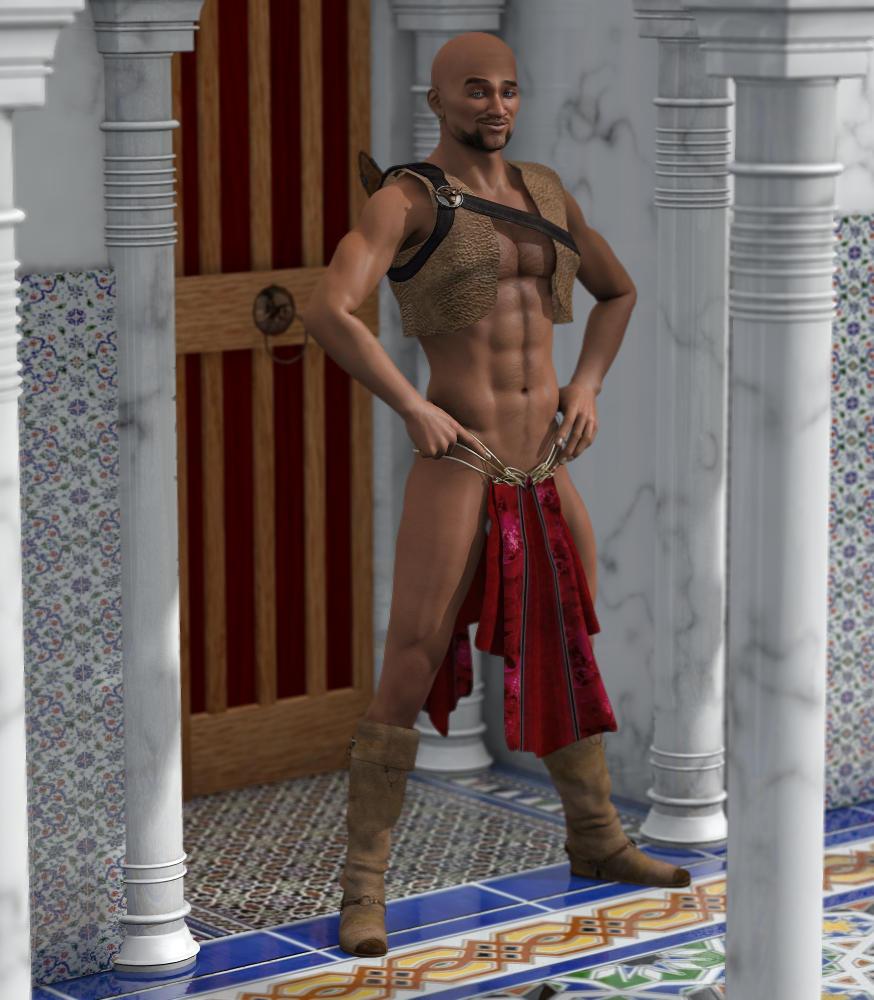
3rd Annual It's Raining Men Picture Thread -- Entries and NAE PicturesSecond Entry (including re-purposed V4 clothing)
Imposter In The Harem
(I was trying out various items of V4 clothing on M4 waiting for inspiration. When I got to the Earane skirt a certain scene from Mel Brooks' History Of The World Part 1 came to mind...)
- V4 Bootz ( https://www.renderosity.com/mod/bcs/the-bootz/56317/ ): Conformed to M4. His feet and toes poked through so I simply made them invisible.
- V4 Earane skirt ( https://www.daz3d.com/earane-outfit ): Neither conformed nor parented. Just moved into position on the posed figure using the x/y/z translations and adjusted using the x/y/z scales on the body.
- V4 Asesina vest ( https://www.daz3d.com/asesina-for-v4-a4 ): Neither conformed nor parented. Just moved into position on the posed figure using the x/y/z translations and adjusted using the x/y/z scales on the body.M4 is in a simple pose at the world origin to make it simple to 'fit' things. After 'fitting' the skirt and vest I made some further adjustments to his pose and morphs to improve the look of the 'fit', and went through a couple of iterations - adjust clothing, adjust pose/morph,repeat. If you look carefully you can see the bottom of his right shin is sticking out of the side of the boot, but due to the floor tiles behind you don't really notice. Except if I tell you.
Of course, because the skirt and vest aren'tconformed or parented, when he decides to walk away only the boots will go with him...
 Novica & Forum Members Tips & Product Reviews Pt 10
********** TUTORIALS**********
Tutorial: Bus, Noggins- Converting from Bryce to Daz Studio (RGcincy) Here
Tutorial: Breast Gone- In Hexagon (Smoothing Zev0s Grow Up product even more)
Tutorial: Clothing, Making in Blender SickleYield's tutorial on Deviant Art.
Tutorial: Create Categories Using Gen2F, I showed how to Create Categories and Export to save your custom categories. (Here's WHY you may want to do that with your characters.)
Tutorial: Custom Actions In Toolbar How to Create Custom Actions In Toolbar
Tutorial: Customizing Morphs Using Morph Loader Pro New Feb 19 2018
Tutorial: D Former D Former Tutorial D Former tutorial and links
Tutorial: Depth of Field Flipmode provides a good depth of field tutorial for you.
Tutorial: Fisty's Shaders & Getting Rid of Gooey Lips This one shows you Fisty's shaders. Get rid of the overly gooey lips.
Tutorial: Fur Brushes Download and Video (Kathryn Loch)
Tutorial: Garibaldi Hair Doing a cat with Garibaldi Hair- Tutorial
Tutorial: GenX links on "how to use."
Tutorial: Generation 4 Materials on Genesis 2 This one put Generation 4 materials on Genesis 2 using Victoria 4 for Genesis 2 Female.
Tutorial: Geometry Shells How to do Geometry Shells (video tutorial the3dwizard) and doing makeup for different characters
Tutorial: Hair Shaders (Slosh, his product) explaining how to use them.
Tutorial: Iclone Iclone videos
Tutorial: Images- How To Put Them In Forum Posts Here's Putting Images in Posts
Tutorial: Instances: Using Ultrascatter
Novica & Forum Members Tips & Product Reviews Pt 10*******TIPS I-W *********
Tip: Iray Organized References This thread links to the threads, but also categorized some of the topics within the thread so you can look things up quicker.
Tip: Iray Section Plane TabascoJack shows you how to use the Iray Section Plane
Tip: Madelyn Ears- How to remove those elf ears.
Tip: Manual Downloads in Product Library How to find them ultra-quick
Tip:/Info: Materials and Shaders: Difference in Materials and Shaders (from Commons)
Tip: Mermaid Top Family friendly suggestion.
Tip: Metallicity and Metallic Flakes Add More Sheen to your characters Added Jan 17th
Tip: Millenium Cat- Free Persian Head
Tip: Mocap Animations FREE Here (Mixamo)
Tip: Nobiax Free Iray Daz Textures
Tip: OOT Hair Steps
Tip: Photoshop Postwork Postwork Photoshop Tips (Laticis) and my example
Tip: Photoshop Plugins From Thread 6: Examples
Tip: Portrait Lighting Novica's XYZ Dome Orientation Quick Guide (Portrait Tweaks)
Tip: Pose Converter (Genesis 2 to Genesis 3) Where to find files (Scroll for discussion)
Tip: Combining Poses by locking body parts
Tip: Postwork The Postwork thread has a lot of good information!
Tip: Putting Prop On Top Of Prop (Align Pane) New March 4th 2018
Tip: RDNA How to find your purchases
Tip: Rigging How to import OBJ and rig in Daz Studio
Tip: Rigging Basic Rigging Preparation then Adding Bones for Rigging
Tip: Section Planes How To Use (by TabascoJack)
Tip: So Wet Bundle Examples
Tip: Skies of iRadiance Which are for high / low altitudes? Answer
Tip: Spectural Rendering tests for the studio
Tip: SubD: How To Add It (Darwins Mishap)
Tip: Texturing With DestinysGarden (DestinysGarden) New June 2017
Tip: The Briefing Room Lighting with Iray (V3Digitimes)
Tip: Ultragenesis: Faces of G has a variety of older faces.
Tip: Weight Maps: How To Remove or Change (Thomas Windar)
Tip: White Point Changing it- Examples
Tip: Walls- Sets Which Are Easier To Use- or Not. Sets that don't have separate walls and handy notes on a few sets
Transfer utility/Projection templates not working for G8FAfter reading this, I tried using the transfer utility and autofit with a G2F and a G8M character, and suddenly those lines weren't greyed out any longer, so it seems the issue might not be the CMS (which still isn't showing up in "services" in Task Manager, but maybe that's not important) but missing projection templates for G8F. I did already uninstall and reinstall them once but that didn't seem to do much.
I found a folder called "Projection templates" in C:\Users\Public\Documents\My DAZ 3D Library\data\DAZ 3D\Genesis 8\Female\. I tried following the advice of the guy in the post I linked to above, and copied and pasted the folder to C:\Users\User Name\Documents\DAZ 3D\Studio\My Library\data\DAZ 3D\Genesis 8\Female (these folders: DAZ 3D\Genesis 8\Female weren't there to begin with) ... but that didn't actually seem to do anything.
Transfer utility/Projection templates not working for G8FThanks for the reply, Richard. I might have confused some terms but this article in the documentation center says there should be a line for "DAZ Content Management Service" and if there isn't, the software isn't installed and you need to reinstall. Since I can't find that line, I was assuming the CMS - which I thought was the same thing as the PostgreSQL - wasn't installed. When I check now I can see that "PostgreSQL Server" is actually under "processes"! But are these two different things then, the CMS and the PostgreSQL? Or is the article I linked outdated?
My issue is still that when I try and do the Edit / Object / Transfer utility, the "projection template" is greyed out. (Additionally, when I autofit G3F hair to G8F, the "what type of item is it?" is also greyed out).
The only security software I'm running is the default Windows Defender
Can't Migrate User Categories from DAZ Studio 4.8.0.59 Pro to DAZ Studio 10I would like to know this as well "Where can I find the original data file, and where do I place it?" I do not understand why one cannot transfer user categoriized data. (DAZ is losing money because I cannot upgrade.) I have never had any luck exporting and reimporting data.
Kiddos, Costumes, and Canines for DSWith holidays coming up, plan to do some Normal Rockwell style scenes (a snowball fight if I can pull it off) and that means parents, kiddos, winter clothing, and dogs enjoying a bit of family fun.
A “Growing Up” bundle for G3 is on sale for a little over $10, but that’s only part of it.
Real problem might be hair (one hair resource might cost more than the morph pack!) and finding believable clothes-- hoodies, jackets, ski caps, boots, etc. Things can add up when you’re on a budget.
Which leads me to “Millennium Dogs Bundle" which is on sale for $17.95
So for those of you who have been around for a while-- apt to get a better price on it? Discovered by accident that people seemed to like "Millennium Cat" -- that’s where I got the idea to include family pets in the action.
Suggestions welcome. : )
--Bruce
Daz 3D is part of

Connect
DAZ Productions, Inc.
7533 S Center View Ct #4664
West Jordan, UT 84084Licensing Agreement | Terms of Service | Privacy Policy | EULA
© 2026 Daz Productions Inc. All Rights Reserved.