-
3D Art Freebie Challenge-October 2017-MONSTERMASH Rehash -Main Thread Only
DAZ 3D Art Freebie Challenge October 2017
"MonsterMash Rehash October 2017"
"Jimmy Plays Monsterey!""After all the Jacks are in their boxes and the clowns have all gone to bed..."
After the small concert Jimmy was playing some tunes for his favorite groupie Megan when suddenly in the blink of an eye the temperature dropped, bats appeared and two members of the band that played before Jimmy's, The Vamps, turned out to be nothing but real vampires and attacked poor Megan before she even knew what was happening. "That's alright I still got my guitar, look out now!" Jimmy thought...
Jimi Hendrix - Hey Joe (Monterey Pop Festival 1967)
https://www.youtube.com/watch?v=ZwhtwqkCfYQ
COUNTABLE FREEBIES:#01! !Tyrese! for M4 by Sheldon24
http://www.sharecg.com/v/35198/favorite/6/Texture/!Tyrese!-for-m4 **#02! MMBlousonSetForM4part1 & 2 by mamomamo
http://mamomamo.candypop.jp/Freestuff/CCP013.html (item 1 & 2)#03! MMShortTrenchCoat01ForM4 by mamomamo
http://mamomamo.candypop.jp/Freestuff/CCP013.html (item 4)#04! M4 Dress Boots by Cool Tuna Studio
http://www.cooltuna.com/poser/poser-freebies.html (item 12)#05! SOTO's Bandanna for The Freak 4 by Hellboy
http://www.sharecg.com/v/62757/gallery/11/Poser/SOTOs-Bandanna-for-The-Freak-4 **#06! Pose 08 (adapted), M4 Regal poses by Portrait Studio (jlk)
http://www.sharecg.com/v/60821/browse/11/Poser/M4-Regal **#07! M4 Hands 16 hand Poses by Most Digital Creations (AdamThwaites)
http://www.most-digital-creations.com/free_poser_poses_textures_morphs_props_27.htm (item 13)
(Pose 10 right hand (adapted), pose 11 left hand)#08! mcjNewStrat by mCasual Jacques
https://sites.google.com/site/mcasualsdazscripts2/mcj-1#09! mcjStack by mCasual Jacques
https://sites.google.com/site/mcasualsdazscripts2/mcjstack#10! Guitar Cheat Strap by Simon-3D
https://www.renderosity.com/mod/freestuff/?item_id=72048 **#11! Effector by Laboratory108
http://lab108.x0.com/lab108/inst.html (item 1)#12! Guitar Pick by Laboratory108
http://lab108.x0.com/lab108/inst.html (item 20)#13! MIC Set Set by MDP
https://sites.google.com/site/mdp6gdl/ (item 10)#14! MicStand Set by MDP
https://sites.google.com/site/mdp6gdl/ (item 11)#15! MicCable Set by MDP
https://sites.google.com/site/mdp6gdl/ (item 12)#16! Ludwig Drum Set by Music2u4u
http://www.sharecg.com/v/49151/browse/11/Poser/Ludwig-Drum-Set **#17! Valens Hair For V4/A4 by Dyald
http://www.sharecg.com/v/36166/Poser/Valens-Hair-For-V4/A4 **#18! 35 Color Options For Valens Hair by fictionalromance
http://www.sharecg.com/v/55297/browse/11/Poser/35-Color-Options-For-Valens-Hair **#19! P3D Megan for Victoria 4 by P3Design
https://www.renderosity.com/mod/freestuff/p3d-megan/73121 **#20! MMJSBforV4A4Part1 & 2 by mamomamo
http://mamomamo.candypop.jp/Freestuff/CCP012.html (item 13 & 14)#21! MMT-ShirtSet01ForV4A4 by mamomamo
http://mamomamo.candypop.jp/Freestuff/CCP002.html (item 6)#22! ScaerieTales of Zadacchiel: Hunter and Prey by RuntimeDNA
https://www.daz3d.com/scaerietales-of-zadacchiel-hunter-and-prey **#23! Tear Drops for V4 by katanas
http://www.sharecg.com/v/34414/related/// **#24! 4 Blood/Gore PNG Overlays for Horror, Zombie, Vampire Facial Textures by ModernWiz
https://www.renderosity.com/mod/freestuff/4-blood-gore-png-overlays-for-horror-zombie-vampire-facial-textures/76697 **#25! Fangs for Victoria 4 & Genesis Reposted by ghosty12
https://www.renderosity.com/mod/freestuff/fangs-for-victoria-4-genesis-reposted/69928 **#26! Fang morph for Genesis by Oom_Fooyat
http://www.sharecg.com/v/63076/browse/21/DAZ-Studio/Fang-morph-for-Genesis **#27! Liquids - DS Shaders & Poser MT5s by Fisty
http://www.sharecg.com/v/82337/gallery/7/Material-and-Shader/Fistys-Liquids-DS-Shaders-Poser-MT5s **#28! Pallet v1 by Yughues aka Nobiax
http://www.sharecg.com/v/52181/gallery/5/3D-Model/Pallet-v1 **#29! Beer Bottle by AphoticInferno
https://www.renderosity.com/mod/freestuff/midnight-pirate-beach-party/76528 **#30! Cigarette buds (Simple Used Ashtray) by 3-d-c
http://www.sharecg.com/v/38258/gallery/11/Poser/Simple-Used-Ashtray **#31! Cigarette for V4 by 3-d-c
http://www.sharecg.com/v/33769/gallery/11/Poser/Smoking-V4-Cigarette-SmartProp **#32! Koff cigarette pack and cigarette with morphs by TrekkieGrrrl
http://www.sharecg.com/v/18207/poser/Cigarettes **#33! Labeled Whiskey Bottle by Area-50
http://www.sharecg.com/v/24358/gallery/11/Poser/Botles **#34! Movie Posters by DOA Services (James Miller and Rick Ricci)
http://www.sharecg.com/v/25344/browse/11/Poser/Movie-Poster **#35! Rat by by AdamThwaites (Most-Digital-Creations)
https://www.most-digital-creations.com/rat.htm#36! Simple Smoke by Ladymist95
http://www.sharecg.com/v/76297/browse/21/DAZ-Studio/Simple-Smoke **#37! Ultimate Shader Pack for DAZ Studio by Georgehaze
http://www.sharecg.com/v/27568/gallery/7/Material-and-Shader/Ultimate-Shader-Pack-for-DAZ-Studio-UPDATED_2011 **#38! R72 Natural plain leather shaders for Daz Studio 3 by Samuel
http://www.sharecg.com/v/42304/browse/7/Material-and-Shader/R72-Natural-plain-leather-shaders-for-Daz-Studio-3 **#39! REC Satin Shaders by RedEyeCat
https://redeyecat.wordpress.com/2013/08/13/rec-satin-shaders/#40! Koz's Short Bob by Kozaburo
http://digitalbabes.jp/dload/Koz_Short_bob.html#41! Scraps-Hair Fits for V4, M4.. by RedEyeCat (mmalbert)
https://redeyecat.wordpress.com/2013/05/03/ranger-hair-colors-hair-refits/ (2nd item)#42! RDNA Scatters Vol 4 - Bats by Daz Originals, RuntimeDNA, Traveler
https://www.daz3d.com/rdna-scatters-vol-4-bats **#43! RDNA Atmospherics - Fog Vol 1 by Daz Originals, RuntimeDNA, Traveler
https://www.daz3d.com/rdna-atmospherics-fog-vol-1 **#44! Props Pack - Vampire Hunter Gear by Daz Originals, RuntimeDNA, Traveler
https://www.daz3d.com/props-pack-vampire-hunter-gear **#45! Basicwear for V4 Unimesh by DAZ Originals
https://www.daz3d.com/basicwear-for-v4-unimesh **
NO-COUNTS:Eavan V4 by DAZ Originals, Liquid Rust (Bi-weekly Freebie, October 9-23 2017)
Floor and Wall Background Prop by Colm (RuntimeDNA Forum freebie, no longer available.)
Genesis Starter Essentials by DAZ Originals
PURCHASED/PAID FOR ITEMS:$1. RDNA Stylez 5 - Alicia - Mega Morphing Afro Style *UPDATED* by Daz Originals, RuntimeDNA, Traveler
https://www.daz3d.com/rdna-stylez-5-alicia-mega-morphing-afro-style-updated **
PRIMITIVES:The jackplugs, cymbals, cork, nails and wooden "stage" floor.
** Registration required
#x! Countable Items
$x. Purchased/Paid For Item
Rendered with DAZ Studio 4.9.4.117
No postwork.
Other free software used: GIMP v2.8.18 and Irfanview 4.41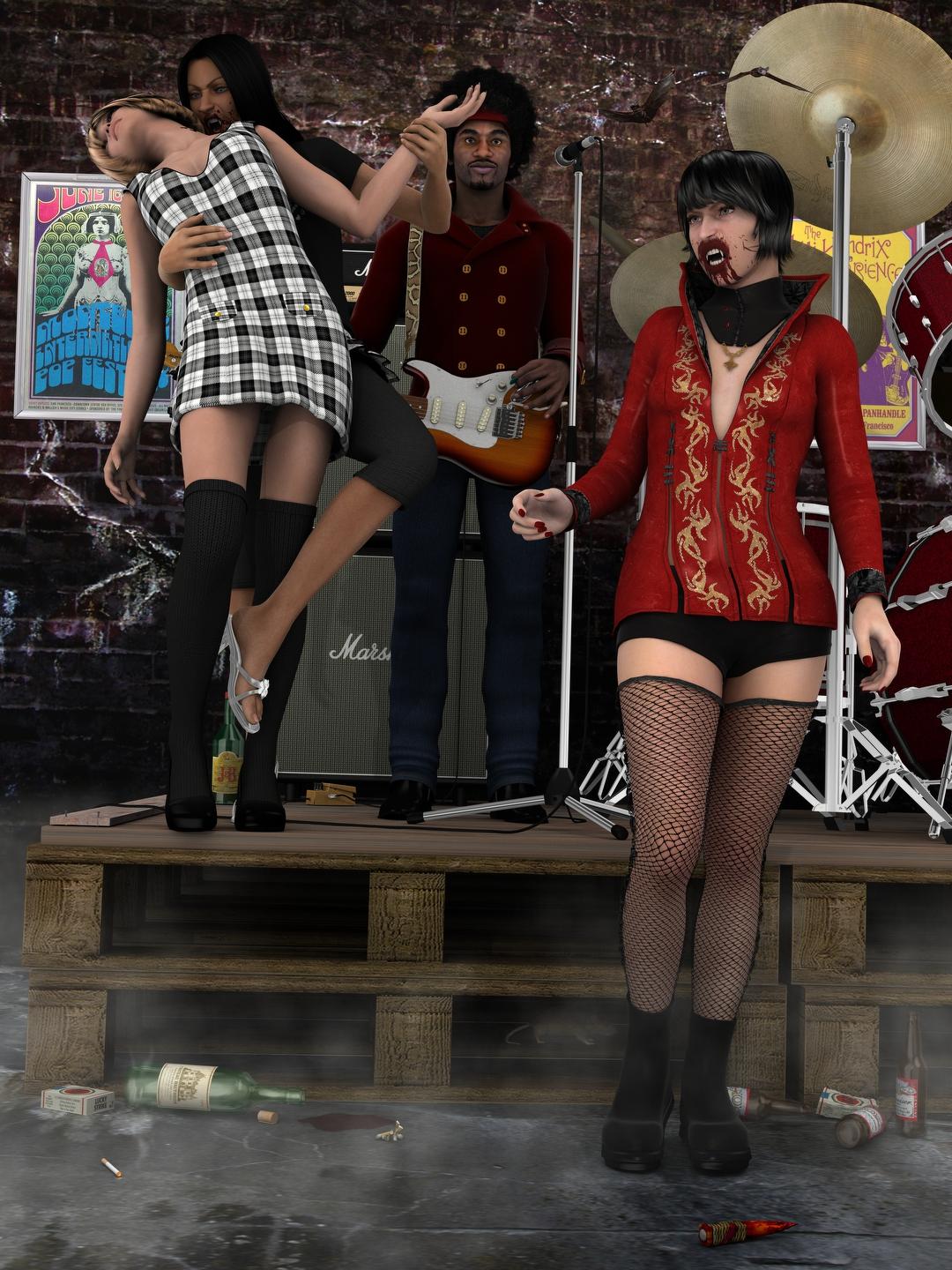
ALL LINKS CHECK OUT PLZ MOVE TO ENTRIES THREAD
Carrara Challenge #36 - Pinups and Cheesecake and Hunks - Oh My! - WIP Thread --Meet Ringo Monfort!woes, how much time left?
Almost two weeks!
WOW Varsel you just upped the ante

I am afraid I will not be getting around to this again, still stressful work issues and waiting for my transfer
my life on pause at the moment
Sorry to hear. Hope it gets better soon!
2! slightly less panicky
tryimg to do more with the cornea and eye moisture, i been doing unexciting transparency
and thinking on Raistlin's hourglass pupils3D Art Freebie Challenge-October 2017-MONSTERMASH Rehash -Main Thread OnlyFinally got my entry ready, and it was not easy.
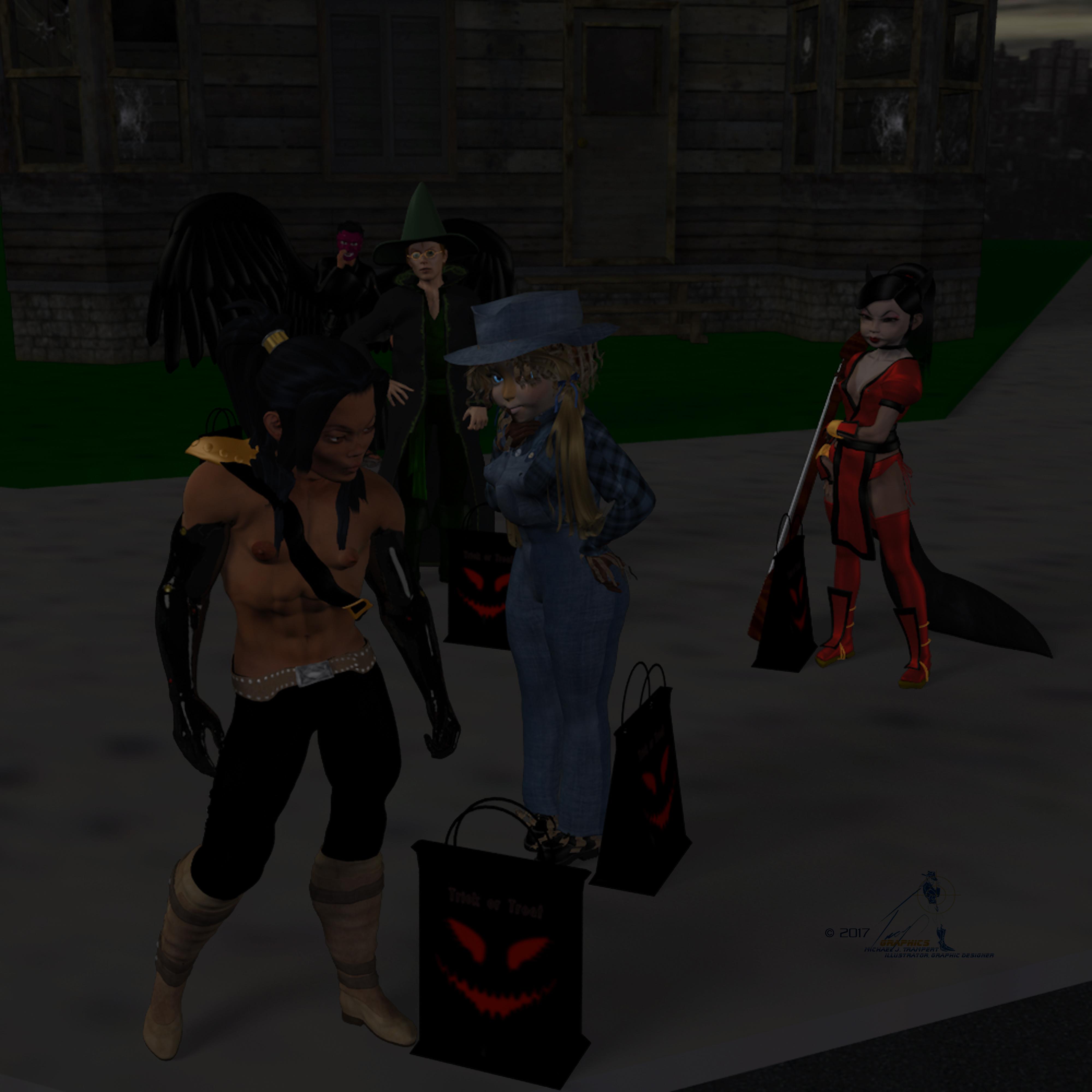
Time for Trick or Treat
Tommie and Kageto, and their respective siblings, areheading out Trick or Treating, but Tommie seems more interested in admiring Kageto's costume than actually Trick or Treating.
Tommie (Scarecrow)
Kageto (Warrior)
Kiriko (Kitsune)
Keiji (Tengu)
Jesse (Wizard)
Die_trying's V4 morphs for Genesis (Tommie, Kageto)*
Pin-up Girl Pack (Tommie)*
Ghastly's General Purpose Anime Team Morphs ( Kageto)*
Ultimate Shader Pack (Chrome shaders—with reflection maps removed—for Tommie's wristwatch and necklace)*
Ella V4 (Tommie's eyes)*
Sandra for V4* (Tommie's skin)*Akina for A4 (Kiriko)*
Findlay for Genesis (Jesse)*
Mifuyu Hair (Kiriko)*
Satin shaders (Kiriko's and Keiji's costumes, Jesse's sash)*
Super Shine Shader pack (Kageto's, cyberarms)*HFS EVAN Expansion set (Kageto's cyberarms)*
Two items from Hisayan Image Labs (clothes converted to fit Genesis):
4th down: Kozure_Okami for M3—[converted to fit manually in Hexagon] (Keiji's Hakama)
5th down: Yagyu for M4—[fit via Transfer Utility] (Kageto's kimono, obi, and Tabi)Geta and Seta for Genesis2M (Keiji)*
Witch Hat (Jesse's hat)
M4H4 Sickle Trench Coat (Jesse's coat)*
Angel Wings (Keiji)
Halloween bag: (Tommie, Kageto, Keiji, Kiriko, Jesse)*
Dystopia City Blocks 11-20 (sky,road)
Cosplay Costume 7 (Kiriko's costume)*
Foxy Sorceress (Kiriko,s tail and "fox ears")*
Halloween House (haunted house)*
Elven Trench for Mr Trenchcoat (Jesse)*
Building Set 01: (sidewalk and lawn)*
Impractical Rogue for Genesis (Kageto)*
Shamisen (Kiriko)*
Paid For Items
Ryuu International (Kageto, Keiji)
Willow for Genesis 2 Female (Tommie)Buccaneer Basic for Genesis (Kageto)
No Count ItemsRamwolf's Genesis Morphs (all figures)
Genesis Evolution Head and Body Morphs (all figures)
Journeyer Scout Outfit (Jesse's boots, pants, shirt and sash)
Wildmane Hair (Jesse)
Sallie Mae Hair (Tommie)
Genesis Scarecrow outfit by Dragonbreath (Tommie)
ALL LINKS CHECK OUT PLZ MOVE TO ENTRIES THREAD
What, exactly, is “welding?”mod will preserve UVs and morphs (if loaded as morph vertex maps) too, but yes it is a potentially risky operation. You can also, I believe, use dForce Add-Ons to link separate parts though I'm still hazy on the details (there is some information in the dForce Start Here thread).
I assume you meant 'modo'? (thanks for that tip). As for being risky, any radical change on one part logically has to have an impact on the other, so that's not surprising. In fact, keeping it all intact is the impressive accomplishment!
I saw sickle-yield's video on mapping/painting for dforce, but have not seen anything regarding your mentioned 'Add-Ons'. I'll go look at the 'Start-Here' thread you mentioned (thanks). Maybe this can all be done in place (DS) now... That would be quite handy!
cheers,
--ms
New/Updated EULA?I've been a member here since 2005 and I don't ever remember having to phsically agree to anything before I'm allowed to get to my content. Seems this part of being strongarmed into it is new. Believe me, I'd remember if someone blocked access to my content over the years unless I 'signed' something.
If I read the agreement correctly and I'm not an attorney, it seems like we're unable to sell our images that we've created with purchased content. 1.0 General License Agreement.
That's not what I see:
Two Dimensional Works. Subject to the terms and conditions of this Agreement, User may (i) access, use, copy and modify the Content in the creation and presentation of two-dimensional animations and renderings, (ii) incorporate two dimensional images (including two dimensional images that simulate motion of three dimensional objects) derived by User from the Content in User’s other works, and (iii) publish, market, distribute, transfer, sell or sublicense User’s two-dimensional animations, renderings and other works; provided that User may not in any case publish, market, distribute, transfer, sell or sublicense any renderings, animations, software applications, data or any other product from which any Content, or any part thereof, or any substantially similar version of the Content can be separately exported, extracted or de-compiled into any re-distributable form or format.
as long as the original data is not extractable (e.g. a render of a plane with a texture attached) then you can use the images or animations as you wish (with a limited exception for the Anne Marie Goddard Digital Clone for Victoria 3).
Carrara Challenge #36 - Pinups and Cheesecake and Hunks - Oh My! - WIP Thread --Meet Ringo Monfort!woes, how much time left?
Almost two weeks!
WOW Varsel you just upped the ante
I am afraid I will not be getting around to this again, still stressful work issues and waiting for my transfer
my life on pause at the moment
Sorry to hear. Hope it gets better soon!
SY Clothing Breast Helper Genesis 8 FemaleYep, this has a video and it works exactly the same:
https://www.daz3d.com/sy-universal-breast-helpers-genesis-genesis-2-and-genesis-3-female-s
EDIT: the short version is, conform clothes to the figure, then dial the morph from the Actor/Chest section of G8F. They have their own heading in that section.
How to Use dForce: Creating a Blanket, Draping Clothes on Furniture, and Much More [Commercial]Subject Index (some topics appear more than once)
How to Use dForce: Creating a Blanket, Draping Clothes on Furniture, and Much More [Commercial]In October 2017 I started to use dForce. I shared my first tutorial, thinking it was a one-time effort, but then I kept discovering new things and this thread is the result. The tutorials are accessible within this thread as well as in downloadable PDF files and videos in the Daz store. I hope these help you learn how to better use dForce.
TUTORIALS IN PDF FORMAT
This collection of tutorials is available in PDF format. It is now split into parts as it was too large to upload to the forum.
Part 1 - Sections 1 to 25 - 91 pages
Part 2 - Sections 26 to 50 - 94 pages
Part 3 - Sections 51 to 75 - 92 pages
TUTORIALS IN VIDEO FORMAT
In late 2018 Digital Art Live invited me to do a dForce webinar and since then two more. Videos from these webinars are available in the Daz store. Although many of the examples are similar to what's been posted here, there are documents and examples exclusive to the videos. These will be helpful for those who learn better by seeing than just reading.
Video 1: Powerful dForce Discoveries and Solutions
Video 2: New dForce Discoveries
Video 3: dForce Tutorial Set : Fantastic Voyage!
ACCESSING THE ONLINE TUTORIALS
Table of Content (sequential listing of tutorials as they were published)
Subject Index (found in next post)
- Using dForce to Create Objects or Effects
- Creating/Using Clothing
- Simulation Parameters & Tools
- Weight Nodes and Map
- Surface Properties
- Helper Objects
- dForce Add-on Modifier
- UI Tips
- Other Daz Studio Tools
Table of Content
- Creating and Draping a Blanket Over a Figure
- dForce Global Environment and Duration Settings (Gravity, Air Resistance, Stabilization Time, Negative Air Resistance)
- Cast Off Blanket
- Adding a Smoothing Modifier
- Using dForce Surface Smoothing Settings (Velocity Smoothing and Velocity Smoothing Iterations)
- Draping Clothes on Furniture
- Friction
- Creating a Clothes Pile
- Various Methods to Correct Poke Through (including Push Modifiers)
- Getting a Figure’s Head to Sink into a Pillow
- Hanging Towel (introduces use of dForce influence weight map)
- Wind Node
- dForce Surface Parameter Tests
- Creating a Foot Stool
- Animated Posing for the Foot Stool
- Head Scarf and Telephone Wires
- Creating Blowing Curtains
- Creating a Tablecloth and Napkin
- Exploring Influence Weight Maps
- Short-cut Key to Clear Simulation on Selected Item(s)
- Dropped Papers
- Banner Flag
- Effect of Surface Properties Using Simple Sheet Drop - Part 1
- Effect of Surface Properties Using Simple Sheet Drop – Part 2
- Effect of Surface Properties Using dForce Primitive Flag Test
- Dropping an Object onto a Surface
- Creating a Kite from Primitives - Part 1 Part 2
- Creating a Bag of Fruit
- Deflated Soccer Ball
- Explorations of a Half Sphere
- Creating a Round Floor Cushion with Negative Gravity
- Footsteps in the Snow, Sand, or Mud
- More Footprints
- Sand Trap (footprints)
- Creating Icicles
- Creating a Cape
- Mummy Wrappings
- Create a Skirt from a Cone
- Create a Bandeau from a Cylinder
- Create a Dress with Gathered Waist
- How Resolution Affects Simulation Results
- Using Silo 2.5 to Create a Shirt
- Another Shirt Made with Silo
- Flying Cape
- Cylinder Helpers - Creating a Shawl
- Cylinder Helpers - Part 2
- Spherical Helper - Pulling a Cloth through a Ring
- Cylinder Rigidity
- Rotating Cylinder Helper - Wrap Up a Rope
- Creating a Necklace Creating a V in the Necklace Chain
- Dog Leash
- Effect of Density on Rotating and Horizontal Ropes
- Effect of Density on a Rotating Cloth
- Tie a String
- Using a Dynamic Surface Add-on
- Finding Vertex Coordinates within Daz Studio
- Button and Collar Add-ons
- Creating a Seat Belt
- Polyline Add-On
- Script to Quickly Add Dynamic Modifier to an Object
- dForce Menu Addition (Updated Version)
- More About Pillows
- Momentum Transfer
- Chair Cushions
- Men's Underwear
- Shorts and Swim Trunks
- More Momentum Transfer
- Loose and Rumpled Clothing
- dForce Magnets
- Making Caves
- Fantastic Voyage: Making Artery and Blood Cells
- Skin Indentation
- Blindfold
- Making a Breast Helper for Clothing
- Skin Indentation: Punch to Face
- Socks
- Puffy Sleeves
- Creating Mountains
- Creating Rocks
- Adding Wrinkles to Couch Cushions
- Plowed Field
- dForce Companion
- Making a Sash for a Dress
- The Problem with Buttons
- Sphere to Shirt
- Making Waves
- Another Look at Waves
- Making Waves 3 - Rings
- Making Mountains 2
- Rigid Follow Nodes
- Cling Wrap
- Putting Goggle Straps On Over Hair
- Putting a Hat Over Hair
- Creating and Using a Face Mask
- New! A Veil Covering the Face and Hair
Anyone tried Sixus 1 Mentoring for ZBrush ?It's in the title did you try :
either https://www.daz3d.com/sixus1-mentoring-witchery-pt1-tandem-morph-creation
or https://www.daz3d.com/sixus1-mentoring-witchery-pt2-fibermesh-hair-creation ?
I wishlisted both but would like to know what you think about it.
How long are the videos for example?
Thank you.
Carrara Challenge #36 - Pinups and Cheesecake and Hunks - Oh My! - WIP Thread --Meet Ringo Monfort!WOW Varsel you just upped the ante
I am afraid I will not be getting around to this again, still stressful work issues and waiting for my transfer
my life on pause at the moment
Monique 8I also haven't used Monique 6 or 7 enough, at least from the shape/morph perspective. I get more mileage out of facial morphs, in general, rather than specific characters.
If I buy Monique 8 (and who am I kidding? I'll buy her), it'll be first for the skin texture. I preferred the Genesis 2 versions over Genesis 3, to be honest... between IG's Iray settings and my own preferences in Iray settings.
As for messing up skin textures? It varies so much between artists. Every artist seems to have a different set of translucency settings (which I think causes a lot of the orange skin), and that's why I pretty much always pick up the Beautful Skin product from Sickleyield & Fuseling (although others might recommend other solutions). The main reason is to even out the skin settings across the different artists' preferred settings.
3D Art Freebie Challenge-October 2017-MONSTERMASH Rehash Winners Announced -Entries Thread OnlyFinally got my entry ready, and it was not easy.
Time for Trick or Treat
Tommie and Kageto, and their respective siblings, areheading out Trick or Treating, but Tommie seems more interested in admiring Kageto's costume than actually Trick or Treating.
Tommie (Scarecrow)
Kageto (Warrior)
Kiriko (Kitsune)
Keiji (Tengu)
Jesse (Wizard)
Die_trying's V4 morphs for Genesis (Tommie, Kageto)*
Pin-up Girl Pack (Tommie)*
Ghastly's General Purpose Anime Team Morphs ( Kageto)*
Ultimate Shader Pack (Chrome shaders—with reflection maps removed—for Tommie's wristwatch and necklace)*
Ella V4 (Tommie's eyes)*
Sandra for V4* (Tommie's skin)*Akina for A4 (Kiriko)*
Findlay for Genesis (Jesse)*
Mifuyu Hair (Kiriko)*
Satin shaders (Kiriko's and Keiji's costumes, Jesse's sash)*
Super Shine Shader pack (Kageto's, cyberarms)*HFS EVAN Expansion set (Kageto's cyberarms)*
Two items from Hisayan Image Labs (clothes converted to fit Genesis):
4th down: Kozure_Okami for M3—[converted to fit manually in Hexagon] (Keiji's Hakama)
5th down: Yagyu for M4—[fit via Transfer Utility] (Kageto's kimono, obi, and Tabi)Geta and Seta for Genesis2M (Keiji)*
Witch Hat (Jesse's hat)
M4H4 Sickle Trench Coat (Jesse's coat)*
Angel Wings (Keiji)
Halloween bag: (Tommie, Kageto, Keiji, Kiriko, Jesse)*
Dystopia City Blocks 11-20 (sky,road)
Cosplay Costume 7 (Kiriko's costume)*
Foxy Sorceress (Kiriko,s tail and "fox ears")*
Halloween House (haunted house)*
Elven Trench for Mr Trenchcoat (Jesse)*
Building Set 01: (sidewalk and lawn)*
Impractical Rogue for Genesis (Kageto)*
Shamisen (Kiriko)*
Paid For Items
Ryuu International (Kageto, Keiji)
Willow for Genesis 2 Female (Tommie)Buccaneer Basic for Genesis (Kageto)
No Count ItemsRamwolf's Genesis Morphs (all figures)
Genesis Evolution Head and Body Morphs (all figures)
Journeyer Scout Outfit (Jesse's boots, pants, shirt and sash)
Wildmane Hair (Jesse)
Sallie Mae Hair (Tommie)
Genesis Scarecrow outfit by Dragonbreath (Tommie)
This image has been resized to fit in the page. Click to enlarge.
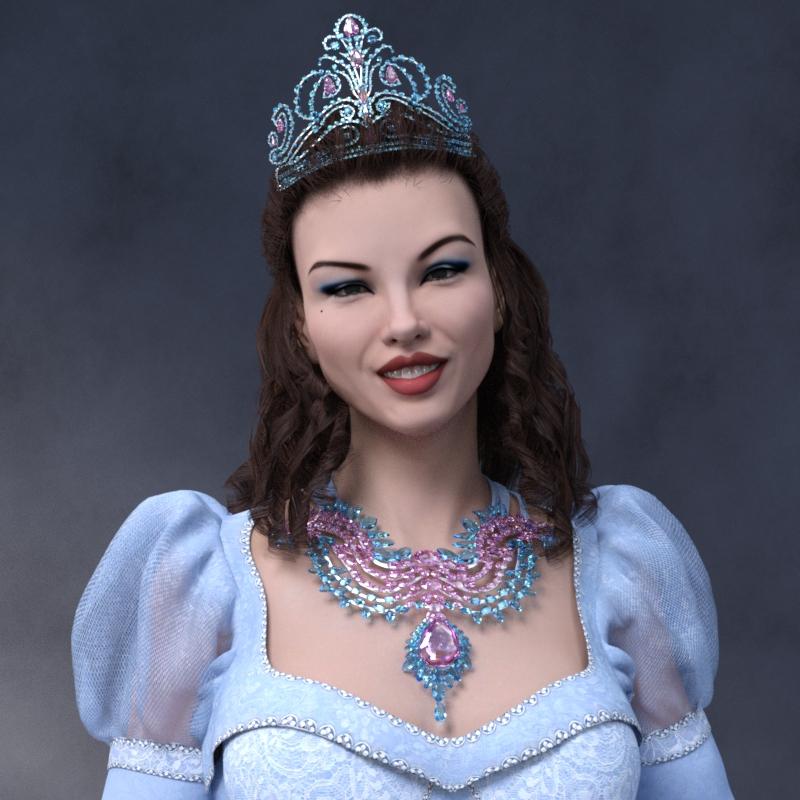
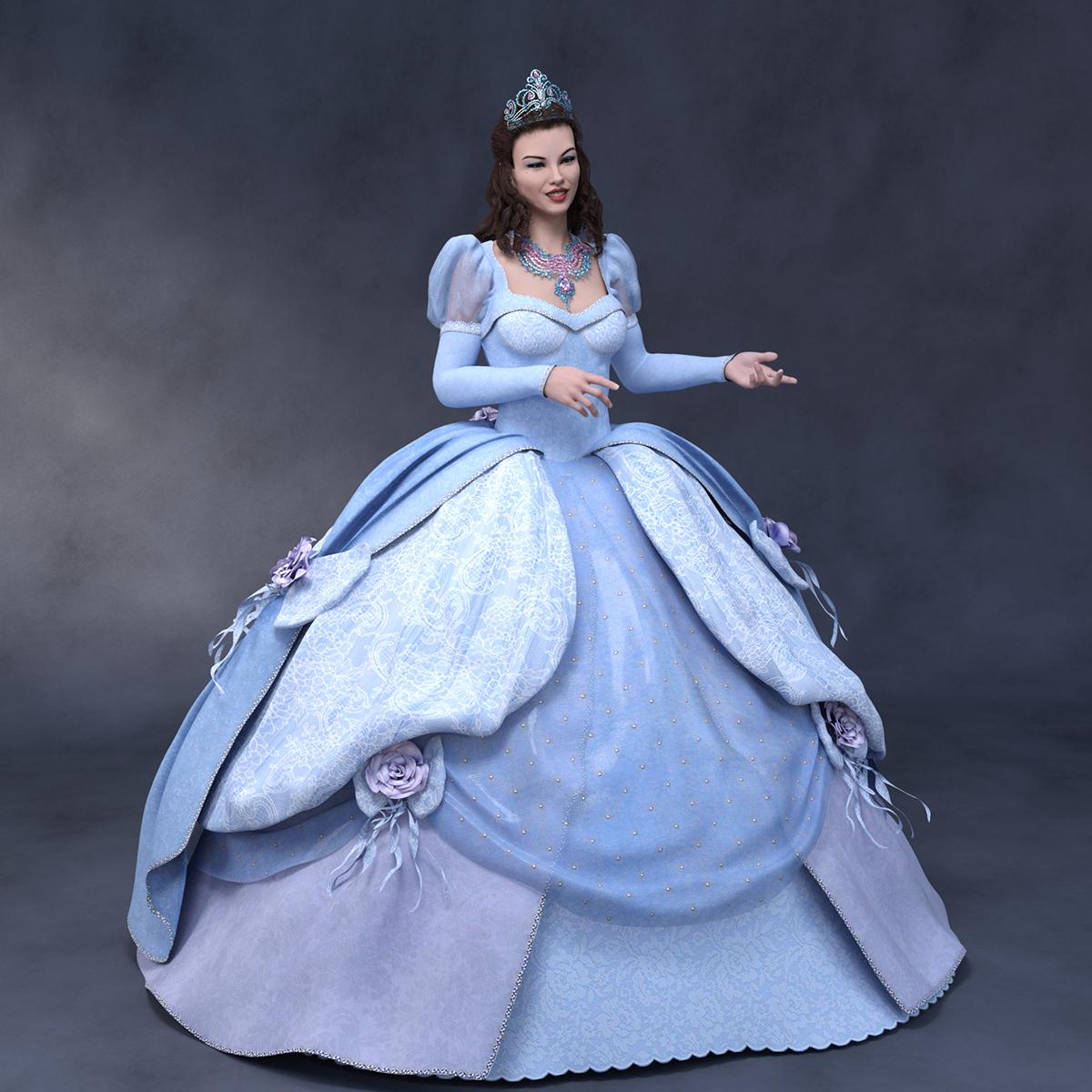
Dracorn's Render ThreadSo here's a Victoria 8 and Iray conversion of Enchanted Dreams, with a morph conversion of G1's Mina morph for the face. Boss Pro Light Set.
Note that the skirt had to be loaded without the autofit, then parented in place. When I tried auto fit, somehow it connected to the movement of her arms, and warped.
I used Allen Art's free gemstone materials - they really are beautiful.
 anyone recommend a Vampirella V4 character?
Well then, it boils down to what you personally like. With a nearly 50 year history, she's been drawn "just about every which way". The only thing I might recommend are upswept, almond shaped eyes (thus hinting at a predatory animal) accented with thick border of "goth" eyeliner and mascera. The atrist who drew her most for the original Warren Magazin run, Jose Gonzalez, usually gave her a "triangular" face, her high cheekbones leading to a delicate chin.
I hope you don't mind a personal example. Here's what I did using Aiko 3 with Thorne & Sarsa's "Mila" morph enhanced by various dials from Beth Capsces' "Kioki for A3" set. the "bikini" is actually a texture using transparency and displacement maps made by sam Therapy.

Sincerely,
Bill
OOT Hair for Genesis 3 converting to Genesis 8I have these two products. Is it possible to make them work on a Genesis 8 characters?
https://www.daz3d.com/sporty-ponytail-hair-and-oot-hairblending-2-0-for-genesis-3-female-s
https://www.daz3d.com/everyday-updo-hair-and-oot-hairblending-2-0-for-genesis-3-female-s
They seem to lose all the morph presets?
Thank you for any advice.
Trying to create skin textures for specific outputAssuming you have the correct licenses you'd probably want to do soemthing fairly simple like use a modeller or UV editor to move entire blocks around (say scale to 33% centred on the origin and then move by 33% or 66% to arange them in a single square), then you coudl do the same to the textures in an image editor to make a combined map that would fit. More elaborate schemes might be more efficient, but woudl be fiddlier. A complete remap loaded as a UV set and then using Map Transfer to covnert the maps would be more awkward.
CCMP - Learning animation thread.Hi Mat :)
the process of attaching rigging to a mesh in every program i've used,. creates an "area of influence" (for the mesh defomation) ,.around the bones,. automagically..
if the user then want's to re-define, or adjust those weights,.(by manually weight painting) ... that is optional..
Carrara does a pretty decent job of creating the mesh weights based on the bones. but those can be adjusted or changed easily (using Bone influence slider controls,.. or painting by hand) in the weightpainting area.
As for an established system,.
Ideally,. you'd make the mesh for your figure,. then add bones to allow deformation of the mesh,. then attach those bones to the mesh.
whether you do the bones in Carrara, Poser, or even daz studio would depend on the intended use for that model,. EG: personal use, limited use EG: a single animation project
, for commercial profit, (mass retail) etc
In carrara,. you could simply make a mesh,. export it as an OBJ,. and use Poser or Daz Studio to "Transfer" the rigging from an existing figure (eg Victoria/Michael/Genesis) onto your imported OBJ mesh from carrara. ...this is ideal for creating clothing "figures" for Genesis etc..
(note) this will automagicallly create weights for your mesh based on the bones.
In Daz Studio,. there's a function called "Transfer Utility" under Assets,. which allows the user to select a "Source" figure, and "Target" mesh, and auto transfers the rigging and creates weights from that rigging to fit the mesh.
Hope it helps :)
GenX2 with ConnectGenX is for transferrign morphs, Michael 4 as Michael 4 is the base shape so there's nothing for GenX to transfer (also I don't think GenX supports Genesis 8)
Morphing Fantasy Dress issue - anyone else?I just installed the update. While the MFD seems to fit Olympia 8 without any pokethru now, is the overskirt meant to do this? Huge pokethru at back and thigh, and it gapes at the waist. I looked for a morph called "fit dress" or something like that, but there's nothing of that ilk.
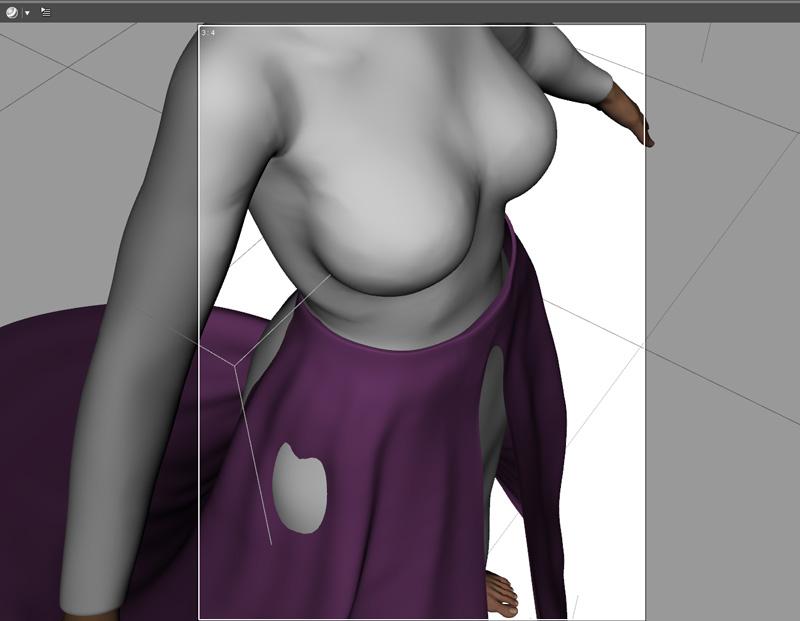
Setting the overskirt to collide with the MFD should work. You'll still get a minor poke near her butt but that is easily fixed by increasing the smoothing and/or colision iterations a little bit.
Hey, at least the overskirt looks fine with Olympia 8. It still has issues with small bodies like Moxie and the extra small ones like Faye and Young Lyra.
Daz 3D is part of

Connect
DAZ Productions, Inc.
7533 S Center View Ct #4664
West Jordan, UT 84084Licensing Agreement | Terms of Service | Privacy Policy | EULA
© 2026 Daz Productions Inc. All Rights Reserved.