-
What is a clone?It's an invisible model that sits in the G8 base figure and shows DS the shape the G8 facets would have to take to give G8 the same shape as Victoria 4 or Michael 4. The reason to do this is to show DS how to distort V4/M4 clothing to automatically fit the appropriate G8 base figure. It gives you the same type of autofit clone as G8 already has to wear G2 or Genesis clothing, only for V4/M4. It allows you to get G8 to wear all your favourite old V4/M4 clothing and hair. If you get adventurous, it's direction can be reversed and you can create (with effort and a lot of work) a weight mapped version of V4/M4 and the reversed autofit clone allows G8 clothes to be worn by V4/M4. Regards, Richard.What is a clone?
And when do I use it?
SY Victoria 4 and Michael 4 Clones for Genesis 8 | Daz 3D
This is just an example.
Chopsticks Poses: Sushi, Noodles, etc.jmucchiello said:
csaa said:
Thanks for the replies. This pose converter product went on sale this weekend. I'll give it a try.
This product works well. But I'd say get BJ Pose Zone Plugin instead. Why save a bunch of poses you already own to disk when you can convert them on the fly as needed. BJPZ does this for most figure types. I can't believe it didn't exist sooner.
I am not BlueJaunte and am not paid for this endorsement. :)
It basically did exist...there was an artist on DeviantArt who sold something similar back in the day, though that was when the newest figure was G8, though IIRC they've long since left that site. Similarly, that's basically what Riversoft's Bone Minion products do, though it breaks the functionality into seperate modules. Costs more that way, but besides the full Genesis line, Bone Minion also converts poses between those and Victoria 4 and Michael 4, as well as all four of the major horse models (Daz Horse 3, DAZ Horse 2, DAZ Millenial Horse, and the Hivewire Horse,) and also has an module that transfers transfers the positions of held/worn props between the generations.
Daz Studio 6 + Diffeomorphic 5.1 + Bforartists Blender fork 5.1.2 workssidcarton1587 said:
Valiska said:
Daz Studio version: 6.25.2026.14722
Diffeomorphic version: 5.1.0
Bforartists Blender fork version: 5.1.2
I'm on Windows 11 Professional.
I have successfully installed Diffeomorphic in Daz Studio v6. The extra file menu items installed successfully. I have exported a landscape successfully (ShaaraMuse3D Rusty Blue Rockscape).
Bforartists is a Blender fork that closely tracks Blender but alters the interface. I've just started checking it out. Diffeomorphic installation is as normal and the import worked fine.
I've been exporting my Daz library as a long-term project, but I've been doing the non-figure parts first. I haven't done more than simple test exports in earlier Daz-Diffeomorphic-Blender versions either. So I'm not commenting on the figure exports, particularly. Just noting that the export workflow is working for me, with the new Daz & Diffeo versions and the Bforartists fork.
Is there a specific workflow that you are using to export your Daz library? I've been looking for more use cases for my Script Server project and this sounds like something that is open to automation.
(I'm having trouble pasting this in where I want it. I hope it comes out formatted OK.)
First thing: I divided my libraries into about a dozen so I had some hope of finding products and the parts thereof.
- Smart Content is useless for these purposes because too many items are missing or miscategorized or uncategorized. I use the Content Library.
- PA-named folders: the organization of Daz content as installed is often markedly unhelpful, since stuff gets stuffed under the Published Artist's name instead of under a name that tells you what it's a model of.
- There is some consistency in where different kinds of items end up, but not a lot. Settings, usually the simplest kind of item to move, may be stored under Architects, Environments, Environments/Architecture, Props, Props/Architecture, or occasionally Scenes. Vehicles are likely be in Props, Figures, or Vehicles.
- The relatively recent items are still decidedly better than the old items. In recent years, texture sets and add-ons have mostly been designed for Daz libraries, which means they are right there with the item they belong to. Easy to find once you find the item itself.
- Poser era stuff is really, REALLY bad.
- The Poser library organization forces you to break a single product into multiple top-level categories. This sounds like a better idea than it really was. The pieces of products are scattered through multiple high-level directories. The subdirectories they're actually in could be named blasted near anything: the item itself, the figure they belong to, the artist who made them, the figure they belong to THEN the artist who made them then the item itself, etc.
- The texture setters might be in Poses or Materials and if they're in materials there's a good chance they don't work in Daz Studio, because for some benighted reason, in spite of the fact that it's a simple script conversion, Daz never made the later Poser material setters work. And the subdirectories they're in might, as usual, be named anything.
- PA names are used but they don't stick to a single version of the name. One PA might have three different spelling-forms of their name, and other products not in any PA folder anyway.
- Add-ons to products include both texture sets, and additions to the product itself not necessarily produced at the same time. The texture-set maker may well not be the modeller. So you get stuff like:
- Original models and supplied textures.
- New texture set for original model, the setters for which may be located practically anywhere a texture-setter could conceivably be found.
- Add-on for the models including new models.
- Texture set for the original model *and* the add-ons. May be anywhere.
- Yet another add-on with more models.
- Texture set for original model and both add-ons which also may be anywhere.
- Now here's the fun part of this: once you manage to track down the texture setters, nothing in the Daz library itself that tells you immediately what variation of the original model set and its add-ons it applies to. In fact, there is nothing to tell you, just from looking at the library with everything installed, that there even might be such a source of confusion.
- Unlike Renderosity, Daz rips down the original page for any item that's no longer sold or any PA that's no longer selling, and leaves you with a skeleton page with part of the information about what it does and what it's for missing.
- If the product page still exists the software it's useful for gets updated in a fashion that's not very accurate or very useful, being a blanket update to newer versions even when old content has a tendency to break over time.
- The chaos of bad Poser organization is at its worst for the Millennium figure eras. I have enough for/made at the time of Victoria 4 and Michael 4, and a few things for Millennium 3, to have plenty of examples.
- It starts getting better some time for Genesis 1/5, but there's still a lingering habit of putting things that belong to a particular item in another high-level directory in a Daz Studio library, as if it were Poser. Mercifully the very worst of tendency mostly dies with Generation 5, except in the case of the PA folders, which persist and ruin organization to this day.
- You export the products whose pieces you can easily find first. Then you uninstall each product as you export it. (If you still want to use it in Daz Studio, install it in another library.) So, as you remove the simpler-to-understand products, you are gradually left with fewer and fewer directories you have to understand and keep track of, in a given library, in order to find and understand the pieces of the insanely disorganized products. By the time you get down to the worst of the worst, there are only a few directories left in the whole library and only a few products they could possibly belong to.
- Enough of the products are borked, one way or the other, that I wouldn't want to attempt to export a large range of products at once. It'd probably be handy to batch some of what I describe below, but you have to take a look at the results after every set, to make sure you got exports you can use.
My general procedure for Daz to Blender exports:
- Install characters or items for characters in a Daz/Poser library for that generation, or for that kind of item. (I have Millennium 3, Millennium 4, Genesis generations, Main (Settings and general), Nature, Vehicles, Animals 1 (old animals), Animals 2 (newer animals), Hivewire, etc.
- Use Daz Install Manager if possible. Don't try to change where DIM puts anything, except make sure it ends up in the right library. Remember old stuff is mostly going to be in Poser libraries, except for some texture-setters that ended up in Daz Studio libraries.
- In the case of items that belong to multiple generations, like sets for Victoria 4 and Michael 3, install it in the library of the generation you're working on first. Then you can uninstall it and reinstall it in the other generation's library, to get the other half.
- Find an item you think you've found the pieces of.
- Load a version of it you want to save. Save it as a full Scene File.
- Save it as a Diffeomorphic *.dbz. No advice from me on options for figures yet, because I really have only done the simplest tests. I almost always export with rigging, no matter what the item is. Clothes of course need the rigging.
- Load the exported item in Blender.
- If no model appears, you can try a Diffeomorphic import into another version of Blender. Occasionally that works.
- If that doesn't work, try an FBX export from Daz Studio.
- If that doesn't work, try a Wavefront object export from Daz Studio. You will lose any rigging, but you might get the geometry and the textures.
- If that doesn't work either, you're probably not going to get that model. But you could try some of the newer formats I haven't done anything with.
- If you get a model with warnings, it's probably complaining about something you can cope with. Save it in Blender.
- Blender will show Z-fighting with models where it doesn't show in Daz Studio. You may have to nudge some surfaces or resize something very slightly to stop this.
- Find the textures in the Daz/Poser libraries and save them in a subdirectory with the Blender model. Occasionally textures don't show up, or look bad, when they look OK in Daz Studio. You want them handy if you need them. Textures are usually stored under vendor directories in Runtime/Textures. The catch is, they're not necessarily always in one subdirectory. Sometimes the vendor uses some of their own textures from another product which is not in the same directory with the main set. Sometimes some or all of the textures are provided by another PA altogether and her textures are under her name. The easiest way to find all these is to have installed the product and its add-ons with Daz Install Manager. In DIM you can right-click on the product to see the Installed files, and that will show you if you have textures to grab from multiple directories.
- DIM is also usually the easiest way to find any UV maps. Otherwise they tend to show up under the product directory, in a high-level directory called Templates then named by vendor or product or vendor/product, or sometimes in Documentation with a similar range of variations.
- Put the now-Blender models, textures, uv-maps if any, web pages, add-ons, their web-pages together in a directory. Put one of the best illos for the product at its top level. Set the directory to display the illustration instead of just the folder icon if that works in your system. (It doesn't work reliably in Windows, so I use Directory Opus instead of File Explorer. I use it for everything but it was inspired by the need to be able to tell what's in my graphics folders.)
- If the product has multiple textures, or multiple configurations, load up the next configuration, texture set, etc. Export the variation to Blender, save it if it worked well enough as above.
- For exporting clothing for most generations, you can just load the clothing and export that.
- But Genesis 1/5 and Genesis 9, the unisex base figures, are a pain because the base form of the clothing is usually conformed to the epicene base that is not usually directly useful. In this case you have to load the figure, add the clothing to the male or female version of the figure, and export clothing and figure together. (The clothing will usually revert to epicene base if you remove the male or female version of the figure before you export.) Then, in Blender, you can eliminate the figure itself before saving the clothing, if you don't want large numbers of copies of Genesis 1/5 or 9 stored with the clothing. (I suspect it would be more convenient in the future to keep the model and the clothes together, but this devours drive space, so I don't.)
- The most likely thing to be broken in Daz Studio is texture-setters. Sometimes these can be fixed in Daz without too much difficulty (it usually involves Notepad++ and the setter files). Sometimes it's just mislabelling/duplication of colors or something easy to correct. Sometimes it's worse and I figure I'll deal with it manually in Blender.
I would like to stop saving variations of the same model with different textures, as that takes up a lot of drive space and is tedious. But in the past it's been obvious that I wouldn't be likely to get much use out of the models if I always had to apply the texture variants manually, as that's time consuming. The first time I tried Blender's asset manager for anything, it was more nuisance than help and I abandoned it. I'm going to try it again to see if it'll allow me a reasonably easy way to make texture-setters in Blender. In that case, I could export only variations of products that involved altered geometry, instead of exporting for texture variants.
Looking for Hockey GearMight want to add 'air hockey' to that possibility. See what I found by just asking the store for 'hockey'. Unfortunately is seems it is mostly Michael 4 era.
And Renderosity wasn't much better.
If it was ice hockey, may I say pro, scratch, or grass might be a great idea for a PA to look into, along with a stadium that has an ice floor that can convert to a basketball court, or a rock-n-roll/concert performance venue... And a nice lakeside or small ice park for local teams. Of course the grass courts that are multiuse centers of community sports. Things like Rugby or Soccer/Football, or American Football, or whatever could use that shape of field.
m4 clothes and later genesisChoppski said:
felis said:
There is this https://www.daz3d.com/rssy-clothing-converter-from-michael-4-to-genesis-8-male
and similar for V4, if you don't want to go from M4 > G1, G1 > G2, G2 > G3, G3 > G8.
You might be able to jump some steps, as I can't remember how far back each character has clones default.
Thank you. I had forgotten about that script. I had also forgotten about the move from m4 to genesis. and forward. I suppose I save the converted item as a figure asset and then can load it on a later generation? I will try that first.
(Note: I have the V4/M4 to G3 F/M). Yes, just save as. The PAs recommend saving to a separate folder. I use Daz Studio Formats/My Library instead of the default Daz Studio Formats/My Daz Library.
m4 clothes and later genesisfelis said:
There is this https://www.daz3d.com/rssy-clothing-converter-from-michael-4-to-genesis-8-male
and similar for V4, if you don't want to go from M4 > G1, G1 > G2, G2 > G3, G3 > G8.
You might be able to jump some steps, as I can't remember how far back each character has clones default.
Thank you. I had forgotten about that script. I had also forgotten about the move from m4 to genesis. and forward. I suppose I save the converted item as a figure asset and then can load it on a later generation? I will try that first.
m4 clothes and later genesisThere is this https://www.daz3d.com/rssy-clothing-converter-from-michael-4-to-genesis-8-male
and similar for V4, if you don't want to go from M4 > G1, G1 > G2, G2 > G3, G3 > G8.
You might be able to jump some steps, as I can't remember how far back each character has clones default.
Looking for G2M hairI couldn't find a perfect match for either but here are some more suggestions:
https://www.daz3d.com/drifter-hair-for-genesis-2-males
https://www.daz3d.com/alex-hair-for-genesis-2-male-s-genesis-3-male-s-and-michael-4
RRRR - Remake or Sequel Render Contest *CLOSED *Tag: Totte#03
#4604 Phx Jack Character for M4 (Rendo)
#4217 MMX Sporty Sunglasses for Genesis 3 8 and 9 (#87810)
#3096 Q Suit for Genesis 8 Male(s) (#68493)
#4387 Cliff for Thimor 9 HD (#89278)
LB1: #5419 NG Ankle Socks for Genesis 9 (#92404)
LB2: #5553 dForce Angie Cuffed Jeans Outfit for Genesis 9 (#88389)
LB3: 31 Fantasy Cloth Wrap for Genesis 2 Female(s) (#21072)
Also used:
Michael 4 + Hardcore
Gene Hair
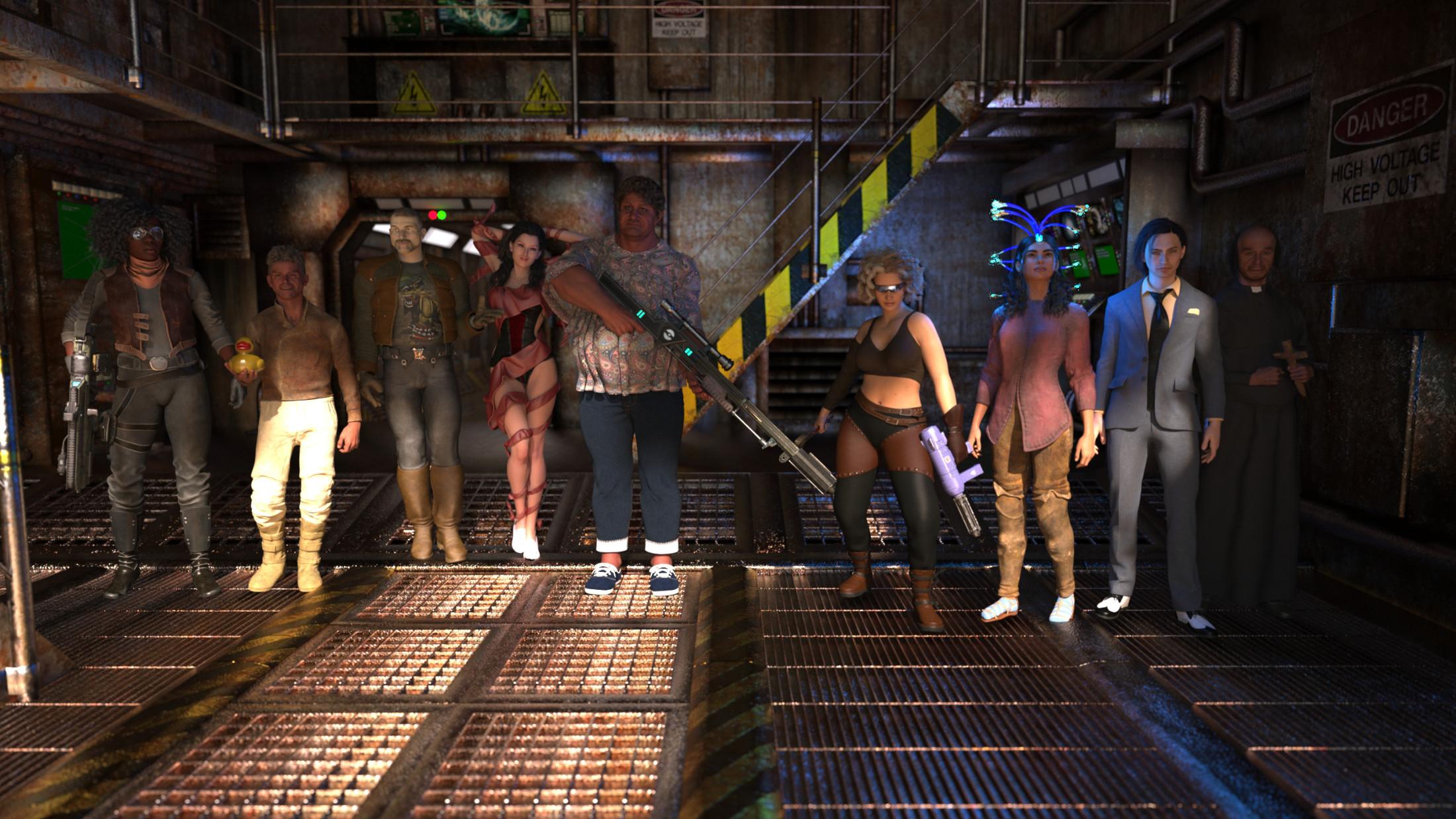
Jinx Jones B + Sci-Fi Rebel Outfit for Genesis 8 Females + Miranda Hair
Bethany 7 + Adventure Gir + dForce Fantastic Twirls Hair
Milo for Genesis 8 Males + Dax Hair for Genes 3 Males ( Autofit )
IG Iray Lilith 6 HD + Ruffle Teddy + Julius Hair + Edwardian Assessories (Shoes)
JS Cleona HD + BW Fsryn ( footwear ) + BW Zoran Crimson Armor Outfit + M3Du54a Hair + Dianne Hair
Zack 9 HD + Rogue Marshall Outfit + Aiden Hair + Bath Towels ( duck )
Walter 9 Heavy + Priest Outfit fir Genesis 9 + M3D Balding Hair Styles
ART Collab; CargoholdScripts, Lights and Shaders used:
RSSY 3DLToIray
JG Simple Fabric
Legacy Set Converter
Advanced Material Converter
PBS Shaders Vol 2TEMU Plime: Firefly
To become the next Amazon, TEMU decided to start their own streaming service, TEMU Plime, and their first series was a reboot of the iconic Sci-Fi series Firefly.
 Untitled
Daz has released 9 generations of figures so far starting from the first "Victoria" and "Michael" figures.
Generations 1 to 3 predate Daz Studio and were made for Poser only.
V4 was released in 2006 and was primarily made for Poser, though materials for DS were sometimes provided (3DL ones, Iray wasn't part of DS at the time). Same for Michael 4 and Kids 4.
Genesis 1 was generation 5 and the first one made specifically for Daz Studio, released in 2011.There are many technical differences between V4 and the Genesis line:
- V4 is in poser format (cr2 file)
- V4 is not weight mapped, the figure uses a type of rigging called parametric rigging. Genesis 1 and 2 are weigh mapped using a type of rigging called "TriAx", while G3, G8 and G9 use dual quaternions rigging.
- The morph system used is also different: V4 morphs are not all loaded and ready to use when loading the figure, you usually have to first "inject" morphs you wanted to use to activate the corresponding dial. Also, due to the rigging system the V4 base mesh is split into groups corresponding to the various bones, so some morphs can be "partial" morphs related to only one body part.
- Clothes don't follow V4 morphs automatically unless there's a matching morph in the clothes. There's a "transfer active morphs" feature in DS which can make the clothes follow active morphs in V4 but it's something you have to activate explicitly.
- You can't autofit clothes to V4. Autofit only works when the target figure is weight mapped. You can autofit clothes from V4 to Genesis line figures though (if you have a V4 clone for them).
- dForce didn't exist when V4 was the main figure (it was introduced during Genesis 3 time IIRC), so V4 clothes are not dForce-ready. There's nothing stopping you from applying a dForce modifier to them but the results will vary depending on how the clothes were built (among other things, dForce needs clothes to be welded and not have intersecting parts). Poser dynamic clothes made for V4 have a good chance of working well with dForce as they were intended for simulation in Poser cloth room (they load as static props in DS though).
"V4 for G2F" is a product which includes a morph for Genesis 2 female to look like V4 base, UVs so that G2F can use V4 textures, and an autofit clone to fit V4 clothes to G2F. The actual figure you use is Genesis 2 female so it has all the features of G2.Regarding availability, the earliest generation figures (V1/2 and the first kids figures based on generation 2) are not available for sale anymore. The generation 3 base figures are still in the store, but a lot of content for them has been retired several years ago. V4 and all Genesis figures are still available and will likely continue to be available for now.
And we'll probably get a Generation 10 figure at some point, but there's no set schedule for that.
List of Core Figuresacb said:
How about a search for 'Pro Bundle'? That should pretty much get everything from 4.2 through G8...
- 4 Horsemen Pro Bundle
- Aiko 3.0 Professional Bundle
- Aiko 4 Pro Bundle
- Aiko 5 Pro Bundle
- Aiko 6 Pro Bundle
- Aiko 7 Pro Bundle
- Aiko 8 Pro Bundle
- Alawa 8 Pro Bundle
- Alexandra 8 Pro Bundle
- Anatomy 4 Pro Bundle
- Angharad 8 Pro Bundle
- Anneka Pro Bundle
- Arabella 7 Pro Bundle
- Arcadia 8.1 Pro Bundle
- Ashan 8 Pro Bundle
- Aubrey 8 Pro Bundle
- Babina 8 Pro Bundle
- Belle 6 Pro Bundle
- Bethany 7 Pro Bundle
- Bridget 8 Pro Bundle
- Callie 6 Pro Bundle
- Celani 8 Pro Bundle
- Centaur 7 Female Pro Bundle
- Centaur 7 Male Pro Bundle
- Charlotte 8 Pro Bundle
- Christian 8 Pro Bundle
- CJ 8 Pro Bundle
- Dain 8 Pro Bundle
- Daisy 8 Pro Bundle
- Damien Pro Bundle
- Dante 7 Pro Bundle
- Darcy 8 Pro Bundle
- Darius 6 Pro Bundle
- Darius 7 Pro Bundle
- Darius 8 Pro Bundle
- Dasan 8 Pro Bundle
- David 5 Pro Bundle
- DAZ Dragon 3 Pro Bundle
- DAZ Horse 2 Pro Bundle
- Diego 8 Pro Bundle
- Edie 8 Pro Bundle
- Edward 8 Pro Bundle
- Elijah 7 Pro Bundle
- Elios 8 Pro Bundle
- Ellithia 8 Pro Bundle
- Eva 7 Pro Bundle
- Eva 8 Pro Bundle
- Floyd 8 Pro Bundle
- Freak 5 Pro Bundle
- Gabriela 8 Pro Bundle
- Genesis 8 Centaur Pro Bundle
- Genevieve 7 Pro Bundle
- Gia 6 Pro Bundle
- Gia 7 Pro Bundle
- Gia 8 Pro Bundle
- Gianni 6 Pro Bundle
- Gianni 7 Pro Bundle
- Giselle 6 Pro Bundle
- Hiro 4 Pro Bundle
- Hiro 5 Pro Bundle
- Honni 8 Pro Bundle
- Ivan 7 Pro Bundle
- Izabella 7 Pro Bundle
- Jenni 8 Pro Bundle
- Jonathan 8 Pro Bundle
- Josephene 8 Pro Bundle
- Kala 8 Pro Bundle
- Kalea 7 Pro Bundle
- Kanade 8 Pro Bundle
- Karen 7 Pro Bundle
- Karyssa 8 Pro Bundle
- Kayo 8 Pro Bundle
- Keiko 6 Pro Bundle
- Kenji 7 Pro Bundle
- Kimo 7 Pro Bundle
- Kwan 8 Trooper Bundle
- Landon 8 Pro Bundle
- Latonya 8 Pro Bundle
- Lee 6 Pro Bundle
- Lee 7 Pro Bundle
- Lee 8 Pro Bundle
- Leisa 8 Pro Bundle
- Leo 7 Pro Bundle
- Leroy 8 Pro Bundle
- Lilith 6 Pro Bundle
- Lilith 7 Pro Bundle
- Lucas 8 Pro Bundle
- Lucian 7 Pro Bundle
- Mabel 8 Pro Bundle
- Mei Lin 6 Pro Bundle
- Mei Lin 7 Pro Bundle
- Mei Lin 8 Pro Bundle
- Merlin 8.1 Pro Bundle
- Michael 4 3D Model Pro Suite
- Michael 4 Pro Bundle
- Michael 5 Pro Bundle
- Michael 5 Pro Suite
- Michael 6 Pro Bundle
- Michael 7 Pro Bundle
- Michael 8 Pro Bundle
- Mika 7 Pro Bundle
- Mika 8 Pro Bundle
- Monique 6 Pro Bundle
- Monique 7 Pro Bundle
- Monique 8 Pro Bundle
- Mr Woo 8 Pro Bundle
- Mrs Chow 8 Pro Bundle
- Nida 8 Pro Bundle
- Ninive 6 Pro Bundle
- Nix 8 Pro Bundle
- Ollie 8 Pro Bundle
- Olympia 7 Pro Bundle
- Olympia 8 Pro Bundle
- Olympia 6 Pro Bundle
- Ophelia 7 Pro Bundle
- Owen 8 Pro Bundle
- Penny 8 Pro Bundle
- Robyn 8 Pro Bundle
- Rune 7 Pro Bundle
- Rynne 8 Pro Bundle
- Sahira 8 Pro Bundle
- Sakura 8 Pro Bundle
- Sanjay 8 Pro Bundle
- Scar 8 Pro Bundle
- Scott 6 Pro Bundle
- Silas 8 Pro Bundle
- Stephanie 4 Pro Bundle
- Stephanie 5 Pro Bundle
- Stephanie 6 Pro Bundle
- Stephanie 8 Pro Bundle
- Sunny 7 Pro Bundle
- Supersuit Pro Bundle
- Sydney 8 Pro Bundle
- Tasha 8 Pro Bundle
- Teen Jane 8 Pro Bundle
- Teen Jayden 6 Pro Bundle
- Teen Josie 6 Pro Bundle
- Teen Josie 7 Pro Bundle
- Teen Josie 8 Pro Bundle
- Teen Kaylee 8 Pro Bundle
- Teen Raven 8 Pro Bundle
- The Brute 8 Pro Bundle
- The FREAK 4 Pro Bundle
- the Girl 4 Pro Bundle
- The Girl 6 Pro Bundle
- The Girl 7 Pro Bundle
- The Girl 8 Pro Bundle
- The Guy 7 Pro Bundle
- The Kids 4 Pro Bundle
- Tika 8 Pro Bundle
- Toon Dwayne 8 Pro Bundle
- Tristan 8 Pro Bundle
- Tween Julie 7 Pro Bundle
- Tween Ryan 7 Pro Bundle
- Valentino 8 Pro Bundle
- Victoria 4.2 Pro Bundle
- Victoria 4 3D Model Pro Suite
- Victoria 5 Pro Bundle
- Victoria 6 Pro Bundle
- Victoria 7 Pro Bundle
- Victoria 8 Pro Bundle
- Vladimir 8 Pro Bundle
- Young Teens 5 Pro Bundle
- Yuzuru 8 Pro Bundle
- Zelara 8 Pro Bundle
Not perfect. But should be a good enough start.
BTW; this is in fact a list of core characters.
Characters are morphs and need a base figure.
Figures do not need a morph to work inside DAZ studio.
Core figures are:
Victoria
Victoria 2
Victoria 3
Michael
Michael 2
Michael 3
Stephanie 1
Aiko 1
Victoria 4
Michael 4
Genesis 1
Genesis 2 female
Genesis 2 male
Genesis 3 female
Genesis 3 male
Genesis 8 female
Genesis 8 male
Genesis 9List of Core Figuresacb said:
How about a search for 'Pro Bundle'? That should pretty much get everything from 4.2 through G8...
- 4 Horsemen Pro Bundle
- Aiko 3.0 Professional Bundle
- Aiko 4 Pro Bundle
- Aiko 5 Pro Bundle
- Aiko 6 Pro Bundle
- Aiko 7 Pro Bundle
- Aiko 8 Pro Bundle
- Alawa 8 Pro Bundle
- Alexandra 8 Pro Bundle
- Anatomy 4 Pro Bundle
- Angharad 8 Pro Bundle
- Anneka Pro Bundle
- Arabella 7 Pro Bundle
- Arcadia 8.1 Pro Bundle
- Ashan 8 Pro Bundle
- Aubrey 8 Pro Bundle
- Babina 8 Pro Bundle
- Belle 6 Pro Bundle
- Bethany 7 Pro Bundle
- Bridget 8 Pro Bundle
- Callie 6 Pro Bundle
- Celani 8 Pro Bundle
- Centaur 7 Female Pro Bundle
- Centaur 7 Male Pro Bundle
- Charlotte 8 Pro Bundle
- Christian 8 Pro Bundle
- CJ 8 Pro Bundle
- Dain 8 Pro Bundle
- Daisy 8 Pro Bundle
- Damien Pro Bundle
- Dante 7 Pro Bundle
- Darcy 8 Pro Bundle
- Darius 6 Pro Bundle
- Darius 7 Pro Bundle
- Darius 8 Pro Bundle
- Dasan 8 Pro Bundle
- David 5 Pro Bundle
- DAZ Dragon 3 Pro Bundle
- DAZ Horse 2 Pro Bundle
- Diego 8 Pro Bundle
- Edie 8 Pro Bundle
- Edward 8 Pro Bundle
- Elijah 7 Pro Bundle
- Elios 8 Pro Bundle
- Ellithia 8 Pro Bundle
- Eva 7 Pro Bundle
- Eva 8 Pro Bundle
- Floyd 8 Pro Bundle
- Freak 5 Pro Bundle
- Gabriela 8 Pro Bundle
- Genesis 8 Centaur Pro Bundle
- Genevieve 7 Pro Bundle
- Gia 6 Pro Bundle
- Gia 7 Pro Bundle
- Gia 8 Pro Bundle
- Gianni 6 Pro Bundle
- Gianni 7 Pro Bundle
- Giselle 6 Pro Bundle
- Hiro 4 Pro Bundle
- Hiro 5 Pro Bundle
- Honni 8 Pro Bundle
- Ivan 7 Pro Bundle
- Izabella 7 Pro Bundle
- Jenni 8 Pro Bundle
- Jonathan 8 Pro Bundle
- Josephene 8 Pro Bundle
- Kala 8 Pro Bundle
- Kalea 7 Pro Bundle
- Kanade 8 Pro Bundle
- Karen 7 Pro Bundle
- Karyssa 8 Pro Bundle
- Kayo 8 Pro Bundle
- Keiko 6 Pro Bundle
- Kenji 7 Pro Bundle
- Kimo 7 Pro Bundle
- Kwan 8 Trooper Bundle
- Landon 8 Pro Bundle
- Latonya 8 Pro Bundle
- Lee 6 Pro Bundle
- Lee 7 Pro Bundle
- Lee 8 Pro Bundle
- Leisa 8 Pro Bundle
- Leo 7 Pro Bundle
- Leroy 8 Pro Bundle
- Lilith 6 Pro Bundle
- Lilith 7 Pro Bundle
- Lucas 8 Pro Bundle
- Lucian 7 Pro Bundle
- Mabel 8 Pro Bundle
- Mei Lin 6 Pro Bundle
- Mei Lin 7 Pro Bundle
- Mei Lin 8 Pro Bundle
- Merlin 8.1 Pro Bundle
- Michael 4 3D Model Pro Suite
- Michael 4 Pro Bundle
- Michael 5 Pro Bundle
- Michael 5 Pro Suite
- Michael 6 Pro Bundle
- Michael 7 Pro Bundle
- Michael 8 Pro Bundle
- Mika 7 Pro Bundle
- Mika 8 Pro Bundle
- Monique 6 Pro Bundle
- Monique 7 Pro Bundle
- Monique 8 Pro Bundle
- Mr Woo 8 Pro Bundle
- Mrs Chow 8 Pro Bundle
- Nida 8 Pro Bundle
- Ninive 6 Pro Bundle
- Nix 8 Pro Bundle
- Ollie 8 Pro Bundle
- Olympia 7 Pro Bundle
- Olympia 8 Pro Bundle
- Olympia 6 Pro Bundle
- Ophelia 7 Pro Bundle
- Owen 8 Pro Bundle
- Penny 8 Pro Bundle
- Robyn 8 Pro Bundle
- Rune 7 Pro Bundle
- Rynne 8 Pro Bundle
- Sahira 8 Pro Bundle
- Sakura 8 Pro Bundle
- Sanjay 8 Pro Bundle
- Scar 8 Pro Bundle
- Scott 6 Pro Bundle
- Silas 8 Pro Bundle
- Stephanie 4 Pro Bundle
- Stephanie 5 Pro Bundle
- Stephanie 6 Pro Bundle
- Stephanie 8 Pro Bundle
- Sunny 7 Pro Bundle
- Supersuit Pro Bundle
- Sydney 8 Pro Bundle
- Tasha 8 Pro Bundle
- Teen Jane 8 Pro Bundle
- Teen Jayden 6 Pro Bundle
- Teen Josie 6 Pro Bundle
- Teen Josie 7 Pro Bundle
- Teen Josie 8 Pro Bundle
- Teen Kaylee 8 Pro Bundle
- Teen Raven 8 Pro Bundle
- The Brute 8 Pro Bundle
- The FREAK 4 Pro Bundle
- the Girl 4 Pro Bundle
- The Girl 6 Pro Bundle
- The Girl 7 Pro Bundle
- The Girl 8 Pro Bundle
- The Guy 7 Pro Bundle
- The Kids 4 Pro Bundle
- Tika 8 Pro Bundle
- Toon Dwayne 8 Pro Bundle
- Tristan 8 Pro Bundle
- Tween Julie 7 Pro Bundle
- Tween Ryan 7 Pro Bundle
- Valentino 8 Pro Bundle
- Victoria 4.2 Pro Bundle
- Victoria 4 3D Model Pro Suite
- Victoria 5 Pro Bundle
- Victoria 6 Pro Bundle
- Victoria 7 Pro Bundle
- Victoria 8 Pro Bundle
- Vladimir 8 Pro Bundle
- Young Teens 5 Pro Bundle
- Yuzuru 8 Pro Bundle
- Zelara 8 Pro Bundle
Not perfect. But should be a good enough start.
Thank you. I appreciate the effort!!
List of Core Figures- 4 Horsemen: Pro, Starter
- Aiko 4: Pro, Starter
- Aiko 5: Pro, Starter
- Aiko 6: Pro, Starter
- Aiko 7: Pro, Starter
- Aiko 8: Pro, Starter
- Alawa 8: Pro, Starter
- Alex Capital 8.1: Goon Getaway, Stool Pigeon
- Alexandra 8: Pro, Starter
- Angharad 8: Pro, Starter
- Anneka: Pro, Starter
- Arabella 7: Pro, Starter
- Arcadia 8.1: Pro, Starter
- Arianna 8.1: Fairytale
- Ashan 8: Pro, Starter
- Assassin 8.1: Mega, Stealth
- Aubrey 8: Pro, Starter
- August 8.1: Bold and Fierce Pathfinder, Dapper Fluid
- Babina 8: Pro, Starter
- Belle 6: Pro, Starter
- Bethany 7: Pro, Starter
- Bonnie 8.1: Mega, Roaring Twenties, Vintage Sleuth
- Bridget 8: Pro, Starter
- Brodie 6: Bundle
- Brooke 8.1: Gold Marksman, Manhattan Style
- Bryce 7: Pro
- Callie 6: Pro, Starter
- Catty 8.1: Gender Fluid Pride Fashion, Inclusive Digital Realities
- Celani 8: Pro, Starter
- Centaur 7: Female PB, Female SB, Male PB, Male SB
- Charlotte 8: Pro, Starter
- Christian 8: Pro, Starter
- CJ 8: Fantasy, Pro, Starter
- Clara 8.1: The Nutcracker Princess
- Coral 8.1: Mega, Sand Between Your Toes, Seas the Day
- Cory 6: Bundle
- Crow 8.1: Familiar Fates, Mega, Soul Bearer
- Dain 8: Fantasy, Pro, Starter
- Daisy 8: Pro, Starter
- Damien: Pro, Starter
- Dante 7: Pro, Starter
- Darcy 8: Pro, Starter
- Darius 6: Pro, Starter
- Darius 7: Pro, Starter
- Darius 8: Pro, Starter
- Dasan 8: Pro, Starter
- David 5: Pro, Starter
- Diego 8: Pro, Starter
- Drutherson 8: Better Not Pout, Gnome of Gears
- Edie 8: Pro, Starter
- Edward 8: Pro, Starter
- Elijah 7: Pro, Starter
- Elios 8: Pro, Starter
- Ellithia 8: Pro, Starter
- Eva 7: Pro, Starter
- Eva 8: Pro, Starter
- Floyd 8: Pro, Starter
- Freak 5: Pro, Starter
- Fred 8.1: Brings Down the House, Rise to Fame
- Freja 8: Viking Maiden
- Gabriela 8: Pro, Starter
- Genevieve 7: Pro, Starter
- Gia 6: Pro, Starter
- Gia 7: Pro, Starter
- Gia 8: Pro, Starter
- Gianni 6: Pro, Starter
- Gianni 7: Pro, Starter
- Giselle 6: Pro, Starter
- Hans 8.1: The Nutcracker Prince
- Haunt: Starter
- Hiro 3.0: Starter
- Hiro 4: Pro, Starter
- Hiro 5: Pro, Starter
- Holt 8: Wild West
- Honni 8: Pro, Starter
- Ivan 7: Pro, Starter
- Izabella 7: Pro, Starter
- Jacqueline 8.1: Alternate Reality, Undercover Retro
- Jada 8.1: Undercover Roller Girl
- Jazz 8.1: Knight vs. the Giant, Undercover Boogie
- Jenni 8: Pro, Starter
- Jinx Jones 8.1: Captain of the Seas, From the Crow's Nest
- Jonathan 8: Pro, Starter
- Josephene 8: Pro, Starter
- Juan Carlos 8: Cyber Dystopia, Streets of Cyberpunk
- Kala 8: Pro, Starter
- Kalea 7: Pro, Starter
- Kanade 8: Pro, Starter
- Karen 7: Pro, Starter
- Karyssa 8: Pro, Starter
- Kayden HD 8.1: Future Ninja, Young Grasshopper
- Kayo 8: Pro, Starter bundle, Trooper Returns
- Keiko 6: Mega Manga, Premiere Add-On, Pro, Starter
- Kenji 7: Pro, Starter
- Kento 8.1: Futuristic Protector, Mega, Protector of the Realms
- Khemsit 8: Ancient Egyptian Handmaiden
- Kiko 8.1: Battle Warrior, Rising Star
- Kimo 7: Pro, Starter
- Kjaer 8: Blacksmith, Plunder
- Kola 8.1: Bundle, Mega
- Kota 8.1: Mech Warrior, Pop Idol
- Kwan 8: Trooper
- Landon 8: Pro, Starter
- Latonya 8: Pro, Starter
- Leanne 8.1: Mega, Retaliation, Undercover Assassin
- Lee 6: Karate, Pro, Starter
- Lee 7: Pro, Starter
- Lee 8: Pro, Starter
- Leisa 8: Pro, Starter
- Leo 7: Pro, Starter
- Leroy 8: Pro, Starter
- Lilith 6: Pro, Starter
- Lilith 7: Pro, Starter
- Lucas 8: Pro, Starter
- Lucian 7: Pro, Starter
- Mabel 8: Pro, Starter
- Mei Lin 6: Bonus, Geisha, Pro, Starter
- Mei Lin 7: Pro, Starter
- Mei Lin 8: Pro, Starter
- Merlin 8.1: Pro, Starter
- Michael 4: Pro, Starter
- Michael 5: Pro, Pro Suite, Starter
- Michael 6: Pro, Starter
- Michael 7: Pro, Starter
- Michael 8: Pro, Starter
- Michael 8.1: Campus Life, Varsity
- Mika 7: Pro, Starter
- Mika 8: Pro, Starter
- Millawa 8: Cryomancer, Cyber Mission
- Minotaur 6: HD
- Monique 6: Pro, Starter
- Monique 7: Pro, Starter
- Monique 8: Pro, Starter
- Mr Woo 8: Pro, Starter
- Mrs Chow 8: Pro, Starter
- Necromancer 8.1: Bundle, Dragon, Mega
- Nida 8: Pro, Starter
- Niko 8: Cyber Funk, Supercharged Cyber
- Ninive 6: Pro, Starter
- Nix 8: Pro, Starter
- Noska 8.1: Rebel Protector 2099
- Ollie 8: Pro, Starter
- Olympia 6: Pro, Starter
- Olympia 7: Pro, Starter
- Olympia 8: Pro, Starter
- Ophelia 7: Pro, Starter
- Owen 8: Pro, Starter
- Pablo 8.1: Day of the Dead, La Revolución
- Penny 8: Pro, Starter
- Refreshing Girl 6: Bundle
- Reptilian 6: HD
- Robyn 8: Pro, Starter
- Rosa Maria 8.1: Day of the Dead, Fiesta
- Rune 7: Pro, Starter
- Rynne 8: Pro, Starter
- Sahira 8: Pro, Starter
- Sakura 8: Pro, Starter
- Sanjay 8: Pro, Starter
- Scar 8: Pro, Starter
- Scott 6: Pro, Starter
- Senator Greaves 8.1: Intergalactic Soldier
- Silas 8: Pro, Starter
- Stephanie 4: Elite Base, Pro, Starter
- Stephanie 5: Pro, Starter
- Stephanie 6: Pro, Starter
- Stephanie 8: Pro, Starter
- Sukai 8: Superhero
- Sunny 7: Pro, Starter
- Sydney 8: Pro, Starter
- Tara 8: Bundle, Fierce Adventurer, World Adventurer Mega
- Tasha 8: Pro, Starter
- Teen Jane 8: Pro, Starter
- Teen Jayden 6: Pro, Starter
- Teen Josie 6: Pro, Starter
- Teen Josie 7: Pro, Starter
- Teen Josie 8: Pro, Starter
- Teen Kaylee 8: Pro, Starter
- Teen Kola 8.1: Bundle
- Teen Raven 8: Pro, Starter
- The Brute 8: Pro, Starter
- The FREAK 4: Pro, Starter
- the Girl 4: Pro, Starter
- The Girl 6: Pro, Starter
- The Girl 7: Pro, Starter
- The Girl 8: Pro, Starter
- The Guy 7: Pro, Starter
- The Kids 4: Complete, Pro
- The Scrooge 8.1: Bundle
- Tika 8: Pro, Starter
- Toon Big 5: Bundle
- Toon Dwayne 8: Pro, Starter
- Topsy 8: Merry and Bright, The Tinkerer
- Torian 8.1: Elven
- Torment 8.1: Hell On Wheels, Temptations
- Tristan 8: Pro, Starter
- Tween Julie 7: Pro, Starter
- Tween Ryan 7: Pro, Starter
- Twosret 8: Pharaoh Living
- Underbelly 8: Bundle, Gangster Bundle
- Valentino 8: Pro, Starter
- Victoria 4: 3D Model Pro Suite, GW1-4 Male
- Victoria 4.2: Pro, Starter
- Victoria 5: Pro, Starter
- Victoria 6: Pro, Starter
- Victoria 7: Pro, Starter
- Victoria 8: Pro, Starter
- Victoria 8.1: Loving Life, University
- Vladimir 8: Pro, Starter
- Wolfgang 8.1: High Seas, Scallywag
- Young Teens 5: Pro, Starter
- Ysabeau 6: Bundle
- Yuzuru 8: Pro, Starter
- Zale 8.1: Deep Sea King, Landlubber, Mega
- Zelara 8: Pro, Starter
- ZsaZsa: Character
The older generation: Victoria 2/3, Michael 2/3 and their children rendersDollyGirl said:
Oooh Halloween! Nope can't guess. Who is it?
richardandtracy said:
@Semicharm, it is nice to see someone new joining in with the older generations, great images full of action & character.
If I have to guess as to the newer figure, I'd say the ghost sheet in the lowest image. IIRC in the last year or two there was a ghost sheet figure released.. Where from I can't recall, but it rings a [faint] bell.
It seems the "bookmark" system keeps breaking. It will randomly stop sending notifications for replies and I lose track of theads without them. Er...

The "new" figure is the vampire girl in the background. It's a character I made for Poser's La Femme. I think the ghost was Maddie, as is Bo Peep. The wizard was Luke, Scarecrow was Kid 4, and vampire Michael 4.
BTW, I'm curious how you got G8F outfits on Victoria 3. You mentioned about converting V3 to DS weightmaps, but I'm a bit lost after that. I don't think the shape was that close to G8F to just do a generic refit in DS.
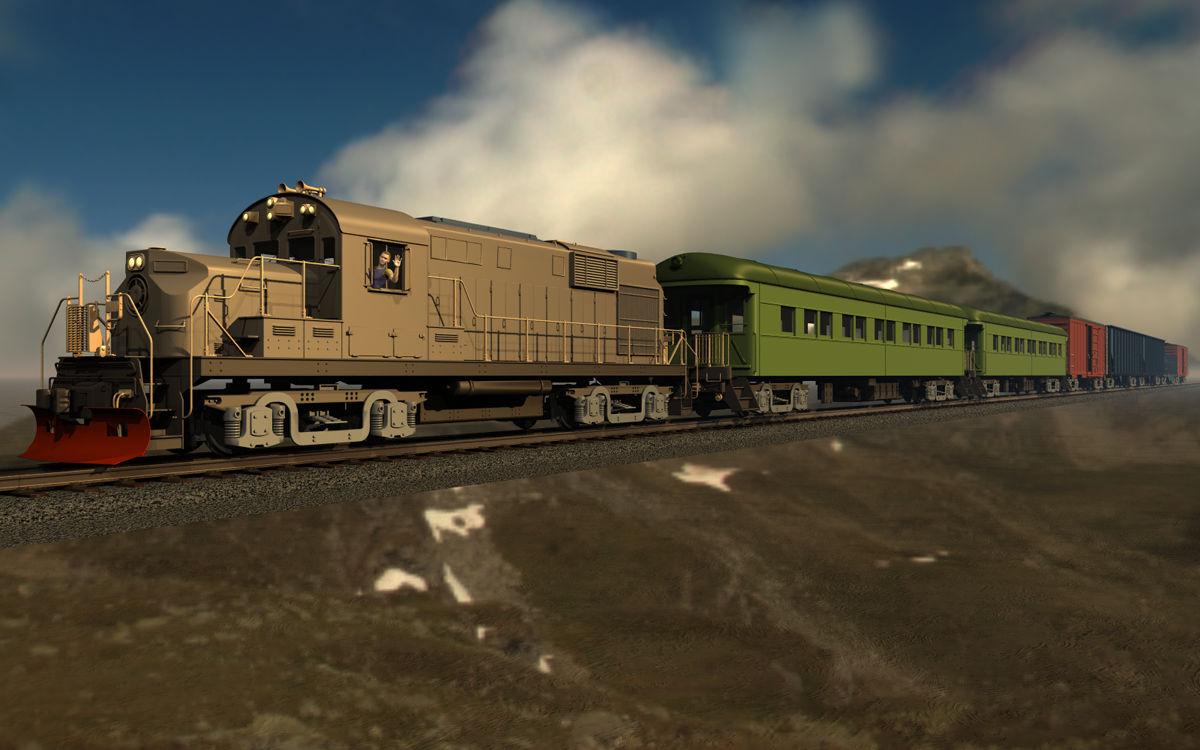
Show Us Your Bryce Renders Part 14The train consists of parts from "Parkside" by Jack Tomalin with my own materials: 1 Fright, 2 Passenger Car, 2 Box Car, 2 Haulage Hopper and 1 Haulage Flat. The waving train driver is "Michael 4" (everything available at Daz 3D). Sky, background and ambient light by the "Illpass" HDRI (unpublished) and the key light by the sun. A fright train with wagons for voyagers in transit. To reduce the memory/zip use from 859 MB/144.8 MB to 358 MB/63.7 MB I instanced everything that I used more than once, the rail needed a lot of time: 1 master and 49 instances, length X = 28,800 Bryce Units (BU).
 WHEN... will DAZ3D learn...
You create a figure from scratch, you get the basic morphs. You want to use a morph you purchased called "heads vol 2", you go to the library and "attach" the morphs within it to the figure. Now the figure is "base morphs" plus "heads vol 2" (and whatever else heads v2 loads). Later you save and reload this figure. When it reloads, it load "Heads vol 2" automatically because the scene/character file tells it to.
Which is, to an extent, what the ExP system used with Victoria/Michael 4 did - it added its own data files to /Runtime/Libraries/!DAZ/Figurename and in order to use them we had to run a script that added those files to the master list of files to load that the figure read in. People hated this, hence the Genesis system.
TheMysteryIsThePoint said:
A design that creates "very important practical reasons" why it must be inefficient is not a very good design. There is no degree of rationalization or explanation that is more important than the user experience, which is the reason why the design exists in the first place. Knowing why it is inefficient is no consolation while I'm twiddling my thumbs while waiting for the scene to load; I'd vastly prefer to simply be ignorant and not know why it can load a scene so quickly rather than knowing all the exact design decisions, as you've carefully explained, that make it painfully slow.
Hating the experience of the current system doesn't mean that an alternative system's experience would be better. There are always trade-offs, as I noted in reference to ExP above, and Daz chose what they thought would be the lesser evil. It is possible that history has shown a different approach would have been a lesser evil, but it can't be assumed that that is the case. It is possible that DS 6 will try to adjust the system, but there will probably be downsides to that too.
New Year, New Sales Thread: Report Issues Here 3 "Reporting Only"MelanieL said:
paulawp (marahzen) said:
Togire said:
Elor said:
mding said:
In case this hasn't been reported yet: Several core figures lost their "Product Add-ons" sections:
Victoria 4.2 Base, Michael 4 Base, Stephanie 4 Elite Base, Aiko 4 Base, Hiro 4 Base
Genesis: Michael 5, Victoria 5,
Genesis 2: Victoria 6, Michael 6, Josie 6, Stephanie 6, Gianni 6, Mei Lin 6, Aiko 6, Lilith 6
Genesis 3: Michael 7, Aiko 7, Victoria 7
Genesis 8: Here I only checked and found: Victoria 8, Michael 8, didn't look any further.
Could that be please reported, please, as I find these sections are very helpful?
Daz Dog 8 also lost the product add-ons section:
https://www.daz3d.com/daz-dog-8
If it's mainly for figures with a lot of add-ons, maybe it's a performance saving change? But I hope they'll revert back to the previous situation or offer a way to browse add-on for a figure.
Actually, they also suppressed the add-on section of Genesis 9 Starter Essentials, but this is a *very very very good* thing.
Making any G9 figure/outfit an addon of Genesis 9 Starter Essentials was extremely stupid. First, loading the G9 starter essential page with its addon section composed of 20k+ elements was (how can I say) ... an interesting experience... If you have tried recently, you know what I mean. But, this is now fixed
But, if any G9 item is already an addon, it completely breaks the search of real dependencies. For instance, with "daz deals" you can find in a big list of assets which ones are addons of items that you already own. Very useful, indeed. But if all G9 items are already addons of G9 essentials, this is a useless information that masks real addon dependencies as all G9 assets will appear in the list. And this problem is not fixed...
This prompted me to look and confirm that this feature is also lost for Daz Horse 2 and 3, the original Ultrascenery, and likely many other comparable products. That, IMHO, is a bad thing that needs to be fixed. I own pretty much all of the add-ons for items like these, but when I was building my Daz collection, I made a lot of use of picking up add-ons when on sale. As a newbie, I wouldn't even have known about all the cool add-ons that were available for some things without this feature.
Oh I really hope this is some kind of temporary glitch or a reversible mistake. I've used the feature several times to pick up extras for a base figure like the horse or the dog.
Please Daz change your mind!
I'm still not sure what it is that is broken, which makes it hard to report. It isn't a Daz Deals feature?
New Year, New Sales Thread: Report Issues Here 3 "Reporting Only"paulawp (marahzen) said:
Togire said:
Elor said:
mding said:
In case this hasn't been reported yet: Several core figures lost their "Product Add-ons" sections:
Victoria 4.2 Base, Michael 4 Base, Stephanie 4 Elite Base, Aiko 4 Base, Hiro 4 Base
Genesis: Michael 5, Victoria 5,
Genesis 2: Victoria 6, Michael 6, Josie 6, Stephanie 6, Gianni 6, Mei Lin 6, Aiko 6, Lilith 6
Genesis 3: Michael 7, Aiko 7, Victoria 7
Genesis 8: Here I only checked and found: Victoria 8, Michael 8, didn't look any further.
Could that be please reported, please, as I find these sections are very helpful?
Daz Dog 8 also lost the product add-ons section:
https://www.daz3d.com/daz-dog-8
If it's mainly for figures with a lot of add-ons, maybe it's a performance saving change? But I hope they'll revert back to the previous situation or offer a way to browse add-on for a figure.
Actually, they also suppressed the add-on section of Genesis 9 Starter Essentials, but this is a *very very very good* thing.
Making any G9 figure/outfit an addon of Genesis 9 Starter Essentials was extremely stupid. First, loading the G9 starter essential page with its addon section composed of 20k+ elements was (how can I say) ... an interesting experience... If you have tried recently, you know what I mean. But, this is now fixed
But, if any G9 item is already an addon, it completely breaks the search of real dependencies. For instance, with "daz deals" you can find in a big list of assets which ones are addons of items that you already own. Very useful, indeed. But if all G9 items are already addons of G9 essentials, this is a useless information that masks real addon dependencies as all G9 assets will appear in the list. And this problem is not fixed...
This prompted me to look and confirm that this feature is also lost for Daz Horse 2 and 3, the original Ultrascenery, and likely many other comparable products. That, IMHO, is a bad thing that needs to be fixed. I own pretty much all of the add-ons for items like these, but when I was building my Daz collection, I made a lot of use of picking up add-ons when on sale. As a newbie, I wouldn't even have known about all the cool add-ons that were available for some things without this feature.
Oh I really hope this is some kind of temporary glitch or a reversible mistake. I've used the feature several times to pick up extras for a base figure like the horse or the dog.
Please Daz change your mind!
New Year, New Sales Thread: Report Issues Here 3 "Reporting Only"paulawp (marahzen) said:
Togire said:
Elor said:
mding said:
In case this hasn't been reported yet: Several core figures lost their "Product Add-ons" sections:
Victoria 4.2 Base, Michael 4 Base, Stephanie 4 Elite Base, Aiko 4 Base, Hiro 4 Base
Genesis: Michael 5, Victoria 5,
Genesis 2: Victoria 6, Michael 6, Josie 6, Stephanie 6, Gianni 6, Mei Lin 6, Aiko 6, Lilith 6
Genesis 3: Michael 7, Aiko 7, Victoria 7
Genesis 8: Here I only checked and found: Victoria 8, Michael 8, didn't look any further.
Could that be please reported, please, as I find these sections are very helpful?
Daz Dog 8 also lost the product add-ons section:
https://www.daz3d.com/daz-dog-8
If it's mainly for figures with a lot of add-ons, maybe it's a performance saving change? But I hope they'll revert back to the previous situation or offer a way to browse add-on for a figure.
Actually, they also suppressed the add-on section of Genesis 9 Starter Essentials, but this is a *very very very good* thing.
Making any G9 figure/outfit an addon of Genesis 9 Starter Essentials was extremely stupid. First, loading the G9 starter essential page with its addon section composed of 20k+ elements was (how can I say) ... an interesting experience... If you have tried recently, you know what I mean. But, this is now fixed
But, if any G9 item is already an addon, it completely breaks the search of real dependencies. For instance, with "daz deals" you can find in a big list of assets which ones are addons of items that you already own. Very useful, indeed. But if all G9 items are already addons of G9 essentials, this is a useless information that masks real addon dependencies as all G9 assets will appear in the list. And this problem is not fixed...
This prompted me to look and confirm that this feature is also lost for Daz Horse 2 and 3, the original Ultrascenery, and likely many other comparable products. That, IMHO, is a bad thing that needs to be fixed. I own pretty much all of the add-ons for items like these, but when I was building my Daz collection, I made a lot of use of picking up add-ons when on sale. As a newbie, I wouldn't even have known about all the cool add-ons that were available for some things without this feature.
And how could one have ever known or found out, unless one came to this forum and asked the super-helpful people here who would gladly and quickly furnish one with a comprehensive list of links? Superior people, these forumites.
Daz 3D is part of

Connect
DAZ Productions, Inc.
7533 S Center View Ct #4664
West Jordan, UT 84084Licensing Agreement | Terms of Service | Privacy Policy | EULA
© 2026 Daz Productions Inc. All Rights Reserved.