-
Carrara Sale Email Message Alert threadFlash sale on 150 items for 1.99 even for non PC members. Includes Victoria 7 that can be made somewhat compatible with Carrara I think. https://www.daz3d.com/premier-artist-itemsany news on the hd plugin?? :DI have https://www.daz3d.com/victoria-6-michael-6-hd-add-on-bundle https://www.daz3d.com/creature-creator-hd-for-genesis-2-female-s https://www.daz3d.com/vascularity-hd-bundle and ready for testing.any news on the hd plugin?? :D
I have:
Sydney 8 HD Add-on
Genevieve 7 HD Add-On
Elijah 7 HD Add-On
Dante 7 HD Add-On
Gianni 7 HD Add-On
Ophelia 7 HD Add-On
Gia 7 HD Add-On
Victoria 7 HD Add-On
Michael 7 HD Add-On
Edward 8 HD Add-On
Floyd 8 HD Add-On
Edie 8 HD Add-OnI could test some of them.
Novica & Forum Members Tips & Product Reviews Pt 12***** Tutorials T through W ******
Tutorial: Tears by SereneNight
Tutorial: Teeth, Getting Realistic Shapes Getting realistic teeth shapes was here and slight tweaks here.
Tutorial: Texturing Texturing With DestinysGarden is a good thread- let a pro show you how!
Tutorial: UltraScatter Advanced Instancing UltraScatter Advanced Instancing: RGcincy's handy notes, how-to.
Victoria 4 for Genesis 2 Female: How to use the product.
Tutorial: Weight Mapping: How To Smooth All Face Groups At Once (By SickleYield)
Tutorial: Windows, Making Them From Planes And Cubes Realistically Making Windows using planes and cubes, with glass panes and images!
 Novica & Forum Members Tips & Product Reviews Pt 12
********** TUTORIALS**********
Tutorial: Bus, Noggins- Converting from Bryce to Daz Studio (RGcincy) Here
Tutorial: Breast Gone- In Hexagon (Smoothing Zev0s Grow Up product even more)
Tutorial: Clothing, Making in Blender SickleYield's tutorial on Deviant Art.
Tutorial: Content Package Assist Added May 2019
Tutorial: Converting G3 and G8 Clothing by SickleYield on Deviant Art
Tutorial: Create Categories Using Gen2F, I showed how to Create Categories and Export to save your custom categories. (Here's WHY you may want to do that with your characters.)
Tutorial: Custom Actions In Toolbar How to Create Custom Actions In Toolbar
Tutorial: Customizing Morphs Using Morph Loader Pro
Tutorial: D Former D Former Tutorial D Former tutorial and links
Tutorial: Depth of Field Flipmode provides a good depth of field tutorial for you.
Tutorial: Fisty's Shaders & Getting Rid of Gooey Lips This one shows you Fisty's shaders. Get rid of the overly gooey lips.
Tutorial: Fur Brushes Download and Video (Kathryn Loch)
Tutorial: Garibaldi Hair Doing a cat with Garibaldi Hair- Tutorial
Tutorial: GenX links on "how to use."
Tutorial: Generation 4 Materials on Genesis 2 This one put Generation 4 materials on Genesis 2 using Victoria 4 for Genesis 2 Female.
Tutorial: Geometry Shells How to do Geometry Shells (video tutorial the3dwizard) and doing makeup for different characters
Tutorial: Hair Shaders (Slosh, his product) explaining how to use them.
Tutorial: Iclone Iclone videos
Tutorial: Images- How To Put Them In Forum Posts Here's Putting Images in Posts
Tutorial: Instances: Using Ultrascatter
GENERAL FREEBIE REQUESTS part 3My first post in a freebie request thread in quite a while, but I'd like to ask, is there a free armored knight outfit for Michael 4, Victoria 4 or Genesis 1/2/3/8 that I could download?
https://www.renderosity.com/mod/freestuff/mongloid-s-nitro-knight-armor-set-for-m4/54177
Victoria 8 x Genesis 8 femalethanks for the answers, the basically it's a sort of "fake extra polygons without really have extra polyongs like a character with 16k will deform in the same way a 32k would deform without need be a 32k, right? really interesting.
It's not fake extra polygons, the base mesh is subdivided multiple times and so is actually higher resolution.
Another question, beside the basic, victoria 8 and michael 8, what could be others really good characters that you could indicate for game design (very well sculpted morphs and very good compatibility?
I don't do game design so I have no idea what characters are good for that. But maybe you could take a look at the other G8 core figures: https://www.daz3d.com/genesis-8-core-figures
[Released] RSSY Hair Converter from Genesis to Genesis 8 Female [Commercial]hello RiverSoftArts, i really love your products but i have one question, since most of your converters products don't have a interactive license, (only 1 which i could see), i can use the converted cloths/hairs from them to convert the cloths/hairs from others geneses to genesis 8(i'm planning in use genesis 8 or victoria/michael 8 as base), in my game project??? i'm not saying to add the converter addon but the cloths/hair, if they can be used in my work without any problem?
Victoria 8 x Genesis 8 femaleHD means high-definition morph, a moprh that is able to manipulate the additional vertices in the SubD mesh rather than just the base mesh - it does allow more detail.
HD means "high definition" in this case. A HD morph is a morph which was built using a subdivided version of the figure mesh, which means it has more polygons and so more details. You need a special tool that only Daz PAs have access too to be able to load the HD mesh as a morph.
Usually a HD character is the combination of a "regular" morph and a HD "details" morphs.
As for "Elite", there was a series of characters for Generation 4 figures and Genesis called like that because they had high resolution textures (for the time) made from scans of real people.
thanks for the answers, the basically it's a sort of "fake extra polygons without really have extra polyongs like a character with 16k will deform in the same way a 32k would deform without need be a 32k, right? really interesting.
Another question, beside the basic, victoria 8 and michael 8, what could be others really good characters that you could indicate for game design (very well sculpted morphs and very good compatibility?
Victoria 4.3Aside from the morphing issue, there's also the issue of updating the rather massive V4 Clothing library. I don't have an exact count, but I'm sure I've got at least a couple hundred outfits/items in my library alone, not to mention the thousands of outfits/items available around the web. Updating to or creating a Victoria 4.3 would likely mean having to create a whole new line of wardrobe items, which most artists just aren't going to want to invest in.
Edit: Forgot to mention, this is why, I think, that the "V4 Weightmapped" figure never took off.
I actually thought of the massive library issue as well. It is without question that a lot artists have moved on from the V4 figure, but some still create content for it. DAZ and Poser artists' skills have improved over the years and updating their previous content could be a way to pay tribute to a character that kickstarted their hobby. Tribute doesn't necessarily mean it would translate to sales admittedly.
GENERAL FREEBIE REQUESTS part 3My first post in a freebie request thread in quite a while, but I'd like to ask, is there a free armored knight outfit for Michael 4, Victoria 4 or Genesis 1/2/3/8 that I could download?
Very little written on Geometry Editor - why?Okay, I'll ask - what does the geometry editor do? What does "edit" geometry mean? Is that like putting a Victoria 4 head on a Genesis 8 body?
Victoria 4.3Aside from the morphing issue, there's also the issue of updating the rather massive V4 Clothing library. I don't have an exact count, but I'm sure I've got at least a couple hundred outfits/items in my library alone, not to mention the thousands of outfits/items available around the web. Updating to or creating a Victoria 4.3 would likely mean having to create a whole new line of wardrobe items, which most artists just aren't going to want to invest in.
Edit: Forgot to mention, this is why, I think, that the "V4 Weightmapped" figure never took off.
Victoria 4.3Again, I was not referring to HD moprhs but to regular morphs and the impact that the lower mesh resolution in Genesis compared to Victoria 4 has on their potential.
Victoria 4.3Four times the polygon count is one level of sub-division. I was not saying make HD morphs - I was saying that you can make a morph for the base mesh and it doesn't need to have as many vertices devoted to smoothing, since the SubD will deal with most rought spots, as is the case for the Victoria 4 mesh, which isn't usually smoothed. With the higher definition base mesh you can choose two locations for a change compared to a genesis (on average, sicne the distribution of density isn't the same on both figures), but you will need to use at least one extra set of verts either side to smooth the result out in most cases which largely nullifies the detail beenfit of the denser base mesh.
Fine, then why can't high definition mesh morphs be made on Genesis 8 without the HD technology? The reality is that when I have a Genesis 8 figure in ZBrush I can NOT make high definition mesh morphs. I have tried subD in ZB then morphing then reduce subD back to original, but the unmorphed mesh is not returned to the original state, there are subtle but definite changes across the whole mesh. In summary, I can NOT make high definition mesh morphs on Genesis 8, no matter how many levels of subD I apply in DS.
Victoria 4.3Four times the polygon count is one level of sub-division. I was not saying make HD morphs - I was saying that you can make a morph for the base mesh and it doesn't need to have as many vertices devoted to smoothing, since the SubD will deal with most rought spots, as is the case for the Victoria 4 mesh, which isn't usually smoothed. With the higher definition base mesh you can choose two locations for a change compared to a genesis (on average, sicne the distribution of density isn't the same on both figures), but you will need to use at least one extra set of verts either side to smooth the result out in most cases which largely nullifies the detail beenfit of the denser base mesh.
Victoria 4.3DAZ has moved to a new paradigm for their characters. V4 was relatively high poly count and therefore amenable to morphing by almost anyone. Not so good for DAZ character/morph sales. The Genesis range seem to have less and less polygons on each successive generation; the characters rely on subdivision on the fly within DAZ Studio to achieve their high quality mesh appearence. The lower poly count of the Genesis series means making detailed mesh morphs is more difficult at best and impossible for some morphs, unless you are a DAZ PA, when you have access to DAZ propriety HD technology which enables making HD detailed morphs. This is better for DAZ sales of detailed morphs for their characters. Makes good business sense for DAZ. So DAZ upgrading the rigging of V4 is not very likely as V4++ would compete (rather well, IMO) with the Genesis series and risk losing character/morph sales to third parties.
That's not really correct - since the V4 mesh is used at its final esolution some of the extra is needed to smooth out those morphs, which on Genesises can be left to the SubD to smooth. Remember that Victoria 4 is roughly equivalent to one level of SubD on a Genesis. The idea that this is some kind of ply to boost sales is not really credible - most HD moprh need more resolution thanm the older figures ever offered.
Hi Richard, I was not saying that the V4 mesh (which has more than 4 times the poly count of base genesis 8) was or is sufficient to achieve the same final smoothness of a well subdivided G8 character. Merely that mesh morphing of the base Genesis series (which is all non-PAs have access to) is significantly lower resolution than V4 due to the lower poly count of the base Genesis series. Certainly subD is the way to go, however since making mesh morphs with subsequent subD in DS is not available to normal DAZ clients, the result is that making high resolution morphs for Genesis is only available to DAZ PAs. This has an undeniable commercial consequence; if you want high res morphs for the Genesis series then you must buy them from DAZ and no where else. I am not suggesting that DAZ have done this in secret as a method of tricking people, of course not. Anyone who understands even vaguely how 3d figures work and how business works can see that restriction of DAZ proprietary HD technology to DAZ PAs is commercially advantagous to DAZ. This surely is stating the obvious. DAZ has every right to limit their HD technology to their own PAs.
I personally wish that DAZ would sell a licence to use that HD technology for non-commercial purposes, but it is their choice (and right) that they do not.
However, it also makes perfect commercial sense that DAZ would not then upgrade V4 to compete with their Genesis series characters whilst doing so would potentially allow competing third parties to profit from DAZ doing so. This is the answer (or at least part of it) as to why V4.3 will never happen (as requested by the OP).
Morphs from G3 to G8It does not. I suspect it can, but I need to really study the format of the CR2 file, and generalized Poser-ness. I just don't know enough about it to be definitive. That said, The tools this product uses to work rely on Studio's internals, and I have noticed that there many cases where those tools do not like to work with legacy formats and post Genesis formats at the same time. So it might also not be possible.
Select the Victoria 4 or Michael 4 figure in the scene, go to Edit>Figure>Rigging>Convert Figure To Weight Map, now choose a weight map system you want to work with.
Once this is done with TriAx or General weights you can start to use for example the Node Weight Map Brush tool on those Legacy figures. Also more important the Transfer Utility will work on them.
Like always to transfer morphs they have to be once saved as Morph Assets go to File>Save As>Support Asset>Morph Asset.
But since the figure isn't saved yet as a Figure/Prop Asset you go here File>Save As>Support Asset>Figure/Prop Asset.
With this the morphs get saved along with it in the "data/Morphs/Base" folder. Now don't forget to delete the current Victoria 4 or Michael 4 figure from the scene because its still the old version. Restart DS and load your new V4 / M4 Figure/Prop Asset from the library to actualy use the new asset in the scene. Now try the Transfer Utility with them I'm pretty shure it will work.
Yeah, that doesn't allow legacy authoring. I do recognize that isn't what you asked, but my first goal would be bidirectional support. That said, I see some indications in the script API that you can do legacy authoring, and getting that to work with the existing code would still require converting the Legacy figure to weight mapping in order to get the ... stuff. That should be fine, as long as the converted figure is removed from the scene when it's done, but it does require that another copy of that Legacy figure be in the scene, unconverted, to act as the target. So, it may be possible. I'll still need to look into it.
More specific to your question, presently, the script relies on the ability to pose the figure as part of generating the transfered morphs. So it would be important that the conversion to weight mapping be accurate. I've noticed that this doesn't work so well with hair figures. You have to, basically, re do the weight maps. This is not insurmountable, but it would end up being a whole separate script (which is about what I expected). I will look into it in more depth, but it probably will still be an addon, even if it's unidirectional.
I'd prefer bidirectional, because V4 still has significant following, and that's worth supporting.ok licking my lips, does this mean we will get it soon?
The test crew will hear from me today. I hope I've ironed out the major issues, and will be ready to submit for products review by the end of the month. But I haven't been planning on that last. Still, I've just got a couple of hours worth of tests to do, and then I'll be ready for more beta. I really don't anticipate trouble, but the tests are necessary. I've already caught an issue with the way I formated Genesis 8, originally. It's incompatible with the clever solution I invented for baking morphs. But it's an absurdly easy fix. Took 10 minutes for G8M. I still need to G8F, but that's allI should need.
Do you have tried very extreme morphs for Genesis1 like Mavka, Sadie or Sam? I'm really interested in those results.
Anyway, great work, it looks amazing! Insta-buy for me!I was going to do these tests with Hiro 5, but I do have Sadie and Sam, so I'll do that, instead, I'll get back to you.
35th Daz3D Bryce Render challenge. The theme is ~#~ "Abstract" ~#~My second entry.
Name: Lippen (Lips).
Used: Victoria 3 Base, an HDRI I made from an artwork by David Brinnen in 2007, a terrain, a torus, three cylinders, a spher and nine radials.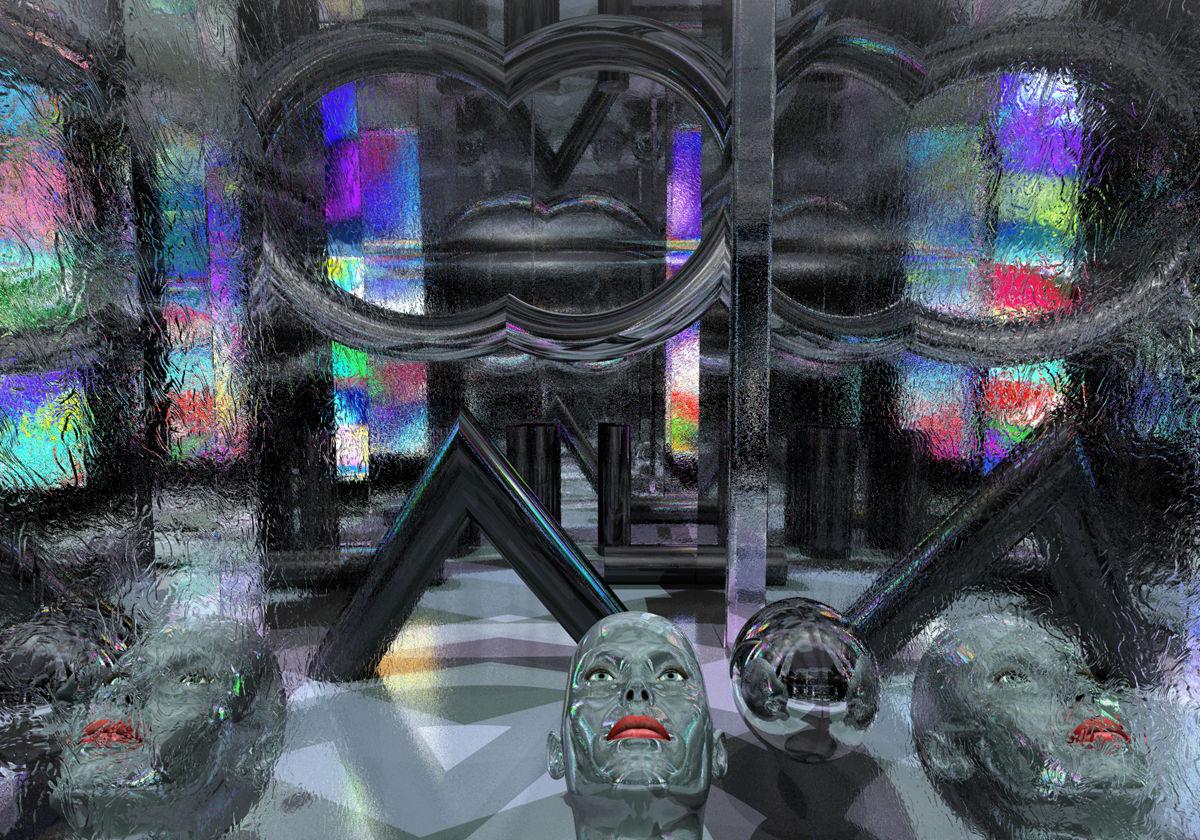 Victoria 4.3
Due to the continued popularity of the iconic Victoria 4, an updated version perhaps could be explored.
V4 only remains "popular" with poser users....for now at least.

Daz 3D is part of

Connect
DAZ Productions, Inc.
7533 S Center View Ct #4664
West Jordan, UT 84084Licensing Agreement | Terms of Service | Privacy Policy | EULA
© 2026 Daz Productions Inc. All Rights Reserved.