
Daz 3D is part of 
Connect
DAZ Productions, Inc.
7533 S Center View Ct #4664
West Jordan, UT 84084
Licensing Agreement | Terms of Service | Privacy Policy | EULA
© 2026 Daz Productions Inc. All Rights Reserved.
Comments
Oh! I do have one new buy I've rendered! https://www.daz3d.com/px-rooftop
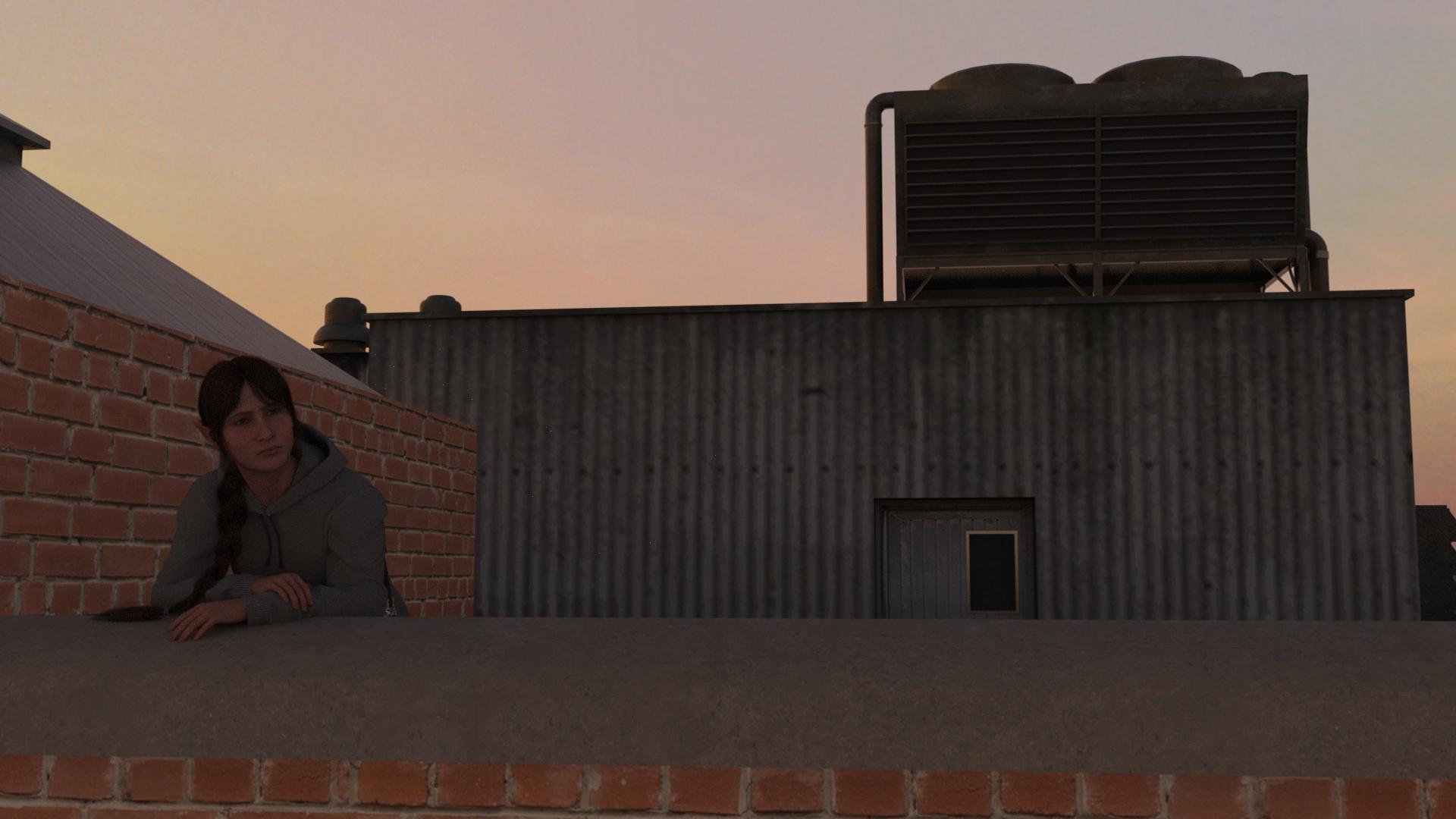
I had to hit it with some shaders because it looked really dated, and then to my annoyance the brick on the structure to the left didn't properly line up at the corner, so I had to frame my shot so you couldn't tell. But as a $2 outlet buy, I feel I can't complain too much. Also, it rendered super fast.
It'll depend on how the surfaces are on this product (if all the brick walls are one big surface, it may require re-surfacing them to avoid fixing problem in one place while creating another elsewhere) but it should be possible to fix the problem by changing the position of textures using the 'Horizontal Offset' and 'Vertical Offset' parameters.
Here's an example with a brick shader on a primitive cylinder:
No change:
Vertical offset changed:
Oh hey, is that what that setting does? Cool! Yeah, I'd have to resurface because it is indeed all one big thing, but I bet that would fix the problem and I could get the bricks to line up at the corner if I played around with it enough. Thanks!
At that point, I might as well just reupload, because it's not my hosting that's being cluttered with duplicates of the same files, and it's really not my job to have to do a load of legwork to fix Daz's poor community section functionality.
Honestly, at this point, I really just want a straight answer about whether anything will be being done to fix this, because I would like to know whether I will be wasting my time if I try to repair posts that this change has broken.
I certainly don't see any immedaite prospect of a fix, and they definitely won't revert.
After a long hiatus, I continued with the final stretch of my fairy tale princess story inspired early on by this thread. I had to split that last chapter into two since it was just too long. So here's the first of those, while I work on the final renders.
There are about 10 or so renders, so I've got them up in the gallery.
Gallery link to chapter 5 of Love Great and Small (All ~10 renders)
Chapter title image... (Love Great and Small, aka The Princess and the Giant)
Previous chapters are here: Chapter 1, Chapter 2, Chapter 3, Chapter 4
I invariably keep adding more pose sets to use for this and other series. They're such great starting points. Plenty more of Zeddicuss and New Guy sets made their way into my runtime over the last few months. A couple of new things I remember putting to use are: Z The Big 50 and Eye Clock Pose Control. That last one by Riversoft Art was a nice find at $1.99. It's been updated since the G3 days to work with G8, G8.1 and G9 as well. Cool!
Thank you for giving this rec! I took a look at it, and I'm not even waiting for it to go on sale more than it already is. That would've saved me so much fuss if I'd had it sooner, and I'm all for making things easier going forward. In the cart it goes!
Eye Clock is cool, and if you don't have it, also Look at Me II:
https://www.daz3d.com/look-at-me-ii-pose-control
I use it almost every time I do anything in Daz, pretty much when there's anything with eyes...
Same rec here, these are my must-haves in terms of posing.
I do have Look At Me II and use it a bunch! Pretty sure I picked it up off a rec in the forums somewhere, but thank you for the repeat. If I hadn't already known about it, I would definitely want to!
Not much new in this one, but I *did* get this Locker Room from the Outlet Store, and while it needed some shader updates, I will commend it for the lockers having posable doors and modelled interiors, which is not something you can expect from every environment set on the store.
Gallery Link
Before I go do something with that giant pile of G8 poses that I just bought, I finished this minor WIP that uses a bunch of stuff that I just picked up in the last week or so:
https://www.daz3d.com/fn-san-street
https://www.daz3d.com/dforce-linet-hair-for-genesis-9
https://www.daz3d.com/dforce-hnc25-knit-cardigan-outfit-for-genesis-9
https://www.daz3d.com/tn-winter-collection--hats-and-scarves-for-genesis-8-female--genesis-9
https://www.daz3d.com/tn-winter-collection--bags-for-genesis-8-female--genesis-9
https://www.daz3d.com/vrv-evie-jewelry-style-boutique-addon-for-genesis-9-81-and-8-females
That looks fabulous!
Paula and Matt, the new renders look so cool! Matt, thanks also for the locker room recommendation, put it in my cart right away. And Paula, you basically rendered all my new stuff there, too! Nice to see that it all actually looks as good as I hoped it would.
Yes, the sort of thing we don't see often enough
I just saw on my local news channel a spot where a fashion coordinator was on showing how to use separates and accessories to pull together a variety of looks for summer. I was thinking I wanted to try to do that in DAZ since I never do it for myself. And here you have a lovely example.
@paulawp (marahzen) you have done that for the fall. And I agree with barbult, it does look fabulous!
Hey, thanks all, for all the nice compliments! This was a fun bunch of stuff that all came in together in one or two recent carts I picked up.
I'm loving all these entries, but maybe not the toll it takes on my wishlist and wallet! Thanks as always for sharing!


I'm gonna cross post. I just finished up a series with KA's Iray Cinematic Cameras for the DAZ sale contest thread, and turned it into a video. It also stars an older buy - Sickleyield's Cracked Creepy Doll, who didn't feel creepy at all to me as I worked with her, and was rather very sweet. Some of the other new things I used include KA's Ultimate dForce Bed 2, Sleeping Beauty pose set, HDRI Extensions Aftermath and Dance Dance poses for G8. And probably a few other things I'm forgetting...
The series is a visual narrative about finding your joy and serenity, regardless of the state of the world around you, alongside a soundtrack that reflects that inner state of mind. I composed and sang the music as an exercise in minimalism. It consists of a processed dulcimer musical bed under an improvised vocal.
@SapphireBlue Beautiful
This is so, SO beautiful and whimsical and wistful and sweet! Such a lovely way to start my sunday morning. I'll be running over to Youtube in a sec and liking the hell out of it ;-) How did you get the renders to look so nostalgic? Oh, and what language are you singing in here, I couldn't quite catch the words. Sorry if you explained this already elsewhere! - I have that doll too, now I'm so inspired to go something lovely with it as well.
I got the https://www.daz3d.com/dforce-ubor-for-genesis-9 when it was in a freebie offering amongst a bunch of textures. I didn't like the dress with its boob flashing but I loved the cape. So I got it and yesterday I converted them to G8. And happily discovered an 'invisible' surface that covered the centre panel and was textured to boot...woot! Used a OOT hair I got last week, some poses from the Amazing Pose Sale of 2025, and suddenly I had a render.
Finally pulled everything together to nerd out and give my geeky character the Doctor Who fangirl cosplay she so richly deserves
New assets:
TARDIS: https://www.daz3d.com/historic-police-box
backdrop: https://www.daz3d.com/back-alley (currently in Outlet for the lower tier; the gas mask graffiti was already there! Added the White Wolf off to the side as a decal node. Also hid some of the stuff on the side of the building because it was irrelevant visual clutter)
coat: https://www.daz3d.com/classic-trenchcoat-for-genesis-3-male-s (comes with a nice flare morph, had to parent to the jacket and then use geometry editor to hide some persistent pokethrough bits)
suit: https://www.daz3d.com/trading-floor-outfit-for-genesis-3-male-s (works remarkably well as long as you fit the jacket to the shirt)
sneakers: (not new, but for the sake of being complete) https://www.daz3d.com/dforce-capsule-wardrobe-01-for-genesis-9 with https://www.daz3d.com/capsule-wardrobe-01-texture-addon
Sonic screwdriver: freebie from Sketchfab
This is really cool to know, thanks for sharing! I got the outfit in the same sale and had the same annoyance; thought I would use a geoshell beneath it maybe. But this is much better!
Cute render, and thanks for sharing! The neckline (if it can even be called that) turned me off looking further, but that cape really is fun, and it's nice to know the dress can be salvaged. It's on my wishlist now!
MoreTN Thank you very much!
Lorraine Very cool render! And very useful discovery.
SilverGirl Fun! I find myself living vicariously through some of my characters...
tsroemi Aw, thank you so much! I'm glad you liked it. "Whimsical and wistful and sweet" is a very good description! As for the song, it isn't in any language. It was an improvised vocal and I just made up sounds/words as I sang it. It's pretty common in improv traditions (like in jazz vocal improvs or improvs in Indian ragas), and also happens in a slightly more organized way in some full songs. Lisa Gerrard does that often in her music, like for her song in Gladiator.
For the renders, I approached the look in a few ways. Below are the original render and the postworked version of one image to help compare. Hopefully this explanation gives some useful ideas.
Within DAZ Studio I opted for a blue night-time HDRI on a lower setting to create a darker blue-tinted environment that fades away behind the character, especially with the added DOF. Then used a more warm-hued spotlight on the character with some godrays (I think this one). For a nostalgic look, several things help to reduce the clean crisp evenly-lit DAZ render look. I first brightened up the render a bit, and softened the whole thing with some bloom/glow (can also be done in DAZ Studio), then used some of Ron's bokeh and light brushes to add soft bokeh and light patches in blue and pink/purple tones (blended in very low amounts to the render). That softness and un-eveness makes a difference.
For the video, I also used Ron's grunge brushes to create a grungy frame that I used as an overlay for the entire video - kind of ties in with the destroyed and crumbling environment in the renders.
I hope you do render something with the doll too and share it with us! I love how each character looks different and comes to life in a different way in every project and in every different pair of hands. And each of them (and all our DAZ stuff) is a little treasure in our runtime!
Can finally join in on this thread - I had fun doing this, and I will do more because I have a ton of older products I never even used (how sad )
)
My latest artwork: Aiko's Revenge
I actually did 5 pieces and posted them in the Gallery.
Rendered in DazStudio, postwork in Photoshop, Topaz2, PortraitPro
Aiko 6 (Genesis2 Female)
FW Lin
Sporty Braid
Mech Girl for Genesis 2 Female
TY3DArt She looks really great!! I was going to suggest you post some of your other renders with her in the G2 thread and just noticed you had. Can you let me know what environment you used - looks neat.
Uploading a quick doodle. My Plus subscription is expiring in a few days so I spent the DO coupon on two low-priority items that had been on my wishlist forever. I got Erevan Airy for her watercolour tattoos (her shape does nothing for me and I didn't use it for this render) and oldie-but-goodie Olenna Hair.
Thank you for all the explanation! I hadn't gotten a notification that you replied, so sorry I'm really late! Again, I love the effect you achieved here. Will be saving the above pic to my iPad, just to look at and be calmed ;-)
Okay, I finally got a new one, using the new cameras https://www.daz3d.com/iray-cinematic-cameras like Sapphire Blue did, but nothing as fancy, 'cause this is my first foray into depth of field. Also new (for me at least) is Noemi by Bluejaunte (https://www.daz3d.com/noemi-hd--smile-hd-expression-for-genesis-8-female). The basset is from Lyne's animals I think, I can't remember exactly where I got it. I'm quite happy with the general vibe, but I think I accidentally put the figure's face slightly outside of the focus area. Never mind though, I still really liked the overall effect. The lovely lighting and puddles are from After Rain 2 (https://www.daz3d.com/after-rain-2). I'll put everything else with the gallery image as usual.
"Shades of Orange after Rain" (well ... duh ...)