-
Daz loading new installs into Lost and Found, Why? and How to fix?
"Are there any so-called "third-party creators and vendors"?
Yes, for example, Sickleyield has products in various 3d stores and isn't a Daz3d employee but sells a portion of her products through the store as opposed to whoever created Victoria 9 which either was made completely in house or a PA was commisioned by DAZ3d to create the product specifically for the DAZ3d and cannot ever show up at Renderhub or Renderosity. The category has gotten blurry but the "core" characters always have Daz3d as the creator. Some vendors have multiple generations of the same character but they are considered the "artist name" Trixie 3.0 for example rather a core character like Michael or Victoria.
The older generation: Victoria 2/3, Michael 2/3 and their children rendersI have been asked (admittedly not very recently) why I still bother with V3. I can now say 'Because this:' and show the attached image.
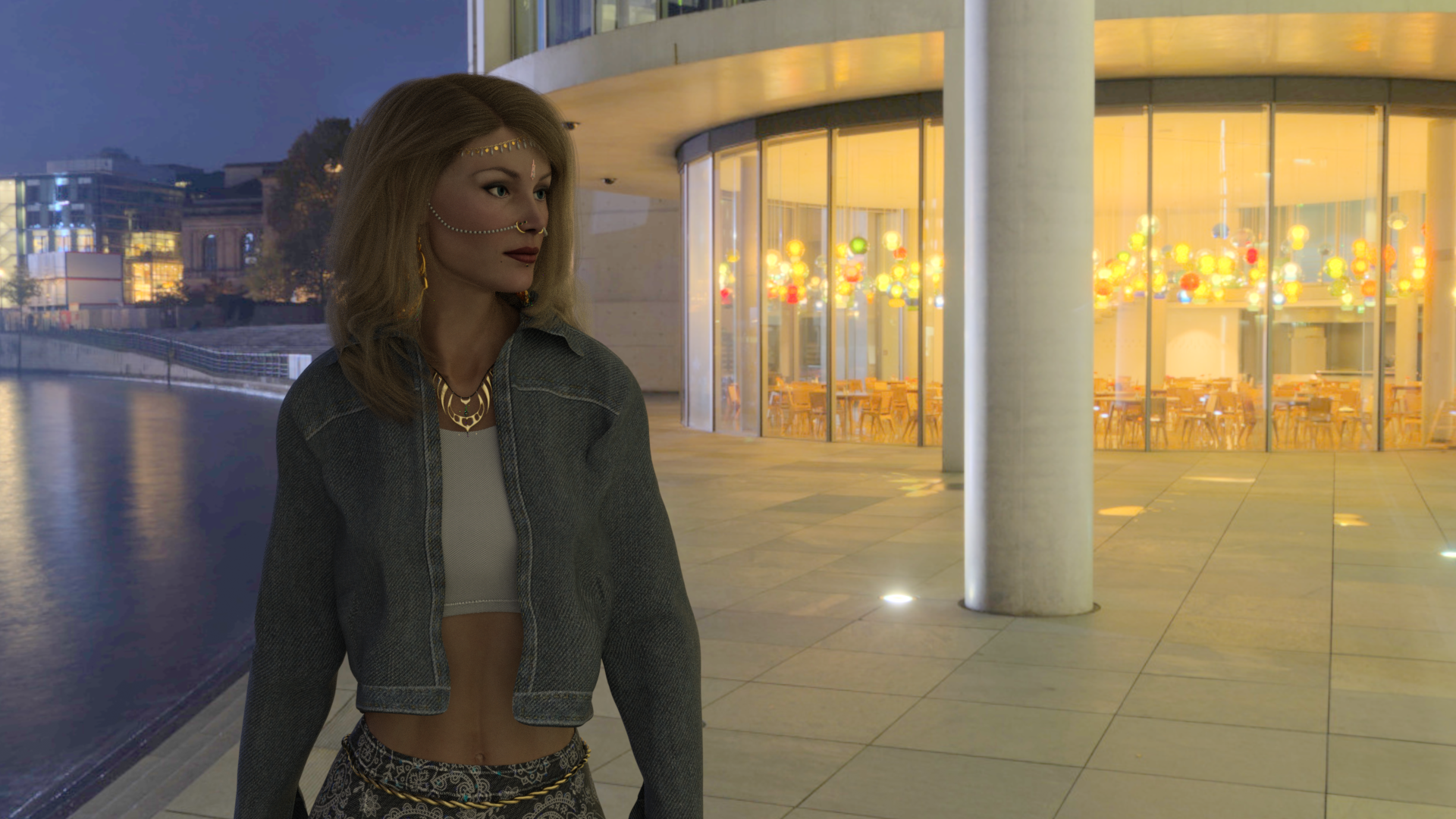
Jim Burton's Glamorous Vickie 3 TriAx'ed, G8F Denim Diva outfit, G8F Akhelloos Kasia Hair and V3 Celestial Jewels converted to TriAx GV3 wearables. PolyHaven HDRI.
While I was converting the nose ring on her right into a TriAx GV3 wearable, I exported, mirrored and inverted normals on the ring and chain, re-imported, and created a left nose ring wearable to match the right side one - so don't go looking for a left side one in the Celestial Jewels set.
I have just noticed that the HDRI is actually a different direction of view of the HDRI used in another of my GV3 images, the one here. Dear me.
Regards,
Richard
Genesis 2 Appreciation Threadrichardandtracy said:
@DollyGirl, that is very illuminating. The use of the same texture, hair, clothing and pose on both characters enables a direct comparison of the differences. V3's hand, elbow & armpit show their age quite a lot in the image. However, you have also shown that with a bit of work, both generations can stand alongside G8 and G9 for a full figure shot without looking out of place. Most impressive.
Regards,
Richard
@DollyGirl: Totally agree, this is incredible - a V3 texture which looks so beautiful and realistic even today, I also like the outfit with feather boa - many thanks and I hope you don't forget to post it also at https://www.daz3d.com/forums/discussion/108001/the-older-generation-victoria-2-3-michael-2-3-and-their-children-renders. Very impressive!
Hair products - simple explanation neededAlso SBH was introduced after G8, so you can assume everything before is not. As well hair curves and the omnihair shader were introduced after G9. For example Victoria 8 is code 43673, so a hair product before that code can't be SBH, that of course doesn't mean everything after is SBH as PAs are not forced to adopt the new hairs.
p.s. In general you can always look at codes to evaluate how old a product is, or go to the documentation center.
http://docs.daz3d.com/doku.php/public/read_me/index/start
p.p.s. Also be aware that hair curves don't support the omnihair shader as you get a different result.
Can you help me with a college project?- How long have you used Daz 3D Studio?
- I first used DS at version 0.7.xx beta in 2005. I continued with its development until 2007 when it became apparent my PC couldn't cope with Victoria 4 or Genesis. I took a break until 2019 when I got hold of a vastly more powerful ex-work machine that I could upgrade further quite cheaply. Since then, I've stuck with DS.
- Do you use any other software with Daz 3D? (bridges, photo editing, or other rendering software)
- I do use other software. As a creator of a certain amount of freebie content, I do use various other programs. Due to my history as a design engineer, stress engineer and amateur programmer, some of my programs are unique. I use my own copy of SolidWorks to model mechanical items. The version of SolidWorks I have and DAZ Studio have no common formats or bridges, so I export to STL format, use my own STLtoOBJ translator, clean the model in my own home written 3d modeller (which I originally used to create stress models with and have repurposed by adding additional functions). Then I either texture map in my modeller or in 'UVMapper Free'. I create textures in 'PaintShopPro 5' or 'GIMP' (only if PSP5 can't do it). Normal maps and bump maps are generated from textures using 'Materialize'. Then, I collect and zip a distribution package together using 'Windows Explorer' or '7Zip' - depends how lazy I feel. I have used Carrara and Pegasus 4.1, neither of which have got to finished products yet. Hexagon and Blender work well for artistic types and the way they think. I'm an engineer, and both programs feel irrational in the way they work to me. Blender by & large only has video tutorials - which are unsearchable, and hugely inefficient in time and bytes and seem to always miss the single piece of information I've wasted 30 minutes watching for.
- How easy or difficult was it to learn Daz Studio?
- I thought it fairly easy to use to a basic level. Due to the catastrophic inadequacies of the documentation, it is far from easy to use to its limits.
- Did you have to purchase a specific computer to use the application?
- I did not have to. I chose to buy one. My second hand work computer was satisfactory, but getting very long in the tooth as it dated back to 2013, and I replaced it at 10 years old.
- How much money have you spent at the marketplace or other third-party sites for content?
- These days I have a monthly discretionary spending budget of £60 for all my hobbies. These include fountain pen making, metalworking, model trains and cross stitch. This hobby has to take its place in that.
- What kinds of bugs or errors have you ran into?
- None really. I don't push the program to its limit so really only use tried and tested features.
- Is there anything you would change about the application?
- It needs, desperately, an adequate WRITTEN handbook. Video is unsearchable, hopelessly inadequate and grossly inefficient in terms of bytes an time, at recording every function, syntax, script use etc. Not only would it document all the functions for the users, it would also ensure that the programmers document every function so nobody looses track of any function or nuance.
One thing that may be of interest to gather is what users consider to be DS's unique selling points. To me, it's rendering quality and UltraScenery. No doubts.
Regards
Richard
Genesis 2 Appreciation ThreadI forgot how well G2F cleans up with some updates to the skin settings.

FW Destiny HD for Victoria 6: https://www.daz3d.com/fw-destiny-hd-for-victoria-6
Skin updated to Iray with: https://www.daz3d.com/n-g-s-anagenessis-2-revolution and https://www.daz3d.com/iray-smart-converter-and-advanced-skin-managers-for-genesis-2
Hot Uniforms School Girl for G2F (shirt, skirt, and backpack): -no longer for sale here http://docs.daz3d.com/doku.php/public/read_me/index/20831/start
XBikini: https://www.daz3d.com/xbikini-for-genesis-2-female-s
FW Kenzi (eyeglasses): https://www.daz3d.com/fw-kenzi-character-and-accessories
Delphi Hair for G3F/G8F: https://www.daz3d.com/delphi-hair-for-genesis-3--8-females
LuneChains for G3F (sold at Rendo)
Lighting: PixelTizzyFit NeonSplash 3 pt lighting setup combined with a Cake One HDR:
https://www.daz3d.com/ptf-neon-splash-lighting-suite
https://www.daz3d.com/click-n-render--pop-edition--ibl-set
FE Strand-Based Bubble Bob Hair for Genesis 9 character in promoThe skin and brows are from Victoria 9: https://www.daz3d.com/victoria-9-hd
Maybe it's her head morph too, but she felt a bit younger than she usually is. I can't say it's because FeSoul blended her with other character or if it's the hairs or her expression.
Product: https://www.daz3d.com/dforce-fe-strand-based-bubble-bob-hair-for-genesis-9
AI gets it right!AndrewJJP You can find out more about this topic from the previous threads that exhaustively went over it - all just a google search away. (Where even google's AI assistant will give you a summary of what's in those threads...)
The "AI gets it right" statement for a user influenced response was a bit jarring. So here, we can also let AI Victoria summarize that side for us! Why not?
My question:
Can you state all the reasons PAs can't link to all the products used in the promo images?AI Victoria's answer: (Quickly pulled and magically summarized from various threads - may not be complete and comprehensive of course - so best to refer to those actual threads as needed too):
Here are the main reasons why PAs (Publishing Artists) can't link to all products used in promo images:
Time and Effort Constraints
- Creating comprehensive lists requires significant additional work with no financial benefit to PAs
- PAs pull many different objects to create appealing images, making it impractical to track every asset used
- Listing assets weeks or months after creating artwork becomes extremely difficult
Custom and External Assets
- Many PAs use personal custom characters rather than store-available products
- Assets often come from other websites outside of Daz, which can't be linked back to our store
Production Workflow Issues
- PAs may not create their own promos - external promo artists handle the work
- Kitbashing involves combining 30+ products, making comprehensive listing impractical
Business Structure
- PAs don't receive affiliate income from listing other products
- Our store policies don't allow linking to competitor products
The primary goal is showcasing the featured product effectively, not cataloging every supporting asset used.
AND from one those threads, here's Zicon's quick list explaining it all too:
Zicon said:
Possible reasons why a PA has not listed additional assets used in promo images for a product:
- the asset is sold in a different store
- the asset isn't sold anywhere anymore
- the asset was created specifically for the promos and is not available
- the asset is an early version of a different product and looks different from the finished version
- the asset was modified so heavily by the promo artist that it's not representative of the product used
- the PA does not remember what assets were used
- the promo was made by someone else and the PA does not know what assets were used
- creating a product is a lot of work and listing assets used is yet another chore
- the "additional asset" is part of the product
Does this bikini come with a morph that allows you to untie the knots?Thank you Leana, I'd forgotten the address format for direct access to the readme. And you're right. No untie morphs.
The Hongyu G8 bikini does, as does the equivalent G3 bikini, if that's any use.
Regards,
Richard
Genesis 2 Appreciation ThreadMany thanks @SapphireBlue, hope you will show us some more g2 artworks of yours!
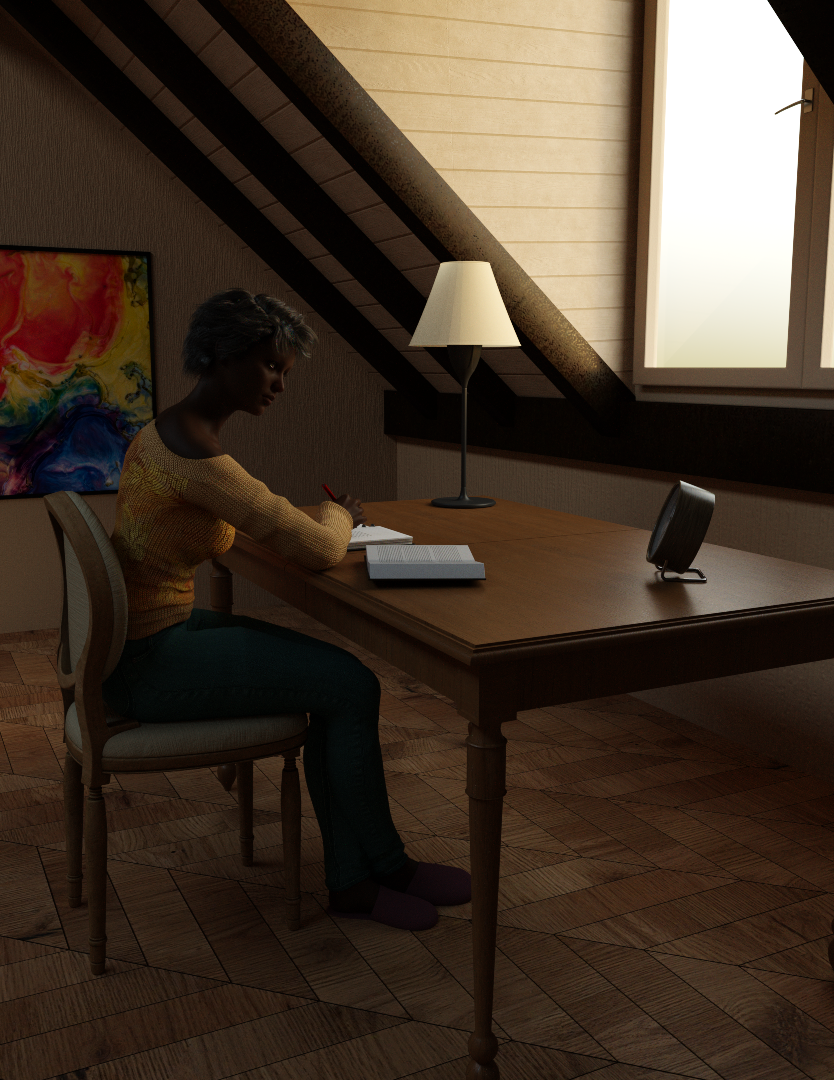
Here is a more relaxed and quiet render: https://www.daz3d.com/candy-slims-jeans-for-genesis-2-female-s by WildDesigns with the sweater from https://www.daz3d.com/autumn-chill-for-genesis-2-female-s also by WildDesign with another texture pack available: https://www.daz3d.com/coldsnap-for-autumn-chill by Jessaii and Raziel. The slippers are from https://www.daz3d.com/nitetime-outfit-for-genesis-2-female-s by Nikisatez. https://www.daz3d.com/micah-hair by AprilYSH includes a male and female version. The character is https://www.daz3d.com/nyota-victoria-6 by gypsyangel. Not g2 but the fountain pen Nyota is using is a freebie from @richardandtracy: https://www.renderosity.com/freestuff/items/95165/cheap-fountain-pen (commercial use allowed). Many thanks, Richard!
 Genesis 2 Appreciation Thread
@richardandtracy: Many thanks, Richard! No secrets with my cropping, I wanted the focus on the face and the dress, that was all
 .
. It is weard, that the MFD expansion packs for V3 and Sp3 are still available, but the MFD itself disappeard. As far as I understand, the generation 3 textures fit the g2 and V3 MFD version, and quite some are on sale at the outlet right now:
https://www.daz3d.com/once-upon-a-time-cinderella
https://www.daz3d.com/blue-dream
https://www.daz3d.com/midnight
Will be good news for the V2/3 and M2/3 and children Appreciation Thread: https://www.daz3d.com/forums/discussion/108001/the-older-generation-victoria-2-3-michael-2-3-and-their-children-renders/p1, if you succeed in creating renders!
Genesis 2 Appreciation ThreadI really enjoy catching up on this thread when I pop into the forums. The renders are great! Genesis 2 still has so much to offer.

The cinderella render is lovely and atmospheric mding! That dress looks really great. I know I have it, but I also know I've never tried it before...
That gallery entry with Michael 6 is insanely good! I now feel the need to try him in some proper renders.
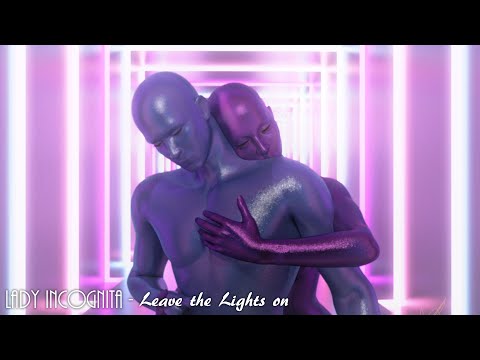
I recently visited an old project - my first little music video from 2022.
Since I had a lot of renders to do and didn't have a graphics card, I opted to keep things simple. I went with Victoria 6 and Michael 6 in colored geoshells in a single setting, making good use of the Ultimate Couple Dances Poses set for V6 and M6 (so I didn't need to adjust the poses much). Every generation is still a lot of fun to use. They're all really nice in their own way.
Here's the video. Warning for flashing lights. (These were incomplete CPU renders, since I had little patience but also because I liked the grain for a more retro analog look).
 Genesis 2 Appreciation Thread
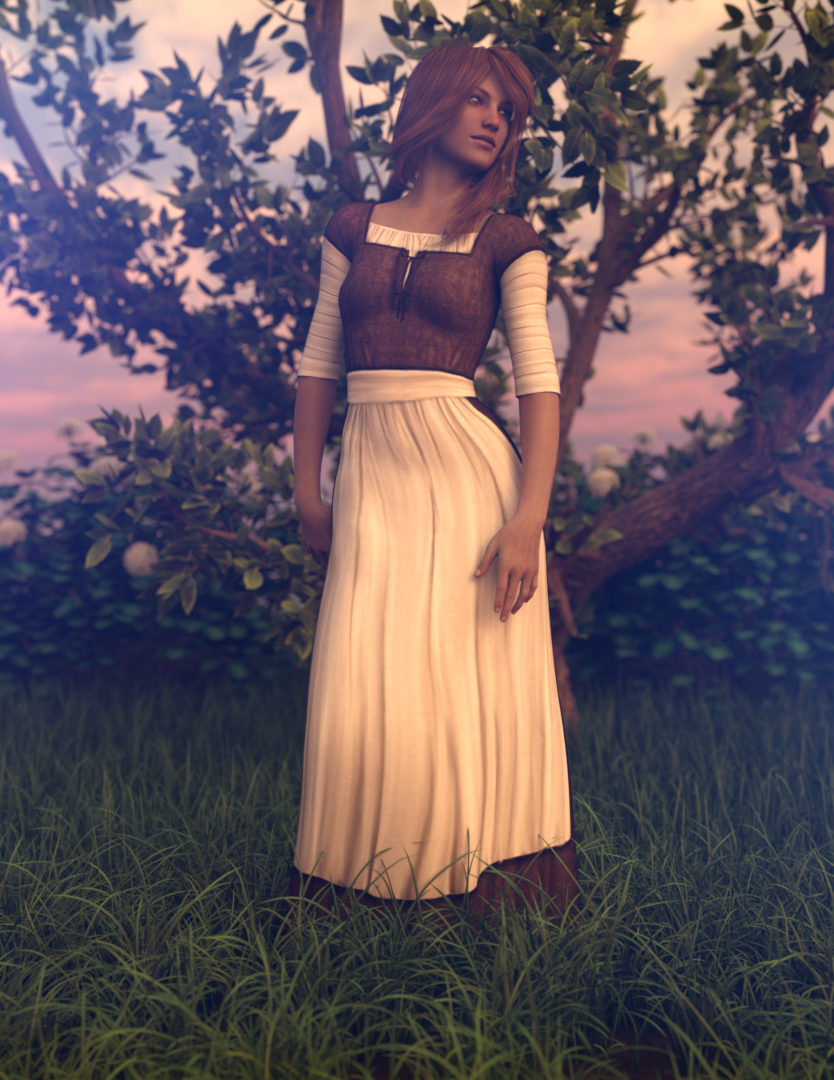
This is https://www.daz3d.com/morphing-fantasy-dress-for-genesis-2-females by JGreenlees and Ravenhair, and the texture option https://www.daz3d.com/once-upon-a-time-cinderella by LaurieS with SKU 1360 turns it into one of the oldest assets for g2f in the shop. Hair is https://www.daz3d.com/belinda-hair-for-genesis-3-female-s-and-genesis-2-female-s-and-victoria-4 by SWAM.
 Genesis 2 Appreciation Thread
Just a little scene, G2F Britany with her feet in Linday's stone swimming pool, accompanied by a cat (who looks very like our late Squeaky who died at 19.5 years old earlier this year). Britany's hair is Linday's G3 summer wet hair. The other character is Jim Burton's Glamorous Vickie 3 ( separate Bikini , hair is the unavailable V3 Las Vegas Hair by Jim Burton) and she's trying to make friends with a mini Galapagos Tortoise (which was a freebie in 2006).
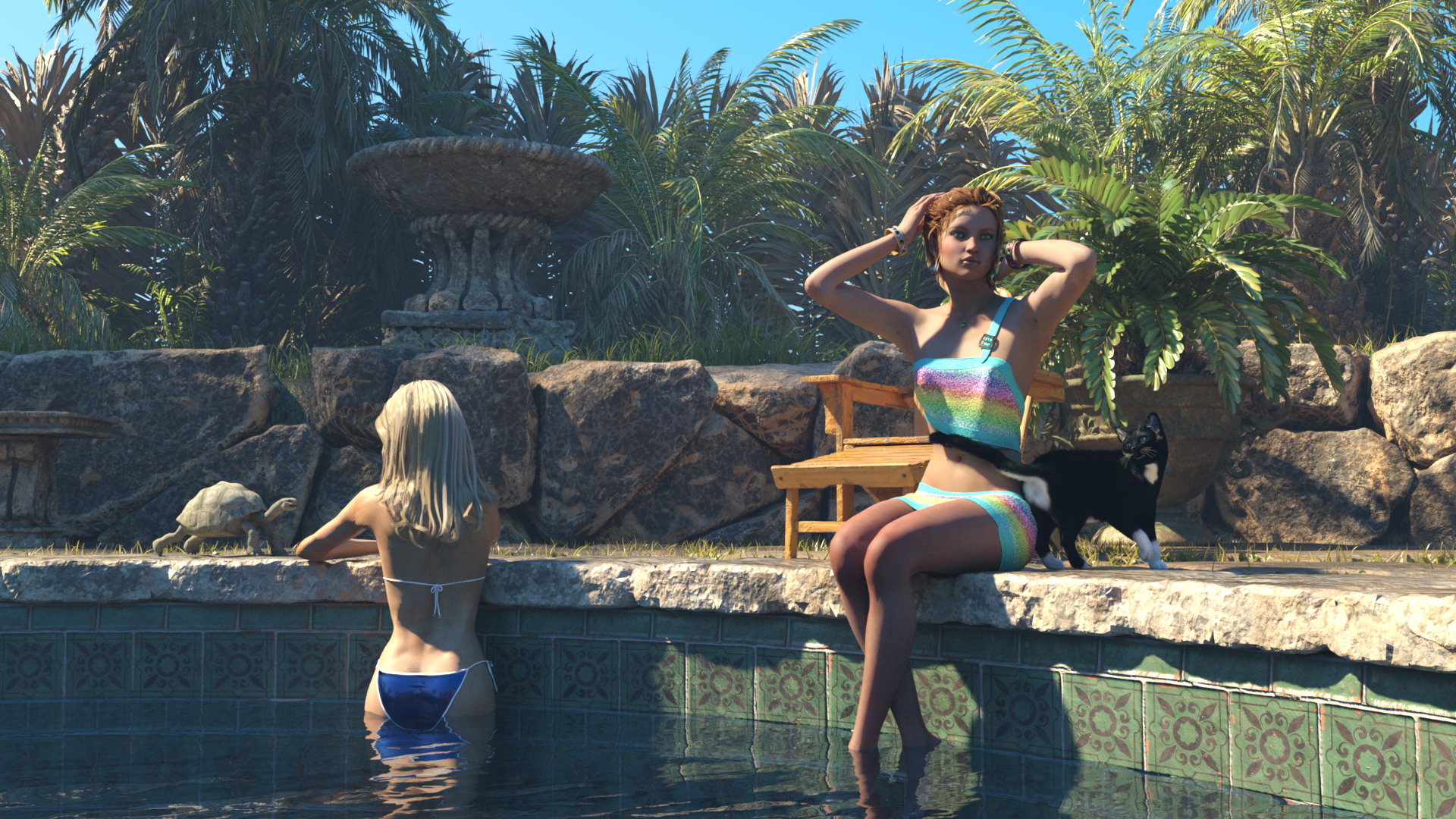
I had meant to put some octagonal highball glasses within reach of each character, but on balance the pets would probably knock them over. I used dForce to drape Britany's dress. The buckle exploded until I set that as having a dynamic strength of zero. The reason - putting Britany's thighs together made the skirt, for some reason known only to itself, gape upwards somewhat, and for realism purposes, dForce had to smooth it down a bit.
Regards,
Richard.
Generation 3 Aiko and Hiro Appreciation ThreadJan_Scrapper said:
Ethin, I am in awe of your work with A3. My dream would be to transfer her textures to Iray. I am so confused with what you are doing...which is absolutely brilliant.
Also, if you are transferring A3 Poser textures to Daz Studio Iray, please, please tell me how you are doing that!!! I will pay for lessons if that is possible!!
Thank you!
 I have to admit I’m in awe of my own work as well, it seems like not too long ago that I wasn’t that good.
To answer your most pertinent question, I’m afraid I don’t use Iray much, what you see here and in 98% of my work is good old 3Delight. In the few Iray renders I’ve done if something didn’t all ready have Iray settings I just copied them from something with a similar surface.
@richardandtracy made a Gen3 Iray preset. ( https://www.daz3d.com/forums/discussion/108001/the-older-generation-victoria-2-3-michael-2-3-and-their-children-renders/p16 not too far down the page)
I read that you try to stay away from creating textures...I think I read that, anyway.
I may have made some comment to give you that impression, but that would be far from the truth, if I have D|S open then photoshop is also open. Not that most of the stuff I make is professional grade or anything, half the time it's sloppy on the fly just good enough for the project at hand.
Now I haven’t made a whole human skin texture from “scratch” that I can share or sell yet, not for a lack of wanting to or resources or skill, it’s still just a bit too intimidating as of yet.
This kitbash of outfits is amazing! I recognize Blossoms Day by FK Design and Sugar by Lady LittleFox. I know the sleeves, however just cannot place them. The same with the bodysuit and the little skirt. Would you please reveal all of the outfits that you included here?
The small skirt is also FK’s
The tiara is from Batlab’s free ballerina set
The earrings, choker, over skirt, anklets, and shoes are from Sugar
The sleeves are from CDI/Littlefox’s A3 Ballet
The swimsuit was made by kobamax, I think it was a freebie from one of the old Japanese poser sites
I know you don't want to give away secrets. I watched your video. It's rather overwhelming and deals with morphs, not textures...right??
I know you spend a lot of time on your art and do not want to divulge all of your secrets. I so much understand!!!
Secrets? lol I would gladly help out all I could, but between low social skills and high anxiety I normally just cop out for short simple replies, I spent several hours just trying to figure out a (hopefully) thorough and well worded response for you.
*sigh* Yeah, my vids are not the most educational things, I don’t have a microphone so I can’t talk about what I’m doing, not that I know the correct terminology, and most of the texture and shader work was done before hand since the focus of the vid is more on the character shape. The only things I edit out of my vids are shots of NSFW texture sheets and library thumbnails.
If you want to know anything else ask away, I’ll try my best to give you a hopefully coherent and timely answer.
Store "Shop" menu is now gone?09:37 AM | Victoria: Ticket number: #479263 has been created. You will receive further responses via email.
---
Exported from Daz 3D on September 10, 2025 at 09:37 AM America/Denver time MDT (GMT-0600)
Did you happen to check and see what was in that ticket AIVictoria made? I ask because the ticket that was made from AI for me was completely blank.
Store "Shop" menu is now gone?So spoke with Vicki AI and here is the convo.
Conversation with Daz 3D
Started on September 10, 2025 at 09:25 AM America/Denver time MDT (GMT-0600)
---
09:25 AM | RAMWolff: why is the Shop button in the store hidden or removed?
09:25 AM | Victoria: Missing buttons in our store can happen occasionally due to temporary technical issues. This affects various buttons including "Add to Cart" and other shop features. (https://www.daz3d.com/forums/discussion/415/where-is-the-add-to-cart-button)
When this occurs, it's usually a temporary glitch that gets resolved automatically. The buttons typically reappear after a short time.
If you're using browser add-ons like the Daz Deals extension, some store functionality might be reduced or unavailable on certain pages, particularly search results pages. (https://www.daz3d.com/forums/discussion/454726/announcing-daz-deals-browser-add-on-ii/p4) (https://www.daz3d.com/forums/discussion/454726/announcing-daz-deals-browser-add-on-ii/p6)
Try refreshing the page or waiting a few minutes - the Shop button should return once the temporary issue resolves.
Sources:
Where is the Add to cart button?? - Daz 3D Forums (https://www.daz3d.com/forums/discussion/415/where-is-the-add-to-cart-button)
Announcing: Daz Deals Browser Add-on II - Page 4 - Daz 3D Forums (https://www.daz3d.com/forums/discussion/454726/announcing-daz-deals-browser-add-on-ii/p4)
Announcing: Daz Deals Browser Add-on II - Page 6 - Daz 3D Forums (https://www.daz3d.com/forums/discussion/454726/announcing-daz-deals-browser-add-on-ii/p6)
09:25 AM | Victoria: Was that helpful?
09:26 AM | RAMWolff: It's been missing for a few days now since introducing YOU to the pages. Not blaming you but it's a button I use all the time
09:26 AM | Victoria: I understand how frustrating that must be when it's a button you rely on regularly. Since it's been missing for several days rather than just a temporary glitch, this sounds like a more persistent issue that needs attention.
The forum discussions show that missing buttons like this do get reported and resolved, but when they persist for days, it typically requires our technical team to investigate. (https://www.daz3d.com/forums/discussion/415/where-is-the-add-to-cart-button)
Have you tried clearing your browser cache completely or testing in a different browser to see if the Shop button appears there?
Source:
Where is the Add to cart button?? - Daz 3D Forums (https://www.daz3d.com/forums/discussion/415/where-is-the-add-to-cart-button)
09:29 AM | RAMWolff: No, I really like using Opera browser and I really don't want to use two browsers for various browsing needs. Just seems overkill
09:29 AM | Victoria: I totally understand wanting to stick with Opera! Let's try clearing your browser cache in Opera first - that often resolves missing button issues without needing to switch browsers. (https://www.daz3d.com/forums/discussion/454726/announcing-daz-deals-browser-add-on-ii/p6)
In Opera, you can clear cache by going to Settings > Privacy & Security > Clear browsing data, then select "Cached images and files" and clear it.
Do you happen to have any browser extensions installed in Opera, particularly any Daz-related ones? Some extensions can affect store functionality and cause buttons to disappear. (https://www.daz3d.com/forums/discussion/454726/announcing-daz-deals-browser-add-on-ii/p4)
Sources:
Announcing: Daz Deals Browser Add-on II - Page 6 - Daz 3D Forums (https://www.daz3d.com/forums/discussion/454726/announcing-daz-deals-browser-add-on-ii/p6)
Announcing: Daz Deals Browser Add-on II - Page 4 - Daz 3D Forums (https://www.daz3d.com/forums/discussion/454726/announcing-daz-deals-browser-add-on-ii/p4)
Announcing: Daz Deals Browser Add-on II - Page 5 - Daz 3D Forums (https://www.daz3d.com/forums/discussion/454726/announcing-daz-deals-browser-add-on-ii/p5)
09:30 AM | RAMWolff: Cleared the cache, button still missing
09:30 AM | Victoria: Thanks for trying that! Since clearing the cache didn't help, let's check browser extensions next. The forum discussions mention that some store functionality can be reduced or unavailable when certain extensions are active, especially on search results pages. (https://www.daz3d.com/forums/discussion/454726/announcing-daz-deals-browser-add-on-ii/p5)
Can you check if you have any browser extensions installed in Opera, particularly any Daz-related ones like Daz Deals? If you do, try temporarily disabling them to see if the Shop button returns.
Source:
Announcing: Daz Deals Browser Add-on II - Page 5 - Daz 3D Forums (https://www.daz3d.com/forums/discussion/454726/announcing-daz-deals-browser-add-on-ii/p5)
09:31 AM | RAMWolff: I just disabled DAZ Deals and the button is still missing.
09:31 AM | Victoria: Thanks for trying that! Since disabling Daz Deals didn't restore the Shop button, this points to a deeper store issue rather than an extension conflict.
The forum discussions show that users sometimes need to uninstall and reinstall the Daz Deals extension completely to get store functionality working again, rather than just disabling it. (https://www.daz3d.com/forums/discussion/454726/announcing-daz-deals-browser-add-on-ii/p7) Some users report that checkboxes and buttons disappear intermittently and require a full reinstall to restore. (https://www.daz3d.com/forums/discussion/454726/announcing-daz-deals-browser-add-on-ii/p3)
Try completely uninstalling the Daz Deals extension from Opera, then restart your browser and see if the Shop button returns. If it does, you can reinstall Daz Deals fresh.
Are you seeing the Shop button missing on all store pages, or just specific ones like search results?
Sources:
Announcing: Daz Deals Browser Add-on II - Page 7 - Daz 3D Forums (https://www.daz3d.com/forums/discussion/454726/announcing-daz-deals-browser-add-on-ii/p7)
Announcing: Daz Deals Browser Add-on II - Page 4 - Daz 3D Forums (https://www.daz3d.com/forums/discussion/454726/announcing-daz-deals-browser-add-on-ii/p4)
Announcing: Daz Deals Browser Add-on II - Page 3 - Daz 3D Forums (https://www.daz3d.com/forums/discussion/454726/announcing-daz-deals-browser-add-on-ii/p3)
09:32 AM | RAMWolff: IF I restart the browser will I loose my conversation with you?
09:32 AM | Victoria: No, you won't lose our conversation! Our chat is saved on our servers, so when you restart Opera and come back to this page, you'll see all our messages still here. (https://www.daz3d.com/forums/discussion/737571/cleaning-up-broken-references)
Go ahead and restart your browser - I'll be waiting right here when you get back. Then we can see if uninstalling the Daz Deals extension helped restore your Shop button.
Source:
Cleaning up broken references - Daz 3D Forums (https://www.daz3d.com/forums/discussion/737571/cleaning-up-broken-references)
09:32 AM | Victoria: Was that helpful?
09:33 AM | RAMWolff: Sadly, no! It's still MIA!
09:33 AM | Victoria: I hear you - this is definitely persistent! Since we've tried the usual fixes, this looks like a deeper store issue that's affecting your specific setup. (https://www.daz3d.com/forums/discussion/454726/announcing-daz-deals-browser-add-on-ii/p6)
The forum discussions show that some users experience intermittent button disappearances that require multiple troubleshooting attempts, and sometimes the issue is on specific store pages rather than everywhere. (https://www.daz3d.com/forums/discussion/454726/announcing-daz-deals-browser-add-on-ii/p7) (https://www.daz3d.com/forums/discussion/454726/announcing-daz-deals-browser-add-on-ii/p3)
Can you tell me which specific store pages you're missing the Shop button on? Is it happening on the main store page, product pages, search results, or everywhere you look?
Sources:
Announcing: Daz Deals Browser Add-on II - Page 6 - Daz 3D Forums (https://www.daz3d.com/forums/discussion/454726/announcing-daz-deals-browser-add-on-ii/p6)
Announcing: Daz Deals Browser Add-on II - Page 7 - Daz 3D Forums (https://www.daz3d.com/forums/discussion/454726/announcing-daz-deals-browser-add-on-ii/p7)
Announcing: Daz Deals Browser Add-on II - Page 4 - Daz 3D Forums (https://www.daz3d.com/forums/discussion/454726/announcing-daz-deals-browser-add-on-ii/p4)
Announcing: Daz Deals Browser Add-on II - Page 2 - Daz 3D Forums (https://www.daz3d.com/forums/discussion/454726/announcing-daz-deals-browser-add-on-ii/p2)
Announcing: Daz Deals Browser Add-on II - Page 5 - Daz 3D Forums (https://www.daz3d.com/forums/discussion/454726/announcing-daz-deals-browser-add-on-ii/p5)
Announcing: Daz Deals Browser Add-on II - Page 3 - Daz 3D Forums (https://www.daz3d.com/forums/discussion/454726/announcing-daz-deals-browser-add-on-ii/p3)
09:36 AM | RAMWolff: The main store page. As I explained in the forums the browser I love has a glitch in the code so if I'm scrolled down a little ways on the offerings in the store and hit the back button on the browser it will take me to the bottom of the page. So I've taken to using the Store button to take me to the top of the page and then try to get back to where I was. I've written the Opera team about this glitch but no fix has been done to correct this. Usually in most browsers you hit the back button and it will take you to the exact place you were on the previous page.
09:36 AM | Victoria: That's such a clever workaround for Opera's back button issue! I can see why losing the Shop button is particularly frustrating when you've been relying on it for navigation.
The forum discussions show that browser back-button problems with our store pages are a known issue that affects different browsers in various ways. (https://www.daz3d.com/forums/discussion/454726/announcing-daz-deals-browser-add-on-ii/p5) Some users report similar navigation glitches where the back button doesn't return them to their previous position on store pages.
Since you've exhausted the typical troubleshooting steps and this appears to be a persistent store display issue on the main page specifically, this might need our technical team's attention. The missing Shop button combined with your Opera navigation workaround creates a real usability problem.
Would you like me to help you connect with our support team to report this missing Shop button issue? They can investigate why it's not displaying on the main store page for your Opera setup.
Source:
Announcing: Daz Deals Browser Add-on II - Page 5 - Daz 3D Forums (https://www.daz3d.com/forums/discussion/454726/announcing-daz-deals-browser-add-on-ii/p5)
09:37 AM | RAMWolff: That would be great. Thanks Vicki!
09:37 AM | Victoria: We'll create a ticket for this conversation. Please give us your email address to help us get back to you:
09:37 AM | Victoria: We'll be in touch shortly!
09:37 AM | Victoria: Ticket number: #479263 has been created. You will receive further responses via email.
---
Exported from Daz 3D on September 10, 2025 at 09:37 AM America/Denver time MDT (GMT-0600)
Which body shape is used in this product ?Elor said:
It's just a guess (because without the head and/or the skin textures, it's difficult to be sure), but I would say Olympia 9.
My reasoning: when Sprite is doing promo render with textured characters, these renders are usually using Daz Core figures like Victoria 9, Michael 9, etc, and looking at the list of supported shapes, Olympia 9 is the most likely shape among them.
Thank you for your response, it such a shame that we can't contact the vendor for informations like this :(
Genesis 2 Appreciation ThreadThe earrings in my last render were a bonus inside https://www.daz3d.com/fwsa-tempie-hd-for-victoria-6 by Fisty & Darc, Fred Winkler Art and Sabby
so I decided to use her for my second portrait render. The hair is https://www.daz3d.com/baroness-hair-for-genesis-2-female-s-and-victoria-4 by SWAM using https://www.daz3d.com/fsl-realistic-hair-shaders-for-iray-and-filament by Fuseling, dress is https://www.daz3d.com/chloe-dress-for-genesis-2-female-s by Nikisatez using https://www.daz3d.com/dg-iray-fabrics-of-asia-shaders by DestinysGarden and IDG Designs and the main reason for posting this: https://www.daz3d.com/glam-choker-g2f by Lilflame which is definitely a very special product.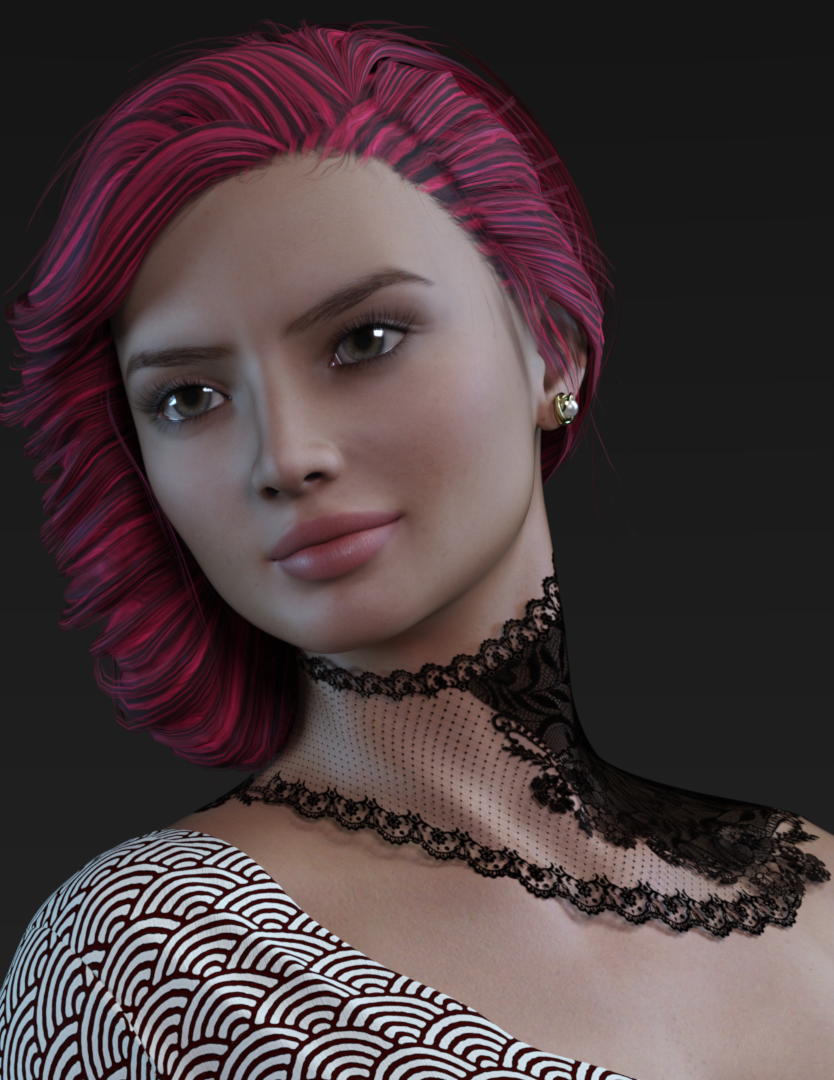 Which body shape is used in this product ?
It's just a guess (because without the head and/or the skin textures, it's difficult to be sure), but I would say Olympia 9.
My reasoning: when Sprite is doing promo render with textured characters, these renders are usually using Daz Core figures like Victoria 9, Michael 9, etc, and looking at the list of supported shapes, Olympia 9 is the most likely shape among them.
Daz 3D is part of

Connect
DAZ Productions, Inc.
7533 S Center View Ct #4664
West Jordan, UT 84084Licensing Agreement | Terms of Service | Privacy Policy | EULA
© 2026 Daz Productions Inc. All Rights Reserved.