-
Cyberpunk Courier Robot Poses
It was the fact some bone names were the same & some different and a happy accident and allowed me to wrongly apply a V3 pose to G8F, and have a lightbulb moment that resulted in pose transfer scripts between generations. I'd never thought of changing bone the names in the pose file before applying them. Interesting idea.
Regards,
Richard
Freebie Challenge June 2026 - "INVASION!" - Entries Threadcomplying...
Party meeting at the pool
...desperate, the aliens showed up with the full might of thier fleet, ready to subjegate or destroy any who stood in their way. But, when the humans realized that the aliens were primarily aquatic, and the aliens realized that, although Earth is a water planet, its dominant intelligent lifeform was primarily terrestrial some quick negotiating happened and the aliens just - moved in.
Afterwards, the two races began a much more mutualistic cultural and technological exchange, and while there were certainly some adustments (like getting used to pools being open year round and important meetings being held in them), pretty much everyone involved had to agree it all worked out really well.
Free (last 2 months)
Anemone for Genesis 2 Female(s) https://www.daz3d.com/anemone-for-genesis-2-female-s 5-29
Feathered Phoenix for Genesis 2 Female(s) https://www.daz3d.com/ninja-keiko-for-genesis-2-female-s 6-12
Sorority Skort https://www.daz3d.com/sorority-skort 5-29
Keres Outfit for Genesis 3 Female(s) https://www.daz3d.com/keres-outfit-for-genesis-3-female-s 6-12
Ninja Keiko for Genesis 2 Female(s) https://www.daz3d.com/ninja-keiko-for-genesis-2-female-s 5-15 (alien guy's anklewraps)
FWSA Kori HD for Genesis 3 Female https://www.daz3d.com/fwsa-kori-hd-for-genesis-3-female 5-15
Business Suit for Genesis 3 Female(s) https://www.daz3d.com/business-suit-for-genesis-3-female-s 5-15
Soleil Hair for Genesis 2 & 3 Female(s) https://www.daz3d.com/soleil-hair-for-genesis-2-3-female-s 6-12
Laptop Poses for Genesis 3 https://www.daz3d.com/laptop-poses-for-genesis-3 5-1
Ysabeau 6 https://www.daz3d.com/ysabeau-6
Hawthorn Hair for Genesis and Genesis 2 Female(s) https://www.daz3d.com/hawthorn-hair-for-genesis-and-genesis-2-females 5-15Nocount:
Genesis 2 female, male, and basic morphs
Genesis 3 femaleCozy Pool Interior - DAZ Christmas freebie '25
quickie recolor of "pool interior"'s teal tiles
golden waves plaid shaders - DAZ summer freebie in '25
Lully's colors - DAZ Christmas freebie '24
SI4 Xmas Sunglasses for Genesis 9, 8, 8.1, and 3 - DAZ Christmas freebie '24
Huddle Room - DAZ Christmas freebie '25 table, chairs, laptop
assorted single-color planesUNKNOWN:
"elf ears long" morph for genesis 2 male and pose control basic expressions and phonemes - I think both came with DAZ, but I didn't manage to find out for sure.
No post-processing except to crop it - I rendered it as a 1024x1024 square
Freebie Challenge July 2026 - "Summer holidays" - Main Thread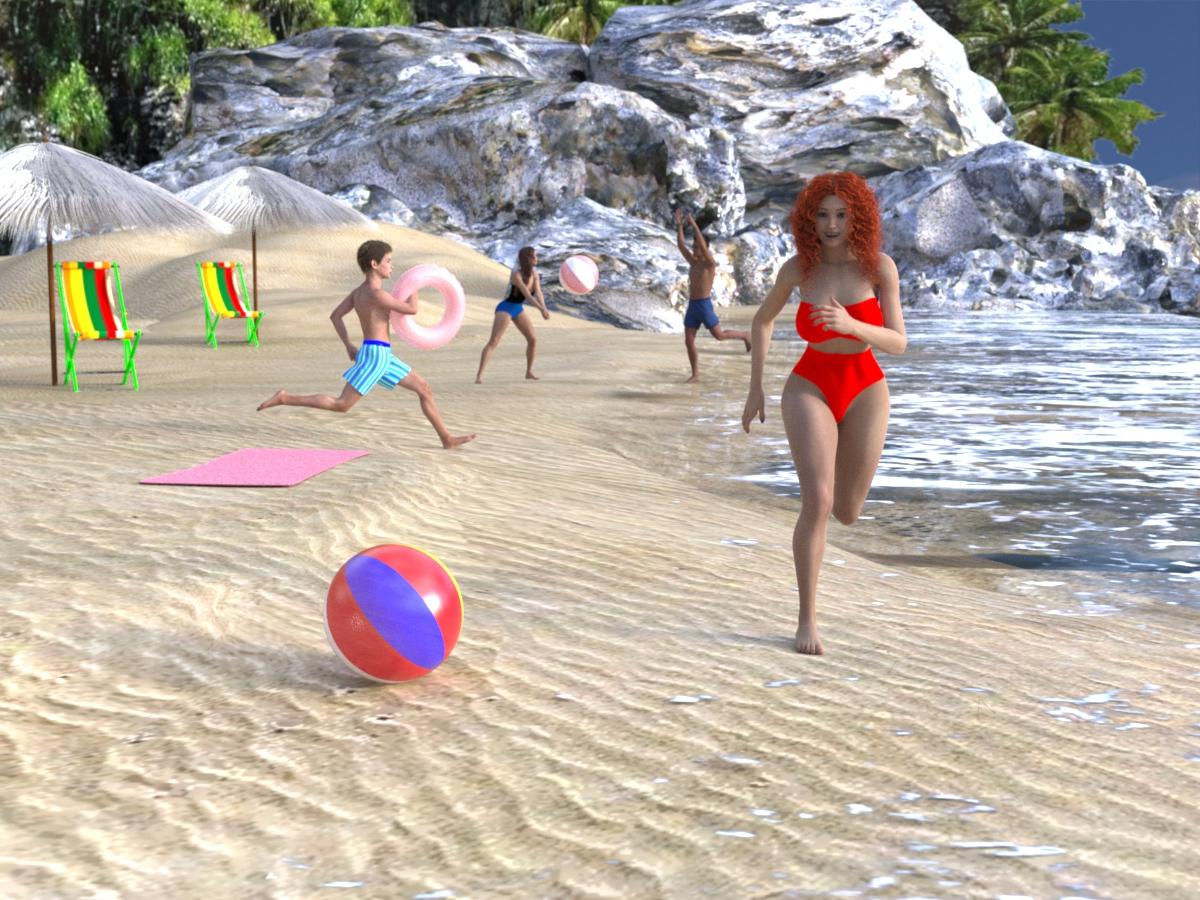
Summer holidays are here. Where are you, where are you heading, what places do you dream of? Do you think of the sea, beach lazing in the sun or going on adventurous diving?
Do you long for the cool of the mountains, hiking through the countryside and peaks to climb? A desert safari? A cruise on a luxury ship or an adventure on a sailboat? Do you dream of going to the Moon or Mars? Tell us about the vacations you're taking, will take, or dream of with your renders.Some useful links for the Contest
The KindredArts Free Resource Repo Here are the KindredsArt freebies and a rich list of sites that host freebies
Free 3D Models Link to DAZ's bi-weekly freebies
Limited Time Freebies Discussion Thread A thread under the Commons section of the forum, where DAZ's biweekly freebies are announced and, recently, even listed. It's useful for remembering which freebies were added and when.
The rules of the contest are:
-
Your entry must be a new render, especially made for this challenge.
-
Your entry must follow the DAZ TOS.
-
You may enter a maximum of 4 entries.
-
A minimum of five (5) Freebies must be included in your image
-
All Daz Bi-Weekly Freebies are allowed throughout the entire month in which they are free, as well as the following month (for a total of 2 months).
-
You may use a maximum of 5 paid items.
-
Base figures (Genesis 9, Genesis 8, etc.) as well as their basic morph packs may be used as needed. They do not count as either paid items or freebies.
-
DAZ Studio, Poser, Bryce, Carrara, Hexagon, and Blender are allowed.
-
DAZ AI Studio is not allowed. The use of image generating AI technology (midjourney, stable diffusion, etc.) is not allowed in any form.
-
Postwork is allowed. You must also include the raw render (before postwork) of your entry.
-
For a more detailed version of the rules see the PDF attached to this post; or ask your question in this thread, we're always happy to clarify!
-
Let's have fun and be creative with all the amazing resources that are available for free!
This contest ends on July 31st 2026.
Post your images and freebie links in this thread for link verification.
Once the links are verified, you can post your image and links in Entries Thread for judging.First Place: $15 store credit from KindredArts
Second Place: $10 store credit from KindredArts
Third Place: $5 store credit from KindredArtsPast Freebie Contests:
January 2022 - Around and around and around...
February 2022 - Mysteries of the heart
March 2022- Luck Of The Draw
April 2022 - New Beginnings
May 2022 - Cozy Corner
June/July 2022 - The Secret Life Of...
August 2022- Sniff, sniff... what's that smell?
September 2022-Cars Cars and More Cars
October 2022 - Horror Movies
November 2022 - Thieves, Robbers, and Fraudsters all around!
December 2022 - The Night is Darkest...
January 2023 Speed Demons and Slowpokes
February 2023- I See Red
March / April 2023 Magical
May 2023 - Sweet Music
June/July 2023 Holes, Gaps, Caves, Tunnels
August 2023 Fabulous Pink
September 2023 Gardening
October 2023 Hallowed Night
November 2023 Wobble, jiggle, sway, and shake
December 2023 / January 2024 Driving Home For...
February 2024 The Glow Up
March 2024 Power Source
April/Mai 2024 Soft as Plush, Smooth as Silk
June 2024 An Octopus' Garden
July/August 2024 Take A Break
September 2024 Fake Smiles and Real Joy
October 2024 "Monster Mash '24!"
November 2024 - Dreams
December 2024 - A Curious Christmas
January 2025 - Thank you, Saphirewild!
February 2025 - My Hallowed Valentine
March 2025 - Pride, Prejudice and other Shenanigans
April 2025 - The Little Ball of Calm
May 2025 - To Be Beautiful
June 2025 - Summer and Piracy
July 2025 - Design a Book Cover
August 2025 - Pure Cinema
September 2025 - Holiday Memories
October 2025 - Monster Mash!
November 2025 - The Winter Witch
December 2025 - Christmas!
January 2026 - When One Door Closes, Another Opens
February 2026 - Stronger Than You Think
March 2026 - The big blue
April 2026 - Free for All
May 2026 - Lies and Truth
June 2026 - Invasion
Freebie Challenge June 2026 - "INVASION!" - Main ThreadParty meeting at the pool
...desperate, the aliens showed up with the full might of thier fleet, ready to subjegate or destroy any who stood in their way. But, when the humans realized that the aliens were primarily aquatic, and the aliens realized that, although Earth is a water planet, its dominant intelligent lifeform was primarily terrestrial some quick negotiating happened and the aliens just - moved in.
Afterwards, the two races began a much more mutualistic cultural and technological exchange, and while there were certainly some adustments (like getting used to pools being open year round and important meetings being held in them), pretty much everyone involved had to agree it all worked out really well.
Free (last 2 months)
Anemone for Genesis 2 Female(s) https://www.daz3d.com/anemone-for-genesis-2-female-s 5-29
Feathered Phoenix for Genesis 2 Female(s) https://www.daz3d.com/ninja-keiko-for-genesis-2-female-s 6-12
Sorority Skort https://www.daz3d.com/sorority-skort 5-29
Keres Outfit for Genesis 3 Female(s) https://www.daz3d.com/keres-outfit-for-genesis-3-female-s 6-12
Ninja Keiko for Genesis 2 Female(s) https://www.daz3d.com/ninja-keiko-for-genesis-2-female-s 5-15 (alien guy's anklewraps)
FWSA Kori HD for Genesis 3 Female https://www.daz3d.com/fwsa-kori-hd-for-genesis-3-female 5-15
Business Suit for Genesis 3 Female(s) https://www.daz3d.com/business-suit-for-genesis-3-female-s 5-15
Soleil Hair for Genesis 2 & 3 Female(s) https://www.daz3d.com/soleil-hair-for-genesis-2-3-female-s 6-12
Laptop Poses for Genesis 3 https://www.daz3d.com/laptop-poses-for-genesis-3 5-1
Ysabeau 6 https://www.daz3d.com/ysabeau-6
Hawthorn Hair for Genesis and Genesis 2 Female(s) https://www.daz3d.com/hawthorn-hair-for-genesis-and-genesis-2-females 5-15Nocount:
Genesis 2 female, male, and basic morphs
Genesis 3 femaleCozy Pool Interior - DAZ Christmas freebie '25
quickie recolor of "pool interior"'s teal tiles
golden waves plaid shaders - DAZ summer freebie in '25
Lully's colors - DAZ Christmas freebie '24
SI4 Xmas Sunglasses for Genesis 9, 8, 8.1, and 3 - DAZ Christmas freebie '24
Huddle Room - DAZ Christmas freebie '25 table, chairs, laptop
assorted single-color planesUNKNOWN:
"elf ears long" morph for genesis 2 male and pose control basic expressions and phonemes - I think both came with DAZ, but I didn't manage to find out for sure.
No post-processing except to crop it - I rendered it as a 1024x1024 square
Expressions not visible in head, only in whole figureGenesis, as opposed to previous figures, places all the morph data in the main body.
Morphs in sub-nodes, are "alias" dials.
The G8M version lacks these "alias" morphs, so they won't apear in the head.
Unfortunately, the only way to correct this porblem is to create your own Alias morphs.
This can be accomplished by using the "Property Hierarchy" pane, or by copying and editing the appropriate sections from the original DSF files and creating new dsfs.
more....Wacky Modelling ~ In Carrara ~WendyLuvsCatz said:
not a schoolkid in sight
pretty cool showcase of your modeling skills nonetheless

thanks Wendy, the building is a model of my old high school, it's been demolished now ( about 1977 I think it was ). Year 7 was the top, my room was on the left Room 4 and in year 8 the bottom just left of middle was my room, Room 2. I was there in '71 & '72 then we automagically wuld transfer to a bigger college in a totally different area of Wollongong to start year 9 and onwards.
 New Year, New Sales Thread: Report Issues Here 4 "Reporting Only"
Phoenix1966 said:
Cybersox said:
The coat in today's new Ergou bundle, dForce EG Fashion Coat for Genesis 9 , displays what clearly appear to be "open" and "reveal shoulders" morphs in the product pictures... in fact, I can't think of any other reason for those images except to display those, but there are no morphs at all listed in the product description AND, as happens all too often these days, the readme link goes to a dead page. Is there anyway to confirm whether these morphs are actually included with the product?
@Cybersox There are two styles of coats (single row and double row of buttons) and each version has those reveal morphs. I believe all 6 "adjust shape" morphs are pictured in the promotional renders. Three reveal more cleavage and mid body, one opens the coat completely and there is one to expose the right shoulder and one to expose the left.
Thank so much! I figured that it probably had them, but one never knows and I found it really strange that a PA would go to all of the trouble to add those morphs and even have image of them, but then not mention them in the description or even include a morph list... And, of course, that's assuming that the problem was on the PA's side at all given the also missing read me.
texture of the breasticularGood you got it working on another character.
You should be able to apply any morph to a character of the same generation.
Regarding your video, you should just have copied the body surface, but it worked because Breasticular also uses Body surface. But it looks like there is a tiling problem.
texture of the breasticularI just tried it with another character and it works fine. Maybe there's a trick I can use by activating the morph on my original character and deactivating the morph on the character that works?
added jcms driving me crazy!!Phoenix1966 said:
All those named characters do not have their joint corrective morphs tied to their specific characters' bodies. So they fire whenever you use any G9. You can uninstall them(the problematic characters) from your library and/or file tickets with Daz support to get those character products updated.
I filed a ticket recently on Beverly 9, was told they knew there was an issue and support closed my ticket. So your mileage may vary regarding fixes.
You can also go through the process of fixing them yourself(where you add the specific character's body to the cbs 2nd controller).
https://www.daz3d.com/forums/discussion/743756/corrective-morph-problem?
Hello. I just came across your post. I've provided a response on the other thread if that helps, or if you'de like to discuss it further. Thanks
https://www.daz3d.com/forums/discussion/590766/mechasar-s-characters-catalog-who-s-next-commercial
Mechasar's Characters Catalog: Who's next? (commercial)Uthgard said:
Hi, first of all, love every single one of your products (it needs to be said and repeated). There's an issue with Beverly 9, though: the JCMs trigger even when she's at 0%. I've uninstalled her for the moment, but she's a really nice shape to add to the genepool, and I would like to know if there's a fix planned. Thanks for everything!
Hello! As you may have noticed, Beverly 9 includes many JCMs, so I’ll need to ask which specific JCM you’re referring to. I haven’t been able to reproduce any issue, and no problems were found during the testing phase either, which I can assure you was carried out thoroughly. Therefore, I believe that if the defect exists, it may have arisen during the upload process to the store or as a result of some package update.
If, on the other hand, you’re referring to the parameters labeled KEY and are concerned that they remain active even when Beverly’s morphs are disabled, please note that these are neither JCMs nor do they contain any morph data. The KEY parameters simply convert the numeric rotation values of the limbs into values ranging from 0 to 1. That’s all they do. At the same time, the JCMs that use these KEY values already include an internal multiplicative control that activates only when Beverly’s body or head morphs are enabled. So if that’s your concern, you can rest assured.
Multiplicative controls were not added to the KEY parameters themselves in order to avoid introducing redundant constraints, which could slow down character animation or, in worse cases, create conflicts.
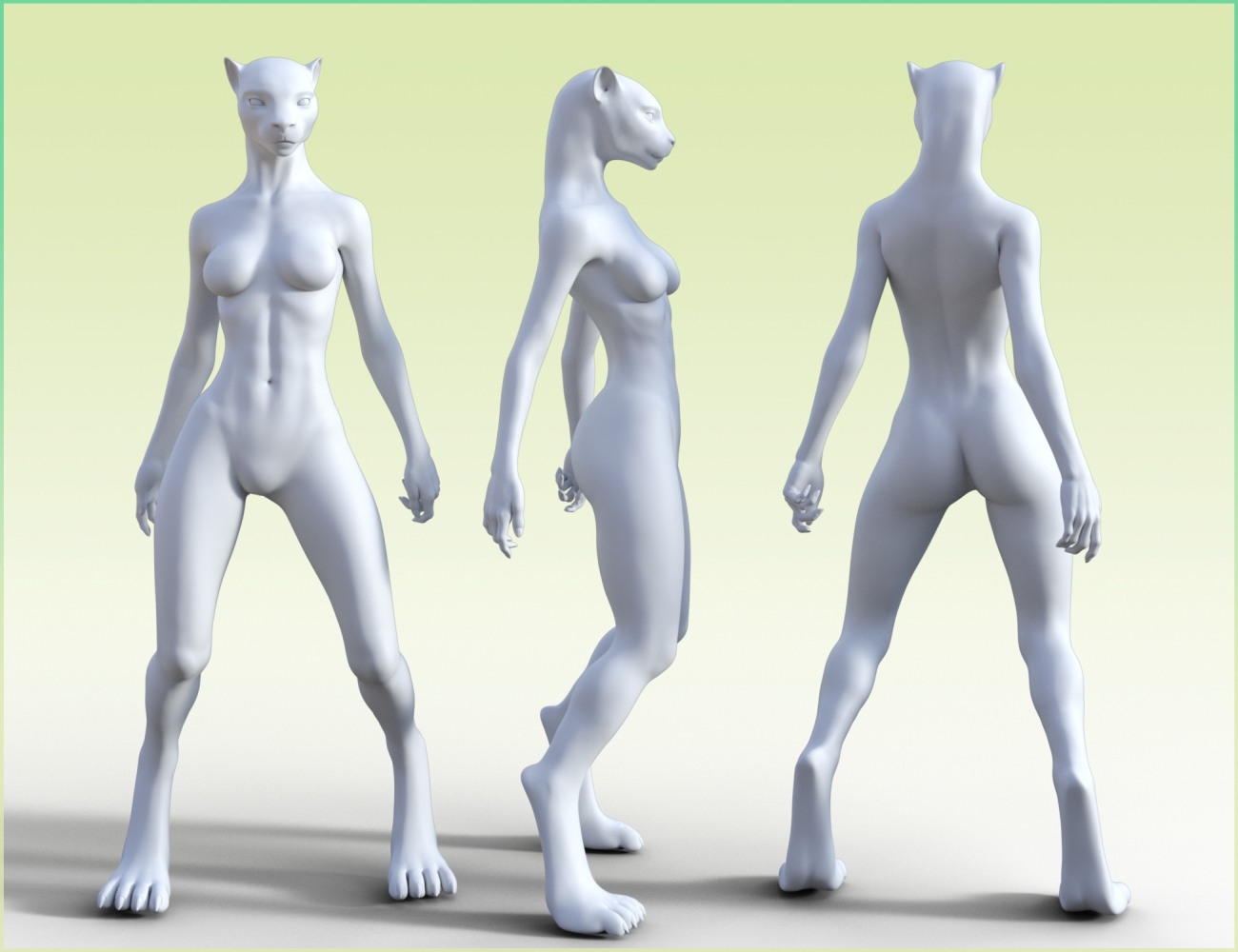
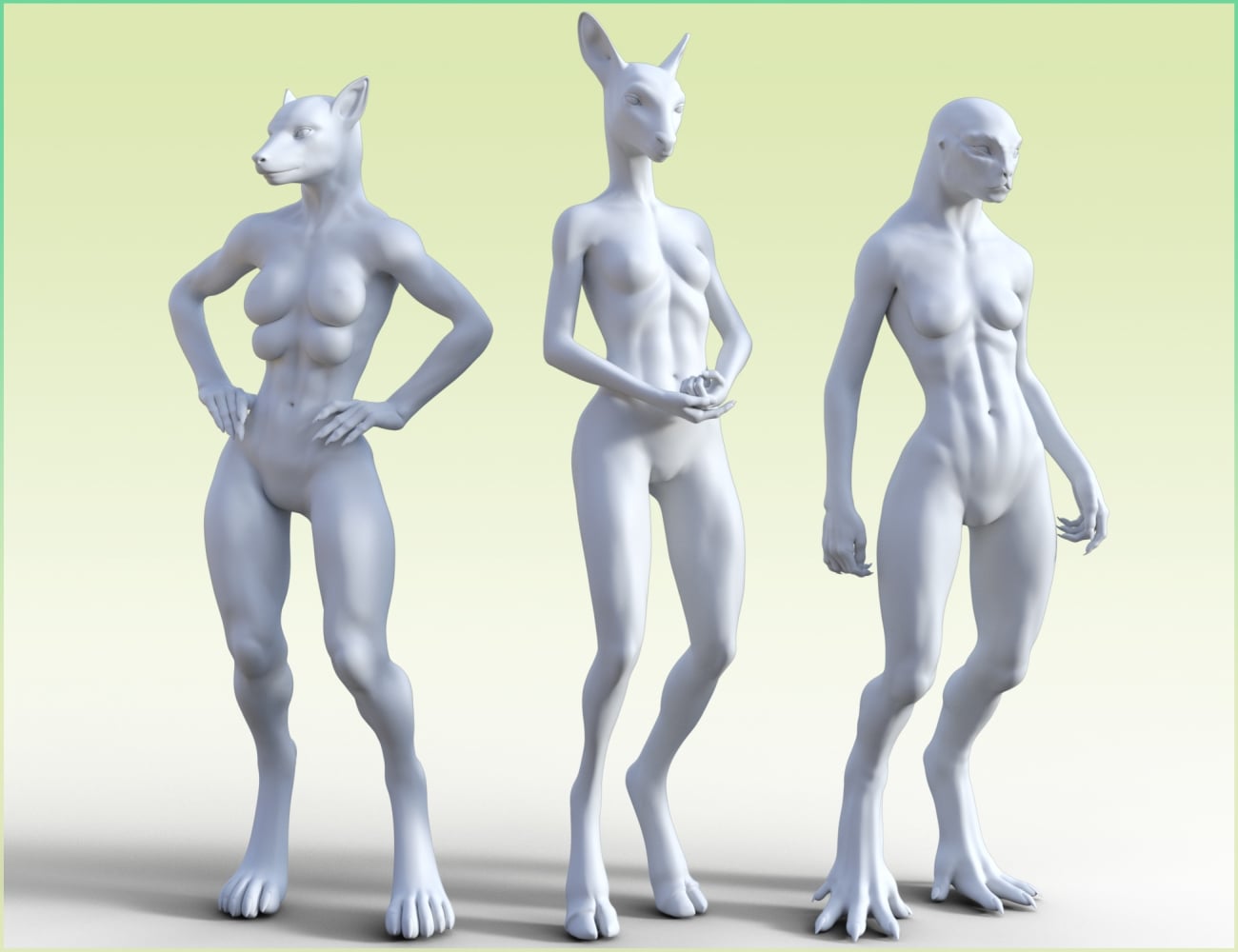
Anyway, thank you for bringing it to my attention, and for you appreciation too ;)tiger, lion or cat for G3Could it be a Darofish morph from this set, https://www.daz3d.com/hfs-fantasy-shapes-for-genesis-3-bundle?
 [Released] Bone Minion Batch Converter for Genesis 8 Poses [Commercial]Thank you for the prompt response, and for the possible workaround. I have just a couple of further questions: if I do use another machine to do the conversion, how would I then transfer the metadata back to my main computer? The way that the batch converter makes new G9 pose products is great and I would like to keep that benefit. The other question is more of a tangent: I have experienced a lot of lagging when posing G9, and now I'm wondering if there's anything that a huge library may contribute to that. Would using turbo loader be recommended? Also, just a side note: there are a few complaints about how the PA ATrillionGames makes posing products that rely on scripts rather than pose files. Batch converter has been perfect to get the actual pose files out of these products.tiger, lion or cat for G3
I could have sworn that I purchased a tiger, lion or cat morph or shader for G3 but I can't seem to find it.
All Genesis 8 male figures have lost their compatibilityI am not sure what you mean - compatibility settings have nothing to do wiith how a character looks, and theya re what drives the Filter By Context feature which you say is working. I suspect that you may have mis-idnetified the issue (if all Genesis 8 Male figures load looking like a creature that sounds like a morph saved with a non-zero default).
Single & Multi UV SetDiffeomorphic will import the uv sets available in your scene, if they're used in any material. While in daz studio you see all the uv sets available for the figure that you installed, as uv sets for custom characters for example. If you want a specific uv set to be imported just use it in any material. It wouldn't make sense to import all the uv sets available if they're not used. For example G3 figures get a separate uv set for every custom character, G8 less but still.
p.s. Of course as an alternative you can always export a uv set in obj format, then load it in blender.
object > transfer > uv map
[Released] Turbo Loader for Genesis 9 [Commercial]So after an extensive amount of debugging done with 3 different AI chat bots (no, I don't use I for my art - just tech problems), I finally found the issue. Essentially, Turbo Loader had somehow cause my JP Sandor figures to point to the wrong URL. JP Sandor actually has two .dsf files: the one in the old standard definition folder for the character and the one in the newer HD folder ("JP Sandor" and "JP Sandor HD" respectively). Both of those .dsf files are still called "JP Sandor HD," though. So I guess when Turbo Loader reset my morphs, it changed the URL of that .dsf file. Anyway, after uncompressing all my scene files using the Batch Convert pane in Daz Studio, I ran the following script (I saved this as a .dsa file and then opened that file in Daz Studio) to edit each of the .duf files to update the bad URL to the correct one:
// DAZ Studio version 4.24.0.4 filetype DAZ Script

// JP Sandor HD URL Repair Script
// Top-level folder only. No subfolders. URL replacement only.

var ROOT_FOLDER = "C:/SCENE_FOLDER_PLACEHOLDER"; // replace with your folder containing scenes

var BAD_URL = "/data/Daz%203D/Genesis%209/Base/Morphs/Jepe/JP%20Sandor/JP%20Sandor%20HD.dsf#JP%20Sandor%20HD";
var GOOD_URL = "/data/Daz%203D/Genesis%209/Base/Morphs/Jepe/JP%20Sandor%20HD/JP%20Sandor%20HD.dsf#JP%20Sandor%20HD-0xa95d2eb";

var scannedFiles = 0;
var changedFiles = 0;
var failedFiles = 0;

function makeBackup(path)
{
	var backupPath = path + ".bak";
	var src = new DzFile(path);

	if (!src.copy(backupPath))
	{
		print("Backup may already exist or copy failed: " + backupPath);
		return false;
	}

	return true;
}

function processDuf(path)
{
	scannedFiles++;

	var file = new DzFile(path);

	if (!file.open(DzFile.ReadOnly | DzFile.Text))
	{
		print("Could not open for reading: " + path);
		failedFiles++;
		return;
	}

	var text = file.read();
	file.close();

	if (text.indexOf(BAD_URL) < 0)
	{
		return;
	}

	var newText = text.split(BAD_URL).join(GOOD_URL);

	if (!makeBackup(path))
	{
		failedFiles++;
		return;
	}

	if (!file.open(DzFile.WriteOnly | DzFile.Truncate | DzFile.Text))
	{
		print("Could not open for writing: " + path);
		failedFiles++;
		return;
	}

	file.write(newText);
	file.close();

	changedFiles++;
	print("Fixed: " + path);
}

function scanTopLevelFolder(folderPath)
{
	var dir = new DzDir(folderPath);

	if (!dir.exists())
	{
		MessageBox.critical("Folder does not exist:\n" + folderPath, "JP Sandor HD URL Repair", "&OK");
		return;
	}

	var files = dir.entryList("*.duf", DzDir.Files);

	for (var i = 0; i < files.length; i++)
	{
		processDuf(folderPath + "/" + files[i]);
	}
}

scanTopLevelFolder(ROOT_FOLDER);

MessageBox.information(
	"Finished.\n\n" +
	"Scanned DUF files: " + scannedFiles + "\n" +
	"Changed files: " + changedFiles + "\n" +
	"Failed files: " + failedFiles + "\n\n" +
	"No subfolders were scanned.\n" +
	"Only the JP Sandor HD URL was modified.",
	"JP Sandor HD URL Repair",
	"&OK"
);
Obviously, if someone came across this error in the future, they would have to find the bad/good URLs for their individual morph, but I thought I would post this here just in case someone found it useful.
Genesis 9 error loading both Daz 4.24 and Daz 6Try unistalling recent installed content until the error goes away, odds are a character or morph pack has a "bricked" file.
Deregistered PluginsIt seems that a selection of Plugins have deregistered themselves in my Daz Premier, they are,
AutoSave
dForce Manager
Geometry Sculptor
Pose Converter
Render Que
& Shape Transfer
I also seem to have lost Serial numbers from my account page.
Not feeling so Premier at the moment!!!
 help! missing (essential) pose reset/zero utility
Ultimate Zero used to be my go to. But it's a bit too powerful. These days I only use it when I have a weird morph I can't track down. It will find it.
Daz 3D is part of

Connect
DAZ Productions, Inc.
7533 S Center View Ct #4664
West Jordan, UT 84084Licensing Agreement | Terms of Service | Privacy Policy | EULA
© 2026 Daz Productions Inc. All Rights Reserved.