-
* Closed * RRRR - "Back from the dead" Render Contest
Pull #1
Ghostly Toys
The mansion won't let her leave, but it supplies her with whatever toys she wants to play with...
1104 Capsces Variety Poses and Expressions for Genesis 8 Female and Victoria 8 (SKU 44401)
1675 A Peck Of Dirt - Iray Ground and Dirt Shaders for Daz Studio (2 of 2) (SKU 83586)
1478 Carnival Big Tent DS (SKU 12806)
902 Haunted Mansion DS (SKU 2699)Random numbers generated Apr 3 2023 at 22:11:43 by psychicscience.org
Free educational resources for parapsychology and psychical research.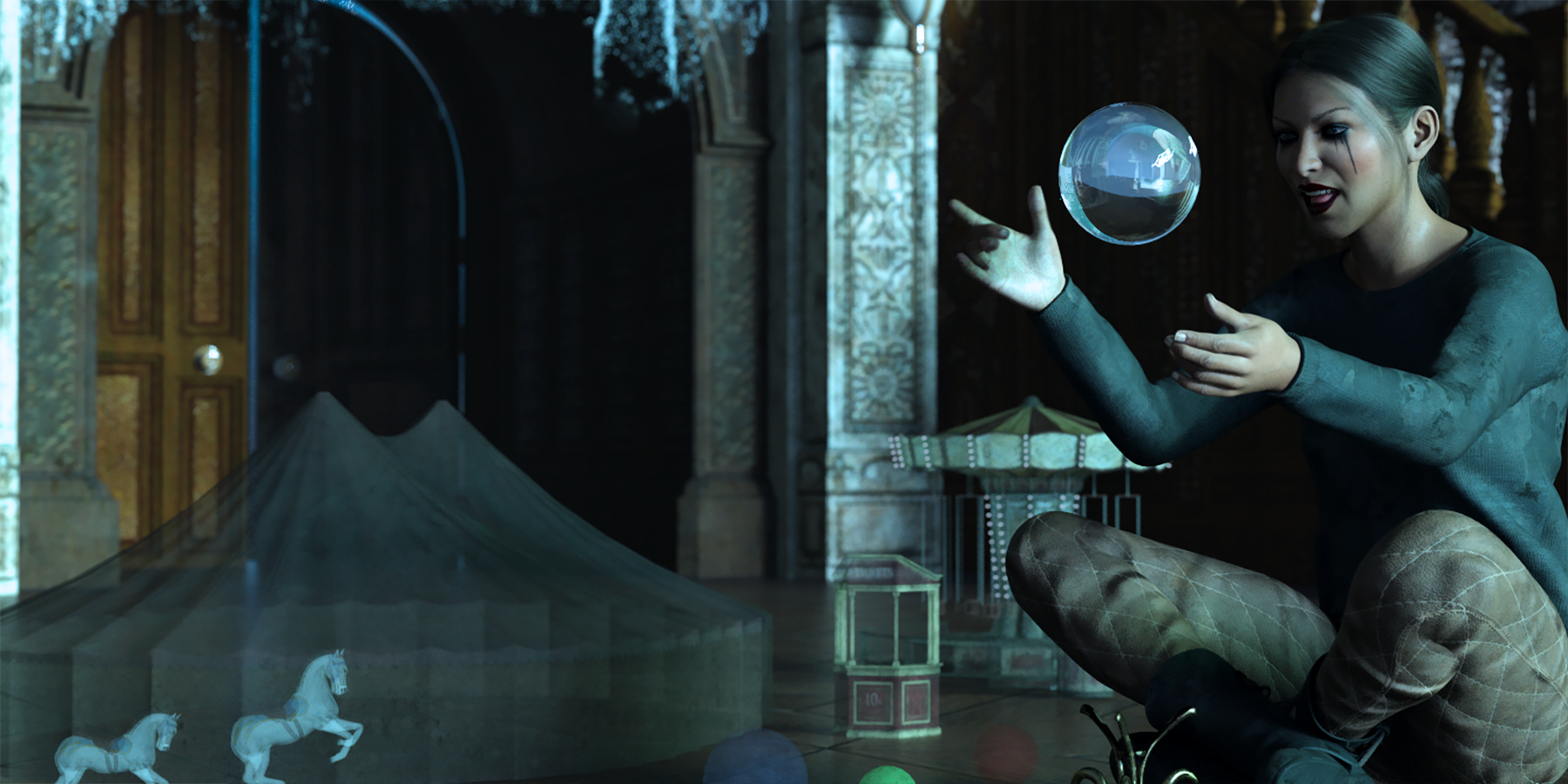 * Closed * RRRR - "Back from the dead" Render Contest
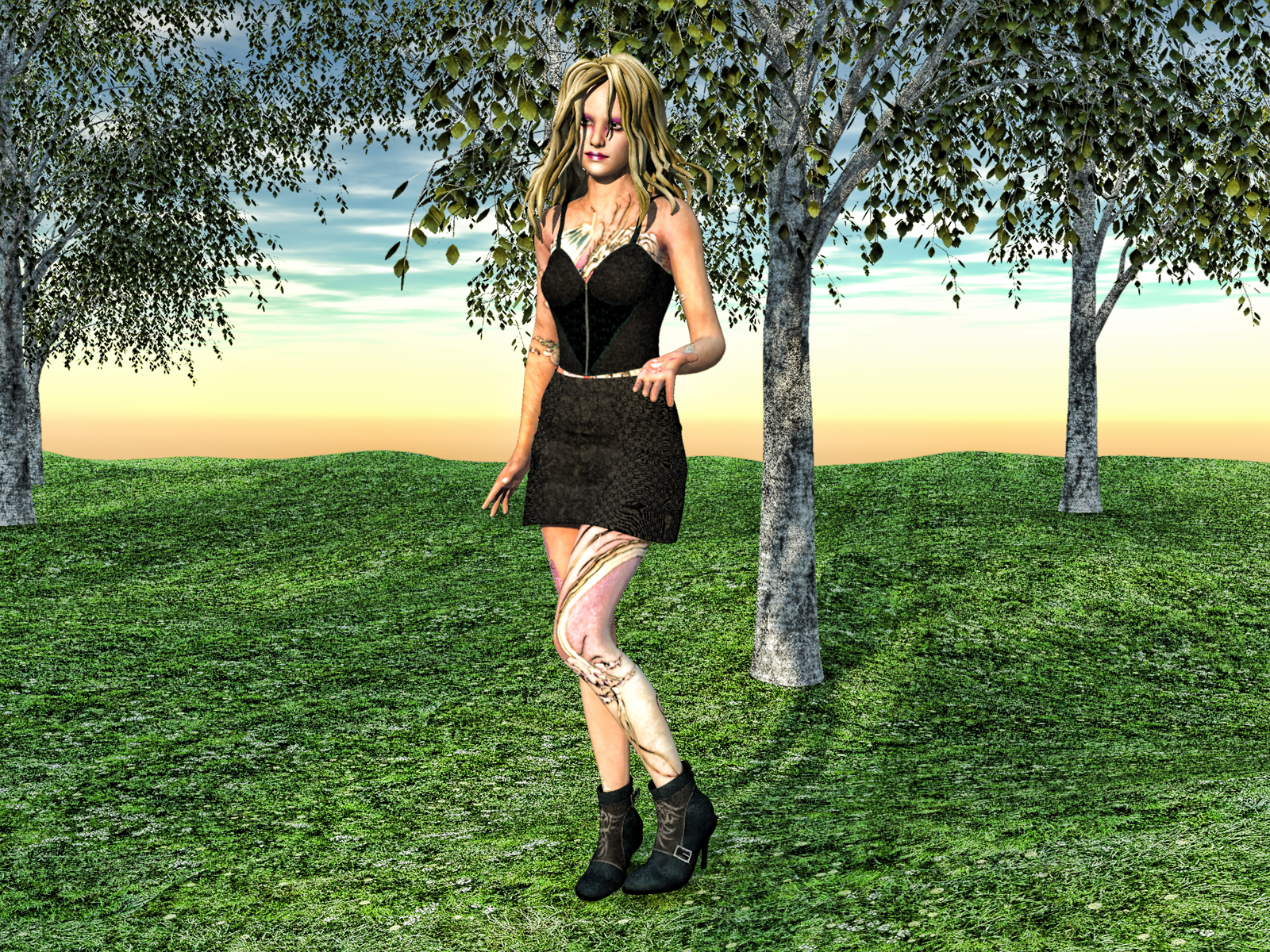
Draw 1 - Vicky is in mourning after her hairdresser ruined her hair. She has made a new booking with another hairdresser to get her hair fixed.
Items Used -
3835 Dragon Ink - Loryn for Steph Petite & Aiko (SKU 3960) - Texture Converter 2 used to convert the textures from A3 to V4, then Victoria 4 Skins Batch Converter used to convert from V4 to G2F.
10970 Predatron Silver Birch Trees (SKU 12242)
9683 Darkish for Emotions PoserCF (SKU 17424) requires Emotions for Teen Josie (SKU 17419)
7790 I2 Mix-n-Match: Wild Hair (SKU 24709) - Cross Dresser XD4 used to convert hair to fit V4, then autofitted to G2F.
Also used was G2F, Carrara terrain, Flinks Spring Ground Textures, & Carrara Skies Vol 1
Material problem on reimport of an obj export of a Genesis 9 figurecrosswind said:
Just applying V9's base mat. preset will also do ~
Before asking I had tried to apply the "Victoria 9 All MAT" material directly to "G9_Victoria_Test" but I got "An error occurred".Why didn't I tried the "Victoria 9 Skin 01 MAT" material just beside it ? This one solved the problem. And thinking about it, the error msg makes perfect sense.
Thank you for the solution, and thanks again to UncannyValet for the explanation.
There's Always Another Sale Thread -- Discussions Onlydaveso said:
is this nuts or what? KISS a much better way to go. I glaze right over all these requirements and possibilities
"40% OFF Newly Mad Releases
50% OFF* when you buy any combo of 2+ Items from
Newly Mad, Still Mad, Mad Artist Stores, or Mad RelatedBuy any Newly Mad Release to get:
80% OFF* up to 10 Victoria 4 Items AND 85% OFF* up to 10 Michael 4 Items
60% OFF* up to 8 Genesis 2 and 3 Female Items AND 70% OFF* up to 8 Genesis 2 and 3 Male Items
50% OFF* up to 6 Genesis 8 and 8.1 Female Items AND 60% OFF* up to 6 Genesis 8 and 8.1 Male Items
PLUS 45% OFF* up to 4 Genesis 9 ItemsGet 65% OFF* Dazzling Poses when you buy any Newly Mad Release
Get 50% OFF Newly Mad Interactive Licenses"
Pretty much the same for me. I was like, is there something really good hidden in this mass of text and requirements... lol
Would be nice if each day was like the best day for a particular small group of artists. Then the next day was the best deals for a particular group of small artists. That way you know that is the best day for those artists and the next day will be the best deal for the next small group of artists instead of complex different daily offers overlapping each other in complex ways.There's Always Another Sale Thread -- Discussions Onlyis this nuts or what? KISS a much better way to go. I glaze right over all these requirements and possibilities
"40% OFF Newly Mad Releases
50% OFF* when you buy any combo of 2+ Items from
Newly Mad, Still Mad, Mad Artist Stores, or Mad RelatedBuy any Newly Mad Release to get:
80% OFF* up to 10 Victoria 4 Items AND 85% OFF* up to 10 Michael 4 Items
60% OFF* up to 8 Genesis 2 and 3 Female Items AND 70% OFF* up to 8 Genesis 2 and 3 Male Items
50% OFF* up to 6 Genesis 8 and 8.1 Female Items AND 60% OFF* up to 6 Genesis 8 and 8.1 Male Items
PLUS 45% OFF* up to 4 Genesis 9 ItemsGet 65% OFF* Dazzling Poses when you buy any Newly Mad Release
Get 50% OFF Newly Mad Interactive Licenses"
Material problem on reimport of an obj export of a Genesis 9 figureHi,
I imported back an obj export of Victoria 9 HD but the material doesn't render correctly.
What I do:
- New scene
- Load Victoria 9 HD
- Parameters / General / Mesh Resolution - Level: Base - SubD Level: 0 - Render SubD Level: 0
- Export to "G9_Victoria_Test.obj" - All default settings except TO: Modo & uncheck "Quota Path Containing Spaces"
- Immediately import back this file in the same scene (no modification, not even opening it in another app in between) - From: Modo - no change in the settings
- In the scene I select "Victoria 9 HD" then in the "Surface" tab right click on "Victoria 9 HD" / Copy selected surface(s)
- In the scene I select "G9_Victoria_Test" then in the "Surface" tab right click on "G9_Victoria_Test" / Paste to selected surface(s)See attached file "G9 Victoria HD obj reimport.jpg" (in front the original figure).
I've also attached a 2nd file, "G8F Chrissy obj reimport.jpg", showing the same procedure applied to a G8 figure... and it works.
This works with G8 but not with G9. So what's the problem ? How should I do it with G9 ?
I'm using Daz Studio 4.21
Thanks,
When enough is enough?BlueFingers said:
@outrider42: I agree some people would stay dedicated to Daz, but if a influx on new users would be drying up it would be a start of the end. And yes the hardware requirements for the process you are describing are steep, but will they still be in two more years for folks who just want to get into making pretty pictures? Besides there are other AI programs that can upscale images without those VRAM requirements like Topaz Labs Gigapixel. And if you do the calculations, is buying a Nvidia card with 24GB of VRAM (I just checked, I can get a new Gigabyte GeForce RTX 3090 24G for € 1595) just to use AI really more expensive than getting into Daz?
@paulawp (marahzen): Yes that used to by my argument as well, the lack of control, the crazy fingers, but those issues have been resolved with the development with ControlNet, ComfyUI and AINodes it seems, and we are only at the start of this.
Now, I'm not a fan of AI, that is not a secret. I dislike the enviromental impactt, the ignoring of artists wishes when AI models are trained, the likely slow down of artistic development in grahpical arts. And getting the light just right or stubling upon a great composition in Daz is one of the best feelings ever IMO, but I do worry for the Daz ecosystem which I love. This does make me wonder sometimes (and increasingly so) if "enough is enough" concering my purchases, and does make me very picky. I very much hope Daz will find a way to prosper the coming years, but I think there are major challenges ahead.
I don't see AI requirements ever going down for local machines. They require large amounts of data to produce good results. It is only because there are 5.8 billion images in the training data that any of these image generators started to become passable. The downloads of the models can be several gigbytes in size, the larger, the better. Unlike Daz, a low res AI generation will look significantly worse than generating the same prompt at a higher resolution.
Try it. Generate a person a 512 px, and then generate the exact same prompt at 2048 px. I have personally done this. When you generate a human face in AI, the only times the face looks good is when the face has a lot of pixels to work with...specifically a portrait shot where the face takes up most of the frame. The instant you pull away and start doing a pic with a full body in the frame, or multiple people, the quality of the faces goes down dramatically. When you see the mangled pictures of faces with AI, I bet most of those are people not close to the camera. The fellow that fooled people into thinking he was a photographer had all these pics that were basically close ups of faces. None of them were distant from the camera...for this reason.
Upscaling is not point in favor of rendering AI. Daz can render 720p pics in Iray to save memory, too, and we can upscale them in Gigapixel the same way. And unlike the AI pic, the faces will look better because they start with a image. Gigapixel has a cool face enhancer, but the problem is the result may not be the face you wanted! If you are trying to upscale a specific person with the face enhancer, it might produce a completely different person!
None of this even gets into the legal questions that AI has to battle, which are very much uncertain at this time. There is every possibility that copyright lawsuits against the AI win, and if that happens, boom, a lot of this AI generation dies. It could also go the other way, it is really hard to say, but with this kind of dark cloud overhead, I would not be that keen to predict AI killing Daz off so easily. At least with Daz, your copyright issues are far more straightforward.
Midjourney is pretty cool, but you must work with their rules. They will ban people who do not.
Besides all of this, the Genesis model has a growing following with people who make machinima from game engines. In this group of people there are still a number that use extremely old modeling apps like XNA/Lara or MikuMiku Dance. XNA/Lara is based on the original Lara Croft from Tomb Raider...a game from 1996. The original XNA dates back to the late 90s. That is why it is called XNA/Lara, it was originally just an app for posing the Lara character, then it grew from that. MikuMiku Dance dates back to 2008, which is pretty ancient by software standards. XNA hasn't been updated in years. Many moved on to Blender, or Daz, or both and use Genesis. They like the modularity. You can rest assured that people like this will still be finding use for Genesis long after Daz3D is dead and gone.
And that doesn't even mention the people like we see in these forums. Content is still being produced for Victoria 4 if you look for it, long after her expiration date. Genesis 8 is so popular that I bet it will still be getting content from places like Renderosity for years to come even if Daz itself stopped selling G8 content. I think we could be getting new G8 content as far as 2030 (again, probably not in the Daz store, but somewhere else.) IMO, G8 is the new V4. For that matter, I personally feel that G9 is the new G1, LOL. But that is a different topic.
Fitting Victoria 4 materials on G8MI've run into a issue I'd like to solve, since I'd really like to use this material. For example, I have a V4 Material (makeup) for Poser which I have fit onto Victoria 4 in Daz Studio and saved as a material preset (.duf). I then used the Legacy UVs product to successfully fit this preset onto G8F. Properly fitting it onto G8M (which is my goal), however, is escaping me. I have the UV swap for G8 and the Cross-Figure kit products, if they can be in any way useful here. Is there any possible way to do this?
Tell Me What Was The Early-bird Benefit of Buying Daz Horse 3 in Dec 2022?Unfortunately I thought the same things after the Victoria 9 pre-sale release and I still fell for the Sleigh Ride Bundle with Daz Horse 3 and the Reindeer. I expect I will fall for the next gimmick and get mad at myself again.
What I think is the core of our disappointment was the failure of quality control in the products.
Help realismjimread said:
Hello Sandy,
Good of you to post more stuff. May I ask your permission to have a go at the snow image. If you do I will give a full explanation.
I do hope you don't mind but the shadow from the fishing man is lit from the back, but his face is lit from the lower right of the picture.
Regards - J
You don't need my permission :)
The sun is in the exact position of the sun when the photograph was taken which I do by setting it to the Exif settings from the picture. The reason he looks so bright is I didn't take time to put something between him and the sun to create the shadow that lies across that part of the image. Most of these were just early experiments using my photos and i didn't realy spend much time on them.
Achmelvich Bay background Genesis 2 Female, FW Joannie HD, Victoria 5 UV Set.. Librarian Outfit with G2Femail Flipflops and Flirt Hair
2017-07-15 19:25:16.403 Total Rendering Time: 12 minutes 42.25 seconds
Click on image for full size.
* Closed * RRRR - "Back from the dead" Render ContestAre you ready? I can't hear you!!
It's been a rough year, but it's time to reboot the RRRR contest, so now we added a new R. This is a splendid oppurtunity to use all the new shiny stuff you bought during the March Madness. The theme for this contest is "Back from thr dead" (Thanks again to Karibou for waking this up).
Imagination is your limit here. Back from the dead can be anything, really. Something long lost have been found, something you have tried to forget returns.
RRRR stands for Random Runtime Roulette Renders, and it's a contest that has been running for over seven years until it needed a well deserved break. We invite anyone to enter, specially all those new users who have shown up the past years. This is not the usual make a very nice render contest but more like tell a really great story, often fun, with your render!How does it work?
Make your pull of 4 items, no lucky bastards (handicap points) are active as this is a clean reboot, some rules will change too.Who can play?
Anyone can play!How do you prepare yourself for play?
The rules are very simple, but first you need to have all your items in some kind of order in a text file, dumped from the itemized history into a text file or a spread sheet. Remove things like software, gift certs, and special plugins from the list and items that wil not work with the software you work with. For example if you have items for Poser, Bryce or Carrara, and want to use DAZ Studio, remove those other items from your list. If you have loads of older figures, M3, M4, a ton of non Iray stuff and you only want to use Studio with Iray, remove all the junk from you list. (I personally will see much joy in dropping Camel, I don't know how many times it has been pulled over the years)Then you use a randomizer to randomly pick items from your list (your Runtime/My Library) for your start pull . You can use items from any store. Now build a scene with those 4 items plus any other items you want to add to make a fun scene. For newcomers I heartly recommend looking at the previous contests below to get ideas how you can do this.
Randomizer that works well:
Randomizer where you get all numbers in one draw scroll down last all the gibbersh and ads and set it to unique values (Remind me to write a randomizer for DS for the next round): randomThere are some situations where you allowed to redraw, these are:
- You pulled something that doesn’t work, broken thing, only works in a version / software not used etc etc, or you forgot to remove that item from you list even though you knew it wont work, or figure that out later.
- You pulled a software or add-on to a software or anything you should have filtered out from the list.
- You pulled only huge environment props and will not be able to render a scene without crashing.
- You pulled an item you already have been using in two RRRR renders in this content and that was picked randomly. Three is a curse - rule!Lucky Bastard Rule!
If you have sticky lucky bastards, you pull one extra item for each LB you have, simple as that.
No LBs are active this run, we all have a clean sheet.
Explaination of Lucky Bastards.
Lucky Bastards, or LBs, are a form of handicap system which makes the contest a little more difficult for those who have won. No lucky bastards are in play now, but will be for the next run.How to play?
You pull, you compose and you Render. You post your images and pulls in this thread (Don't miss that, entries without pulls and posts in this thread will be disqualified!!).
Then the entry should also be posted in the Entries only threadBundles
If you pull a bundle, use two or three complete items from it, or more if you like, but you do not need to use all, but only picking a hairpin from Victoria 8 Pro Bundle is “too little”. Clarification: A bundle still counts as only one pulled item.Poses, Expressions and textures/colors
If you pull a pose pack, an expression pack or a texture/color pack, you only need to use one of them, not all. For example if you pull 500 expressions for Genesis 8 Female, use one, if you pull 128 colors for Frappe Hair, use one.
Accidenty breaking the TOS
If your entry is removed by the forum mods because it accidentally, not deliberate, broke the TOS, you do not have to redo that entry but can move on and make a new pull.The rules of madness!
Now you have successfully and randomly picked your items, make a scene, you can add other items as well but the one you picked should be prominent or cleverly used. Render it, post it and make us all laugh! Remember though that the renders must follow the TOS of the forum. As we have a theme on the contest, the render should in some way touch that theme.The contest categories!
There are two categories Best and Funniest. Every image will compete in both categories.Contest duration!
It starts now at Monday April 3 2023, and will go on until Sunday May 28 2021 at 23:59:59 local DAZ time.Yes, we have prizes, thanks to our sponsors!
This months sponsors so far:
Totte (Code 66) is sponsoring with two items from his store
ARTCollaborations is sponsoring with two items from their store
Amaranth is sponsoring with two items from their store
Boost For DAZ is sponsoring with 2 "Boost For DAZ" giftcards of $50 and two 2 "Boost For DAZ" giftcards of $25.
Karibou put in $50 DAZ Giftcard
Barbult put in a $20 DAZ Giftcard
Daventaki put in a $10 DAZ Giftcard
WE NEED SPONSORS!!More to know?
I will edit this when new info on sponsors arrive.Do you want to sponsor the RRRR?
Please chip in a gift card sponsorship, sponsors can play, they should play, they are even extra encouraged to play, as sponsors always plays for keeps.Maximum number of entries?
I think for this round it will be a maximum of 10 entries per player.List of some previous RRRR Contests
In the PC Members Only forum:
RRRR Summer Edition ( 13 June 2012 - 15 July 2012) http://www.daz3d.com/forums/discussion/2065/
Winners Thread: http://www.daz3d.com/forums/discussion/5053/RRRR “Back to Reality / My Summer Memory (15 August 2012 - 23 September 2012) http://www.daz3d.com/forums/discussion/5759/
Winners Thread: http://www.daz3d.com/forums/discussion/9315/In The Commons: RRRR Commons Premiere (9 October 2012 - 18 November 2012) http://www.daz3d.com/forums/discussion/9325/
Winners Thread: http://www.daz3d.com/forums/discussion/12867/RRRR “Sayings” Contest (6 December 2012 - 31 December 2012) http://www.daz3d.com/forums/discussion/12867/
Entries-Only Thread: http://www.daz3d.com/forums/discussion/12877/
Winners Thread: http://www.daz3d.com/forums/discussion/15094/RRRR Contest (18 January 2013 - 24 February 2013) http://www.daz3d.com/forums/discussion/15285/
Entries-Only Thread: http://www.daz3d.com/forums/discussion/15307/
Winners Thread: http://www.daz3d.com/forums/discussion/17908/RRRR “April Fool” Contest (with “Mini” Contests) (21 March 2013 - 21 April 2013) http://www.daz3d.com/forums/discussion/19109/
Entries-Only Thread: http://www.daz3d.com/forums/discussion/19108/
Winners Thread: http://www.daz3d.com/forums/discussion/21780/RRRR Summer Contest (23 May 2013 - 4 August 2013) http://www.daz3d.com/forums/discussion/21780/
Entries-Only Thread: http://www.daz3d.com/forums/discussion/22664/
Winners Thread: http://www.daz3d.com/forums/discussion/27864/RRRR “Chain” Render Contest (15 September 2013 - 13 October 2013) https://www.daz3d.com/forums/discussion/29000/closed-rrrr-chain-render-contest/
Entries-Only Thread: http://www.daz3d.com/forums/discussion/28997/
Winners Thread: http://www.daz3d.com/forums/discussion/31526/RRRR “Chain” Render Contest - Round II (1 November 2013 - 1 December 2013) http://www.daz3d.com/forums/discussion/31615/
Entries-Only Thread: http://www.daz3d.com/forums/discussion/31760/
Winners Thread: http://www.daz3d.com/forums/discussion/33417/RRRR “Story” Contest (4 December 2013 - 12 January 2014) http://www.daz3d.com/forums/discussion/33479/
Entries-Only Thread: http://www.daz3d.com/forums/discussion/33478/
Thread: http://www.daz3d.com/forums/discussion/36407/RRRR - One day in XXXs life Render Contest: 13 February 2014 - 16 Mars 2014) http://www.daz3d.com/forums/discussion/37042/
Entries only thread: http://www.daz3d.com/forums/discussion/37041/
Winners thread: http://www.daz3d.com/forums/discussion/39504/RRRR Classic (19 May 2014 - 22 June 2014) http://www.daz3d.com/forums/discussion/41451/
Entries only/Winners; http://www.daz3d.com/forums/discussion/9325/RRRR Freak Accindents (15 July 2014 - 10 August 2014) http://www.daz3d.com/forums/discussion/43832/
Entries only/Winners: http://www.daz3d.com/forums/discussion/43830/RRRR Back to renders ( 25 Aug 2014 - 28 September 2014) http://www.daz3d.com/forums/discussion/45619/
Entries only/Winners: http://www.daz3d.com/forums/discussion/45617/RRRR Things to do before you die ( 13 October 2014 - November 9 2014) http://www.daz3d.com/forums/discussion/47518/
Entries only/Winners: http://www.daz3d.com/forums/discussion/47517/RRRR Unleashed (3 December 2014 - 11 January 2015) http://www.daz3d.com/forums/discussion/49497/
Entries only/Winners: http://www.daz3d.com/forums/discussion/49496/RRRR Not on the screen ( 29 January 2015 - 1 March 2015) http://www.daz3d.com/forums/discussion/52007/
Entries only: http://www.daz3d.com/forums/discussion/52006/
Voting & winners: http://www.daz3d.com/forums/discussion/53400/RRRR Just Random (25 March 2015 - 3 May 2015) http://www.daz3d.com/forums/discussion/54371/
Entries only thread and Winners: http://www.daz3d.com/forums/discussion/54370/RRRR Unlikely Occupations (20 Jun 2015 - 2 August 2015 ) http://www.daz3d.com/forums/discussion/56841/contest-rrrr-unlikely-occupations-with-prizes
Entries only thread:http://www.daz3d.com/forums/discussion/56835/
Winners thread:http://www.daz3d.com/forums/discussion/61494/rrrr-unlikely-occupations-winners-announcedRRRR Stupid is as stupid does (September 1 2015 - October 4 2015) http://www.daz3d.com/forums/discussion/61970/rrrr-stupid-is-as-stupid-does-render-contest-closed/
Entries thread: http://www.daz3d.com/forums/discussion/61969/rrrr-stupid-is-as-stupid-does-entries-only-thread
Winners thread: http://www.daz3d.com/forums/discussion/64971/rrrr-stupid-is-as-stupid-does-winners-announcedRRRR Murphy's Law (November 15 2015 - Sunday January 10 2016) http://www.daz3d.com/forums/discussion/66026/rrrr-murphy-s-law-render-contest-closed/
Entries Thread: http://www.daz3d.com/forums/discussion/66025/rrrr-murphy-s-law-entries-only-thread
Winners thread: http://www.daz3d.com/forums/discussion/70820/rrrr-murphy-winners-announcedRRRR The sequel ( February 11 2016 to Sunday March 20 2016) http://www.daz3d.com/forums/discussion/71563/rrrr-the-sequel-render-contest-closed/
Entries Thread: http://www.daz3d.com/forums/discussion/71562/rrrr-the-sequel-entries-only-thread
Winners thread: http://www.daz3d.com/forums/discussion/78321/rrrr-sequels-winners-announced
RRRR Story ( April 8 2016 to Sunday May 15 2016) http://www.daz3d.com/forums/discussion/78671/closed-rrrr-story-render-contest/p1
Entries Thread: http://www.daz3d.com/forums/discussion/78666/rrrr-story-contest-entries-only-thread
Winners thread: http://www.daz3d.com/forums/discussion/92406/rrrr-story-winners-announcedRRRR Twisted Lyrics (June 7 2016 to July 31 2016) http://www.daz3d.com/forums/discussion/92481/rrrr-twisted-lyrics-contest
Entries Thread: http://www.daz3d.com/forums/discussion/92471/rrrr-twisted-lyrics-entries-only-thread
Winners Thread: http://www.daz3d.com/forums/discussion/108966/rrrr-twisted-lyrics-winners-announced
RRRR What does it mean (September 11 2016 to October 30 2016) http://www.daz3d.com/forums/discussion/112771/rrrr-what-does-it-mean-render-contest
Entries Thread: http://www.daz3d.com/forums/discussion/112766/rrrr-what-does-it-mean-entries-only-thread
Winners Thread: http://www.daz3d.com/forums/discussion/127361/rrrr-what-does-it-mean-winners-announced
RRRR Alternative Holidays Render Contest (November 17 2016 to January 15 2017) http://www.daz3d.com/forums/discussion/127526/closed-rrrr-alternative-holidays-render-contest
Entries Thread: http://www.daz3d.com/forums/discussion/127521/rrrr-alternate-holidays-entries-only-thread
Winners Thread: http://www.daz3d.com/forums/discussion/147326/rrrr-alternative-holidays-winners-announcedRRRR - It could be true - 5th anniversary contest (February 20 -2017 to Sunday April 2 2017): https://www.daz3d.com/forums/discussion/149891/rrrr-it-could-be-true-5th-anniversary-contest
Entries Thread: https://www.daz3d.com/forums/discussion/149886/rrrr-it-could-be-true-entries-only-thread
Winners Thread: https://www.daz3d.com/forums/discussion/167426/rrrr-it-could-be-true-winners-announced
RRRR A long time ago or Far far away Contest (June 22 2017 to Sunday August 20 2017): https://www.daz3d.com/forums/discussion/178416/closed-rrrr-a-long-time-ago-or-far-far-away-contest
Entries: https://www.daz3d.com/forums/discussion/178406/rrrr-a-long-time-ago-or-far-far-away-entries-only-thread
Winners: https://www.daz3d.com/forums/discussion/197491/rrrr-a-long-time-ago-or-far-far-away-content-winnersRRRR They're ba..ack ( September 16 2017 to Sunday October 29 2017) https://www.daz3d.com/forums/discussion/198056/rrrr-the-re-ba-ack-render-contest
Entries: https://www.daz3d.com/forums/discussion/198051/rrrr-they-re-baa-ack-entries-only-thread
Winners: https://www.daz3d.com/forums/discussion/214026/rrrr-they-re-ba-ack-winners-announcedRRRR - What can go wrong? (Monday November 27 2017 to Sunday January 14 2018) https://www.daz3d.com/forums/discussion/214591/rrrr-what-can-go-wrong-render-contest
Entries: https://www.daz3d.com/forums/discussion/214586/rrrr-what-can-go-wrong-entries-only-thread
Winners: https://www.daz3d.com/forums/discussion/232941/rrrr-what-can-go-wrong-winners-announcedRRRR Judged by the cover ( Saturday February 17 2018 to Sunday April 1st 2018) https://www.daz3d.com/forums/discussion/233496/closed-rrrr-judged-by-the-cover-render-contest
Entries: https://www.daz3d.com/forums/discussion/233491/rrrr-judged-by-the-cover-entries-only-thread
Winners: https://www.daz3d.com/forums/discussion/249461/rrrr-judged-by-the-cover-winners
RRRR - Error 404 Not Found! (Sunday May 6 2018 to Sunday July 22 2018) https://www.daz3d.com/forums/discussion/251026/rrrr-error-404-not-found-render-contest
Entries: https://www.daz3d.com/forums/discussion/251021/rrrr-error-404-not-found-entries-only-thread
Winners: https://www.daz3d.com/forums/discussion/277091/rrrr-404-not-found-winnersRRRR RRRR Muddled Maxims ( Sunday September 16, 2018 to Sunday November 18 ) https://www.daz3d.com/forums/discussion/278006/closed-rrrr-muddled-maxims-render-contest/
Entries: https://www.daz3d.com/forums/discussion/278006/closed-rrrr-muddled-maxims-render-contest
Winners: https://www.daz3d.com/forums/discussion/302491/rrrr-muddled-maxims-winners-announced
RRRR Build it and they will come ( Sunday October 20 2019 to Sunday December 15 2019 ) https://www.daz3d.com/forums/discussion/360136/rrrr-built-it-and-they-will-come-render-contest/
Entries: Entries only thread
RRRR - But you promised entries thread (this one was the last and we never got enough votes, thats why no winners were selected) https://www.daz3d.com/forums/discussion/374101/rrrr-but-you-promised-entries-only-thread
RRRRR - Coming Late Excuses (anotherone where we tried a new voting system, that worked, but then wanted a shitload of money to actually get the vote results (as it was past the 10 day free trial time): https://www.daz3d.com/forums/discussion/482906/rrrrr-coming-late-excuses-entries-only-thread/
So, register your purchases in a file, pull 4 items, and let your imagination go wild!
This is how you can get a list of what you have from DIM, rightclick and select Export Selected as CSV...
Then you just need to filter what to export inside DIM.
Which you can read all about here: http://docs.daz3d.com/doku.php/public/software/install_manager/referenceguide/tech_articles/filters/start
..or, you can use this filter, DAZ Studio 4.5+ and SKU>=2100..
[tag::all::DAZ Studio 4.5+] && sku::21000- && chk::on && type::Content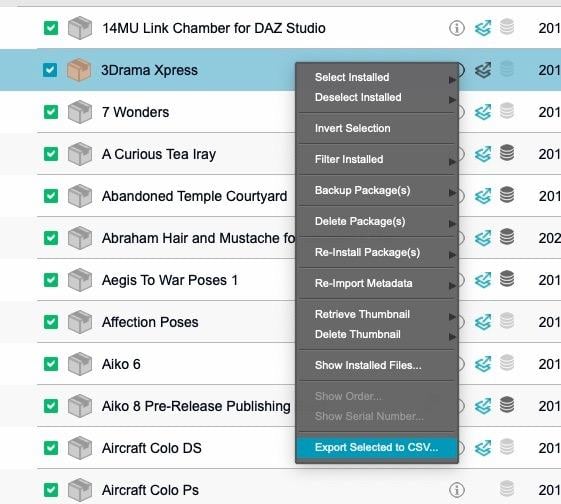
Let the fun begin!
Can't seem to change Victoria 8.1 brow colorsI'm not really sure what that means to be honest. All I did was load in Victoria 8.1 from smart library directly into the scene (not by morph dials or loading presets onto base model). I don't know what mesh eyebros are, but is loading them in something I'm supposed to do?
Can't seem to change Victoria 8.1 brow colorsI load victoria 8.1 into emtpy scene. I try changing the color of the brows by choosing one of the 6 presets it comes with; while having victoria 8.1 selected in the scene tab. But the brows don't change color, remaining the same in both the viewport and final render. The other presets that come with her, like tattoos and makeup, all work fine.
Anyone know what I'm doing wrong?
Convert G1 poses to G3, G8taiuri said:richardandtracy said:
I'd say there is a freebie pose transfer available which does the job too. https://www.daz3d.com/forums/discussion/502771/victoria-5-g1f-to-g8f-pose-transfer-script. Regards, Richard.
It worked very well! Thank you! Just to say I needed it for all G3/G8 Males and Females figures, but only I converted them once I had them in G8F
TBH, there isn't really a great difference between G8F & G8M when applying a G1 pose to a G8 character. It's something I never really checked at the time when writing the script, but have done twice since (wow, such depth of experience!). Anyway, glad you found the script worked. Regards, Richard.
Convert G1 poses to G3, G8richardandtracy said:
I'd say there is a freebie pose transfer available which does the job too. https://www.daz3d.com/forums/discussion/502771/victoria-5-g1f-to-g8f-pose-transfer-script. Regards, Richard.
It worked very well! Thank you! Just to say I needed it for all G3/G8 Males and Females figures, but only I converted them once I had them in G8F
Thank you! Now we can do real art.Charlie Judge said:
benniewoodell said:
This could be my favorite one yet! Well done lol!
It easily is one of my favorites;. However, as an April Fool gotcha I think V8 when we were looking for Victoria 8 to be released is at the top of my list
That was good, but I'd have to say that the top spot has got to go to Pretty In Pink https://www.daz3d.com/pretty-in-pink That one came completely out of the blue and kind of set the benchmark.
Thank you! Now we can do real art.benniewoodell said:
This could be my favorite one yet! Well done lol!
It easily is one of my favorites;. However, as an April Fool gotcha I think V8 when we were looking for Victoria 8 to be released is at the top of my list
Convert G1 poses to G3, G8I'd say there is a freebie pose transfer available which does the job too. https://www.daz3d.com/forums/discussion/502771/victoria-5-g1f-to-g8f-pose-transfer-script. Regards, Richard.57th Bryce contest (Lonely islands)Hansmar : Wonderful work, well done.
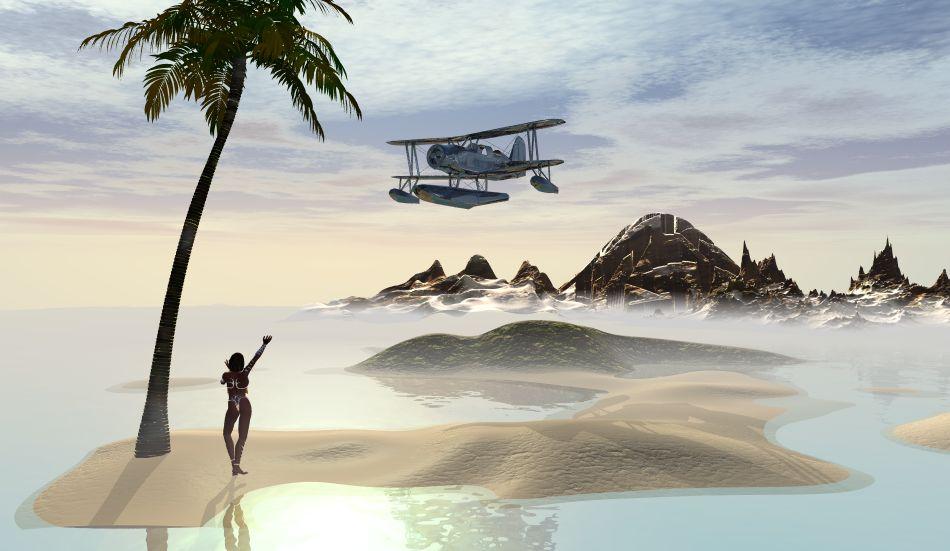
My last entry : Island rescue
bryce terrains, the plane : archive 3d, the figure : Victoria 4 (belly dancer)
 Do I have to buy Victoria 4?
V4.2 base: https://www.daz3d.com/victoria-4-2-base
Several bundles including her have been on sale dirt cheap or even free previously.
Daz 3D is part of

Connect
DAZ Productions, Inc.
7533 S Center View Ct #4664
West Jordan, UT 84084Licensing Agreement | Terms of Service | Privacy Policy | EULA
© 2026 Daz Productions Inc. All Rights Reserved.