Show Us Your Iray Renders. Part V

15681011100

Comments

  • Oso3DOso3D Posts: 15,104

    I'm constantly amazed at how much really amazing free stuff is out there. Now, I'm glad I have a budget to get things like squiddie up above, but it's gratifying.

    Here's a recent (I think) freebie from Renderosity:

    http://willbear.deviantart.com/art/Dryad-583129868

  • Oso3DOso3D Posts: 15,104
    kyoto kid said:

    http://willbear.deviantart.com/art/Octogal-583061050


    Been wanting to pick up Octogenesis for a while. SALE helped!

    And, as I said elsewhere, WOW. The Anemone hair is amazingly clever and well-designed.


    ...you are defintely a master at geografting.  The only time I ever did it was back in Daz 2.3 with Sadie and Aiko 3 (and it was pretty darn tough as well as involved a lot of polys).

    I adore geografting for making the truly weird. Four arms FASCINATES me.


    It reminds me of when I was a preteen ... my parents would ask me what I wanted to do when I grew up. I said 'I want to design and make MONSTERS.' (not just scary, but everything WEIRD and different)

    I was disappointed to find out genetic engineering was insufficient for my needs... and, for a long time, so was my artistic skills. Artist friends have said 'well, you just have to work at it.' But considering it probably would have taken 20 years to get to the point where I was making artwork I'd be happy with... demoralizing.


    CGI is fulfilling my lifelong desire for the weird. ;)


  • Oso3DOso3D Posts: 15,104

    Toying with more presets for my shaders. I have several attempts at 'scaly skin,' this one is somewhat inspired by pythons.

    http://willbear.deviantart.com/art/Scaleshader-Drakon-fourarm-583156671


    Now, there are limitations to these shaders. For example, there's no easy way to have specific 'regions,' like scales that look different on the belly and palms. For that you really need a conventional painted texture.

    That said, this approach is also pretty cool, IMO, and handy for sewing up content that doesn't easily go together. For example, there are no textures that will work on Four Arms and the Drakon Tail. Normally I'd either have to try to make a new texture (eep) or use camera angles to hide the fact that the skins don't go together. Or clothes.


  • algovincianalgovincian Posts: 2,672

    I'm constantly amazed at how much really amazing free stuff is out there. Now, I'm glad I have a budget to get things like squiddie up above, but it's gratifying.

    Here's a recent (I think) freebie from Renderosity:

    http://willbear.deviantart.com/art/Dryad-583129868

    Thanks for the heads-up on the dryad model. It does look interesting!

    - Greg

  • kyoto kidkyoto kid Posts: 42,213
    edited January 2016
    Nyghtfall said:
    kyoto kid said:

    ...how big was the render file?

    The original PNG is 6.11 MB.

    ..that's the final render.  Actually I should have asked "scene file size during rendering".  I've had scene files in grow to over 10 GB (in addition to the Daz application) during CPU based rendering (monitoring in task Manager)

    My railway station scene (Iray) taxes both the CPU and memory to the point that I can do nothing else on the system while the render is in process. Even cancelling the render and closing the render widnow can take ten to fifteen minutes. It easily uses all the available memory and goes into swap mode as the HDD light is steasy for hours.

    Post edited by kyoto kid on
  • Oso3DOso3D Posts: 15,104

    And I was inspired. Hey, V4 skeleton, V4 dryad... welp, great tastes that taste great together -- http://willbear.deviantart.com/art/Overgrown-Skeleton-583265832


  • FishtalesFishtales Posts: 6,228
    kyoto kid said:
    Nyghtfall said:
    kyoto kid said:

    ...how big was the render file?

    The original PNG is 6.11 MB.

    ..that's the final render.  Actually I should have asked "scene file size during rendering".  I've had scene files in grow to over 10 GB (in addition to the Daz application) during CPU based rendering (monitoring in task Manager)

    My railway station scene (Iray) taxes both the CPU and memory to the point that I can do nothing else on the system while the render is in process. Even cancelling the render and closing the render widnow can take ten to fifteen minutes. It easily uses all the available memory and goes into swap mode as the HDD light is steasy for hours.

    kyoto

    When I have scenes that do that I use the Affinity setting in Task Manager to set DAZ to only use three of the four cores on my processor so that I can still use my laptop on the other core. It is still slow because of the memory swapping but not as bad :)

  • kyoto kidkyoto kid Posts: 42,213

    ...basically I have to find a way to get both the memory and Win 7 upgrade I need. The 24 GB memory kit is probably as low in price as it will ever be (134$)  but I also need 139$ for a Win7 Pro OEM so that I can use all 24 GB. 

    After that it's a 4 GB GPU just so the viewport doesn't bog down on me and I can use Iray view mode once in a while (pretty much impossible to set up HDRI scenes without it).

  • IceDragonArtIceDragonArt Posts: 12,972
    edited January 2016

    Just dipping my toes in the Iray world.  Working my way through the Iray for newbies thread as well as sickleyeilds tutorials.  Still feeling very confused but not as much as a couple days ago lol.
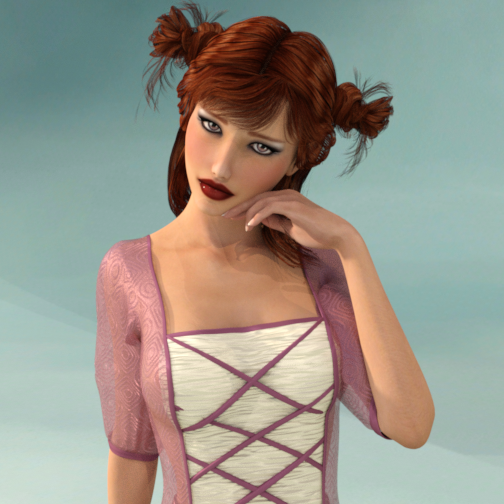
    Danicka Character Gen 2F.png
    504 x 504 - 381K
    Post edited by IceDragonArt on
  • kyoto kidkyoto kid Posts: 42,213

    ...not bad

  • TJohnTJohn Posts: 11,355

    Mayuree.

  • kyoto kidkyoto kid Posts: 42,213

    ...wow, pretty.

  • TJohnTJohn Posts: 11,355
    kyoto kid said:

    ...wow, pretty.

    Thankee. smiley

  • Tako YakidaTako Yakida Posts: 548
    edited January 2016

    My first real Iray render (I did one test render a couple months ago but that was it).

    I think it turned out pretty good. This is V7 with skin modified with Filter Forge and using Elianeck's Iray light set and one of my Supernatural Poses. (Forgive the self-advert but I list it in case anyone wants to know.)

    The hair is Desir Hair for V4 parented to V7. I added an emissive plane light in the back stairs to add some variery of color to the backround. I set it to an aqua-ish color.
    The chair, candle stick, candle and dishes are from a free set I got at RDNA years back called RDNA Banquet Set. The environment was Dunegeon by Stonemasion.
    The candle flame is from Jepe's FlameZ set here at Daz. A great set for these kind of effects. Highly recommend it. :)

    Elf Girl.jpg
    1000 x 1300 - 358K
    Post edited by Tako Yakida on
  • HavosHavos Posts: 5,655
    kyoto kid said:

    ...basically I have to find a way to get both the memory and Win 7 upgrade I need. The 24 GB memory kit is probably as low in price as it will ever be (134$)  but I also need 139$ for a Win7 Pro OEM so that I can use all 24 GB. 

    After that it's a 4 GB GPU just so the viewport doesn't bog down on me and I can use Iray view mode once in a while (pretty much impossible to set up HDRI scenes without it).

    If you have windows 7 of any sort already, then upgrading to Windows 10 for free will support up to 128 GB even for its lowest version (windows 10 home). Would save you some money, unless you either do not want 10 for any reason, or your system can not support it.

  • IvyIvy Posts: 7,165
    Tjohn said:

    Mayuree.

    That is Lovely Tjohn. whats the skin type your using .. I like that glow it has

  • TJohnTJohn Posts: 11,355
    Ivy said:
    Tjohn said:

    Mayuree.

    That is Lovely Tjohn. whats the skin type your using .. I like that glow it has

    That is the Mayuree 3DL mats with the Iray Optimized Mat for G2F. No other tweaks.

  • IvyIvy Posts: 7,165
    Tjohn said:
    Ivy said:
    Tjohn said:

    Mayuree.

    That is Lovely Tjohn. whats the skin type your using .. I like that glow it has

    That is the Mayuree 3DL mats with the Iray Optimized Mat for G2F. No other tweaks.

    Thanks Tjohn. its a great looking skin texture even for a 3dl 

  • grinch2901grinch2901 Posts: 1,247

    Something new.

    Present.jpg
    1229 x 950 - 588K
  • TJohnTJohn Posts: 11,355

    Playing around with the Mil Cat and http://www.daz3d.com/leather-and-fur-iray-shaders

  • kyoto kidkyoto kid Posts: 42,213
    Havos said:
    kyoto kid said:

    ...basically I have to find a way to get both the memory and Win 7 upgrade I need. The 24 GB memory kit is probably as low in price as it will ever be (134$)  but I also need 139$ for a Win7 Pro OEM so that I can use all 24 GB. 

    After that it's a 4 GB GPU just so the viewport doesn't bog down on me and I can use Iray view mode once in a while (pretty much impossible to set up HDRI scenes without it).

    If you have windows 7 of any sort already, then upgrading to Windows 10 for free will support up to 128 GB even for its lowest version (windows 10 home). Would save you some money, unless you either do not want 10 for any reason, or your system can not support it.

    ..suffice to say, I have reasons for sticking with 7.

  • eiliestleiliestl Posts: 100
    edited January 2016

    N/a

    png
    png
    Valia_3.png
    816K
    Post edited by eiliestl on
  • eiliestleiliestl Posts: 100

    Based off of my character from Dragon Age . 

  • kyoto kidkyoto kid Posts: 42,213

    ...pretty.

  • IvyIvy Posts: 7,165

    School Girls Walking to School.

    This is the biggest scene I ever did using Iray. This render uses Stonemasons China town using the Iray mats it came with. The characters I converted to Iray. which were 5 different types of Asian School girls created in G2F that I hand spun dialed my self but the textures are from a bunch of girls by Silver. &  1 G2M  with M6 texture walking away.  The render took me about a hour . But it used 23.7 gigs of my 24 gig of ram. and all of my 2 graphic cards gpu memory .. I was afraid it was going to crash before it was done rendering..lol .  I used the Global Daz Iray present for the light source. Set to 7Am

    Best viewed full size 1920 x 1080 -  Orignal Posted in the Daz Gallery

  • Ivy said:
    Ivy said:


    The Flying Dutchman      Orignal Post in Daz Galleries

    Rendered in Daz Studio 4.8 , with No post work.

    This is made up of all older content, that I kit bashed together and converted to Iray Mats. The lighting consist of Magix's 101 world domes for Iray and I custom illuminated the clouds & the windows on the ship by hand. it took me 32 hours total to build and convert mats for the scene and 22 minutes of rendering with Dz Studio Iray. Click for best view 1080 HD


    Wow! that is stunning Ivy.  How did you do the fog?  Is that done in Iray or was that in post?

    I used the cloud props from stonemsons Wintery terrain set.   I then applied  the Uber Iray default mat preset and pressed the control button at the same time and then i clicked ignore instead of replace texture. it created a Iray Mat for the cloud prop using the orginal cloud texture map.. Then under the surface tab  way down the list you will see emissions I selected the Original  Cloud Base map and placed it in the emissions setting. and set the color from black ( defualt) to white and then a few more settings down there is a setting called lumes. it will adjust the brightness for the texture. and I set the lumens around 45 lumes for each cloud prop this made the clouds appear to glow softly  with their own light.  it also allowed me to blanket a old Poser Pirate ship model  which I had spent a week converting to Iray mat in the cloud props . giving me this fishned render without using any post work at all.  Cool cheat huh. :)

    Ohh, I am SO using those directions for a render in the near future!!! And, I have that set.  Thanks so much for the detailed directions.  I really love the final result. Not sure I would have thought to do all of that.

  • IvyIvy Posts: 7,165
    Ivy said:
    Ivy said:


    The Flying Dutchman      Orignal Post in Daz Galleries

    Rendered in Daz Studio 4.8 , with No post work.

    This is made up of all older content, that I kit bashed together and converted to Iray Mats. The lighting consist of Magix's 101 world domes for Iray and I custom illuminated the clouds & the windows on the ship by hand. it took me 32 hours total to build and convert mats for the scene and 22 minutes of rendering with Dz Studio Iray. Click for best view 1080 HD


    Wow! that is stunning Ivy.  How did you do the fog?  Is that done in Iray or was that in post?

    I used the cloud props from stonemsons Wintery terrain set.   I then applied  the Uber Iray default mat preset and pressed the control button at the same time and then i clicked ignore instead of replace texture. it created a Iray Mat for the cloud prop using the orginal cloud texture map.. Then under the surface tab  way down the list you will see emissions I selected the Original  Cloud Base map and placed it in the emissions setting. and set the color from black ( defualt) to white and then a few more settings down there is a setting called lumes. it will adjust the brightness for the texture. and I set the lumens around 45 lumes for each cloud prop this made the clouds appear to glow softly  with their own light.  it also allowed me to blanket a old Poser Pirate ship model  which I had spent a week converting to Iray mat in the cloud props . giving me this fishned render without using any post work at all.  Cool cheat huh. :)

    Ohh, I am SO using those directions for a render in the near future!!! And, I have that set.  Thanks so much for the detailed directions.  I really love the final result. Not sure I would have thought to do all of that.

    Its not really a trick of any type. I like to use Keyboard short cuts or Hot/keys. and I did alot of work in textures before Iray so it was easy to apply those technique to Iray & Iray allows for its textures to be light emissions, which is nice when you need part of something to illuminate and not the whole model your working with. 

  • IceDragonArtIceDragonArt Posts: 12,972
    kyoto kid said:

    ...not bad

    Thank you!

  • ScytharScythar Posts: 127

    Trying other thingy's

    Scene1EddyGun.jpg
    2048 x 1152 - 2M
    Scene2.jpg
    2048 x 1152 - 2M
  • kyoto kidkyoto kid Posts: 42,213
    kyoto kid said:

    http://willbear.deviantart.com/art/Octogal-583061050


    Been wanting to pick up Octogenesis for a while. SALE helped!

    And, as I said elsewhere, WOW. The Anemone hair is amazingly clever and well-designed.


    ...you are defintely a master at geografting.  The only time I ever did it was back in Daz 2.3 with Sadie and Aiko 3 (and it was pretty darn tough as well as involved a lot of polys).

    I adore geografting for making the truly weird. Four arms FASCINATES me.


    It reminds me of when I was a preteen ... my parents would ask me what I wanted to do when I grew up. I said 'I want to design and make MONSTERS.' (not just scary, but everything WEIRD and different)

    I was disappointed to find out genetic engineering was insufficient for my needs... and, for a long time, so was my artistic skills. Artist friends have said 'well, you just have to work at it.' But considering it probably would have taken 20 years to get to the point where I was making artwork I'd be happy with... demoralizing.


    CGI is fulfilling my lifelong desire for the weird. ;)


    ..agh missed your response due to flaky bots.

    Yeah, Geografting seems the perfect pastime for those with the desire desire to become mad scientists but cannot do so  in RL.

    I may have to start messing  around with it myself as after seeing what you've been doing, maybe I can create a couple of the races from my old SF story.

This discussion has been closed.

