
Daz 3D is part of 
Connect
DAZ Productions, Inc.
7533 S Center View Ct #4664
West Jordan, UT 84084
Licensing Agreement | Terms of Service | Privacy Policy | EULA
© 2026 Daz Productions Inc. All Rights Reserved.
Comments
I understand. I only use this type of texture assignment in Hexagon for billboards; otherwise, I don’t use it.
At the very beginning I worked that way as well, but I realized that it takes a lot of time.
If you work without mapping and, like me, use groups, you only need three textures in Twinmotion: one for the body, one for the upper ring, and one for the contact surfaces at the top and bottom for the positive and negative poles.
If you need a logo or lettering on the battery, use decals.
They are extremely flexible and allow you to adjust everything very quickly in the renderer to suit your needs. That’s how I always do it.
If it’s a complex model, however, you can’t avoid proper UV mapping.
Since my main focus is architecture, detailed mapping would actually be counterproductive for me. I handle this work in the rendering software instead. In Octane, however, the situation is different, as texture coordinates are required there.
It’s nice to see that you are working with Twinmotion. Stick with it and you will see that it offers many advantages and is much more up to date. In terms of performance and realism, it is also future-proof thanks to the Unreal Engine.
_____________________________________________________
Before I forget: please don’t use mirroring in Hexagon, as it breaks the normals. This issue has not been fixed by DAZ.
____________________________________________________________
For illustration purposes, I quickly created a simple battery model and produced a texture in Photoshop. The model created in Hexagon was not textured and does not have any UV mapping. All materials, visualization, and rendering are done exclusively in Lumion or Twinmotion.
It is important that, when doing this, objects are not modeled as a single solid piece. This approach also offers several advantages, as it provides greater flexibility.
I place great importance on a fast and efficient way of working.
I’m only writing this to show how I personally handle things. This approach works very well for me, but that doesn’t mean it’s the right way for everyone. Everyone works differently..... in the end, the result is what matters.
Update : Right now, the building is under further construction and is getting sun protection.
Nova, thanks for the awesome tutorial above. I dug up a few great tutorials to get us back on the horse.


More Hexagon goodies, since Hexagon was once the glue that held Daz3D together.
It is great to see that you are working with Hexagon again. Please continue using it. For me, it is much more comfortable to work with than Blender because I need a pure modeling tool without unnecessary extras.
However, I still find it very disappointing that DAZ 3D does not update the programs that originally made the company successful. Yes, I am familiar with these tutorials, and there are many of them. I have watched almost all of them, and they have helped me a lot.
That said, I want to emphasize that when working intensively with Hexagon, there are many different ways to model and to use the program effectively. These efficient workflows only develop over time. In my case, it took years to learn how to use Hexagon properly and stably without crashes.
Current status: The sandbox had to be modified, the garage lifts are being added again as they received an update, and the sunshades have been converted into balconies.
@Nova Wow, that turned out great.
Crazy enough i decided to work on an old watch project and i recreated the face in Hexagon while dusting off the cobwebs. Fun to get back into Hexagon.
This is a WIP.
Nice job on the garbage. Yeah, you have to keep after the b██████s!
(Sorry about the redaction. )
)
Havent been playing with Hexagon in a while, here is where I left off with the watch project. All built in Hexagon down to the digits.
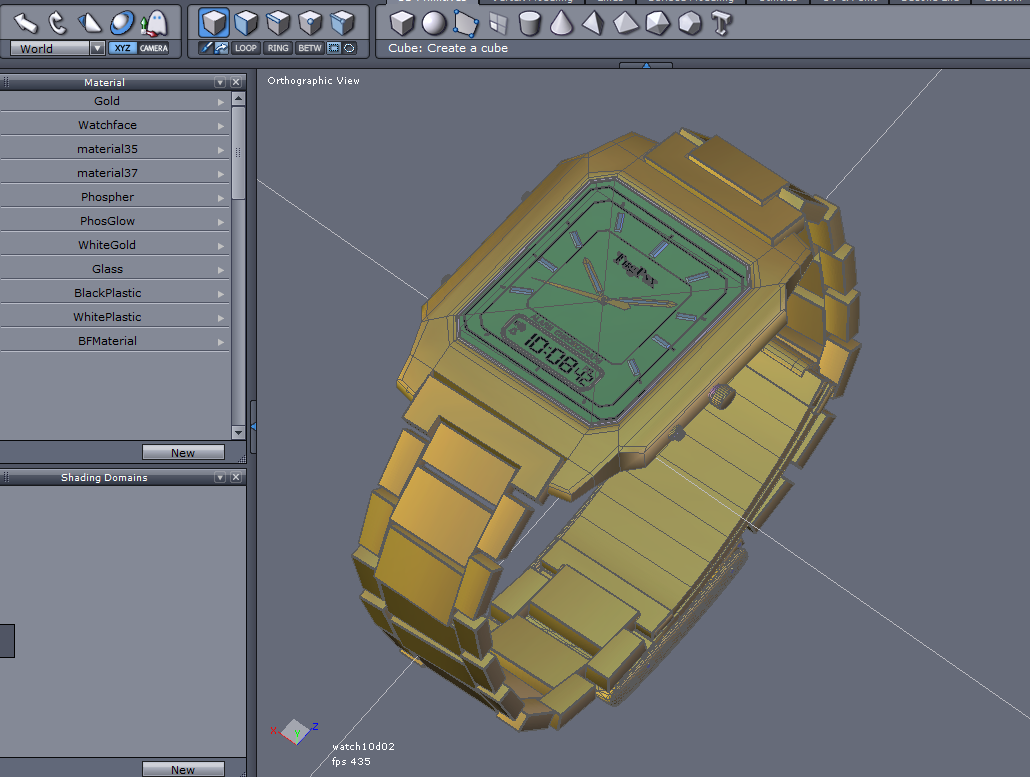
I think you’ve done an amazing job.... I really like the watch.
I’m already looking forward to your future work.
At the moment, I’m quite busy with work, so I can’t continue working on Hexagon right now. I really miss that sense of relaxation it gives me.
You two are really Rockin' this stuff! Killer work!