
Daz 3D is part of 
Connect
DAZ Productions, Inc.
7533 S Center View Ct #4664
West Jordan, UT 84084
Licensing Agreement | Terms of Service | Privacy Policy | EULA
© 2026 Daz Productions Inc. All Rights Reserved.
Comments
I understand. I only use this type of texture assignment in Hexagon for billboards; otherwise, I don’t use it.
At the very beginning I worked that way as well, but I realized that it takes a lot of time.
If you work without mapping and, like me, use groups, you only need three textures in Twinmotion: one for the body, one for the upper ring, and one for the contact surfaces at the top and bottom for the positive and negative poles.
If you need a logo or lettering on the battery, use decals.
They are extremely flexible and allow you to adjust everything very quickly in the renderer to suit your needs. That’s how I always do it.
If it’s a complex model, however, you can’t avoid proper UV mapping.
Since my main focus is architecture, detailed mapping would actually be counterproductive for me. I handle this work in the rendering software instead. In Octane, however, the situation is different, as texture coordinates are required there.
It’s nice to see that you are working with Twinmotion. Stick with it and you will see that it offers many advantages and is much more up to date. In terms of performance and realism, it is also future-proof thanks to the Unreal Engine.
_____________________________________________________
Before I forget: please don’t use mirroring in Hexagon, as it breaks the normals. This issue has not been fixed by DAZ.
____________________________________________________________
For illustration purposes, I quickly created a simple battery model and produced a texture in Photoshop. The model created in Hexagon was not textured and does not have any UV mapping. All materials, visualization, and rendering are done exclusively in Lumion or Twinmotion.
It is important that, when doing this, objects are not modeled as a single solid piece. This approach also offers several advantages, as it provides greater flexibility.
I place great importance on a fast and efficient way of working.
I’m only writing this to show how I personally handle things. This approach works very well for me, but that doesn’t mean it’s the right way for everyone. Everyone works differently..... in the end, the result is what matters.
Update : Right now, the building is under further construction and is getting sun protection.
Nova, thanks for the awesome tutorial above. I dug up a few great tutorials to get us back on the horse.


More Hexagon goodies, since Hexagon was once the glue that held Daz3D together.
It is great to see that you are working with Hexagon again. Please continue using it. For me, it is much more comfortable to work with than Blender because I need a pure modeling tool without unnecessary extras.
However, I still find it very disappointing that DAZ 3D does not update the programs that originally made the company successful. Yes, I am familiar with these tutorials, and there are many of them. I have watched almost all of them, and they have helped me a lot.
That said, I want to emphasize that when working intensively with Hexagon, there are many different ways to model and to use the program effectively. These efficient workflows only develop over time. In my case, it took years to learn how to use Hexagon properly and stably without crashes.
Current status: The sandbox had to be modified, the garage lifts are being added again as they received an update, and the sunshades have been converted into balconies.
@Nova Wow, that turned out great.
Crazy enough i decided to work on an old watch project and i recreated the face in Hexagon while dusting off the cobwebs. Fun to get back into Hexagon.
This is a WIP.
Nice job on the garbage. Yeah, you have to keep after the b██████s!
(Sorry about the redaction. )
)
Havent been playing with Hexagon in a while, here is where I left off with the watch project. All built in Hexagon down to the digits.
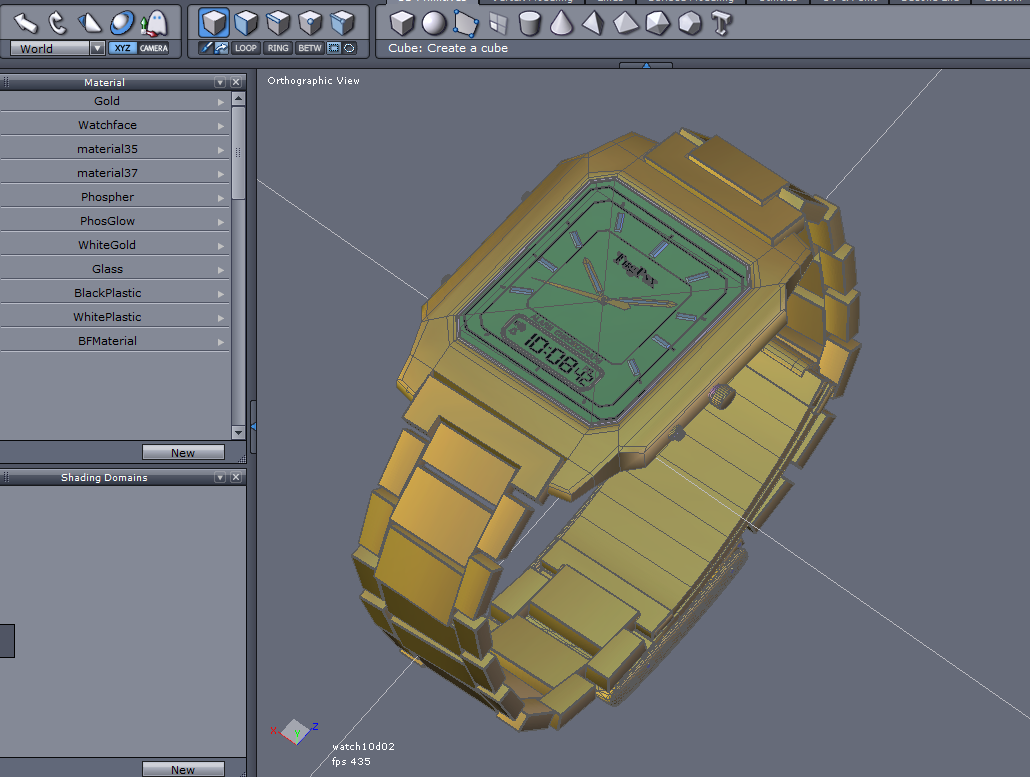
I think you’ve done an amazing job.... I really like the watch.
I’m already looking forward to your future work.
At the moment, I’m quite busy with work, so I can’t continue working on Hexagon right now. I really miss that sense of relaxation it gives me.
You two are really Rockin' this stuff! Killer work!
Awesome. Hex is a very capable modeling app and I love it to death. Only reason I jumped to Silo3D and later Blender was the lack of updates and support.
@ Awesome. Hex is a very capable modeling app and I love it to death. Only reason I jumped to Silo3D and later Blender was the lack of updates and support.
I completely agree. The workflow in Hexagon really clicks for me, especially because it stays focused on the essentials. It isn’t an overloaded all-in-one package, but a clear and dedicated tool that does exactly what it’s meant to do: clean, direct modeling.
That simplicity makes a big difference. You’re not distracted by endless features, panels, or systems, and it’s much easier to stay in a creative flow. Each step feels intentional and controlled, almost like a hands-on craft. It lets you concentrate on form, proportions, and details instead of constantly jumping between tools or workspaces.
Compared to more complex software like Blender, Hexagon feels more focused and less overwhelming. It doesn’t force you to think about the entire 3D pipeline at once, but allows you to fully immerse yourself in the modeling process.
For me, that’s the biggest strength. Hexagon isn’t a Swiss army knife, it’s a precise tool designed for a specific purpose.
Hexagon + Lumion 10 Pro
INFO_ https://bruder-aural.com/000-00_-comet_-konzeptentwurf---informationen.html
Amazing renders! Bravo!
Bravo some MORE!!!
Thank you to everyone contributing here. Let’s work together to ensure Hexagon is not forgotten.
Thanks for the tip. When modeling cars, spaceships. etc. I depend on mirroring. Perhaps the solution would be model half than import into Blender to use mirroring.
I totally agree the beauty of Hex is it is not a multi-funtional app like Blender or 3DMax. Hexagon is more like Silo3D in that aspect. I also enjoy Wings3D but it lacks many of the modeling tools Hexagon has.
Impressive!
A truly impressive piece of work... I like it very much, and it once again proves how powerful Hexagon is.
Because of the mirroring, there are three possible approaches:
A modern VR gallery in a Brutalist style, with simple shapes and raw materials. The base is finished and the model is still being worked on, with a sunshade to be added next.
@Nova Wow again, your models look great. We all have been able to get great results from Hexagon. Thanks for sharing tricks and tips. Keep them coming.
@ Tugpsx_ Thanks a lot, I really appreciate it!
___________________________________________________
This design presents a conceptual architectural study of a modern VR gallery in a brutalist style. The structure consists of four clearly defined segments arranged around a central circular element. Sharp-edged geometries and reduced forms shape the overall composition, giving the object a calm, almost monolithic presence.
The architecture is conceived as a deliberate contrast to the digital world it contains: while the exterior appears raw, massive, and restrained, the interior serves as a platform for immersive virtual art experiences. The clean lines and abstract representation draw attention to spatial impact, proportion, and structure.
A particular focus lies on opening the building to the surrounding environment. Parts of the exhibition are intentionally shifted outdoors and spatially framed by the segmented arrangement. Two of the areas function as covered stages, enabling an extension of use toward performances and media-based productions.
The representation itself is kept minimalistic and deliberately avoids color in order to highlight the architectural idea in its pure form. Light, shadow, and structure come to the forefront, making the composition perceptible as a spatial concept.
Hexagon / Lumion 10 Pro
There is still a lot of work ahead of me... this is the current progress of the large VR gallery. Further adjustments and refinements will still be made. At the moment, a standard base plant package has been used, which will later be replaced with higher-quality and more detailed models.
________________________________
Wow Nova! that looks impressive. As i have said you do great work with Hexagon and we are all in awe!!!!
Thanks for sharing your work. It inspires us the try and do more with Hexagon.
__ ^^ __ Many thanks, Tugpsx! That is exactly the goal, to inspire people to continue using this amazing software. Hexagon is truly fantastic and surprisingly easy to learn.
Here is a small update on the current project.
Current update on the second VR gallery:
Today, the information panels and picture frames are being installed. In addition, further improvements have been made to one of the 3D models.
I will also be uploading several new 360° views throughout this week.