Bringing older generations up to modern standards - might be fun ;)
 AllenArt
Posts: 7,175
AllenArt
Posts: 7,175
I thought I'd document my progress in bringing some of my older, favorite figures up to modern standards (namely Iray skin that looks truly good). I'll share what I did to make my older figures look like they do in the images I post so that you can fix your skins too (it really IS pretty easy). I'm sure success will vary from figure to figure and I don't know yet what I'll run into as I've only so far done David 5.
A quick synopsis of what I did:
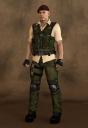
I made SSS maps out of David's color maps, and using a shader from a G8 character I really like (in David's case, Edward 8's skin shader), I placed the new SSS maps I made on David's surfaces where they are on Edward's shader and removed or moved maps that don't belong. I applied the shaders for the different surfaces one by one by saving a "shader" preset (not material!) for each surface of Edward 8 to a temp folder, then while holding down Control, applied the corresponding surface to David's surfaces, telling DS to ignore the maps so that I could keep David's original maps. I then used Edward as a reference and went down the stack, putting maps where David didn't have a matching one (like the SSS maps I made), and deleting them from places where they didn't belong and placing them where they did (mostly the specular maps). The results looked quite good IMVHO. Other things I did to make David look like he had more detail (this was pre-HD morphs) was to add detail to under the eyes with the eye crease morph, some dimples, and adding some definition to the brows (all part of Genesis' basic morphs). I also added some of Zevo's Vascularity, which also helped a great deal. For his eyes, I used Chevybabe's eye shaders (but still kept David's eye textures), which are the best I've seen so far, even though they take a long time to resolve noise when rendering. You can just use the shader from the G8 skin that you pick. I also have a G3 clone for Genesis that allows me to use G3M clothing and hair, which I did in the first image - I even used Redz Super Natural Brows on him.
How I made the SSS maps:
I use Photoshop, but I'm sure there is a corresponding way to do it in your image editor of choice.
I loaded all the color maps from David. I loaded the SSS face map of Edward so I could judge how light to make my SSS maps for David. Starting with the face (David's), I went into Hue/Saturation and gave it a saturation of -25 and lightness of +25. Whatever values you use, write them down or memorize them, because they need to be done exactly the same way for every other map. I saved them out, adding "SSS" to the name of the map and then placed them in the Translucency Color after applying Edward's shader. The specular that is in the Glossy Color will need to be moved to Dual Lobe Specular Reflectivity and the specular map that is in the Top Coat Color will need to be moved to Top Coat Weight.
I hope all that made sense! Phew! :) I'll post my progress with other figures as I do them and any problems I run into. Hopefully there won't be any :P.


Daz 3D is part of 
Connect
DAZ Productions, Inc.
7533 S Center View Ct #4664
West Jordan, UT 84084
Licensing Agreement | Terms of Service | Privacy Policy | EULA
© 2026 Daz Productions Inc. All Rights Reserved.
Comments
Outstanding work! I'm inspired to do the same with V3 if I can dig her out of my runtime!
Looks great. Any idea how long it took?
Excellent work, Laurie!
I absolutely ADORE polishing up older content and making it pretty for Iray. It's a lot of fun, imo. :)
I'm looking forward to seeing more of your work!
Took me way longer to fiddle with the morphs, but for the shaders and texture map creation total? Less than two hours - probably closer to one. That was my first one though, so I'm sure that part of it will get faster ;).
Laurie
This is fantastic! Can 't wait to see more !
This is wonderful! I have loved messing around with old figures (and especially their clothes) and bringing them into Iray. (Some day, I'd love to make an Iray V3 skin, just because.)
I think this is the best conversion I've ever seen. Great work!
Awww...thanks. I love messing with older figures too...hehe. This guy turned out so good that I think he's my favorite male...out of them ALL and I wouldn't hesitate to use him in any scene ;).
Laurie
David 5 rocks
he is my favourite character
your render is awesome too
Yah, very nicely done. Great work Laurie.
Just for fun, here he is with a full-on Alec Baldwin man-pelt...LMAO. Cause I could :P
Ok, no more goofing. Gia 6 or Mike 6 is next. Haven't decided which yet.
Laurie
Very impressive!
Damn, girl, that looks good!
Gia 6 please!
Yep, Gia 6 it is. Already started. Maybe I'll go boy, girl....lol. At the moment she's an extremly dark burnt orange. Urgh :P
This is what you get when there are the diffuse color maps in the translucency color like the Genesis 2 Gia is set up...
Laurie
Excellent results, Laurie! Looking forward to Laurie: The Next Generation! .
.
(BTW, I just stumbled on this here in the Commons by accident. This is the kind of thing I would have expected to find over in the Art Studio, but it may gain more notice here, dunno.)
Trying to get out a render but having rendering issues...urgh! Little speckles everywhere. Pfffft!
Laurie
Wow, looks incredible! Better than a lot of the newer characters!
I'm having weird issues with that, even on some newer characters. Two things that might help:
Could also be some weird issue with dual lobe settings. Saw this before when we were working with a script here in the Freebies section to add dual lobe to G3 characters. I'll see if I can find that one.
ETA: Here it is: https://www.daz3d.com/forums/discussion/176756/script-apply-dual-lobe-features-to-pre-lobe-g3-skins#latest
Looks like it was SSS issues.
Well, I didn't have speckles until yesterday after I updated my gfx drivers :(. I rolled it back, but it's still doing it. Might go to the laptop. I didn't update the video drivers on that.
FWIW, I have an HDRI in the bkgnd. I had spectral rendering turned on, tried it with it off. It's still doing it. *sigh*
Laurie
Laurie, I had the same thing happen to me last week. I have a GeForce 1080Ti. It started after the update and rolling it back did not fix it either. Sorry. Right now the above things I listed are my workarounds.
I'll eventually move to my laptop I guess when I get sick of trying to fix it ;). Just trying to get Gia rendered and it's like pulling teeth. :P
Laurie
This is another thread talking about the speckles:
https://daz3d.com/forums/discussion/222136/how-do-i-get-rid-of-these-spots-in-iray-render
They are actually holes in the generated PNG, so you don't even spot them until you open the saved file with an image viewer. As mentioned above, using a HDR with the draw dome switched on will solve the issue, but there are a few other work arounds mentioned in the thread.
From what I have read the problem is fixed in 4.11, but I have not installed the beta as yet.
That's not it. I have a backdrop prop behind the figure. AND I have an HDRI turned on in the scene. It's something else. Very very tiny and fine colored noise. All over uniformly. This is the first I've seen it. I've seen the holes before.
Laurie
Multi-colored noise on skin, that isn't SSS mode being set to Chromatic instead of Mono is it? I always have trouble with that.
What you've shown so far looks great, especially that very first portrait! I need to spend more time trying to update some older stuff too, your suggestion and results on the translucency map helps a lot.
Unfortunately since the day before yesterday some time, I have multi-colored noise ALL OVER, not just skin. It's uniform across the image. It starts to resolve eventually to the color it's supposed to be but never fully goes away. So I have fine noise that gives the image sort of a blurry appearance, even if it's thousands of samples. I can't get any fine detail with it present. It's so discouraging :(.
Laurie
Just as an update since I'm having trouble getting a good render atm, I've hit some trouble with Gia 6. I had such high hopes, but she's showing texture seams. I'll have to figure a way to get rid of that if I want to use her with the skin forumula I used on David 5. Otherwise she doesn't look bad. Not as good as David, but still looks good ;). This is the best I've got so far, but I had to run the image thru Photoshop's despeckle and it blurred it out even more than the fine noise did. Sorry about that. Up close you can see her texture seams pretty easily (dark lines), and I'll try to get an image of those.
Laurie
This is so inspiring! You give me real hope for these great older generations. But I'm a bit hesitant with Photoshop, that is, until I scrolled down and saw David! I've always been partial to him and his entire Pro Bundle crew. Thanks for your efforts and for sharing with us how you got these results. Now, which G8F did you use as your basis for Gia's conversion?
I have some M3 hair that work good in Iray with some surface tweaking. David looks good!
LOL...I forgot to mention that, didn't I? Well, I started out trying to use Vicky 8's shader, but in the end, went with Edward's again :P. Edward's shader has a top coat that Vicky's lacks and I think it's important to the shader to have it there. So Edward again it was ;). It did pretty well, but in trying to get these figures over to Iray I did figure out one thing. In order for the modern skins to look their very best you should probably always have spectral rendering turned on. I know a lot of people don't wanna hear that because it makes the render slower, but it is what it is unfortunately. I noticed with it turned off, the shine on the skin was much harsher and looked horrible compared to having spectral turned on. Try it yourself: use Edward or a recent G8 and put them in a scene with a sharp rim light and do a closeup without spectral...the shine on the skin is not only more glaring and doesn't look right, it actually looks much shinier than it's supposed to. At least with all the noise frustration, I'm learning things from this little exercise. LOL.
Laurie
Thanks! I will try that. I'm battling longer-than-usual render times at the moment; so, my experiments will have to wait until I can get to my machine and install the old driver. I'll be watching.