Superheroes Rebooted - Ready to Rrrrrender?
This discussion has been closed.

Daz 3D is part of 
Connect
DAZ Productions, Inc.
7533 S Center View Ct #4664
West Jordan, UT 84084
Licensing Agreement | Terms of Service | Privacy Policy | EULA
© 2026 Daz Productions Inc. All Rights Reserved.
Comments
Love that first Storm. On your kitbashed figures with parts from elsewhere (like the Batman ones), I have yet to see any posed shots, do they pose well with the extra parts?
Mainly I decided to do all my character presets in the zero poses to emulate the character images I have seen put out by Marvel/DC for their games. Also I felt that it shows off the details as a whole a little bit better by showing them in different perspectives. I was originally doing them in a few different posed shots, but it was becoming really time consuming trying to get each character in a decent pose all the time just to show off the kitbashing. I do plan on using all of these presets in future artwork though which is why I starting making them to begin with.
Here is a quick render of my Batman character preset in a posed shot for you to see. Not the best lighting, so please excuse that since I just slammed in a lighting preset from a different environment. He is using a preset pose for G2M, and I only did minor tweaks to the belt and chest emblem placement from the original static pose. If I was to spend more time, I would adjust the guantlets and shoulder pads as well. As it is, all the 3rd party objs are parented to the specific bones that they should be, so they follow the pose pretty close I think.
As you can see the cape is a complete disaster. It literally sticks to the figures feet and legs like glue and none of the included morphs help at all. I believe I am using the Super Cape Long for G3M and autofit it to G2M but have no idea how to make it work better. I have bought so many capes from the DAZ store and quite honestly none of them seem to work much better. It is really disappointing.
I think I solved the cape issue. Looks like the only viable option is the G2M Hooded Cloak. Not a perfect solution but better than all of these other capes.
I have to agree. Better than what you had, but not quite right. ;-)
Pose and lighting are good, though.
When you conform the cape it projects the morphs from the figure. Try parenting it instead.
Sorry guys. I forgot to upload new render to show the fixed cape/cloak. Here it is.
Here's a couple quick additions to my library. Two new versions of Harley Quinn and Moon Knight. The first Harley I take very little credit for since it uses the full Jester costume set with no realy modifications. but the second is a variation inspired by her Arkham costume that I made with Smay's Super Hero Suit.
My first thought when I saw the Reptilian 6 HD character was Curt Connors/The Lizard. So I bit the bullet this weekend and nabbed him with the $20 off March Madness deal.
I am not 100% happy with the clothing results so I might re-do them. Mainly I need to find a shirt that has an "open" or "unbuttoned" morph, so if anyone knows of one, please let me know.
Here's a differently angled and posed version of a Superman pic of mine from a couple of months ago, now with updated shaders.
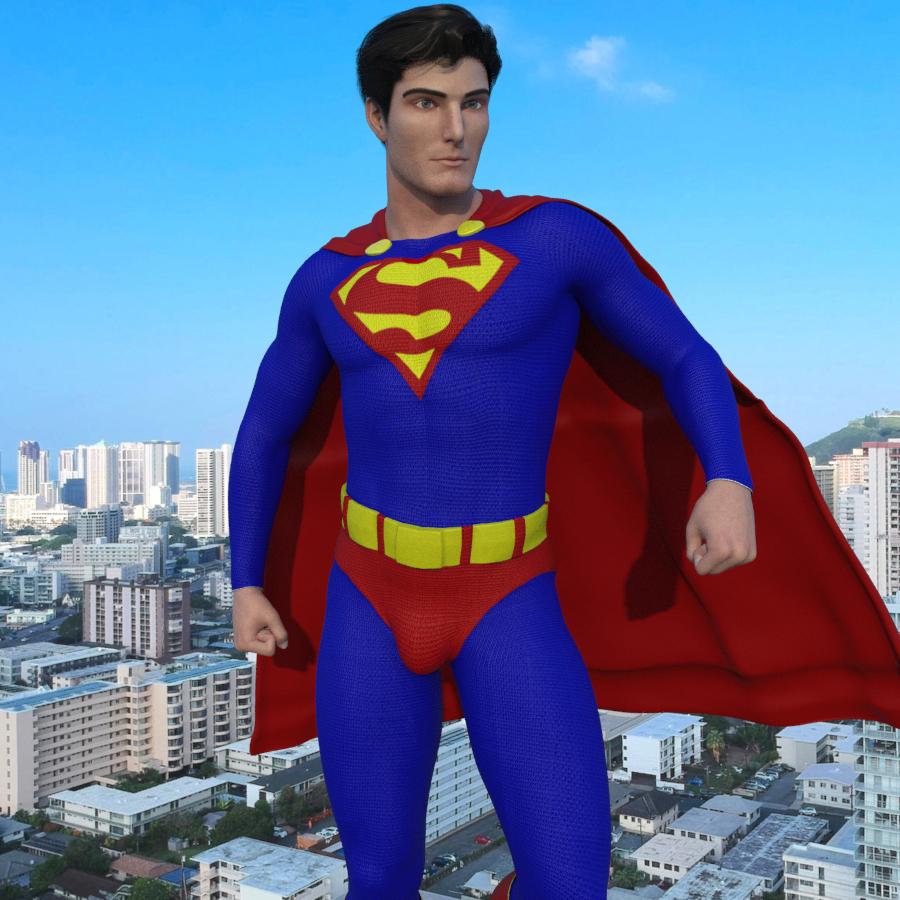
Credit goes to Kaleomokuokanalu Chock for the background panorama, used under this license.
This is my Nightwing Costume. The gloves and boots and hair are all kitbashed together (Thank you, Mightymite) but the costume and shoulderpads are all mine. I hope you like it. :)
Nice! I have been wanting to make a Nightwing costume as well. How did you do the shoulder pads?
Here's my Jack O Lantern version of the Green Goblin.
Slowly and with much thought. Kidding. I have ZBrush. Once I created the bodysuit, I just made a panel loop of the shoulderpad area.
I have no idea what that means but it sounds time consuming. LOL
Egads, no. Easiest thing to make is armor panels in ZBrush. You paint on the figure you have then decide how thick they should be, press a button and they are made....now FINDING that button is time consuming. :) I so need to setup custom menus on that thing.
Holy smokes. I just checked and Zbrush costs $795 on Mac?! Wow. Way out of my price range.
LOL, that is cheap compared to comparable software (3dsmax $3900, LOL)
I can't spend that much either,
I guess if DAZ was more than a hobby for me and I had deep aspirations to make a career out of it, then it might make sense. But definitely not at this point, so I will just keep kit bashing like a poor person. With that... here's my version of Black Lightning
There's always Blender. It only demands your soul in payment is free.
Tried and gave up in frustration. I can't even get a model to export out of that program correctly. It maked me feel like an idiot and I'm not an idiot.
I've started with some starter tutorials, and I think I'm getting the basics down, but it's hard work. And yeah, I feel like an eternal noob and/or an idiot a lot of the time.
WOW! Nice Black Lightning! What "suit" is that?
It's Smay's Super Hero Suit. 99% of the time it is what I use for my kit bashing costumes since I have gotten really familiar with how to edit the textures in Photoshop.
Here's two versions of Cyclops I made recently that also use Smay's Super Hero Suit and Sci-Fi mask.
Man, I would LOVE to get a hold of some of the textures you are using for the suit. Where did you get the shoulder gear for Cyclops? :)
Carrara and Hexagon are doable and inexpensive. Carrara is on sale for like $20 right now, I believe.
It's hard to beat the Blender community for support and tutorials, though (unless you compare it to the ZBrush community. :) )
Have you considered the "BKCBoyfriend Shirt" for G3F at Rendo? I think you can do an autoadapt between genders.
I am just making the suit textures in Photoshop. Lots of trial and error to get seams right but I am getting better and faster at it I think. LOL. As for the shoulder gear I found those straps in this set:
https://www.daz3d.com/highlander-wildenlander-for-genesis
I feel your pain. I have both Carrara and Blender. I have jumped into both and can't get my head around either. I need to go through some good tutorials and really get all the commands and navigating down. Mainly all I want out of Carrara/Blender right now is just to be able to properly unwrap UVs for 3D objs. There doesn't seem to be easy solution. People have offered some really great advice on how to do this but I am just missing something in how to navigate those apps and often I see tutorials where people are doing things but not showing what shortcut keys they are actually using.
I don't know how to package them as an actual texture, but I will PM you and we can chat.