-
DAZ Log File?
I keep getting errors when loading G8F about duplicate errors, and to check the log. For the life of me, I cannot seem to fing the log. WHere may i find the log, and which log file shall I be checkign for the morph collission?
Thanks,
-David
Baking Displacement: bloated meshHello,
Maybe one of you has a clue what's going on here.
I got zBrush a few days ago and want to bake in zBrush die HD morph of an expression to a displacement map.
But what ever I do, the height map also bloats the mesh additionally. Here in DAZ Studio: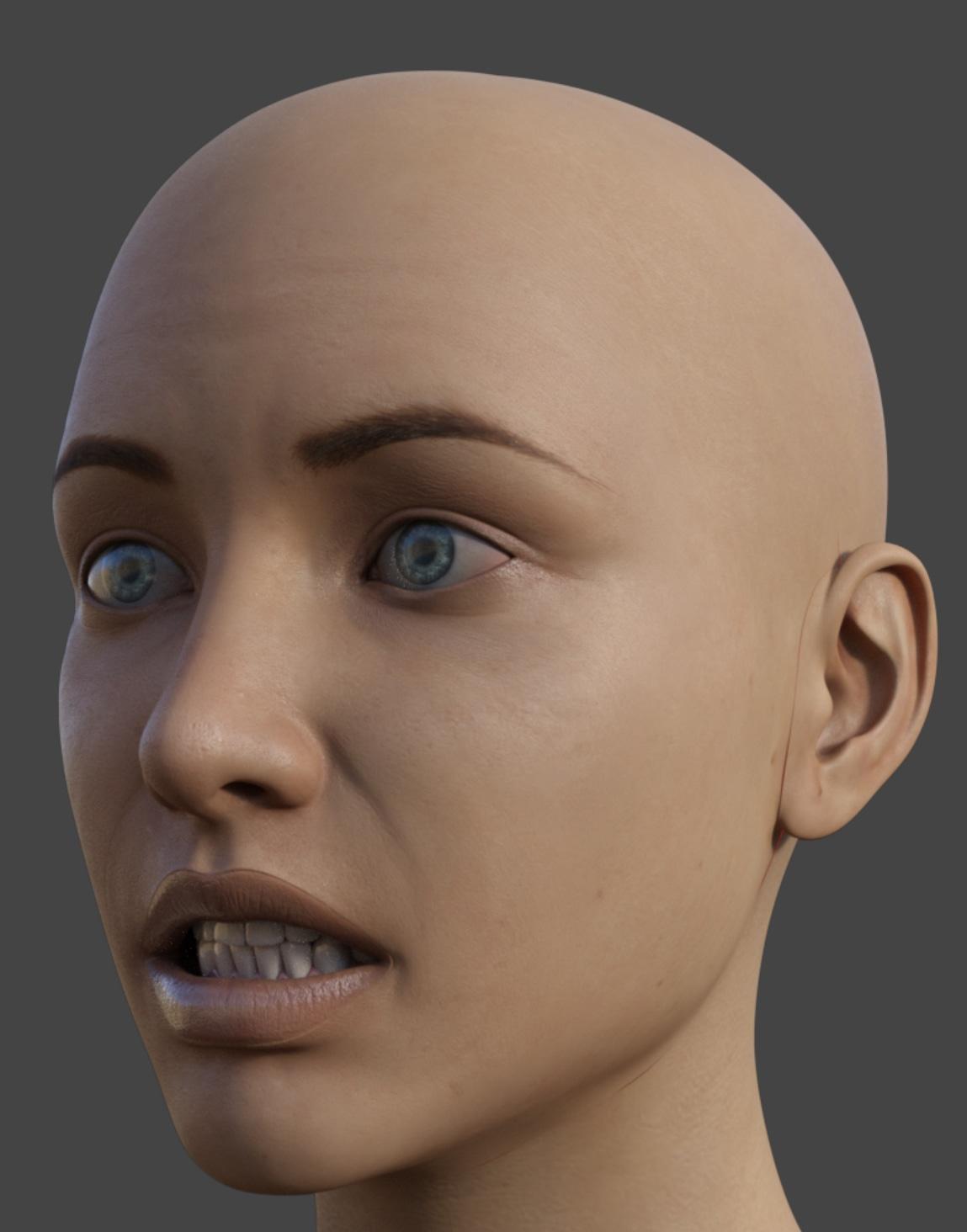
It's clearly visible that the displacement causes seams. The Displacement is only applied to the face. The seams are the result of the displacement maps adding height, in places it shouldn't.
Here the same map used in Blender: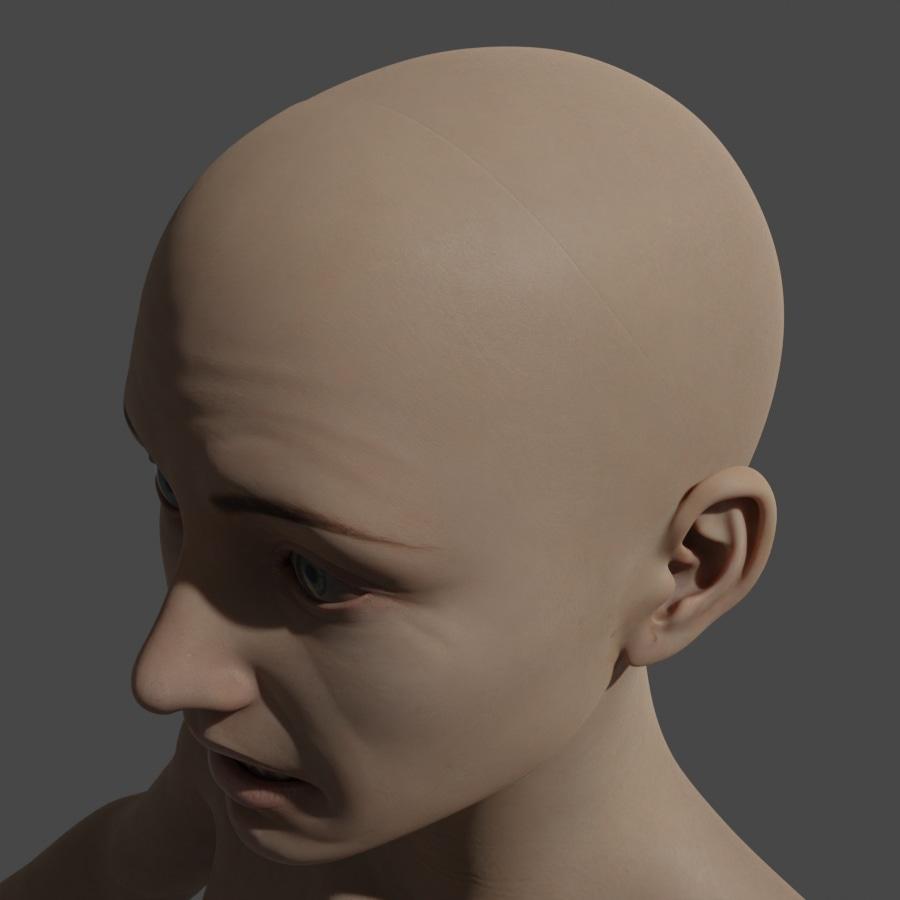
And just for comparison without any displacement: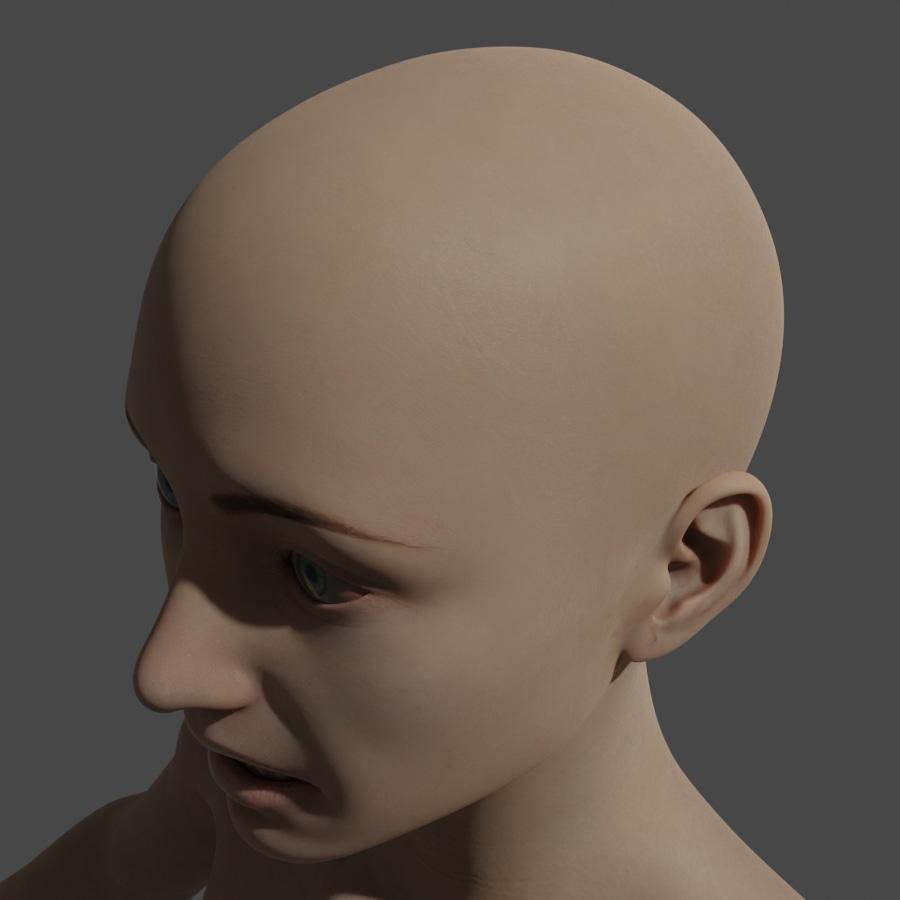
If I look on the map, it's clear why this happening. Even if there is no HD information, the mesh is overall grey instead of black on non affacted parts.
This is clearly obvious in the ears. They should be completely black, but they are gray. Even if I bake a mesh without any HD information I get a grey map which bloats than the mesh.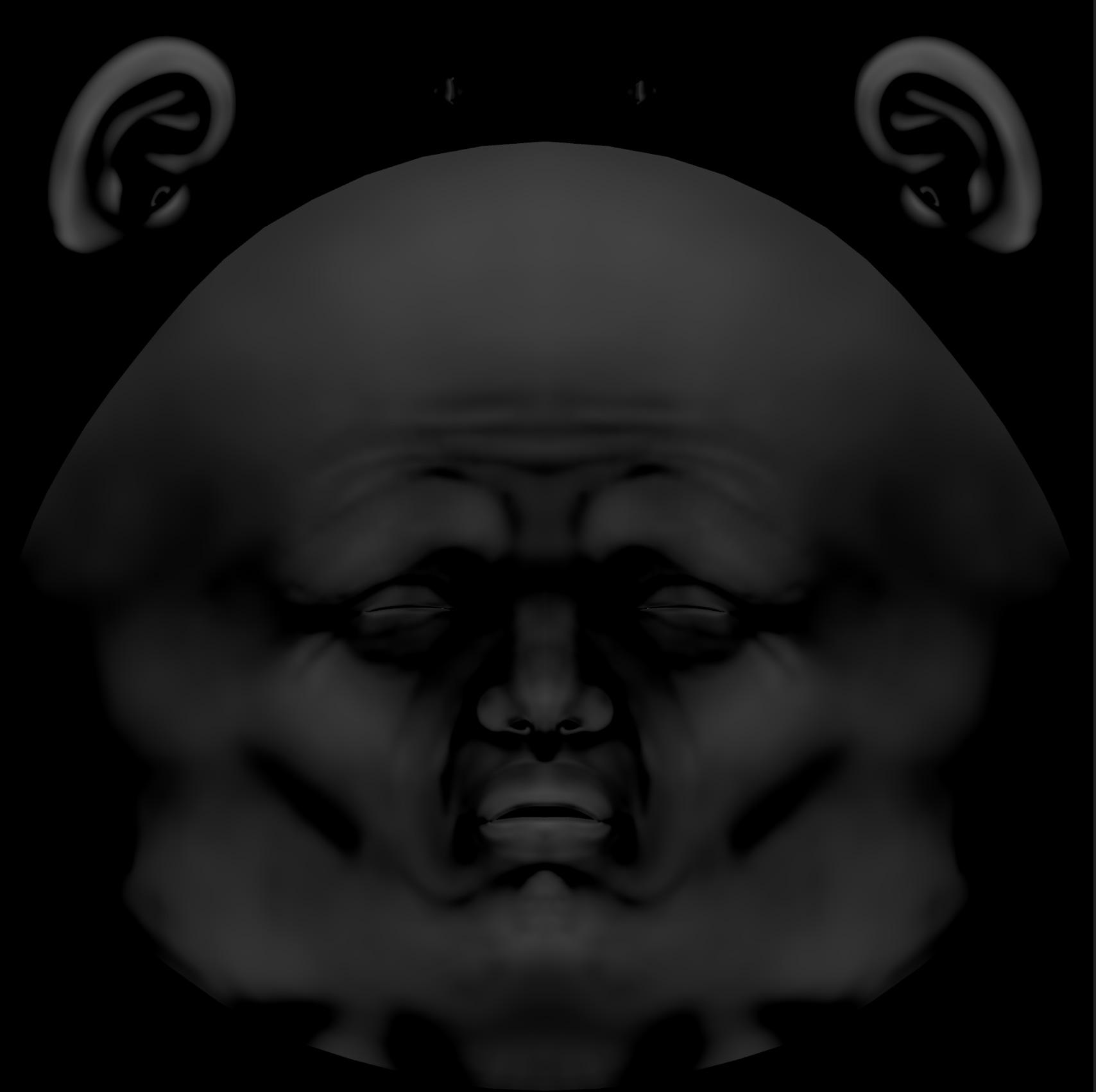
Here as a comparison the mesh without any HD information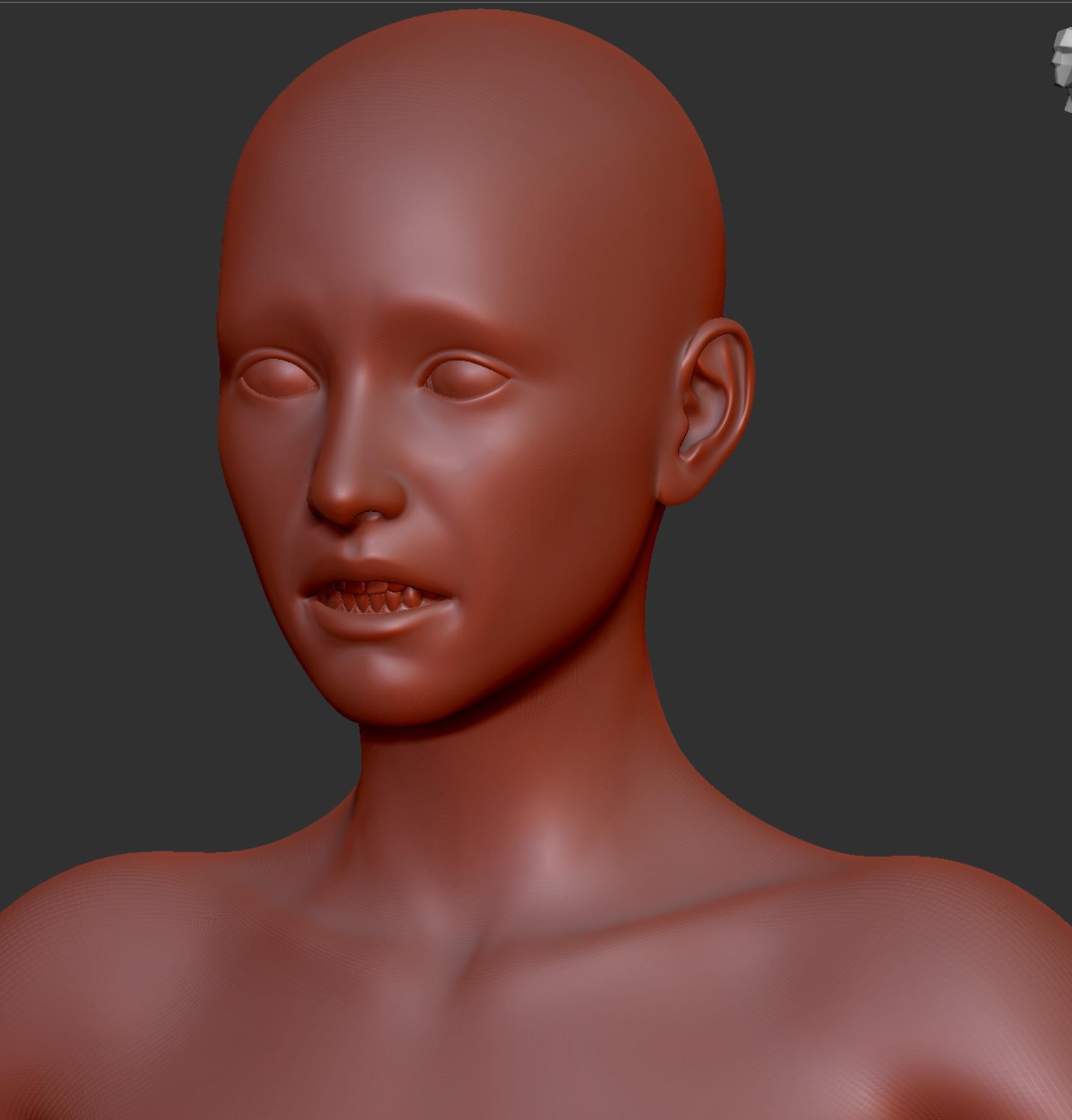
And here with (I managed to project a layer):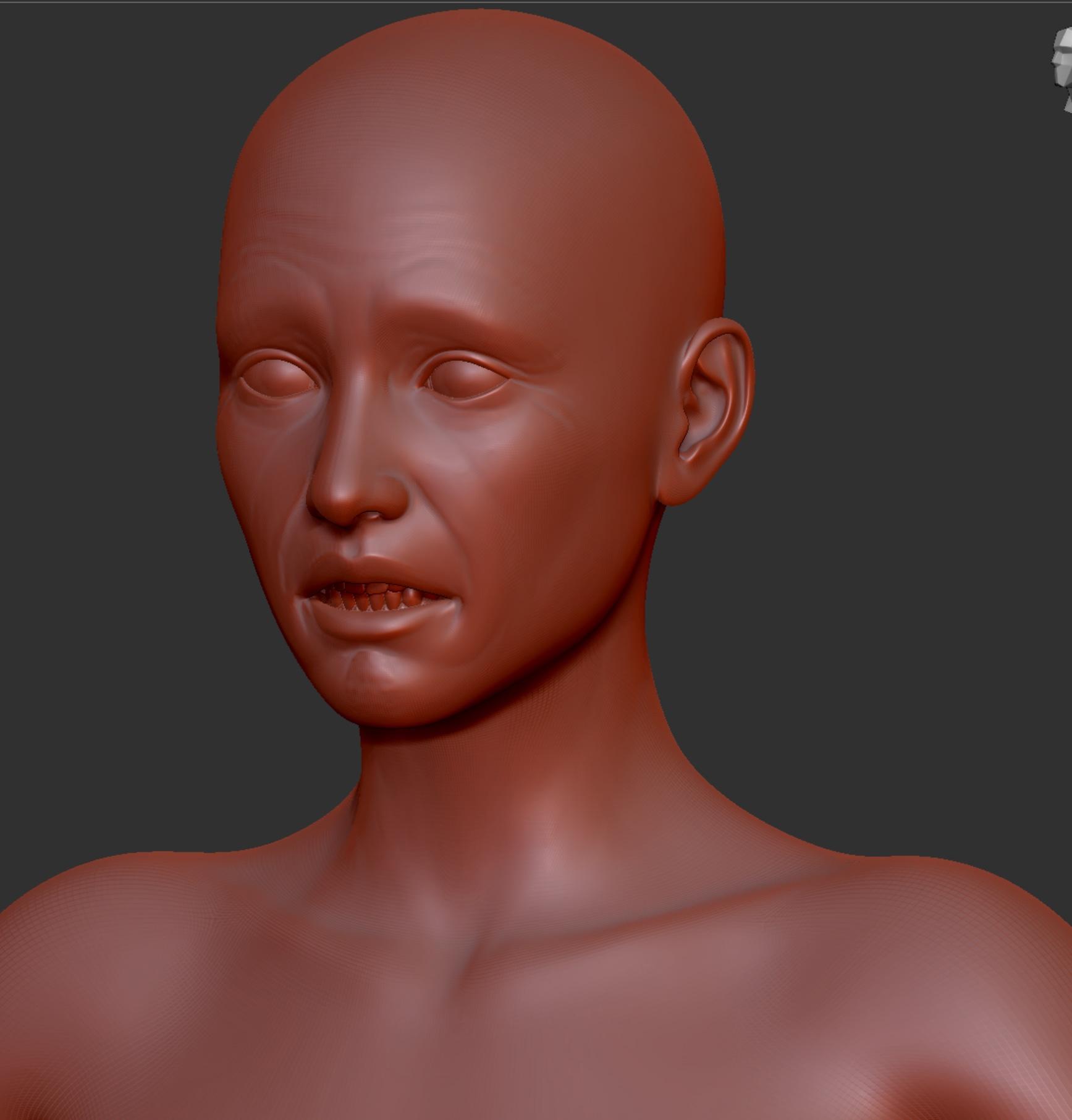
This seems to be a pretty basic problem in that it seems not to be possible to generate a displacement mesh that has only the diff between two meshes.
Any idea how I achieve this and why has a displacement map some kind of default grey?
I guess that be caused by thegeometry of the basemesh is too different from the subdivded mesh?
Genesis 9I wonder if any of these morph products will work on Genesis 9:
https://www.daz3d.com/cartoonized-for-genesis-8-female
https://www.daz3d.com/musculature-hd-morphs-bundle-for-genesis-8
https://www.daz3d.com/auto-muscle-enhancer-hd-for-genesis-8-males
https://www.daz3d.com/z-slender-model-shape-preset-and-poses-for-genesis-8-female
https://www.daz3d.com/z-strong-within-shape-and-pose-mega-set
I have a few other morphs, but the PAs have released G9 versions for those luckily.
IM Tennis Outfit Top missing MorphsOn inspection, can confirm no morphs, including any corrective fit morphs for specific shapes or characters, are visible for the top. The cause is unclear; all the morph files are on disk on a seemingly corrrect path.
[Fisio SB addOn released] Fisio: Physics SimulatorArtini said:
I have to test https://www.daz3d.com/shape-splitter
as it says "Work with any object that contains a morph, figure, clothes or prop."
Maybe that one could be used for disassembling.
That would be worth getting if it did
What's Your Favorite Eight Year Old Girl and Boy Character?Well, are you talking about a morph or a skin? When you talk about looking like plastic, that sounds more like a complaint on the skin textures or settings. Just look for your favorite realistic skins and start from there. You can mix and match textures if you think a certain skin looks too weathered. Base textures that do not bake too much detail are ideal here.
My advice is take a bluejaunte character, remove the normal maps, and dial back the bump map strength. This should give a youthful look that still borders on realistic. The problem with a lot of skin textures is many are too flat, this makes them toonish. The bluejaunte models do a few things. The base color is not flat and has variance. Then the dual lobe textures do a great job emulating the unique pattern of human skin, and how that skin reflects light. Even most G9 characters don't do this as well, imo.
These elements can blended in with all sorts of characters to add that realism you seek.
For a boy, there are no bluejaunte males. But you can use the UV swap product to use a female skin on a male (assuming this is G8.) I took the extra step of converting a set for G8M, allowing me to mix these with other existing G8M textures. With G9 this not necessary, and bluejaunt has a G9 character.
File Attachments to posts not workingRichard Haseltine said:
We are told this should be fixed.
This problem still exists. I cannot upload a png image nor a small zip file with a script, to a post I just made. It either says "Uploading..." forever, or sometimes says "[filename] failed to write to disk" (approximately).
Using chrome or Firefox, on Windows 10.
I made a huge improvement to the G8 to G9 transfer script and want to share it, but, I cannot upload either the screen shot (59k) or the zip file (11k). https://www.daz3d.com/forums/discussion/598316/g8f-m-pose-transfer-to-g9#latest
How do other users manage to upload files? Is this failure "intermittent"?
G8F/M Pose Transfer to G9Richard, thanks again for making this script available!
I sent you several emails (per the note included with your zip) about changes I made; I've gotten no reply and so, I am posting here.
I wanted to use this script to substitute in a G9 figure through the animation range. I wound up making an extensive transformation of the script, although I did not (intentionally, at least) make any change to the functionality at the bone-and-property level (even though nearly all of the code is refactored). I thought it was easy enough to require the user to first select two firgures in the scene hierarchy panel, so, I dropped the hip selections from the dialog. This made room for the options that popped out as making sense to me, as I worked on it. I wound up with the dialog looking like this:
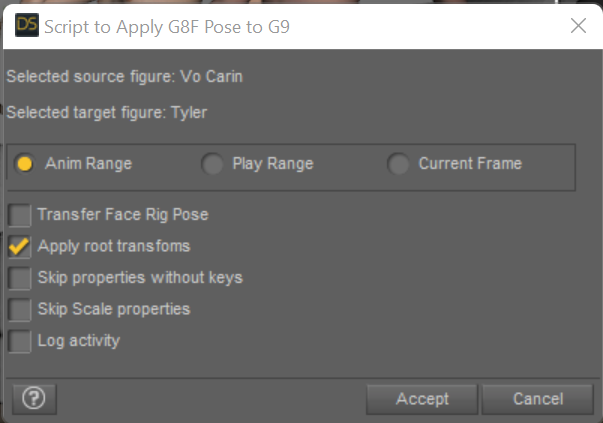
You can choose to process the entire timeline range (default), or limit it by setting the Play Range on the Timeline panel, or just process the current frame. The option to Transfer face rig pose is retained. To get the new figure in the same place in the scene as the old one, check the Apply root transforms option. If your timeline is an animation that you created by setting keyframes, the process may be faster and the result more flexible if you select the option to Skip properties without keys, which will check for a key in the G8 figure in each property in each frame, and if none is found then skip setting the corresponding G9 property in that frame (NB: the process of accessing keys by property has been made much faster in a recent DS release; this option might be very slow on older versions...) It seemed unlikely to me that I would want to transfer scale settings, so, I added the option to Skip Scale properties; finally, the option to Log activity, property-by-property, into the DAZ log file (quite a bit slower, if checked).
I've used this modified script on a 60-frame "photoshoot" and it took about 11 seconds to complete; small manual adjustments were then needed in about half the frames, such as bending an arm to get the G9 figure's fingers out of another figure's arm. This seems reasonable to me, and, the results on a single frame look the same to me as the result from (Richard's) original script. I also used it on 3800 frame animation, with the fastest options selected, and it took about 11 minutes and 16 seconds. From other tests I saw that the slowest option settings will slow it down from about 5.5 FPS to about 1 FPS.
It took several tries and a late visit but it seems I've finally gotten the files attached.
To use the script first just unzip it somewhere in your library where you can find it in your Content Library tab. Select the two figures in your scene hierarchy panel, first the G8 that is posed the way you want and second the G9 figure to be posed to match it, then launch the script to get to the options dialog. Set the options you want and click accept. The progress dialog is displayed and you can cancel if you want; on cancel it asks if you want to keep or undo the frames completed to that point. All effects from the script are part of a single undo scope and can be undone / redone from the regular DAZ Studio edit menu.
If you want to use the play range to limit the processing, set that on the Timeline panel before starting the script.
As for animations of your G8 figure, they either have to have been created in the Timeline or, if using aniblocks, those have to be baked to Studio Keys in order to be seen as bone poses tha can be transferred to your G9 figure. A good clue that your animation has not been baked is, if the script says it completed all the frames, seems to run very fast, and your G9 figure is not doing anything as you step through the timeline.
/t
NOTE added 27 Jan 2023, I hit a problem in the script a revision 104 is attached to another post a bit later in this thread.
[Released] RSSY Clothing Converter from Genesis 8 to Genesis 9 [Commercial]Muneman said:
Once the update is out, Is there an option to convert again that doesn't actually update the item? For instance, I spent some time doing some heels. I'd like to have the Metadata updated, but I don't want the converter to actually touch any data/morph files.
Sorry, no, there is not. You could copy the data files for the heels before converting and then paste them back after conversion
[Fisio SB addOn released] Fisio: Physics SimulatorI have to test https://www.daz3d.com/shape-splitter
as it says "Work with any object that contains a morph, figure, clothes or prop."
Maybe that one could be used for disassembling.
Will the Animation side of DAZ ever get attention?It's a plug-in to transfer your Daz Studio content to Blender.
Transfer utility for rigid objectsWhen I use the transfer utility, daz adds a weight map for each node. If I want to modify the weights of the right collar map, for example, to reduce the intensity with which the object will be deformed, should I use the smooth tool or is there a sort of slider where I can proportionally decrease the weights of the already drawn area?
Genesis 8.1 - Power Pose dots for face are missingPerttiA said:
Making the G8 base expressions (and any expressions that are using them) work on G8.1 requires removing dummy/placeholder expressions that are installed to G8.1 morph folders - These dummy/placeholder expression files have no other function than to prevent the base G8 expressions from loading.
The dummy/placeholder files are located in;
...\Data\DAZ 3D\Genesis 8\Female 8_1\Morphs\Daz 3D\Base Pose Head\ (255 files)
...\Data\DAZ 3D\Genesis 8\Female 8_1\Morphs\Daz 3D\Expressions\ (24 files)
...\Data\DAZ 3D\Genesis 8\Male 8_1\Morphs\Daz 3D\Base Pose Head\ (255 files)
...\Data\DAZ 3D\Genesis 8\Male 8_1\Morphs\Daz 3D\Expressions\ (24 files)Please make sure you are removing the files from G8.1 morph folders and not G8 morph folders.
If you are logging in to DS and allowing DAZ Connect within DS to install/update the content, these same files may be found also in whereever DAZ Connect installs content, in ...\Data\Cloud\1_xxxxx\ (xxxxx is the SKU number of the product)
I can confirm that this still works. Just need to remember to remove the *all* the 8.1 Base Pose Head and Expressions Morphs from both the main install directories and the cloud based directories.
...\Data\DAZ 3D\Genesis 8\Female 8_1\Morphs\Daz 3D\Base Pose Head\
...\Data\DAZ 3D\Genesis 8\Female 8_1\Morphs\Daz 3D\Expressions\
...\Data\DAZ 3D\Genesis 8\Male 8_1\Morphs\Daz 3D\Base Pose Head\
...\Data\DAZ 3D\Genesis 8\Male 8_1\Morphs\Daz 3D\Expressions\
...\Data\Cloud\1_xxxxx\DAZ 3D\Genesis 8\Female 8_1\Morphs\Daz 3D\Base Pose Head\
...\Data\Cloud\1_xxxxx\DAZ 3D\Genesis 8\Female 8_1\Morphs\Daz 3D\Expressions\
...\Data\Cloud\1_xxxxx\DAZ 3D\Genesis 8\Male 8_1\Morphs\Daz 3D\Base Pose Head\
...\Data\Cloud\1_xxxxx\DAZ 3D\Genesis 8\Male 8_1\Morphs\Daz 3D\Expressions\How can I do a COMPLETE uninstall do DazCentral and Daz3D Studio...I've run into a variety of issues across the board after trying to locate an offending morph that was interfering with a 3rd party product. Gave up trying to track it down from a large-asset full package and attempted to just reinstall Daz3D, moving all of the assets to an unknown location as far as Daz was concerned.
After going through the reinstall, DCentral convinced DStudo that all of the assets purchased through you guys were loaded, even though they were not. All of the 3rd party assets shode up with the exclamation mark. With the reinstall came a LOT of issues and missing items in the UI, as well as other problems.
I want a way, which I have spent hours looking for, to completely uninstall any presence of Daz3D and DazCentral from my system.
Import animation from blender into dazmindsong said:
TheMysteryIsThePoint said:
So, I asked it:
When I asked you to write code for Blender before, why did you not have to affix the GPL license to it?
As for GPL license, it is a software license that requires any derivative work to be distributed under the same license. It is only applicable to software and not to information or text. So, I don't have to affix the GPL license to any text or information I provide.And I think it was telling me that it hadn't been trained on the Houdini source:
Why can you right code for Blender, but not Houdini?
As a language model, I am able to understand and generate code in a variety of programming languages, including C++, but my knowledge is based on text that I have been trained on. While I can provide examples of C++ code for Blender, I may not be able to do the same for Houdini. The information about creating an armature in Houdini, as you describe it, requires knowledge on how the Houdini API works, and how the functionality is implemented in that software. I also do not have access to the specific libraries and functions that Houdini provides to developers. It is also important to note that the code I generate could contain errors, and it is not guaranteed to be the optimal or most efficient solution. It is best to test and verify the code in the context of the intended application before using it in a production environment.Am I to understand that you asked a program that second question, and that was its answer? (ms winces-in-advance at the probable answer).
Hi @mindsong
Yes, that's correct. It was chat.openai.com and trust me, that reply is not even remotely close to the most mind-blowing thing that it has said to demonstrate its creativity and vast store of factual information. People who deny that the AI revolution is not even 10 years off, 5 years off, 1 year off, but we are already in it, are just not paying attention or willfully deceiveing themselves. It is like talking to the most intelligent, polite, and worldly person you've ever known and I think it's laughable that people caution against AI's lack of human interaction. Puh-lease. I already prefer it over 90% of the people I know and I habitually get kicked off the system after an hour of just talking about whatever comes to mind.
To the first answer, this seems consistent with current patent law. The idea is not patentable (contrary to what most folks wish to think), it requires a clear manifestation of the idea for a patent to be granted.
Yes, and thank god that it isn't...
Both Algorithms and Art have a hybrid flavor that makes this question interesting. Is it the DAZ mesh or Aiko5 shape that are copyrightable? Both, kind of. How much can you change either to become unique and non-derivative? That's many-another-thread, but still relevant to the "idea vs instance" question going on here. I've always wondered how a DAZ Aiko5 that's converted to iclone/reallusion's CC3/4 mesh is treated... It's still Aiko5, but it's not the DAZ mesh... If I morph a raw Aiko5 in CC4, is that a derivative. I think this is actually the same issue as the AI code conversion in most ways. Derivation and variation.
To your OP, it's going to be interesting watching the very-protective creators (and AI users) try to push into copyrighting entire idea-domains like love songs, using their own specific and "contemporary" and wholly 'unique' instances of ... love songs - using the veil of hi-tech-shiny to hide obvious prior-art. Are the million Harlequin Romance novels unique and copyrightable - ideas vs instances, etc.? If (when) an AI writes one, is that a new genre because it's AI, or is it yet-another-romance-novel (or mesh shape?)
(Regardless the lack of interest and value,) is the likeness of my face copyrightable? All variations and ages? Would the mesh it was formed of matter? I dunno.
It's arguably a kind of an accidental arrogance, probably based on a complete dirth of historical awareness, that each generation assumes they are the first to have experienced and thought of the many things that we all express. And new technology often hides the latent prior-art that lurks within. To wit, the first guy to use a leather or rope bullwhip actually invented the weed-whacker - and the Da Vinci estate should probably be getting royalties of some sort for the T-Pose and A-Pose according to current copyright law etc. lol
FWIW, I honor and appreciate the motivations driving copyright, IP, and anti-piracy law, but I'm starting to wonder if the societal value and self-evidence of copyright law are beyond question. Imitating success is arguably the basis of the survival and progress of most higher level species ("on the shoulders of giants", etc.). It is, in fact, how we educate our own offspring... heh
The jealous guarding of success (in any form) and its treatment as a scarce resource tends to primarily benefit only the creator (and/or its corpus), which is good for their evolution, but not that of the herd. Creativity is hardly scarce, and to limit its propagation in its original form, and therebye limit its derivatives, could be far more expensive to society than the localized benefits to the originators.
As a wanabee creative, I *completely* understand the motivation of IP/copyright/etc., but the actual benefits of patents and copyright are less clear and obvious than I once thought. The open-source and creative-commons movements prove that the self-evidence and obvious correctness of current law is not so self-evident or obvious. To legislate limits to imitating success might not be as simple and side-effect free as it seems on the surface.
I wonder what sort of 'natural' law will come from this technological acceleration and exposition of the weaknesses of our current law over the long-term. Per your earlier comment, that genie is now out of the bottle. Where's the popcorn?
best,
--ms
(edits: the usual re-read edits and clarifications)
I agree with every word. I too understand and appreciate the concerns of IP holders. But how many times does technology have to disrupt cherished and time honored conventions before we realize that that will always be the case? And that technology always wins and the practioners always adapt or perish? My fear is that there might be some heavy-handed legislative non-solution that retards the technology. Temporarily, to no long term effect.
What's Your Favorite Eight Year Old Girl and Boy Character?This character is made with mininessie's Bettina, a free character morph at Renderosity. She mixes well with other morphs, too--I've aged her up here and made some tweaks because the character I'm using her for is supposed to be 10 or so and Bettina is 5-6.
 [Released] RSSY Clothing Converter from Genesis 8 to Genesis 9 [Commercial]Once the update is out, Is there an option to convert again that doesn't actually update the item? For instance, I spent some time doing some heels. I'd like to have the Metadata updated, but I don't want the converter to actually touch any data/morph files.Auto Muscle Enhancer HD [Commercial]
windli3356 said:
wow~ I'm so glad this topic is still ongoing.
After playing with AME for a little bit, I was finally able to get that realistic bicep bump I always wanted on my G8/8.1 female, but the effort to achieve good result is too overwhelming, to convert AME morphed male to female, certain body parts always need to be adjusted to look feminine, ,the file size in the end could close to 1G due to combination of numerous morph, normal map and hair product merged together. It's a shame that AME female version never saw the light of the day so it could save creators so much trouble.
Recently I was able to get that perfect bicep bump on native G8/8.1 female too, but the muscle definition and vein detail still aren't anywhere near as realistic as AME has to offer (for those into low bodyfat female bodybuilder contest shape)
Here's hoping some genius would come up with something similar to AME on G9, so far, G8/8.1's eco system + flexibility is too big too good to beat
Nice job! Now, is that G8M/AME or your G8F/8.1 mod in the image?
How is the shape of clothing affected by Genesis 8 morphs?When you make a morph there is an option to set it to "Auto Follow", by default it is always ON, so you need to turn it OFF to stop it from projecting into anything "Fitted To" the figure.
Each morph "Slider" has a "cog", clicking this and selecting "Parameter Settings" gives you access to the morphs settings, in there you will find a check box for "Auto Follow".
This however only works on that "copy" of the figure, load a second "copy" and the morph will have "Auto Follow" turned ON, to turn it OFF completely means editing the morphs DSF file.
What's Your Favorite Eight Year Old Girl and Boy Character?The best child characters are if you buy the DAZ Originals head & body morph products and then use the ratios of the real child's pictures to dial-in the child from a dialed in adult DAZ character without using "Growing Up". In my opinion all "Growing Up" characters look like the same character everytime. It's as if DAZ release Base G9 and then no other characters. It's a lot of work though if you aren't a profi at this 3D stuff. I did it once only and felt the results were quite good.
...but if you are in a hurry then "Growing Up" is fine.
Daz 3D is part of

Connect
DAZ Productions, Inc.
7533 S Center View Ct #4664
West Jordan, UT 84084Licensing Agreement | Terms of Service | Privacy Policy | EULA
© 2026 Daz Productions Inc. All Rights Reserved.