-
Can I turn off the morphs in a Dforce Clothing Item?
Morph or pose? You could always not fit the dress to the figure and just allow the simulation to handle it, though a timeline simulation should do that anyway. If the dress is going in an unhelpful direction relative to the pose, rather than because of a morph or joint bend, then you may need either to edit the animation or add one or more non-rendering props to push the fabric where you need it to go.
need help with posing 3rd party content with custom morphs appliedIf the thing a figure is fitted to is morphed then the morph will, without a Rigidity Map or a pre-existing property of the same name, be projected into the fitted item.
need help with posing 3rd party content with custom morphs appliedand i dont understand why this custom morph affects the item like this, the custom morph is created for g9 figure itself, not the tongue. this issue seems suspicious too cuz other FBM morphs dont affect lickalicious like this. and when i scroll it back to 0% it breaks the mesh in another wrong way. So simply scrolling down doestn seem to be the answer
Celebrity Look-a-Likes for 3D figures Part 43DIO said:
Same here for the most part. I've not seen anywhere near all of the thread, but so far the only women I recognise are those from the 60s, 70s and 80s. Kristen is something of an exception so far since 2002 is what brought her fame in Panic Room, and I've seen that.
She put on some great acting along-side Jodie Foster in that one, that's for sure (highly recommended movie).
But yup, was dead easy to tell her as Kristen, still, I've added a few here along-side her so you can open in separate tabs and flip between them:
She's not exactly on the top of my list as far as actresses go, but that is quite an amazing morph likeness of her. Kudos to the artist.
G8 Cat-like muzzle without ears/etc + sabertooth?Not sure if you ever got them, but there's also these discontinued products "EJ Teeth Collection for Genesis 8 Male(s)" and "EJ Teeth Collection for Genesis 8 Female(s)" they have a saber tooth and lip morph too.Does anyone recognize this figure?Dareshiranu said:
Elor said:
@xtrart-3d has used skin from characters by @P3Design in the past (see this discussion), so I searched if I found one that would correspond.
Iit's possible Gigi is the skin used: she has moles on her abdomen and her back that seem to be where the character wearing the bikini has them (see the last render of Gigi where she's wearing a bikini).
She (Gigi) does sort of have that look about her. Thanks. I also own that figure too. But I own... far too many, so thanks again. It's quite difficult to sort 'em all, you know?
It does not look the same because the morph is not Gigi. But i agree with Elor, is Gigi skin, all moles front and back are the same.
need help with posing 3rd party content with custom morphs appliedRichard Haseltine said:
Did you make sure that the adjusted rigging in fact worked when manually posing the tongue, and indeed that you were working on the Gensis 9 Mouth? Adjust Rigging to Shape is not usually a click-and-done thing, especially in cases where the bones are close together, so a degree of further manual adjustment is often needed.
um i guess so, with the default mouth and tongue, i tried some scaling and applying morphs with and without my custom morph applied and nothing seems to be odd or ackward
Base Joint Correctives IssueElor said:
Do you have the name of the problematic JCM ? And a screenshot of how it is set in the Property Hierachy?
To open the Property Hierachy on that JCM, in the Parameters tab, switch to Edit Mode, then right click on the problematic JCM and select Show in Property Hierarchy.
Example with a JCM from Vicky 9:
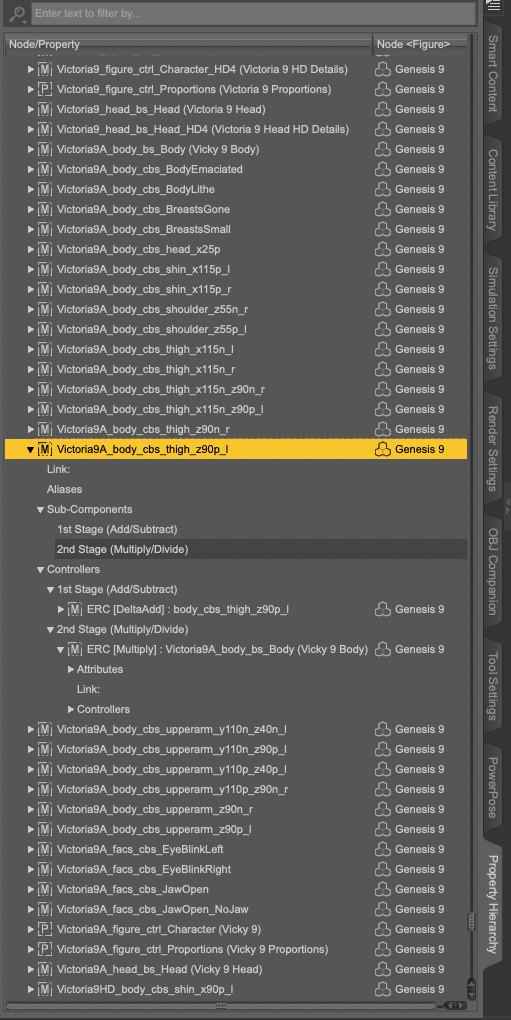
The usual mistake is that the body morph of the character is not set as a 2nd Stage controller, but maybe it's another one.
Thanks for this. Much appreciated. I've removed the files currently to make DAZ work again so I'm unable to do this. I might reinstall them at some stage and try your fix. It's good to know this for potential future problems anyway.
I've got to say - the DAZ community is super helpful. Thanks to everyone who has taken the time to sort out my little issue :-0)
Face Transfer question@riverman63 @punisher_1700138904
If you go under File> Merge, then navigate to C:\Daz 3D\Applications\Data\DAZ 3D\My DAZ 3D Library\Scene Subsets\Face Transfer
Double click on the face transfer file that you saved and your character should appear - see attached screenshots
G8 Cat-like muzzle without ears/etc + sabertooth?cosmosm said:
MimicMolly said:
Here is an old example I did with that mouth shape on an anime-ish character. https://www.daz3d.com/gallery/user/4701855078678528#gallery=newest&page=1&image=1151138
You've convinced me to wishlist Thistle.
...Which reminded me that although https://www.daz3d.com/tomcat-for-genesis-8-male and https://www.daz3d.com/catgirl-megapack-for-genesis-8-female-s don't have face morphs, they might be useful with this project.
(I don't own these)
Yeah. I don't actually have a character I was planning to use that needs these particular morphs, but now that I'm doing them... I might as well mock-up two of my OCs. I don't love the tabby skins in the Catgirl megapack, but I can probably make my own if I get pictures of some of the cats where I volunteer. (I did get pictures of noses already to make textures from). I love the ears from Tomcat and Catgirl but I wish they were easier to pose.
I'm probably going to finish the nose morph this week. I have a couple more ear morphs I want to do (Grune has rounded ears it turns out) and then I'll do the saber tooth morphs
need help with posing 3rd party content with custom morphs appliedi havent had problems with purchased assets before :( i dont know whats going on
i downloaded Lickalicious tounge for G9 its a third-party tounge asset for G9 figure
currently i dont have much morphs so i applied my custom obj format morph as an FBM ( i got the idea from here : Converting Genesis 8 Character Shapes to Genesis 9)
i corrected joints in joint editor, by pressing adjust rigging in shape when this morph is activated, and i also did the ERC freeze
so the G9 figure, with my custom edited morph scrolled 100%, i applied the lickalicious preset
in default-standing pose the tongue asset seems to be fine but when i try to do the tongue pose the issue arises, the tongue deforms like a weird string as it shouldnt be
i assume other FBM morphs or morphs that change whole body dosent matter with this, maybe the process i did whet something wrong yet i cant get the clue where should i start from.
i can also see the custom morph automatically appended to the lickalicious but just scrolling down to 0% wont fix it; it deforms to another weird shape.
Is there anyone who handles this issue well? TY in advance
Base Joint Correctives IssueDo you have the name of the problematic JCM ? And a screenshot of how it is set in the Property Hierachy?
To open the Property Hierachy on that JCM, in the Parameters tab, switch to Edit Mode, then right click on the problematic JCM and select Show in Property Hierarchy.
Example with a JCM from Vicky 9:
The usual mistake is that the body morph of the character is not set as a 2nd Stage controller, but maybe it's another one.
Creating Animations on Blender then exporting to Daz3DPadone said:
steps:
- convert to mhx
- animate
- mhx > animation > transfer ik to fk
- runtime > export > save pose preset
If you used any ik stretching you need to unlock the figure in daz studio.
https://github.com/Diffeomorphic/import_daz/wiki/Posing_Save_Pose_Preset
I can't believe it this actually works and I tried doing the pushup animation as an exxperiment, feet and hands are in the right places, the feet are in place, I disable the limits on the genesis 8.1 female in daz btw.
Everything is good, hands are sliding slightly in daz, it's not sliding in blender but it's a looot better than the tool I used before, but finally there is a tool that I can use to create animations from. Thank you so much!!!!!Daz Studio 6 Beta - version 6.26.2026.26903! (Updated September 29, 2026)ramasancar said:
I purchased an RTX 5060TI graphics card recently because of it's cheapness combined with its high VRAM capacity.
I read that scripts no longer work in beta version of DAZ studio, is that correct or it only applies to mesh grabber?
I am using the following scripts, I basically can't use DAZ properly without any of them:
Pose swissknife
Batch Render
Render Queue
mcjDenoise
Genesis 3&8 to 9 Pose converter
Genesis 9 to 3&8 Pose converter
Scene optimizer
Incremental save
Look at camera II
Animate IIPlease let me know if anyone who is using BETA version also use these scripts correctly. Sorry for my english in advance!
Mesh Grabber is a plug-in, not a script, and plug-ins will need updating (though Mesh Grabber is now the Premier Geometry Sculptor tool, and that is the only version that will get updates; the same is true for Render Queue, only the premier plug-in will get updates - both are available now in DS 2026/6). Scripts, which most of your list are, may or may not work in DS 2026/6. However, most of these do their work and then leave regular DS data behind, which will transfer to DS 2026 - so do scene set up in DS 4, convert any Mesh Grabber modofiers to morphs, save, and open in DS 2026 for rendering. You will be without Render Queue if you are not a Premier member, but everything else should be manageable.
Diffeo: Imported custom morphs affecting other morphs as wellWhen you import extra morphs, as the lips, all the morph sliders must be zero, otherwise the current shape is baked together with the imported morph. This is a recent bug now fixed in the dev version, so either zero the sliders or grab the dev.
https://github.com/Diffeomorphic/import_daz
p.s. Please remove the zip we can't share blender files as for the DAZ EULA. While duf files are fine, provided they don't embed geometries.
Creating Animations on Blender then exporting to Daz3Dsteps:
- convert to mhx
- animate
- mhx > animation > transfer ik to fk
- runtime > export > save pose preset
If you used any ik stretching you need to unlock the figure in daz studio.
https://github.com/Diffeomorphic/import_daz/wiki/Posing_Save_Pose_Preset
Let's appreciate/discuss today's new releases - more ongoinger threadCam Fox said:
arks0ng said:
Does nobody else find Fiorella's 11th promo picture (and a few of the others) a bit, or very... odd? Considering the age presented of the character.
Interesting that Final Fantasy is mentioned by name in the description too rather than just a coy hint, I haven't seen that before!
imo not as dubious as the promos in the Reigha bundle showing a chest reveal morph. But, open to interpretation. The product images and description text are important to show a character's versatility, and they are also a vibe.
Reigha is on special this week, and according to a few AI age calculators, she's anywhere from mid-teens to early 20s. A bit like that post I made some time ago on Microsoft's now-defunct How-old.net.
----------------------------------------------
Next iteration https://www.daz3d.com/forums/discussion/762591/let-s-appreciate-discuss-today-s-new-releases-ongoinger-still-futherer-thread
After some eight months since I last spent time with the Studio...For the shirt, if you know your way around a modeler program like Hexagon, Blender, Zbrush, etc, the best way to improve how a shirt drape around the breasts of a character is fixing the problem in an external modeler, by creating a proper morph for the character.
You can also bake the effect of the smoothing modifier into a morph but I only know how to do it if the character is using only one body morph, not multiple. If an item has a lot of details, you'll likely lose some of them after smooting it a lot.
And if you don't want to deal with all that, you can always try to do a 45 frames timeline simulation:
- At frame 0, the character is in base shape, base pose
- At frame 15, the character is still in the base pose but now has her final shape
- At frame 30, the character is posed
And the last 15 frames will let the simulation stabilize.
Autofollow is not active during a simulation, so the shirt will only have its shape change because the character's breasts are pushing the shirt. Which means that if the character is smaller than G8F, the clothes will end longer than they are, and shorter than they are if the character is taller. If it's too big of a problem, you can play with the scale of the figure, to get the base shape closer in height to your character.
Example using Olympia 9 morph transfered to G8F (this way I'm sure none of my Genesis 8 clothes will have a FBM created for Olympia 9
 ), which is around ~3-4 cm smaller than G8F, so the shirt is a bit longer when I used a timeline.
Among the three methods shown, the timeline is I think the one providing the best result (it sadly means you'll have to deal with a scene with a timeline, which I personally dislike a lot so I prefer to fix the problem in Blender, at least when fixing it is withing my current Blender skill level).
Single frame simulation:
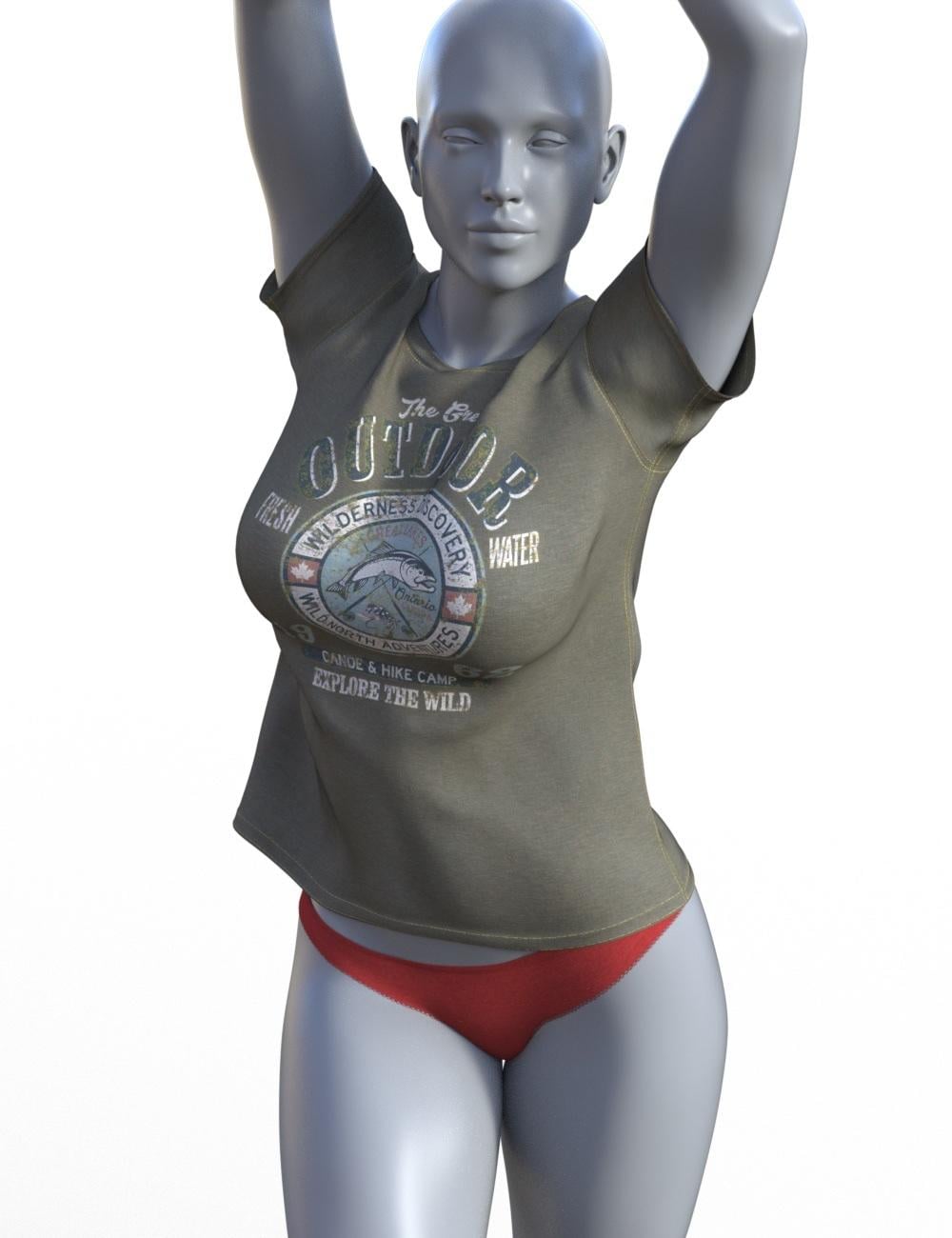
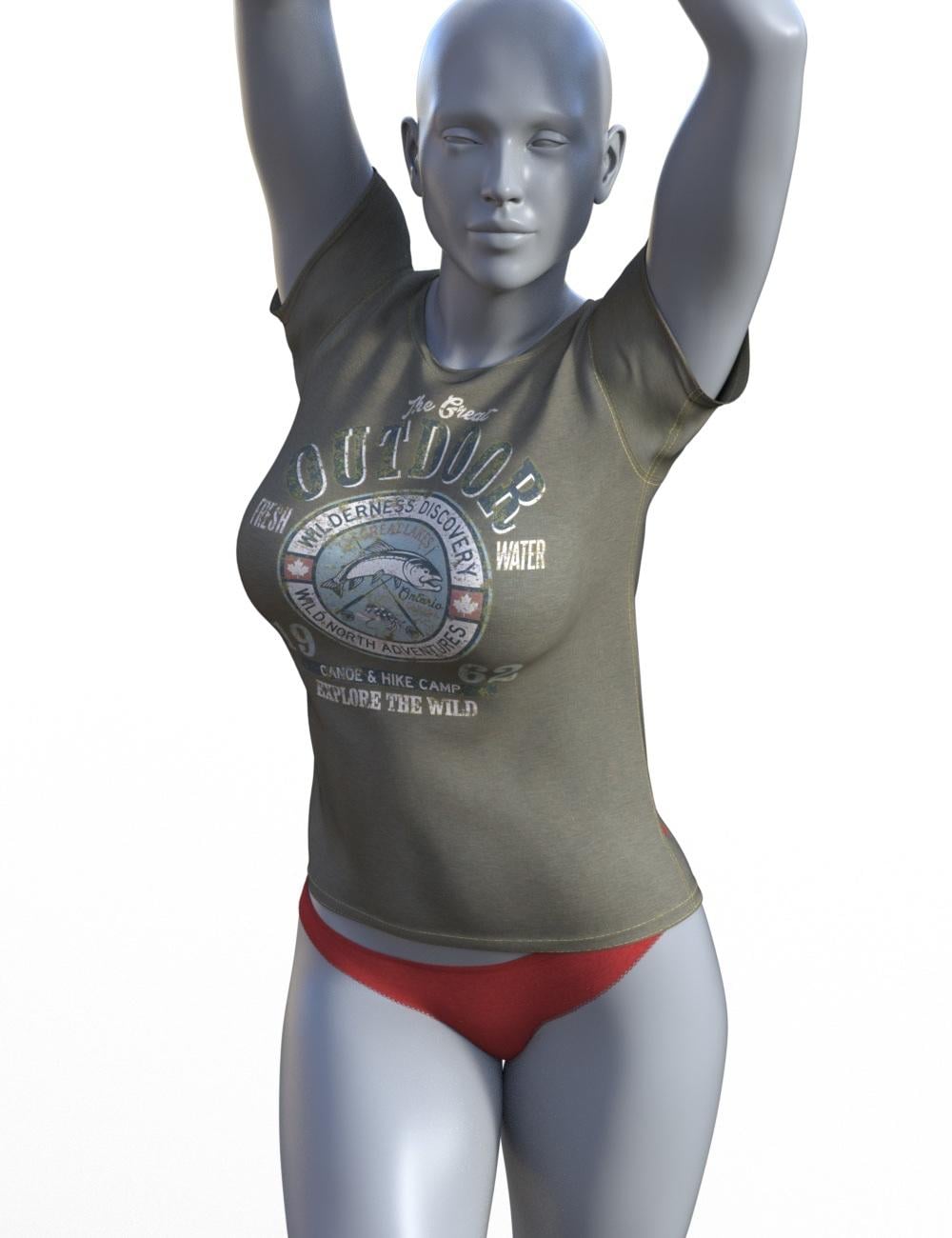
45 frames simulation:
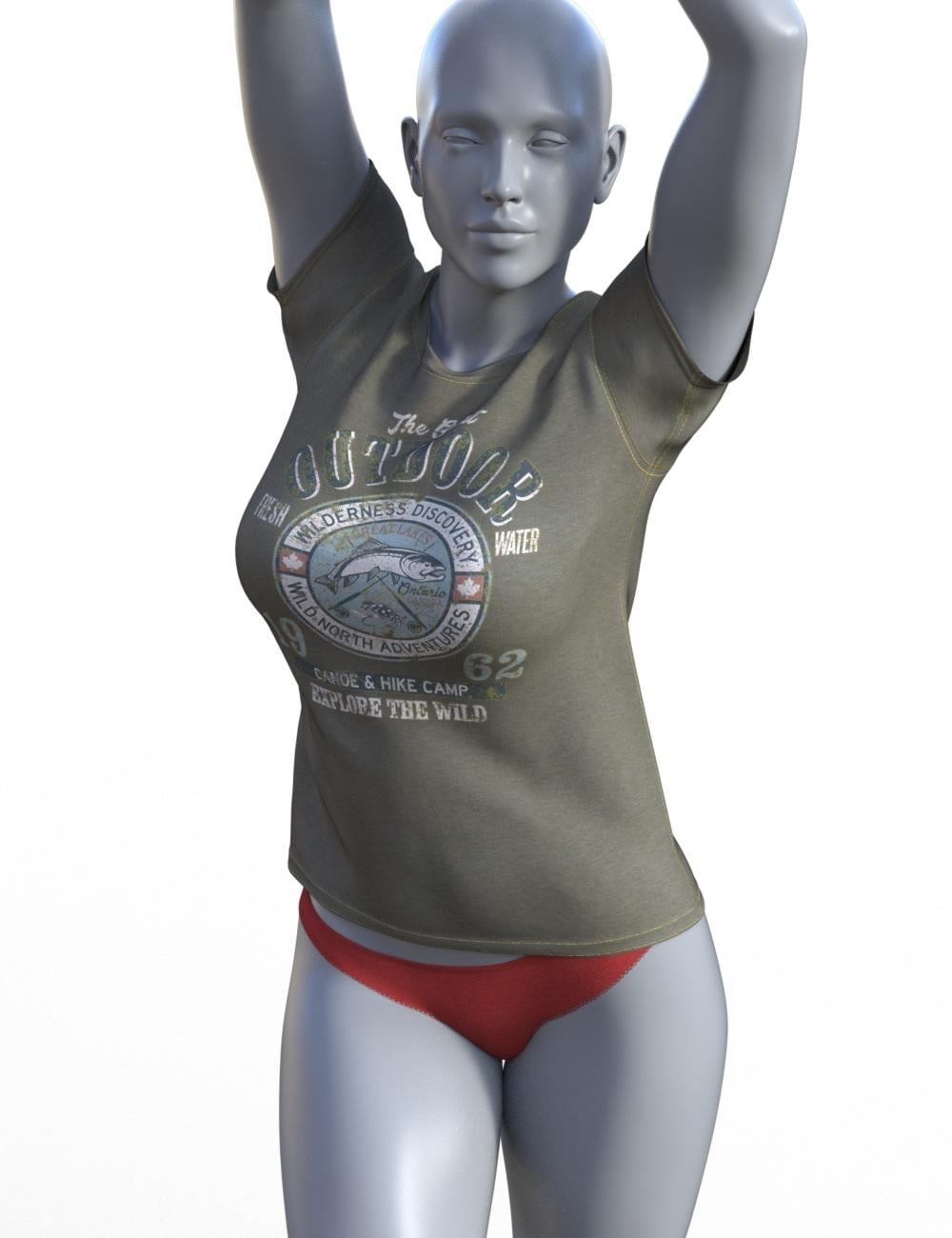
Single frame simulation with the smoothing modifier effect baked (I did have to dial some morphs from the clothes because with a 50 smoothing iterations, part of the shirt ended inside the character, I likely should have dialed more but it's just to illustrate):
 Base Joint Correctives Issue
I uploaded the image to IMGUR which may be blocked in other regions, I'll try using another website.
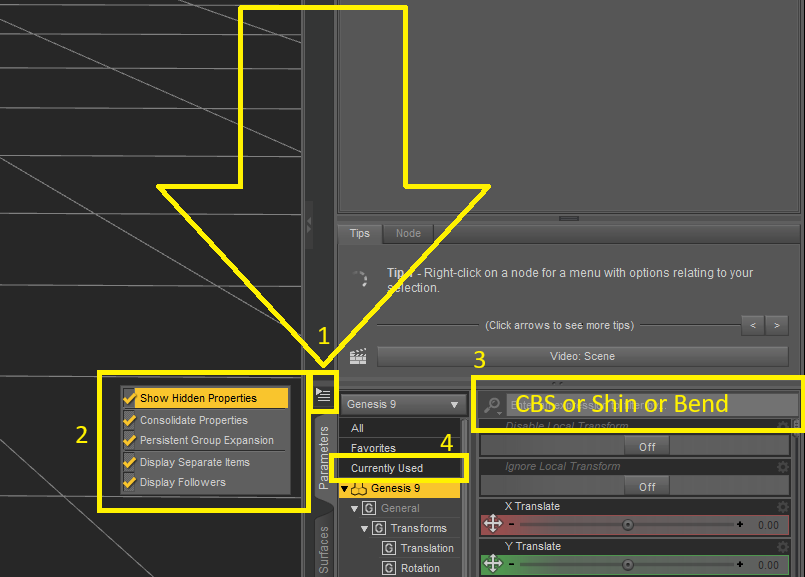
I don't know exactly how to fix the morph (can be simply dialed down but that won't really fix the issue), but if you just want to browse the folder containing it, click the Cog icon on the right side of any morph to open its properties. At the end of the File Path field, click the three dots (“...”) to open its folder.Base Joint Correctives IssueYou probably have a hidden rogue JCM that shouldn’t be enabled by default. To identify which morph is causing it, try the following:
>Activate Show Hidden Properties
>Load a new Genesis 9 figure, select the Left Shin, and set the bend value to 90.
>Select the figure in the Scene pane.
>With the figure selected, use the search bar to look for terms like “CBS”, “Shin”, or “Bend”, then switch the filter to Currently Used.
Normally, you should only see the default morphbody_cbs_shin_x90p_lactive, but you’ll probably also find the rogue morph there as well (usually something with the character name plusshin_x90p...).
Daz 3D is part of

Connect
DAZ Productions, Inc.
7533 S Center View Ct #4664
West Jordan, UT 84084Licensing Agreement | Terms of Service | Privacy Policy | EULA
© 2026 Daz Productions Inc. All Rights Reserved.