-
Cascadeur 2025.2 to Daz 4.24
Hi everyone,
I’ve created an animation in Cascadur, but after exporting it, I'm seeing that it's not importing into Daz correctly. The arms and legs don't seem to be rotated the way they are in Cascadeur.
Here are the details:
- I’m importing the model into Cascadeur using Import Fbx/dae → Scene.
- I use auto rigging which finds all the correct bones and Generate Rig, then I create the animation.
- I export using the Command → Export to Daz option in the 2025.2 Pro version of Cascadeur.
- I've followed the steps of the official Cascadeur YouTube tutorials (although they're a little old now), and applying the Prepare for Animation script that turns off limitations and locks in Daz, but neither solved the problem.
Could you please advise on where the issue might be, or provide a workflow to avoid this? I love how the animations come out in Cascadeur so it would be a waste to not use them with my Daz models.
Thank you!
ClothesEh, no. DAZ studio is not a modeling software. You would have to use Hexagon, Blender, marvelous designer, zbrush, etc and then import the clothing objects into DS to rig it for daz figures.[TIP] Golden Palace misplaced, script for material inactive when opening scene in PublicBuildPadone said:
Crosswind, we are not discussing the status of tools here. We are rather stating that saving a duf file within MG or GE may alter the geometry information saved in the duf, thus creating issues when importing or opening it in another application. In diffeomorphic we get some displacement in geografts if we save the duf within GE.
If you open the duf in daz studio this doesn't happen as it is dealt with, but it happens if you open or import the duf with another application.
I'm confused ~~ I know that modified data of geometry with MG / GE are stored within DUFs but in the above OP, they didn't mention anything about opening DUFs (saved in DS 4.24) in other applicaitons other than DS PublicBuild, did they ?
So, it looks as if they saved a Scene with GP in DS 4.24 GeneralRelease when MG is activated, then found an issue of geometry misplaced after opening the Scene in DS 4.24 PublicBuild, doesn't it ?
Besides, they said "It appears DAZ serializes the active tool state into the .duf file, and Mesh Grabber leaves a pending transformation on the mesh at save time." i.e., they didn't alter any geometry with MG but just loaded GP with MG tool activated~
However, Mesh Grabber saves nothing new to Scene file if there's no delta change with it in terms of geometry manipulation... it's the same with the tools like Geometry Editor / Node Weight Brush that just unweld conformers ~~
Edit: I personally never experienced such an issue mentiond in OP ~~ I just tested the case a couple of times, with DS 4.2x / DS 6.2x GR + PB, I couldn't reproduce the issues ~~ So, the issue shouldn't happen as long as MG or GE or NWB tool is not activated when opening DUF file no matter with DS GeneralRelease or PublicBuild ~~
[TIP] Golden Palace misplaced, script for material inactive when opening scene in PublicBuildCrosswind, we are not discussing the status of tools here. We are rather stating that saving a duf file within MG or GE may alter the geometry information saved in the duf, thus creating issues when importing or opening it in another application. In diffeomorphic we get some displacement in geografts if we save the duf within GE.
If you open the duf in daz studio this doesn't happen as it is dealt with, but it happens if you open or import the duf with another application.
EZFinder - Advanced Content Manager for Daz Studio [Commercial]Deepeyed said:
In EZOrganizer what does the export do?
Great question! EZOrganizer gives you three export options — Export Folder, Export Panel, and Export All — and they all do
the same thing at different scales: they convert your EZFinder organization into a format Daz Studio can natively read.Why does this exist? EZFinder stores your folders in its own optimized format for speed. Daz Studio can't read that
directly. Export bridges the gap — it translates your virtual folders into standard Daz-compatible metadata.Export All is the big one. It takes every tab, panel, and folder you've built and writes them out to a single location.
Point Daz Studio at that folder as a base directory, and suddenly all your carefully organized content shows up in Smart
Content and the Content Library — no EZFinder needed.So if you prefer working inside Daz Studio rather than switching to EZFinder, you get the best of both worlds: organize in
EZFinder where it's fast and flexible, then export so everything is available right inside Daz.One thing to keep in mind: if you reorganize anything in EZFinder, you'll need to re-export for Daz to see the changes.
The 'Eat Your Food and Like It' Complaint Threadmemcneil70 said:
Complaint: I woke just before midnight this morning. That spiking headache that drove me to bed early last evening was still there, pounding behind my right frontal lobe. And of course it is Saturday and there is very little but CNN on live right now. I do have 8 cups of coffee brewed to make it until Denver wakes up. Of course Charlie spit up just as I came back to my bedroom from the kitchen. We are on week two of this run of tummy upsets
Yesterday, I was getting ready to work on the metadata for one of the Fabiana packages I had bought from DAZ, Theory of Light 2 - Energy Flow, I found that I had it already, bought from Renderosity. So now I have two files of it, in two places. There are days you want to shoot yourself in the head. But I noticed her products are on sale this morning! I have two more to still do the metadata on them and their promos are up on my screen and show $5.00. If you didn't buy them from Renderosity already, even having to do the metadata is worth purchasing her fantastic products.
So sorry for your ongoing head troubles, and for Charlie's tummy issues. I hope there's relief from both soon.
I've been waffling on the Fabiana light products... everybody sings their praises, and I've no doubt they're good, but I don't tend to do portraits, so I'm wondering if I would ever actually use them.
The 'Eat Your Food and Like It' Complaint ThreadComplaint: I woke just before midnight this morning. That spiking headache that drove me to bed early last evening was still there, pounding behind my right frontal lobe. And of course it is Saturday and there is very little but CNN on live right now. I do have 8 cups of coffee brewed to make it until Denver wakes up. Of course Charlie spit up just as I came back to my bedroom from the kitchen. We are on week two of this run of tummy upsets
Yesterday, I was getting ready to work on the metadata for one of the Fabiana packages I had bought from DAZ, Theory of Light 2 - Energy Flow, I found that I had it already, bought from Renderosity. So now I have two files of it, in two places. There are days you want to shoot yourself in the head. But I noticed her products are on sale this morning! I have two more to still do the metadata on them and their promos are up on my screen and show $5.00. If you didn't buy them from Renderosity already, even having to do the metadata is worth purchasing her fantastic products.
Twisted Easter Bunny problemWendyLuvsCatz said:
have you redownloaded in case the tiff was fixed?
I also just apply Iray Uber and tweak settings no fancy script needed
though I do have them
don't own this product
yep redownloaded via dim couldn't instudio didn't even have unistall option and updating metadata did nothing either but what NorthOf45 suggested worked. On side note I often come across something in smarty that hasn't installed properly and gotta unistall reinstall sometimes several times either by dim or in studio if it has that option even newer stuff gets annoying at times
Creating JCMs for programs using Linear Skinning (Blender, Unity, 8.1F)I'm currently using 8.1F in my Unity game via the Daz to Unity Bridge. The bridge is super helpful, thanks Daz!
There are some quite noticeable skinning issues around the shoulders (primarily), but also the knees and elbows, which I'd like to improve with custom JCMs for use in Unity. 8.1F has JCMs but they don't work well with linear skinning. I'm facing several issues creating these.
The first is the mismatched bone axes. In Daz Studio, the x/y/z differs from the exported FBX consumed by Unity/Blender. In Unity, I need to make a corrective morph for the lShldrBend x-rotation. I had to open an FBX of the character in Blender, create this pose, export as OBJ into Daz Studio, and then match it closely using the three rotation sliders that in Daz Studio, use different axes. Ok, it's doable.
I then export this posed character from Daz Studio using OBJ, and import into Blender to make the corrective morph for the desired pose. At this point, I realise that the skinning issue is not present, because the skinning to reach this pose was done in Daz Studio. Even if I disable corrective morphs in Daz Studio, the pose skinning remains pretty good - however, I will be posing in Unity/Blender, where this issue will occur.
Can anyone give guidance on how I can make this JCM, if I have to first create the pose in Daz Studio, but if Daz Studio doesn't produce the skinning issue? As far as I can tell, I need to export the posed mesh from Daz Studio via OBJ, then re-import via OBJ, to import corrective morphs.
I want to send my corrective morphs back to Daz Studio so that I can do further exports of the character whilst keeping everything intact.
Here's a demonstration of the issue:
SapphireBlue's freebies: Flower Earrings for G8/8.1F and G9(Let's hope I have removed all the strange characters added by my spellchecking software…)
These earrings look very nice

Thank you!
The Genesis 8 presets will also load them where they should be on Genesis 3 characters
: some time ago, I used them on a background character in ‘Samedi soir sur la terre’ (the blonde woman is Taraਂ for Genesis 3 and she’s wearing them, but they are too blurred to be seen clearly) and one is more visible on my most recent render, 'Hanako 9' (sorry, the hair slightly hiding them can’t be moved…):
I don’t know if everything is possible with Content Wizard though, as a script, it’s unstable on my Mac and I now have plenty of muscle memory creating metadata with Daz Studio UI), but some suggestions regarding the metadata:
1. I think a product’s name has to be unique (I’m not 100% sure, but if I’m trying to create a new product with an existing name, Daz Studio will say it already exists and suggests adding the files to the existing product), and 'Flower earrings’ while on point, is as generic as it gets, so my suggestion would be to either add SB before, making it SB Flower Earrings, less likely of conflict, or go the whole way and call them SapphireBlue’s Flower Earrings (when I made them myself, I decided to use SB, because it’s making it easier to find them by typing key::SB instead of having to type your whole name).
2. Currently, filter by target doesn’t work once in a product (it has been added to DS 2025 I think) so it can be helpful to add a number on the icon or a way to identify the figure in the name of the preset loading something related to a character. On my end, I added ’ G9’ at the end of the Genesis 9 version, but as an example, Strangefate and Roguey are also adding a number on the icon (8F for G8F, 8M for G8M and 9 for G9).
3. One suggestion about material presets (also based on what Strangefate and Roguey are doing with their bi-generation products): for material presets (it doesn’t work for Hierachichal material presets though), you can use .djl files to create links to the original presets. For people using the Content Library, it’ll be invisible because they will see material presets instead of .djl. But on the Smart Content side, the djl files are not shown, so instead of having every material preset twice, they are shown only once:
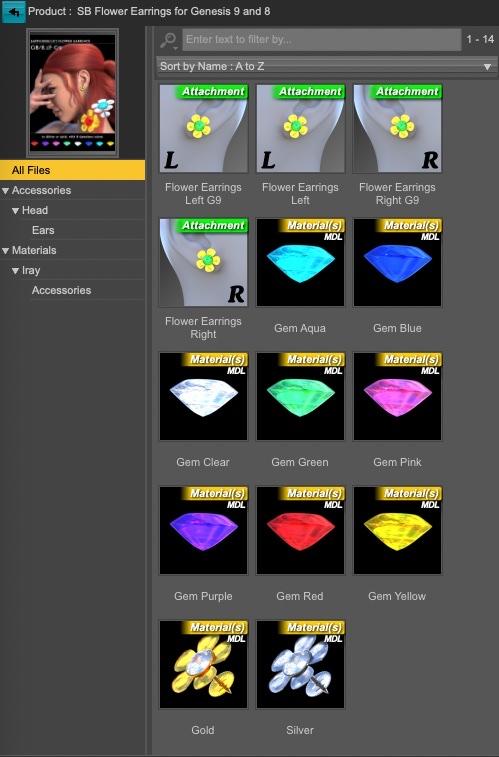
(I set them as attachment instead of accessories but I don’t remember why, I may have looked at how other products did it)
Daz Studio has a entry in a menu somewhere to create djl files, but I don’t remember where: as .djl files are very simple text files with a relative link to the .duf files they are linking to, I created my own Shell script to create them automatically using MacOS Terminal.
I don’t know if metadata made using Daz UI will play nice with the script created by, I think, Content Wizard, but if you want to see the ones I’m using, I can send you everything to check if you like it or not.
And if you don’t, I hope the render was a nice compensation for having to read my ramblings about metadata

Again, thank you for sharing these nice earrings
PRPC broken againYou can push RMB on Advanced Library category and import desired folder with DAZ or Poser library files(.duf, .cr2, etc.), next - run Synchronize Library function, then AL will make it's own database in XML format with all content inside this folder or folders.
https://drive.google.com/file/d/1vFBdxWs4GC7Uyx4i0wVoWwCsiAtqXcLr/view?usp=sharing
In the end it can look somehow like this:
https://drive.google.com/file/d/1UbCBrmidmwl2cMV9W4Gd4F9co0BQB8rz/view?usp=sharing
Hope this info can be somehow helpful for you.
Unfortunately, I haven't used Poser for over a decade.
reset the x,y,z location on an object to 0,0,0Richard Haseltine said:
If it's a prop, just export as OBJ with it at the origin, then import that OBJ and reapply materials.
I did find an older veriosn that displays the movement arrows at its location.
And while the object in question s a prop its a window with a set of morphs to raise and lower it's sash, its shade, and open a close a set of curtains.
but it's loaded via a duf file.
certainly there is data the tells the program where to load it and it's loading at x-10, Y+23, z-38 there must be somewhere to say set x, y, z to zero?
===
In this particular case the drag transfer gadget is miles away from the object which if i"m replaceint a 100 windows gets time consuming.
I removed all the windows from thise stonemason bldgs and dragging windows into place from 8 inches away from where the window was loacated was a "real drag"
Buy Something That Doesn't Work in Carrara? Post your Questions and Workarounds here. (please)this balloon dog for $10499.30 doesn't quite work right in Carrara but it is an easy excersise in getting it to work
first you will need the Carrara Plugin called Daz Studio
Open you expensive balloon dog in DS and then export in OBJ format and set for Carrara to your fav folder for doing stuff like this
then one at a time in DS apply the pose and export each time the same as before and name it the pose you have applied
when all that is done open Carrara
import the OBJ default balloon dog ... it will be a bit over size when imported so adjust it back to 100%
then into the modelling room... select all of the object and create morph
in the morph you created create a morph and call it one of the poses you saved, then import the balloon posed OBJ file and appy
do same for all the poses and then you will have a working balloon dog worth $10,499.30 working in Carrara

then all that you need to do is create a balloon texture for the balloon dog
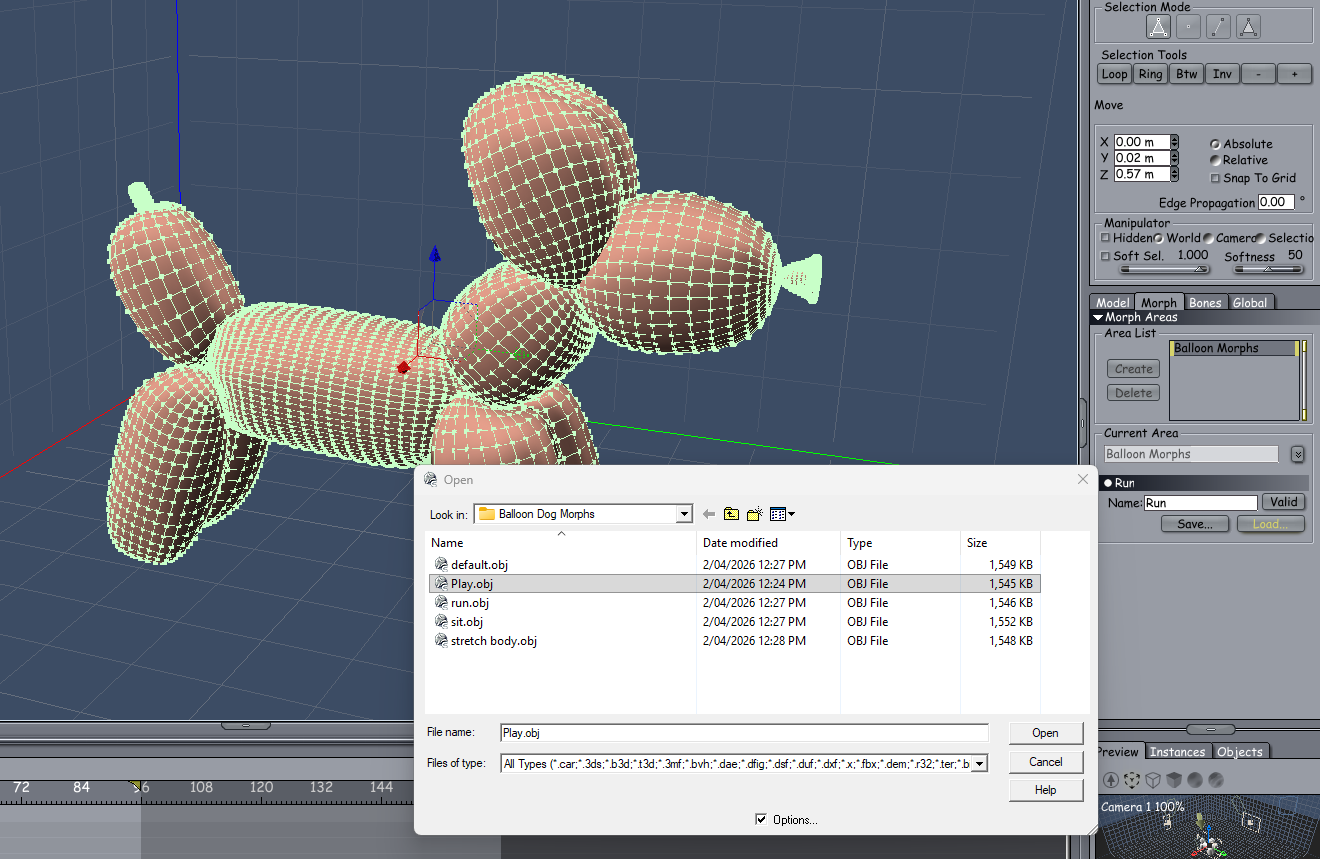
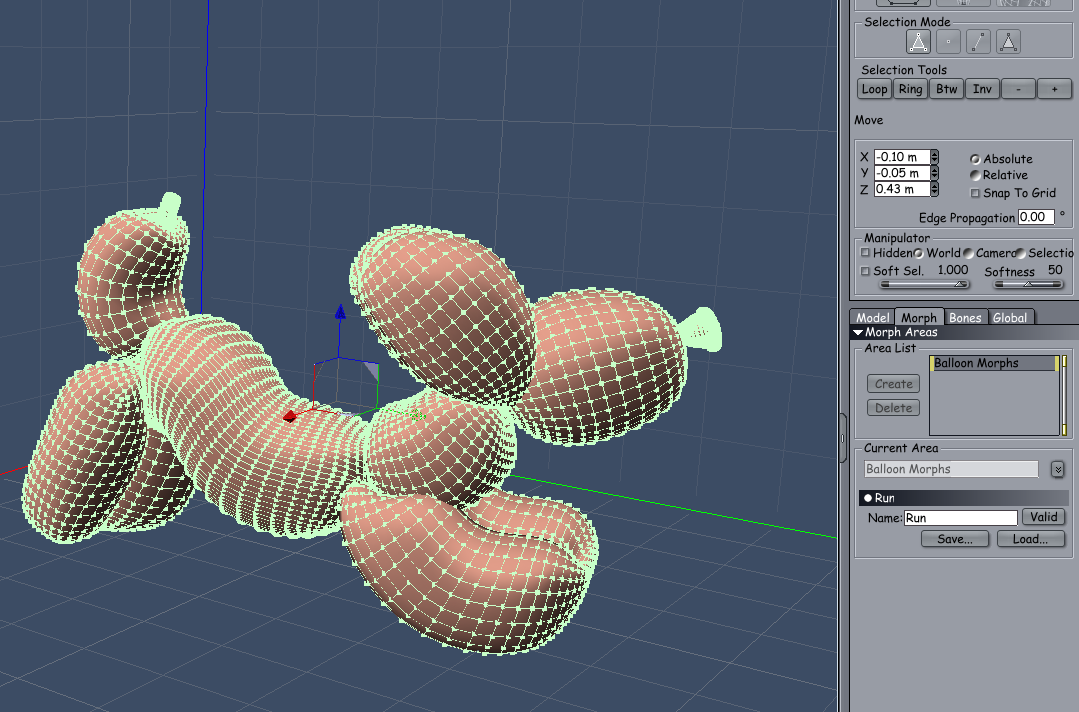 DAZ Studio Feature Request
Richard Haseltine said:
Sorry you have been having such serious health issues, I hope the treatment was effective.
This script https://docs.daz3d.com/public/software/dazstudio/4/referenceguide/scripting/api_reference/samples/metadata/list_products_used/start will list the products that left "stuff" in the scene - DS objects or textures. It won't pick up poses, cameras, lights etc. which do not usually leave something identifiable in the scene and it does require that the products have been added to the database (e.g. by DIM).
Thanks I will check out this script. The BCG treatments I had last year where all ineffective. I now require surgery to really fix this situation.
Take care Richard...
Kenmo
Wayfinder Sign GeneratorBy V3Digitimes.
Does anyone know if it is possible to import your own .png image as a layer? (Trying to create a town name sign). The instructions are a bit complicated for an old dinosaur like me.
TIA.
DAZ Studio Feature RequestSorry you have been having such serious health issues, I hope the treatment was effective.
This script https://docs.daz3d.com/public/software/dazstudio/4/referenceguide/scripting/api_reference/samples/metadata/list_products_used/start will list the products that left "stuff" in the scene - DS objects or textures. It won't pick up poses, cameras, lights etc. which do not usually leave something identifiable in the scene and it does require that the products have been added to the database (e.g. by DIM).
Diffeo Retarget BVH/FBX issuesI remember ticking to ON. I'll try without it.
Not sure why scaling on import doesn't work for me anymore, but it's not that important to me.Thanks Padone!
Update:
Yeah, it was the Native Blender option. That also messed with the scaling. All's well now.Thanks for your help again, Padone! Appreciated!
 Diffeo Retarget BVH/FBX issues
Hi,
I wanted to use a Mixamo anim today and the BVH/FBX Retargeter (latest) was giving me issues.
I had used it in the past, but things seem to have changed since v5.1A. For one, scaling when importing an FBX file no longer seems to work. The imported rig is always way too big. That used to work. Picture 2
B. And secondly, after retargeting, my DAZ character no longer moves in -Y direction, but ALWAYS in +Z, no matter which orientation & forward direction I select during import.Does anyone have the same issue? I didn't see that mentioned here.
Thanks!
Revisiting saving material presetsUsing Condense Database from DB Maintenace used to correct the issue for the Materials Saves specifically, when the problem first started roughly 4 years, but would then DOUBLE the save time for Scenes, Subsets, Wearables, and Poses (at that time is was about 3 minutes per save, then turned into 6 mins after Condensing for those, and returning Materials to a 1 Second Save. Eventually the Material save began to take longer and longer again and trying to Condense again offered no improvement and ended up making them all worse. There is definitely not a simple Solution to this Problem from inside of DAZ.
As far as re-importing metadata, I did do that twice I think, possibly 3 times severals years ago while trying to solve the problem. Good to know your not having the same problem with that many assets installed. My installed DAZ Store Content is 34K+, not sure of the total from Rendo, would say roughly between a 10 to 12k more, and that doesn't really count content for Poser going back to Poser 6 days, nor the content I have created going to back to 3dsMax6 days. But total active content size is around 21TB. +/-1ish. Definity agree that it can't just be the amount of installed Conent, or you too would be having the problem.
Revisiting saving material presetsmrpenguin76 said:
crosswind said:
Only saving a Mat. Preset takes a long time ?
1st, where is the mapped folder that you mentioned located ? Then have you tried setting up a My Daz Library locally and save your presets to this local Library path ?
For me as I said above it is not just Mats. It is also Scenes, Subsets, Wearables, and Poses. Hierarchical Mats,Hierarchical Poses, Shapes, and well all the rest ALL save as normal in under a second. So this isn't really about were the folder.
But yes, if by local you mean saving to the C:Drive, it doesn't matter, same thing happens if I add the original "My Library" that DAZ puts in the Documents Folder (via C:\\Users\\.......etc.) with Content Directory Manager, the same thing will happen with files saved into that library.
I didn't mean C drive but the drives connected to your PC with pcie / SATA / USB etc. rather than network cables or wireless.
Also of note again, this is technically NOT a FILE SAVE issue, as the file itself will write instantly where ever it is saved inside the Librarys that are active in "DAZ Studio Formats", this can be observed by those of this happens to by browsing to the Folder(dir) before saving.... This is all about DAZ Studio getting HUNG UP while trying to write the "Default/Saved Files/" Category. and It also happens when Saving a NEW figure/Prop Asset IF "Set Catagory is Checked.
Also this is not an Anti-virus Issue (for one I have exceptions for DAZ Studio and PostgreSQL Server, and if it was it would effect ALL Preset types, not a select few) which brings me to my next point.
The REAL problem is caused by PostgreSQL Server (a thread of it) getting queued while trying to write that category. This too is observable with Task Manager open and expanding the DAZ Studio Application that is saving (I use instances which I can still work in while this is happening) and expanding it to see the PostgreSQL Server (Not Responding) Which can then be right Clicked on and "Go to Details" Where you can see the thread and use Analyze Wait Chain, to get a little more info...) Now I also mentioned Instances for a reason. The moment I saved that file I can use In my Instance while I "Wait" for the other to finish writing that Category, I will Also note that WHILE this is happening, NO Copy/Pasting of Files in File Explorer can be done, if you try It will Hang too and basically get Queued and do it when DAZ is finally finished Writing that Metadata to the "/Daz 3D/Application/Data/Daz 3D/Content Database. Of which Mine is currently located on my F:Drive, in the past I did try putting it back on the C:Drive, and the results where the same. Now a NEW Content Database can be made, and eliminate this problem completely, as everything will save instantly the way it should, But once you switch back to the MAIN, you will not have metadata, and STILL need to manually add it in. Trying to Save over that file that Instanty saved in the NEW "Content Database" will result in the same thing Happening, a very LONG save. So there really is no point in doing that for this purpose. Though there certainly IS, a purpose for having multiple "Content Database" locations...
So why do many people never have this problem? Simply put, their "LOCAL" librarys are not big enough. YET, and I stress that.
The current size of my "Content Database" where the Metadata is stored located "F:/Daz 3D/Applications/Data/Daz 3D/Content Database" is 21.4Gigs Total.
Base Folder= 21.1Gigs
I don't think the size of cluster folder should be the culprit. I have 12TB Daz content (nearly 36K products with metadata), my cms cluster folder (condensed) is appr. 9.5GB. I've never had the issue that you guys have.
In general, postgreSQL is robust enough for such an application like DS, so committing a transaction of writing metadata to cms can be instantly done even with multiple sessions. You can check the db log to see if there's any significant issue ~~
Then, the size of your cluster folder is 20GB+ ... I don't know how many products you have or how many times that you ever did re-import metadata, etc. etc., but I'm afraid you may firstly give it a condense command with DB maintenance to improve its performance ~~
1 Folder= 6.03Megs
12024 Folder= 6.03Megs
12029 Folder= 6.15Megs
16384 Folder=21.0Gigs
pgql_tmp Folder=0 bytes
Daz 3D is part of

Connect
DAZ Productions, Inc.
7533 S Center View Ct #4664
West Jordan, UT 84084Licensing Agreement | Terms of Service | Privacy Policy | EULA
© 2026 Daz Productions Inc. All Rights Reserved.