Creating JCMs for programs using Linear Skinning (Blender, Unity, 8.1F)
 liamfoot
Posts: 0
liamfoot
Posts: 0
I'm currently using 8.1F in my Unity game via the Daz to Unity Bridge. The bridge is super helpful, thanks Daz!
There are some quite noticeable skinning issues around the shoulders (primarily), but also the knees and elbows, which I'd like to improve with custom JCMs for use in Unity. 8.1F has JCMs but they don't work well with linear skinning. I'm facing several issues creating these.
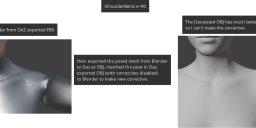
The first is the mismatched bone axes. In Daz Studio, the x/y/z differs from the exported FBX consumed by Unity/Blender. In Unity, I need to make a corrective morph for the lShldrBend x-rotation. I had to open an FBX of the character in Blender, create this pose, export as OBJ into Daz Studio, and then match it closely using the three rotation sliders that in Daz Studio, use different axes. Ok, it's doable.
I then export this posed character from Daz Studio using OBJ, and import into Blender to make the corrective morph for the desired pose. At this point, I realise that the skinning issue is not present, because the skinning to reach this pose was done in Daz Studio. Even if I disable corrective morphs in Daz Studio, the pose skinning remains pretty good - however, I will be posing in Unity/Blender, where this issue will occur.
Can anyone give guidance on how I can make this JCM, if I have to first create the pose in Daz Studio, but if Daz Studio doesn't produce the skinning issue? As far as I can tell, I need to export the posed mesh from Daz Studio via OBJ, then re-import via OBJ, to import corrective morphs.
I want to send my corrective morphs back to Daz Studio so that I can do further exports of the character whilst keeping everything intact.
Here's a demonstration of the issue:

Daz 3D is part of 
Connect
DAZ Productions, Inc.
7533 S Center View Ct #4664
West Jordan, UT 84084
Licensing Agreement | Terms of Service | Privacy Policy | EULA
© 2026 Daz Productions Inc. All Rights Reserved.