-
Geoshell compatibility between generations
You can simply rig an OBJ of G9 onto G8 with Transfer Utility to make a "Material Suit" which can derive UV Set from G9. Load a geo-shell to the material suit, hide the material suit, then load the Material Presets for G9's geoshell to G8's geoshell.
How to make the material suit: https://www.daz3d.com/forums/discussion/comment/9316161/#Comment_9316161
Edit: if G9's geoshell have a tailor-made UV Set, you can export G9 to OBJ (Base Resolution!) with that UV Set selected in Surfaces pane, then Load UV Set... to the material suit.
JW Face Parts Shapes for Genesis 9 not applying to any Genesis 9 models.I started off with a clean scene and a Genesis 9 male model and tested trying to apply different morph parts to the face and never got it to work. Is there anything I'm missing? I tried re-installing it still the same issue.
Diffeomorphic not transferring Body Morphs to geograftThanks for your quick response, Padone!
Your test file worked mostly fine, but it (like the other files I'm trying to work with) does not merge the geografts on import, though I could swear it did when I was working through this last week. The main body geo imports as hidden (easy enough to unhide), and I have to manually merge the two geografts, even though I have "merge geografts" selected on import. This isn't a problem - merging them manually still works.
I think I've really got two main hurdles with this workflow:
1) Not all favorites transfer to Blender. In the first two screenshots attached, you can see that one favorite doesn't transfer. I have tried renaming the .DUF file and exporting a fresh .DBZ file each time (deleting the old .DBZ file beforehand), but this one favorite still does not want to export, even though others from the same addon export and function with no issue.
2) While the geografts' favorite morphs do transfer and function perfectly well, the geografts do not always respond to the body morphs (as shown in screenshot 03 and 04 attached), but do respond as expected to the geografts' favorited morphs. I have transferred morphs from body to graft before merging.As far as the exact steps I am using:
1) In DAZ, I select the root of the figure I am exporting ("Genesis 9" for unnamed characters)
2) In the File menu, I select "Export to Blender"
3) I Turn on the "Export HD" and "HD Convention" radio boxes on the little popup, and it exports.
4) In Blender, I open the DAZ setup menu and select "Easy Import DAZ"
5) In the import window, I select the .DUF file that corresponds to the .DBZ that was created on export. Screeshot 05 attached includes the options I have turned on/off.
6) Once imported, I unhide the body mesh (it has started importing the body mesh as hidden, as I mentioned above. I must have turned something on/off to cause that, because it is a relatively new behavior).
7) Even though I have "merge geografts" selected on import, the geografts do not merge, and import as separate meshes (possibly because I have more than one geograft?)
8) I test out the favorited morphs. The geograft-specific morphs all work fine, every time I try, but not all body morphs transfer (BC Breast Top Curve1 to be exact, though other BC_* morphs do transfer)
9) I transfer shape keys from body to the nipple graft (sometimes it works, sometimes not)
This is about as far as I've gotten. Something is always a little bit broken every time I retry.
And is this a good time to mention that "merge rigs" never seems to work when importing clothing to this character? Though reparenting and doing it manually in Blender works fine.Either way, thanks for your attention on this.
Any way of using dForce to drop pants?You didn't have to post four threads to ask the question ~~
In most cases, nope ~ because Friction will prevent the pants from draping or "taking off" even if you give Friction a very small value on dynamic surfaces ~
You need a morph or at least an initial shape on the pants before simulation. You can shape the pants and make morphs by using Mesh Grabber / Geometry Sculptor... or in external application like Blender.
Any way of using dForce to drop pants?In most cases, nope ~ because Friction will prevent the pants from draping or "taking off" even if you give Friction a very small value on dynamic surfaces ~
You need a morph or at least an initial shape on the pants before simulation. You can shape the pants and make morphs by using Mesh Grabber / Geometry Sculptor... or in external application like Blender.
Any way of using dForce to drop pants?It's possible to do this using dForce and painting the weight map but it's much better if you just use a pants with the morph included.
Diffeomorphic not transferring Body Morphs to geograftDiffeomorphic 5.3.0.3046, Blender 5.2.2.
I tried the Strix nipples with a couple G9 breast morphs and they work fine here. I just selected some daz favorites and exported/imported. Test scene included so you can check it. Or provide exact steps if it's needed to trigger the issue.
steps:
- easy import the test scene with "daz favorites" + "transfer to geografts" + "merge geografts"
- try the included morphs
AH dForce Grace Christmas Outfit doesn't conform to Genesis 9 shapesThe issue with a sitting morph is it is depending on what sitting pose the character has and what the character is sitting on.
But you can yourself making morphs for sitting, by simulating, and then make a morph of that. But requires that you also save the pose.
Personally I would simulate it each time I needed it, so I could address the actual setup.
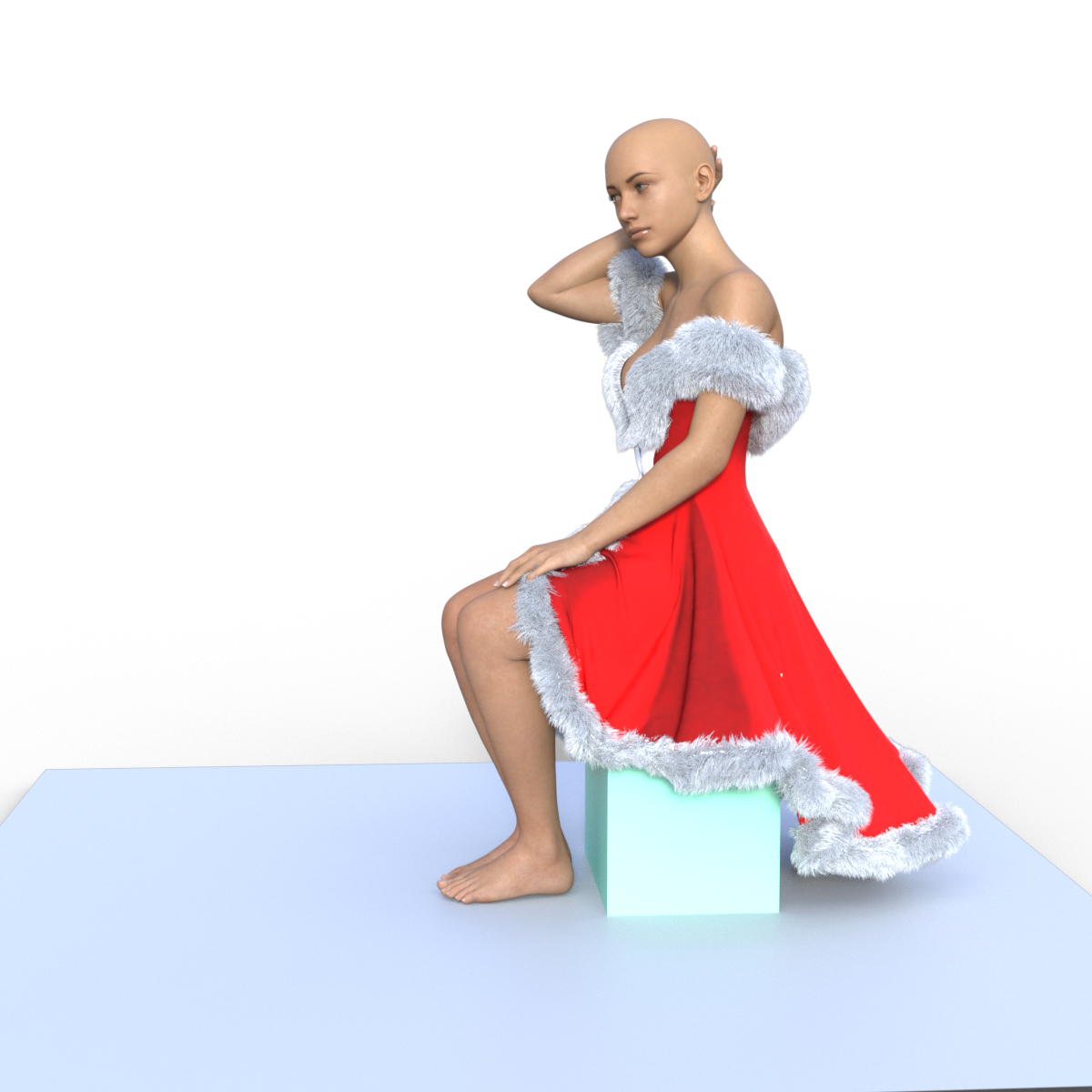 AH dForce Grace Christmas Outfit doesn't conform to Genesis 9 shapes
While they are addressing this, any chance for a sitting morph?
Diffeomorphic not transferring Body Morphs to geograftApologies if this is a repeat thread, but I haven't been able to find a solution to this anywhere.
On using Diffeomorphic (version 5.2.0.3018) to import a DAZ (version 4.23) Genesis 9 character to Blender (version 5.2), I have been unable to get the nipple geografts to follow the other breast morphs I have included in the export. The nipple-specific morph works just fine, but the graft stays in place while trying to reposition the breasts themselves (that is, the "Nipple Length" morph on the geograft functions just fine, but "Breasts Cleavage" has no effect on the geograft mesh).
I have tried Transfer Shapekeys, but that has no effect both before and after morphs are imported. And I have been importing morphs to both the base body and geograft meshes (even tried without importing morphs to the geograft). And I am certain I have the correct selection order in Blender (I've tried both ways). I have also tried a Surface Deform modifier in Blender, but that doesn't survive after merging the meshes.Is there something I'm missing? Why would transferring shape keys not work? Is there some little setting I'm overlooking? Love to hear from anyone with ideas on the matter, thanks!
dForce Simming Haircrosswind said:
jmucchiello said:
Her arm is going through the hair. That's why I'm starting from a zero pose. It doesn't get to the point where her arm crosses the hair though when the sim pauses.
I've created an entirely new scene.
- Created a plane on the floor and given it a static dForce modifier.
- Loaded a base G9 figure.
- Loaded the hair on the figure.
- Loaded the pose (that I saved from the other scene file) onto the figure
- Turn on start from memorized pose
- Hit simulate.
We'll see how that does. This is DS4.
EDIT: 15 minutes to sim. Now I have to figure out how to get this hair onto my actual character in the actual scene.
I 100% followed your steps. With a 4090, it took 6 mins 21 secs in DS4.24, 5 mins 58 secs in DS 6.25 to complete a simulation ~ (read from DS logs)
Then I turned off Enable Smoothing on the hair, it took 1 min 53 secs in DS 6.25 to finish the job. Then turned Enable Smoothing back on.
You may give it a try with my scene... see if it still simulate with that long time ~
I already rebuilt the scene from scratch and the sim finished successfully. I've moved on from that scene. My library is huge and there's probably some morph somewhere out of whack. But the logs around the simulation say nothing between start and finish aside from these things: 2026-09-28 03:50:12.977 [INFO] :: Spring(102623, 102643) of node "dForce Bob Style Hair" extended: rest length < collsion offset (0.0195355 < 0.02001) There's 591 of them.
If I have time later, I'll check out your duf. Thanks for trying to help.
Bypassing bones limitsMorph, not pose.
Poses allow to bypass limits, I'm looking for the same behavior with morphs.
Daz Studio and LinuxI've had most stuff working on Fedora KDE for a while.
I've never tested the bridges though. Just straight DS. Iray and Dforce.
One thing which never worked was the Map Transfer as the baked textures always come out as empty (black canvases)
The most recent collection of bugs has convinced me to do with DAZ Studio the same I've done with my guitar plugins and some of the games I played the most (all of which don't work particularly well under Linux) which will be inevitably give up on trying to use that stuff on Linux.
I'm thinking Fedora is going to become a "ChromeOS" sort of OS for me (just to use web browsers)
I haven't been able to pinpoint which of the September Updates broke Toolbars from Custom Actions for products like cayman legacy UVs, where the script doesn't execute everything it should, to things like Genesis 9 makeup Scripts not doing a thing (like Van Helsing 9)
No meaningful information on the logs, no error messages, nada.
I've checked different runners (creating .sh scripts to avoid changing my system Wine), tested with both 4.24 and 4.23 and the result it the same.
Guess I just got yet another reason to actually boot into Windows 10 and spend more time there. (Thanks a lot Fedora...)
Face Shaping Not AppearingFace is empty for me (which is what the gryed out text means)(, but I have more sub-groups. Which morph packs do you have installed?
Bypassing bones limitsMorph or pose? It sounds like the latter. If so then there is an option in Edit>Preferences>Content to control how poses that exceed limits are handled (by default you should be asked, but that can be turned off).
Bypassing bones limitsI'm creating some morphs from script and use DzNode.getYPosControl().setIsClamped(false) to bypass bones translation limits.
Everything works as expected, except that when I'm applying the morph on a freshly loaded figure, limits are still honored.
Unclamping doesn't seem to be part of the frozen properties of ERC freezer.
Is there a way to have unclamping embedded in my morphs or some alternatives (apart from manual settings) ?
what do i need to do to replicate this?If you actually want dimples, https://www.daz3d.com/face-morph-kit-for-genesis-9 has cheek dimples too.
what do i need to do to replicate this?Like Buccal Depression or sort of commonly-seen Cheeks Depth / Cheeks Lower Depth / Cheeks Sink in DS ~ If you have 200 Plus for G9 or VINME, or dial official morph Cheek Sink and tweak the cheeks height ~~
what do i need to do to replicate this?Zev0's Aging Face Details has versions of those lines https://www.daz3d.com/aging-face-details-hd-for-genesis-9
He doesn't call them anything special, though. The morphs are just listed as "AFD Mouth 01" through "AFD Mouth 12". There's a separate morph called "AFD Mouth Corner Folds HD" that's just for the corners of the mouth; those corner ones would otherwise be called "Marionette lines", I think.
what do i need to do to replicate this?Those would likely be called dimples. I don't know, if any of the morph names in that pack correspond to that though.
Daz 3D is part of

Connect
DAZ Productions, Inc.
7533 S Center View Ct #4664
West Jordan, UT 84084Licensing Agreement | Terms of Service | Privacy Policy | EULA
© 2026 Daz Productions Inc. All Rights Reserved.