-
BJ Rapid Pose - Faster posing better IK in/out of Daz Studio
crosswind said:
bluejaunte said:
crosswind said:
bluejaunte said:
Try it for yourself. It's the exact same software but you can't send the poses to Daz Studio. Your customized settings will carry over to the full version.
Thank you for having deployed the new features as well as fixed the bugs !
Then do I have to uninstall the 0.3.2 first of all ? The installer tells me tiral version cannot be installed ~
Yeah I'm preventing overwriting a full version with a trial. Did you wanna try the new features or something? You could uninstall the full version first, that should probably work.
Yep, I uninstalled the full version and I'm playing with the trial one. So far so good, thanks ! BTW,
1) The plugin doesn't mean to work in Public Build of DS 4/6, correct ?
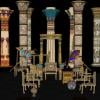
2) When sending a figure, better send the figure's current status as well as without the hidden nodes... (pls see the table in screenshot 1... )
3) Better be able to send Props with which Genesis figure can interact when being posed.Props aren't even supported yet. How did you manage that?
 Is that that table a figure or something? I just tried with some random furntiure and couldn't get it transfer over.
1) The plugin doesn't mean to work in Public Build of DS 4/6, correct ?
It should work, but you need to change the folders in the installer to point to those instead. Or copy the BJ_RapidPose.dll and dsp_BJ_RapidPose.dll afterwards.
Edit: ah yes, I see it in the outliner. The tables and chairs are set up like a figure. Cool. Proper props support is something that I'll be working on fairly soon. It's often needed for posing. Chairs to sit on, swords to hold etc.
2) ...without the hidden nodes...
Agreed, or transfer them but make them invisible by default with a proper visibility toggle. There's already a list of figures (later props) where each could have such a toggle.
Is there a helpful tutorial on converting non-DAZ characters to G8?barcgwcc said:
Hi,
A non-DAZ modeling site recently had a great sale so I picked up a nice set. The items are in fbx, obj, and blend. However, whenever I import either fbx or obj rigged A-pose characters, the bones are separated from the body mesh (which is laying 90° off the bone rig). And the bones can not be selected or tranformed. I'd really like to use these characters for G8 in DS. The collection that I bought has a dozen or so pre-posed sets for each character as well, but when I import them, there are no bones at all that are imported with them. Is there a way to successfully import them into DS.
1. OBJ format figures have no bones with which you can pose them.
2. FBX format figures have bones, but depending on the software / the way that the content creators used when they exported FBX files, the imported figure in DS may vary.
The common way is to wrap a non-Daz figure with a G8 base mesh, then creating a head and body morph. Better take a look at these tutorials to understand the typical workflow first of all:R3DS Wrap: from Body Scan to Genesis 8
But if you don't want to go for the more complex workflow to get a final result of G8 + morphs, well FBX figures can still work well in DS esp. if they were made with Blender. Better post a screenshots of how they look in DS and Blender.
PS, I tried importing them into Blender (both fbx and obj as well) and then back out but that didn't work (but I'm not a blender guy, so I just accepted the defaults for both the import and export).
You mentioned they have blend files... so you should've opened the blend files firstly for a try. Usually the figures work well as expected in Blender.
Is there a helpful tutorial on converting non-DAZ characters to G8?You can't really convert like that. You could use a modelling/sculpting application to shape Genesis 8 to match the figure shape, then load that into DS as a morph; there would most likely be a lot of joint adjustments to make, and probably some extra morphs to make the new shape play nicely with posing and other morphs. You would be unlikely to be able to transfer the psoes, though you could load the posed figure as guide to posing the morphed Genesis 8 to match.
[Diffeomorphic] an you change the name of a morph's categorywhat the tittle says, lets say that I load a series of morphs and I accidentally misspell the name of the category and want to fix it, or I import some custom morphs into a new character but I want to change the name of the imported categories to fit with the new character, can that be done?
Hitchens: A DAZ Studio to Blender Live LinkYo TheMysteryIsThePoint, Let me help with your marketing...
 (in case anyone is getting notifications from this thread)!
Hitchens, the (roughly) "bring animatable scene elements back from Blender into DAZ Studio 4.x" feature addition of TheMysteryIsThePoint's latest Sagan Alembic Export Tool is now released for use and feedback! Follow this link to get Sagan 5, and maybe keep an eye on this nearby-forum-thread relating to Sagan itself (a working alembic format exporter plugin for DS 4.x) for comments, details, bug reports, etc.
The best description I've found (back in this forum topic's pages) looks something like (from a while back):
It is intended to get just enough into Blender so that one can animate with IK and layers, and be able to have characters interact with each other, precisely. That means the mesh is at base res for speed, and the JCMs are only needed at certain frames, say, one character is touching another. Then, get the animation back to DS, precisely as it was in Blender. Once the animation is back in DS, I can export it through the usual ways, i.e. Diffeo or Sagan, or the upcoming LotP at render time.
Rather than re-invent some of the key transfer/conversion elements, TheMysteryIsThePoint has wisely leveraged the brilliance of Thomas Larson 's (w help/support from Padone) nearby diffeomorphic tool to take care of many of the fine-tuned conversion functions in a symbiotic manner.
Not having work through the new Hitchens release yet, I believe this tool can (or will someday) run DS in the background, to take advantage of DS specific capabilites (like a plugin, just kind of bigger-ish), then those results can be moved forward in a way that supportseach user's project needs.
Let us all know how you get along with it if you check it out. I'm just starting to dive in and figure out how the gears work together, so i'm not at all useful for feedback yet, but my goal here is to help get the word out and let folks know it's live and ready to play with. A lot of work went into this, so it would be great to see those efforts result in cool outputs and time-savings for those that dive in!
I'm hoping that my experiments will enlighten me enough to result in a quick use-case/tutorial that will shine a spotlight on the end-to-end use-case and ultimate value of this project.
Note that Sagan, Hitchens, and Diffeomorphic are all open-source volunteer projects that make DS a better tool for all of us. In that spirit, please share your experiences (good or bad) so we can all benefit, trading hacks and ideas, making these tools more useful and used by everyone.
TheMysteryIsThePoint, thanks again, and, if I've missed anything or gotten any of it wrong here, let me know ASAP and I'll edit/tweak things until our info is correct/complete.
best,
--ms
Tips for creating attractive Genesis 9 Female characters from all angles?To be honest, I had no idea about the multiple viewports! I’m testing them right now, and it makes creating faces so much easier. Thank you so much guys for the tip!
However, I'm not sure if that is the main issue, though it definitely helps. I’ve been experimenting with different female models, and even the smallest adjustments make the proportions look completely off—even though I have plenty of morph sliders. For instance, I find Victoria 9 incredibly difficult to mix with other models or to tweak without losing her realism. Is it just me? I don't rule out that I might just need more practice, but it's frustrating because I can easily create great-looking male models and faces.
I am still very new to Daz but eager to learn, so any advice is highly appreciated! I just find it really hard to create an attractive female face, which is strange since my male creations turn out exactly how I imagine them. At this point, I’m starting to wonder if this is just a 'Genesis 9 thing' and if I should switch back to Genesis 8 or 8.1.
GENERAL FREEBIE REQUESTS part 3ånyone know of a freebie Verpine morph/ character?
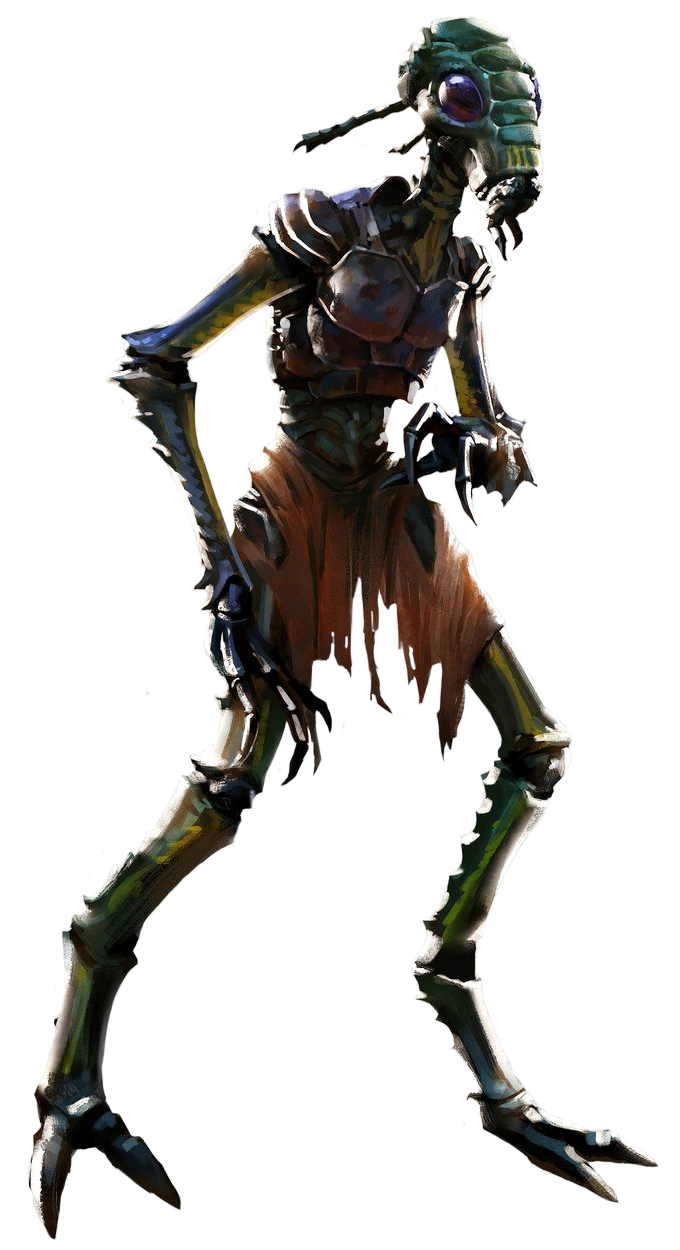
One of the othee players in a SW RPG camaign I'm also playing in is playing a Verpine Mandalorian, and I ant to do some renders of the whole party.
Tips for creating attractive Genesis 9 Female characters from all angles?exastris said:
i think she looks cute, btw. if i were working on her, the lower mouth/chin and nose (base and bridge depth compared to eyes/cheek/brow) might be where i'd start tweaking her from what you currently have.
but i mostly wanted to suggest changing the viewport display to have at least two panels if you haven't already tried doing that, so that you can see the front and profile simultaneously. you'd have to set up a camera for at least one of the two viewport panels but that's always a help for me.
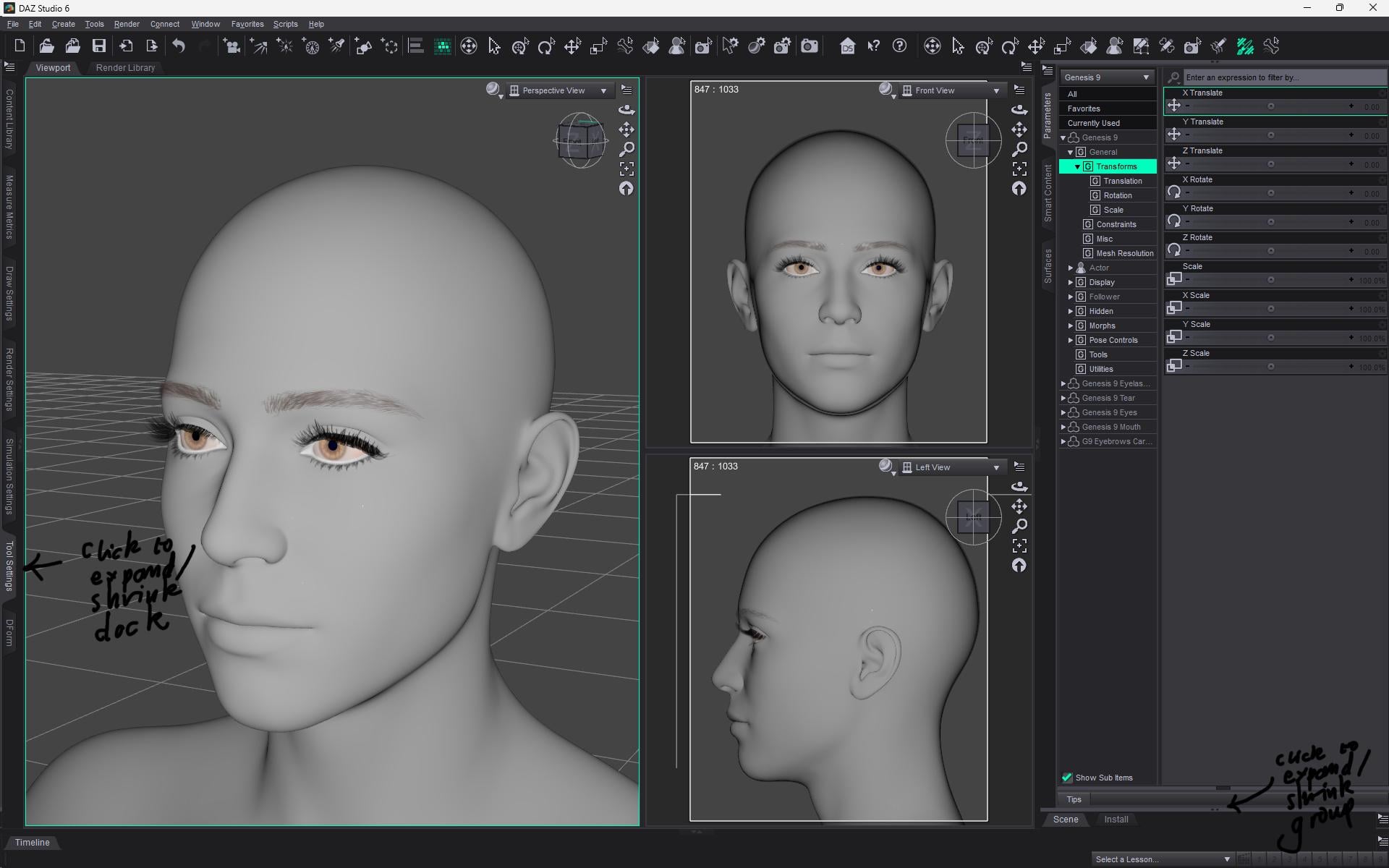
Yes, I mean to suggest this in my first reply. If you are sculpting with morphs you can probably close or collapse most pane groups (you can collapse a group by clicking on the tab of one of its active panes) to give you as large as possible a Viewport, then I would suggest the Window>Viewports>2 right, 1 Left mode with the two on the right set to Front and Left or Right views and the bigger View on the left set to Perspective (so you don't undo your camera moves if you undo a morph change). You can also cliick the dots in the middle of the dividier to shrink/restore a pane group that shares a pane well with the one you want:
 Freebie Challenge August 2026 - Plastique Fantastique! - Main Thread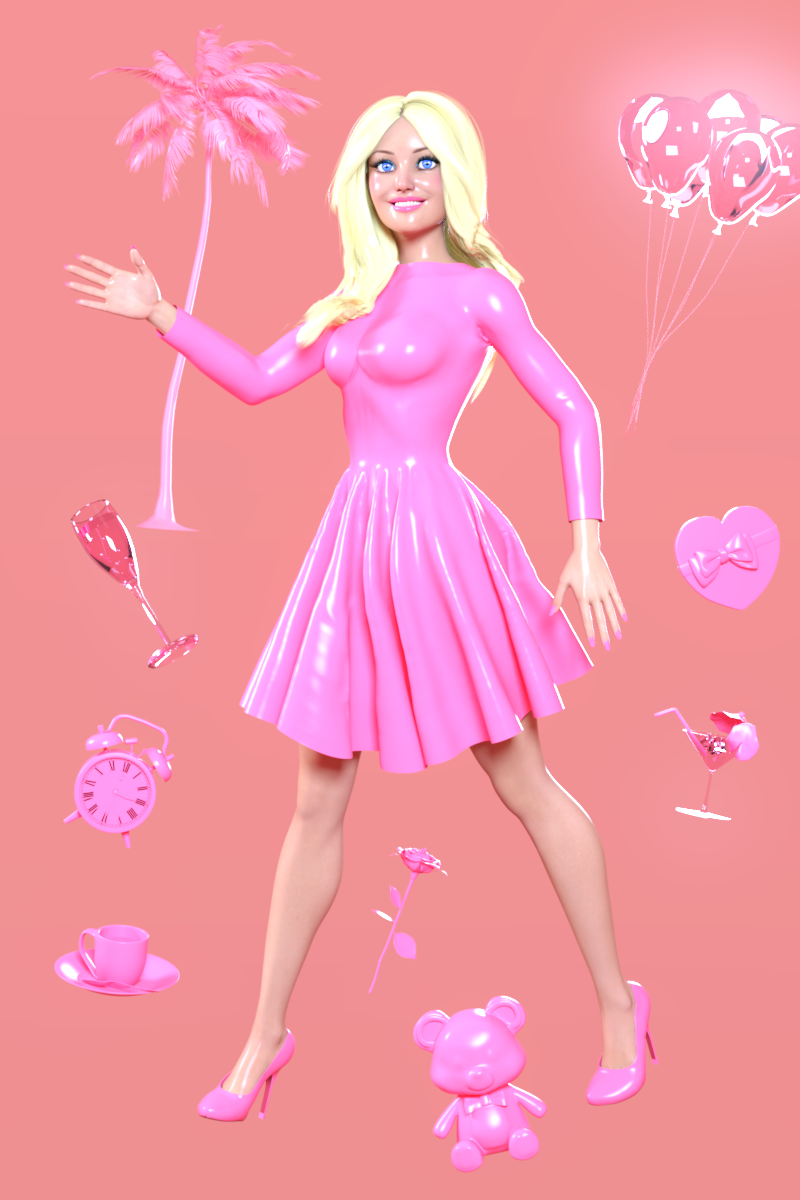
The world's first fully synthetic plastic was invented in 1907 by Leo Baekeland, who coined the term plastics. Since then plastics have taken over the world, especially once mass manufacturing became much cheaper around the 1950's and 60's.
Plastics are cheap, colourful, and versatile. Everything can be made of plastic: furniture, clothes, wigs, household objects, toys, medical equipment, computers. We achieve huge advances in technology and science as we use plastics to fly to the moon and connect the entire world through the internet. Life in plastic, it's fantastic!
Or is it, really? Looking at the environmental and health impact of plastics, they definitely have their dark side. Is recycling really the solution, or is it just green-washing? Does "plastic" automatically mean "cheap and disposable", or can plastics bring value to our lives? For better and for worse, plastics are all around us (and they may or may not be lead by Regina George.) The theme of August is: Plastique Fantastique!
Some useful links for the Contest
The KindredArts Free Resource Repo Here are the KindredsArt freebies and a rich list of sites that host freebies
Free 3D Models Link to DAZ's bi-weekly freebies
Limited Time Freebies Discussion Thread A thread under the Commons section of the forum, where DAZ's biweekly freebies are announced and, recently, even listed. It's useful for remembering which freebies were added and when.
The rules of the contest are:
-
Your entry must be a new render, especially made for this challenge.
-
Your entry must follow the DAZ TOS.
-
You may enter a maximum of 4 entries.
-
A minimum of five (5) Freebies must be included in your image
-
All Daz Bi-Weekly Freebies are allowed throughout the entire month in which they are free, as well as the following month (for a total of 2 months).
-
You may use a maximum of 5 paid items.
-
Base figures (Genesis 9, Genesis 8, etc.) as well as their basic morph packs may be used as needed. They do not count as either paid items or freebies.
-
DAZ Studio, Poser, Bryce, Carrara, Hexagon, and Blender are allowed.
-
DAZ AI Studio is not allowed. The use of image generating AI technology (midjourney, stable diffusion, etc.) is not allowed in any form.
-
Postwork is allowed. You must also include the raw render (before postwork) of your entry.
-
For a more detailed version of the rules see the PDF attached to this post; or ask your question in this thread, we're always happy to clarify!
-
Let's have fun and be creative with all the amazing resources that are available for free!
This contest ends on August 31st 2026.
Post your images and freebie links in this thread for link verification.
Once the links are verified, you can post your image and links in Entries Thread for judging.First Place: $15 store credit from KindredArts
Second Place: $10 store credit from KindredArts
Third Place: $5 store credit from KindredArtsPast Freebie Contests:
January 2022 - Around and around and around...
February 2022 - Mysteries of the heart
March 2022- Luck Of The Draw
April 2022 - New Beginnings
May 2022 - Cozy Corner
June/July 2022 - The Secret Life Of...
August 2022- Sniff, sniff... what's that smell?
September 2022-Cars Cars and More Cars
October 2022 - Horror Movies
November 2022 - Thieves, Robbers, and Fraudsters all around!
December 2022 - The Night is Darkest...
January 2023 Speed Demons and Slowpokes
February 2023- I See Red
March / April 2023 Magical
May 2023 - Sweet Music
June/July 2023 Holes, Gaps, Caves, Tunnels
August 2023 Fabulous Pink
September 2023 Gardening
October 2023 Hallowed Night
November 2023 Wobble, jiggle, sway, and shake
December 2023 / January 2024 Driving Home For...
February 2024 The Glow Up
March 2024 Power Source
April/Mai 2024 Soft as Plush, Smooth as Silk
June 2024 An Octopus' Garden
July/August 2024 Take A Break
September 2024 Fake Smiles and Real Joy
October 2024 "Monster Mash '24!"
November 2024 - Dreams
December 2024 - A Curious Christmas
January 2025 - Thank you, Saphirewild!
February 2025 - My Hallowed Valentine
March 2025 - Pride, Prejudice and other Shenanigans
April 2025 - The Little Ball of Calm
May 2025 - To Be Beautiful
June 2025 - Summer and Piracy
July 2025 - Design a Book Cover
August 2025 - Pure Cinema
September 2025 - Holiday Memories
October 2025 - Monster Mash!
November 2025 - The Winter Witch
December 2025 - Christmas!
January 2026 - When One Door Closes, Another Opens
February 2026 - Stronger Than You Think
March 2026 - The big blue
April 2026 - Free for All
May 2026 - Lies and Truth
June 2026 - Invasion
July 2026 - Summer Holidays
{Diffeomorphic} HD Import Results in Blender Not Responding, More Often Than NotHere's a question on HD export... I lose all my HD details: things like muscle definition and veins provided by various morph packs. Is that because these are "proprietary" DAZ HD morphs?
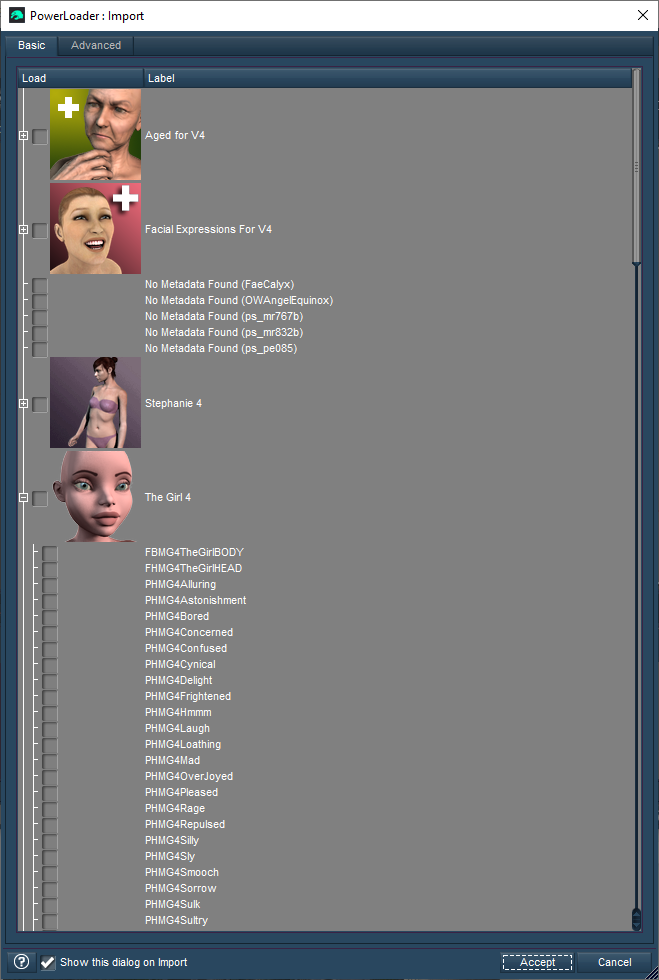
What Do These Icons Mean?Powerloader is a V4, M4, etc script that brings up a dialogue for checking which morph packs you want loaded with the figure
 LJ Studios - Art Work and Tips
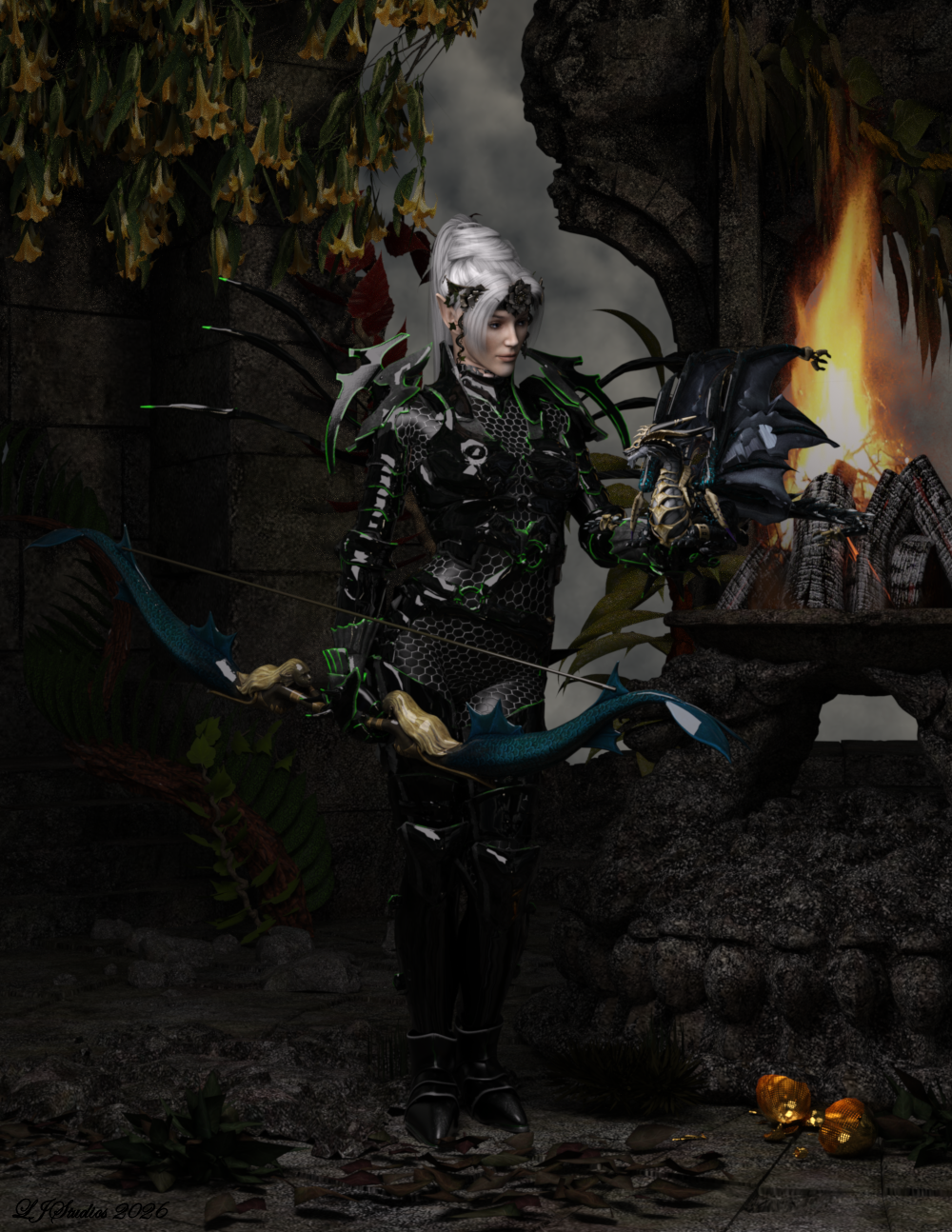
A Bond is Born
Victoria 3, Rendered in iRay.
This image started out with me wanting to see what ''KT Head Piece G9'' would look like in iRay. From there it was a let's see what is looks like on Victoria 3. A bit of scaling and presto one frecking amazing look appeared. The character for Victoria 3 is a spin dail morph I created called Julie. Her skin texture is Dreampaint's Yarishan with an iray shader applied to help with the skin. She is wearing jibicoco's Yvraine Ynnari corsair dark Eldar for v3, an armoured suit based upon the Eldar (40k). The freebie also included the hair. She is holding summoner's Lucent Drago in her left hand and summoner's Morphing Elves-Bow in her right. She stands in the middle of the old temple ruins by DAZ3D. Foliage is Lisa's Botanicals - Wisteria, and Dreanpaint's Forest vines. The fire is Traveler's Camp Fire. Environment is DAZ3D and Dimension Theroy's Skies of iRadiance - Night Sky HDRIs for Iray. Hope you like her.
List of items:
No longer available - Yarishan, old temple ruins, Forest Vines, Camp Fire, Lisa's Botanicals - Wisteria
Yvraine Ynnari corsair dark Eldar for v3 - No longer available but you might contact him to see if he would offer it again. Jibicoco - Download Daz Content at RenderHub
Lucent Drago - Summoner's Lucent-Drago_DS ( Daz Studio Fan Art ) - Free ( Public ) - Free Poser/DS - Free Poser ART - Freedom Of Arti
Morphing Elves-Bow - Summoner's Morphing Elves-Bow ( Fan Art For Poser DS ) - Free ( Public ) - Free Poser/DS - Free Poser ART - Freedom Of Art
KT Head Piece G9 - KT Head Piece G9
Skies of iRadiance - Night Sky HDRIs for Iray - Skies of iRadiance - Night Sky HDRIs for Iray | Daz 3D
LJ Studios - Art Work and TipsThe Adventures of Barbarella
Poser 4 Female, Rendered in iRay.
This project''s purpose was to use some of the files I had found that were not a complete freebie. In this case I had found some of renapd''s Barbarella outfit files. renapd had remapped Posette''s catsuit into two different versions. There were no textures, and no images of what the outfit was suppose to look like but you could get a good idea by just looking through the internet at all the still images of Jane Fonda in the costumes used in the movie. In my hunting I also found PoserWorld''s Thigh boots used in the project and the gun. Also in my hunting I fould a really cool texture freebie called DNA Dragon Scales by creed3d. I converted the freebie to iray textures. That is what I used on the catsuit and the boots. The model is Valeri P4 by stahratte. The model uses Posette morphs and textures but there is a bit of V2 in the mix. Her face is 3Dream''s Cara and her hair is Kozaburo''s Morph hair that is contained in Arduino''s Eve 2 freebie and her skin texture is 3Dream''s old texture. Her jewelry is by traveler. The finger nail is a V4 freebie Freebie Vampy-4.0, by Maikaefer-Mai3d.
The background uses the old temple ruins by DAZ3D, the ship and tenticals are Dreampaint and the background is Cyclo Drop by Traveler. Rendered in iRay.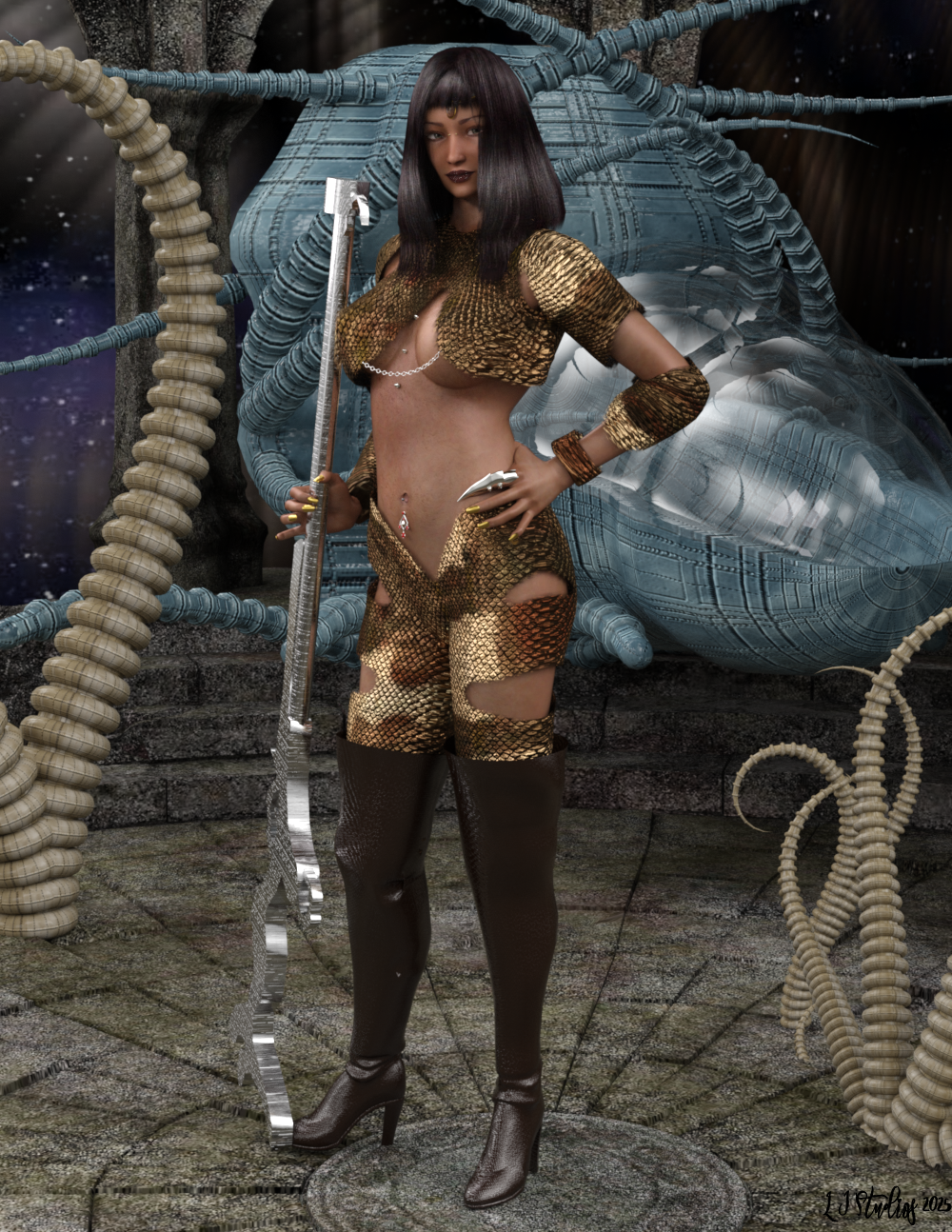 My G9 characters' heights are all WRONG - what content is making G9 bigger?
Padone said:
@lilweep Thank you for all the explanations. To me it is difficult to read ERCs and understand what they do. Is there some tutorials you can advise ?
you can google AllStereo's guide for ERCs. They are the only person I am aware of who made a comprehensive tutorial, although maybe it's a little overkill for what is actually quite a simple process. https://www.renderosity.com/freestuff/items/81207/tutorial-daz-studio-erc-feature
Most common ERCs you will see use only these three types:
- DeltaAdd: For every y value incremented by the Controller, the Subcomponent gets bumped up an increment defined by: y*scalar. Note if scalar is a negative value, then the Subcomponent will be decreased by incrementation of the Controller.
- Keyed: define a range of Controller-Subcomponent pairs to control how the Subconent is adjusted when the Controller is in certain ranges. Useful if you want more precise control than DeltaAdd gives. Keyed is also pretty useful if you are too lazy to calculate the Scalar for DeltaAdd when using joint rotation degrees.
- Multiply: generally just put a Master controller here to switch on or activate the other Controllers. E.g., Character Body morph is put in Multiply to stop any Character Body Correctives activating when the Character Body is at 0.
The other two types are not used as often
- Subtract: If you need to subtract, you can just use DeltaAdd with a negative scalar, so I dont understand the point of this type...
- Divide:
If you are using complex combination where a Subcomponent is controlled by say a DeltaAdd Controller, a Subtract Controller, and a Keyed Controller, just be a bit careful and do testing, because Keyed and Subtract may behave in strange ways in their order of operations which I have yet to fully understand.
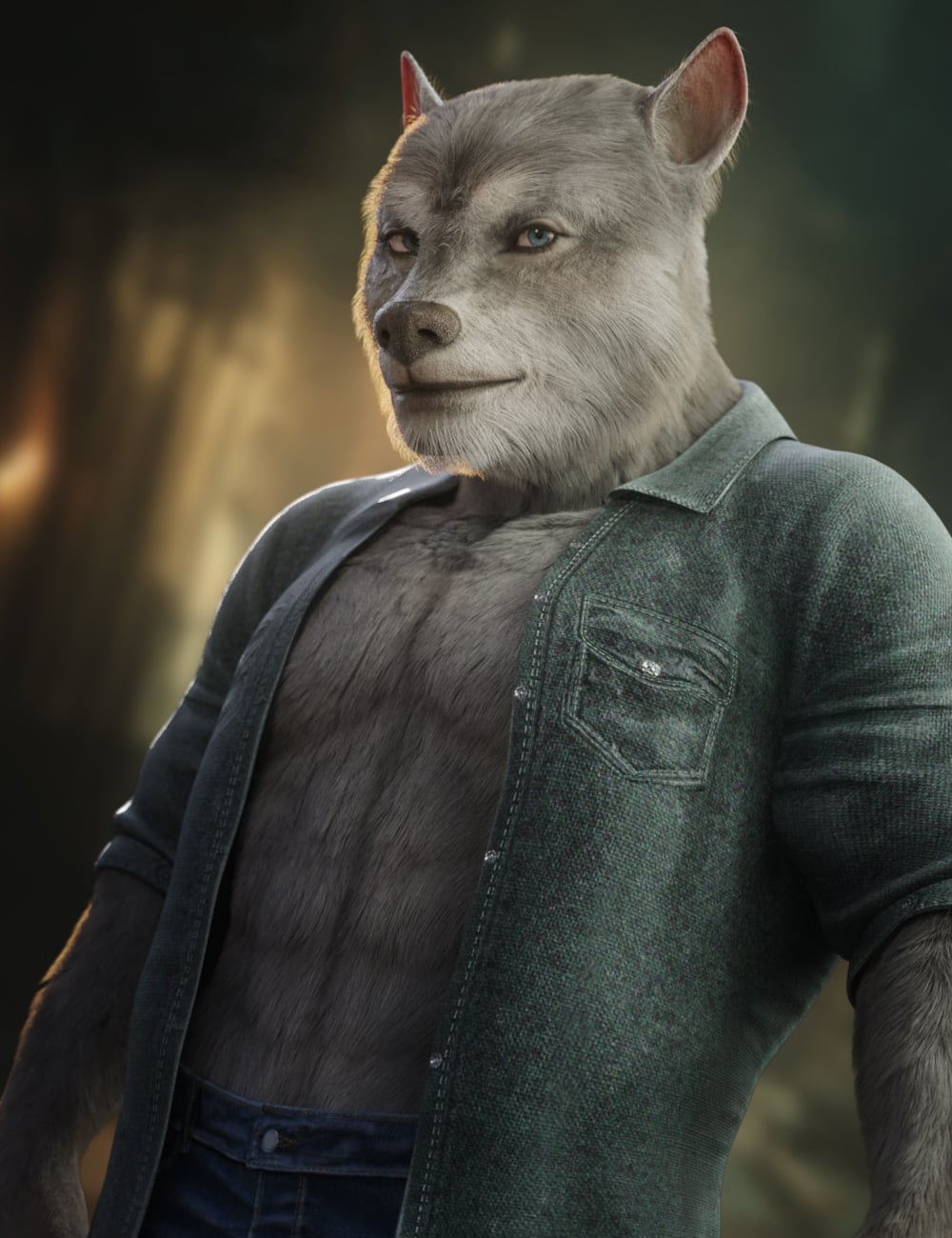
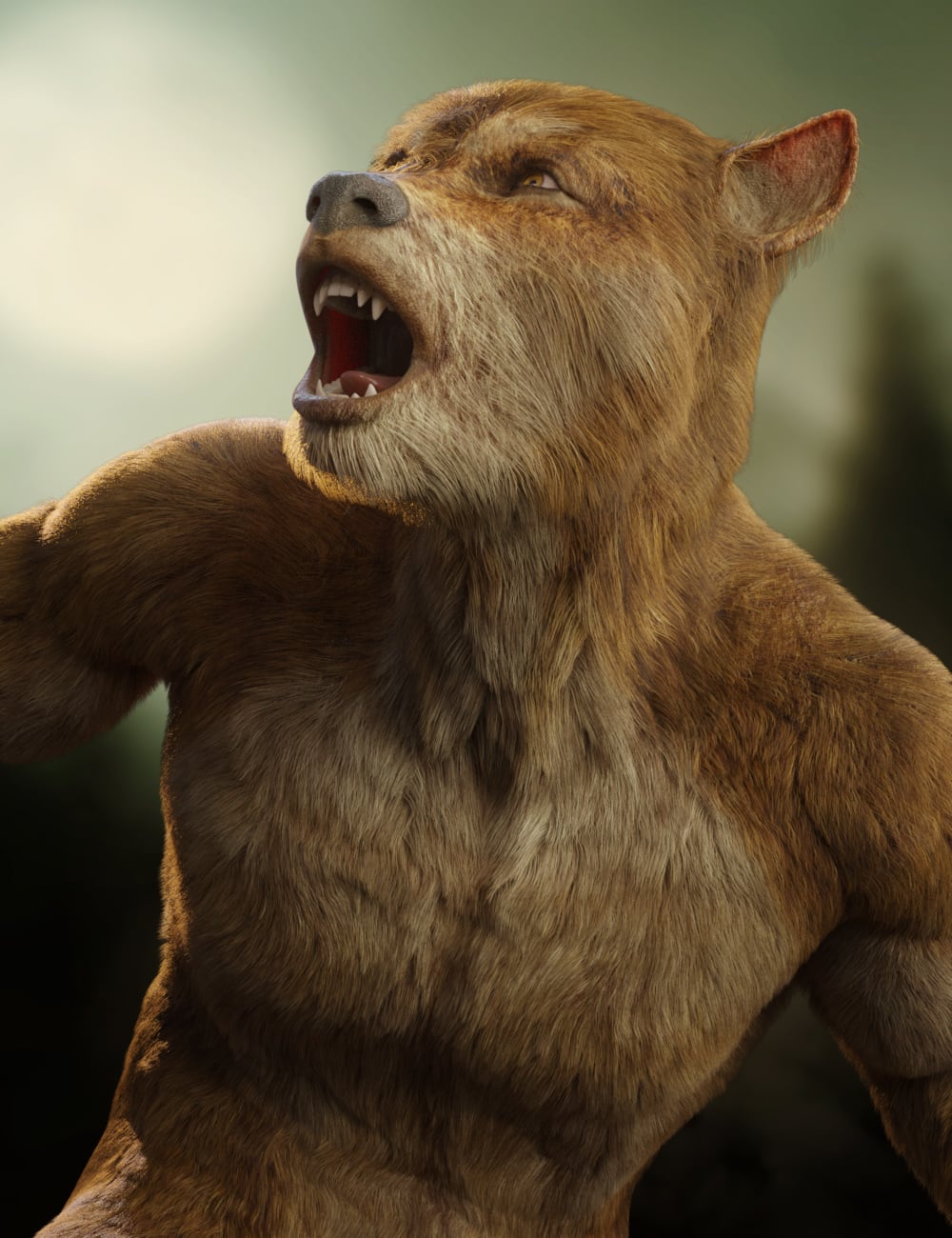
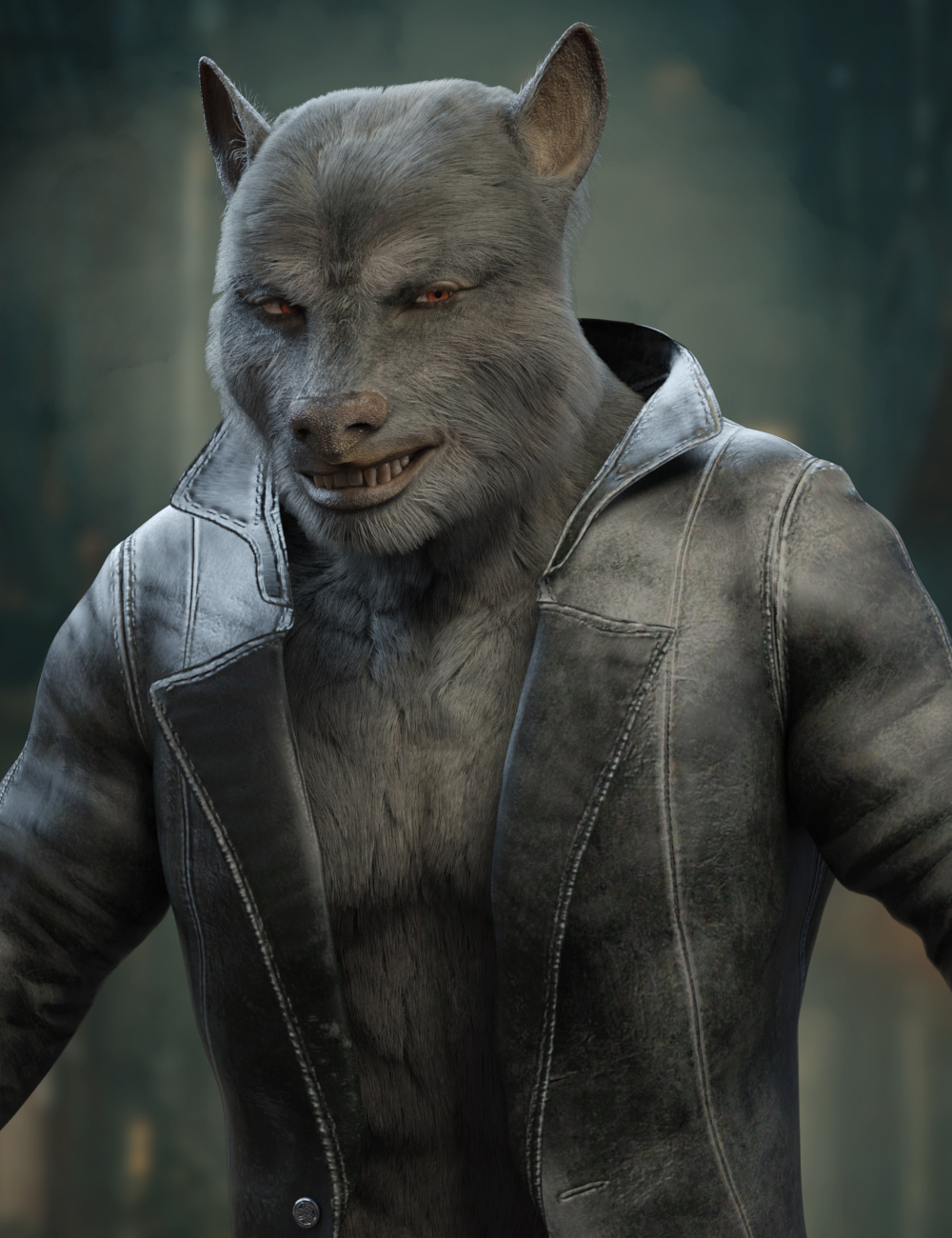
Ulfred for Genesis 9 [commercial]Ulfred for Genesis 9
https://www.daz3d.com/ulfred-for-genesis-9
Bring the strength of the wild into your renders with Ulfred, a powerful anthropomorphic wolf character designed for both fantasy and science fiction worlds. Whether portrayed as a savage werewolf, noble beast warrior, alien predator, or an entirely new race, Ulfred delivers a commanding presence with his muscular build, lupine features, and highly detailed realism.
Ulfred includes a full-body HD morph along with four richly detailed texture variations - Black, Brown, Grey, and White - allowing for a wide range of visual styles and character concepts. Five eye color options provide additional customization, while the included dHair fur adds depth, softness, and enhanced realism to every render.
From dark forests and ancient kingdoms to distant worlds and futuristic battlefields, Ulfred is ready to hunt in any setting.
What's Included and Features
- Ulfred for Genesis 9 : (.DUF)
- One Ulfred Character Preset
- One Ulfred Male Shaping Preset
- Material Options:
- One Black Full Body Base Skin Material Presets (with Male Genital Maps)
- One Brown Full Body Base Skin Material Presets (with Male Genital Maps)
- One Grey Full Body Base Skin Material Presets (with Male Genital Maps)
- One White Full Body Base Skin Material Presets (with Male Genital Maps)
- Five Eye Material Presets
- Addons:
- One Set of dHair Body Fur
 Duplicate files issue *Solved*
Rantanrave said:
crosswind said:
Duplicate formula issue usually comes from two main reasons: 1) two or more modifiers have the very same url (i.e. "id", not modifer "name"); 2) two or more very same formulas saved in one DSF file (usually comes from ERC Freeze for times or wrongly modify DSF manually... )
The log shows that the issue you have comes from 2) ... since more likely you converted the figure from G3F to G8F with XTransfer which might've created two same formulas in the DSF file.
If you already had the DSF file deleted : E:/Daz Main Install/Daz/data/DAZ 3D/Genesis 8/Female/Morphs/XTransfer/P3DOZI/Avery/XT_Avery Head.dsf from all the XTransfer data folders in all your Daz Libraries, the issue should be gone.
So, search XT_Avery Head.dsf in the data folders of all your Daz Libraries (check if there're same formulas within the DSF by using Notepad++ if you can find the files...), delete the duplicate formula or delete all XT_Avery Head.dsf files.
Edit: If the issue still stubbornly persists, try: in Preferences, Clear DSON Cache Files, and test again.
The issue is fixed.
I tried both suggestions in your post, without luck, sadly. Then I did some searching and stumbled across the answer in this thread: https://www.daz3d.com/forums/discussion/322166/how-to-remove-unwanted-morphs
"JoWa" gave the solution: Enable Edit mode and deleting the morph from within Daz itself. I did so, deleting all the assosiated morphs and closing down Daz. Then I navigated to the XTransfer folder, where the files were still present for some reason, so I deleted them as well (again). Then I booted up Daz, ported the morphs again with XTransfer and *bingo*, worked like a charm.
Thanks to those who assisted me here, I really appreciate it.
That was great you had the issue fixed!
But for the record, the action of deleting morph properties with Edit Mode in Parameters pane just deletes the properties in DUF file per se rather than the culprit DSF files in data folder.
Besides, duplicate formula issue only comes from existing DSF files rather than the properties in a Scene file (DUF). So still, deleting the culprit DSFs in all linked Daz Libraries, or correcting modifier's ID or removing the problematic formulas in DSF(s)... is the only KEY.
Duplicate files issue *Solved*crosswind said:
Duplicate formula issue usually comes from two main reasons: 1) two or more modifiers have the very same url (i.e. "id", not modifer "name"); 2) two or more very same formulas saved in one DSF file (usually comes from ERC Freeze for times or wrongly modify DSF manually... )
The log shows that the issue you have comes from 2) ... since more likely you converted the figure from G3F to G8F with XTransfer which might've created two same formulas in the DSF file.
If you already had the DSF file deleted : E:/Daz Main Install/Daz/data/DAZ 3D/Genesis 8/Female/Morphs/XTransfer/P3DOZI/Avery/XT_Avery Head.dsf from all the XTransfer data folders in all your Daz Libraries, the issue should be gone.
So, search XT_Avery Head.dsf in the data folders of all your Daz Libraries (check if there're same formulas within the DSF by using Notepad++ if you can find the files...), delete the duplicate formula or delete all XT_Avery Head.dsf files.
Edit: If the issue still stubbornly persists, try: in Preferences, Clear DSON Cache Files, and test again.
The issue is fixed.
I tried both suggestions in your post, without luck, sadly. Then I did some searching and stumbled across the answer in this thread: https://www.daz3d.com/forums/discussion/322166/how-to-remove-unwanted-morphs
"JoWa" gave the solution: Enable Edit mode and deleting the morph from within Daz itself. I did so, deleting all the assosiated morphs and closing down Daz. Then I navigated to the XTransfer folder, where the files were still present for some reason, so I deleted them as well (again). Then I booted up Daz, ported the morphs again with XTransfer and *bingo*, worked like a charm.
Thanks to those who assisted me here, I really appreciate it.
Products inspired by existing franchisesGordig said:
Richard Haseltine said:
when people submit products to daz theya re required to state that they own the rights (much like kpr's comment on commisioners and the artists they hire) so saying "This is from X" is accusing them of misrepresenting the product, and we do not allow accusations in general.
A PA might earnestly believe they own the rights to their product, but that doesn't necessarily mean they're correct. If a PA creates a morph that is their own original work but is based on an existing person or character, where does that lie? They legitimately created the morph themself, and would own the right to their creation, but whether they actually have the right to distribute it is a little trickier.
Right, this gets back to my original post. Making accusations against a PA for copying an existing IP may not be allowed in the forum, but the copying is absolutely being done and it's often not even that subtle. I just went looking in the store for a dress (which I own) that was released with Kaede 9, and now I can't find it. It was an obvious replica of an outfit from a game, but one that was likely very popular for cosplay and fanart. If it is gone, why couldn't it have remained with the no-commercial usage clause?
DAZ should consider allowing customers the option to provide images that prove that a product is a reasonable copy of an existing item, and if it is, all that needs to be done is for a little note to be added to the product that says "Inspired by popular media". Doesn't mean it isn't good, doesn't necessarily mean you can't use it in commercial renders, it just means that if you do use it, someone may recognize it even if you don't.
I am honestly sick and tired of all that franchise related content. The Poser/DAZ marketplaces get overflooded with Fairy-Fantasy and Tolkin-ish content items for almost 30 years now.
NudeVickyInATemplewithASword or PixieOnAMushroomInTheMiddleOfAForrest, or everything, that looks like Lord Of The ringsAnd I'm honestly sick of pirate and cyberpunk stuff, but it sells and I would not deny anyone else the opportunity to buy what they like. 90% of what I've bought here since the day this store opened has been fantasy stuff and I'm basically one of the founders of the whole 3D NVIATWAS thing. Let them sell what sells.
There's Always Another Sale Thread -- Discussions Only Pt 6Torquinox said:
You should be able to excise the unwanted portions and just install the g8 version
I would have to pay for the unwanted part of the product. It's usually sold with a bundle price, which is a little bit higher than the price for other characters. As there's only two characters that I would be interested in, and of these two I made a version for one myself, using morph tools etc, that comes close enough except for some details, it's not really something I bother about too much.
Blender to Daz plugin not exporting info/data from Shading sectionHey everyone,
For those who will ask:
OS Windows 11 Pro - Processor 12th Gen Intel(R) Core(TM) i9-12900K, 3200 Mhz, 16 Core(s), 24 Logical Processor(s)The main reason that I purchased this plugin is because they said:
BaseColor, Metallic, Specular, Roughness, Transmission, Emission, Normal and Alpha), Blender PrincipleBSDF materials (which will be converted to the Daz UberIray material) and the textures, which will be exported with this pattern...But when I select one item, click on the "Selected" button - it sends the object to Daz a completely white colored object appears
I have tried to go to the UV editing> UV> Unwrap> Smart... - no difference - still a completely white colored object
The following images attached are -
1) after export to Daz
2) from Blender with the Material Render on
3) as you can see these beautiful nodes did not transfer at all - you think at least some type of color then I do something
I have tried this with Daz 4.23 and Daz 4.20
I have tried with Blender 5.0 and 4.3 to no avail
can anyone give me any suggestions to fix this issue or some kind of work around
I am so disappointed right now - I wish I would have gone out and purchased a huge dilicious sandwich but instead I am hungry and disappointed
No matter what item that I select and transfer over - same result - no shading info is transfered
Does the size of the merge texture count - even though none of these items have textures
Thanks in advance
Daz 3D is part of

Connect
DAZ Productions, Inc.
7533 S Center View Ct #4664
West Jordan, UT 84084Licensing Agreement | Terms of Service | Privacy Policy | EULA
© 2026 Daz Productions Inc. All Rights Reserved.