Blender to Daz plugin not exporting info/data from Shading section
 tam_c3df5332fc
Posts: 152
tam_c3df5332fc
Posts: 152
Hey everyone,
For those who will ask:
OS Windows 11 Pro - Processor 12th Gen Intel(R) Core(TM) i9-12900K, 3200 Mhz, 16 Core(s), 24 Logical Processor(s)
The main reason that I purchased this plugin is because they said:
BaseColor, Metallic, Specular, Roughness, Transmission, Emission, Normal and Alpha), Blender PrincipleBSDF materials (which will be converted to the Daz UberIray material) and the textures, which will be exported with this pattern...
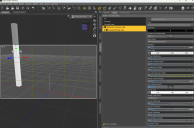
But when I select one item, click on the "Selected" button - it sends the object to Daz a completely white colored object appears
I have tried to go to the UV editing> UV> Unwrap> Smart... - no difference - still a completely white colored object
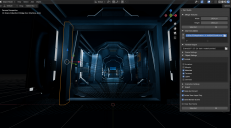
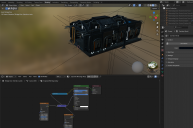
The following images attached are -
1) after export to Daz
2) from Blender with the Material Render on
3) as you can see these beautiful nodes did not transfer at all - you think at least some type of color then I do something
I have tried this with Daz 4.23 and Daz 4.20
I have tried with Blender 5.0 and 4.3 to no avail
can anyone give me any suggestions to fix this issue or some kind of work around
I am so disappointed right now - I wish I would have gone out and purchased a huge dilicious sandwich but instead I am hungry and disappointed
No matter what item that I select and transfer over - same result - no shading info is transfered
Does the size of the merge texture count - even though none of these items have textures
Thanks in advance

Daz 3D is part of 
Connect
DAZ Productions, Inc.
7533 S Center View Ct #4664
West Jordan, UT 84084
Licensing Agreement | Terms of Service | Privacy Policy | EULA
© 2026 Daz Productions Inc. All Rights Reserved.
Comments
That is a great addon you didn't waste your money. The description clearly states that only the principled shader is exported, as it is common in blender export tools. All other shaders and nodes will not be exported, that means most blender scenes I'm afraid. One thing you can try is to bake the materials to principled before exporting.
https://superhivemarket.com/products/simplebake---simple-pbr-and-other-baking-in-blender-2
Thank you for responding @Padone
So what is the difference between simplebake and switching your render to Cycles, followed by selecting an object, then clicking the Bake button
Because I have tried that, followed by UV> Unwrap> Smart UV Project - but still to no avail
Do I have to have different settings in the Bake section
By the way, most of the time I receive a notification - no active image...
If my elements have no textures, then what am I baking?
Thanks once more
There's plenty of tutorials if you want to learn baking by hand in blender, that's completely a viable way if you have some time to learn and some time to bake. Otherwise get the addon. I'm not going to start a tutorial here how to bake by hand in blender, as it is complex and long enough.
The ones by Ryan are good tutorials.
Thank you @Padone
There have been many things that I discovered throughout this process
1) You have to individually select each element/object - UV> Unwrap> Smart UV Project
you cannot do a select all and unwrap to have one giant UV - has to be each part has
it's own UV
2) Before baking, if you do not actually have any textures attached to an object/element
then you have give it a "fake" image texture - basically add an image texture node
without selecting an actual image and do not connect that image node to anything - it can hang by itself
3) Now, you are able to bake - once you have a baked (4 - basecolor, normal, ao and roughness)
then you can do the export of the object/element to Daz
I literally just rendered this latest attached test image as I was typing this response - now just because I have done all
this work, it is still far from over, because during the export - for whatever reason, Daz is not seeing my "bake" directory
so I literally have to go and re-attach base, normal, top color and top roughnes
Maybe you cannot see from the image, but that bottom middle bar at the bottom of the trolley tray - I connected all the baked images
and it looks worse with all those connections
With that said, the color that was passed to Daz were the result of the two first steps - before I would just receive a solid white piece
from Blender to Daz plugin - as you can see, it has passed the textures
Hope that helps someone who was searching for some answers