-
Is there a way to hide/remove completely nipples/navels for G9?
I made another post between Richard's and Elor's post. I don't know why it isn't here.
I managed to smooth the bump with the geometry editor in smooth mode.
@Richard, the figure is a default G9 with along with some geometry shells, these assets applied:
Shape: ....\People\Genesis 9\Characters\Cherubit\CHB Fiona\CHB Fiona !A Apply.duf
Shape: ....\People\Genesis 9\Characters\Cherubit\CHB Fiona\CHB Fiona Head A Apply.duf
H Mat: ....\People\Genesis 9\Materials\RawArt\RawSkins\RawSkins Female MAT.duf
I used GIMP to edit copies of all the rawskin female body texture files and removed the darkened areas from the copies. Then applied them to the body of the figure.
@Elor, Removing the nipple morphs worked just fine. Aside from the color, there were no mesh issues with removing the nipples.
Setting Navel HD to 0 (or deleting the morph entirely) pushed the navel forward, presumable for an "outey" navel. As I've fixed the bump I don't have an image with in wire view. If the image works (this is a navel regardless of what it might look like), it includes a geoshell changing the coloring of the texture.
Is there a way to hide/remove completely nipples/navels for G9?jmucchiello said:
Because all the morphs were set to their default values. The default values create a G9 figure with an inney navel. I need to remove that one, but not leave behind a bump in that morph's place. Any assistance appreciated. Thanks.
A screenshot would help seeing the problem with the navel (in smooth shaded mode to be safe regarding the forum rules) because setting Navel HD to 0 should simply remove the navel active by default on G9 and should not create a bump either on the character or the clothes that character is wearing.
As for the textures, they are exceptions but teen or young adult characters by Daz usually don't have any nipples painted on their torso so if as an example you want to use Olympia 9 skin, you can use Olympia 9 Young Adult's skin instead.
Is there a way to hide/remove completely nipples/navels for G9?Okay, a quick internet search revealed the secrets of removing a morph. But I couldn't find an answer to what morphs to remove. And my library has a bunch of navel morphs. When I delete them all, the spot where the navel should be bumps out. Either I delete one I shouldn't have, or the default is a bump there. How do I figure out what was the specific morph to remove? Because all the morphs were set to their default values. The default values create a G9 figure with an inney navel. I need to remove that one, but not leave behind a bump in that morph's place. Any assistance appreciated. Thanks.
Let's appreciate/discuss today's new releases - more ongoinger threadWell I bit the bullet, killed the gift card and more.
https://www.daz3d.com/chb-gabriel-and-sweatsuit-bundle-for-genesis-9
https://www.daz3d.com/predatron-desert-plants-bundle
https://www.daz3d.com/vrv-faye-jewelry-for-genesis-9-81-and-8-females
https://www.daz3d.com/hd-essentials-expressive-hands-for-genesis-9
https://www.daz3d.com/ultimate-natural-bend-morphs-for-genesis-9-feminine-20
https://www.daz3d.com/morph-master - seeing the PA work with customers to fix a problem convinced me to buy it when I could.
https://www.daz3d.com/dforce-decorous-outfit-for-genesis-9-and-8-female
So full price would have been $204.93, with tokens, discounts, my remaining birthday gift card I just had to spend $32.78 for some items I have wanted for awhile. Or fell for this week!
Thank you to all the PAs for their talent and preserverance and DAZ and everyone who brought them to my attention on the forums.
Mary
AIUTO...CHI CONOSCE L’ITALIANO? PARTE QUATTORDICIGuardando meglio l'immagine, sembra che i capelli siano troppo stretti, quindi cerca qualche morph per ingrandirli un po'.
AIUTO...CHI CONOSCE L’ITALIANO? PARTE QUATTORDICISono i capelli, secondo me.
Prova ad usare morph per spostare la parte frontale e/o laterale dentro alla testa.
Oppure usa il mash grabber.
Free Toon Characters – Released Early!wsterdan said:
Eustace Scrubb said:
One thing I did notice, though, was that geoshells don't always scale up with the figure when the morph dials scale them (Male Fit/Hero/et c), and though the shapes are correct, the scales of the shells have to be tweaked manually.
Thanks for letting me know; I hadn't noticed, as I don't normally use geoshells that often. I'm at a total loss as to what would cause that or how to fix it.
Ths shaders sound great, I'm looking forward to seeing them in action.
Further twiddling shows that the shells don't like following body transforms at all. Not for the figure, anyway. I'm using D|S 4.22.0.19.
These are unretouched renders: the halftone is part of the shader. I've also included a Geoshell Outline option so that the Shell is using the same shader as the primary mesh (which might be a mistake, as big as the shader is). All surfaces use the same base shader.What would really be good is a PowerPose template.
Here's Geoshell Outlined, Geoshell + Toon (Edge-Blend/Normals), Toon Only, and No Outline. Hair is a Poser prop by StudioMaya.
Somehow, my geoshell tints its contents even when forward normals are 100% transparent.
GENERAL FREEBIE REQUESTS part 3ModernWizard said:
@Petege -- thanks! Have you considered sharing this on Renderhub or Renderosity so that others can benefit from it too? I appreciate it!
--MW
You are welcome. Yes, it will be a part of a freebie morph set where I am working on.
Is there a way to hide/remove completely nipples/navels for G9?Is there a way to hide/remove completely nipples/navels for G9?
I have Sickleyields Bodypiercing product which says it contains:
- Remove Daz Navel Morph
- Remove Daz Nipple Morphs
But they don't get rid of the graft, just morphs. Do I need to edit the skin texture? Is there some other product?
G9 only, please.
GENERAL FREEBIE REQUESTS part 3ModernWizard said:
Hello everyone. Has anyone seen any free resources for goatlike ear morphs? Nothing long and floppy, but horizontally projecting with rounded ends, similar to the attached picture. I've successfully converted some free satyr assets down to G8.1F, but the satyrs now need appropriately shaped ears. I can convert morphs from Victoria/Michael/Aiko/Hiro 3 up through Genesis 9.
How about a free goat tail too?
Just for those who may be interested, the G9 faun fur and horns are my Mysticartdesign here https://3dshards.com/product/faun-fur-and-horns-for-g9/ .
The leg morph for G9 cloven hooves is by sentionaut here https://www.renderosity.com/freestuff/items/94066/demon-legs-morph-for-genesis-9 .
--MW
Hi, I created a goat like ears morph for G8F/G8.1F and hope it will work for you. You can find the morph "PTG Fantasy Ears Long 04" in Actor -> Head -> Ears.
With the ear bones, the ears can be rotated up/down etc.
 Free Toon Characters – Released Early!
Eustace Scrubb said:
One thing I did notice, though, was that geoshells don't always scale up with the figure when the morph dials scale them (Male Fit/Hero/et c), and though the shapes are correct, the scales of the shells have to be tweaked manually.
Thanks for letting me know; I hadn't noticed, as I don't normally use geoshells that often. I'm at a total loss as to what would cause that or how to fix it.
Ths shaders sound great, I'm looking forward to seeing them in action.
Free Toon Characters – Released Early!I'm working on a toon/comic shader package for DS4--unfortunately, it's not going to work with the current DS6/2025 versions as it's built in 3Delight and ShaderMixer--but I'd love to include Webboid preset options. (The figures work quite well in the earlier edition of the software.)
One thing I did notice, though, was that geoshells don't always scale up with the figure when the morph dials scale them (Male Fit/Hero/et c), and though the shapes are correct, the scales of the shells have to be tweaked manually.
How do I save morph-dialed pose parts within the actual pose?Here is the deal.
I've made some G8F-based poses and used certain hand gesture morphs as assistance. The fun part is, I don't have said gestures for G8M, so when I try to apply the pose on the right to a G8M, I get the result on the left. So the big question is -- how do I turn dialed morphs (gestures, expressions and stuff) into raw bone rotations to save the whole construction as a pose without any morphs?
Thanks.
 Transferring Genesis 8 morphs to Genesis 9 using Faceform Wrap
Hello all,
I have transferred a morph from G8 to G9 using Facefrom Wrap: so I applied a G9 clone morph to G8, then also applied the morph I wanted to transfer and then exported to OBJ to be able to wrap.
Everything works perfectly, the morph now works on G9 but...The morph I transferred is a very subtle morph that slightly changes the shape of the feet. For it to work, I have applied it to the G9 body only, not the face. That works, bit it does affect the entire body:
Suppose I load any G9 character into DAZ and then apply my transferred morph on top, it actually dials back the entire character body to the default G9 shape.
I can get around it by turning off limits and applying the character morph at 200%, but I would like to know if there is a setting I missed when bringing in this morph into DAZ Studio using Morph Loader Pro...
Is there a way to make it compatible with other morphs and not "overwrite" those morphs back to the default shape?
Thanks a lot!!!Daz Studio Premier (The software): how much better compared to "Normal" daz studioHi,
I'm out of the loop of the whole Daz Premier things, and most of the discussions on this is from 2024. So I'd like to ask a few things regarding the Daz Studio Premier software (the benefits on the store is pretty straight forward).
As I understand correctly from https://www.daz3d.com/daz-studio-premier, there are 6 main benefits of the Premier version: Geometry Sculptor, Shape Transfer, Pose Converter, Render Queue, Simulation Manager, and Enhanced Exporting Tools (which I don't care).
1. These tools are exclusive to the Premier version of Daz studio, right? Is there any "hidden" feature of Daz Studio Premier that hasn't been mentioned on the page?
2. I owned Mesh Grabber (https://www.daz3d.com/mesh-grabber-win), Render Doctor (https://www.daz3d.com/render-doctor), Character Converter to Genesis 9 Bundle (https://www.daz3d.com/rssy-character-and-material-conversion-genesis-8-to-genesis-9-bundle) so what's the benefit of having premier verion ? Is the Geometry Sculptor, Render Queue, Shape Transfer better or newer or support more figures than the plugins I have? As I can read from the daz studio premier page, the Shape Transfer, Pose Converter only support convert to genesis 9? No other target figures?
3. How good is the Daz Studio Premier in performance, stability compare to the normal one, or it's exactly the same, just with some built in plugin?
4. Will the plugin I mentioned continue to work in the future version of Daz Studio?
5. Right now the Daz Studio 4.24 "normal" version, all the plugins in (2) are working (I haven't tried everything so if something doesn't work please tell me), so the only thing I will get is the Simulation Manager, right? Is there any other benefits of the Daz Studio Premier ?
Sorry for the long ask, my searching skills are bad. So if these information are already mentioned elsewhere please kindly point me to it. My Daz+ has just expired so I'm looking into renewing it, just wonder how useful Daz Premier is, on the software side.
Thank you very much.
Best regards,
MinhStuck Trying to Fit/Simulate Cloth - What would you do?I've used Poser for two decades, but only for stills--never for animation. Recently I've started using Poser to make short animations with rewarding success, but simulating and dealing with clothing is so unreal and I have experimented with nigh on everything recognizable, and no matter what, each article is just as disagreeable with my morphs as the last, especially dresses. I'm using Poser 11.
- I'm using my old V4 base morphed to look like Anna Williams from Tekken 2- Cloth sims for Fitting Room and Clothfiy yield cloth which clips through my model or straps hovering over the neck with no remedy in sight. I have experimented with parameters from weight painting to sliders but the cloth will not adhere suitably or just break apart and sail right off the figure.
- I want to try again in DAZ but when I copy every morph parameter over to a loaded V4 in DAZ, the character model doesn't look the same. The skin texture I have looks awful and discolored in DAZ as opposed to Poser and I don't know how to fix it without, I assume, extensively editing the texture in Photoshop
- I'm quite angry when it comes to purchasing material like clothing because, not only am I poor, but even when compatibility is listed, there is no indication on how 'usable' the clothing is regarding morphing, fitting, and propping for cloth simulation. Items that cannot fit my needs waste both time and $$$How can this project be salvaged? Is there a way to get my Poser model, rigged and all with an adjustable face, into DAZ where she can be dressed, manipulated, and animated there (needs to have movable limbs, movable face for speaking, etc.). Is there a better way to tackle the clothing issue to where my clothes will parent properly to my figure, wont break down like tissue paper, or clip through my character when animating in Poser? I would like to keep the kind of look you see in the completed render below. The "old photorealistic look" is verymuch the target of this project.
why can't I get the trekline pants to morph around Anatomical Elements?Hi. I have an embarrassing problem... well at least for my character. I got the trekline pants with the julian 9 bundle and I cannot for the life of me get his crotch to look normal. Meaning the pants either leave his genitals literally hanging out. or if I remove them and just have a bulge it is too sharp looking and he looks like it got chopped off. Someone please help. He cannot go around pantsless in every scene I create.
Let's appreciate/discuss today's new releases - more ongoinger threadElor said:
And while I have no idea how useful being able to disable JCM on a Genesis figure is, I can see that having more granular controls could be something tempting to add, even at the expense of making it easier to disable them with Zero figureDisabling them is probably not usually directly useful to the average user.
However, it is important for developing things like clothing. Most of the time when you use Transfer Utility to start the process of getting clothes set up for a model, the weight maps and JCMs you get are flawed. Being able to disable the JCMs so they're not confusing the matter of sorting out the weight maps is extremely useful. (As you want to sort out weight maps first, *then* get JCMs right on top of them).
I'm not sure to what end a slider is considered more useful, although it may be that the intent is to be able to help check for clipping on partial values. However, in a practical sense, not actually any harder to set up, and maybe there's some "hell, might be useful to some one I guess?" factor.
Conversions From Victoria 4/Genesis 2 to Genesis 9joe.cotter238561212 said:
Ainm said:
...
... Genesis was the first that came up with a unified mesh for both ...
Technically correct, but there's a bit of nuance behind that if you want/need to take advantage of it.
Generation 3 (V3 and M3) were actually morphs of the same 'Unimesh' figure but sold a separate male & female base figures. As a result, if you go through the process of of creating your own weight mapped figure (TriAx or Weight Mapped) you can base it on (say) V3 and import an M3 .obj file as a full body morph, as shown in the slightly disturbing images below where the M3 morph goes from 0% left to 100% right while changing nothing else:
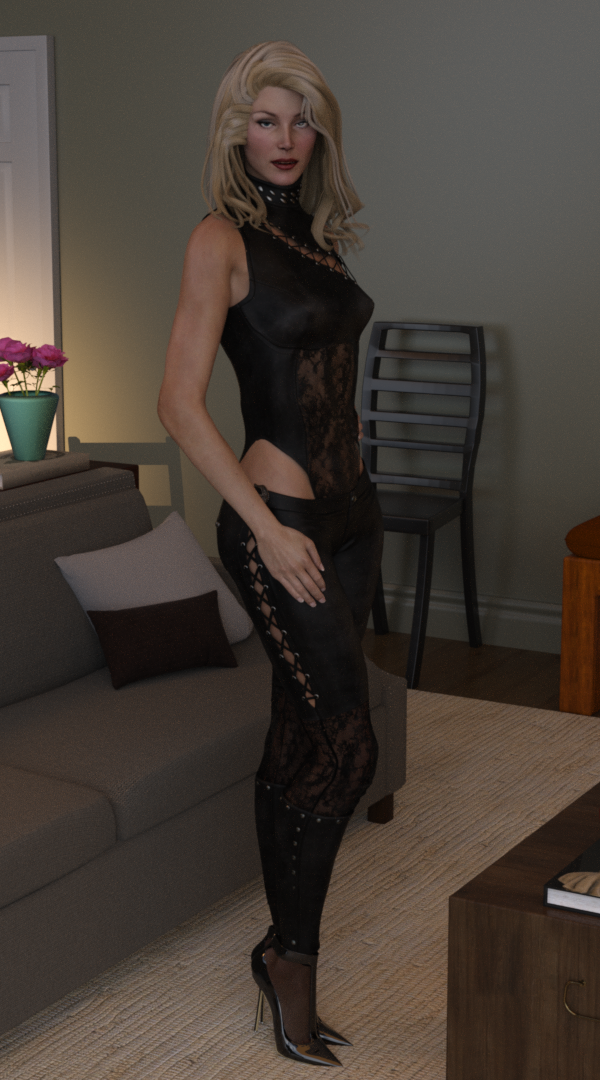
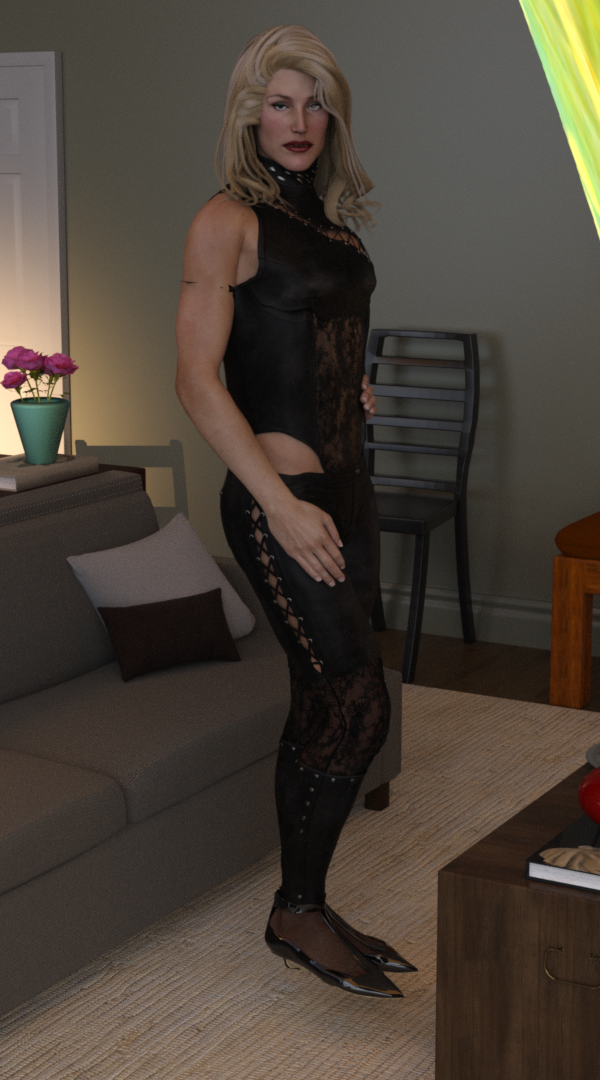
A V3 morph on the left, M3 morph created simply by importing an M3 mesh as a FBM on the right and applied at 100%. In fact you can add in every Gen3 base character - A3, H3, F3, SheFreak 3, GND2, GV3 and Iv etc. as they are all based on the same unimesh origin mesh. The same can be done with Generation 4, V4/M4/A4/H4/F4
In effect with Genesis and G9, DAZ released the sex-undifferentiated base model and the sex differentaited base figures are morphs. While for Generation 3 & 4, Genesis 2, 3 & 8, DAZ didn't release the base unimesh as a figure, instead only released the sex differentiated morphs as base figures.
Where you can take advantage of this is in creating TriAx/weight mapped versions of V3 & V4, and then you can have effort-free autofit clones for male clothing and you can apply male characters as fbm's too. OK, a limited & niche area, but it does mean that you can create autofit clones for your modernised V3/V4 by morphing M3/M4 to match the G3/G8/G9 shapes for the male clothing as well as doing the same with V3/V4 on the female side. (full details in the rather long tutorial pdf here [if you have loads of time and a burning desire to use V3/V4 in their original state but modernised to take advantage of autofit and autofollow for many generations of clothing] https://www.daz3d.com/forums/discussion/655676/tutorial-making-triax-figures-from-old-parametric-characters/p1)
Regards,
Richard
dForce Ponytail Floats Away with Custom Head Morph – Looking for AdviceWhen I apply the "dForce Strand-Based Flirty Casual Ponytail Hair for Genesis 9" to a Genesis 9 figure with a custom head morph I created, the ponytail part floats away from the head, as shown in the image below.
There are some parameters available to adjust the size of the head cap, and I’ve tried tweaking them, but it hasn’t resolved the issue. (While the overall size of the cap changes, the ponytail section still remains detached and floating.)
I understand that this kind of issue can happen when using custom morphs, but I’m wondering how more experienced users usually handle situations like this. I’d really appreciate any advice you could give me.
Daz 3D is part of

Connect
DAZ Productions, Inc.
7533 S Center View Ct #4664
West Jordan, UT 84084Licensing Agreement | Terms of Service | Privacy Policy | EULA
© 2026 Daz Productions Inc. All Rights Reserved.