

Speed Instances looks nice, but I'm trying to figure out if and how it's different from Ultrascatter 2. I can't tell whether the two are just two alternative approaches to the same functionality, or they serve different purposes. I don't have US2 (only US1 which I used very scarcely so far), but it feels like while US might be offering more options, Speed Instances is more sleek and streamlined in its UI.
Anyone has any insights?
I got really excited when I saw that. Then I realised it's not what I thought it was. I had hoped it was something that could add the effect of speed in renders - blurred backgrounds, wheelspin, etc.
Speed Instances looks nice, but I'm trying to figure out if and how it's different from Ultrascatter 2. I can't tell whether the two are just two alternative approaches to the same functionality, or they serve different purposes. I don't have US2 (only US1 which I used very scarcely so far), but it feels like while US might be offering more options, Speed Instances is more sleek and streamlined in its UI.
Anyone has any insights?
The description for Speed Instances says it works in DS 4. Does it also work in DS 6?
Biggest downside is that outoftouch doesn't use dForce addon (or whatever the name is), so the closed version and the opened version are two different meshes, so will require two different CBS.
I have noted that with more PAs, that if there is open/closed version it will be two different geometries.
No idea why. I find using dForce addons a more elegant solution.
Why is that bad? I really don't understand what dForce Addons do.
A dForce add-on is an invisible helper object used to give some structure to the original mesh when simulated.
There are two main uses that I know of:
First one is to provide "shape support" to a part of the mesh, for example adding a hoop under a skirt, or when you have a tubular item but don't want it to "flatten" when simulated.
Second one is to "glue" together some vertices so they keep their position relative to each-other when simulated, which is the case which interests us.
Say for example that you want to create a shirt which can be openend and closed. You model the shirt as opened, with left and right sides separated, then morph it so that the sides are over each other as if it is closed. But if you just simulate the morphed version as is, there's a good chance that the sides will not stay together.
One option to handle that would be to have a separate "closed" mesh where the sides are actually joined so they don't move independantly when simulated. The problem is that you have now two separate meshes which need separate morphs, and getting the materials to work on both versions will also require some extra work to get the UVs to match.
A dForce add-on enables you to have only one version of the base mesh, but you add a helper to the "closed" version which will "pair" vertices from the left side to the right side, and so when dForce computes the simulation it will keep them together.
Biggest downside is that outoftouch doesn't use dForce addon (or whatever the name is), so the closed version and the opened version are two different meshes, so will require two different CBS.
I have noted that with more PAs, that if there is open/closed version it will be two different geometries.
No idea why. I find using dForce addons a more elegant solution.
For people using older and/or less powerful computers, it can save time and effort.
Biggest downside is that outoftouch doesn't use dForce addon (or whatever the name is), so the closed version and the opened version are two different meshes, so will require two different CBS.
I have noted that with more PAs, that if there is open/closed version it will be two different geometries.
No idea why. I find using dForce addons a more elegant solution.
For people using older and/or less powerful computers, it can save time and effort.
For the user you will simulate the same amount of geometry, so not faster or lighter. And on your HD you will have 2 times geometry.
To continue with shirts, with dForce addons, it's possible to decide the number of buttons that'll be closed: to unbutton one button, you simply hide the dForce addon related to this button and you just have to re-rerun the simulation to see the difference.
On top of that, if you're creating corrective morphs for the clothes you're using, one mesh mean the work done on the closed shirt is directly usable with the open shirt too (in some case, you could have to create a morph to fix some pokethrough with the open morph, but it'll still require less work than creating two full correctives morphs).
A couple of examples with felis's crop top (buttons are hidden from bottom to top) and I didn't use the open morph provided by felis: it's just the result of three simulations with a different number of buttons hidden.
1 button hidden:
2 buttons hidden:
All of them hidden (I don't think there was any difference between hidding three and four, likely due to the pose used):
Biggest downside is that outoftouch doesn't use dForce addon (or whatever the name is), so the closed version and the opened version are two different meshes, so will require two different CBS.
@Elor, thank you so much. I totally missed this and it is very appropriate for a normal business office anywhere I think.
Speed Instances looks nice, but I'm trying to figure out if and how it's different from Ultrascatter 2. I can't tell whether the two are just two alternative approaches to the same functionality, or they serve different purposes. I don't have US2 (only US1 which I used very scarcely so far), but it feels like while US might be offering more options, Speed Instances is more sleek and streamlined in its UI.
Anyone has any insights?
I suspect this
Ultrascatter only has angle slider options from upright not from following normals
UltraScatter2 does have the option to position instances following the normals of the target object. I don't see anything in the list of Speed Instancer that UltraScatter2 doesn't have, so I didn't buy Speed Instancer. UltraScatter2 is a plugin and for that reason, I would suspect that it would be much much faster than a script based product. It is certainly much faster than the older script based UltraScatter and UltraScatter Pro.
UltraScatter2 also has a choice between surface scatter and volume scatter.
Speed Instances looks nice, but I'm trying to figure out if and how it's different from Ultrascatter 2. I can't tell whether the two are just two alternative approaches to the same functionality, or they serve different purposes. I don't have US2 (only US1 which I used very scarcely so far), but it feels like while US might be offering more options, Speed Instances is more sleek and streamlined in its UI.
Anyone has any insights?
I suspect this
Ultrascatter only has angle slider options from upright not from following normals
UltraScatter2 does have the option to position instances following the normals of the target object. I don't see anything in the list of Speed Instancer that UltraScatter2 doesn't have, so I didn't buy Speed Instancer. UltraScatter2 is a plugin and for that reason, I would suspect that it would be much much faster than a script based product. It is certainly much faster than the older script based UltraScatter and UltraScatter Pro.
UltraScatter2 also has a choice between surface scatter and volume scatter.
It works reasonably well. I suppose for a quick setup it does the job. The only possible negative is that one can't specify how many instances, only select a number from the list.
And how does she get her front legs through the holes?
In my canon, centaurs tend to develop a lot of flexibility; if you keep exercising your bends, then you'll get pretty lithe.
That said, some of them choose to learn telekinesis instead. (Most non-humans and a rare few humans in my setting have the *potential* to learn magic, but it's very challenging; learning magic is more akin to learning how to play a piano than it is to waving a wand and saying the right words).
I think Centaurs are traditionally woodland critters (even though horses are plains critters) because they have a deal with the fae who help them do things like get dressed. :)
Lorewise, centaur clothes came about because as a more ordered society was starting to get established, the centaurs with wealth were inclined to show off using their wealth, and had clothes tailored. Then slightly less-wealthy centaurs had to follow suit (pun not intended) in order to not seem lower class, and it propagated down society with each level unwilling to be seen as the first "poor tier".
And so, eventually, the centaurs in society pretty much all ended up wearing clothes. Although to some extent it's not just about fitting in, it's also a matter of personal expression.
That said, there are some other races which are less integrated into society who often don't bother with the clothes.
It all comes down to the fact that the classic centaur really doesn't make a lick of sense in terms of design. Forget about clothing, there's not even enough space for air to get through a human face to support half a human body plus an entire horse, not to mention the vulnerability of placing the head atop two seperate spinal junctures. The only place I've ever seen it approached logically was in old series of novels by Phillip Jose Farmer, The World Of Tiers, where, IIRC, a race of centaurs were engineered to be functional, having huge heads with large mouths and noses that sat directly on the human torso so that the torso would effectively serve as the neck of a horse while the horse torso, which was closer to that of a pony or donkey, contained the active lungs and digestive system. Farmer's centaurs also lived in a society patterned after the old plaiins tribes of North America, which made a great deal of sense to me, especially since it resulted in the Centaurs chasing the heroes like a scene from an old western. Mind you, the rest of the books didn't make that much of an impression and I'm hard pressed to remember much beyond the first book or even if I finished the last book in the series.
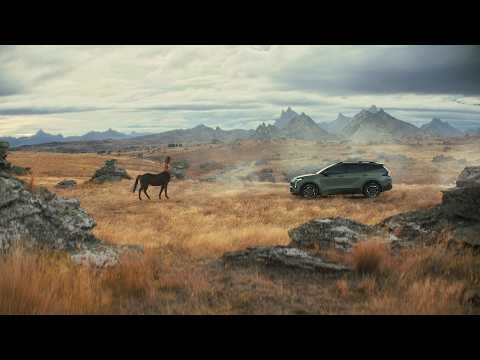
thought you all be interest in this new Australian ad actually there's a few of these kia ones now including a herd? of centaurs with this main one constantly trying to outrace the kia
Comments
I got really excited when I saw that. Then I realised it's not what I thought it was. I had hoped it was something that could add the effect of speed in renders - blurred backgrounds, wheelspin, etc.
Why is that bad? I really don't understand what dForce Addons do.
The description for Speed Instances says it works in DS 4. Does it also work in DS 6?
I have noted that with more PAs, that if there is open/closed version it will be two different geometries.
No idea why. I find using dForce addons a more elegant solution.
I would like to know as well, thanks
A dForce add-on is an invisible helper object used to give some structure to the original mesh when simulated.
There are two main uses that I know of:
First one is to provide "shape support" to a part of the mesh, for example adding a hoop under a skirt, or when you have a tubular item but don't want it to "flatten" when simulated.
Second one is to "glue" together some vertices so they keep their position relative to each-other when simulated, which is the case which interests us.
Say for example that you want to create a shirt which can be openend and closed. You model the shirt as opened, with left and right sides separated, then morph it so that the sides are over each other as if it is closed. But if you just simulate the morphed version as is, there's a good chance that the sides will not stay together.
One option to handle that would be to have a separate "closed" mesh where the sides are actually joined so they don't move independantly when simulated. The problem is that you have now two separate meshes which need separate morphs, and getting the materials to work on both versions will also require some extra work to get the UVs to match.
A dForce add-on enables you to have only one version of the base mesh, but you add a helper to the "closed" version which will "pair" vertices from the left side to the right side, and so when dForce computes the simulation it will keep them together.
If you want some examples you can checlk this thread (which includes lots of interesting stuff and tutorials about dForce): https://www.daz3d.com/forums/discussion/comment/3845981/#Comment_3845981
For people using older and/or less powerful computers, it can save time and effort.
For the user you will simulate the same amount of geometry, so not faster or lighter. And on your HD you will have 2 times geometry.
A possible reason could be that with two meshes, autofollow may work best than on one mesh with a morph?
To add to what Leana said, Mada has a tutorial on dForce addons, focusing on preserving shapes:
felis is using them to keep the shirt from this outfit closed:
https://www.renderosity.com/freestuff/items/99746/crop-shirt-and-miniskirt-for-g8f
You can also see them in action if you have the Wet and Dry Boyfriend Shirt Dress from Linday:
https://www.daz3d.com/dforce-wet-and-dry-boyfriend-shirt-dress-for-genesis-8-females
To continue with shirts, with dForce addons, it's possible to decide the number of buttons that'll be closed: to unbutton one button, you simply hide the dForce addon related to this button and you just have to re-rerun the simulation to see the difference.
On top of that, if you're creating corrective morphs for the clothes you're using, one mesh mean the work done on the closed shirt is directly usable with the open shirt too (in some case, you could have to create a morph to fix some pokethrough with the open morph, but it'll still require less work than creating two full correctives morphs).
A couple of examples with felis's crop top (buttons are hidden from bottom to top) and I didn't use the open morph provided by felis: it's just the result of three simulations with a different number of buttons hidden.
1 button hidden:
2 buttons hidden:
All of them hidden (I don't think there was any difference between hidding three and four, likely due to the pose used):
@Elor, thank you so much. I totally missed this and it is very appropriate for a normal business office anywhere I think.
Mary
UltraScatter2 does have the option to position instances following the normals of the target object. I don't see anything in the list of Speed Instancer that UltraScatter2 doesn't have, so I didn't buy Speed Instancer. UltraScatter2 is a plugin and for that reason, I would suspect that it would be much much faster than a script based product. It is certainly much faster than the older script based UltraScatter and UltraScatter Pro.
UltraScatter2 also has a choice between surface scatter and volume scatter.
It works reasonably well. I suppose for a quick setup it does the job. The only possible negative is that one can't specify how many instances, only select a number from the list.
Yeah, but it's still funny to dress them in vintage bloomers.
thought you all be interest in this new Australian ad actually there's a few of these kia ones now including a herd? of centaurs with this main one constantly trying to outrace the kia

Yes, please post more renders of centaurs.
Have to say I like Chris Cox's clothing today: https://www.daz3d.com/dforce-street-league-outfit-for-genesis-9-and-8-female The options & morphs are good. Much appreciated.
Regards,
Richard
What about a 6 legged centaur, or a centaurpede? or a 2 headed centaur? So many possibilities.
I want to see a centaurpede!
The Human Centipede
no. someone needs a timeout.