

Remixing your art with AI

1…3133353637

Comments

  • wsterdanwsterdan Posts: 3,616
    edited June 3

    inquire said:

    Very fine. Do you animate on your computer, or do you use the website that provides render engines?

    I'm using sites like Openart.ai because they have a number of different engines available that allow me to do different things more easily. They're not perfect and there's always tradeoffs, but overall I'm enjoying making both the still images and animations that I just can't do with DAZ Studio, though almost everything I do start with DAZ and Poser figures and props. If you skim through a few of the threads you'll see that I make use of a lot of much older figures and props that might not even be useable today.

    For example, I used my free Webboids characters, a number of MIghtmite's clothing items for Genesis 3 and Lady LIttlefox's Cookie character and a set of amor and other accessories to make this character back in 2009:
     

    and in the course of about half an hour, I cobbled together two test videos just for fun:

    If clickin on the image above doesn't work, you can use this link: http://sterdan.com/wp-content/uploads/2026/05/Emerald-Empress-Escapes.mp4

    If clicking on the image above doesn't work, you can use this link: http://sterdan.com/wp-content/uploads/2026/05/Emerald-Empress-Victorious.mp4

    I have tried setting up local AI renders on my Mac but met with limited success; one of the main issues for me, though, was that the features availble for engines I could get to work locally didn't match the features of the for-pay-only engines I've been using for animation.


    01 Empress.jpg
    250 x 250 - 108K
    02 Empress.jpg
    250 x 250 - 93K
    empress-02.jpg
    809 x 956 - 71K
    Post edited by wsterdan on
  • inquireinquire Posts: 2,464

    It all looks very good. I couldn't get the videos to play. Do you have links to the videos? Enjoying an animation  that way is so much faster than trying to do it on one's own computer. And with web language apps, you don't have to worry about how Fast is your GPU, how fast is your CPU, do you have the latest version of a particular app? 

  • wsterdanwsterdan Posts: 3,616

    inquire said:

    It all looks very good. I couldn't get the videos to play. Do you have links to the videos? Enjoying an animation  that way is so much faster than trying to do it on one's own computer. And with web language apps, you don't have to worry about how Fast is your GPU, how fast is your CPU, do you have the latest version of a particular app? 

    Not sure why clicking on the images in the text didn't work (you have to click on the bigger images in the post, not the smaller ones at the bottom of the post) but I've added the links separately, hopefully that helps. 

  • ArtiniArtini Posts: 10,920
    edited June 1

    I need to find out more about this cat ...

    CatAndMouse.jpg
    1536 x 1024 - 983K
    Post edited by Artini on
  • ArtiniArtini Posts: 10,920
    edited June 1

    Exploring the story further...

    CatAndMouse02.jpg
    1024 x 1536 - 1M
    Post edited by Artini on
  • sueyasueya Posts: 867
    edited June 2

    I changed the scene to a stately home and changed the outfit to a ballgown

    I didn't specify a colour for the ballgown but like how it kept it similar to the original image

    Girl_inOremusgardensmaller.jpg
    800 x 494 - 143K
    Womaninballgown_smaller.png
    800 x 495 - 749K
    Post edited by sueya on
  • wsterdanwsterdan Posts: 3,616

    sueya said:

    I changed the scene to a stately home and changed the outfit to a ballgown

    I didn't specify a colour for the ballgown but like how it kept it similar to the original image

    Nicely done! 

  • WendyLuvsCatzWendyLuvsCatz Posts: 41,644

    I would love sets like those in 3D heart


    a bit more mixed AI and 3D animated 3D renders

  • wsterdanwsterdan Posts: 3,616

    WendyLuvsCatz said:

    I would love sets like those in 3D heart


    a bit more mixed AI and 3D animated 3D renders

    Sweet! It sure makes the scene look incredibly huge! 

  • ArtiniArtini Posts: 10,920
    edited June 4

    Inspired by recent posts in the other thread...

    BubbleWrap.jpg
    1536 x 1024 - 803K
    Post edited by Artini on
  • inquireinquire Posts: 2,464

    https://www.daz3d.com/art-official-intelligence-daz-studio-centered-workflows-with-ai-tools
    Does  anyone know anything about this product?

    I am wondering, do people use AI apps that are on their own hard drives, or are people using websites that render quickly because the web app connects to servers?

    Another question I have is how to Best take a DAZ Studio character and render it in AI so that the skin looks completely realistic.

    I can do renders in AI with DAZ characters, and even animations in AI with them,  but the skin textures don't look completely natural.


  • wsterdanwsterdan Posts: 3,616
    edited June 14

    As I've detailed a few times here, I view AI enhancement as another plug-in or filter, for the most part.

    In 2009 I was playing with the idea of using Chip and Cookie for a youth-oriented comic series called, "Problem Solvers". My idea was to have different young heroes around the world using their magical abilities to solve some specific "problems", mainly supernatural in nature. I would set up my toon characters, render them in 3Delight using pwToon (and others) and then using different Photoshop actions and filters to try and get the comic look I wanted. 

    When I use AI, I work the same as before but use AI "filters" instead of pwToon and Photoshop. I used to use purchased animation blocks but now use AI instead, still setting up starting points, end points and mid-points but letting AI do the tweening. Overall, to me, the only major differences are the time saved and the end quality.

    Anyway, here's five sampls of the 2009 Chip and Cookie heroes re-imagined in 2026.

    Chang 01 3D.jpg
    1024 x 768 - 542K
    Chang 01.jpeg
    2400 x 1792 - 2M
    LIng 01 3D.jpg
    1024 x 768 - 590K
    Ling 01.jpg
    2400 x 1792 - 1M
    Ivan 01 3D.jpg
    1024 x 768 - 620K
    Ivan 01.jpg
    2400 x 1792 - 1M
    Ivan 02 3D.jpg
    1024 x 768 - 567K
    Ivan 02.jpeg
    2400 x 1792 - 1M
    Ivan 03 3D.jpg
    1024 x 768 - 581K
    Ivan 03.jpg
    2384 x 1788 - 1M
    Post edited by wsterdan on
  • wsterdanwsterdan Posts: 3,616
    edited June 14

    Besides re-imagining older toon renders like these two:
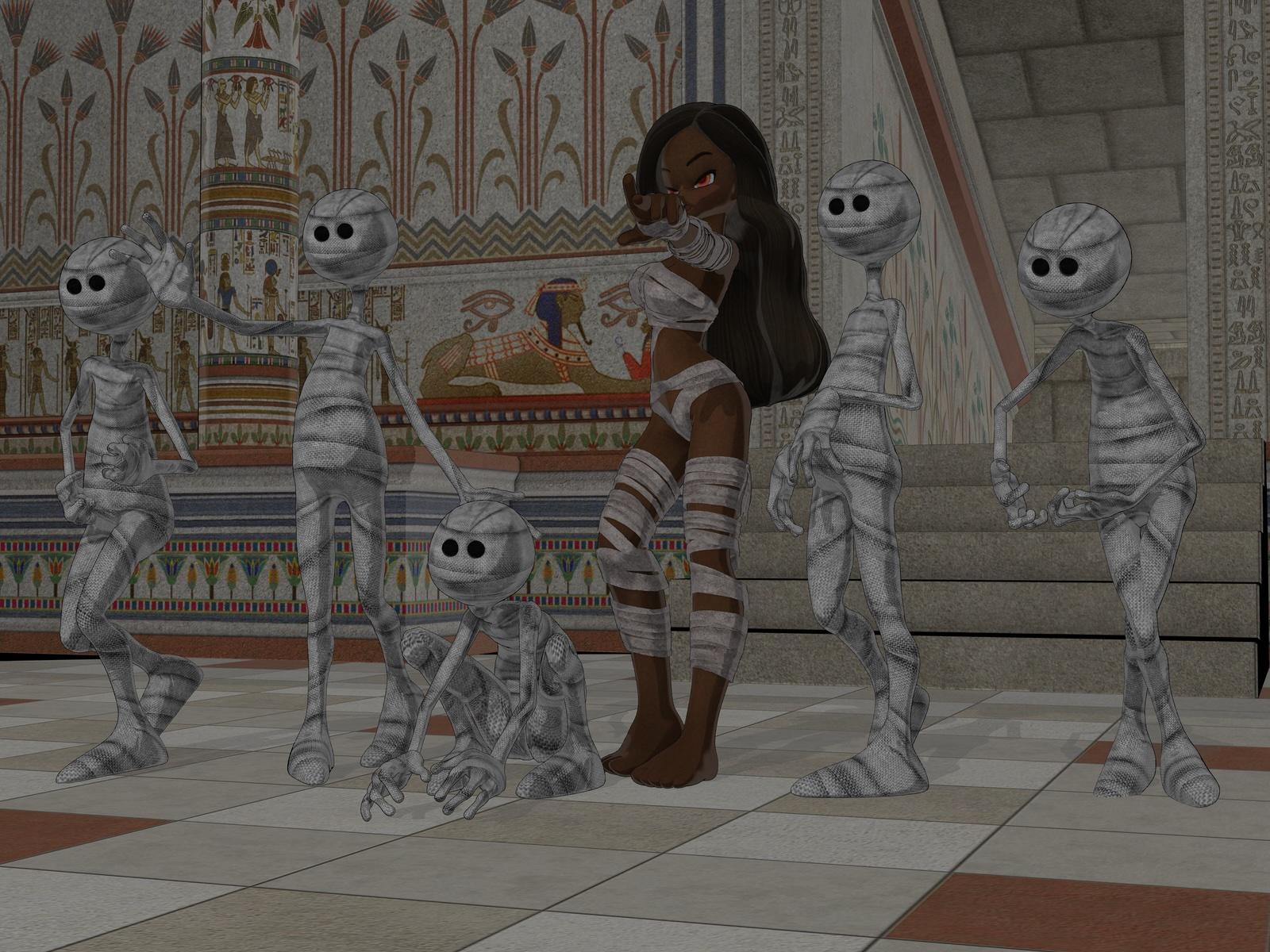


    I love that I can insert my new, custom characters (like Katherine "Kat" Kelley, from my Flynn's Folly series here) into the roles of the older toons. 

    Mummy 01 3d.jpg
    1600 x 1200 - 686K
    Mummy 01.jpg
    2384 x 1788 - 1M
    Mummy 02 3D.jpg
    1600 x 1200 - 694K
    Mummy 02.jpg
    2390 x 1792 - 1M
    Mummy 02 Kat.jpg
    2384 x 1788 - 986K
    Post edited by wsterdan on
  • csaacsaa Posts: 1,082

    inquire said:

    https://www.daz3d.com/art-official-intelligence-daz-studio-centered-workflows-with-ai-tools
    Does  anyone know anything about this product?

    inquire,

    If I'm not mistaken, its a recording of a webcast hosted at Digital Arts Live. It's not a "product" per se; rather, it's a show-and-tell tutorial.To give you a taste of what it's about:

    furiousstug said:

    To expand on barbult's question, what level of AI integration is covered in the series? I see references to Photoshop, Firefly and Freepik. Is the AI integration limited to these options, or will local models like Wan or LTX (to name just two) be addressed at some point? The promo images seem focused on NPR style imagery. Will photorealistic options be discussed?

    That quote came from another thread on Daz where the speaker talks about the webcast at length - https://www.daz3d.com/forums/discussion/298811/digital-art-live-drew-spence-daz-store-commercial - Scroll down towards the later posts to skip over earlier products. 

    Cheers!


  • 3Diva3Diva Posts: 12,058

    wsterdan said:

    Besides re-imagining older toon renders like these two:


    I love that I can insert my new, custom characters (like Katherine "Kat" Kelley, from my Flynn's Folly series here) into the roles of the older toons. 

    That's an impressive level of pose, composition, and character consistency! Awesome! What Ai model are you using?


  • 3Diva3Diva Posts: 12,058
    edited June 14

    I definitely prefer using Ai as a post-work tool. I want complete control over composition, camera angle, poses, characters, backgrounds, etc. That's why I think Daz Studio plus Ai can be an extremely powerful combo. Here's a couple of renders enhanced with Ai to push it a bit more into realism. The workflow was created by my friend Algovincian and I think it's amazing!

    IMG2Vid Test - G2F 03_1920x1080_02_s_s.jpg
    1920 x 2160 - 3M
    La Cafe w G81F and G3F 10 Post Layers.jpg
    1400 x 1576 - 2M
    Post edited by 3Diva on
  • wsterdanwsterdan Posts: 3,616

    3Diva said:

    That's an impressive level of pose, composition, and character consistency! Awesome! What Ai model are you using?


    Thanks; for stills like this stuff, mainly Nano Banana 2 and Nano Banana Pro these days. 

  • wsterdanwsterdan Posts: 3,616

    3Diva said:

    I definitely prefer using Ai as a post-work tool. I want complete control over composition, camera angle, poses, characters, backgrounds, etc. That's why I think Daz Studio plus Ai can be an extremely powerful combo. Here's a couple of renders enhanced with Ai to push it a bit more into realism. The workflow was created by my friend Algovincian and I think it's amazing!

    Very nice! Nothing overwhelming or completely rewriting everything, subtle shifts here and there without changing your work too much, excellent! 

  • 3Diva3Diva Posts: 12,058
    edited June 14

    wsterdan said:

    3Diva said:

    I definitely prefer using Ai as a post-work tool. I want complete control over composition, camera angle, poses, characters, backgrounds, etc. That's why I think Daz Studio plus Ai can be an extremely powerful combo. Here's a couple of renders enhanced with Ai to push it a bit more into realism. The workflow was created by my friend Algovincian and I think it's amazing!

    Very nice! Nothing overwhelming or completely rewriting everything, subtle shifts here and there without changing your work too much, excellent! 

    Thank you, but it's all Algovincian! His workflow is awesome for just adding realism while keeping the vast majority of the render the same. It works pretty well for NPR work as well, IMO. I'm just floored at how cool it is! I think there's a LOT of potential here for stories and series where consistency of characters is important. 

    La Cafe w G81F and G3F 10 B_s_s_npr.jpg
    1400 x 1576 - 2M
    IMG2Vid Test - G2F 03_1920x1080_02_s_s_npr.jpg
    1920 x 2160 - 3M
    Post edited by 3Diva on
  • MelanieLMelanieL Posts: 7,874

    3Diva said:

    I definitely prefer using Ai as a post-work tool. I want complete control over composition, camera angle, poses, characters, backgrounds, etc. That's why I think Daz Studio plus Ai can be an extremely powerful combo. Here's a couple of renders enhanced with Ai to push it a bit more into realism. The workflow was created by my friend Algovincian and I think it's amazing!

    Those are great! Is the Algovincian workflow documented anywhere we can see it?

  • 3Diva3Diva Posts: 12,058
    edited June 17

    MelanieL said:

    3Diva said:

    I definitely prefer using Ai as a post-work tool. I want complete control over composition, camera angle, poses, characters, backgrounds, etc. That's why I think Daz Studio plus Ai can be an extremely powerful combo. Here's a couple of renders enhanced with Ai to push it a bit more into realism. The workflow was created by my friend Algovincian and I think it's amazing!

    Those are great! Is the Algovincian workflow documented anywhere we can see it?

    No, it's a build he's been developing that he's still not 100% happy with. I'm not sure what he plans on doing once he's happy with it.

    Post edited by 3Diva on
  • MelanieLMelanieL Posts: 7,874

    OK, thanks.

  • Griffin AvidGriffin Avid Posts: 3,886

    Oh wow, those look good. That last one with the horse speaks to me.

  • LauritaLaurita Posts: 289
    edited June 28

    I am actually in the same boat. I found a workflow with a simple prompt: "add photorealism".

    It keeps my everything I composed in the render and just does what it says on the box. There is room for improvement, mostly in regards to the background but iwhen it comes to face and, expression and pose I am reasonably happy with the result.

    Before

    and after

    Emma_Port_087.jpg
    2700 x 1800 - 2M
    Flux2-Klein_00008_.png
    1248 x 832 - 1M
    Post edited by Laurita on
  • WendyLuvsCatzWendyLuvsCatz Posts: 41,644

    sometimes AI just gets stuff hilariously wrong

    my start and end images, where was the hint of a car?

    GothicEntranceStairs00a.png
    2560 x 1440 - 4M
    GothicEntranceStairs01.png
    2560 x 1440 - 4M
  • edited July 24
    Laurita said:

    I am actually in the same boat. I found a workflow with a simple prompt: "add photorealism".

    It keeps my everything I composed in the render and just does what it says on the box. There is room for improvement, mostly in regards to the background but iwhen it comes to face and, expression and pose I am reasonably happy with the result.

    Before

    and after

    It's like playing that game puzzle, spot 7 differences between these two images in alotted time.
    Post edited by Barefoot Upto My Soul on
  • edited July 24
    i am loving this forum commentaries with the before and after DAZ to ai enhanced that i had to add to my watch list. Here is one of mine. The top rendered in 3DLight about 20 minutes and the bottom having it enhanced with ai in 30 seconds.
    country_girl_by_barefootuptomysoul_ddz4f6e.png
    1920 x 1080 - 3M
    ext__country_road___day_by_barefootuptomysoul_dltdvfu.jpg
    1920 x 1080 - 480K
    Post edited by Barefoot Upto My Soul on
  • I don't even render anymore. Just set up the scene and take a screenshot which is one second. Then use the ai to render for 30 seconds pasting in my prompts. Animate from that ai image, which takes about 5 minutes for a 5 or 10 second movie clip. Sure there is a shooting ratio of bad or slightly off renders but that is pretty much the same as actors and camera wo/men having to redo for the director. So hang in there.
  • csaacsaa Posts: 1,082
    edited July 24

    Barefoot Upto My Soul,

    I haven't put much effort into combining generative AI and Daz3D. Mostly I use AI in my professional work; with any spare time I have for creative hobbies, I'd like to explore pre-AI art. 

    That said, I do appreciate this thread! There's so much contention surrounding AI, much of it based on misinformation or narrow POVs. The work that people share here goes a long way to support much needed counter-narratives.

    Just a suggestion: Please continue sharing your before-vs-after renders. Nothing carries more weight, or gets the idea across more succinctly, than a well made image. More so than a wall of text here in the Daz Forum. wink

    Cheers!

    Post edited by csaa on
  • jmucchiellojmucchiello Posts: 2,312

    At the risk of being contentious, all I see here is some folks need to learn how to do lighting better.

Sign In or Register to comment.