
Daz 3D is part of 
Connect
DAZ Productions, Inc.
7533 S Center View Ct #4664
West Jordan, UT 84084
Licensing Agreement | Terms of Service | Privacy Policy | EULA
© 2026 Daz Productions Inc. All Rights Reserved.
Comments
Wait, you're not Michaelangelo? I aways assumed ....
Yeah, sorry, I had a lot of people fooled.
Well since I can only do CPU renders my GPU-Z says
GPU memory: N/A
Although on the Sensors tab it says i'm using 106MB memory currently and the maximum used was 187MB.
Says GPU temperation is 99C. Generally Intel PC will shut off in the CPU goes above 104C.
For DAZ Studio render it says: CPU: Allocated 343.143 MiB for frame buffer (is 343 MiB the approximate same as 343 MB?)
Task Manager says DAZ Studio has used about 3GB RAM but doing some renders I've seen it climb up to over 13GB (of 16GB RAM total) before Windows 10 shuts down DAZ Studio. Windows 10 won't shut down DAZ Studio if it allocates to the free memory border and stays there or starts releasing memory though.
Turns out MiB is short for Mebibyte with is a rough equivalent for Megabyte in binary exponential form.
https://en.wikipedia.org/wiki/Mebibyte
The David statue by Michelangelo is in fact made out of Marble. I am sure copies have been made from Bronze, but the original is definitely marble.
Right, I knew that - but forgot. I've seen both original and bronze in Florence - I should have remembered which was which.
Well, I played with lights and Domes and whatever I can move,
But I cannot get a descent light.
If I change ISO and F-stop then rendering is taking 100 times longer then without changing those settings seems like it. (when i render it's bright inside, but outside it looks like the world is on fire)
I attached my project file, not sure who has these items, so it's a long shot.
Idk how i can figure out what package I used.
1 of them is Iray Skydome Superpack
2. Westpark Nursery props
3. my guess it's the West park nursery.. (i tried clicking on the names on the right, but doesn't show me where it belongs to. (idk of you can backtrace that?? )
Would anyone able to look at this and tell me what i am doing wrong?
All I want is the default iray render settings, and brighten up the room.
The story I read was that there was a large marble stone laying outside the city walls of Florence where another artist had discarded it. He had planned to use if for a statue but after beginning to work with it declared that it was unfit for statues because it was brittle or had a fault line or something like that. Michealangelo said "I'll take it" and the David was the result. Turns out that a master can do things mere mortals cannot.
do renders finish now, or is still the saltiness?
thanks!
I am not seeing anything worth shouting about with the new iray update. In fact I am seeing a step backwards, with the previous version of 4.9 I was able to render scenes without fear of skin static, Everything else in the scene is nice and clear but exposed skin suddenly looks like bad 70's TV.
I am also not seeing any change in render times. My render machine is an ASUS G74 with an NVIDIA GT-560 video card.
Greetings,
@pkappetein I don't have the World Base kit that's referenced in that scene file, but that's okay... It includes a skydome (in fact it specifically complained that it couldn't locate said skydome), and as far as I know it's not designed for Iray. So I reset all the Tone Mapping settings completely, and did a render straight from the default Perspective View. I've attached it here... The tone mapping settings were blowing out the image in weird ways, probably to compensate for the inability for light to penetrate the skydome.
It took a while to start rendering (about a minute and a half), and that might be because I have a slow computer (but a fast GPU). The scene also took a while to look okay, and this took around 3,603 iterations to get to a good state (95% converged).
I'd start by deleting the Magix101 World Base stuff entirely, as it's probably causing the default Iray Dome to not be able to get light into the scene.
There may be other issues with the scene; I was just testing if I could render it straightforwardly.
-- Morgan
Edit: The second image is what it looked like from Camera 1's view in 3,777 iterations to get to 95% converged.
Edit^2: The images appear much darker on my Mac than on my Windows box. Might be my Windows monitor's colors aren't properly set up.
So how can I make it brighter inside ? I tried all the lamps and didn't work. and when i change ISO (which works)
but then the skydome and env. outside turns into a flaming war.. (and rendering takes a long long time) idk why if you just change the iso.
Odd, since it says that it's an Iray Skydome. http://www.daz3d.com/iray-skydome-super-pak
That would be strange it that's not the case, wouldn't it ?
It is possible to have an Iray dome - the image is added to the emissive colour - but ti still blocks other infinite/distant lights that way. Something like the new Ghost Lights set would be the obvious way to lighten the interior, but you'd have issues in a similar real world room getting an image that showed the interior well lit but not blowing out the exterior..
I guess I have a lot to learn about all of this..
I don't have the ghost light package (think that was new).
Guess I always used 3delight with the lamp choosen attached to the camera, so i never had a problem. but with Iray it's becoming a problem.
Do you need to have with Iray an Emision item attached to the light? I saw a Iray Uberlight, but adding that, i didn't see the extra properties according to some youtube videos.
Yeah, it took me a while to adjust to IRay lighting too but I came to it via Reality/Luxrender so it wasn't so bad. Even then, some things are different. I still don't know how to guess the right Lumen number - all those zeroes! I'm more comfortable with Watts because that's how lights are measured in my real world.
All I can say is have a look at the Ghost Lights. You can create your own mesh lights using planes but from what I've read, that set makes things a lot more manageable. Almost all my scenes are interior and I always use mesh lights so I've bought the Ghost Lights on the strength of that (and the good reviews in the thread here). I have not had chance to try them yet as my PC is in transit to my new home but I'm looking forward to experimenting with them.
The new DS release does not work for me, I can load Studio and load a character but as soon as I move my mouse pointer into the viewport it crashes and shuts down. This happened in one other release and I upgraded my video driver and it started working. Not this time, I have tried 3 different video drivers now and it keeps crashing. My beta version works fine tho no matter which driver is installed. I am trying to run this particluar version on my laptop which has a nvidia 2GB 650M video card, before upgrading to the latest studio I had no issues running either version, altho render time was long. Anyone experienced this or could help me?
Try pressing ctrl-9 to switch to Texture Shaded preview, or even ctrl-7 for smooth shaded, and see if that helps. The beta and the release are the same version so it lamost has to be down to as etting, and draw mode or some draw setting in the nVidia Iray preview are the obvious suspects.
I will try your suggestions when I get home from work and let you know if they work, thanks
Greetings,
So...I had trouble with a several different Magix 101 sets, and so I don't buy their stuff anymore, so I can't really speak to that particular set.
However, you had 'Dome and Scene' set as your environment, and that doesn't really make sense if you're using a physical skydome. If you're doing that, you probably want 'Scene Only', IIRC. Then you have to have the emission set on the skydome, and it has to have a very strong luminance number. I would have imagined that would all be taken care of by the set, but looking at your scene it doesn't seem to be configured in a way that is friendly to a physical skydome.
Reading the raw DUF file, I found that the IR-Skydome has a Luminance set to 60,000 which seems reasonable. You also have an 'IR-Sun' which has a luminance of 5,000,000 which seems about right for the sun. :)
Also your spotlight doesn't reach the floor. If you select the spotlight, and then look in Perspective View, you'll see a 'dot' at the end of the the beam. You generally want that dot to pass through the item you want lit. I moved it to go a few inches past the floor that it was pointing at, and I started to get some interior lighting, not just the lighting that came in through the windows.
I know you can do skydomes that work, but I'd start without it and see if you can get it rendering.
-- Morgan
[Edit: For what it's worth, you CAN turn on the Headlamp, by using 'Always on', or something like that, for the Camera Headlamp configuration, IIRC. However it really doesn't look very good to have light coming from that angle. A little more work on lighting will always make for a better picture.]
You need to make the surface an emitter to make an object/surface a light in Iray (for example wall lights). The easiest way to do this is to select the item/surface you want to emit light, go to "Shader Presets>Iray>DAZ Uber" in your Content Library and apply the "Emissive" shader to the surface you want to make a light out of.object/surface. You control the lights color and strength through the surface propeties (see attached). The the light intensity is controlled via "Luminance", if you change the "Luminance Units" to cd/cm2 the values used in luminance will seem closer to what you would expect using watts than what the default value of cd/m2 needs. "Emission Temperature" controls the color of the light (more info on color and corresponding Kelvin temp values can be found here: https://en.wikipedia.org/wiki/Color_temperature), the default value of 2900 creates a yellowish orange light, for white light change this value to 6500.
Hope this helps.
Ooh, I thought I had to select Dome and Scene. since i was using a dome.. Guess I missunderstood those training videos then.
I'll take a closer look at it
That's the thing, I highlighted the items I wanted, and selected the Iray uber one, but i don't get those settings. I followed this one: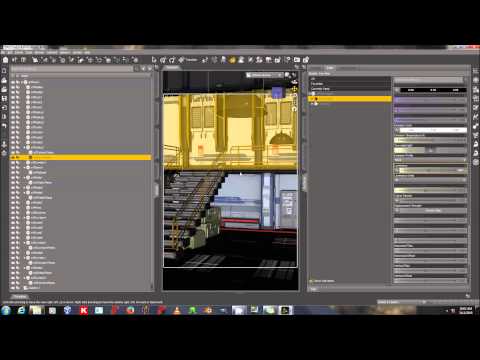
and those settings doesn't seem to get applied to the items
ok, removed the spot light, and used liniear ligth.. now it looks way way better. to light the whole area.
What I do miss, is the shiny glow on it now...
Still not sure what the difference is with rendering "Scene only" or "Dome and Scene" ?
Maybe someone else knows.. did some searching, and not really finding an answer
A linear pint light is the same as a regular point light in Iray - Iray does not support non-physical falloff in intensity (a linear light dims in proportion to the distnace from the source, or even falls to zero over a set distance, while physical lights dim in proportion to the square of the distnace from the source).
Apparently when a human being is standing in a dark room the pupils become dilated. This has the effect of allowing much more light in. While this dilation allows enough light for us to see the room, it also allows us to see the outside as it would appear with our pupils accepting much more light than usual. Typically, when in a bright environment the pupils become smaller to avoid overexposing the retina.
So from my experience I think the overexposed outside is exactly what would happen if the room itself had become bright enough to see clearly.
In the end, the Sun is always king of all the lights in any scene unless there's some sort of localized high energy discharge.
If you research such scenarios online I think you will find lots of examples of overexposed outdoors with dim interiors.
Greetings,
Iray has a virtual dome (virtual here meaning it doesn't have actual geometry) which you can use to provide (1) HDRI lighting, and (2) a backdrop that items will appear to exist in. But that virtual dome is infinitely far away. If you completely enclose your scene, either by having it be in a box like a room that has actual geometry, or a dome that has actual geometry, then the light from the dome will never penetrate to your scene, and Iray is (I believe) wasting cycles trying to calculate light paths from the virtual dome to your camera.
These are in my own words, from my understanding, so the details will not be perfect, but it should help you think about the different modes...
Dome Only means light from the environment settings is the ONLY light in your scene, which is commonly used for outdoor renders. Lights and emissive surfaces will not generate any light in this setting.
Dome and Scene is the most flexible IMO, allowing light from the dome to peek through windows, or anything else, AND allowing you to add localized scene lights (using inherent lights or objects with emission set up) for improving lighting or realism for specific pieces.
Scene Only disables the Dome environment settings, and your scene can only be lit by items that are either inherently lights or have emission set up to shed light..
Since you're blocking the Dome light entirely by using a physical dome, it's not worth having Dome and Scene, which is why I recommended Scene Only.
I hope that helps some.
-- Morgan
Remember that IRay simulates the lens of a camera much closer than that of a human eye. The eye and brain are highly complex and well developed devices which allow you to sit in a darkish room, and yet you can still observe the bright scene outside through the windows and it does not look washed out. A camera on the other hand, set to a high enough ISO to properly light the room will almost always make the scene outside the window seem far too bright.
I find neuroanatomy fascinating, and it's an interesting side topic of how much visual processing the brain has. We, in fact, have two completely different visual processing centers; one that breaks down what you see in terms of relationships and shapes, and a different segment based on object recognition.
Optical illusions essentially rely on poking the bias in our visual processing to produce weird results.
Anyway, back to thread. ;)
\in case anyone else experiences this after updating to newest build of studio and updating video driver, I just had to uncheck OptiX prime accelerationunder render settings. It must get checked by default when installing. Now my version of studio works fine on my laptop
Yes, the photos that don't look blown out outside the window, or dark inside are composite of two different exposures most of the time. Photographers use all kinds of fancy tricks these days, a lot easier in the digital age than when it was developed from film :)