
Daz 3D is part of 
Connect
DAZ Productions, Inc.
7533 S Center View Ct #4664
West Jordan, UT 84084
Licensing Agreement | Terms of Service | Privacy Policy | EULA
© 2026 Daz Productions Inc. All Rights Reserved.
Comments
In theory, you can use a command line to make DS 6 call a Daz Script that handles opening and rendering a Scene ~ however, DS still has to be launched by the command line... though it could be launched in background in some ways.
The way it behalves. In DS4 when looking at the keyframes on the graph they are perfectly linear but with the same animation in DS6 they are no at all linear however, when I delved into it a little more it's like the keyframes for certain animated properties are not loaded initially.
What's even more strange is that if I left the animation play through, then remove the animation (undo applying it) then reapply it, it plays correctly with all properties animating correctly.
It's as though there is some optimisation being applied initially that prevents the animation for working properly.
Here is a video showing the problem and the undo/redo workaround: https://www.youtube.com/watch?v=StyW3ZJ5pfE
Not sure if this has been asked already, But is there a way to get back the coloured Gizmo for View Rotations from DS4.24, in DS6, I seem to remember a way to do that mentioned when Daz first put out the all grey viewport tools, but I can't find that thread.
Thanks in advance
Top bar: Window -> Style -> Customize Style - > 5. 3D Axis
Is DS 6.25.x.x ever going to be given a manual download option?
For those with no online capability for their rendering PC, this is of significant interest.
Regards,
Richard
There are no plans at the moment.
However one can download it using DIM with one computer, then copy it to the DIM download folder on another machine and run DIM in offline mode to install it on the other computer. Premier features require and internet connection however.
You can also change where DIM saves its downloads (and manifest files and thumbnails). I have DIM saving everything on the same external SSD that I also have my DS and Poser libraries on (and DS temp files, DSON cache etc). If I have a reason to go back to my previous laptop, I just swap the SSD over., so the DIMs and DSs on both laptops can access the downloaded content.
Unfortunately, not possible. My contact with the outside world at home is an android tablet. DIM doesn't run on android. And with a tiny storage space, it's not feasible, either. When doing conventional DAZ downloads onto the tablet I occasionally have to clear out the Kindle storage to allow sufficient room for a biggish (700Mb+) download - and the only apps I have on it are Kindle, Adblock Browser and Google maps (cache & user data is cleared out after every use). The layout of our house is not compatible with wifi or cable to my rendering PC and I simply can't justify/afford a second PC just to simply download one program, when everything else works rather well.
Regards,
Richard
File a support ticket. "My only Internet access is via my Android phone. How do I download 6.x?"
Why isn't there still a manual download available like with previous general releases?
The fact that they STILL haven't got round to giving DS6 a thumbnail in DIM or included the alternative splash screen makes it feel like a beta, not a general release. And a beta quite some way from moving out of beta at that.
You might try (for less than £2)
Wifi Hotspot on Android: https://support.google.com/android/answer/9059108?hl=en
USB Wifi Dongle (for your PC): https://www.amazon.co.uk/Hi-Speed-wireless-Downloads-Compatible-Consoles/dp/B0CKNQYBL3
(other wifi dongles... and, apparently, other online retailers... are available)
I think Richard mentioned once that the construction of his house blocks Wi-Fi signals.
Would be really, really nice to get an answer from DAZ about that.
I would suspect it reflects the number of people who had problems follwoing a manual installation
Could they not offer the DIM-based package so that people could download it without DIM (using devices that don't support DIM) and then use DIM on their computers to do the installation? That would essentially still have DIM doing the installation and eliminating those problems.
If you download it with DIM, you can still install it manually. You don't have to have DIM install it. That's how a lot of people are doing it that manually install all their products. There are a lot of benefits to using DIM, even for just downloading products. A lot of the people are using it on a computer that is online to get the zips and then putting the product on a thumb drive and putting it on their offline computers.
The initial problem is that some people's connection to the internet are not compatible with DIM (e.g. Android Tablets). Allowing them to download the DIM package without DIM installed fixes that issue.
The second (possible problem) suggested by Richard was that manual downloads may have been eliminated due to problems installing without DIM; allowing them to run DIM on their non-connected computers to install the DIM package on their computers using an offline DIM solved that problem.
You're correct, people can still manually install the DIM package without DIM, but this would be one way to at least reduce the issues for people without a DIM-connected system. You're suggesting that DAZ is still going to see people messing up their installs manually anyway, so that suggests that they should just allow manual downloads.
DIM for those, who don't know how to use a zipping app, manual for everyone who does know.
it worked fine in the past.
Someone know how to fix lags in viewport daz studio 6? It feels like there is 100% more lag in Daz version 6 than in version 4.24 for the same scene. I’d happily keep using 4.24, but I have an RTX 5080 and there’s no way for me to roll back. I'm attaching my settings, maybe someone can offer some advice. There are two characters and one environment in the scene, but it's lagging so badly that I can't even change a pose properly. on all chars i already have Resolution level base.
Hide more stuff? Unfortunately, this is an ongoing issue with DS6. It is hoped they will fix it eventually. But "Hide more stuff" has worked for me.
I've an RTX 5070, which DS 4.whatever doesn't use, so I mostly use DS6 unless I need to use some script or plugin for something that DS6 doesn't support, then save the scene to load it into DS6 to continue. In DS6 I basically switch the viewport to texture shaded when I'm moving the camera viewpoint or moving a figure, which give huge lag if the viewport is in Iray preview mode, and just switch the viewport to Iray preview when i'm just looking at lighting or altering materials and not moving the camera or figures/props. So lots of quick flipping between viewport display modes depending on what I'm focused on at the moment. Works fine for me.
Some more evidence that keyframes are somewhat broken in DS6.
In the screenshot you can see that all the keyframes are set to linear but for some reason the values as indicated on the graph and the property itself seem to randomly go all over the place in some instances.
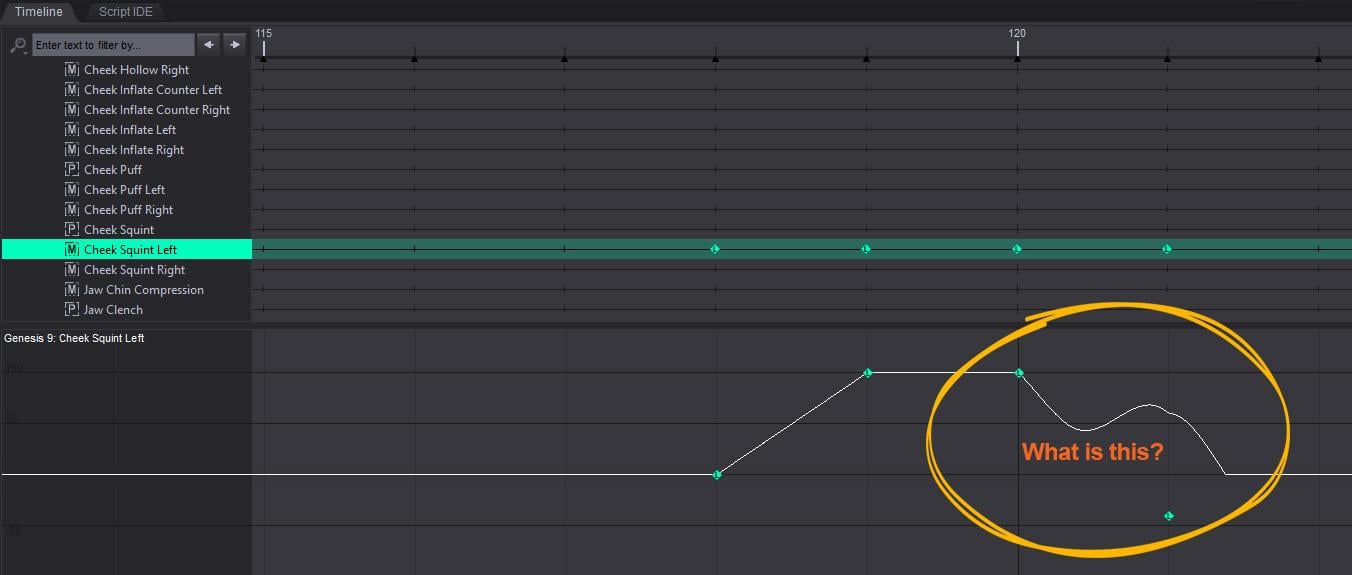
It was suggested that Patch Tuesday three months ago might resolve the issue, and nothing since. You're not the only one waiting for Daz to fix that issue. Since Daz Studio 6 is a separate install, keep using 4.24 until they resolve that issue.
When DS 4.anything doesn't support your Nvidia graphics card and renders in it take at least 10 times longer than in DS6, which does, sticking with DS4 is not a reasonable option.
And as I said, switching viewport between Iray and texture shaded depending on what your doing in DS6 is quick and easy.
Not having lag at all in 4.24 is pretty easy too.
Some users had reported that the patch resolved their lag issues, so Daz listed that as a possibility worth trying. They didn't say it was the fix. In any event, not everyone is experiencing the same issues and it isn't even clear that every report of lag is about the same thing.
That's true, but after three months, it's kinda like, you know, c'mon.
Took a few weeks to get back in touch but support tried their best to resolve the issue for me. Nice fellow, unfortunately, I'd already tried everything he suggested. But I did finally get 'em to admit it was a known bug, which was something, at least.
I'm not sure if this will help anyone but many people are having trouble with recent Nvidia drivers. I've seen reports of a memory leak when running OpenGL that go back quite a few driver versions. I don't claim all of what I've read is 100% correct and I'm not an expert but based upon what I read and the fact that DAZ has not updated their Nvidia driver recommendation in a long time I rolled back from Game Ready Driver 610.74 (yes I know Game Ready is not recommended for DAZ) to Studio Driver 576.80 and I'm much, much happier. I tried Studio Driver versions between 576.80 and 610.74 but going all the way back to 576.80 worked best for me. No guarantees that it will make any difference to you but it's easy enough to try and you can always reinstall the newer driver you've been using if it doesn't help.
I should add that this does NOT make the viewport in DAZ 6 as good as the viewport in DAZ 4.24. In 'texture shaded' mode it still lags and jumps a little which annoys me. I move back and forth between DAZ 4.24 (better viewport performance, plug ins, and script support) and DAZ 6 (5090 video card, many faster operations except the viewport). When I go from 4.24 to 6 I always have to "relax, take a breath, and slow down" when using the viewport. I really hope DAZ figures out what the problem is and improves the viewport performance in DAZ 6 some day. Fingers crossed! To be fair, I really appreciate that many operations are faster in 6 than they are in 4.24.