October, 2025 - Daz 3D New User Challenge - Atmosphere, Ghosts and Special Effects
 Leana
Posts: 13,560
Leana
Posts: 13,560
New User's Challenge – October, 2025
Are you new to the 3D World? Are you at the beginning stages of learning 3D rendering? Have you been around for a little bit but feel you could benefit from some feedback or instruction? Have you been around awhile and would like to help other members start their creative journey? Well then come and join the fun as we host our newest challenge.
We are breaking down each month into 2 different challenges. A Beginner Challenge and then also an Intermediate Challenge.
So which "Challenge" should you choose?
Follow the Beginner Challenge if you are:
- New to the New User Challenges
- New to Daz Studio
- Newer to 3D Rendering in General
Follow the Intermediate Challenge if you have:
- Participated in the New User Challenge for awhile
- Know the basics of Daz Studio and would like to learn more in depth topics
- Been using 3D Rendering Applications for awhile and feel comfortable with learning Intermediate Topics
*Please be sure to list in your post which Challenge level you are participating in*
Closing date for both is October 31, 2025
For a list of the current challenge rules, please see this thread: Challenge Rules
They apply for both versions of the challenge.

Daz 3D is part of 
Connect
DAZ Productions, Inc.
7533 S Center View Ct #4664
West Jordan, UT 84084
Licensing Agreement | Terms of Service | Privacy Policy | EULA
© 2026 Daz Productions Inc. All Rights Reserved.
Comments
Beginner challenge - "Atmosphere"
Creating atmosphere in art is more than simply using some godrays, fog or dust in an image. It is creating a feeling; a sense of place or time. It needs to enhance and bring attention to the subject matter.
Tutorials
for DAZ Studio Iray:
http://sickleyield.deviantart.com/journal/Tutorial-Creating-Dust-And-Atmosphere-in-Iray-522291773
http://rawart3d.deviantart.com/art/Raw-FogCam-535959358 free product
https://www.daz3d.com/forums/discussion/334586/tutorial-adding-atmosphere-with-a-depth-canvas - this tutorial explains how to use a Depth Canvas
DAZ Studio 3Delight:
http://www.omnifreaker.com/index.php?title=UberVolume
Linwelly's Simple Atmosphere Tutorial for 3Delight ( may also work in Iray ): https://www.daz3d.com/forums/discussion/comment/1654176/#Comment_1654176
for Carrara:
https://carraracafe.com/atmosphere-tutorial/
for Bryce:
Artist’s guide Sky Lab page 759
Bryce: https://www.youtube.com/watch?v=ahiyabdeUBI DOF in Bryce by David Brinnen
Bryce 7.1 Pro Easy - Spooky trees in Dan's fog https://www.youtube.com/watch?v=x-lDcqH78Is
Bryce Basics - Free content cloud over Big Sur https://www.youtube.com/watch?v=bs9490Co-XE
Atmospheric Basics:
https://www.youtube.com/watch?v=VyLOZWevi8g A Blender tutorial but the first 46 seconds really give you an idea of what atmosphere can be like.
What are some other elements for creating atmosphere:
https://prezi.com/dmvb-nlsj_wr/creating-mood-in-art/
http://www.zevendesign.com/mood-lines-giving-designs-attitude/
Don't forget to look at previous themed contests where information and hints are available.
October 2015's contest
October 2016's contest
October 2017's contest
October 2018’s contest
October 2019’s challenge
October, 2020's challenge
October, 2021's challenge
October, 2022's challenge
October, 2023's challenge
October, 2024's challenge
There are many products in the DAZ store which can be of help. You are not required to purchase any of these products to create your images. They are simply being listed for your convenience and/or inspiration. The promo images are also excellent examples of atmosphere using props and/or lights. Below is just a small sample.
DAZ Studio - Iray
Iray Distance Mist
Iray Distance Fog
Atmocam2
Iray Storm
Plane Easy Atmospheres
Fast Fog Iray 2: Electric Fogaloo -
IG Iray Dawn to Dusk 2 Atmospheric Lighting
FSL Rigged and Morphing Atmosphere Props and Shaders
Fog Camera
Time Inside Light Gels Bundle
Cinematic Light FX plus Atmosphere
Epic Props: Godrays & Volumetric Light for Iray
Atmospheric Smoke Camera
Iray Dust
SY dForce Rain Iray
SY Fast and Easy Fog Iray
SY Fast Fog and Atmosphere Iray
DAZ Studio - 3Delight
Above the Fog for Iray and 3Delight
Simple Godrays
Expanded Godrays - Celestial Bodies
Heavy Rain for 3Delight and Iray
Daz Studio - Filament
Atmosphere for Filament
SY Atmospheric Blur Filament
Poser
Widow’s Woods: Forest
RDNA Atmospherics – Fog Vol 1
Spooky Light Gels for Poser
Bryce
Bryce ATMO
Some other items that may be of help in this Challenge:
Composition helpers:
Bryce: http://www.daz3d.com/golden-rules-composition-helpers-for-bryce
DAZ Studio: https://www.daz3d.com/canary-s-composition-helpers
Also, DS has a built in thirds golden rule.
Here are various links to other things that may help you in this month's challenge. Credit is given to Szark for this wonderful thread.
Tutorials by Szark https://www.daz3d.com/forums/discussion/2765/time-for-sharing-what-i-have-no-idea/p1
Here are some examples of images using "Atmosphere" provided by CV L'Adair.
Heart Of Winter
In The Misty Moonlight
Dubious Shelter
Nocturnal
Here are some examples of atmosphere using lighting.
Strange Discovery
Yuzuru Full
Yuzuru
This was my home once
Intermediate Challenge - Ghosts and Special Effects
Working with Magical Elements and Forces
In this challenge you can use lighting, effects, atmospherics, special effects and volumetric effects to bring your artwork to the next level whether it is adding magic to your favourite witchy scene or turning your favourite beloved characters into a ghost set to haunt people’s dreams
You Tube Tutorials
Daz 3D Shader Tutorial : Introducing Volumetrics in 4.20
Creating Atmospheric Ground Fog with Daz Studio 4.20 Volumetric Effects
Creating Volumetric Fires and Explosions in Daz Studio 4.20
Erste Schritte mit VDB Volumetrics in Daz Studio 4.20
Getting Started with Volumetrics in Daz Studio 4.20
Written Tutorial
Daz Tutorial new Volumetric Feature in DS4.20
Various Products that may be of help:
Muelsfell Storm of Magic Iray FX
Jepe's Effects - various products
Special FX for Daz Studio, 2 and 3
Soldiers of Magic: Serpio
Ultraviolet Shaders, Lights, and Props
Iray Ghost Shaders
Vengeful Spirit for Genesis and Genesis 2 Female(s)
dForce Sheet Ghost for Genesis 8 Female and for Genesis 9
Iray Spectre for Genesis 8 Female and Male
SY Real Fog Iray VDB and SY Real Fog VDB 2
Oso VDB Magus Effects Volume 1 and Oso VDB Magus Effects Volume 2
Arcane VFX
PTF More Magic!
Ethereal VDB FX
Superhero Body FX and Eyes and Face FX for Genesis 8 Females
Special thanks to L'Adair for creating an example image containing ghosts.
guess i'm the first to enter
Intermediat ghost and effects challange entry
Demon Hunter | Daz 3D
You cannot link to the gallery image, it expires after a short while. Youcan update to the gallery page, but an in-line image must point to ana ttachment or an off-site host.
hmmm, did they change how you upload to here? it's been a little while since i participated. thanks for the feedback. guess i'll have to look up how to enter again.
not an entry, just an example
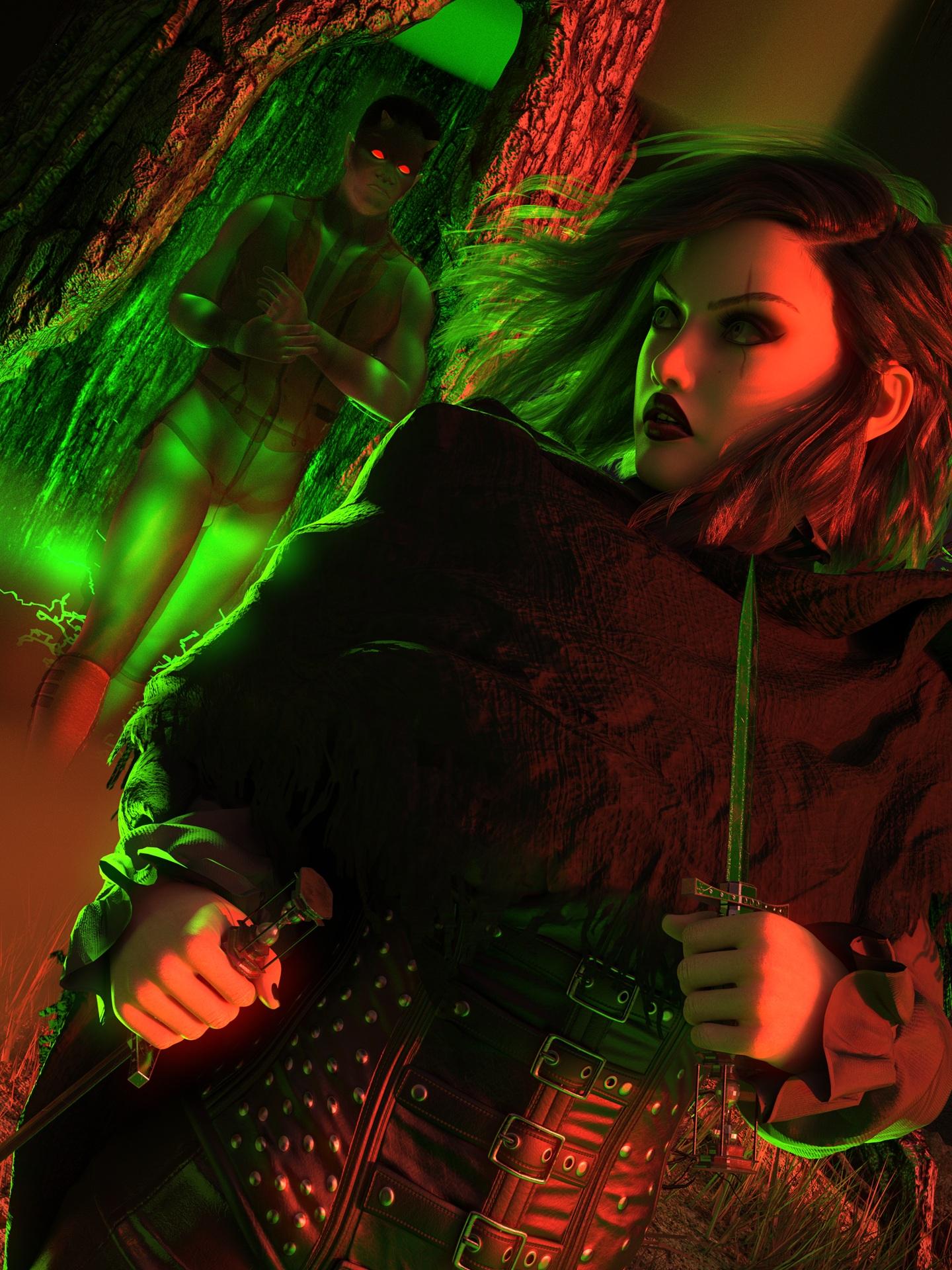
Demon Hunter | Daz 3D
Right-click on the atachment image and copy the link (not the image link, which is just the thumbnail) and then paste it into an image box as you do with the gallery images - it's just a link, so don't delete the attachment afterwards.
Yes, it was changed a few months ago.
that seemed to work! Thank you :0)
Beginner Atmosphere
The Morning run after Early morning rain
Might still tweak this some, not sure.
Here's my start for this month. All I can say is, "Let's be glad we're not in his boots."
Added some glowing sludge in the city ruins.
Nice pic! There's a good impression of movement.
Looks quite good so far.
It could be interesting to add more elements to make the figure interact more with the rest of the scene though, eg tracks in the sand, wind in the hair, and so on.
Indeed, poor guy seems to be having a rough day...
For the moment I find it rather distracting tbh, as it's very shiny so it tends to draw the eye there. It might work if you add other elements in that section though.
Tried lowering the sludge and adjusting the lumanance value of it to have it more behind the wall, but still getting the glow on the mech attacking the main character.
Much better IMO, that's less distracting than the previous version but still brings depth to the scene
thank you! is there any suggestions you would make for improvement? i'm honestly looking to learn new ways to make a character more ghostly like. i feel the demon could look a little better. i used ghostly shaders, and mesh to volume. then expanded the shaped cloud volume a little hoping to get like a mistiness to him.
I think the main thing with the demon in your pic (in regards to "ghostly feel") is that he looks like something material but semi-transparent, like it's slowly becoming visible maybe. That's a cool look, but I tend to think of ghosts as something immaterial which doesn't really interact with the rest of the environment, like it's there but not there at the same time (not that clear I know ).
).
It's probably due in part to the the fact that it interacts with the green light. The way it reflects lights tends to make it more "solid" in my eyes.
i have stuff i could easily use for making it more like there but not there. i was thinking more like a casper type looking ghost, kinda materializing like you stated. so it's at least got that. i just wanted to try and challange myself more then just putting on an outfit that does it all for me. it's prolly because i want the bright green lights is why i can't get him more translucent.
idk how to post 2 pics in one post. but, here is the original before editing. idk if that's needed since i edited my work.
Hi! Could you tell me if it is allowed to use a HDRI for this challenger, or if, since the theme is atmospheric effects, HDRIs are not allowed?
Thank you in advance!
I don't see any problem with using an HDRI.
Really nice one :)
It's quite interesting to see the before / after pics. The mist really adds to the ghostly effect.
The ghost effect on the hands of the specter is a bit strange, but that seems to come from the shader.
Great, thank you very much!
Here are my entry for the intermediate challenge:
Title: "The Gost Wolf" and "The Drangon Wolf".
Based on the same idea, but I hesitated between the version where the wolf is alone, like an independent spirit, and the version where it is "linked" to the dragon's breath, like if it was created by the dragon. So I present both versions.
The smoke comes from the DA Spectral Horse for Horse 3 (https://www.daz3d.com/da-spectral-horse-for-horse-3) with additionnal pointlights. Maybe I could do better but, I don't know why, the smoke was red when I didn't add some blue pointlights, while it is "naturally" blue when I use it with the Spectral Horse...
TY! and yeah it comes from not knowing how to draw digitally really. i tried it a few times, but just couldn't get use to drawing on my lap or with a mouse, and looking at the screen. the tablet i have now is also the screen. it makes a huge difference for me. so i'm still trying to learn how to work everything, and didn't get fineline with anything. right now i know how to usee 2 brushes, eraser, and a blender lol. this was the first real edit of my work i've done.