
Daz 3D is part of 
Connect
DAZ Productions, Inc.
7533 S Center View Ct #4664
West Jordan, UT 84084
Licensing Agreement | Terms of Service | Privacy Policy | EULA
© 2026 Daz Productions Inc. All Rights Reserved.
Comments
In the LAMH pane is a "Show LAMH Editor", and in the Create Menu there is a "New 'Look at my Hair' Object...
This is presuming that the Full Plugin is in place and activated. If the free player got installed by accident instead, then these won't be available.
Kendall
I will double check to make sure the right one loaded when it updated. I have been running the full version for awhile although this week is the first week I've had a project and the time to start mucking about. The New Look at my hair object is there. Thanks for the help, I will hunt it down in the next day or two as its bedtime and a very long day at work tomorrow lol.
I really like that I did not have to go through the somewhat odd activation procedure in this last version.
So far, the main cause for re-activation is the Windows 10 upgrade procedure which is a problem on M$'s end that affects much more than LAMH. Updating LAMH versions should not ask for a re-activation.
Kendall
I'm having the same experience as Barbult. I've started to gert a pretty good handle on the rest of how the plugin operates - but it won't save.
There are multiple ways to save. Which is failing? Have you tried saving from the "Save" button in the UI? Saving from DS Scene? Is it saving but not loading on reuse of the scene?
Kendall
I'll run some tests and pay attention and report back here.
Here is an example workflow. Load and pose a Genesis based character.
Highlight the character and click New Look At My Hair Object.
LAMH 1.6.0.1 Hair Saloon window appears. select the figure from the pull-down and import it into Hair Saloon.
Select area for follicles. In styling, set length, points. I want sparse short hair, so, length 5, points 5.
Shape hair with spherize, curl and length.
Next to ShaveGroup click the gear. Set root thickness ~40, tip thickness ~40. Select color... Chestnut Brown. Click Update Materials and Exit.
Click the Save icon nextm to the Fiberhair button. Save LAMH preset.
Now, from there things get sketchy. If I click the "Fiberhair" button, it comes up with the dialog for shaveGroup #1. Let's say I push the FiberHair Quantity down to around 1500 and click "Export Fiberhair". I wait there for a few seconds, I don't really get any alerts. If I click Export Fiberhair again, I get the message, "There is already a group named Genesis LAMH Group, overright it?"
I click NO, exit the FiberHair Export options window. Close Hair Saloon. Back in DAZ, no change at all, except that there is now a LAMH Group with no sub items. No guide hair or fiberhair shows on the figure loaded.
So I open up Look at My Hair Hair Saloon again.
This time I click the export hair button. in Geometry type, the only selection that has worked for me is Export to .OBJ. Renderman and Instanced Geometry don't seem to have any effect - or will export the guidewires, but no actual hair.
Hair quantity remains the same. Click the Export Geometry Button. It reports, "There is already a group named Genesis LAMH group. Overwrite it?"
Click YES.
After a few moments, a DS message comes up, "OBJ exported to: /DAZ3D/Studio/LookatmyhairAM/Geometry/GEnesis LAMH Group_0."
Click OK. It returns to Daz Studio, I see the guidehairs and the hair.
Save the Scene in DAZ.
Close DAZ Studio.
Close LAMH Hair Saloon.
Open DAZ Studio.
Open Scene.
Well... this time I got something new. I got a DS message - "The Resolutions don't match. The Preset is for a High Resolution Figure. Please change the resolution then try again."
I click OK. The posed figure loads, no hair.
If I Create new LAMH object and load the preset I created, I get the same error.
It is entirely possible my workflow is ridiculous. I haven't been able to find any incredible tutorial videos or documentation on what specific steps I should be following to generate hair. I've stumbled through several tutorial videos and pieced together some steps that will reliably GENERATE hair on a character that will render - but will not save or reload.
If there are specific tutorial videos or documentation that might help - I'm eager to spend some time learning how to avoid the issues I am encountering. When it works, I'm pretty impressed with the results. In the meantime, it seems to crash a lot, crash DAZ Studio a lot, and not work exactly the way I expect it to. Again, almost certainly this is operator error, not the fault of the plug in... But either way I'm struggling to get satisfactory, consistent results.
Main point is that generating Fiberhair, or generally exporting to OBJ is simply a way to freeze fur and output it to a static geometry mesh. So, before arriving to that point better to build a good LAMH preset and make sure you have set it up correctly.
My steps would be:
1) load a Genesis based figure (or else), and make sure it's at Base Resolution
2) create the follicles, grow guides, style the hair/fur as you like
3) eventually create additional shavegroups to add more detail
4) during this process remember to save the preset every now and then
5) whenever you want to make a test with Iray, export to FiberHair and give it a go
Later on, when you want to load the preset you saved, load the figure it was designed for and remember to set it to Base Resolution first, otherwise you will get the error you mentioned above.
I hope this helps.
Checked, and the resolution is set at base on the character I have loaded. I'll start from scratch and follow your workflow and see if my results improve.
I do appreciate how helpful and responsive you are in supporting LAMH. I am very happy with the results I am getting, and I can see the vestitality of the plug-in.
I am having one other issue - the LAMH preset I am creating isn't parenting to the Genesis figure. If I repose the figure, the hair does not follow the pose. I've tried parenting to Genesis, and to Head, and it makes no difference. Again... maybe the best thing for me to do would be to start fresh following your workflow and see if that improves my experience.
You are welcome, I'm always happy to help if I can.
Your steps above seem to be making things progress a lot more smoothly. Thanks! :)
This is a weird behavior. Do not parent LAMH items manually, that's assured it won't work and will most likely make things crash. When you design a preset, as you export it from LAMH to Studio and you see the green guides on the model ( in the Studio viewport), then if you pose the model it should follow, that's the expected behavior. If you want you could email me your preset so that I can try out myself, just to check if things work as supposed. Eventually my email is: [email protected]
I have been trying to make a detailed LAMH fur preset; normally I don't have trouble using the plugin for "simple" stuff, but every so often, when I click on a face in follicle mode to select/deselect it, DAZ Studio crashes. Just curious if I am doing something wrong...
If it continues to be a problem, I'll send a preset to you, Alessandro. Thanks!
Once you export to FiberHair or OBJ the preset will not adapt. In order for the preset to adapt it must be left as renderman until right before render.
Kendall
Okay I finally got my Fenris wolf done after 4 or 5 crashes. Fortunately I save at each step so it wasn't too bad. I got all the way through it and imported the fiber hair and it freezes either while its importing or while its rendering. Here is the log file.
x
x
Ughh sorry its so long! Next time I will put it in a word document and email it to you!
Yes, email is the best option. Please don't post logs to the forums. And anyway, that was the wrong log. Once the FiberHair is created and loaded, LAMH is no longer involved.
Kendall
Why are you using both 4.8 and 4.9? Just curious..
Sandman: (trying to find my quote) Oooh, 10 months ago.
I believe, at the time, 4.9 was in beta so LAMH just wasn't available for it. So what I was doing was using the live 4.8 to create fiberhair, and then opening everything in the beta, now that the hair wasn't LAMH format.
Ok, so I know I'm new to this but I'm having a problem here. I have my big cats 2 folder of course there are all my options to load what I want, then there is a folder for breeds, well under breeds there's a folder for AM. Now in this is my tiger I want to use. The first time around I loaded up my big cats 2, then applied the tiger and then applied the tiger from the folder AM. That gave me 2 tigers, so I cleared my scene and just loaded the tiger from big cats2>breeds>AM and it shows my guide hairs in green, but when I look at my scene tab it shows tiger and Tiger LAMH Group. Now under Tiger LAMH Group there are Tiger_Grp_0_RMan_SkinFace and Tiger_Grp_0_RMan_SkinBody and that's it. So I go to iray and do a simple render....no hair shows up in my render. I made the green invisible render again....stil no hair in the render.
Can some one please tell me what I'm doing wrong? I want to get my tiger right before I do my scene with him in it. Any advice would be greatly appreciated :)
LAMH doesn't work in Iray until it has been converted to Fibrehair or exported as a .obj and then imported.
See this thread for more information.
http://www.daz3d.com/forums/discussion/14818/look-at-my-hair-lamh-official-thread-update-1-6-0-1-released#latest
Thanks, I'll have a look see at the link :)
If it can be of any help, here is a video tutorial I made (sorry for my english with italian accent) that shows how to convert my Wolf2 model to Iray and render it: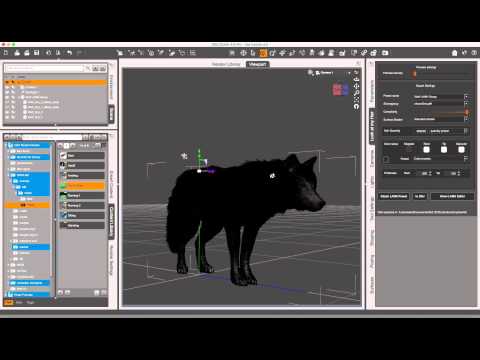
Process is the same for every LAMH-based character, so it would apply also to the tiger model you are trying to render. If you have any questions let me know. Cheers.
Well got an error that import didn't work or something like that and now everytime I try to open DS it won't get past the "connecting to CMS", whatever that is. So I'm backing my DS library just in case, then later on once everything is backed up I'll try again. If I still have problems with LAMH I'll let ya know...LOL
It's been one of those days...LOL
Sooo... I could be missing something, but I'm attempting to edit hair via the LAMH editor pane and while it does pop up, none of the controls respond. I've uninstalled and reinstalled, and I only have the full plugin installed (not the free player). Is there some additional step I need to take to activate the editor? Purchased and installed via the Daz store and installer.
Are you sure LaMH is properly initialised, with ther serial number? I can't recall what you see before that.