
Daz 3D is part of 
Connect
DAZ Productions, Inc.
7533 S Center View Ct #4664
West Jordan, UT 84084
Licensing Agreement | Terms of Service | Privacy Policy | EULA
© 2026 Daz Productions Inc. All Rights Reserved.
Comments
Hi
I cannot get the mcjTeleBlender3.zip from https://sites.google.com/site/mcasualsdazscripts4/mcjteleblender3 to install using 7zip - get error "cannot open output file". So, I don't get the extra options shown above and my export is purple. Is this the correct file?
Downloaded three times in case it was corrupted.
My download of it works fine.
The download work good for me also,
I use "Winrar" to unzip it.
I use this link to get it:
https://sites.google.com/site/mcasualsdazscripts4/mcjteleblender3
here's a direct link to the zip file
https://sites.google.com/site/mcasualsdazscripts4/mcjteleblender3/mcjTeleBlender3.zip?attredirects=0&d=1
with windows7 you can right-click on zip files and do an "Extract All" and as the destination folder you specify a daz studio content folder
( which usually contains a subfolder named Scripts and Runtime )
i think i have 7-zip dont i? hmm yes!
it worked , no problem ! t
Thanks for the responses - I was trying to unzip it into the directory as shown in the site referred to - example: C:\Program Files (x86)\DAZ\Studio\content. It actually belongs in C:/users/user/Documents/Daz3D/Studio/MyDaz Studio Library/Scripts/Scripts.
Working just great now, thanks so much for all your hard work mCasual:)
in my case C:\Program Files (x86)\DAZ\Studio\content.was home for Daz Studio 1 and 2
the Windows XP days !
Hi,, thank you up-date.! then I have one question,,Can this plug in work,, with different UV set, in one Figure?
because,, I sometimes apply different character mat (different UV) for Eye part only,, then export it by mjcblender,,
I feel I need to add UV nodes, then set UVset for Eye part,, to render correclty,, though it work for me,, but
I hope to know,, if there is setting,, to export multi UV sets (vicotria6 torso,, and another charalcter UV for eye) in one figure, correclty?
(or future request ,,)
==============
Sorry,,, I needed to tell more clear what I hope,,,
1. I make one character with V7 UV set and mat , then export it to blender, name UV set as V7UV, then re-name each Mat for future use (eg torso_V7) . and save the scene in blender,, V7mat.blender.
2 I make second character with Karen UV set and mat, then export it to blenlder,, name UV set as KarenUV, re-name each Mat ,but hope to change eye mat ,then append it from V7mat.blend. then exchange it in blender, only about eye parts mat.
3 I need to transfer V7 UV set, then import mesh of Figure from V7mat.blender, then transfer UV to current Karren mesh .
4. now Karen have two UV set in Blender,, then about eye mats,, it use V7mat. , I need to apply V7uv sets for eye parts.
5 Then I add UV nodes for each eye parts ,, then select Karen UV for them,,, to render.
I really like exchange mat in blender,, by "append " from mat.library (which I stored exported mat, and there is already each UV sets in one mesh ) ,then I hope,, (request) , if this plug in can auto generate "UV set " nodes,,when I export figure,, ^^;
( each UV nodes is useful,,, when I export grafted item (eg gen,,) with Actor too. I usually merge mesh in blender and remove doubled mesh to render correclty.. . but after merge them as one figure,, it need to use 2 UV set,, Ithen if there is alerady UV node,,I can change them easy,,in Node editor,,)
i never looked into multi UVs but someday will, maybe this summer , when i do it will be posted here
just a quick idea that came just now
you could export your scene with two Victoria 7, so your blender file would contain the materials for both
then you could hide or maybe even delete the one that is not meant to be rendered
maybe even, in daz studio, hide the parts of that figure which doesnt contain important materials, ex everything is hidden except the eyeballs
daz studio's exporter doesnt export hidden things
Thank you no need hurry, ^^ and yes when I export Actor with multi uv set,, ds do not care, then export it as one new UV set.
so that your plug in can work without problem. and export two FIgures seems good idea, to easy store UVset In one blend.file,,
I store many mat set, with each UV set (which is exported from DS) in one Matlibrary.blend file.
then hope to re-use it for rigged Figure in blender,, ,by Append and transfer UV,, when I need (eg,, nail , or eye only,,,)
Then,, if there is already uv node, I can easy change UV set,,after transfer another UV for curernt Actor for each surface.
I am using Daz Studio 4.9 and Blender 2.77 with Teleblender3, When I export with these settings:
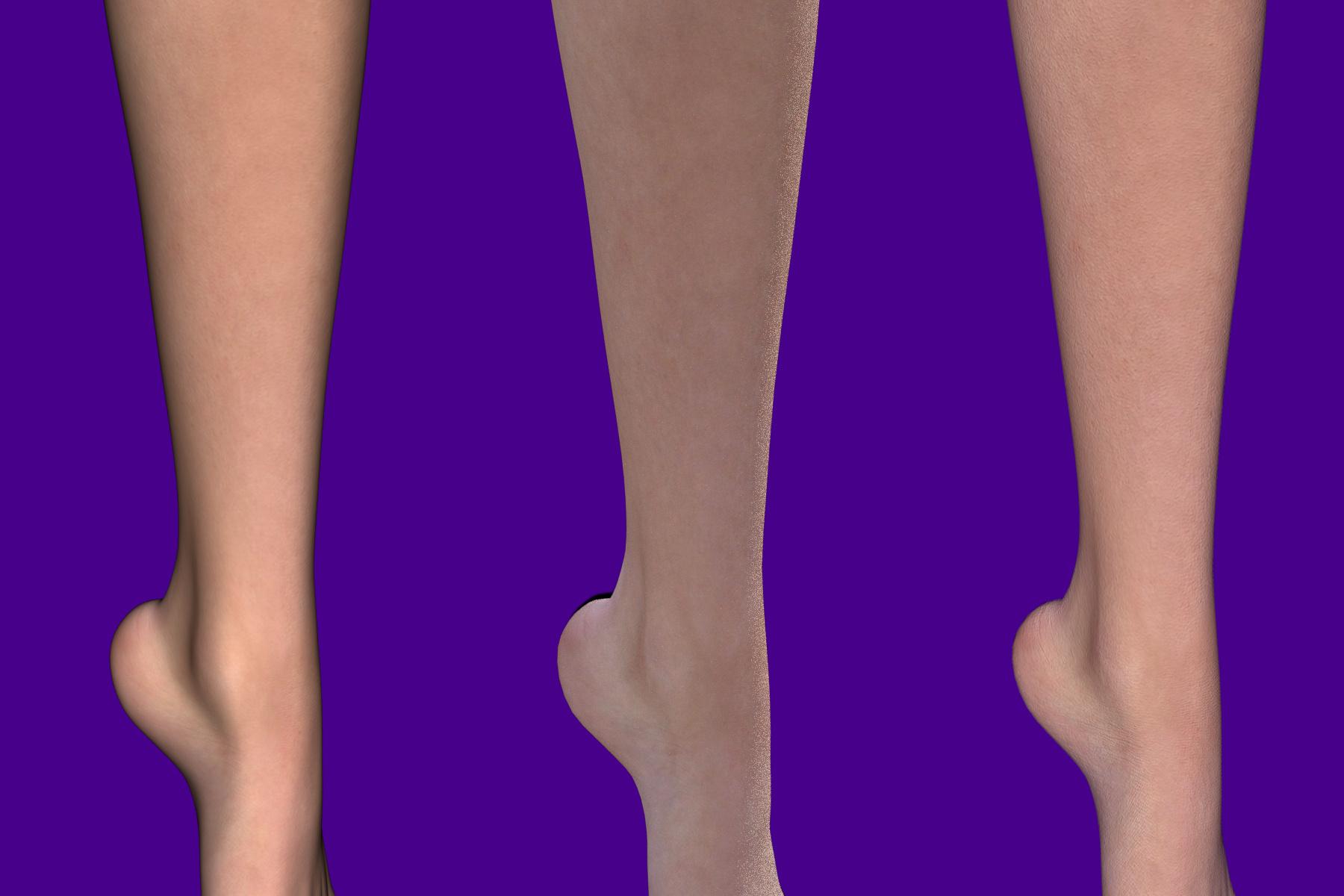
Well, Jacques, I find abundant reasons for using your script. Below is a piece of G2f with default shader “Bree” rendered, left to right, in 3Delight (default settings); iRay (default but 100 samples); Cycles via Téléblender (defaults, 100 samples):
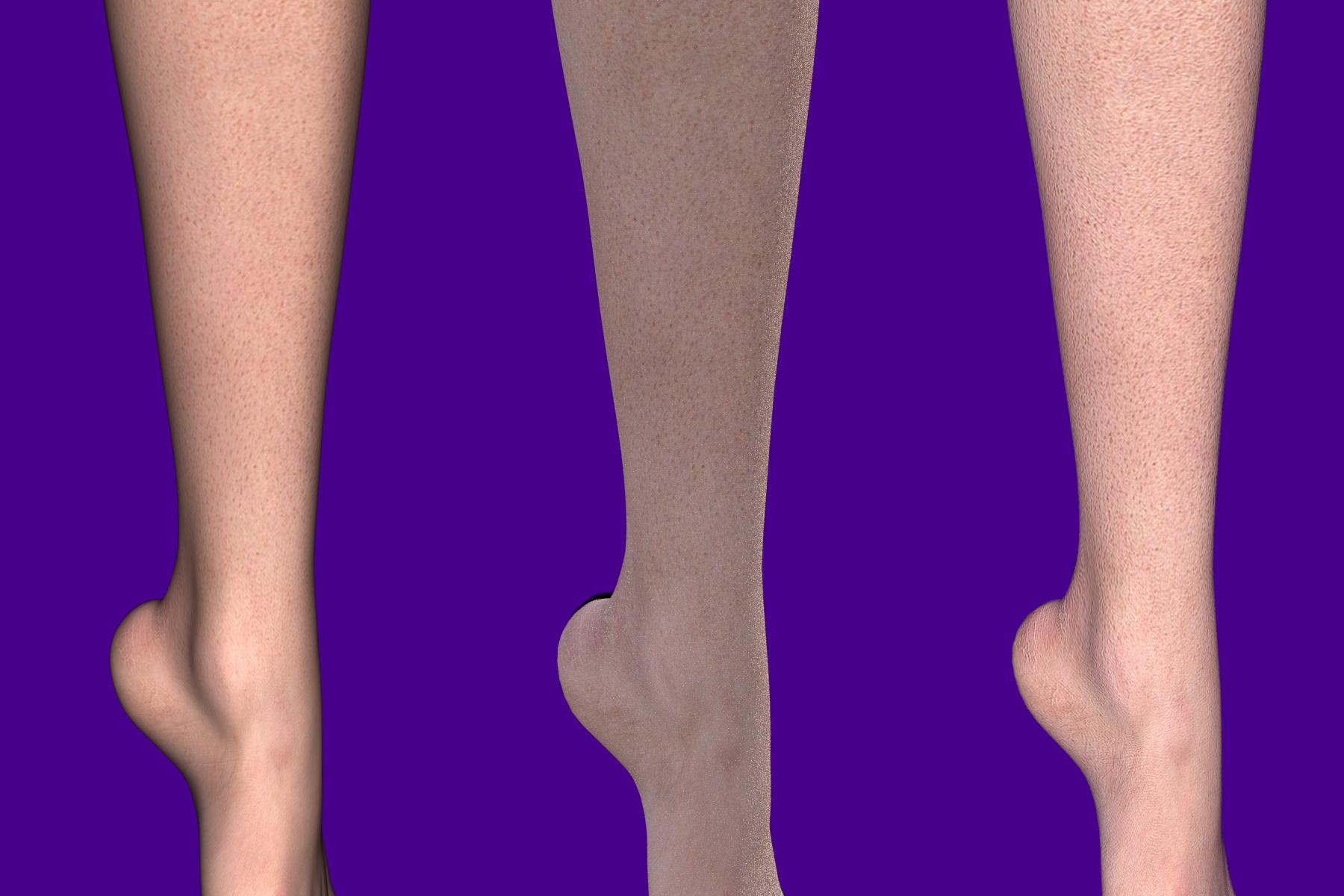
Same 3Delight (default settings); iRay (default but 100 samples); Cycles via Téléblender (defaults, 100 samples),


but with freckled Katie (V4), remapped with DAZ Studio itself:
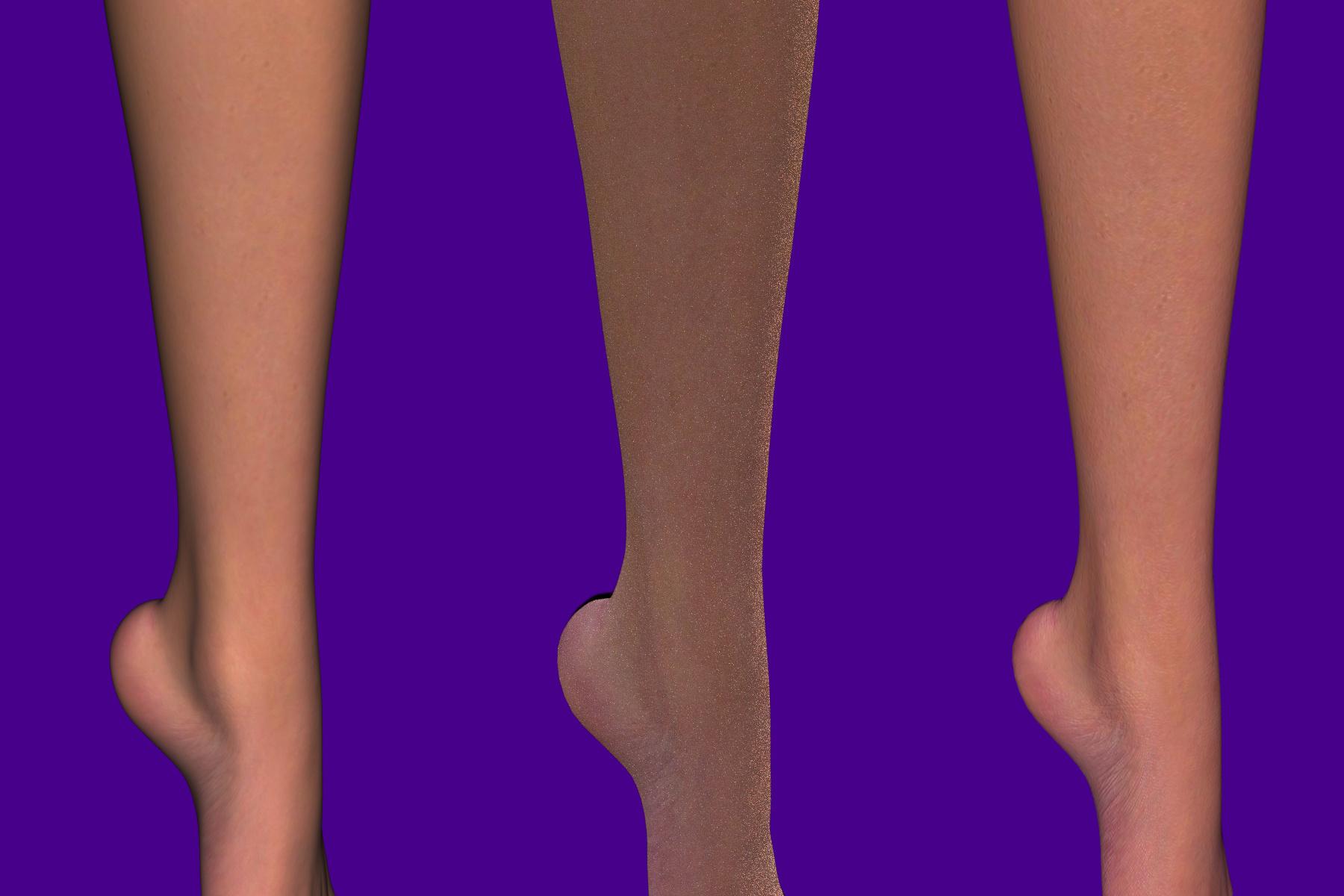
And here, ditto, with Elite Maya from V4:
Since my aim is to illustrate text (as opposed to “being recognized as an artist”),
the ability to (re)use all the anatomical information that inspired individuals
have described and made machine-readable is important to me,
as is to be satisfied with default settings as much as possible; I thank
all the talented and diligent people who have made these wonderful tools available!
With default settings, what I see in the above examples is
but it excels at depicting depth perception by varying levels of darkness:
observe the subtle shadow in that “thumb, here” just under the ankle
(the nameless concavity behind the medial malleolus). [Name, anyone?]
All I see are broken links.
Broken links??
You mean, the Bree renders at
http://www.daz3d.com/forums/uploads/FileUpload/d9/c05a27fc0c41fc42eef21274172bbb.jpg (3Delight)
http://www.daz3d.com/forums/uploads/FileUpload/71/b6a55e5136920687cb876a09362859.jpg (iRay)
http://www.daz3d.com/forums/uploads/FileUpload/ae/7f0e01f73462f69dba9466fddae299.jpg (Téléblender Cycles);
the freckled Katie renders at
http://www.daz3d.com/forums/uploads/FileUpload/5c/cb7981addcf9fe4edee5dfa3914ba2.jpg (3Delight)
http://www.daz3d.com/forums/uploads/FileUpload/fa/e755af49c6e447bd889c57454a0e08.jpg (iRay)
http://www.daz3d.com/forums/uploads/FileUpload/29/0517dfb5a921827efbe2dd74772b4a.jpg (Téléblender Cycles);
and the Elite Maya renders at
http://www.daz3d.com/forums/uploads/FileUpload/3b/c3868860ebd828f6f5ce8ed956b020.jpg (3Delight)
http://www.daz3d.com/forums/uploads/FileUpload/2a/2a444300c041bdcb68108359df0285.jpg (iRay)
http://www.daz3d.com/forums/uploads/FileUpload/41/d32e9f2120016b3e140d16d8f9a52a.jpg (Téléblender Cycles)
all look broken, to you?
They DO exist: I just checked, with three different browsers!
yesterday i think it was, i could see the 9 big images
but today they are all blank
note that if you attached images, posted them in your posts, then deleted them from the attachments ... that would explain things
if you see them it may be because they are in your browser cache
though you said you tried 3 browsers which is odd
Useing Chrome and no images showing and the links give a page not found error
I believe they are images intent on stealing your passwords. If you've clicked any of those image links I suggest your change your password.
they are absolutely not password-stealing-links
each link is in the Daz3D.com domain and is of type jpg, nothing scary about that
As Casual says it looks as though these were image attachments that have since been removed. The attachment puts the image on file at Daz, if it is subesequently removed then the image will not show. when added in line.
How embarrassing! I shall correct that, asap.
(Forgive me.)
Jacques was saying that, these days, he was using iRay a lot, but that the Blender-Cycles preview mode was more responsive,
and that Blender has all those other goodies to fix a scene, and I was starting to make the case that (I, at least)
have powerful reasons for appreciating his Téléblender system and porting figures from DAZ Studio to Blender.
DAZ’s anatomy, morphing, and rigging is tops IMO, and yet,
for the illustrations that I’m attempting, I have decided to construct my scenes in Blender. Why?
As a preamble, I wanted to show that, at least when using default settings,
my Téléblender/Cycles renders do not fall short of 3Delight and iRay from DAZ Studio.
Here is a G2f leg textured with default Bree, freckled Katie, and Elite Maya
—the latter two remapped via DAZ Studio itself: thank you for that option!—
rendered with 3Delight, iRay, and Cycles (from left to right).
Bree:
Katie:
Maya:
As you can see, 3Delight excels at depicting depth perception by varying levels of darkness
(shading, sensu stricto), but goes soft on fine detail,
whereas the Téléblender/Cycles conversion (even with texture remapping from V4 to G2f)
gives (on defaults!) the best detail, without introducing its own artifacts.
Really with the forums being spammed as much as they are and one clicks links that sends their browser into a loop of repeated logs ins? JPGs, image file, and movie files can contain harmful payload. So I'm not embarrassed a bit by being scolded for pointing that out. I'm glad that wasn't the case here but I'll still err on the side of caution when I see bizarre browser behavior such as that by clicking on uploaded content.
I have to say I like the Blender Cycles best but why does it appear that the light source is in a different place for the DAZ Studio iRay render? One can't compare them objectively enough without the environment set up being the same. I also looks as if the iRay renders were canceled early on before sufficient convergence.
Blender Cycles, despite automated remappings and conversions, holds up well: agreed.
iRay can be tweaked, I’m sure, to get a better result than shown. These, I insist,
are default settings, except for the fact that I reduced the default samples-per-pixel
of iRay to only 100. As it turns out, half that many, applied to Cycles,
gives a result that I cannot distinguish from what I’ve shown.
As for lighting, I assure you it is one and the same.
Presumably, iRay expects stronger light sources.
What I find surprising is that iRay casts this spurious dark shadow into the void behind G2f’s heel;
that looks to me like it might be tricky to avoid.
Question: Does iRay have a nodes system?
The ample variety of nodes that Cycles offers is what got me hooked on Cycles
(as I hope to illustrate before dawn tonight).
I use Blender Cycles, but have issues getting the hang of IRAY's nodes.
Does iRay for DAZ Studio really offer nodes with geometry information, vector math, light path, and things like that?
All right; let me venture a couple of attachments, and next we’ll proceed to analyse them.
Sorry: one more attachment.