-
RTX Pro 6000 (Blackwell) selling for $11,000+ (retail)
RexRed said:
A Daz V2025 to Omniverse bridge would be of interest to me. One that would also export Ultra Scenery, VDBs all manner of hair, transparencies and figures (with no baking of shaders) etc...
As far as I'm aware of, DS has no ability to generate VDBs outside of Mesh to Volume, so you should just be able to import your Daz VDB products directly into Omniverse.
Reorganizing entire content library for product packagingYou don't generally need metadata to sell, though you may choose to include it for non-Daz stores (Daz makes its own regardless). If you do want to inlude it you would really want to save as a single product anyway, rather than lumping it in with local user as it probably is now - but moving it using the tools in DS should preserve the metadata.
Reorganizing entire content library for product packagingAfternoon folks,
I had never intended to sell my content, but I'm considering it lately. Problem is I organized my hundreds of morphs, characters, outfits, props etc in a way that makes sense for me to putz around with hobby-wise but is absolutely not conducive to Daz's library structure lol.
For instance, in my Wearables Presets folder, I have a Brows subfolder with say "Able Brows, Baker Brows, Charlie Brows" etc and an Eyelashes folder with "Able Eyelashes---". Not great, when a product catalog would be organized by all of Able's things together, all of Baker's etc.
Now I know presets are different than assets, but the concept of my question is pretty much the same -- since cutting/pasting assets, even with the content library's built-in command, destroys their metadata, what would be the best way to transfer such things from their current, type-grouped folders to new, product-grouped folders?
LOCAL USER ProblemThere is no Local User folder, it isn't that kind of thing. Only the entries under Daz Studio Formats, Poser formats, Other Import Formats are real folders (except for the Daz Connect folder, which is database-driven and aggregates the eral product folders in /data/cloud/). Yoou need to copy the database over, and tell DIM/DS where it is, or you need to export user data on the old system (Content Library Option menu>Content DB Maintenance), copy the files it places in /Runtime/Support/ from the old machine to the new, and reimport the user data using the same Content DB Maintenance dialogue on the new machine (at which point you can also reimport the emtadata for the products for which you copied the files across).
Creating 360 degree HDRIs3deedlin said:
Simply put exr is basically the standard for high end work for it's benefits.You can get a lot of of useful data in an efficient format.
https://www.pluralsight.com/resources/blog/software-development/vfx-file-formats-you-need-to-know
https://openexr.com/en/latest/
Quote: The purpose of EXR format is to accurately and efficiently represent high-dynamic-range scene-linear image data. This is a significant difference to most image formats, which store images that are ready for display. Software that handles OpenEXR images may need to process them differently to images in other formats such as JPEG (see Scene-Linear Image Representation for more details). OpenEXR files have strong support for multi-part, multi-channel use cases, and extensive representation of associated metadata. OpenEXR is widely used in host application software where accuracy is critical, such as photorealistic rendering, texture access, image compositing, deep compositing, and DI.
Here you go.
https://www.daz3d.com/forums/discussion/429356/tutorials-for-using-hdri-resources-exr-filesI hear what you're saying, but I'm wondering if there is a noticeable difference between an HDRI and EXR, because they have a 32 bit depth, yet the HDRIs I've been getting are between 150 and 200 MB, while the same images compiled as an EXR come out at 800 to 900 MB. If the quality of the lighting is only marginally better in an EXR compared to an HDR, then is it worth it?
Creating 360 degree HDRIsSimply put exr is basically the standard for high end work for it's benefits.You can get a lot of of useful data in an efficient format.
https://www.pluralsight.com/resources/blog/software-development/vfx-file-formats-you-need-to-know
https://openexr.com/en/latest/
Quote: The purpose of EXR format is to accurately and efficiently represent high-dynamic-range scene-linear image data. This is a significant difference to most image formats, which store images that are ready for display. Software that handles OpenEXR images may need to process them differently to images in other formats such as JPEG (see Scene-Linear Image Representation for more details). OpenEXR files have strong support for multi-part, multi-channel use cases, and extensive representation of associated metadata. OpenEXR is widely used in host application software where accuracy is critical, such as photorealistic rendering, texture access, image compositing, deep compositing, and DI.
Here you go.
https://www.daz3d.com/forums/discussion/429356/tutorials-for-using-hdri-resources-exr-filesObj imports without any textures after recent updatemilliethegreat said:
All the settings are default. And yes the textures work in blender and yes the objects imported with the textures applied (at least the ones I'm using) prior to the latest update of Daz! I think the Daz update borked something. Is there a fix?
ok but I didnt ask if it was default, i said ensure you tick the box for read materials?
Also check the .mtl file you exported from blender.
troubleshooting usually involves checking some things, not just jumping to a conclusion and then refusing to check anything.
No applying the textures is NOT an option. Some objects have a TON of textures in a TON of places! And I'm not gonna say anything is labeled logically. Because they're not most of the time. But they did import successfully prior to the update but not after. And that's a HUGE Problem for a number of reasons!
Using the Blender to daz bridge or doing it manually is in my opinion the only option. Relying on an .mtl file to assign textures is a flawed approach. First of all, .mtl cant even assign normal maps lol, to say nothing of all the other random settings it might decide to change. Half the time it puts maps in wrong slots.
Diffeomorphic Missing Shells/Shell Materials on ImportNevermind. I'm just an Idiot... I guess the issues is that some materials do merge if Merge Materials is checked on Import.. and some don't.. Hence, the difference in listed materials when checking the geoshells. :/
Diffeomorphic Missing Shells/Shell Materials on Import[Diffeomorphic Missing Shells/Shell Materials on Import] Specifically with Meipix's Golden Palace. I've tried different work flows in Daz to see if it was some specific thing I do that causes it, but I'm at a brick wall. When importing a model with the GP Geograph, Shell and Majora Shell.. Sometimes Diffeomorphic doesn't impor the Rect*m or Minora shells (or at least the Materials and UV's for them.) Sometimes it will make the Rect*m, other times it's just the Torso and Back half, but when it fails, it NEVER creates the Minora Materials/UV, This is so frustrating not being able to get all (5) Mats. [Rect*m, Torso, Torso_Back, Minora & Vag] I coud live without the Vag/Rect*m, but not the other 3. Does anyone have any ideas?
EDIT: It appears to be related to different Daz Textures/Skins. Some Skins just are not translating via Diffeo. (If that helps) ie: JASA & CHB Delila for examples.
Updated both OS and Daz, cannot view content nowYou get the grey icons because of Daz Connect (installing from inside of Daz Studio). It is 2 different installation methods, there will place files in 2 different locations. I will not recommend to installing with both methods, as it will frequently give problems.
But back to your content. If the database wasn't running when you installed it doesn't have the metadata for your content to show. You should be able to find it in the Content Library, as it uses the physical location to navigate.
In order to get your content into Smart Content, you should re-import metadata. When you are in Smart Content click the 4 bars in a corner (the burger menu) and select Content DB Maintenance. And in there select Re-Import Metadata. You will then get a list of all that it can see installed, and you can let it all be ticked and click Accept. It will take a while, but as I assume you have rather few products, it should be quick (for someone with thousands of products it might take over an hour).
Updated both OS and Daz, cannot view content nowfelis said:
If everything is new then look in DIM for the database (CMS). You might not have installed it.
Ahhh!!! Yeah, that was it. I only installed the main program and not all of the ones on the list. I turned out that file was there. Installing it stopped the error messages, however, all isn't well yet.
While I am not getting the error message anymore, my content still wasn't showing up. I went into the content library and did a database reset and an import of the metadata.
After doing that, some of my content is showing up, but everything is greyed out! (See Attached).
Also, quickly looked at what was there, it is only showing my Genesis 9 content, partially my Genesis 8 content and none of my Genesis 3 or prior figures. Further, when I click on a figure (Angela 9 in this case), it looks like it is going through an install procedure. The content picture then is in color and I can click on the figure and it comes up on the screen.
This is a bit disturbing for a couple of reasons.
1) I don't know where it is installing the figure when I already have it installed on my hard drive.
2) Will I have to do this for ALL my content? That could take weeks as I have about 4000 items that I have purchased through the Daz Store.
I am hoping there is a better way to sync up what is on my other hard drive with Daz Studio.
At least, we are getting somewhere.
Thanks!
Geo
Install via DAZ Install Manager and again within DAZ Studio?Instaling one package will not uninstall another, though it might mess up the metadata (which is why I was asking where you were looking). You are seeing the files, when present, in Content Library>Daz Studio Formats>Some folder other than Daz Connect?
[Released] Hat Check for Genesis 9 [Commercial]Platnumk said:
RiverSoft Art said:
Platnumk said:
DoctorJellybean said:
Platnumk said:
Can't get it to work at all, No morph is ever created
2025-05-10 14:46:14.867 [DEBUG] :: Importing /Volumes/Private/My Daz3D Library2/data/RiverSoft Art/Data/G9HatCheckHigh.obj
2025-05-10 14:46:14.867 [WARNING] :: /src/sdksource/fileinput/dzimporter.cpp(227): Undo stack left open for file import - it will be closed to avoid errors
2025-05-10 14:46:14.867 [INFO] :: Importing File...
2025-05-10 14:46:15.192 [INFO] :: Importing: G9HatCheckHigh.obj...
2025-05-10 14:46:15.948 [INFO] :: Imported Wavefront Object: G9HatCheckHigh.obj
2025-05-10 14:46:15.965 [INFO] :: Imported file in: 0.1 sec (1097.54 ms)
2025-05-10 14:46:15.965 [INFO] :: Imported file: /Volumes/Private/My Daz3D Library2/data/RiverSoft Art/Data/G9HatCheckHigh.obj
2025-05-10 14:46:15.965 [DEBUG] :: Mask G9HatCheckHigh
2025-05-10 14:46:15.966 [DEBUG] :: Create Hair Morph RS Hat_2289 LayeredWinterStyleHair_195795 pCube(10q0000)20 2 0 true true false [object Object] 0
2025-05-10 14:46:16.229 [DEBUG] :: Num of Vertices 195795
2025-05-10 14:46:16.229 [DEBUG] :: Num of Facets 93692
2025-05-10 14:46:16.235 [WARNING] :: Script Error: Line 140
2025-05-10 14:46:16.235 [WARNING] :: TypeError: Result of expression 'oNode.inherits' [undefined] is not a function.
2025-05-10 14:46:16.235 [WARNING] :: Stack Trace:
<anonymous>()@/Volumes/Private/My Daz3D Library2/data/RiverSoft Art/Common/RSHatCheckFunctions.dse:140
2025-05-10 14:46:16.240 [WARNING] :: /src/sdksource/general/dzundostack.cpp(590): Call to DzUndoStack::cancel() with no matching beginHold()Which OS and DS version?
Daz 4.24, OS: MacOS 15.4.1.
Can I see the entire log for the script? I should be seeing what common functions it is pulling in. The snippet you posted indicates that it is getting a wrong node and then cannot find the function it needs. At a guess, did you install via Daz Connect?
Installed Via DIM, Could it be that you require to click on the Hair then the Hat by using the CTRL Key, if so then his operation can't be done on a Mac as Pressing CTRL & Clicking works as a Right Mouse Button (there is no way of disabling this action)
2025-05-10 20:44:15.669 [WARNING] :: QString::arg: Argument missing: <p>To use Hat Check for Genesis 9:<ul><li>Select the Hair</li><li>Hold the CTRL button and Select the Hat</li><li>Start Hat Check for Genesis 9</li><li>Select Effect Volume type</li><li>Use the Movement, Rotation, and Scale controls to position the Effect Volume. You want to cover all the vertices inside the "hat".</li><li>Optionally specify the Feather Distance (in centimeters)</li><li>If you are running Hat Check for Genesis 9 on the same hair and hair twice or more, optionally specify whether the morph will be replaced, added to, or a whole new morph created </li></ul></p><p><i>Note that the more hair vertices inside the effect volume and feathering distance, the longer it takes to create the morph. Also, Hat Check for Genesis 9 looks for hair vertices inside the Effect Volume, and morphs them if found, based on the current style of the hair. Depending on the effect you want, you may want to turn on or off other hair morphs before running the script.</i></p><i>The script requires the hair to be on the default figure at the default position and pose. It will temporarily turn off all character morphs and pose, but this slows down execution of the script.</i>, Carme Hair G9
2025-05-10 20:44:15.669 [WARNING] :: QString::arg: Argument missing: <p>To use Hat Check for Genesis 9:<ul><li>Select the Hair</li><li>Hold the CTRL button and Select the Hat</li><li>Start Hat Check for Genesis 9</li><li>Select Effect Volume type</li><li>Use the Movement, Rotation, and Scale controls to position the Effect Volume. You want to cover all the vertices inside the "hat".</li><li>Optionally specify the Feather Distance (in centimeters)</li><li>If you are running Hat Check for Genesis 9 on the same hair and hair twice or more, optionally specify whether the morph will be replaced, added to, or a whole new morph created </li></ul></p><p><i>Note that the more hair vertices inside the effect volume and feathering distance, the longer it takes to create the morph. Also, Hat Check for Genesis 9 looks for hair vertices inside the Effect Volume, and morphs them if found, based on the current style of the hair. Depending on the effect you want, you may want to turn on or off other hair morphs before running the script.</i></p><i>The script requires the hair to be on the default figure at the default position and pose. It will temporarily turn off all character morphs and pose, but this slows down execution of the script.</i>, Wild West Cowgirl Hat
2025-05-10 20:44:15.840 [DEBUG] :: l_metatarsal
2025-05-10 20:44:15.842 [DEBUG] :: X Rot 0 0.000046774741349508986
2025-05-10 20:44:15.845 [DEBUG] :: Y Rot 0 0.00001600385076017119
2025-05-10 20:44:15.847 [DEBUG] :: Z Rot 0 0.000014583160009351559
2025-05-10 20:44:35.652 [DEBUG] :: Creating camera null
2025-05-10 20:44:35.895 [DEBUG] :: Creating Influence
2025-05-10 20:44:35.895 [DEBUG] :: Location: 0 167.55349731445312 0
2025-05-10 20:44:35.895 [DEBUG] :: Rotation: 0 0 0
2025-05-10 20:44:35.895 [DEBUG] :: Scale: 1 1 1
2025-05-10 20:45:40.991 [DEBUG] :: FOUND: /Volumes/Private/My Daz3D Library2/data/RiverSoft Art/Data/G9HatCheckHigh.obj
2025-05-10 20:45:41.107 [DEBUG] :: <Settings>
<Setting Type="String" Key="Preset">Custom (1 unit = 1cm)</Setting>
<Setting Type="String" Key="LatAxis">X</Setting>
<Setting Type="String" Key="VertAxis">Y</Setting>
<Setting Type="String" Key="DepthAxis">Z</Setting>
<Setting Type="Bool" Key="InvertLat">no</Setting>
<Setting Type="Bool" Key="InvertVert">no</Setting>
<Setting Type="Bool" Key="InvertDepth">no</Setting>
<Setting Type="Float" Key="Scale">1</Setting>
<Setting Type="Bool" Key="IncludeVT">yes</Setting>
<Setting Type="Bool" Key="IncludeF">yes</Setting>
<Setting Type="Bool" Key="IncludeL">yes</Setting>
<Setting Type="Bool" Key="IncludeG">yes</Setting>
<Setting Type="Bool" Key="IncludeUsemtl">no</Setting>
<Setting Type="Bool" Key="IncludeMtllib">no</Setting>
<Setting Type="Bool" Key="AutoAdapt">no</Setting>
<Setting Type="Int" Key="RunSilent">1</Setting>
<Setting Type="Bool" Key="SwapYZ">no</Setting>
<Setting Type="Bool" Key="InvertLatAxis">no</Setting>
<Setting Type="Bool" Key="InvertVertAxis">no</Setting>
<Setting Type="Bool" Key="InvertDepthAxis">no</Setting>
</Settings>2025-05-10 20:45:41.118 [DEBUG] :: Importing /Volumes/Private/My Daz3D Library2/data/RiverSoft Art/Data/G9HatCheckHigh.obj
2025-05-10 20:45:41.118 [WARNING] :: /src/sdksource/fileinput/dzimporter.cpp(227): Undo stack left open for file import - it will be closed to avoid errors
2025-05-10 20:45:41.118 [INFO] :: Importing File...
2025-05-10 20:45:41.448 [INFO] :: Importing: G9HatCheckHigh.obj...
2025-05-10 20:45:42.218 [INFO] :: Imported Wavefront Object: G9HatCheckHigh.obj
2025-05-10 20:45:42.416 [INFO] :: Imported file in: 0.1 sec (1283.1 ms)
2025-05-10 20:45:42.417 [INFO] :: Imported file: /Volumes/Private/My Daz3D Library2/data/RiverSoft Art/Data/G9HatCheckHigh.obj
2025-05-10 20:45:42.417 [DEBUG] :: Mask G9HatCheckHigh
2025-05-10 20:45:42.418 [DEBUG] :: Create Hair Morph RS Hat_2289 CarmeHairG9_176823 pCube(10q0000)20 2 0 true true false [object Object] 0
2025-05-10 20:45:42.620 [DEBUG] :: Num of Vertices 176823
2025-05-10 20:45:42.620 [DEBUG] :: Num of Facets 87103
2025-05-10 20:45:42.648 [WARNING] :: Script Error: Line 140
2025-05-10 20:45:42.648 [WARNING] :: TypeError: Result of expression 'oNode.inherits' [undefined] is not a function.
2025-05-10 20:45:42.649 [WARNING] :: Stack Trace:
<anonymous>()@/Volumes/Private/My Daz3D Library2/data/RiverSoft Art/Common/RSHatCheckFunctions.dse:140
2025-05-10 20:45:42.664 [WARNING] :: /src/sdksource/general/dzundostack.cpp(590): Call to DzUndoStack::cancel() with no matching beginHold()By saying CTRL, I meant you have to select both items before starting the script. I guess it would be holding the option key on Mac? I am still not seeing the entire script execution. It should look something like this:
2025-05-11 06:41:03.843 [INFO] :: Loading script: D:/Documents/DAZ 3D/Studio/My Library/Scripts/Hat Check/Hat Check for Genesis 9.dse
2025-05-11 06:41:03.847 [DEBUG] :: FOUND: D:/Documents/DAZ 3D/Studio/My Library/data/RiverSoft Art/Common/RSConstants.dsa
2025-05-11 06:41:03.848 [DEBUG] :: FOUND: D:/Documents/DAZ 3D/Studio/My Library/data/RiverSoft Art/Common/RSBuildPanels.dsa
2025-05-11 06:41:03.849 [DEBUG] :: FOUND: D:/Documents/DAZ 3D/Studio/My Library/data/RiverSoft Art/Common/RSHatCheckConstants.dsa
2025-05-11 06:41:03.850 [DEBUG] :: FOUND: D:/Documents/DAZ 3D/Studio/My Library/data/RiverSoft Art/Common/RSHelperFunctions.dsa
2025-05-11 06:41:03.851 [DEBUG] :: FOUND: D:/Documents/DAZ 3D/Studio/My Library/data/RiverSoft Art/Common/RSAdvHelperFunctions.dsa
2025-05-11 06:41:03.852 [DEBUG] :: FOUND: D:/Documents/DAZ 3D/Studio/My Library/data/RiverSoft Art/Common/RS2019HelperFunctions.dsa
2025-05-11 06:41:03.854 [DEBUG] :: FOUND: D:/Documents/DAZ 3D/Studio/My Library/data/RiverSoft Art/Common/RS2020HelperFunctions.dsa
2025-05-11 06:41:03.857 [DEBUG] :: FOUND: D:/Documents/DAZ 3D/Studio/My Library/data/RiverSoft Art/Common/RS2021HelperFunctionsConstants.dsa
2025-05-11 06:41:03.858 [DEBUG] :: FOUND: D:/Documents/DAZ 3D/Studio/My Library/data/RiverSoft Art/Common/RS2021HelperFunctions.dsa
2025-05-11 06:41:03.861 [DEBUG] :: FOUND: D:/Documents/DAZ 3D/Studio/My Library/data/RiverSoft Art/Common/RS2022HelperFunctions.dsa
2025-05-11 06:41:03.863 [DEBUG] :: FOUND: D:/Documents/DAZ 3D/Studio/My Library/data/RiverSoft Art/Common/RS2022GeometryFunctions.dsa
2025-05-11 06:41:03.864 [DEBUG] :: FOUND: D:/Documents/DAZ 3D/Studio/My Library/data/RiverSoft Art/Common/RS2023HelperFunctions.dsa
2025-05-11 06:41:03.867 [DEBUG] :: FOUND: D:/Documents/DAZ 3D/Studio/My Library/data/RiverSoft Art/Common/RSOctree.dsa
2025-05-11 06:41:03.868 [DEBUG] :: FOUND: D:/Documents/DAZ 3D/Studio/My Library/data/RiverSoft Art/Common/RSHatCheckFunctions.dsa
2025-05-11 06:41:03.870 [DEBUG] :: Hair G9 Genghis Hair
2025-05-11 06:41:03.870 [DEBUG] :: Hat AH CCO Hat
2025-05-11 06:41:03.870 [DEBUG] :: Get Figure G9 Genghis Hair_477409 Genesis9
2025-05-11 06:41:03.870 [DEBUG] :: Genesis9
2025-05-11 06:41:03.871 [DEBUG] :: Figure Genesis 9[Released] Hat Check for Genesis 9 [Commercial]RiverSoft Art said:
Platnumk said:
DoctorJellybean said:
Platnumk said:
Can't get it to work at all, No morph is ever created
2025-05-10 14:46:14.867 [DEBUG] :: Importing /Volumes/Private/My Daz3D Library2/data/RiverSoft Art/Data/G9HatCheckHigh.obj
2025-05-10 14:46:14.867 [WARNING] :: /src/sdksource/fileinput/dzimporter.cpp(227): Undo stack left open for file import - it will be closed to avoid errors
2025-05-10 14:46:14.867 [INFO] :: Importing File...
2025-05-10 14:46:15.192 [INFO] :: Importing: G9HatCheckHigh.obj...
2025-05-10 14:46:15.948 [INFO] :: Imported Wavefront Object: G9HatCheckHigh.obj
2025-05-10 14:46:15.965 [INFO] :: Imported file in: 0.1 sec (1097.54 ms)
2025-05-10 14:46:15.965 [INFO] :: Imported file: /Volumes/Private/My Daz3D Library2/data/RiverSoft Art/Data/G9HatCheckHigh.obj
2025-05-10 14:46:15.965 [DEBUG] :: Mask G9HatCheckHigh
2025-05-10 14:46:15.966 [DEBUG] :: Create Hair Morph RS Hat_2289 LayeredWinterStyleHair_195795 pCube(10q0000)20 2 0 true true false [object Object] 0
2025-05-10 14:46:16.229 [DEBUG] :: Num of Vertices 195795
2025-05-10 14:46:16.229 [DEBUG] :: Num of Facets 93692
2025-05-10 14:46:16.235 [WARNING] :: Script Error: Line 140
2025-05-10 14:46:16.235 [WARNING] :: TypeError: Result of expression 'oNode.inherits' [undefined] is not a function.
2025-05-10 14:46:16.235 [WARNING] :: Stack Trace:
<anonymous>()@/Volumes/Private/My Daz3D Library2/data/RiverSoft Art/Common/RSHatCheckFunctions.dse:140
2025-05-10 14:46:16.240 [WARNING] :: /src/sdksource/general/dzundostack.cpp(590): Call to DzUndoStack::cancel() with no matching beginHold()Which OS and DS version?
Daz 4.24, OS: MacOS 15.4.1.
Can I see the entire log for the script? I should be seeing what common functions it is pulling in. The snippet you posted indicates that it is getting a wrong node and then cannot find the function it needs. At a guess, did you install via Daz Connect?
Installed Via DIM, Could it be that you require to click on the Hair then the Hat by using the CTRL Key, if so then his operation can't be done on a Mac as Pressing CTRL & Clicking works as a Right Mouse Button (there is no way of disabling this action)
2025-05-10 20:44:15.669 [WARNING] :: QString::arg: Argument missing: <p>To use Hat Check for Genesis 9:<ul><li>Select the Hair</li><li>Hold the CTRL button and Select the Hat</li><li>Start Hat Check for Genesis 9</li><li>Select Effect Volume type</li><li>Use the Movement, Rotation, and Scale controls to position the Effect Volume. You want to cover all the vertices inside the "hat".</li><li>Optionally specify the Feather Distance (in centimeters)</li><li>If you are running Hat Check for Genesis 9 on the same hair and hair twice or more, optionally specify whether the morph will be replaced, added to, or a whole new morph created </li></ul></p><p><i>Note that the more hair vertices inside the effect volume and feathering distance, the longer it takes to create the morph. Also, Hat Check for Genesis 9 looks for hair vertices inside the Effect Volume, and morphs them if found, based on the current style of the hair. Depending on the effect you want, you may want to turn on or off other hair morphs before running the script.</i></p><i>The script requires the hair to be on the default figure at the default position and pose. It will temporarily turn off all character morphs and pose, but this slows down execution of the script.</i>, Carme Hair G9
2025-05-10 20:44:15.669 [WARNING] :: QString::arg: Argument missing: <p>To use Hat Check for Genesis 9:<ul><li>Select the Hair</li><li>Hold the CTRL button and Select the Hat</li><li>Start Hat Check for Genesis 9</li><li>Select Effect Volume type</li><li>Use the Movement, Rotation, and Scale controls to position the Effect Volume. You want to cover all the vertices inside the "hat".</li><li>Optionally specify the Feather Distance (in centimeters)</li><li>If you are running Hat Check for Genesis 9 on the same hair and hair twice or more, optionally specify whether the morph will be replaced, added to, or a whole new morph created </li></ul></p><p><i>Note that the more hair vertices inside the effect volume and feathering distance, the longer it takes to create the morph. Also, Hat Check for Genesis 9 looks for hair vertices inside the Effect Volume, and morphs them if found, based on the current style of the hair. Depending on the effect you want, you may want to turn on or off other hair morphs before running the script.</i></p><i>The script requires the hair to be on the default figure at the default position and pose. It will temporarily turn off all character morphs and pose, but this slows down execution of the script.</i>, Wild West Cowgirl Hat
2025-05-10 20:44:15.840 [DEBUG] :: l_metatarsal
2025-05-10 20:44:15.842 [DEBUG] :: X Rot 0 0.000046774741349508986
2025-05-10 20:44:15.845 [DEBUG] :: Y Rot 0 0.00001600385076017119
2025-05-10 20:44:15.847 [DEBUG] :: Z Rot 0 0.000014583160009351559
2025-05-10 20:44:35.652 [DEBUG] :: Creating camera null
2025-05-10 20:44:35.895 [DEBUG] :: Creating Influence
2025-05-10 20:44:35.895 [DEBUG] :: Location: 0 167.55349731445312 0
2025-05-10 20:44:35.895 [DEBUG] :: Rotation: 0 0 0
2025-05-10 20:44:35.895 [DEBUG] :: Scale: 1 1 1
2025-05-10 20:45:40.991 [DEBUG] :: FOUND: /Volumes/Private/My Daz3D Library2/data/RiverSoft Art/Data/G9HatCheckHigh.obj
2025-05-10 20:45:41.107 [DEBUG] :: <Settings>
<Setting Type="String" Key="Preset">Custom (1 unit = 1cm)</Setting>
<Setting Type="String" Key="LatAxis">X</Setting>
<Setting Type="String" Key="VertAxis">Y</Setting>
<Setting Type="String" Key="DepthAxis">Z</Setting>
<Setting Type="Bool" Key="InvertLat">no</Setting>
<Setting Type="Bool" Key="InvertVert">no</Setting>
<Setting Type="Bool" Key="InvertDepth">no</Setting>
<Setting Type="Float" Key="Scale">1</Setting>
<Setting Type="Bool" Key="IncludeVT">yes</Setting>
<Setting Type="Bool" Key="IncludeF">yes</Setting>
<Setting Type="Bool" Key="IncludeL">yes</Setting>
<Setting Type="Bool" Key="IncludeG">yes</Setting>
<Setting Type="Bool" Key="IncludeUsemtl">no</Setting>
<Setting Type="Bool" Key="IncludeMtllib">no</Setting>
<Setting Type="Bool" Key="AutoAdapt">no</Setting>
<Setting Type="Int" Key="RunSilent">1</Setting>
<Setting Type="Bool" Key="SwapYZ">no</Setting>
<Setting Type="Bool" Key="InvertLatAxis">no</Setting>
<Setting Type="Bool" Key="InvertVertAxis">no</Setting>
<Setting Type="Bool" Key="InvertDepthAxis">no</Setting>
</Settings>2025-05-10 20:45:41.118 [DEBUG] :: Importing /Volumes/Private/My Daz3D Library2/data/RiverSoft Art/Data/G9HatCheckHigh.obj
2025-05-10 20:45:41.118 [WARNING] :: /src/sdksource/fileinput/dzimporter.cpp(227): Undo stack left open for file import - it will be closed to avoid errors
2025-05-10 20:45:41.118 [INFO] :: Importing File...
2025-05-10 20:45:41.448 [INFO] :: Importing: G9HatCheckHigh.obj...
2025-05-10 20:45:42.218 [INFO] :: Imported Wavefront Object: G9HatCheckHigh.obj
2025-05-10 20:45:42.416 [INFO] :: Imported file in: 0.1 sec (1283.1 ms)
2025-05-10 20:45:42.417 [INFO] :: Imported file: /Volumes/Private/My Daz3D Library2/data/RiverSoft Art/Data/G9HatCheckHigh.obj
2025-05-10 20:45:42.417 [DEBUG] :: Mask G9HatCheckHigh
2025-05-10 20:45:42.418 [DEBUG] :: Create Hair Morph RS Hat_2289 CarmeHairG9_176823 pCube(10q0000)20 2 0 true true false [object Object] 0
2025-05-10 20:45:42.620 [DEBUG] :: Num of Vertices 176823
2025-05-10 20:45:42.620 [DEBUG] :: Num of Facets 87103
2025-05-10 20:45:42.648 [WARNING] :: Script Error: Line 140
2025-05-10 20:45:42.648 [WARNING] :: TypeError: Result of expression 'oNode.inherits' [undefined] is not a function.
2025-05-10 20:45:42.649 [WARNING] :: Stack Trace:
<anonymous>()@/Volumes/Private/My Daz3D Library2/data/RiverSoft Art/Common/RSHatCheckFunctions.dse:140
2025-05-10 20:45:42.664 [WARNING] :: /src/sdksource/general/dzundostack.cpp(590): Call to DzUndoStack::cancel() with no matching beginHold()Weird jagged glitch on glove handI mean, scaling bones is probably not the best way to handle your problem in any case, but if you're going to do it, do it strictly inside of DAZ Studio, don't export or import scaled bones unless you have a super good reason for it. If I was doing this I would just get rid of the middle and ring finger bones completely and weight the mesh of the two fingers to the index and pinky bones.
Does DAZ work with buckle on shoes or sandals on follow the node?I was trying to do a follow nodes on the shoes; however, I ran into some problems. Like the buckle move around from the strap or if the buckle isn't staying in one place. I separate the buckle from the strap and import it as OBJ geometry. Any more suggestions? :(
[Released] Hat Check for Genesis 9 [Commercial]Platnumk said:
DoctorJellybean said:
Platnumk said:
Can't get it to work at all, No morph is ever created
2025-05-10 14:46:14.867 [DEBUG] :: Importing /Volumes/Private/My Daz3D Library2/data/RiverSoft Art/Data/G9HatCheckHigh.obj
2025-05-10 14:46:14.867 [WARNING] :: /src/sdksource/fileinput/dzimporter.cpp(227): Undo stack left open for file import - it will be closed to avoid errors
2025-05-10 14:46:14.867 [INFO] :: Importing File...
2025-05-10 14:46:15.192 [INFO] :: Importing: G9HatCheckHigh.obj...
2025-05-10 14:46:15.948 [INFO] :: Imported Wavefront Object: G9HatCheckHigh.obj
2025-05-10 14:46:15.965 [INFO] :: Imported file in: 0.1 sec (1097.54 ms)
2025-05-10 14:46:15.965 [INFO] :: Imported file: /Volumes/Private/My Daz3D Library2/data/RiverSoft Art/Data/G9HatCheckHigh.obj
2025-05-10 14:46:15.965 [DEBUG] :: Mask G9HatCheckHigh
2025-05-10 14:46:15.966 [DEBUG] :: Create Hair Morph RS Hat_2289 LayeredWinterStyleHair_195795 pCube(10q0000)20 2 0 true true false [object Object] 0
2025-05-10 14:46:16.229 [DEBUG] :: Num of Vertices 195795
2025-05-10 14:46:16.229 [DEBUG] :: Num of Facets 93692
2025-05-10 14:46:16.235 [WARNING] :: Script Error: Line 140
2025-05-10 14:46:16.235 [WARNING] :: TypeError: Result of expression 'oNode.inherits' [undefined] is not a function.
2025-05-10 14:46:16.235 [WARNING] :: Stack Trace:
<anonymous>()@/Volumes/Private/My Daz3D Library2/data/RiverSoft Art/Common/RSHatCheckFunctions.dse:140
2025-05-10 14:46:16.240 [WARNING] :: /src/sdksource/general/dzundostack.cpp(590): Call to DzUndoStack::cancel() with no matching beginHold()Which OS and DS version?
Daz 4.24, OS: MacOS 15.4.1.
Can I see the entire log for the script? I should be seeing what common functions it is pulling in. The snippet you posted indicates that it is getting a wrong node and then cannot find the function it needs. At a guess, did you install via Daz Connect?
Free Toon Characters coming July 1st, early download available nowWendyLuvsCatz said:
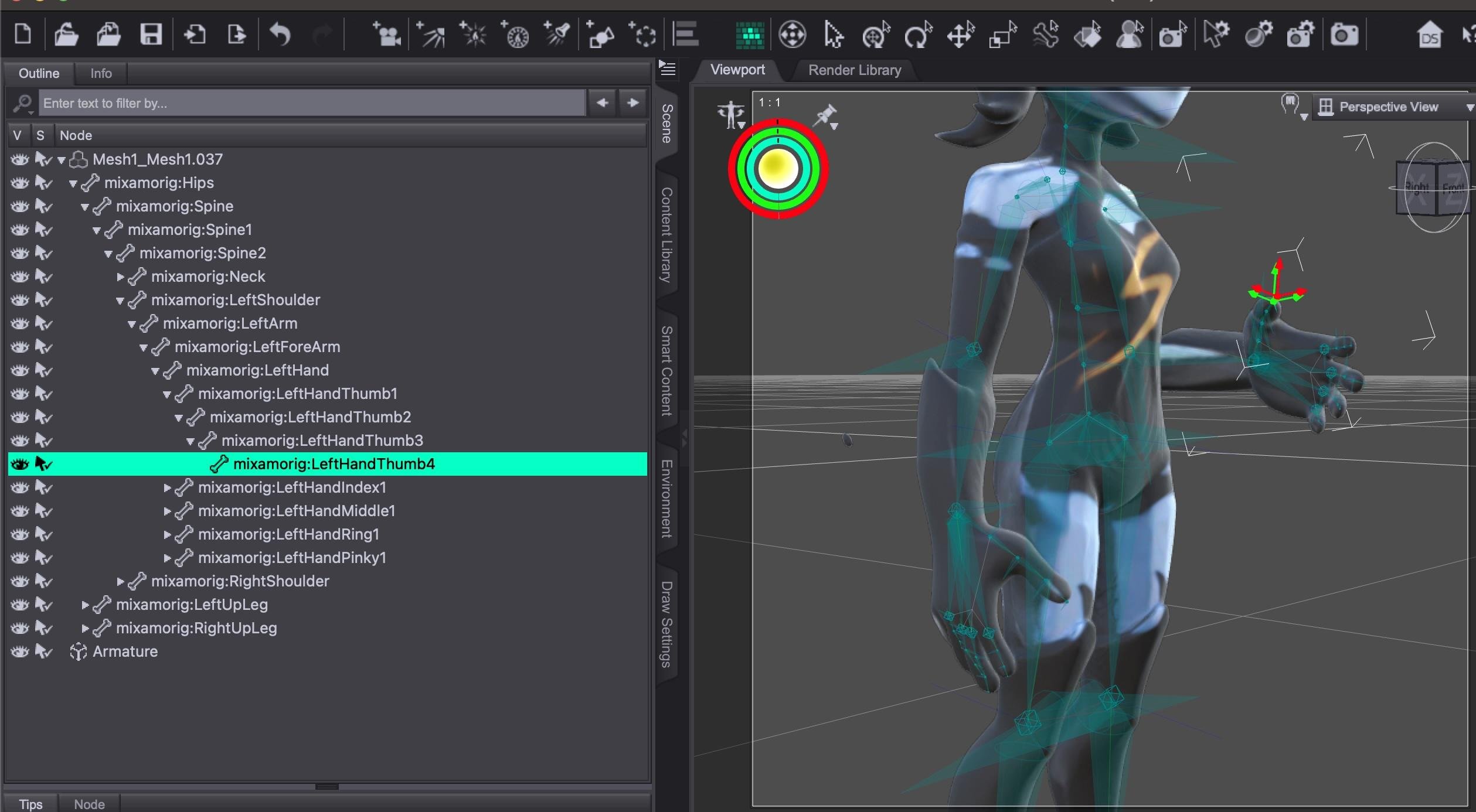
I have had lots of success with Mixamo rigged objs in D|S these last builds, it is fussy about which year of FBX though
you cannot manually pose them as bones fly all over the place but the saved animations load on each other
but
I am on Windows
maybe it's still broken for Mac

That's entirely possible. Using the latest versions (4.24.0.3) attempting to import a Meshy->Mixamo .FBX results in crashing as soon as the .FBX is selected, before any options come up.
Using the Alpha, though, works beautifully, as I mentioned, and all the bones are there and the figure can be posed.
 [Released] Hat Check for Genesis 9 [Commercial]
DoctorJellybean said:
Platnumk said:
Can't get it to work at all, No morph is ever created
2025-05-10 14:46:14.867 [DEBUG] :: Importing /Volumes/Private/My Daz3D Library2/data/RiverSoft Art/Data/G9HatCheckHigh.obj
2025-05-10 14:46:14.867 [WARNING] :: /src/sdksource/fileinput/dzimporter.cpp(227): Undo stack left open for file import - it will be closed to avoid errors
2025-05-10 14:46:14.867 [INFO] :: Importing File...
2025-05-10 14:46:15.192 [INFO] :: Importing: G9HatCheckHigh.obj...
2025-05-10 14:46:15.948 [INFO] :: Imported Wavefront Object: G9HatCheckHigh.obj
2025-05-10 14:46:15.965 [INFO] :: Imported file in: 0.1 sec (1097.54 ms)
2025-05-10 14:46:15.965 [INFO] :: Imported file: /Volumes/Private/My Daz3D Library2/data/RiverSoft Art/Data/G9HatCheckHigh.obj
2025-05-10 14:46:15.965 [DEBUG] :: Mask G9HatCheckHigh
2025-05-10 14:46:15.966 [DEBUG] :: Create Hair Morph RS Hat_2289 LayeredWinterStyleHair_195795 pCube(10q0000)20 2 0 true true false [object Object] 0
2025-05-10 14:46:16.229 [DEBUG] :: Num of Vertices 195795
2025-05-10 14:46:16.229 [DEBUG] :: Num of Facets 93692
2025-05-10 14:46:16.235 [WARNING] :: Script Error: Line 140
2025-05-10 14:46:16.235 [WARNING] :: TypeError: Result of expression 'oNode.inherits' [undefined] is not a function.
2025-05-10 14:46:16.235 [WARNING] :: Stack Trace:
<anonymous>()@/Volumes/Private/My Daz3D Library2/data/RiverSoft Art/Common/RSHatCheckFunctions.dse:140
2025-05-10 14:46:16.240 [WARNING] :: /src/sdksource/general/dzundostack.cpp(590): Call to DzUndoStack::cancel() with no matching beginHold()Which OS and DS version?
Daz 4.24, OS: MacOS 15.4.1.
[Released] Hat Check for Genesis 9 [Commercial]Platnumk said:
Can't get it to work at all, No morph is ever created
2025-05-10 14:46:14.867 [DEBUG] :: Importing /Volumes/Private/My Daz3D Library2/data/RiverSoft Art/Data/G9HatCheckHigh.obj
2025-05-10 14:46:14.867 [WARNING] :: /src/sdksource/fileinput/dzimporter.cpp(227): Undo stack left open for file import - it will be closed to avoid errors
2025-05-10 14:46:14.867 [INFO] :: Importing File...
2025-05-10 14:46:15.192 [INFO] :: Importing: G9HatCheckHigh.obj...
2025-05-10 14:46:15.948 [INFO] :: Imported Wavefront Object: G9HatCheckHigh.obj
2025-05-10 14:46:15.965 [INFO] :: Imported file in: 0.1 sec (1097.54 ms)
2025-05-10 14:46:15.965 [INFO] :: Imported file: /Volumes/Private/My Daz3D Library2/data/RiverSoft Art/Data/G9HatCheckHigh.obj
2025-05-10 14:46:15.965 [DEBUG] :: Mask G9HatCheckHigh
2025-05-10 14:46:15.966 [DEBUG] :: Create Hair Morph RS Hat_2289 LayeredWinterStyleHair_195795 pCube(10q0000)20 2 0 true true false [object Object] 0
2025-05-10 14:46:16.229 [DEBUG] :: Num of Vertices 195795
2025-05-10 14:46:16.229 [DEBUG] :: Num of Facets 93692
2025-05-10 14:46:16.235 [WARNING] :: Script Error: Line 140
2025-05-10 14:46:16.235 [WARNING] :: TypeError: Result of expression 'oNode.inherits' [undefined] is not a function.
2025-05-10 14:46:16.235 [WARNING] :: Stack Trace:
<anonymous>()@/Volumes/Private/My Daz3D Library2/data/RiverSoft Art/Common/RSHatCheckFunctions.dse:140
2025-05-10 14:46:16.240 [WARNING] :: /src/sdksource/general/dzundostack.cpp(590): Call to DzUndoStack::cancel() with no matching beginHold()Which OS and DS version?
Daz 3D is part of

Connect
DAZ Productions, Inc.
7533 S Center View Ct #4664
West Jordan, UT 84084Licensing Agreement | Terms of Service | Privacy Policy | EULA
© 2026 Daz Productions Inc. All Rights Reserved.