-
There's Always Another Sale Thread -- Discussions Only Pt 6
For those who passed on the MB Daniella bundle because of age-related concerns (and are willing to pay more in a potential Golden Ticket catch-up), there was an update to the character part of it:
2026-09-21 updated product to remove age-inappropriate materials and morph shapign presetAIUTO...CHI CONOSCE L’ITALIANO? PARTE QUATTORDICICrios said:
Domanda:
Se io compro la licenza per stampare in 3D Genesis 8 o Genesis 9, e gli applico un morph merchant resource, poi mica devo pagare la licenza anche del morph per stamparlo?
Se è Merchant Resource non dovresti dover pagare nulla, almeno è così per i prodotti digitali.
Ma nel caso di oggetti fisici, meglio chiedere al autore del morph o alla DAZ3D stessa.
Saving part of a G9 character's morph to use on another G9I have lots of G9 characters whose whole faces are created by one morph slider (as most are). Is it possible to save out part of the face morph, say the nose morph, so I can use give another G9 character the other character's nose?
I've tried recreating it with all the existing morph sliders, but it's tedious and just doesn't cut it... especially if the original character's morphs weren't created by the Daz sliders.
AIUTO...CHI CONOSCE L’ITALIANO? PARTE QUATTORDICIDomanda:
Se io compro la licenza per stampare in 3D Genesis 8 o Genesis 9, e gli applico un morph merchant resource, poi mica devo pagare la licenza anche del morph per stamparlo?
Let's appreciate/discuss today's new releases - ongoinger still further threadfelis said:
No idea why. I find using dForce addons a more elegant solution.
A possible reason could be that with two meshes, autofollow may work best than on one mesh with a morph?
jmucchiello said:
Why is that bad? I really don't understand what dForce Addons do.
To add to what Leana said, Mada has a tutorial on dForce addons, focusing on preserving shapes:
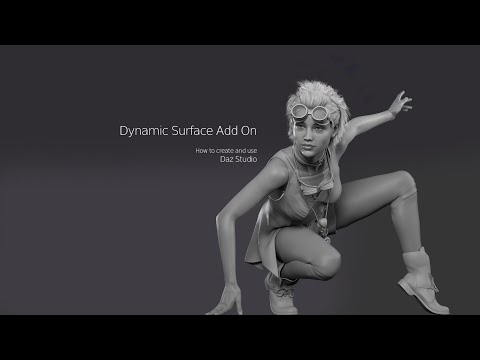
felis is using them to keep the shirt from this outfit closed:
https://www.renderosity.com/freestuff/items/99746/crop-shirt-and-miniskirt-for-g8f
You can also see them in action if you have the Wet and Dry Boyfriend Shirt Dress from Linday:
https://www.daz3d.com/dforce-wet-and-dry-boyfriend-shirt-dress-for-genesis-8-females
To continue with shirts, with dForce addons, it's possible to decide the number of buttons that'll be closed: to unbutton one button, you simply hide the dForce addon related to this button and you just have to re-rerun the simulation to see the difference.
On top of that, if you're creating corrective morphs for the clothes you're using, one mesh mean the work done on the closed shirt is directly usable with the open shirt too (in some case, you could have to create a morph to fix some pokethrough with the open morph, but it'll still require less work than creating two full correctives morphs).
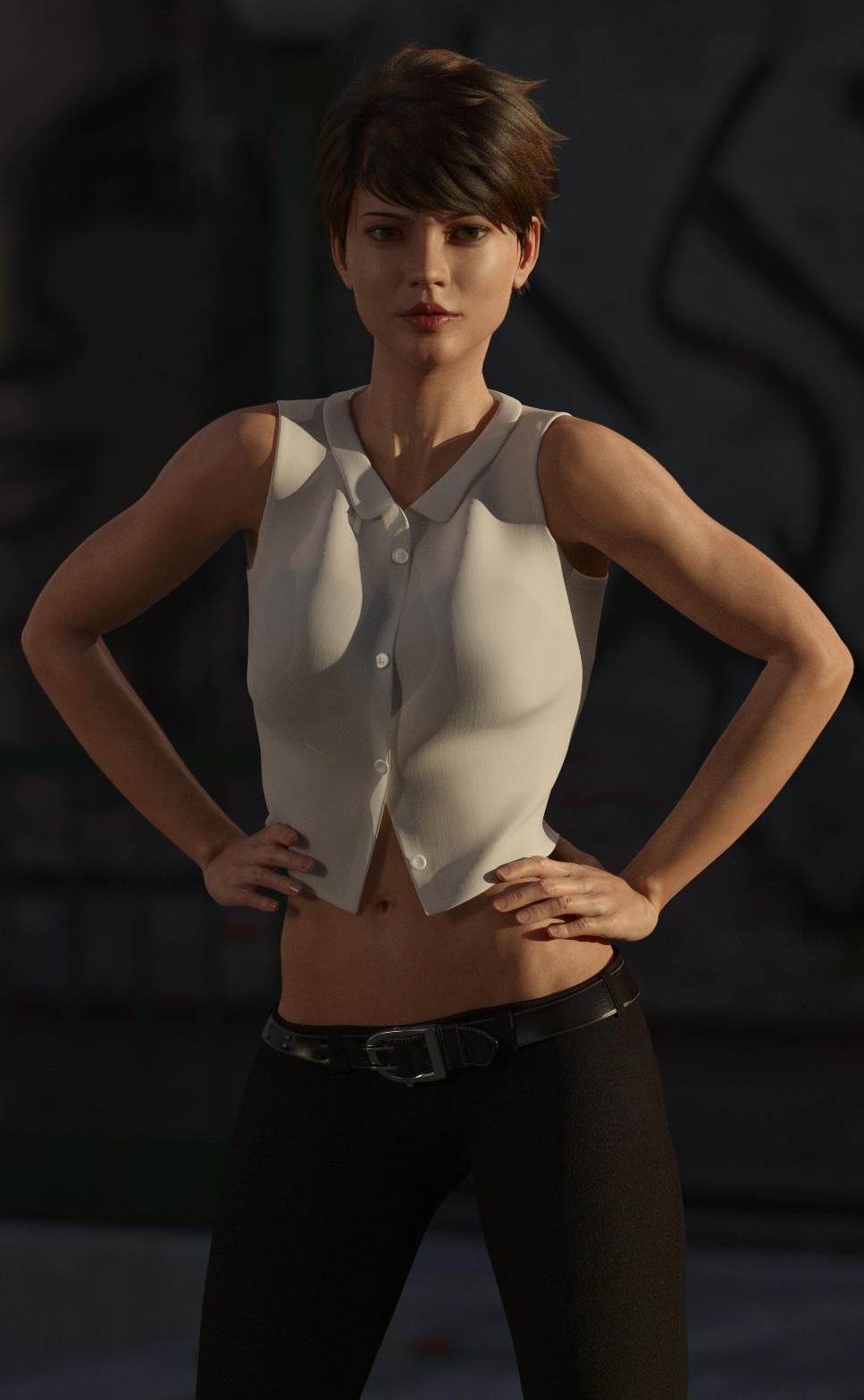
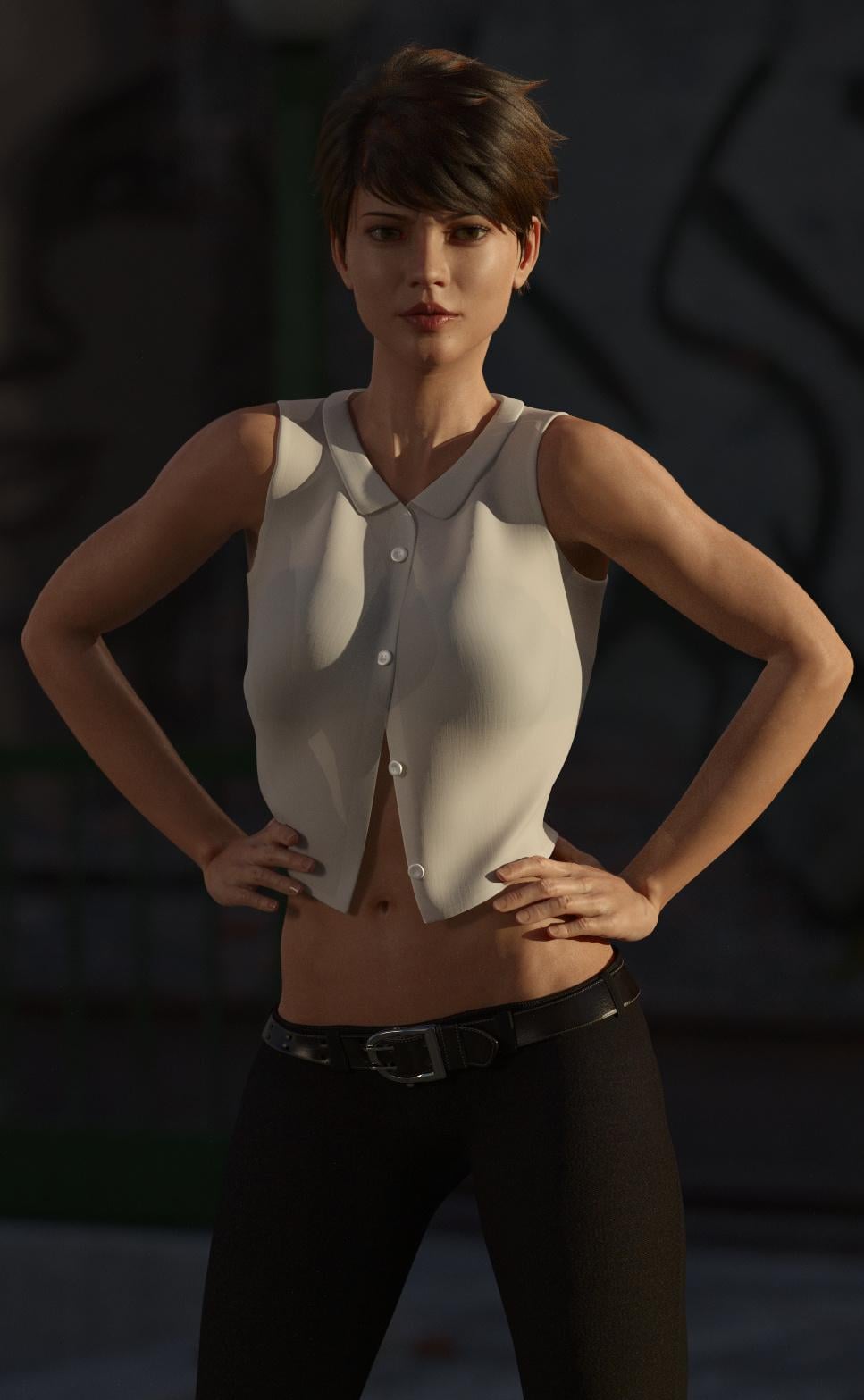
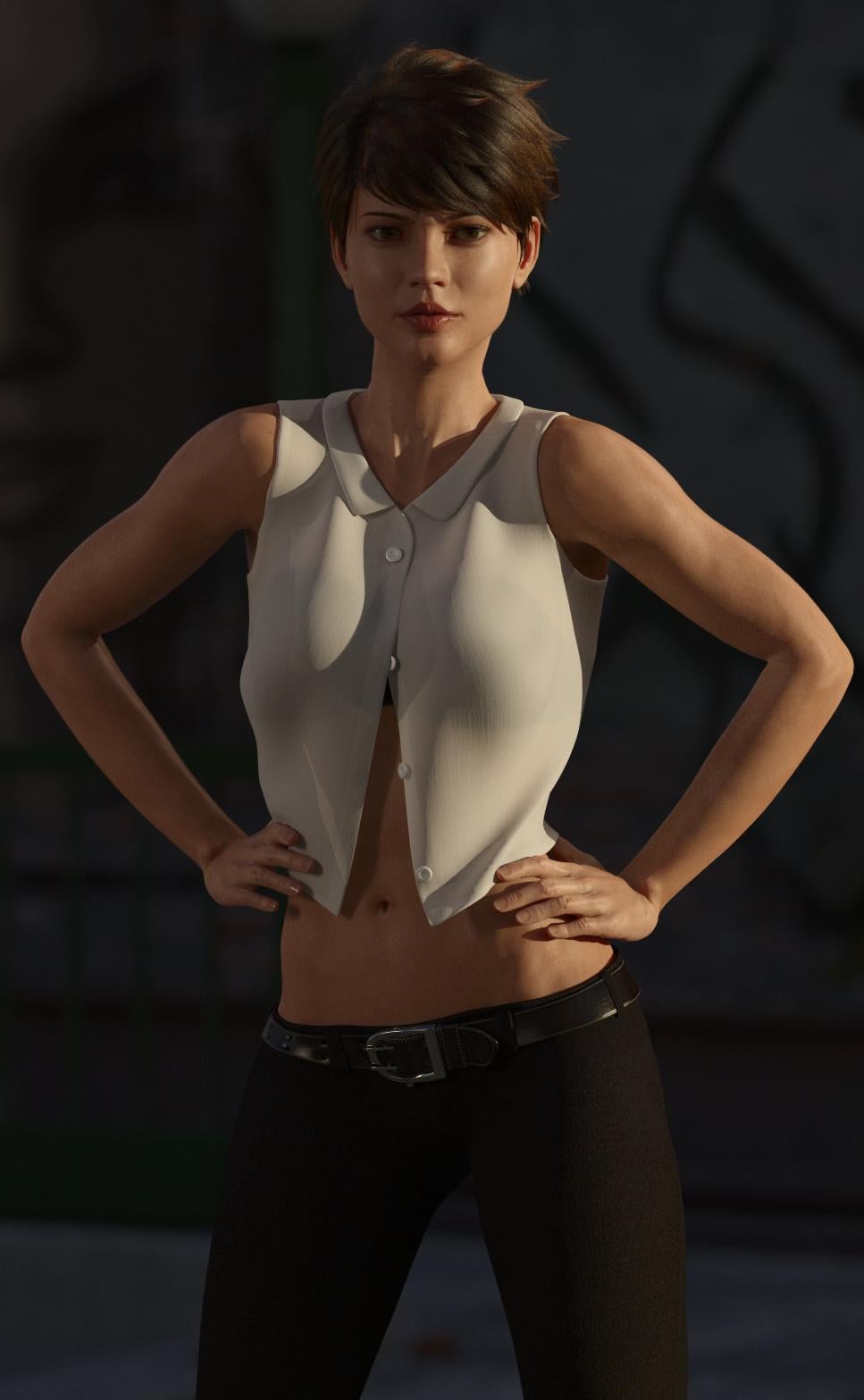
A couple of examples with felis's crop top (buttons are hidden from bottom to top) and I didn't use the open morph provided by felis: it's just the result of three simulations with a different number of buttons hidden.
1 button hidden:
2 buttons hidden:
All of them hidden (I don't think there was any difference between hidding three and four, likely due to the pose used):
 Let's appreciate/discuss today's new releases - ongoinger still further thread
jmucchiello said:
Why is that bad? I really don't understand what dForce Addons do.
A dForce add-on is an invisible helper object used to give some structure to the original mesh when simulated.
There are two main uses that I know of:
First one is to provide "shape support" to a part of the mesh, for example adding a hoop under a skirt, or when you have a tubular item but don't want it to "flatten" when simulated.
Second one is to "glue" together some vertices so they keep their position relative to each-other when simulated, which is the case which interests us.
Say for example that you want to create a shirt which can be openend and closed. You model the shirt as opened, with left and right sides separated, then morph it so that the sides are over each other as if it is closed. But if you just simulate the morphed version as is, there's a good chance that the sides will not stay together.
One option to handle that would be to have a separate "closed" mesh where the sides are actually joined so they don't move independantly when simulated. The problem is that you have now two separate meshes which need separate morphs, and getting the materials to work on both versions will also require some extra work to get the UVs to match.
A dForce add-on enables you to have only one version of the base mesh, but you add a helper to the "closed" version which will "pair" vertices from the left side to the right side, and so when dForce computes the simulation it will keep them together.If you want some examples you can checlk this thread (which includes lots of interesting stuff and tutorials about dForce): https://www.daz3d.com/forums/discussion/comment/3845981/#Comment_3845981
Genesis 10Matt_Castle said:
Ruthven said:
What I hope is a 3 figure set: masculine, feminine, and gender-neutral (more similar to Genesis 1 than 9) for creatures, all with cross/figure features for wearables and similar.
What benefit are you imagining this would add? Unless they have different weight maps (which would break clothing compatibility), then there's not going to be any meaningful difference from a unisex base. And it would *absolutely* break geografts.
Admittedly, one thing I'm peeved that Daz did not set up as a standard for G9 was to have masculine figures all built on top of the base masculine shape and feminine figures all built off base feminine so that clothes could at least rely on being able to have those two base shapes supported rather than having to approximate the entirety of any unknown morph with auto-follow.
It's because I don't like how G9 unisex chest turns out to males; It has too a "boobish" look to me; to get it right, I have to set female to negative. I also prefere a more "V" shape line for those muscles on man. I think the two models tend to look better when built specifically. So, if it is wanted to keep a single base figure, then I think there should be added more polygons at least to allow those kind of differences to be morphed out better, instead of building something "in-between" that actually looks good on neither.
Gen 9 pelvic bulge in outfitsbilyatboring said:
Are you saying that I create a morph for each of my outfits and lose the deails by smoothing out the bulge.
You'll lose details if the morph is created within Daz Studio using a Smoothing modifier (if you don't follow another crosswind's trick I didn't know about).
If you're using an external modeller, it will depend on how you're creating the morph and the starting point used:
- if you start from the result of autofollow and use the smoothing brush to fix the problem, you'll lose details in the areas smoothed, but keep them elsewhere.
- if you start from the base shape of a piece of clothing, and use, let's say, Blender's Edit mode tools, you will retain more details (but it will likely took you longer to create the morph because you'll have to do the work done by autofollow).
bilyatboring said:
I'm sorry but thats not a solution I'm looking for.
Then you can also try the Sickleyield's products I linked: they are advertised as tools to solve that problem.
You can also try to use timeline simulations.
With a native dress, you put your character in the base shape (so Genesis 9 Base for G9, Genesis 8 Female for G8F and so on) and default pose at the first frame, then, you build a 45 frames timeline as follow:
- Frame=15, character is in default pose and it's final shape.
- Frame=30, character is in the final pose and final shape.
The last 15 frames will allow the simulation to stabilize.
With an autofitted dress, as long as every part of the dress is simulated, you can bypass autofit completly by having the dress fitted to an almost invisible to simulation figure of the correct generation (so G8F for a G8F dress, G9 for a G9 dress, etc) and building a timeline following the same principle as the first case except you have to manage two figures.
Exemple of using a Genesis 9 pajama on G8F in on of my render, Morning routine (with basic explanations, I gave more in one or two forums messages but I don't have the link at hand).
DrunkMonkeyProductions said:
Don't worry, none of Elor's suggestions actually solve the problem, at best they just hide it, as long as you don't bend the legs, or try to run a dforce sim on it.
Hu?
Using a morph to remove the triangle does work and it won't magically come back after a simulation (I doubt it'll come back after bending the legs even if other problems will likely appears), regardless of the generation of origin of the outfit.
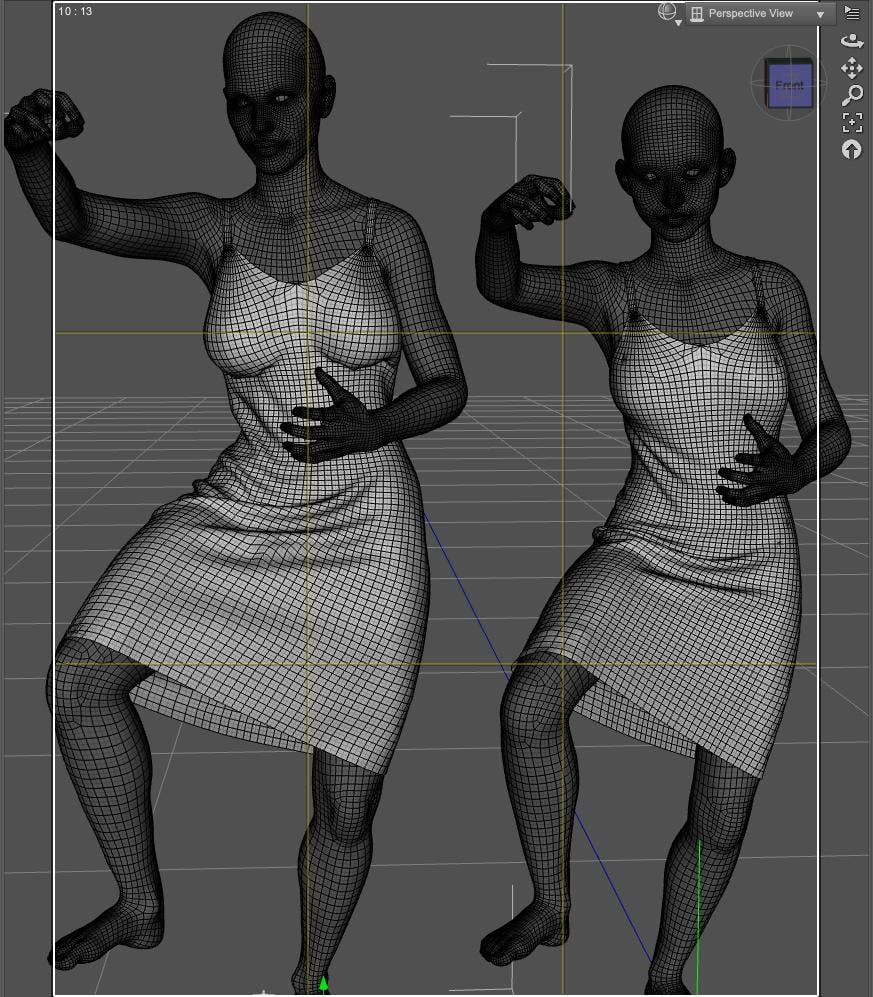
Same dress after a simulation (on the left, CBS created by autofollow while on the right, I created the CBS from the dress base shape in Blender), with the smoothing modifier disable: the triangle area is less visible on the left (but I would say is still here).
What's perfectly visible is how the dress drapped around each character's breasts and how the work done to avoid the usual 'vaccum sealed' effect from autofollow was not reversed by the simulation.
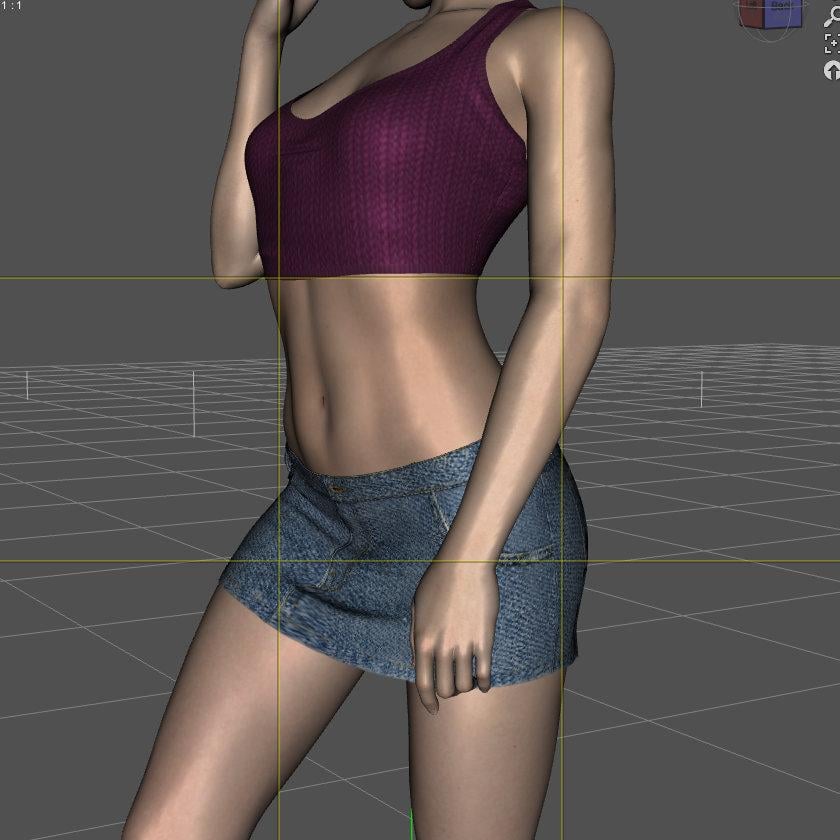
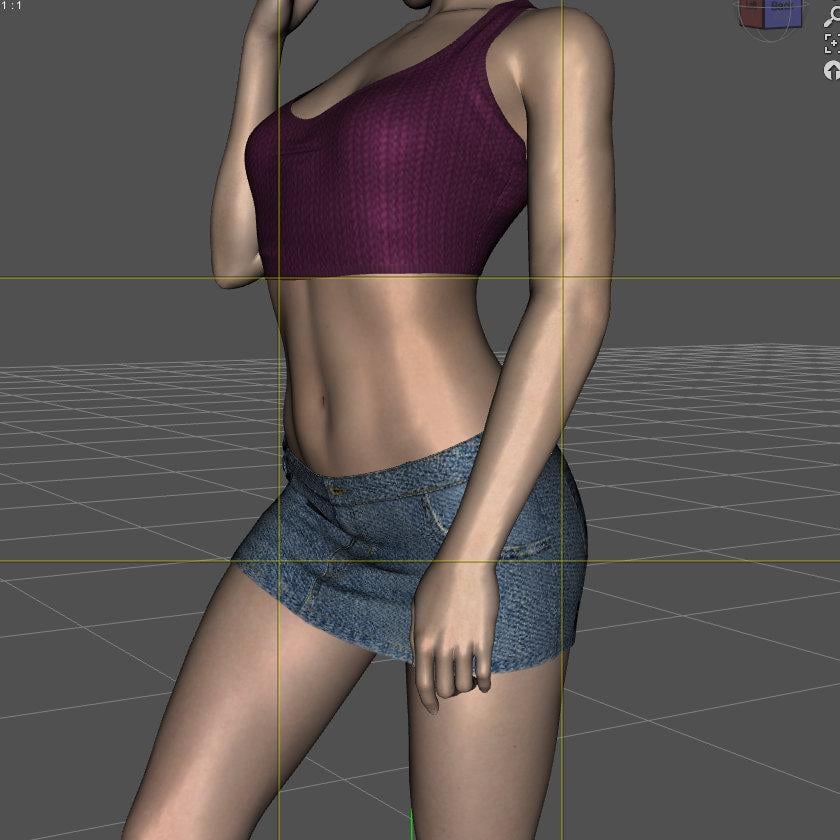
If you prefer an example with autofitted outfit, here's one with a G9 skirt on G8F (less a triangle problem than a problem with the legs pose difference between G9 and G8): the texture deformation (due to the mesh deformation) is still gone after a simulation done with a morph made to fix the problem:
 CBS issue
Almost certainly a corrective morph kicking in when it wasn't needed (probably missing a multipler with the shape it belongs to). If you had checked hidden properties (Parameters pane option menu>Preferences) with a minimum pose applied you could have found it by zeroing each until it went away, then checked to see if the product had an update and reported it as a possible bug if not.
Poses for Cat Zeus by VyusurI can see you not wanting to get Zeus if you don't have pets yourself. We currently have two cats, and they are a pleasure to watch them do daft things. A 180 degree twist in their spine is almost a daily occurrence here, however impossible humans feel it should be. Cat Zeus is the most accurate cat I have to work with. Not perfect, but can get closer to what real cats do. They are hard to pose, especially given how they flow around obstacles. Then the cat-human interaction poses, much more difficult than just between humans. I haven't ditched the idea of doing a pose transfer to/from DAZ House Cat and the Hivewire Cat, but haven't started it yet. Regards, Richard.ID badge on lanyardThanks for the help. Doing a storyt hat will be a lot of renders, and the next sequence the female character is in the gym where she works. Suddenly struck me she shoudl be wearing something to show she's staff, and my mind went to ID badges on lanyards, though now other options have occured.
But that's enough options for that. Back to the really big problem of none of the sports bras here will fit her at all properly. Bunch of morphs used to create her character, but the problematic one is Freja8, which i'm using as the base. NONE of the sports bras include a Freja8 morph, despite custom morphs for a bunch of other DAZ cgaracters who look like they've never been in a gym. Autofollow screws up badly in the region where the breast-band is. None of the products supposed to help fit clothes include Freja8 or the adjustments needed to fix what auto-follow screws up in the Freja8 morph it creates. And while I used to be very handy with DFormers, while I've been away DFormers have been completely wrecked to the point of being unuseable. Feel like I'm banging my head on a wall.
Transferring G8 morphs to G9crosswind said:
AsuCafe said:
Is this feature in Daz Studio 6 located at Figure > Shape > Transfer Active Morphs?
I don't know which step went wrong.

That function is used for transferring morphs from the old figures e.g. V3/V4 with Parametric Joint Parameters... to the conformers. Genesis figures generate morphs on conformers by using Auto-Follow.
Thanks for the reply, but I really don't understand these terms. I remember succeeding before, at least that's what I say historically.
Something to add FBMFreja8 (and Freja8Bulk) morphs to clothesSomething like 'SY Clothing Morpher for Genesis 8 Female' but specifically to add FBMFreja8 (and Freja8Bulk) mortphs to clothes, or some fixes like the nes in 'Fit Control' buut which address the clothing Freja8 issues.
OK, I know I've got zero chance of getting it, but I want a good moan at various PAs. I've got a G8.1F character - for a rendered story who will need assorted different clothes - who is a combination of various morphs, but at the base uses Freja8 (with the Freja8 Bulk). Trying to dress her for a scene in which she needs to be wearing a sports bra, I spent ALL of yesterday gong through something like 20 different sports bras by various PAs, mostly from DAZ, trying to get ONE to fit properly. OK, some do not have PA provided morphs for any of the DAZ G8F/G8.1F characters, but many have some, some have a LOT, including a variety of DAZ characters from skinny to very curvy - but NOT ONE has a provided Freja8 morph. I mean, OK, you're making some floaty chiffon summer graden party dress, Freja8 isn't the msot obvious character to service (though that's a bit playing to stereotypes). But A SPORTS BRA! She is the one DAZ G8F characetr who is actually built like an actual professional athlete in many sports, and there's NOT ONE sports bra that fits her, while there are many that fit characters who've clearly never seen the inside of a gym. FFS.
And before you say autofit, autofit screws up with EVERY SINGLE ONE. With her body shape below the breasts, what autofit does is turn what ought to be a straight breast band below the breasts into a wave like a curved M: it goes up below the outside of one breast, then curves way back down to the centreline/sternum, then curves back up to the outside of the other breast, then back down round the side - AND it stretches and shrinks the thickness of the band too on itsw ay round in an utterly not-real-world way. On every single G8F sports bra. Freja8 is the one DAZ character that REALLY needs a custom provided morph in the clothes, but no - no clothes at all. Was a time I'd have fixed it fairly trivially with DFormers, but I find that in the long gap I was away, DFormers have been completely ruined. Used to be able to create them fixed to and centred on a body part of the clothign or whatever and easily select the affected zone on the figure wherever it was and in whatever position. Now the DFormer just deals wiht the whole figure mesh, and appears to only work on the DEFAULT mesh in teh default location and position, for heavens sake. Trying to waft and scale the sphere around in empty air guessing where it needs to be and hoe scaled and rotated to have the vertices I want affected on the actual morphed figure and in the psoition it's in is HOPELESS. How to ruin what used to ne a great tool, guys.
And 'SY Clothing Morpher for Genesis 8 Female ' includes an extended list of character morphs, but, of course NOT Freja8. And Fit Control helps - a little, like shoving up the sternum area, but has no morphs to bring the area on the outside fo the breasts down and undistort them.
Aaaaargh.
I'm just about to buy a sports bra (and shorts) from another store, because while it also doesn't have a Freja8 morph, something about ti makes it more amenable to correction with Fit Control - not perfect but just about useable unlike ALL the sports bras here.
You know, was a time you might assume an interest in portraying reasonably husky, muscualr women was a very minority taste. Since the 'democritisation' of these things with e.g. OnlyFans etc, you really can't argue that any more. Minority, yes, but not that small a minority - several of the very top OnlyFans models in terms of numbers of memberships and sales are female bodybuilders, revealing a much greater interest in athletic/muscular female physiques than might previously have been assumed; adn there's a lot of muscular female art on DeviantArt. Maybe DAZ belatedly noticed, and that's why Freja9 was one of the first characters released for Geneis 9 and why i notice many Genesis 9 clothing products DO contain Freja9 morphs from the creators. Doesn't halp me with Freja8, though, and while I toyed with re-creating my character with Genesis 9, I had variosu reasons to stick with 8.
Transferring G8 morphs to G9AsuCafe said:
Is this feature in Daz Studio 6 located at Figure > Shape > Transfer Active Morphs?
I don't know which step went wrong.
That function is used for transferring morphs from the old figures e.g. V3/V4 with Parametric Joint Parameters... to the conformers. Genesis figures generate morphs on conformers by using Auto-Follow.
Gen 9 pelvic bulge in outfitsas long as you have it fitted to the base figure in the zero pose at base resolution, sending to Hexagon and using the smoothing brush there and sending back to DAZ studio as a morph is also an option
Gen 9 pelvic bulge in outfitsbilyatboring said:
Are you saying that I create a morph for each of my outfits and lose the deails by smoothing out the bulge. I'm sorry but thats not a solution I'm looking for.
That's a common issue of weight projection when Auto-Fitting clothing on G9 which has a different skeleton / weights from previous Genesis generations.
So, yes, to remove that triangle bulge, you have to fix the clothing shape after Auto-Fit is done... but you don't have to create a morph, just use the function: Figure > Geometry > Update Base Geometry.... It'll only update the garment's vertex postions without creating any morphs.
Besides, if you go for the way of using Smoothing Modifier, you also can avoid losing details by using : Morph Loader Pro > Attenuate By option, i.e. to just update the bulge area (on which you create a Selection Set firstly...) with the smoothed garment object.
If with Blender or Premier Tier's Geometry Sculptor or Sculpt Tool plugin, the process of fixing will be much simpler ~ ~ The ways that Elor suggested would work ~
The screenshots show the result that I fixed an auto-fitted skirt by using Smoothing Modifier + Update Base Geometry, with no morph created, almost all details preserved.
Edit: Finally, optimizing weight maps / corrective morphs might be needed... dForce ready clothing may save you some time depending how well it works on the garments.
Gen 9 pelvic bulge in outfitsbilyatboring said:
Are you saying that I create a morph for each of my outfits and lose the deails by smoothing out the bulge. I'm sorry but thats not a solution I'm looking for.
Don't worry, none of Elor's suggestions actually solve the problem, at best they just hide it, as long as you don't bend the legs, or try to run a dforce sim on it.
The real solution, is worse.
You have to correct the rigging and weight mapping to better match the original figure.
Unfrotunately autofit can screwup the mesh so bad, you may need to take it into a modeler program to fix the squashed polys.
In most cases, you might as well start from scratch with the amount of time it's going to take to fix.
I've attached a couple images to give a better idea of what's going on here.
Genesis 10nightwolf1982 said:
Genesis 10 would be a mistake at this point in time. Genesis 9 is pushing the technical limitations of Daz Studio, whether you're using DS4 or DS6. There really isn't anything feature-wise that can be implemented that would make an entire new figure necessary or viable.
I don't think, that especially G9 pushes technical limits.
Those limits have been pushed with G8. G9 has infact been stepping down.
There is nothing really, that can be improved with figures. The DAZ Studio application has to be improved now.
Better animation
Feet/Hands floor contact
Better rigging system for more realistic joint bendings
Soft body tissue simulation (Bones, muscles and fat)
Way better universal expression tools. Those current FACS don't work better than Morph Targets.
Smoothing modefier for more than just one host figure, in order to avoide poke throughs on layered clothes.
Much more important, than another Genesis figure would be finally a new real time Hair and clothes simulation.Gen 9 pelvic bulge in outfitsAre you saying that I create a morph for each of my outfits and lose the deails by smoothing out the bulge. I'm sorry but thats not a solution I'm looking for.
Gen 9 pelvic bulge in outfitsI don't have any of them so I don't know how good it is, but Sickleyield is selling tools to deal with that triangle shape:
- https://www.daz3d.com/sy-detriangulator-genesis-8
- https://www.daz3d.com/sy-detriangulator-tunic-genesis-9
The other way to deal with the problem is to create, for the clothes, a morph that will replace the one generated by auto-follow (which can be done by using Blender, Zbrush or other softwares like that). An example, on a simple dress:
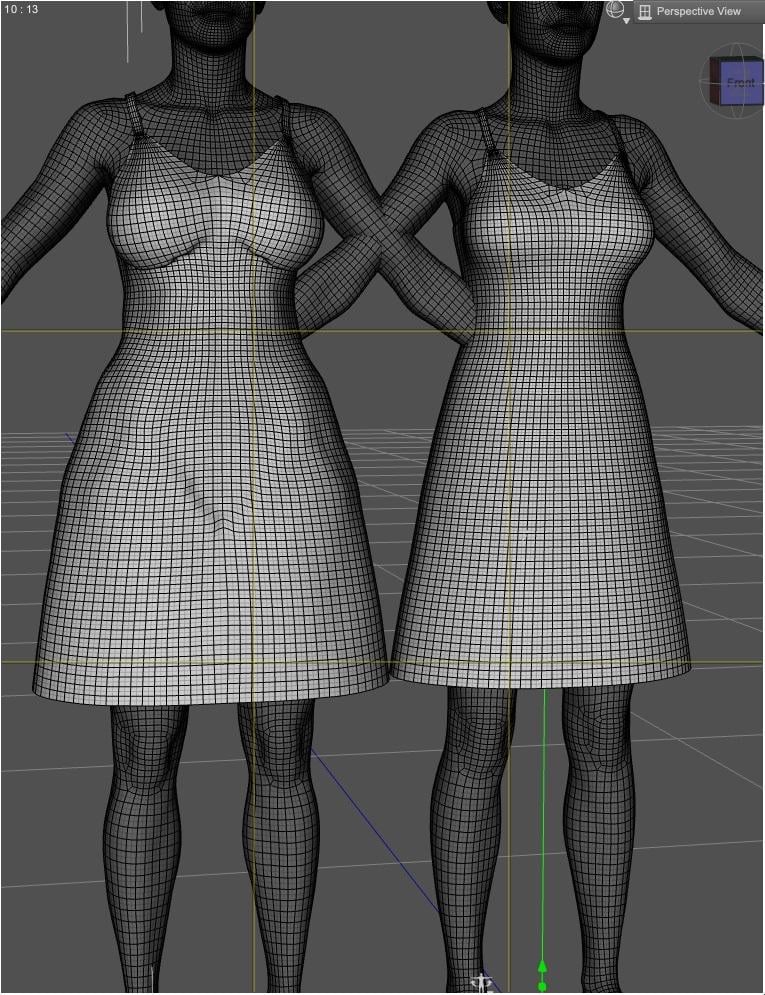
On the left, the dress worn by a character for which there is no such morph was created (smoothing is disabled to show the problem more), on the right, a character with a morph created.
Jay Versluis has a couple of videos on the subject:
It's also possible to create such morph by using the Smoothing Modifier in Daz Studio, setting it to very high values (@crosswind has some explanations somewhere on the subject), but the downside is that you'll lose details you could retain creating it yourself, so on some clothes it may not be an option.
Daz 3D is part of

Connect
DAZ Productions, Inc.
7533 S Center View Ct #4664
West Jordan, UT 84084Licensing Agreement | Terms of Service | Privacy Policy | EULA
© 2026 Daz Productions Inc. All Rights Reserved.
















