-
3D Printing Licences - What?
arbee999 said:
daveso said:
wsterdan said:
In the last few years, I've printed hundreds of DAZ models for myself and patiently waited for an actual commercial license that I might, eventually, offer my models as added incentives for some of my "someday" schemes.
I am absolutely amazed that they've come out with a commercial license to let me do this for only $1.99 per item ($1.39 for Platinum+) with unlimited prints allowed; that it's a one-time fee and not monthly blows my mind. I support some 3D miniature Patreon and Tribes artists and their Merchant licenses (usually $25-$50) are monthly, all rights to sell the prints stop once you stop renewing.
LIke many here, I have over 10,000 DAZ originals purchased before July 13, 2022 that I can get licenses to, for free. Basically, DAZ is giving me -- at no extra charge -- $20,000 worth of lifetime licenses... for FREE!
WOW! Just... wow.
If DAZ doesn't find a way to automate the process of marking my licenses as purchased, I'll do it myself for the few dozen that I aniticipate actually using commercially in the next couple of years and, should I trip across an item of five that I need for something I *didn't* anticipate, I'm perfectly fine with paying another $10 or so for the license, because it's still the cheapest licence out there.
I confess to seeing a lot less "thanks, DAZ" posts than "$20,000 in free licenses isn't enough, you need to work harder to make it better for me" posts, especially from people who admit they've never printed anything nor do that even anticipate printing anything commercially.
THE BOTTOM LINE; When we purchased all of our 10,000 models, THERE WERE NO COMMERCIAL LICENSES. We are being offered free licences for a limited time. DAZ didn't have to do that. They could have said that prinitng licenses were now avaiable for $1.99 an item, and those who want them would have been thrilled and people who weren't interested wouldn't have had anything to complain about.
DAZ doesn't *owe* us free licenses, at all. Not even one. It wasn't offered nor implied when we originally bought the items. This is a free bonus. Free, for the next two months.
So, thanks DAZ, for your incredible generousity regarding your 3D commercial licenses. I'm sorry you have to field so much negative backlash for being so generous, hopefully this won't make you shy away from being generous in the future. It's truly sad that you can't give something away for free without being slammed for it.
-- Walt Sterdan
please write a tutorial explaining step by step how to prepare a DAZ character for printing? I fail constantly and have given up.
DAZ did send out an email with somne links - how-tro's and such
thanks..yea I went there but its pretty elementary. like what to do when the easy mode doesn;t make things manifold? is there a way to make hair solid? how about clothes...holes and more... You have to know quite a lot about exporting obj files, the DAZ /Blender bridge, it rarely works for me so I just export/import obj files. Dude Genesis with no hair or clother seems to work pretty well. I have had success with some terrain.
Redactedmyotherworld said:
kyoto kid said:
Cybersox said:
The thing that really bugs me is that some of these are so blatantly obvious, like a g8f product being in a folder labled "Genessis 8 Female" or a character being in a folder labled "character" instead of the proper "characters". I've even got a Dragon 3 product that shows up in its own folder under "people" I can understand PAs making these kinds of mistakes, but even the most rudimentary product testing should have caught stuff like that.
...this is why some like myself have taken the time to set up our own custom library/runtime structures to create a more logical organisation of items.
This was a lot worse when we still just used the old Poser runtime structure as for example, items like shaders ended un in places like the "Poses" instead of "Materials" folder. Often times product folders used the names of the creator instead of what the item was. (this latter situation still does persist).
Yeah, there is the database and smart content, but when it breaks it is a pain to deal with, and any products without metadata will not show up (particularly freebies not from here).unless you find a way to make them to. Sometimes even products from the Daz store don't show up. and end up in the "lost & Found" requiring a refresh of the database.
With you on this.
That's why I have 425 products out of 17,000 installed.
I install what I need for whatever project I might be working on or items I want to experiment with / test.
Then when I am done, I uninstall them. After I've backed up the project so that I know what needs to be reinstalled if I want to revisit it.
This way my unmanaged, haphazard, impentrable forest of content is only a small garden with a couple of weeds.
Redactedkyoto kid said:
Cybersox said:
The thing that really bugs me is that some of these are so blatantly obvious, like a g8f product being in a folder labled "Genessis 8 Female" or a character being in a folder labled "character" instead of the proper "characters". I've even got a Dragon 3 product that shows up in its own folder under "people" I can understand PAs making these kinds of mistakes, but even the most rudimentary product testing should have caught stuff like that.
...this is why some like myself have taken the time to set up our own custom library/runtime structures to create a more logical organisation of items.
This was a lot worse when we still just used the old Poser runtime structure as for example, items like shaders ended un in places like the "Poses" instead of "Materials" folder. Often times product folders used the names of the creator instead of what the item was. (this latter situation still does persist).
Yeah, there is the database and smart content, but when it breaks it is a pain to deal with, and any products without metadata will not show up (particularly freebies not from here).unless you find a way to make them to. Sometimes even products from the Daz store don't show up. and end up in the "lost & Found" requiring a refresh of the database.
With you on this.
RedactedAll of that is well and good, but complete misses the point I was making.
If I am in DIM and I am trying to filter Shaders, there is no way to do that. Some Shader packages have the word "Shader" in the file name. Some don't. From there it just gets worse in trying to narrow down Shaders.
The "black magic" I referred to is what is built into DIM's filtering. So DAZ should update the DIM Install Filters or whatever the package is. They shouldn't expect that every user will learn how to code filters and then implement them.
The bottom line is, I do this for a hobby. I don't want to have to learn a new language just to be able to sort through my purchased content. I'm certainly not going to install 17,000 products just to be able to filter the directory names. Which may or may not have the right names to begin with.
I only wanted to bring it up as one more ripple of problems that happens when misspellings, bad metadata, etc. makes it through QA.
I know this will probably all be disregarded... but if DAZ wants to know why they don't attract and retain as many new users, its because the whole process is far from user friendly. Just band aiding the problems only makes them fester and infected.
RedactedJason Galterio said:
Richard Haseltine said:
Jason Galterio said:
Taoz said:
Jason Galterio said:
If DAZ wanted to get rid of me as a PITA customer, then all they would have to do is add product sorting to DIM. I'd probably have an immediate joy aneurysm.
Sorting based on which criteria?
Just being able to do simple things... Like "Show me Shaders." "Show me G8F Characters."
The product sorting in DIM right now is just guessimates using fancy filters on the product names. Having actual, meaningful metadata associated with the archives would be nice.
That is not true, filtering can be based on many things other than string matching for the name (though that is an option) http://docs.daz3d.com/doku.php/public/software/install_manager/referenceguide/interface/filter_field/advanced_filtering#file For example, you could use the paths of files in the package to identify morphs etc.
file::rx::ci::^/data/DAZ 3D/Genesis 8/Female/Morphs/.*
--
file::rx::ci::^/data/DAZ 3D/Genesis 8/Female 8_1/Morphs/.*
--
file::rx::ci::^/data/DAZ 3D/Genesis 8/Female/Projection Morphs/.*
--
file::rx::ci::^/data/DAZ 3D/Genesis 3/Female/UV Sets/.*
--
file::rx::ci::^/People/Genesis 8 Male/Characters/.*Okay, there are multiple problems with this approach.
1. It only works if the products are installed.

2. It doesn't work with products that aren't consistently named.


The RegExp can be modified to handle variants:
file::rx::ci::^/People/Genesis 8 Female/(Characters|Character)/.* - Character or Characters
--
file::rx::ci::^/People/Genesis 8 Female/Characters/.* - just Characters
--
file::rx::ci::^/People/Genesis 8 Female/Character/.* - just Character3. The last time I did have everything installed and did this, it was insanely slow because of the number of products I have in DIM.

4. As far as I know, it can't differentiate between periods in the file names.Which is a big problem with the 8.1 files.

If you preceed the dot with a backslash the ., i.e., \., it "escapes" the dot's syntactical meaning of "any character" within a regular expression (rx::) and makes it function as a literal character.
But most of all, this black magic annoys me, which is just a trick to try and catch the 8 in the filename and ignore other instances of 8. And not use any sort of metadata:

Which doesn't catch any of the 8.1 characters, Like Kento and Leanne:
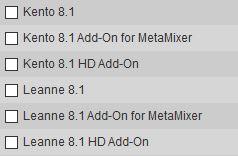
rx::ci::^[A-Z]+\b ?(?:[A-Z]+\b)? 8(?:\.\d+)?$
--
This is the same expression, but "(?:\.\d+)?" has been added between between the "8" and "$", which translates to "an optional non-capturing group consisting of a dot followed by one or more digits" at the end. There are a great many guides availble online to using RegEx syntax.The final two things I will say is that there is metadata associated with the packages, its just not consistent or checked.
Obviously if there are errors in the emtadata they will be an obstacle to filtering - though filtering, e.g by path ("female" vs "male") can help. if you find bad metadata it should be reported, of course, but that doesn't mean that the filtering system is bad or that it doesn't work from the metadata.
Like this, what's the difference between "Software" and "Software Only?"
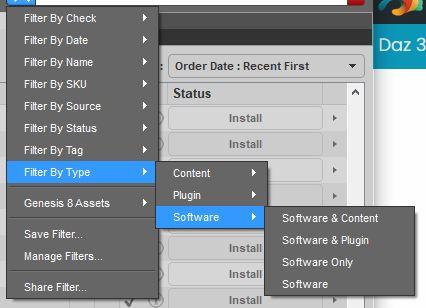
Software is a catch-all while the previous three are specific. See
http://docs.daz3d.com/doku.php/public/software/install_manager/referenceguide/interface/filter_field/advanced_filtering#type_s
http://docs.daz3d.com/doku.php/public/software/install_manager/referenceguide/tech_articles/types/startBut this one is my favorite. If I am searching for "Plug in" under "Type" why does Mystic Gorge, Clothes, and Characters show up?
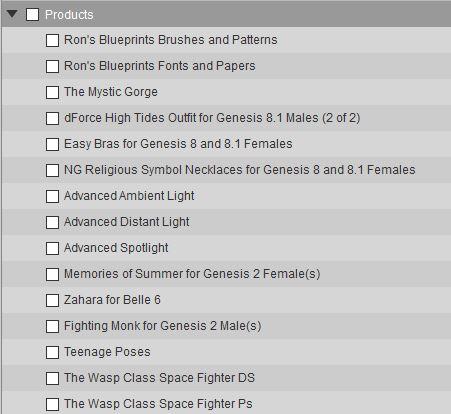
There may be good rasons (I think the Advanced Lights install like plug-ins, they put code, shader code, in the application folder) or it may be a mistake.
RedactedRichard Haseltine said:
Doc Acme said:
Richard Haseltine said:
Bear in mind that, as far as I ama ware, metadata is created in-house as part of the QA and package process, it isn't one person creating it and another person proofing it - that makes it much easier to miss errors /looks shame-faced at own posts/.
Does that roughly traslate to "too many cooks spoil the broth"?
;)
More like many hands make light work
As is often the case, a balance achieves the best results.
Daz3d VR Studio?RavenHawk said:
Is there a way to use a vr set to "dive into" the design enviroment and adjust props/lighting/camera's?
I wish! Currently there is no native VR support for Daz Studio unfortunately. You could try VirtAMate as mentioned, but it's a pain to import Daz content and it only uses the G2 models for now. You could export DS content into Unity and then adjust those scenes in VR since any Unity project can be viewed in VR
Are there any "smart" ways of making an asymmetric imported G8F model symmetric in Blender?Are there any "smart" ways of making an asymmetric imported G8F model symmetric in Blender?
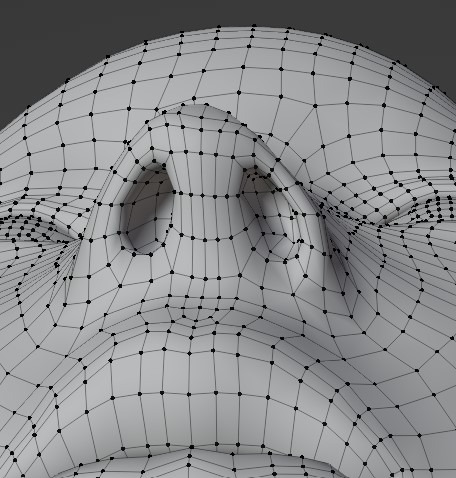
For example I have this asymmetric imported G8F model (the nose is skewed a little. The blender file is attached below, zipped). Instead of using the g button on keyboard and mouse to adjust the nose (I found it very tedous.. whenever I feel like it becomes symmetric from one angle, it is actually asymmetric from another angle...), do you know any smarter way I could look at to make it symmetric quickly? Also please don't change the mesh since I need to import it back to Daz.
By symmetric I don't necessarily mean abosolutely symmetric, but unfortunately the only way I know is grab-and-drag....
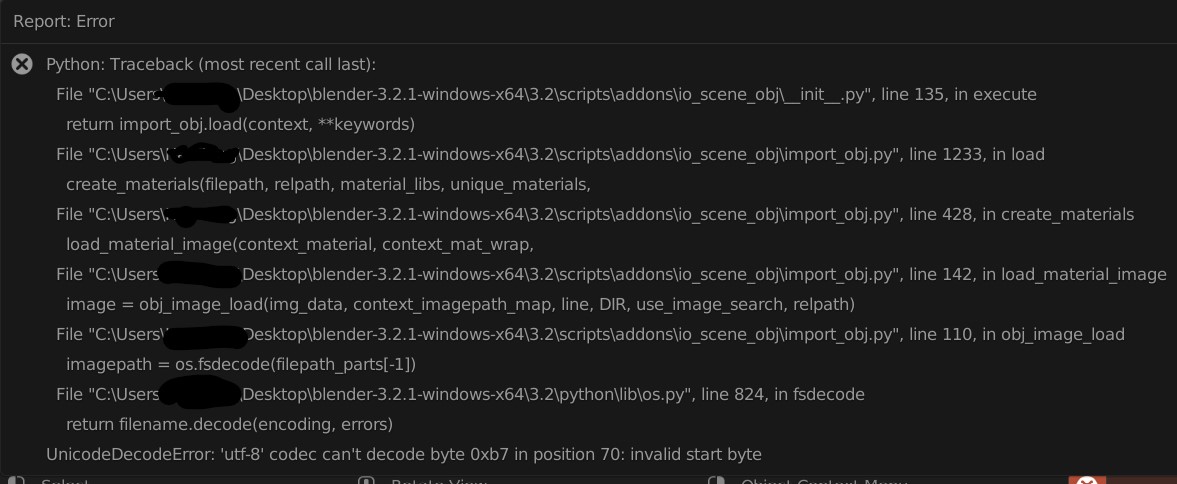
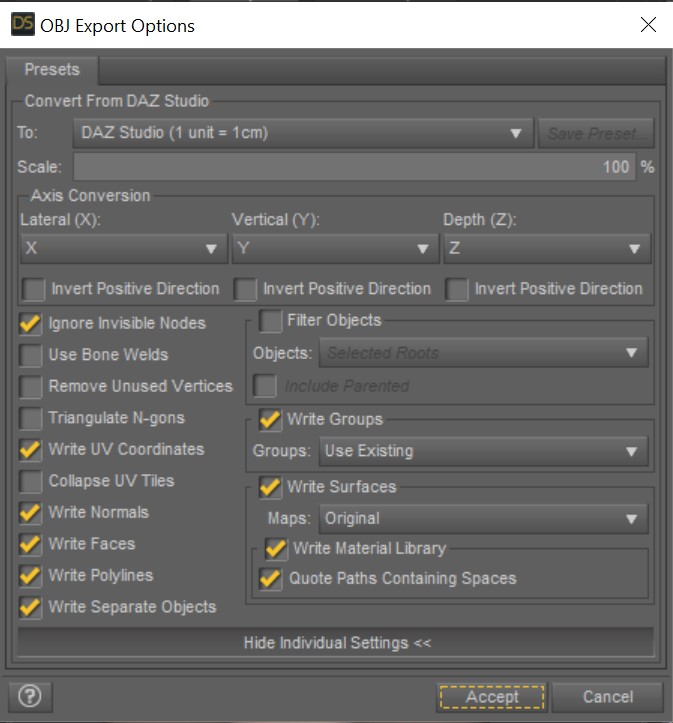
 Error when importing a Daz G8F into Blender
There is an error message when I import a Daz G8F obj model into blender... does anyone know why to fix it?
I have set the model resolution to be low. When I import the obj in Blender, I only unchecked "Split by object" box in geometry and left everything else unchecked.
I am using the 3.21 version of Blender and my error message is a little different from this post
I have attached the obj file (in zip). If by any chance it can be loaded into your Blender, please let me know.
 DAZ to blender hair position issue
You probably didn't merge the rigs. Use easy import and check "merge rigs".
Need help reinstalling Daz to BlenderIt needs to manually clean the old version of Daz to Blender bridge and then install the new version, but the old Daz to Blender plugin installs scripts accross different locations so it's not easy to uninstall. Try the Diffeomorphic plugin instead it has more features to import Daz characters to Blender.
 Redacted
Richard Haseltine said:
Jason Galterio said:
Taoz said:
Jason Galterio said:
If DAZ wanted to get rid of me as a PITA customer, then all they would have to do is add product sorting to DIM. I'd probably have an immediate joy aneurysm.
Sorting based on which criteria?
Just being able to do simple things... Like "Show me Shaders." "Show me G8F Characters."
The product sorting in DIM right now is just guessimates using fancy filters on the product names. Having actual, meaningful metadata associated with the archives would be nice.
That is not true, filtering can be based on many things other than string matching for the name (though that is an option) http://docs.daz3d.com/doku.php/public/software/install_manager/referenceguide/interface/filter_field/advanced_filtering#file For example, you could use the paths of files in the package to identify morphs etc.
file::rx::ci::^/data/DAZ 3D/Genesis 8/Female/Morphs/.*
--
file::rx::ci::^/data/DAZ 3D/Genesis 8/Female 8_1/Morphs/.*
--
file::rx::ci::^/data/DAZ 3D/Genesis 8/Female/Projection Morphs/.*
--
file::rx::ci::^/data/DAZ 3D/Genesis 3/Female/UV Sets/.*
--
file::rx::ci::^/People/Genesis 8 Male/Characters/.*Okay, there are multiple problems with this approach.
1. It only works if the products are installed.
2. It doesn't work with products that aren't consistently named.
3. The last time I did have everything installed and did this, it was insanely slow because of the number of products I have in DIM.
4. As far as I know, it can't differentiate between periods in the file names.Which is a big problem with the 8.1 files.
But most of all, this black magic annoys me, which is just a trick to try and catch the 8 in the filename and ignore other instances of 8. And not use any sort of metadata:
Which doesn't catch any of the 8.1 characters, Like Kento and Leanne:
The final two things I will say is that there is metadata associated with the packages, its just not consistent or checked.
Like this, what's the difference between "Software" and "Software Only?"
But this one is my favorite. If I am searching for "Plug in" under "Type" why does Mystic Gorge, Clothes, and Characters show up?
Python: Traceback (most recent call last): error when importing with diffeomorphicMy Blender 3.21 was the Steam version, will test again using the standalone Blender version.
Update: Test passed with Blender 3.21 standalone version (The Steam version of Blender 3.21 does not work again) and Diffeomorphic 1.6.2.1090 (https://bitbucket.org/Diffeomorphic/import_daz/downloads/)
Test Diffeomorphic 1.6.2.1090 Import DAZ: Success
Test Diffeomorphic 1.6.2.1090 Easy Import DAZ, checked the option Use Favorite Morphs including 100+ genital morphs: Success
Use HD Morphs Plugin (https://gitlab.com/x190/daz-hd-morphs/-/branches) with Diffeomorphic to generate HD mesh: Index Error: list index out of range
Switched to Diffeomorphic 1.6.2.1090 with Blender 3.21, from Diffeomorphic 1.6.1 with Blender 2.93LTS, as the new Diffeomorphic update solves the Blender no responding issue when importing hundreds of morphs, and the new Diffeomorphic version correctly imports the Genesis8.1 materials.
RedactedJason Galterio said:
Taoz said:
Jason Galterio said:
If DAZ wanted to get rid of me as a PITA customer, then all they would have to do is add product sorting to DIM. I'd probably have an immediate joy aneurysm.
Sorting based on which criteria?
Just being able to do simple things... Like "Show me Shaders." "Show me G8F Characters."
The product sorting in DIM right now is just guessimates using fancy filters on the product names. Having actual, meaningful metadata associated with the archives would be nice.
That is not true, filtering can be based on many things other than string matching for the name (though that is an option) http://docs.daz3d.com/doku.php/public/software/install_manager/referenceguide/interface/filter_field/advanced_filtering#file For example, you could use the paths of files in the package to identify morphs etc.
file::rx::ci::^/data/DAZ 3D/Genesis 8/Female/Morphs/.*
--
file::rx::ci::^/data/DAZ 3D/Genesis 8/Female 8_1/Morphs/.*
--
file::rx::ci::^/data/DAZ 3D/Genesis 8/Female/Projection Morphs/.*
--
file::rx::ci::^/data/DAZ 3D/Genesis 3/Female/UV Sets/.*
--
file::rx::ci::^/People/Genesis 8 Male/Characters/.*RedactedTaoz said:
Jason Galterio said:
Taoz said:
Jason Galterio said:
If DAZ wanted to get rid of me as a PITA customer, then all they would have to do is add product sorting to DIM. I'd probably have an immediate joy aneurysm.
Sorting based on which criteria?
Just being able to do simple things... Like "Show me Shaders." "Show me G8F Characters."
The product sorting in DIM right now is just guessimates using fancy filters on the product names. Having actual, meaningful metadata associated with the archives would be nice.
If the DAZ store files we discussed a while ago contains these data it should be possible in some way by passing data to DIM from some external program like Product Manager. I guess you already know that you can pass data from a Product Manager search to DIM so it lists the products found?
Unfortunately the electricy prices where I am, which already were among the highest on the planet, have tripled+ so it's very limited what I can work on right now without going bankrupt.
Yep. And I still use Product Manager when I am doing extensive searching. I just don't break it out when I am looking for one or two products.
Anyway, I don't want to derail the conversation any further. :)
RedactedJason Galterio said:
Taoz said:
Jason Galterio said:
If DAZ wanted to get rid of me as a PITA customer, then all they would have to do is add product sorting to DIM. I'd probably have an immediate joy aneurysm.
Sorting based on which criteria?
Just being able to do simple things... Like "Show me Shaders." "Show me G8F Characters."
The product sorting in DIM right now is just guessimates using fancy filters on the product names. Having actual, meaningful metadata associated with the archives would be nice.
If the DAZ store files we discussed a while ago contains these data it should be possible in some way by passing data to DIM from some external program like Product Manager. I guess you already know that you can pass data from a Product Manager search to DIM so it lists the products found?
Unfortunately the electricy prices where I am, which already were among the highest on the planet, have tripled+ so it's very limited what I can work on right now without going bankrupt.
RedactedTaoz said:
Jason Galterio said:
If DAZ wanted to get rid of me as a PITA customer, then all they would have to do is add product sorting to DIM. I'd probably have an immediate joy aneurysm.
Sorting based on which criteria?
Just being able to do simple things... Like "Show me Shaders." "Show me G8F Characters."
The product sorting in DIM right now is just guessimates using fancy filters on the product names. Having actual, meaningful metadata associated with the archives would be nice.
How to fix this after transfer utiliy?Did you model towards that character or the default?
I create the character from G8F, export it sculpt it, import it back as morph.
The head - I created it from G8F, export it, sculpt it, import it back as morph.
Modelled towards the morphed character,
modelled towrads a base character,
I don't understand what this mean or the different.What does check reverse source shape from target, do?
And I tested it. I can't check it. it's uncheckable.
RedactedFolder names are not metadata, and we are going to have to go on agreeing to differ on the merits of having the artist's name on a folder.
The artist's name on a folder doesn't help find anything when it's among a hundred other folders in a gigantic "Props" directory.
All I'm saying is that whoever is responsible for these installers creating directories like "genesis 8 females" should be...doing something else.
Diffeomorphic DAZ Importer version 1.6.0 released@surody If the pose doesn't work you certainly miss some morphs. In daz studio there may be morphs driving other morphs. So if the expression set is not using the base facs directly you need to load the intermediate morphs for the pose to work. You can tell diffeomorphic to load the missing morphs together with the pose.
Let me know if this works.
edit. p.s. Then if things don't work you may also check the console for errors.
edit. I found some time to test this and seems to work fine here. The sliders go from zero to one and back. Do not import the aliases since diffeomorphic doesn't understand them and make no sense in blender anyway. Just import the morphs without the aliases.
steps:
- import G81F and merge rigs
- import FACS
- import the Big Expressive custom morphs (without aliases)
- now you can either import the Big Expressive poses or use the sliders directly
edit. I reported the aliases issue to Thomas, in case he can do something.
https://bitbucket.org/Diffeomorphic/import_daz/issues/1096/custom-morph-aliases
Daz 3D is part of

Connect
DAZ Productions, Inc.
7533 S Center View Ct #4664
West Jordan, UT 84084Licensing Agreement | Terms of Service | Privacy Policy | EULA
© 2026 Daz Productions Inc. All Rights Reserved.











