• Daz 3D
  • Shop
  • 3D Software
    • Daz Studio Premier
    • Daz Studio
    • Install Manager
    • Partnerships
    • AI Training data
    • Exporters
    • Daz to Roblox
    • Daz to Maya
    • Daz to Blender
    • Daz to Unreal
    • Daz to Unity
    • Daz to 3ds Max
    • Daz to Cinema 4D
  • 3D Models
    • Genesis 9
    • Genesis 8.1
    • Free 3D Models
  • Community
    • Gallery
    • Forums
    • Blog
    • Press
    • Help
  • Memberships
    • Daz Premier
    • Daz Plus
    • Daz Base
    • Compare
  • Download Studio
ADVANCED SEARCH
  • Menu
  • Daz 3D
ADVANCED SEARCH
Add image
  • Shop
  • 3d Software
    • Daz Studio Premier
    • Daz Studio
    • Install Manager
    • Partnerships
    • AI Training data
    • Exporters
    • Daz to Roblox
    • Daz to Maya
    • Daz to Blender
    • Daz to Unreal
    • Daz to Unity
    • Daz to 3ds Max
    • Daz to Cinema 4D
  • 3D Models
    • Genesis 9
    • Genesis 8.1
    • Free 3D Models
  • Community
    • Our Community
    • Gallery
    • Forums
    • Blog
    • Press
    • Help
  • Memberships
    • Daz Premier
    • Daz Plus
    • Daz Base
    • Compare

Notifications

You currently have no notifications.

Loading...
    • Categories
    • Recent Discussions
Daz 3D Forums > 3rd Party Software > Blender Discussion

Error when importing a Daz G8F into Blender

tayloranderson2047tayloranderson2047 Posts: 116
August 2022 edited August 2022 in Blender Discussion


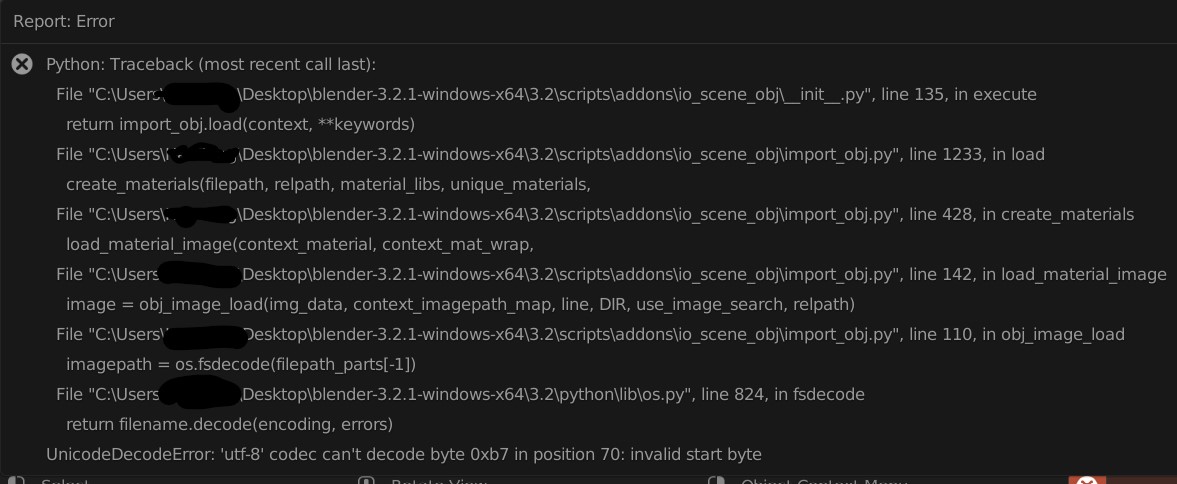
There is an error message when I import a Daz G8F obj model into blender... does anyone know why to fix it?

I have set the model resolution to be low. When I import the obj in Blender, I only unchecked "Split by object" box in geometry and left everything else unchecked.

I am using the 3.21 version of Blender and my error message is a little different from this post

I have attached the obj file (in zip). If by any chance it can be loaded into your Blender, please let me know.


zip
zip
G8F model.zip
769K
Post edited by tayloranderson2047 on August 2022

Comments

  • PadonePadone Posts: 4,014
    August 2022 edited August 2022

    I don't know why the obj importer in blender expects a utf-8 file, obj should be ansi afaik. May be this has something to do with the new python in blender 3. Anyway you may try to resave the obj as utf-8 with notepad.

    Post edited by Padone on August 2022
  • tayloranderson2047tayloranderson2047 Posts: 116
    August 2022

    Padone said:

    I don't know why the obj importer in blender expects a utf-8 file, obj should be ansi afaik. May be this has something to do with the new python in blender 3. Anyway you may try to resave the obj as utf-8 with notepad.

    Sorry for my ignorance of this, but how to resave the obj as utf-8 with notepad?

  • MattymanxMattymanx Posts: 6,996
    August 2022

    tayloranderson2047 said:


    Please try the following sequence shown in the attached images:


    DS-Blender-01.png
    440 x 415 - 31K
    DS-Blender-02.png
    447 x 417 - 37K
    DS-Blender-03.png
    198 x 303 - 21K
    DS-Blender-04.png
    1039 x 858 - 242K
    DS-Blender-05.png
    917 x 352 - 155K
    DS-Blender-06.png
    307 x 564 - 37K
    DS-Blender-07.png
    362 x 288 - 19K
    DS-Blender-08.png
    360 x 288 - 20K
  • andya_b341b7c5f5andya_b341b7c5f5 Posts: 694
    August 2022 edited August 2022

    tayloranderson2047 said:


    There is an error message when I import a Daz G8F obj model into blender... does anyone know why to fix it?

    I have set the model resolution to be low. When I import the obj in Blender, I only unchecked "Split by object" box in geometry and left everything else unchecked.

    I am using the 3.21 version of Blender and my error message is a little different from this post

    I have attached the obj file (in zip). If by any chance it can be loaded into your Blender, please let me know.



    Your OBJ file loads in Blender 3.2.0 for me with no error, though the system console does report that the MTL file can't be found.  Looking at your traceback, the issue is with loading an image file and it seems the filename isn't UTF-8 compatible.  Perhaps it is an image referred to in the MTL file, in which case without that and the image referred to we can't hope to reproduce your error.

    I suggest you make sure the images referred to in the MTL file have names that only use UTF-8 valid characters, or better still only ASCII characters, and see if that helps.

    Post edited by andya_b341b7c5f5 on August 2022
  • tayloranderson2047tayloranderson2047 Posts: 116
    August 2022

    andya_b341b7c5f5 said:

    Your OBJ file loads in Blender 3.2.0 for me with no error, though the system console does report that the MTL file can't be found.  Looking at your traceback, the issue is with loading an image file and it seems the filename isn't UTF-8 compatible.  Perhaps it is an image referred to in the MTL file, in which case without that and the image referred to we can't hope to reproduce your error.

    I suggest you make sure the images referred to in the MTL file have names that only use UTF-8 valid characters, or better still only ASCII characters, and see if that helps.

    Sorry I am a little confused... I only exported the obj of G8F and there weren't supposed to be any images... what do you mean by images here? And by names I guess you meant the file names of images, if any?  

  • felisfelis Posts: 5,760
    August 2022

    When you are exporting an obj, you are also creating an MTL file  (material file) that has simplified version of the materials for your object, with reference to the used image files.

  • PadonePadone Posts: 4,014
    August 2022 edited August 2022

    To save the obj as utf-8 with notepad just open it with notepad and file > save as > "utf-8" encoding. You can also try "ansi" and "utf-8 with bom". But since @andya can open it with no errors it may also be an issue with the regional settings if you're in a japanese pc for example.

    Post edited by Padone on August 2022
  • tayloranderson2047tayloranderson2047 Posts: 116
    August 2022

    felis said:

    When you are exporting an obj, you are also creating an MTL file  (material file) that has simplified version of the materials for your object, with reference to the used image files.

    Thanks! But when I import I only import the obj (and I don't need the material)... How should I let Blender "forget" the information of that MTL file and only recognize the obj (the mesh and geometry)? 

  • tayloranderson2047tayloranderson2047 Posts: 116
    August 2022

    Padone said:

    To save the obj as utf-8 with notepad just open it with notepad and file > save as > "utf-8" encoding. You can also try "ansi" and "utf-8 with bom". But since @andya can open it with no errors it may also be an issue with the regional settings if you're in a japanese pc for example.

    Oh I see, thanks!

  • andya_b341b7c5f5andya_b341b7c5f5 Posts: 694
    August 2022

    tayloranderson2047 said:

    felis said:

    When you are exporting an obj, you are also creating an MTL file  (material file) that has simplified version of the materials for your object, with reference to the used image files.

    Thanks! But when I import I only import the obj (and I don't need the material)... How should I let Blender "forget" the information of that MTL file and only recognize the obj (the mesh and geometry)? 

    I think if you just delete the MTL file you will get the behavior I get, i.e. imports the geometry OK but complains about not finding the MTL file in the system console.

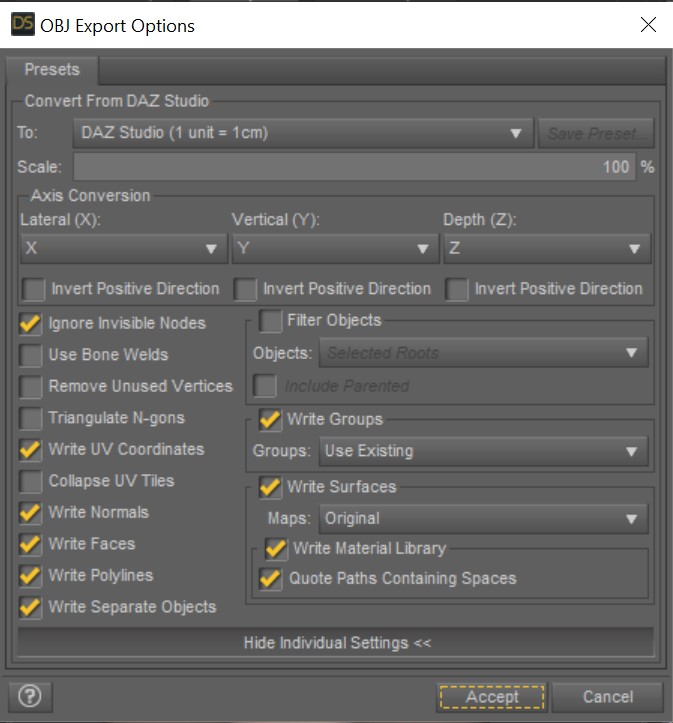
    You could also uncheck the checkboxes for Write Material Library when exporting from DS: I'm not sure, but I assume that would mean not creating an MTL file.

Sign In or Register to comment.
Adding to Cart…

Daz 3D is part of Tafi

Connect

DAZ Productions, Inc.
7533 S Center View Ct #4664
West Jordan, UT 84084

HELP

Contact Us

Tutorials

Help Center

Sell Your 3D Content

Affiliate Program

Documentation Center

Open Source

Consent Preferences

JOIN DAZ

Memberships

Blog

About Us

Press

Careers

Bridges

Community

In the Studio

Gallery

Forum

DAZ STORE

Shop

Freebies

Published Artists

Licensing Agreement | Terms of Service | Privacy Policy | EULA

© 2025 Daz Productions Inc. All Rights Reserved.

