• Daz 3D
  • Shop
  • 3D Software
    • Daz Studio Premier
    • Daz Studio
    • Install Manager
    • Partnerships
    • AI Training data
    • Exporters
    • Daz to Roblox
    • Daz to Maya
    • Daz to Blender
    • Daz to Unreal
    • Daz to Unity
    • Daz to 3ds Max
    • Daz to Cinema 4D
  • 3D Models
    • Genesis 9
    • Genesis 8.1
    • Free 3D Models
  • Community
    • Gallery
    • Forums
    • Blog
    • Press
    • Help
  • Memberships
    • Daz Premier
    • Daz Plus
    • Daz Base
    • Compare
  • Download Studio
ADVANCED SEARCH
  • Menu
  • Daz 3D
ADVANCED SEARCH
Add image
  • Shop
  • 3d Software
    • Daz Studio Premier
    • Daz Studio
    • Install Manager
    • Partnerships
    • AI Training data
    • Exporters
    • Daz to Roblox
    • Daz to Maya
    • Daz to Blender
    • Daz to Unreal
    • Daz to Unity
    • Daz to 3ds Max
    • Daz to Cinema 4D
  • 3D Models
    • Genesis 9
    • Genesis 8.1
    • Free 3D Models
  • Community
    • Our Community
    • Gallery
    • Forums
    • Blog
    • Press
    • Help
  • Memberships
    • Daz Premier
    • Daz Plus
    • Daz Base
    • Compare

Notifications

You currently have no notifications.

Loading...
    • Categories
    • Recent Discussions
Daz 3D Forums > 3rd Party Software > Blender Discussion

Are there any "smart" ways of making an asymmetric imported G8F model symmetric in Blender?

tayloranderson2047tayloranderson2047 Posts: 116
August 2022 edited August 2022 in Blender Discussion

Are there any "smart" ways of making an asymmetric imported G8F model symmetric in Blender?

For example I have this  asymmetric imported G8F model (the nose is skewed a little. The blender file is attached below, zipped). Instead of using the g button on keyboard and mouse to adjust the nose (I found it very tedous.. whenever I feel like it becomes symmetric from one angle, it is actually asymmetric from another angle...), do you know any smarter way I could look at to make it symmetric quickly? Also please don't change the mesh since I need to import it back to Daz.

By symmetric I don't necessarily mean abosolutely symmetric, but unfortunately the only way I know is grab-and-drag....
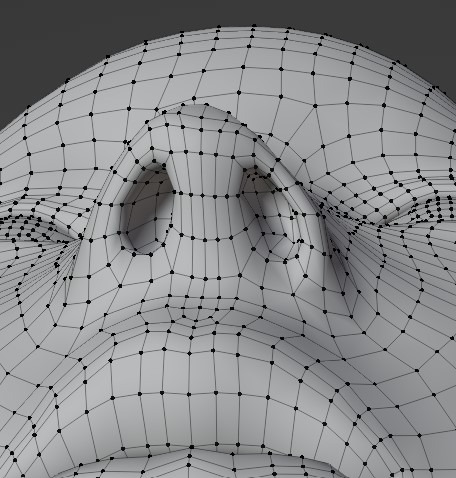

Post edited by tayloranderson2047 on August 2022

Comments

  • PadonePadone Posts: 4,014
    August 2022

    You may try with topology mirror.

    https://docs.blender.org/manual/en/3.2/sculpt_paint/weight_paint/tool_settings/symmetry.html

  • DaremoK3DaremoK3 Posts: 798
    August 2022

    @tayloranderson2047 :

    Are you using a purchased shaped figure with sculpted asymmetry that is far removed from default G8F, or is your default G8F that far out-of-whack?

    And, in this instance, I'm not sure if the 'topology mirror' that Padone linked to above will work ("for when both sides of a mesh have matching mirrored topology"), but there might be a chance it could with a work-around.

    I can show you an advanced work-flow to correct your issue, and send back your mesh to DS as a viable morph target.

  • Richard HaseltineRichard Haseltine Posts: 108,063
    August 2022

    Do not upload files with Daz (or other content) in them unless you have permission. I have removed the attachment.

  • tayloranderson2047tayloranderson2047 Posts: 116
    August 2022
    Richard Haseltine said:

    Do not upload files with Daz (or other content) in them unless you have permission. I have removed the attachment.

    Well that blender file was created by myself... Anyway I will be careful next time.
  • DaremoK3DaremoK3 Posts: 798
    August 2022 edited August 2022

    @tayloranderson2047 :

    "Also please don't change the mesh since I need to import it back to Daz."

    There is no quick or 'smart' button way that I know of, but utilizing an advanced work-flow will allow you to symmetrize the mesh to send back to DS as a morph target.

    Symmetry fixed :

    image

    image

    * Let me know if you would like a write up of what you need to achieve this...

    And Richard, it is not a professional (purchased) mesh.  It looks like his attempt at creating a morph target that got away from him on the default G8F that everyone already has available with DS.

    Don't worry, I deleted the file.

    * EDIT :  Nevermind  --  Editing the post fixed the images not opening up in a new window as set...

    026_FinalWires.jpg
    1920 x 1080 - 454K
    025_Final_ReadyTioSendToDS.jpg
    1920 x 1080 - 260K
    Post edited by DaremoK3 on August 2022
  • tayloranderson2047tayloranderson2047 Posts: 116
    August 2022

    DaremoK3 said:

    * Let me know if you would like a write up of what you need to achieve this...

    Yes I do! Thank you! We can also communicate with private messages if you like. 


  • Richard HaseltineRichard Haseltine Posts: 108,063
    August 2022

    tayloranderson2047 said:

    Richard Haseltine said:

    Do not upload files with Daz (or other content) in them unless you have permission. I have removed the attachment.

    Well that blender file was created by myself... Anyway I will be careful next time.

    Did it not contain a version of Genesis 8 Female?

  • tayloranderson2047tayloranderson2047 Posts: 116
    August 2022
    Richard Haseltine said:

    tayloranderson2047 said:

    Richard Haseltine said:

    Do not upload files with Daz (or other content) in them unless you have permission. I have removed the attachment.

    Well that blender file was created by myself... Anyway I will be careful next time.

    Did it not contain a version of Genesis 8 Female?

    It does contain an imported obj from the mesh of G8F. But since that morph was created by myself, I don't know why it violates the rules here. I thought Daz Studio and G8 figures are free resources.
  • Richard HaseltineRichard Haseltine Posts: 108,063
    August 2022

    tayloranderson2047 said:

    Richard Haseltine said:

    tayloranderson2047 said:

    Richard Haseltine said:

    Do not upload files with Daz (or other content) in them unless you have permission. I have removed the attachment.

    Well that blender file was created by myself... Anyway I will be careful next time.

    Did it not contain a version of Genesis 8 Female?

    It does contain an imported obj from the mesh of G8F. But since that morph was created by myself, I don't know why it violates the rules here. I thought Daz Studio and G8 figures are free resources.

    Free to use in the ways permitted by the EULA does not mean free to distribute. Morphs are shared as .dsf files, which contain only the changes in position of the vertices but not the base shape.

  • DaremoK3DaremoK3 Posts: 798
    August 2022

    Sorry...  I have been very busy, and I was away camping in the mountains for a little while.

    I'm back, and I have begun to work on a PDF tutorial for this.  I finished part 1 of 3 parts, and will upload it here sometime next week when I am finished writing it.

    For now, anyone wishing to follow the tut, you will need to download the free Blender addon  'Transfer Vertex Order'  by bartoszstyperek  --  You can find it here :

    https://bartoszstyperek.gumroad.com/l/copy_verts_ids

    I'll make a post outlining all three parts, but without the accompanying demonstration images that are included in the PDF.


Sign In or Register to comment.
Adding to Cart…

Daz 3D is part of Tafi

Connect

DAZ Productions, Inc.
7533 S Center View Ct #4664
West Jordan, UT 84084

HELP

Contact Us

Tutorials

Help Center

Sell Your 3D Content

Affiliate Program

Documentation Center

Open Source

Consent Preferences

JOIN DAZ

Memberships

Blog

About Us

Press

Careers

Bridges

Community

In the Studio

Gallery

Forum

DAZ STORE

Shop

Freebies

Published Artists

Licensing Agreement | Terms of Service | Privacy Policy | EULA

© 2025 Daz Productions Inc. All Rights Reserved.
