-
How are you greeting the end of the world?
That's what Paris looks like these days:
Place de la Concorde:

Champs Elysées:

Avenue de l'Opéra:

Even in August, where Paris is rather empty (compared to the rest of the year), there are cars and people everywhere. It's pretty weird to see it like that.
How are you greeting the end of the world?Over here one cannot hoard prescription meds ... some are so tightly regulated that a friend of a friend who told me said, he can't even get his next refill until he has taken his last pill. {which we all think is a bit ridiculous but that's the way it is for some}
Becareful about trying to store too much for colds and flu -- they do NOT last well through extreme temperature changes {such as summers that go into the high 90s plus}.
Understandable. I have a bottle of Tylenol for fever, some cough drops, a bottle of cough syrup, and some nasal spray to help congestion. I'm not hoarding anything, because I've seen the damage hoarding does in this crisis. A friend told me they have a police officer in the local Walmart now, because people were getting in fist fights over what food and supplies are left. I won't be getting in any fist fights over anything. There's no point.
...I saw a video of one earlier today.
Yeah. It's about time for me to do a grocery shopping again, and I don't know if I want to brave the huge lines and the possibility of contracting the virus. I think preppers like Ivy have had the right idea for a long time. I'm on a fixed income and have never really been able to stockpile things, but I think if I made a more conscious effort to be prepared for a situation like this, in retrospect there are more things I probably could have done, even to just be prepared for something like the flu or a blizzard much less a pandemic. This will definitely be a learning experience.
..I'm there with you, fixed income here (SS) and no vehicle as well as a tiny flat (not much storage), so all my shopping is done on foot. Thankfully there's a supermart only three blocks away.
Fortunately people at the market tend to be a little less prone to fighting over things. Don't ever want to go to a Walmart from what I've seen.
All it takes is one YouTube video, and people think all Walmarts everywhere are at the battlefront. Not true. Walmart is safe. But no matter where you go, it is always best to have your wits about you and keep your situational awareness sharp.
Mine preppers is for 90 days only. One week already gone. 83 days remaining. Though there is no report of infection within 450 km or 279 miles inside my country. Now I am thinking I preppered too early. Our psychology is based on cleaning with water from ancient times instead of wiping therefore toilet paper is not an issue. Only food and some daily requirement items toothpaste, soap etc. Though I will probably miss potato chips etc.
There is no such thing as prepping too early.
I ordered two bidets. I've always wanted to do this, but I procrastinated. Will be several weeks before they arrive. So again, there is no such thing as prepping too early.
 I have enough TP to get me through almost 6 weeks.
Sainsburys supermarkets in the UK are now restricting customers to 3 of any food item, and 2 of any toiletries item. Evidently, if people won't behave reasonably, they have to be forced into it.
And my cats are volubly telling me that they need more than 3 boxes of food as there are 2 of them and their human only shops once a fortnight online
Cats always want more than you give them. Unless they're mousers. If I had a farm, I'd have a bunch of mousers.
To lighten the mood up a bit, I watched a compilation of Facebook Q&A of the Police of the Slovak Republic (our neighbours). They have the patience of a saint and a good sense of humour.
This one is really hillarious:
Q: My boyfriend returned from the Netherlands and must go to 14 days quarantine. If he does not want to stay with his parents, can he stay with me?
A: Yes. You will spend 14 days together and then you will either split up, or we will provide an escort for you to the maternity hospital in December.
LOL!
" I a little spell that came my way , to help bring good thing your way.
May your troubles be less and your blessing be more
Our family send your love and blessing
Lessons from Gone with the Wind ... if one has LOTS of stuff during times of 'and nobody else does' ... the army marching through will help themselves to your goods for redistribution.
Unlike the gone with the wind, some of us are ready for them.
Reminds me of what I woud tell people when they asked what preperations I was making for Y2K ( anyone rermember that?) When they were telling me what they were doing and asked what I was doing, I would tell them "I am collecting ammunition and addresses". That seemed to hush them up
Ya Y2K luckily turned out to be unfounded scare.
Y2K was NOT unfounded. It was a real problem and it could have been very bad. At my work, we tooled up and swarmed all of the known dodgy code, including needed updates to operating systems and add-on products. And there was a LOT.
But we got it all done, and only two applications didn't work right come the week after NYD.
I just hope the economy picks up and people can keep their jobs

Me too, but I'm ready if the worst should happen. It's never too early to prepare.
" I a little spell that came my way , to help bring good thing your way.
May your troubles be less and your blessing be more
Our family send your love and blessing
Lessons from Gone with the Wind ... if one has LOTS of stuff during times of 'and nobody else does' ... the army marching through will help themselves to your goods for redistribution.
Unlike the gone with the wind, some of us are ready for them.
Reminds me of what I woud tell people when they asked what preperations I was making for Y2K ( anyone rermember that?) When they were telling me what they were doing and asked what I was doing, I would tell them "I am collecting ammunition and addresses". That seemed to hush them up
Ya Y2K luckily turned out to be unfounded scare. But this pandemic has real potential to be come something this world has not experienced since the black plague.
What concerns us more is not people that are hungry & looking for help, our group prepared to take is some of those people willing to work with us. But if thing were to go on & last longer than they expect say a year. and the nations around the world start to go into to collapse . then our HUGE concern is the roving gangs preying on the weak & un-expecting people , stealing and looting resources. Think Mad Max.
Our group remembered what happen during hurricane Katrina in New Orleans. That's not going to happen in our area I guarantee it . we may been called crazy hill billy rednecks cling to our guns and bibles. . But we will definitely will show exactly how tactical we can be protecting the community. our group is a community is family , there will be no Katrina in this area or in our holler
My guess is it will not last long. Possibility is vaccin or something will be available within one year. Or if almost all people infected within one year no one will care it anymore. I am (we are) ready for it too. I am mostly worried for law and order situation at peak time of the virus. Also worried for health personnels, people may attack them too.
Some tests are shoing that the failed Ebola vacine was able to help some victims, sounds like they are doing further tests to see if they can repeat it.
So you are saying "science" over the National Enquirer's "Miracle Pill" and "Kitchen Remedies"... I guess... seems science is still good for something.
Hey, my kitchen remedy is to cook GREAT food and enjoy it, because a good meal can go a long way to making one feel truly wealthy; even if one might not have a lot of cash.
Funny day today. at work we ordered an extra shipment of toilet paper and bottled water for employees to purchase if needed along with our normal shipment. When I got off I picked some up (2 24 packs) along with a few other things before heading home. Needless to say, the shipment we got for the shelves was selling fast and by the time I got off it was empty, So as I cruised around the store with it in my buggy EVERYONE was asking where I got it. As I was waiting in line to check out, the girl in front of me asked if there was anymore, I replied I didn't think so and she looked really sad as did her 2 young daughters (around 5 yrs old). I felt kinda bad so I gave them one of my 24 packs, amazing how toilet paper seemed to make their day. Then as I am going to my car a guy pulls up beside me in a high end BMW and asked if they had more toilet paper inside in which I replied again I don't think so. Then he offers me $100 for the 24 pack I had. I was like "seriously?".
Needless to say I didn't come home with any toliet paper today, LOL
You left out the most important fact: What model BMW was the fella driving?

And everyone thought us survivalist were wingnuts! Thank goodness for long shelf food stuffs (MREs included), batteries, personal hygine items, camp stoves, lights, heaters, paper products and equipment. Experience with orientation and map reading skills a plus and knowing how to cook from scratch. Weapons? Got it covered (you know weapons was going to be in there some place you know us wingnut survivalists got to fit the stereotypes).
I am taking notes so that when this is all over, I can do a self-analysis and figure out if there is/was anything I should have done differently, or anything I can improve on for next time. There will be a next time, and it's never too early to start planning.
For st patty's day i decided to make some egg bread and risen nut bread. I love my bread machine only take a couple of hours to make about any type of fresh bread even pizza dough. much easier than having to hand need the bread dough for sure.
My Mom taught me to cook when I was in my teens, almost 50 years ago, and I loved cooking. She tried to teach me to make bread but I never got the hang of it, though I can make great tea buns and cakes.... I make a great carrot cake. Mom made fantastic bread, white and whole bread, and I still love the crunchy crust from toast. My brother is fantastic at making bread, and often treats me to a loaf.
Here a lot of food is imported, though like most places we were completely self-sufficent in food in the before time. I strongly suspect that this will awaken many people to again start growing their own food.
I learned to bake bread when I was sixteen. We (ex) and I moved to from St. John's to St. Lawrence for a year and my landlord taught me how to cook. We'd make toutons served with molasses while we waited for the bread to bake.
I also self taught making french stick bread and other breads depending on avaialble ingredients. Always good to be prepared.
spent a day or 2 made up some bread in my bread machine. much easier than needing it by hand. made egg bread, oat meal raisen nut , and some whole wheat just finshed this morning got to bag those 2 loafs up :)
love homemade bread with honey butter on it
How do you keep your bread from getting moldy? Every time I bake bread, it barely lasts 3 or 4 days before it's got green spots all over it. I would consider it a huge win if I could get my baked bread to last 7 days outside of the fridge.
I just hope the economy picks up and people can keep their jobs

Chinese Automaker Is Now The Largest Producer Of Face Masks. It is time to produce different types of products.
Um, wait a minute. Who is making face masks?
Pass.

vinegar should work too
Vinegar (which is acetic acid), lemon juice or citric acid. Vinegar is slightly more effective but doesn't smell so nice. Strangely enough they keep stressing that good old fashioned soap and water is actually the best thing to get rid of the viruses from your hands, so presumably would be the same for surface, like the good old days, wash the house down with carbolic soap.
And leave things to air dry, as anything, even bleach, need leaving in situ long enough to work. Wiping on and wiping off does no good at all. That's why the length of time to wash your hands, It's not magic or instantaneous.BTW don't make the mistake of mixing bleach with acid. either bleach or the acdic stuff like vinegar. Chlorine bleach is alkaline and will just react with the acid with sometimes fairly spectacular results but less actual sterilising effect.
Mixing Chlorine with acid is very bad. Well, except when it kills rats. I once treated my pool with Muriatic acid and must have put the chlorine shock into the pool too soon. The next day, there was a little floater; a small mole. AKA, "Florida rat".
And everyone thought us survivalist were wingnuts! Thank goodness for long shelf food stuffs (MREs included), batteries, personal hygine items, camp stoves, lights, heaters, paper products and equipment. Experience with orientation and map reading skills a plus and knowing how to cook from scratch. Weapons? Got it covered (you know weapons was going to be in there some place you know us wingnut survivalists got to fit the stereotypes).
Some of them do tend to go overboard or become obsessed with it, but the actual wingnuts are people that have the attitude of "If I get corona, then I get corona" and carry on as they normally would without exercising any kind of precautions. I was reading this in an article from the msn.com website entitled "'If I get corona, I get corona': Coronavirus pandemic doesn't slow spring breakers' party". I'm guessing they drink too much "I Don't Givadamn" and won't be sobered up unless the consequences hit them specifically or the others around them because of their arrogant attitude.
Spring Break has been canceled pretty much everywhere.
vinegar should work too
Vinegar (which is acetic acid), lemon juice or citric acid. Vinegar is slightly more effective but doesn't smell so nice. Strangely enough they keep stressing that good old fashioned soap and water is actually the best thing to get rid of the viruses from your hands, so presumably would be the same for surface, like the good old days, wash the house down with carbolic soap.
And leave things to air dry, as anything, even bleach, need leaving in situ long enough to work. Wiping on and wiping off does no good at all. That's why the length of time to wash your hands, It's not magic or instantaneous.BTW don't make the mistake of mixing bleach with acid. either bleach or the acdic stuff like vinegar. Chlorine bleach is alkaline and will just react with the acid with sometimes fairly spectacular results but less actual sterilising effect.
Be careful that you don;t mix bleach and Ammonia together either that makes chorine gas which is deadly and much worst than the virus
I will correct you there Chlorine Bleach and Hydochloric acid mixed make chlorine gas mixing bleach and ammonia makes chloramine vapor, which is still toxic but not as deadly as chlorine gas.
Chlorine and Acid = Bad News!
I played a few rounds of cribbage last night with hubby it was a nice distraction for a change to play some cards together without the TV blasting out all the bad news like it has been. it gave us a chance to quietly talk and remissness about better days and talk about what we should expect for the future. we seem to have taught our daughter well she holding out in the high desert of California and told us she ina good place . We know what we are up against with this virus. we know what we need to do to stay safe. so there no sense listening to the media keep drumming the same beat.
I started trimming and weeding in my flower beds today. Tomorrow, I hope to get the tilling done in my garden. It's mid-80s weather in Central Florida this week, so it's time to plant! Gonna have lettuce, onions, peppers, tomatoes, cucumbers, broccolli, and some herbs.
vinegar should work too
Vinegar (which is acetic acid), lemon juice or citric acid. Vinegar is slightly more effective but doesn't smell so nice. Strangely enough they keep stressing that good old fashioned soap and water is actually the best thing to get rid of the viruses from your hands, so presumably would be the same for surface, like the good old days, wash the house down with carbolic soap.
And leave things to air dry, as anything, even bleach, need leaving in situ long enough to work. Wiping on and wiping off does no good at all. That's why the length of time to wash your hands, It's not magic or instantaneous.BTW don't make the mistake of mixing bleach with acid. either bleach or the acdic stuff like vinegar. Chlorine bleach is alkaline and will just react with the acid with sometimes fairly spectacular results but less actual sterilising effect.
Be careful that you don;t mix bleach and Ammonia together either that makes chorine gas which is deadly and much worst than the virus
I will correct you there Chlorine Bleach and Hydochloric acid mixed make chlorine gas mixing bleach and ammonia makes chloramine vapor, which is still toxic but not as deadly as chlorine gas.
Sounds like they pretty much cause the same thing though. information from
Chlorine and Muriatic acid can do enough lung damage all by themselves. But when you mix them, look out!
This is really getting extreme. I was finally able to get some flour and the last jar of yeast at a local store. The immense aisle where they normally sell paper towel and TP did not even have dust on the shelves. I went around the corner to my local sports outfitter store to get a box of shotgun shells (the ranges are open, and I thought I could take my sons there and let them do some practice shooting for something to do). Found what I needed, and noticed a guy at the counter with a 2-level cart stacked with boxes of ammunition. He had also stacked all of the plastic ammo boxes of the larger size on the counter. By the time I shuffled my way to the counter, he was gone, out in the parking lot loading the stuff into the van. I figure he bought upwards of $2,000 worth of ammo.
I asked if there were now reports of zombies associated with the Coronavirus. The store folks chuckled and said "nope, no zombies". I try to find some humor where I can.
...If things get locked down the way they could, I wouldn't be surprised if we start hearing about breakins. We've already gotten local notification of people going door to door claiming they have in-home COVID-19 tests and to NOT fall for it and let them in. We've been hearing way more sirens of late, and there were two police cruisers sitting a few houses down last night at like 1:30AM...so yeah...things are definitely abnormal. Extra security would be nice. As it stands, I have a husband with a bad back and a 80lb Olde English Bulldogge for security.
It's never too early to prepare. You could even be preparing NOW for the next time. A good way to get started on this is to start by educating yourself on various ways to protect yourself and your husband. If he has a bad back, it's very possible that your home security may fall to you.
Order pizza and notice that pizza delivery guy wears gloves!
...several of the pizza places where i live are waiving the delivery fee.
There's only a delivery fee because people don't tip, or grossly undertip.
Michael 8 took a walk tonight it looks like he had his mask and rubber gloves on. playing it safe. Though it looks pretty barren in his scene
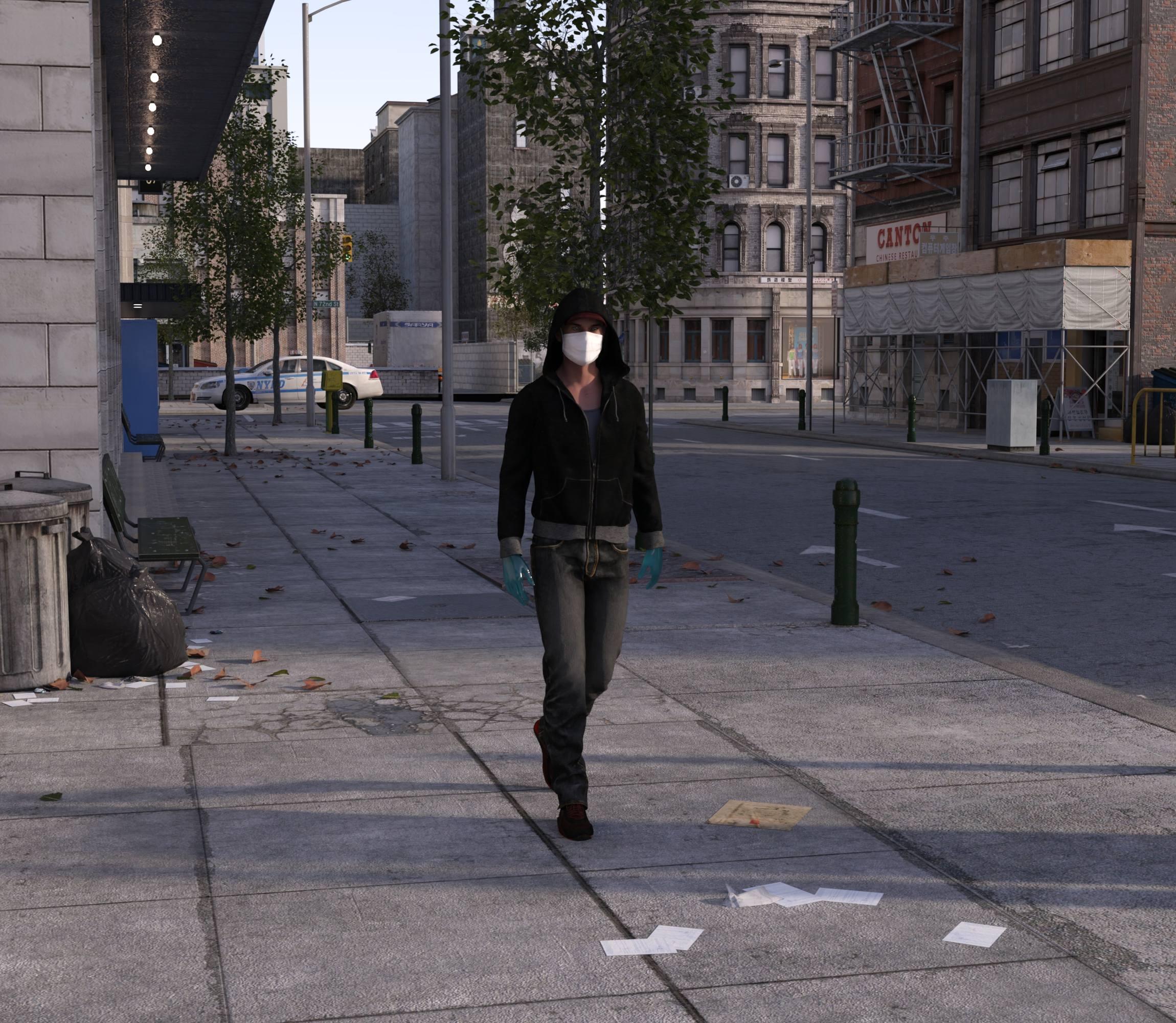
Stay well everyone
Uh oh, it looks like the cop in the background may have caught Michael out after curfew. Into the hoosegow with him!
 And yet another toilet without a seat???
Another for your collection: https://www.daz3d.com/american-family-dining
I wonder whether it simply slips past the Q&A department, or if it's maybe some inside joke.
And would offend against UK building regulations as the Toilet room is straight off the kitchen without an area and 2nd door between.
Same here in NZ, Chohole, would never get past the planning stage.
My nearly 50 year old house has a bathroom that opens on the dining area of the kitchen... thoug it IS seperated by a large counter and approx 20 feet from the cooking/food prep areas... but I was really surprised to find that there was a bathroom door in the kitchen of my brother's new pricy condo, right next to the fridge, and that building is only ten years old. Of course, that's a three story building and the reason is that all of the water/plumbing pipes for all three floors have to come up through the same central access tube in order to be accessible.
A fellow kiwi?! Choice as, bro!
Not me, I'm in Houston, Texas in the U.S.A., though I've been to your amazing country a couple of times now and would relocate quickly enough if the opportunity came up.
Sad face. I get so excited when I think I've found another bro. Not a lot of us methinks. And thanks for your lovely as words about my lovely as country. She's looking pretty dry here ashore at the mo but it's still bewdy on the water.
And yet another toilet without a seat???Another for your collection: https://www.daz3d.com/american-family-dining
I wonder whether it simply slips past the Q&A department, or if it's maybe some inside joke.
And would offend against UK building regulations as the Toilet room is straight off the kitchen without an area and 2nd door between.
Same here in NZ, Chohole, would never get past the planning stage.
My nearly 50 year old house has a bathroom that opens on the dining area of the kitchen... thoug it IS seperated by a large counter and approx 20 feet from the cooking/food prep areas... but I was really surprised to find that there was a bathroom door in the kitchen of my brother's new pricy condo, right next to the fridge, and that building is only ten years old. Of course, that's a three story building and the reason is that all of the water/plumbing pipes for all three floors have to come up through the same central access tube in order to be accessible.
A fellow kiwi?! Choice as, bro!
It's a bloody long time since I was involved in building a house, I'm not surprised if the regs have changed, certainly required two doors back in 1981. I'm on a boat now and there's no door at all between my kitchen (galley) and the loo, I took it off and replaced with a curtain cos it required contortion to use it. There is 12m of boat between loo and kitchen so I'm not worriedI want to make some kind of comment that involves the term "poop deck", but wont.
Hahahaha! I admire your self restraint :)
And yet another toilet without a seat???Another for your collection: https://www.daz3d.com/american-family-dining
I wonder whether it simply slips past the Q&A department, or if it's maybe some inside joke.
And would offend against UK building regulations as the Toilet room is straight off the kitchen without an area and 2nd door between.
Same here in NZ, Chohole, would never get past the planning stage.
My nearly 50 year old house has a bathroom that opens on the dining area of the kitchen... thoug it IS seperated by a large counter and approx 20 feet from the cooking/food prep areas... but I was really surprised to find that there was a bathroom door in the kitchen of my brother's new pricy condo, right next to the fridge, and that building is only ten years old. Of course, that's a three story building and the reason is that all of the water/plumbing pipes for all three floors have to come up through the same central access tube in order to be accessible.
A fellow kiwi?! Choice as, bro!
Not me, I'm in Houston, Texas in the U.S.A., though I've been to your amazing country a couple of times now and would relocate quickly enough if the opportunity came up.
And yet another toilet without a seat???Another for your collection: https://www.daz3d.com/american-family-dining
I wonder whether it simply slips past the Q&A department, or if it's maybe some inside joke.
And would offend against UK building regulations as the Toilet room is straight off the kitchen without an area and 2nd door between.
Same here in NZ, Chohole, would never get past the planning stage.
My nearly 50 year old house has a bathroom that opens on the dining area of the kitchen... thoug it IS seperated by a large counter and approx 20 feet from the cooking/food prep areas... but I was really surprised to find that there was a bathroom door in the kitchen of my brother's new pricy condo, right next to the fridge, and that building is only ten years old. Of course, that's a three story building and the reason is that all of the water/plumbing pipes for all three floors have to come up through the same central access tube in order to be accessible.
A fellow kiwi?! Choice as, bro!
It's a bloody long time since I was involved in building a house, I'm not surprised if the regs have changed, certainly required two doors back in 1981. I'm on a boat now and there's no door at all between my kitchen (galley) and the loo, I took it off and replaced with a curtain cos it required contortion to use it. There is 12m of boat between loo and kitchen so I'm not worriedI want to make some kind of comment that involves the term "poop deck", but wont.
And yet another toilet without a seat???Another for your collection: https://www.daz3d.com/american-family-dining
I wonder whether it simply slips past the Q&A department, or if it's maybe some inside joke.
And would offend against UK building regulations as the Toilet room is straight off the kitchen without an area and 2nd door between.
Same here in NZ, Chohole, would never get past the planning stage.
My nearly 50 year old house has a bathroom that opens on the dining area of the kitchen... thoug it IS seperated by a large counter and approx 20 feet from the cooking/food prep areas... but I was really surprised to find that there was a bathroom door in the kitchen of my brother's new pricy condo, right next to the fridge, and that building is only ten years old. Of course, that's a three story building and the reason is that all of the water/plumbing pipes for all three floors have to come up through the same central access tube in order to be accessible.
A fellow kiwi?! Choice as, bro!
It's a bloody long time since I was involved in building a house, I'm not surprised if the regs have changed, certainly required two doors back in 1981. I'm on a boat now and there's no door at all between my kitchen (galley) and the loo, I took it off and replaced with a curtain cos it required contortion to use it. There is 12m of boat between loo and kitchen so I'm not worriedSemi-OT. 5.7 Magnitude earthquake in SLC UT, with aftershocks... minor damage, a few power outagesI too hope the Daz staff are okay.
Since moving to central Arkansas, I have heard a lot about the New Madrid Fault and the 1811 earthquake.
Fun fact: The fault, & the town that gave it the name, are pronounced New Mad Rid. (I don't know whose idea that was, but it sure wasn't mine.)
The "Powered by Hot Pockets" Complaint Threadstyx sailinnn awayy
can't really sail on a river?
We sused to see sailing barges on our river when I was a kid. It was wide enough the the only way to get to the other side was by boat, and If you didn't have access to a boat of your own (and not many did) then to get over to the other side we used to have to get a bus or a train up river, thenwalk through the town to the riverside and the ferry acroos the Thames, (doesn't have quite the same ring as the Ferry across the Mersey)
Here is a Thames Barge As you can see they can sail up right into London proper, that is Tower bridge in the background

And if you want to see them sailing

they sould be careful of waterfalls
There aren't many waterfalls on the River Thames, nor the Medway. The Thames used to be a working river, with ships going up to the docks and into central London,
And the Martian War Machines hanging about near Tower Bridge....
 The "Powered by Hot Pockets" Complaint Thread
styx sailinnn awayy
can't really sail on a river?
We sused to see sailing barges on our river when I was a kid. It was wide enough the the only way to get to the other side was by boat, and If you didn't have access to a boat of your own (and not many did) then to get over to the other side we used to have to get a bus or a train up river, thenwalk through the town to the riverside and the ferry acroos the Thames, (doesn't have quite the same ring as the Ferry across the Mersey)
Here is a Thames Barge As you can see they can sail up right into London proper, that is Tower bridge in the background
And if you want to see them sailing
they sould be careful of waterfalls
There aren't many waterfalls on the River Thames, nor the Medway. The Thames used to be a working river, with ships going up to the docks and into central London,
Semi-OT. 5.7 Magnitude earthquake in SLC UT, with aftershocks... minor damage, a few power outagesThere's an interactive map on this page that has been tracking the aftershocks.
https://kutv.com/news/local/strong-earthquake-strikes-northern-utah
looks like the initial quake was centered between I-80 and the 201 expressway, to the west of 7200 west, at 7:09 AM, just to the north of the Central Valley Landfill (for those of you that may be familiar with the area). As you can see on the interactive map, there have been numerous aftershocks since the initial event, most of which have been very mild.
So this would put the epicenter almost due west of Daz HQ, just a little to the south. I'm posting this followup mainly for accuracy purposes, as I had previously mentioned it being 'a few miles to the northwest' in my OP. Nothing new to report. SLC airport has now resumed operations, having surveyed the facility for damage and also having removed any new FOD from the taxiways and such.
No fatalities have been reported so far, which is welcome news.
And yet another toilet without a seat???Another for your collection: https://www.daz3d.com/american-family-dining
I wonder whether it simply slips past the Q&A department, or if it's maybe some inside joke.
And would offend against UK building regulations as the Toilet room is straight off the kitchen without an area and 2nd door between.
As far as I'm aware that rule is no longer in place, my bathroom is of my kitchen with no room or extra door inbetween
It's really quite strange. When my first husband and I moved into a Victorian terrace, back in the late 60s we were told that we could change the door on the outside toilet so it became an inside toilet, but would need to leave the small larder as it was, to give the required space and 2 doors. We were then going to make the 3rd bedroom into a bathroom.
Both the previous house we lived in up here in Wales (mid Victorian) and this one have had extensions built on and both have then obviously at a later date changed the extensions to provide the space and 2nd door.
In fact this house, which is older than the previous house (Pre 1850) Was originally upgraded to provide a kitchen half the width of the house, with a door to the back yard area and a window on the same side wall. but the outside loo was left as it was apparently. Then at some subsequent time an extension to the extension was built which makes the extension now the full width of the house. it provides a Uitility are for the boiler, space under and pipes etc for a washing machine to be plumbed in and useful storage area. The amusing thing is that the window was left, so I now have a nice late victorian window which looks into the utility area and has a scenic view of the washing machine and the wall mounted central heating boiler.And yet another toilet without a seat???Another for your collection: https://www.daz3d.com/american-family-dining
I wonder whether it simply slips past the Q&A department, or if it's maybe some inside joke.
And would offend against UK building regulations as the Toilet room is straight off the kitchen without an area and 2nd door between.
Same here in NZ, Chohole, would never get past the planning stage.
My nearly 50 year old house has a bathroom that opens on the dining area of the kitchen... thoug it IS seperated by a large counter and approx 20 feet from the cooking/food prep areas... but I was really surprised to find that there was a bathroom door in the kitchen of my brother's new pricy condo, right next to the fridge, and that building is only ten years old. Of course, that's a three story building and the reason is that all of the water/plumbing pipes for all three floors have to come up through the same central access tube in order to be accessible.
And yet another toilet without a seat???Another for your collection: https://www.daz3d.com/american-family-dining
I wonder whether it simply slips past the Q&A department, or if it's maybe some inside joke.
And would offend against UK building regulations as the Toilet room is straight off the kitchen without an area and 2nd door between.
I think things may have changed in the regs. In our last house in the year 2000 I changed the outside toilet of our victorian terrace style house into one that opened off the kitchen with a single door. It was fully building regs compliant (and was signed off as being so by the inspector). However I did need a sink with hot & cold water & permanent ventilation of 1800mm^2 that could not be closed off. I arranged the latter by building the sash window from scratch & making sure the two parts didn't meet by 3mm at the central horizontal bar. This meant that the inspector initially failed the installation because he couldn't see the ventilation, and only when I pointed it out did he agree it existed (he'd never heard of someone making their own sliding sash window before, but I reckoned £26 of timber and a weekend was vfm compared to £800 for a custom sash window, and only a sash would look right). When we sold the house in 2004 the buyer's surveyor also said it was non compliant until I dug out the 2000 regs and he agreed that he'd forgotten that the change had happened.
Regards
Richard
UltraScenery [Commercial]This is exciting product for DAZ Studio. Are there instructions how we can create our own trees to use as addons?
If not, here is a beginner's list for the addon tree product I'd like to see:
Here's a list of trees from my area (Central Appalachia):
various Rhododendron (both tree & shrub)
various Azalea (only shrub)
Mountain Laurel (both tree & shrub)
blackberry
raspberry
Tulip Poplar
Beech
American Hazelnut
Yellow Pine
Maple (red)
American Chestnut
Oaks (red, black, white, scarlet)
American Ash
Sassafras
Gum (sweet and black)
Hickory (different types)
Black Walnut
Butternut
Northern Pecan
American Persimmon
Paw Paw
There are also things like a wild variety of mosses, blueberry, huckleberry, ferns, grasses, wintergreen and other ground vines, and various native herbs.
eg
http://www.asecular.com/forests/
https://en.wikipedia.org/wiki/Appalachian%E2%80%93Blue_Ridge_forests
+++++
That's my first interest but then there are landscapes in other places I've lived that I'm interested in too. It would be nice to have these offered as subsets the way birds, gardeners, outdoorsmen can buy books and media relevant just for their region.
Well it seems I need to seriously consider what the future roadmap for this is going to be - I have so many things that I'd like/need to put in (including enabling users to design their own ecologies) but it can't all be done at once (I know - not fair).
Well, it seems like you'd want to make it as generic as possible.. So if you figure out a method of measuring the size of a prop which the user adds to the scene (like a tree, but for all we care, people use roadsigns), and calculate a default distance rate from that, and add some means to increase or decrease that distance, then those results could be used to populate the scene. Add a big disclaimer that results will depend largely on products used.
Maybe place some temporary pedestal, on which the user has to allign that first prop, so the program can calculate its offset and default rotation relative to the pedestal, to minimize the amount of floating/dug in trees.
The other option would be, to release some tool or guideline for creators, to make their vegetation products compatible with yours. They can then update their products if they wish (versatility sells, it's their call!), and it'd no longer be your problem or something you'd have to waste time on. UltraScenery would basically turn into a must-have module for the customers (I think it already is for anyone serious about rendering these kinds of landscapes, just, right now it's a must-have product, but then it'd be a must-have module to fully enjoy other products)
UltraScenery [Commercial]This is exciting product for DAZ Studio. Are there instructions how we can create our own trees to use as addons?
If not, here is a beginner's list for the addon tree product I'd like to see:
Here's a list of trees from my area (Central Appalachia):
various Rhododendron (both tree & shrub)
various Azalea (only shrub)
Mountain Laurel (both tree & shrub)
blackberry
raspberry
Tulip Poplar
Beech
American Hazelnut
Yellow Pine
Maple (red)
American Chestnut
Oaks (red, black, white, scarlet)
American Ash
Sassafras
Gum (sweet and black)
Hickory (different types)
Black Walnut
Butternut
Northern Pecan
American Persimmon
Paw Paw
There are also things like a wild variety of mosses, blueberry, huckleberry, ferns, grasses, wintergreen and other ground vines, and various native herbs.
eg
http://www.asecular.com/forests/
https://en.wikipedia.org/wiki/Appalachian%E2%80%93Blue_Ridge_forests
+++++
That's my first interest but then there are landscapes in other places I've lived that I'm interested in too. It would be nice to have these offered as subsets the way birds, gardeners, outdoorsmen can buy books and media relevant just for their region.
Well it seems I need to seriously consider what the future roadmap for this is going to be - I have so many things that I'd like/need to put in (including enabling users to design their own ecologies) but it can't all be done at once (I know - not fair).
That's cool. I can wait. It's make this product a lot of fun for gardeners & hikers & such people.
OT, Mornington Crescent: Round 8 :- (Tudor Court Rules)And now to really throw the game wide open by setting things up for a TARDIS manoevre...
Tower Gateway > Euston > Banc > Charing Cross > Harlesden > Eliffant a Castell > Capel Gwyn (Whitechapel) > Baching > Llanfairpwllgwyngyllgogerychwyrndrobwllllantysiliogogogoch > Shepherd's Bush > B(r)econ[tree] (Beacons) > Pontarfynach (Devil's Bridge) > Angel > Heathrow Terminal 5 >Llandudno Junction > Amersham > Clogwyn> Beddgelert > Pontrhydyfen > Llanwrtyd Wells >
Caerdydd Canolog [Cardiff Central]
UltraScenery [Commercial]This is exciting product for DAZ Studio. Are there instructions how we can create our own trees to use as addons?
If not, here is a beginner's list for the addon tree product I'd like to see:
Here's a list of trees from my area (Central Appalachia):
various Rhododendron (both tree & shrub)
various Azalea (only shrub)
Mountain Laurel (both tree & shrub)
blackberry
raspberry
Tulip Poplar
Beech
American Hazelnut
Yellow Pine
Maple (red)
American Chestnut
Oaks (red, black, white, scarlet)
American Ash
Sassafras
Gum (sweet and black)
Hickory (different types)
Black Walnut
Butternut
Northern Pecan
American Persimmon
Paw Paw
There are also things like a wild variety of mosses, blueberry, huckleberry, ferns, grasses, wintergreen and other ground vines, and various native herbs.
eg
http://www.asecular.com/forests/
https://en.wikipedia.org/wiki/Appalachian%E2%80%93Blue_Ridge_forests
+++++
That's my first interest but then there are landscapes in other places I've lived that I'm interested in too. It would be nice to have these offered as subsets the way birds, gardeners, outdoorsmen can buy books and media relevant just for their region.
Well it seems I need to seriously consider what the future roadmap for this is going to be - I have so many things that I'd like/need to put in (including enabling users to design their own ecologies) but it can't all be done at once (I know - not fair).
UltraScenery [Commercial]This is exciting product for DAZ Studio. Are there instructions how we can create our own trees to use as addons?
If not, here is a beginner's list for the addon tree product I'd like to see:
Here's a list of trees from my area (Central Appalachia):
various Rhododendron (both tree & shrub)
various Azalea (only shrub)
Mountain Laurel (both tree & shrub)
blackberry
raspberry
Tulip Poplar
Beech
American Hazelnut
Yellow Pine
Maple (red)
American Chestnut
Oaks (red, black, white, scarlet)
American Ash
Sassafras
Gum (sweet and black)
Hickory (different types)
Black Walnut
Butternut
Northern Pecan
American Persimmon
Paw Paw
There are also things like a wild variety of mosses, blueberry, huckleberry, ferns, grasses, wintergreen and other ground vines, and various native herbs.
eg
http://www.asecular.com/forests/
https://en.wikipedia.org/wiki/Appalachian%E2%80%93Blue_Ridge_forests
+++++
That's my first interest but then there are landscapes in other places I've lived that I'm interested in too. It would be nice to have these offered as subsets the way birds, gardeners, outdoorsmen can buy books and media relevant just for their region.
New Brooklyn Apartment?...I like it, Kind of has a "Brazil" appeal to it.
"Are you embarrassed by the look of your pipes? Just call Central Services."
Daz 3D is part of

Connect
DAZ Productions, Inc.
7533 S Center View Ct #4664
West Jordan, UT 84084Licensing Agreement | Terms of Service | Privacy Policy | EULA
© 2026 Daz Productions Inc. All Rights Reserved.