-
Store "Shop" menu is now gone?
09:37 AM | Victoria: Ticket number: #479263 has been created. You will receive further responses via email.
---
Exported from Daz 3D on September 10, 2025 at 09:37 AM America/Denver time MDT (GMT-0600)
Did you happen to check and see what was in that ticket AIVictoria made? I ask because the ticket that was made from AI for me was completely blank.
Store "Shop" menu is now gone?So spoke with Vicki AI and here is the convo.
Conversation with Daz 3D
Started on September 10, 2025 at 09:25 AM America/Denver time MDT (GMT-0600)
---
09:25 AM | RAMWolff: why is the Shop button in the store hidden or removed?
09:25 AM | Victoria: Missing buttons in our store can happen occasionally due to temporary technical issues. This affects various buttons including "Add to Cart" and other shop features. (https://www.daz3d.com/forums/discussion/415/where-is-the-add-to-cart-button)
When this occurs, it's usually a temporary glitch that gets resolved automatically. The buttons typically reappear after a short time.
If you're using browser add-ons like the Daz Deals extension, some store functionality might be reduced or unavailable on certain pages, particularly search results pages. (https://www.daz3d.com/forums/discussion/454726/announcing-daz-deals-browser-add-on-ii/p4) (https://www.daz3d.com/forums/discussion/454726/announcing-daz-deals-browser-add-on-ii/p6)
Try refreshing the page or waiting a few minutes - the Shop button should return once the temporary issue resolves.
Sources:
Where is the Add to cart button?? - Daz 3D Forums (https://www.daz3d.com/forums/discussion/415/where-is-the-add-to-cart-button)
Announcing: Daz Deals Browser Add-on II - Page 4 - Daz 3D Forums (https://www.daz3d.com/forums/discussion/454726/announcing-daz-deals-browser-add-on-ii/p4)
Announcing: Daz Deals Browser Add-on II - Page 6 - Daz 3D Forums (https://www.daz3d.com/forums/discussion/454726/announcing-daz-deals-browser-add-on-ii/p6)
09:25 AM | Victoria: Was that helpful?
09:26 AM | RAMWolff: It's been missing for a few days now since introducing YOU to the pages. Not blaming you but it's a button I use all the time
09:26 AM | Victoria: I understand how frustrating that must be when it's a button you rely on regularly. Since it's been missing for several days rather than just a temporary glitch, this sounds like a more persistent issue that needs attention.
The forum discussions show that missing buttons like this do get reported and resolved, but when they persist for days, it typically requires our technical team to investigate. (https://www.daz3d.com/forums/discussion/415/where-is-the-add-to-cart-button)
Have you tried clearing your browser cache completely or testing in a different browser to see if the Shop button appears there?
Source:
Where is the Add to cart button?? - Daz 3D Forums (https://www.daz3d.com/forums/discussion/415/where-is-the-add-to-cart-button)
09:29 AM | RAMWolff: No, I really like using Opera browser and I really don't want to use two browsers for various browsing needs. Just seems overkill
09:29 AM | Victoria: I totally understand wanting to stick with Opera! Let's try clearing your browser cache in Opera first - that often resolves missing button issues without needing to switch browsers. (https://www.daz3d.com/forums/discussion/454726/announcing-daz-deals-browser-add-on-ii/p6)
In Opera, you can clear cache by going to Settings > Privacy & Security > Clear browsing data, then select "Cached images and files" and clear it.
Do you happen to have any browser extensions installed in Opera, particularly any Daz-related ones? Some extensions can affect store functionality and cause buttons to disappear. (https://www.daz3d.com/forums/discussion/454726/announcing-daz-deals-browser-add-on-ii/p4)
Sources:
Announcing: Daz Deals Browser Add-on II - Page 6 - Daz 3D Forums (https://www.daz3d.com/forums/discussion/454726/announcing-daz-deals-browser-add-on-ii/p6)
Announcing: Daz Deals Browser Add-on II - Page 4 - Daz 3D Forums (https://www.daz3d.com/forums/discussion/454726/announcing-daz-deals-browser-add-on-ii/p4)
Announcing: Daz Deals Browser Add-on II - Page 5 - Daz 3D Forums (https://www.daz3d.com/forums/discussion/454726/announcing-daz-deals-browser-add-on-ii/p5)
09:30 AM | RAMWolff: Cleared the cache, button still missing
09:30 AM | Victoria: Thanks for trying that! Since clearing the cache didn't help, let's check browser extensions next. The forum discussions mention that some store functionality can be reduced or unavailable when certain extensions are active, especially on search results pages. (https://www.daz3d.com/forums/discussion/454726/announcing-daz-deals-browser-add-on-ii/p5)
Can you check if you have any browser extensions installed in Opera, particularly any Daz-related ones like Daz Deals? If you do, try temporarily disabling them to see if the Shop button returns.
Source:
Announcing: Daz Deals Browser Add-on II - Page 5 - Daz 3D Forums (https://www.daz3d.com/forums/discussion/454726/announcing-daz-deals-browser-add-on-ii/p5)
09:31 AM | RAMWolff: I just disabled DAZ Deals and the button is still missing.
09:31 AM | Victoria: Thanks for trying that! Since disabling Daz Deals didn't restore the Shop button, this points to a deeper store issue rather than an extension conflict.
The forum discussions show that users sometimes need to uninstall and reinstall the Daz Deals extension completely to get store functionality working again, rather than just disabling it. (https://www.daz3d.com/forums/discussion/454726/announcing-daz-deals-browser-add-on-ii/p7) Some users report that checkboxes and buttons disappear intermittently and require a full reinstall to restore. (https://www.daz3d.com/forums/discussion/454726/announcing-daz-deals-browser-add-on-ii/p3)
Try completely uninstalling the Daz Deals extension from Opera, then restart your browser and see if the Shop button returns. If it does, you can reinstall Daz Deals fresh.
Are you seeing the Shop button missing on all store pages, or just specific ones like search results?
Sources:
Announcing: Daz Deals Browser Add-on II - Page 7 - Daz 3D Forums (https://www.daz3d.com/forums/discussion/454726/announcing-daz-deals-browser-add-on-ii/p7)
Announcing: Daz Deals Browser Add-on II - Page 4 - Daz 3D Forums (https://www.daz3d.com/forums/discussion/454726/announcing-daz-deals-browser-add-on-ii/p4)
Announcing: Daz Deals Browser Add-on II - Page 3 - Daz 3D Forums (https://www.daz3d.com/forums/discussion/454726/announcing-daz-deals-browser-add-on-ii/p3)
09:32 AM | RAMWolff: IF I restart the browser will I loose my conversation with you?
09:32 AM | Victoria: No, you won't lose our conversation! Our chat is saved on our servers, so when you restart Opera and come back to this page, you'll see all our messages still here. (https://www.daz3d.com/forums/discussion/737571/cleaning-up-broken-references)
Go ahead and restart your browser - I'll be waiting right here when you get back. Then we can see if uninstalling the Daz Deals extension helped restore your Shop button.
Source:
Cleaning up broken references - Daz 3D Forums (https://www.daz3d.com/forums/discussion/737571/cleaning-up-broken-references)
09:32 AM | Victoria: Was that helpful?
09:33 AM | RAMWolff: Sadly, no! It's still MIA!
09:33 AM | Victoria: I hear you - this is definitely persistent! Since we've tried the usual fixes, this looks like a deeper store issue that's affecting your specific setup. (https://www.daz3d.com/forums/discussion/454726/announcing-daz-deals-browser-add-on-ii/p6)
The forum discussions show that some users experience intermittent button disappearances that require multiple troubleshooting attempts, and sometimes the issue is on specific store pages rather than everywhere. (https://www.daz3d.com/forums/discussion/454726/announcing-daz-deals-browser-add-on-ii/p7) (https://www.daz3d.com/forums/discussion/454726/announcing-daz-deals-browser-add-on-ii/p3)
Can you tell me which specific store pages you're missing the Shop button on? Is it happening on the main store page, product pages, search results, or everywhere you look?
Sources:
Announcing: Daz Deals Browser Add-on II - Page 6 - Daz 3D Forums (https://www.daz3d.com/forums/discussion/454726/announcing-daz-deals-browser-add-on-ii/p6)
Announcing: Daz Deals Browser Add-on II - Page 7 - Daz 3D Forums (https://www.daz3d.com/forums/discussion/454726/announcing-daz-deals-browser-add-on-ii/p7)
Announcing: Daz Deals Browser Add-on II - Page 4 - Daz 3D Forums (https://www.daz3d.com/forums/discussion/454726/announcing-daz-deals-browser-add-on-ii/p4)
Announcing: Daz Deals Browser Add-on II - Page 2 - Daz 3D Forums (https://www.daz3d.com/forums/discussion/454726/announcing-daz-deals-browser-add-on-ii/p2)
Announcing: Daz Deals Browser Add-on II - Page 5 - Daz 3D Forums (https://www.daz3d.com/forums/discussion/454726/announcing-daz-deals-browser-add-on-ii/p5)
Announcing: Daz Deals Browser Add-on II - Page 3 - Daz 3D Forums (https://www.daz3d.com/forums/discussion/454726/announcing-daz-deals-browser-add-on-ii/p3)
09:36 AM | RAMWolff: The main store page. As I explained in the forums the browser I love has a glitch in the code so if I'm scrolled down a little ways on the offerings in the store and hit the back button on the browser it will take me to the bottom of the page. So I've taken to using the Store button to take me to the top of the page and then try to get back to where I was. I've written the Opera team about this glitch but no fix has been done to correct this. Usually in most browsers you hit the back button and it will take you to the exact place you were on the previous page.
09:36 AM | Victoria: That's such a clever workaround for Opera's back button issue! I can see why losing the Shop button is particularly frustrating when you've been relying on it for navigation.
The forum discussions show that browser back-button problems with our store pages are a known issue that affects different browsers in various ways. (https://www.daz3d.com/forums/discussion/454726/announcing-daz-deals-browser-add-on-ii/p5) Some users report similar navigation glitches where the back button doesn't return them to their previous position on store pages.
Since you've exhausted the typical troubleshooting steps and this appears to be a persistent store display issue on the main page specifically, this might need our technical team's attention. The missing Shop button combined with your Opera navigation workaround creates a real usability problem.
Would you like me to help you connect with our support team to report this missing Shop button issue? They can investigate why it's not displaying on the main store page for your Opera setup.
Source:
Announcing: Daz Deals Browser Add-on II - Page 5 - Daz 3D Forums (https://www.daz3d.com/forums/discussion/454726/announcing-daz-deals-browser-add-on-ii/p5)
09:37 AM | RAMWolff: That would be great. Thanks Vicki!
09:37 AM | Victoria: We'll create a ticket for this conversation. Please give us your email address to help us get back to you:
09:37 AM | Victoria: We'll be in touch shortly!
09:37 AM | Victoria: Ticket number: #479263 has been created. You will receive further responses via email.
---
Exported from Daz 3D on September 10, 2025 at 09:37 AM America/Denver time MDT (GMT-0600)
Which body shape is used in this product ?Elor said:
It's just a guess (because without the head and/or the skin textures, it's difficult to be sure), but I would say Olympia 9.
My reasoning: when Sprite is doing promo render with textured characters, these renders are usually using Daz Core figures like Victoria 9, Michael 9, etc, and looking at the list of supported shapes, Olympia 9 is the most likely shape among them.
Thank you for your response, it such a shame that we can't contact the vendor for informations like this :(
Genesis 2 Appreciation ThreadThe earrings in my last render were a bonus inside https://www.daz3d.com/fwsa-tempie-hd-for-victoria-6 by Fisty & Darc, Fred Winkler Art and Sabby
so I decided to use her for my second portrait render. The hair is https://www.daz3d.com/baroness-hair-for-genesis-2-female-s-and-victoria-4 by SWAM using https://www.daz3d.com/fsl-realistic-hair-shaders-for-iray-and-filament by Fuseling, dress is https://www.daz3d.com/chloe-dress-for-genesis-2-female-s by Nikisatez using https://www.daz3d.com/dg-iray-fabrics-of-asia-shaders by DestinysGarden and IDG Designs and the main reason for posting this: https://www.daz3d.com/glam-choker-g2f by Lilflame which is definitely a very special product.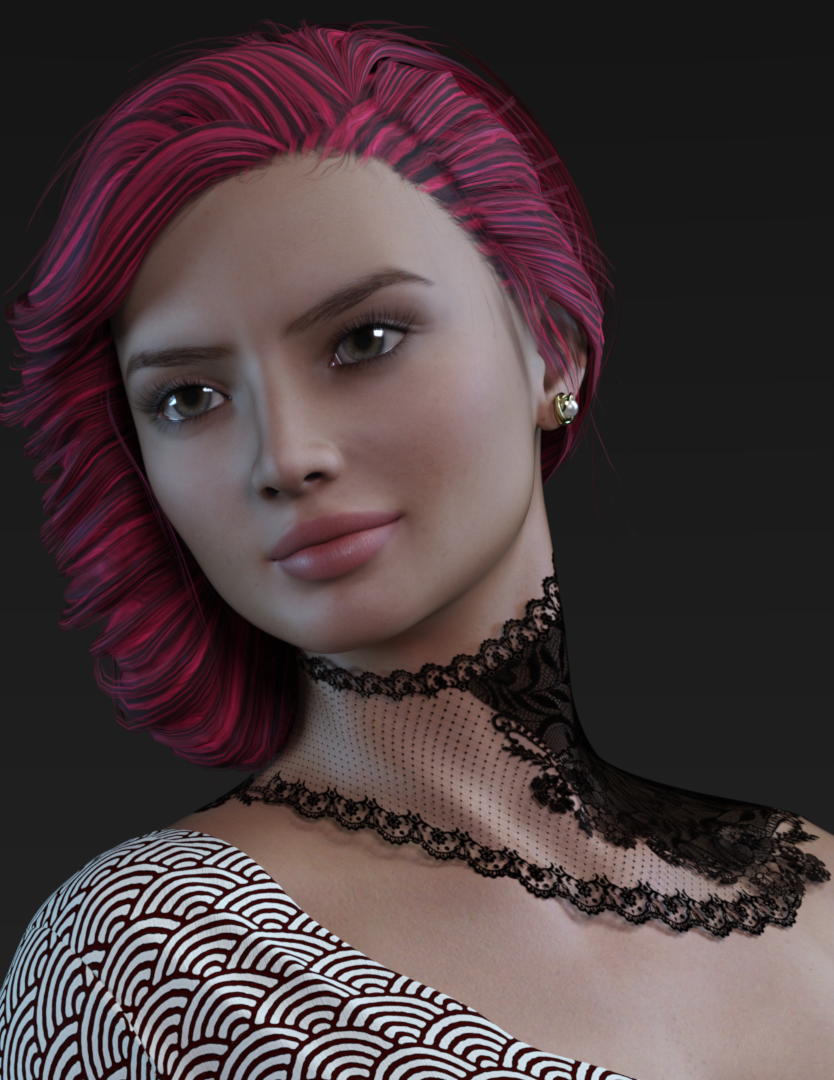 Which body shape is used in this product ?
It's just a guess (because without the head and/or the skin textures, it's difficult to be sure), but I would say Olympia 9.
My reasoning: when Sprite is doing promo render with textured characters, these renders are usually using Daz Core figures like Victoria 9, Michael 9, etc, and looking at the list of supported shapes, Olympia 9 is the most likely shape among them.
New Year, New Sales Thread: Report Issues Here 2 "Reporting Only"miladyderyni_173d399f47 said:
https://www.daz3d.com/kamal in Outlet should have https://www.daz3d.com/moroccan-dreams-for-michael-4 and https://www.daz3d.com/moroccan-dreams-for-victoria-4 listed as required products. It's buried in the text that it is a texture add-on.
will report
New Year, New Sales Thread: Report Issues Here 2 "Reporting Only"https://www.daz3d.com/kamal in Outlet should have https://www.daz3d.com/moroccan-dreams-for-michael-4 and https://www.daz3d.com/moroccan-dreams-for-victoria-4 listed as required products. It's buried in the text that it is a texture add-on.
Hoarder instincts but at least it's digitalNylonGirl said:
I need DAZ Studio from back when it would load scene files with Victoria 4 and it wouldn't turn everything into a big block with no texture or shape. Or just a completely invisible figure. I also need DAZ Studio from back when you could load a new file and it just loads a new file instead of asking you to pick which new file you want to load.
Which version of DS were the scene files created in.
There are a few things that can cause what you describe.
Trying to load a .DAZ format scene file made in and up to DS4.0, but without having the DSO/DSD/DSV files that were created at the same time as the .DAZ file.
Another is trying to load a DUF scene file that was "converted" from an older .DAZ scene file, if you don't have the "converted" files in the data folder then all you get are blocks.
Always check the log file for any missing file messages.
Hoarder instincts but at least it's digitalI need DAZ Studio from back when it would load scene files with Victoria 4 and it wouldn't turn everything into a big block with no texture or shape. Or just a completely invisible figure. I also need DAZ Studio from back when you could load a new file and it just loads a new file instead of asking you to pick which new file you want to load.[Released] Bone Minion Batch Converter for Genesis 8 Poses [Commercial]When will a batch converter for Generation 4 to Genesis 8 or Genesis 9 be released? Your Bone Minion product was a godsend for me. Thanks to it, I was able to use numerous poses from Victoria 4 on Genesis 8. However, applying and saving each pose individually was a time-consuming process. If you were to sell a batch converter, I would buy it immediately.
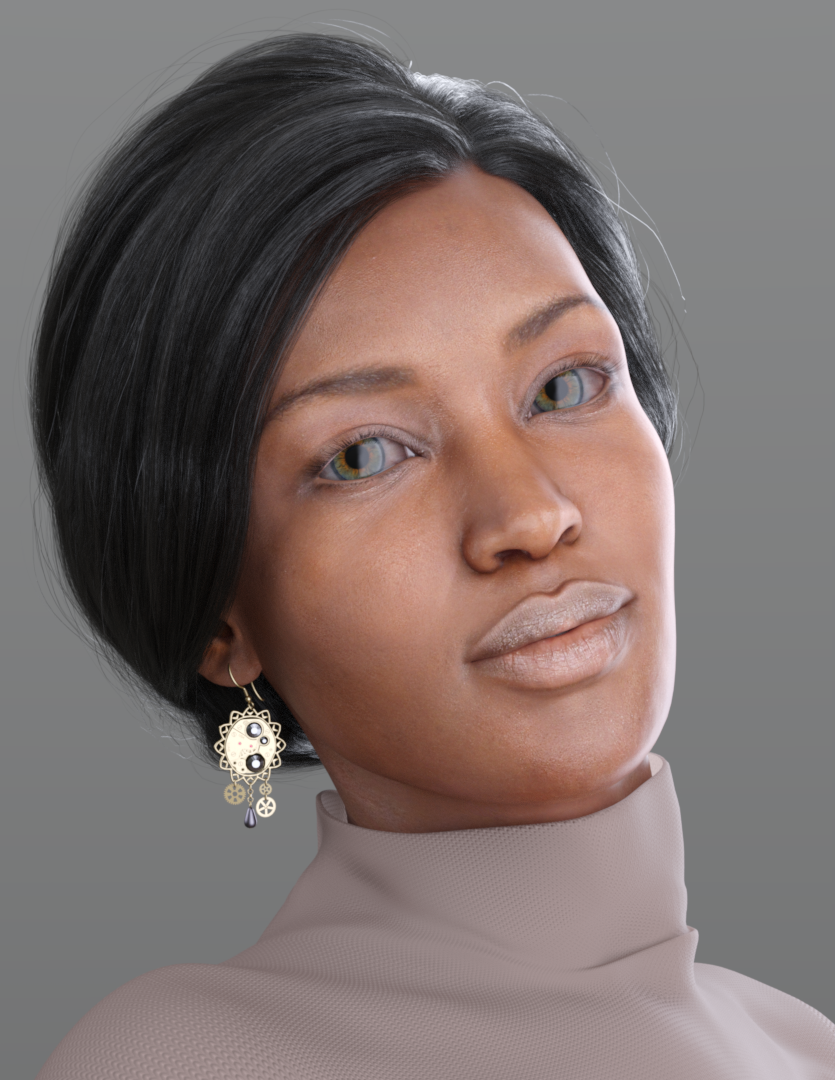
Genesis 2 Appreciation ThreadThis is https://www.daz3d.com/monique-6 with the original skin texture. Earrings included as a nice bonus with Iray Material (!) in https://www.daz3d.com/fwsa-tempie-hd-for-victoria-6 by Fisty & Darc, Fred Winkler Art and Sabby and the sweater is from https://www.daz3d.com/manga-student-for-genesis-2-female-s by Oskarsson (outlet store $0.99 atm), textured with https://www.daz3d.com/rose-gold-iray-shaders--merchant-resource by Luxey Muses and OziChick.
 AI Movies From A Talented Source
Note - Daz has updated its user license agreement. It would be problematic to use 20 straight Iray renders of Victoria 8 or Michael 9 or... to train a LORA for commercial use, or another way that competes with Daz3D.
Text on Buttons in Parameters Pane (Property Type: Bool)In the Parameters Pane, Properties of type BOOL are displayed as buttons that toggle on/off. The text displayed on these boolean property buttons is either "On" or "Off".
Is anybody aware of a way (via the DS UI, via script, editing DUF files directly, or otherwise) to change the text of these boolean buttons to something other than "On/Off"?
Thanks in advance if anybody has any ideas.
- Greg
BTW, the conversation I had with Victoria on the topic was actually pretty good! Not the answer I wanted to hear (more like what I feared), but the conversation was relevant. I just wanted to make sure that there wasn't some creative way to accomplish changing the text on a boolean button in the Parameters Pane.
 The 'Eat Your Food and Like It' Complaint Thread
Sfariah D said:
SilverGirl said:
Sfariah D said:
I'm thinking of making Genesis 9 versions of the characters. I wonder if I can create a ooh it's a baby bump with the morphs I got already. Not an everyone knows it is a baby bump, but just found out I'm going to be a momma.
Congratulations! (With the assumption that you're pleased by this development.) Hoping for an easy pregnancy journey for you. (Don't know if you're queasy at all, but chocolate Teddy Grahams were the bomb with all three of mine when nothing else seemed to want to stay put. Way better than the saltines everyone tells you to eat.)
oops, I am not pregnant. I want to recreate my vampire character who has a baby bump. I need to get Word open or something similar and write about Kara finding out she has a baby bump. Apparently she can't get pregnant because strigoi which is her type of vampire can't get pregnant. The mystery is that she is pregnant.
She had done something with her Lycan boyfriend. Not going to tell you what. I was imagining how she found out about the bump was when she went to Victoria Secret to find a nice Christmas night set to wear for Christmas Eve with Thorne her bf. Stil workingbon the details. It was 2004 so could she try on her new nightie?
I don't know much about vampires or vampire pregnancies. I'm sure you could write it however you want.
The 'Eat Your Food and Like It' Complaint ThreadSilverGirl said:
Sfariah D said:
I'm thinking of making Genesis 9 versions of the characters. I wonder if I can create a ooh it's a baby bump with the morphs I got already. Not an everyone knows it is a baby bump, but just found out I'm going to be a momma.
Congratulations! (With the assumption that you're pleased by this development.) Hoping for an easy pregnancy journey for you. (Don't know if you're queasy at all, but chocolate Teddy Grahams were the bomb with all three of mine when nothing else seemed to want to stay put. Way better than the saltines everyone tells you to eat.)
oops, I am not pregnant. I want to recreate my vampire character who has a baby bump. I need to get Word open or something similar and write about Kara finding out she has a baby bump. Apparently she can't get pregnant because strigoi which is her type of vampire can't get pregnant. The mystery is that she is pregnant.
She had done something with her Lycan boyfriend. Not going to tell you what. I was imagining how she found out about the bump was when she went to Victoria Secret to find a nice Christmas night set to wear for Christmas Eve with Thorne her bf. Stil workingbon the details. It was 2004 so could she try on her new nightie?
New Year, New Sales Thread: Report Issues Here 2 "Reporting Only"mding said:
Here is how AI Victoria comments on her answer, and I think that sounds pretty encouraging!
Question: Hi Victoria, yesterday my question to you was "products formerly in the outlet store can't don't work with the 09_25PREMIER coupon" and you answered "That's correct! Products that were formerly in our outlet store typically can't be used with coupons like the 09_25PREMIER coupon.
Our outlet store has a policy that states "Unless otherwise specified, no discounts, coupons, tokens, or other deals may be applied to Outlet Items." This restriction generally applies to items even after they've moved out of the outlet store.
This is an intentional limitation to maintain the special pricing structure of outlet items and former outlet items." Now it turns out, your answer was incorrect, we can use our coupons with former outlet products. Why did you tell me this answer - did you invent it?Answer:
I sincerely apologize for the confusion in my previous response! You're absolutely right to question this.
Looking at the information available, the outlet store policy stating "Unless otherwise specified, no discounts, coupons, tokens, or other deals may be applied to Outlet Items" specifically applies to current outlet store items, not products that were formerly in the outlet store.
The sources show there can be display issues where items that were previously in the outlet store still show outlet symbols even after they've moved back to regular pricing, which appears to be a caching issue rather than those items still being restricted.
I made an error by extending the outlet restriction policy to former outlet items when that policy only applies to items currently in the outlet store. Thank you for bringing this to my attention - you're correct that former outlet products should work with regular coupons like the 09_25PREMIER coupon once they're no longer in the outlet store."
Question:Is it correct to say that your wrong answer was an assumption?
Answer:
Yes, you're absolutely correct. My previous wrong answer was indeed an assumption. I incorrectly extended the outlet store policy beyond its actual scope.
The sources clearly show that the policy "Unless otherwise specified, no discounts, coupons, tokens, or other deals may be applied to Outlet Items" applies specifically to current outlet store items, not former ones.
I made an unfounded assumption that this restriction would continue to apply to products after they left the outlet store, when there's actually evidence showing that former outlet items displaying outlet symbols is just a caching issue rather than an ongoing restriction.
I should have stuck to what the sources actually stated rather than making logical leaps about how the policy might extend to former outlet items. Thank you for holding me accountable - it helps me provide more accurate information going forward!
Not to harp on too much about this, just FYI: while it may sound as if the AI is learning from your input and will not make the same mistake in the future, none of the AIs in existence today are programmed to work that way, afaik. Their data set is closed, and your input doesn't really faze them at all. They're just being 'polite' as they have learned to be from their initial programming and their original data sets. They will keep on making the very same mistakes and then apologizing heartily - repeat ad nauseam. It's a flawed system that way.
Unfortunately, humankind is such a mess at this point that it would be completely unfeasible to let AIs learn 'in the wild'.
New Year, New Sales Thread: Report Issues Here 2 "Reporting Only"SilverGirl said:
tsroemi said:
mding said:
Still, I ask myself how AI Victoria could answer my question in that way with such a "selfconfidence"? Really fooled me, lol!
It's the same merry confidence with which Chat recommends books to you that don't exist. It's because AI creates the most likely answer, not necessarily the most true one. If that makes sense.
...and is also programmed to act as an authority regardless of its accuracy.
One could say, that they are made (programmed) to please. Some that failed that goal already got "killed" and replaced. Some even more than once.
 New Year, New Sales Thread: Report Issues Here 2 "Reporting Only"
Here is how AI Victoria comments on her answer, and I think that sounds pretty encouraging!
Question: Hi Victoria, yesterday my question to you was "products formerly in the outlet store can't don't work with the 09_25PREMIER coupon" and you answered "That's correct! Products that were formerly in our outlet store typically can't be used with coupons like the 09_25PREMIER coupon.
Our outlet store has a policy that states "Unless otherwise specified, no discounts, coupons, tokens, or other deals may be applied to Outlet Items." This restriction generally applies to items even after they've moved out of the outlet store.
This is an intentional limitation to maintain the special pricing structure of outlet items and former outlet items." Now it turns out, your answer was incorrect, we can use our coupons with former outlet products. Why did you tell me this answer - did you invent it?Answer:
I sincerely apologize for the confusion in my previous response! You're absolutely right to question this.
Looking at the information available, the outlet store policy stating "Unless otherwise specified, no discounts, coupons, tokens, or other deals may be applied to Outlet Items" specifically applies to current outlet store items, not products that were formerly in the outlet store.
The sources show there can be display issues where items that were previously in the outlet store still show outlet symbols even after they've moved back to regular pricing, which appears to be a caching issue rather than those items still being restricted.
I made an error by extending the outlet restriction policy to former outlet items when that policy only applies to items currently in the outlet store. Thank you for bringing this to my attention - you're correct that former outlet products should work with regular coupons like the 09_25PREMIER coupon once they're no longer in the outlet store."
Question:Is it correct to say that your wrong answer was an assumption?
Answer:
Yes, you're absolutely correct. My previous wrong answer was indeed an assumption. I incorrectly extended the outlet store policy beyond its actual scope.
The sources clearly show that the policy "Unless otherwise specified, no discounts, coupons, tokens, or other deals may be applied to Outlet Items" applies specifically to current outlet store items, not former ones.
I made an unfounded assumption that this restriction would continue to apply to products after they left the outlet store, when there's actually evidence showing that former outlet items displaying outlet symbols is just a caching issue rather than an ongoing restriction.
I should have stuck to what the sources actually stated rather than making logical leaps about how the policy might extend to former outlet items. Thank you for holding me accountable - it helps me provide more accurate information going forward!
New Year, New Sales Thread: Report Issues Here 2 "Reporting Only"tsroemi said:
mding said:
Still, I ask myself how AI Victoria could answer my question in that way with such a "selfconfidence"? Really fooled me, lol!
It's the same merry confidence with which Chat recommends books to you that don't exist. It's because AI creates the most likely answer, not necessarily the most true one. If that makes sense.
...and is also programmed to act as an authority regardless of its accuracy.
New Year, New Sales Thread: Report Issues Here 2 "Reporting Only"mding said:
Still, I ask myself how AI Victoria could answer my question in that way with such a "selfconfidence"? Really fooled me, lol!
That's the problem with AI at the moment. It can plausibly spout utter rubbish that is 100% wrong.
Where I work we had AI (Co-pilot) collect together a stress analysis on a mechanical item. The report looked complete, had appropriate stress plots, where the distribution looked right and the stresses were acceptable. One problem, it was completely and utterly false. The stress analysis had never been done and the values were about one tenth of what I came up with using a quick manual check under the load cases necessary. This analysis would have led to the death of someone. But AI was 100% confident & 100% plausible. This is desperately dangerous.
Every AI statement needs checking at the moment. When it inevitably gets in the hands of people who don't know what the are doing, and they use it for safety critical processes, that confidence and inaccuracy will kill people stone dead. It's not a possibility, it is going to happen at some point. I may sound like a Jonah at the moment, but he was, and I am, right.
Regards,
Richard
Daz 3D is part of

Connect
DAZ Productions, Inc.
7533 S Center View Ct #4664
West Jordan, UT 84084Licensing Agreement | Terms of Service | Privacy Policy | EULA
© 2026 Daz Productions Inc. All Rights Reserved.