-
[Solved] Metadata: how to remove a wrong Scene ID from a Compatibility Base ?
Thank you but G9Dragon is not a Compatibility Base: it won't appear in the list, and doesn't, I checked

It's part of the path of geometry file someone at Daz wrongly linked with the compatibility base 'Genesis 9/Base' and I don't know how to unlink it: since then, I also tried to remove Genesis 9 Starter Essentials, but the problem is still here.
To make the matter worse, they did a similar mistake Z Bending Down Pose Partials Mega Set: through this product, they linked 'Genesis 3/Female' with two hairs products (I think, considering the name of the files) on top of having the usual Scene ID for 'Genesis 3/Female' (a scene ID that is not needed at all because poses don't have Compatibility Bases)

<ObjectCompatibility VALUE="/data/Littlefox/BastetG3/G3%20Scalp/XanaduHairG3F-Scalp_1361.dsf#XanaduHairG3F-Scalp_1361" REF="/Genesis 3/Female"/>
<ObjectCompatibility VALUE="/data/powerage/GrandSiecleHair/GrandSiecleHair/GrandSiecleHair_143213.dsf#GrandSiecleHair_143213" REF="/Genesis 3/Female"/>
<ObjectCompatibility VALUE="/data/DAZ%203D/Genesis%203/Female/Genesis3Female.dsf#Genesis3Female" REF="/Genesis 3/Female"/>I also have a similar problem with 'Genesis 8/Female' but I have yet to be able to identify which product is reponsible: I searched for them inside all .dsx files with metadata I have and none have the bogus scenes IDs in them. My current guess is the problem is from products refunded since December 2025 because I created metadata for a Genesis 8 Female character before December 2025 and there is no bogus Scene IDs here and I saw them.
I don't think it's a problem related to other stores, because most of them don't provide metadata and when they do, I'm usually redoing them because most of the time, they are bad.
And I don't think it's a mistake I made while creating metadata, because how could I link a Compatibility Base with geometry files I don't own or knew about in the first place, to say nothing of the fact that if it was a mistake I did, I should see the bogus scene IDs linked to 'Genesis 8/Female' in my metadata files and I don't.
Edit : I just identified the product responsible for the problem for Genesis 8/Female.
It's Absinthe for Genesis 8 Female. I just don't get why I didn't see the problem when I created metadata at the end of 2025 because it's a freebie from September 2025.
<ObjectCompatibilities>
<ObjectCompatibility VALUE="/data/Gendragon3d/Meghan/Meghan%20Brow/Meghan%20Brow_31880.dsf#Meghan%20Brow_31880" REF="/Genesis 8/Female"/>
<ObjectCompatibility VALUE="/data/Gendragon3d/Donna/Donna%20Brow/Donna%20Brow_31880.dsf#Donna%20Brow_31880" REF="/Genesis 8/Female"/>
<ObjectCompatibility VALUE="#Donna Brow_31880" REF="/Genesis 8/Female"/>
<ObjectCompatibility VALUE="#Ava Brow_27280" REF="/Genesis 8/Female"/>
<ObjectCompatibility VALUE="/data/Gendragon3d/Ava/Ava%20Brow/Ava%20Brow_27280.dsf#Ava%20Brow_27280" REF="/Genesis 8/Female"/>
<ObjectCompatibility VALUE="/data/DAZ%203D/Genesis%208/Female/Genesis8Female.dsf#Genesis8Female" REF="/Genesis 8/Female"/>
</ObjectCompatibilities>[Solved] Metadata: how to remove a wrong Scene ID from a Compatibility Base ?Just saw this one. I have had similar conflicts in the past, but I do not have this particular product. As you have realized, the metadata file cannot undo Compatibility Base assignments once they are made. What you do is load Genesis 9, then select Edit->Scene Identification. In the dialog, look for Compatibility Base. Click the ellipsis at the far right. This will open the list of all defined compatibility bases. Search for the erroneous string (G9Dragon) (I can't recall if it would be a Compatibility Base of its own or a Sub-Compatibility Base under Genesis 9) and delete the bad reference. This will clear the entry from the database. (There are other ways to access the "Choose a Compatibility Base" dialog)
Don't forget to delete the line from the metadata file, or it will get back in if ever you re-install or re-import metadata.
If you mess it up, you can re-install Genesis 9 Starter Essentials (or re-load the metadata from DIM) to reset any missing parts.
Texture issue in the Daz Dragon 3 in Blender with DiffeomorphicI tried importing a dragon I made with the Daz Dragon 3 addons into Blender using Diffeomorphic and I like to use normal textures made in https://cpetry.github.io/NormalMap-Online/ in it to make it more detailed, but this time when I use Easy Import Daz it says it comes with a warning and the normal head texture does not work properly, as you can see in the image. Does anyone have any idea what the cause might be and how I can fix this?
[Released] Mirror Geometry for Genesis 9 [Commercial]It’s a year later and I still can’t get the script to work. This time trying the G8F version to mirror https://www.daz3d.com/dforce-roma-dress-for-genesis-8-females. I’m following the steps in the PDF manual precisely.
1. Load G8F base figure, and nothing else.
2. Select figure.
3. Launch script and configure.
4. Click Run. In the viewport, I see the script load the dress onto the figure. Then I see it flip (mirror). Then it disappears and the script apparently stops running. The expected “Update Base Geometry” dialog does not appear.
The script does create !MIRRORED ITEM.obj in the working directory but does not invoke the import step. If I try to import !MIRRORED ITEM.obj in the normal way, the program freezes — it doesn’t quit, but the import dialog is nonresponsive.
DAZ 4.24.0.4, Windows 11
[diffeomorphic] some hairs look like plastic in cyclesMake sure it's using the normal map. I imported the asset myself and the Normal map makes a massive difference Diffeo doesnt import the normal map in either FBX compatable, or Extended for that asset.
Star 2.0 for G3F!!! whoot!!
--- I'm very sorry to bother you after all these years. May I ask what parameters I need to adjust in order to replicate the eyelashes shown in the poster? (The poster shows two distinct peaks in the lashes, but when I directly import the model, the lashes appear completely smooth.) I've been trying for a long time without success, so I have no choice but to turn to the developer for help.Lady Littlefox said:Yeah the rotational centers are in weird places due to them being disks that float, they're like three joints in to make it work ;P
I was actually thinking about adding an expansion to the eyes... give me another week and it'll probably be a freebie or something... main intent woudl be to put one last joint right on the eye disk itself so that it has a pivot to twirl around easier for the grab and move crowd. That sound like a happy solution?(Need help) Eyelashes on the Star 2.0 modelI want to style the character's eyebrows to look like those in a product poster, but I haven't been able to find the corresponding parameters. Her eyelashes have two sharp protrusions, but after I import the model, the eyelashes look very smooth.Sagan: A DAZ Studio to Blender Alembic ExporterAlembic doesn't transfer the materials, just the material slots.
There was no point in implementing some sort of materials converter when Thomas and Padone had already done so in Diffeomorphic, and far better than I would have done. But you can do an import with Diffeomorphic, tell it to alphabetixe the material slots but not to remove duplicate materials, and then easilt copy the materials from the diffeo import to the Sagan import. Or ask your favorite LLM to write a script to do it.
Urgent question about Blender to Daz Studio PluginRather than importing a rigged character, you could maybe pose against a reference image or a similar sized character in Daz, do the pokemon posing in blender, then export a textured/baked statue without any rigging and import that into Daz. Wouldn't be as versatile as being able to pose directly in Daz since you'd essentially be importing a prop, but it might make the workflow more doable for some still renders.
Urgent question about Blender to Daz Studio PluginElor said:
It's just a rapid test before breakfast, I don't know if I picked the wrong model and I never tried to import rigged model using Blender to Daz, but getting a functionning Detective Pikachu will take additionnal time: it imported all the bones and it is cleaner than directly import DAE or FBX into Daz (see second picture: the horror straight from any horror movie written filmed completly wasted is the dae direct import into Daz, and the blank one is the FBX direct import), but it's not a one and done process.
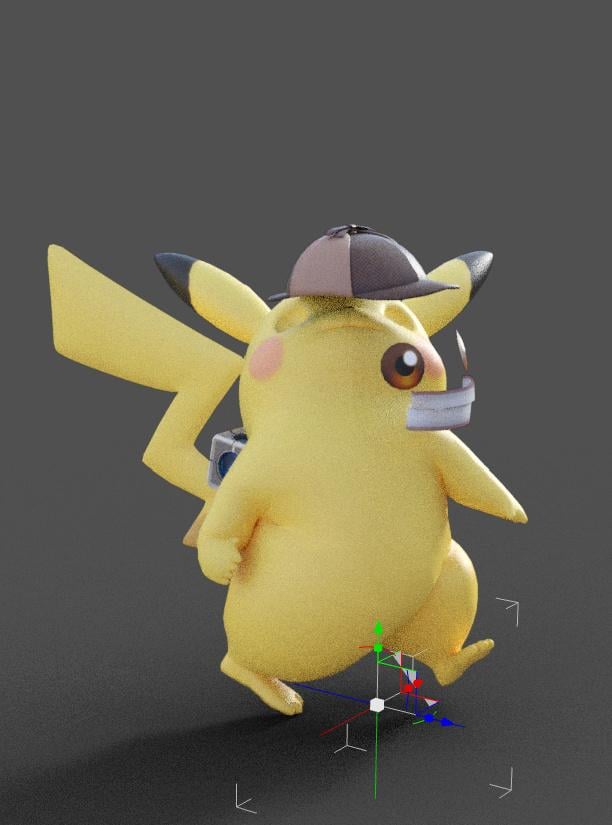
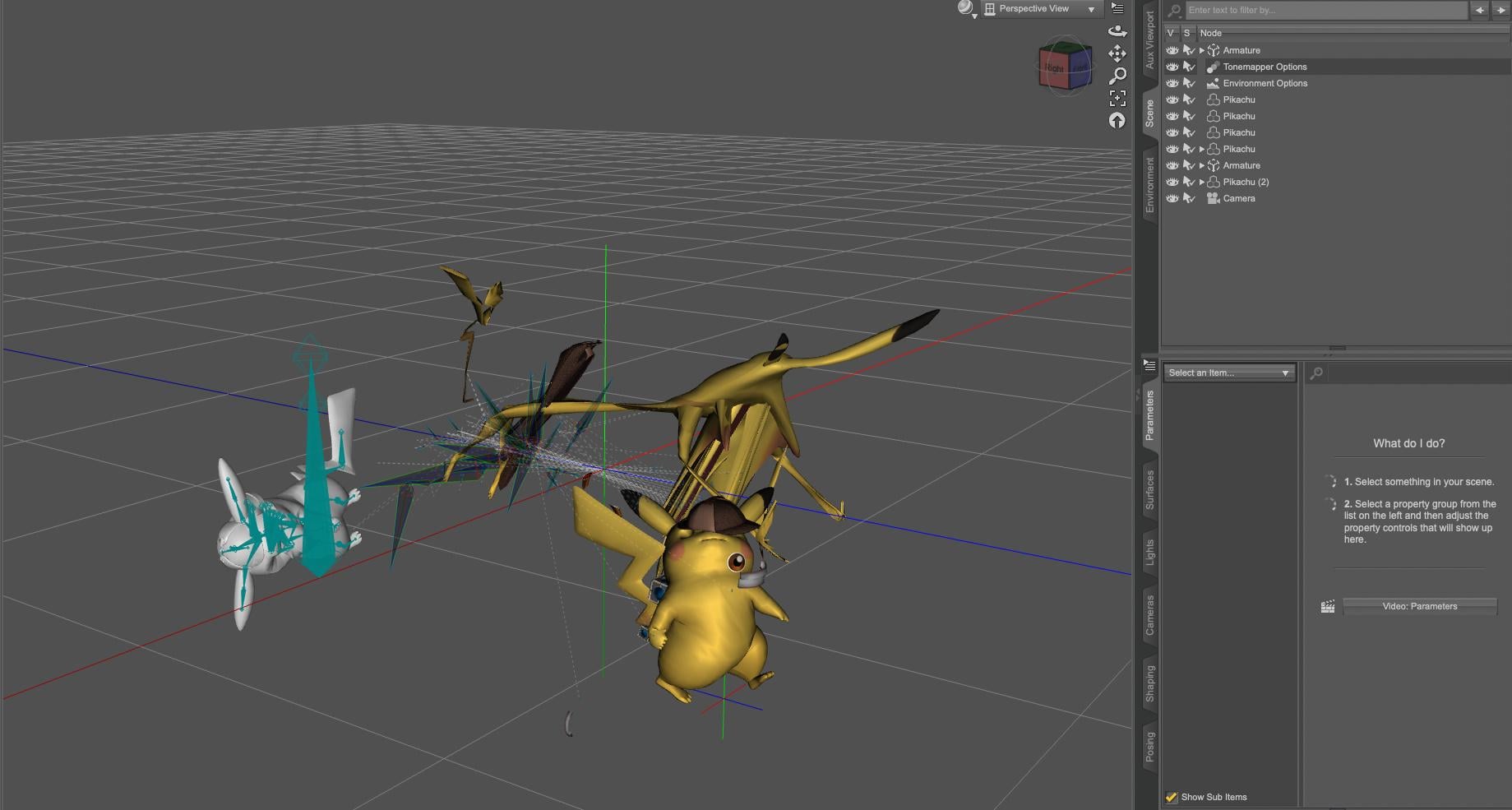
LOL! Yes, the bottom pictures pretty much look like what I keep getting when I try to import them directly into Daz Studio, too. However, the top picture still looks way too messy for me to be able to easily fix. Thank you so much for the images, that tells me a lot!!!
Urgent question about Blender to Daz Studio PluginIt's just a rapid test before breakfast, I don't know if I picked the wrong model and I never tried to import rigged model using Blender to Daz, but getting a functionning Detective Pikachu will take additionnal time: it imported all the bones and it is cleaner than directly import DAE or FBX into Daz (see second picture: the horror straight from any horror movie written filmed completly wasted is the dae direct import into Daz, and the blank one is the FBX direct import), but it's not a one and done process.
Missing files from Daz"Product tansferred from Renderosity" iisn't saying you bought them at Renderosity, it is saying that they were part of a group of products brought over from Renderosity to Daz by the PA in a bulk move and that they were not given metadata or thumbnails when they were added to the Daz store, so they won't have those in the content panes.
Have you checked DIM using the SKU filter as I suggested in my previous post, or checked your content library page here?
Missing files from DazProducts transferred from Rendo doesn't have metadata, and netiher a product icon.
How do you organize a huge content library?bronyswvg said:
But which specific folders am I actually allowed to move? Products are often split into multiple folders like People, Runtime, etc. If I move a file, will it break the asset? Will the software still recognize it?
I wasn't suggesting moving any folders, which would break any existing metadata (and for the Data and Runtime folders would stop the product from working), rather I was suggesting using categories and (if desired) the compatibility system that drives Smart Content, both of which sit on top of the file locations.
DAZ Director Plugin (WIP)So for those who are following, I just published v2.3.0 of the Script Server (and the dazpy Python package that's bundled with it) at Release v2.3.0 — Scene Change Events (SSE) · bluemoonfoundry/daz-script-server
The major updates include:
- Added animation and Geometry support.
* DazPose (snapshot/restore/interpolate full skeleton poses)
* DazAnimation (keyframe read/write)
* Vec3/Quat/BoundingBox math types to the dazpy SDK.
* New posed vertex positions API (vertex_positions_posed)* A new batch of example scripts covering:
- USD export
- BVH motion-capture import (though this one is still very flakey
- Keyframe baking
- geometry analysis, and animation blending.
- Basic body measurements analyzer similar to Measure Metrics for G8,G8.1, and G9
* Full Sphinx API docs and an integration test suite.
* A Server-Sent Events (using a /scene/events endpoint) feature that pushes live DAZ Studio scene changes — nodes, skeletons, lights, cameras,
selection, time, and render events — to any connected client.Wetness (tears) on imported Daz characters via diffeomorphic looks dry and flat in BlenderHi, basically when I import a character from Daz via diffeo with tears, the tears are coming through dry, ive tried various different ones, mainly geoshells but the same issue occurs. Ive made sure the import unused textures setting is on in global settings in the Diffeomorphic menu in Blender. I've messed around in the node editor for the geoshell but it just seems to make things worse. Ive searched Google and all kinds for the passed 3 days trying to sort his out. Does anyone know of any tears that will just work when ported to Blender? This was with "So Sad Tears"Diffeo: Imported custom morphs affecting other morphs as wellWhen you import extra morphs, as the lips, all the morph sliders must be zero, otherwise the current shape is baked together with the imported morph. This is a recent bug now fixed in the dev version, so either zero the sliders or grab the dev.
https://github.com/Diffeomorphic/import_daz
p.s. Please remove the zip we can't share blender files as for the DAZ EULA. While duf files are fine, provided they don't embed geometries.
Problem with Breastacular for G8FIf you mean the daz genitalia, then you have to merge it by hand, after importing without merge. The "last udim tile" option is specific for geografts without shells, as daz.
https://github.com/Diffeomorphic/import_daz/wiki/Setup_Finishing_Merge_Geografts
As for making changes, if you merge udims you will have one single material, that's the purpose of merging. However, if you use the pbrskin, the makeup works as an extra layer, that you can change. Be sure to select the face as active material when merging udims so the makeup layer is preserved.
https://github.com/Diffeomorphic/import_daz/wiki/Material_Tools_Edit_Material_Make_UDIM_Materials
steps (for example Victoria 8.1 with genitalia):
- import without merging geografts
- merge geografts with "last udim tile"
- make udims with face as active material
Diffeo: Imported custom morphs affecting other morphs as wellIf morphs have the same name they can conflict, in the import options you can give a suffix to avoid clashes. Other than that they shouldn't interfere each other. Or if you can provide a specific example we could check if there's a bug.
Problem with Breastacular for G8FOK, I looked into this some more and it seems that this texture bleeding is a much larger issue than I initially thought.
Looks like every character imported with Easy Import and cycles materials has this problem. Graft or no graft.Am I mistaken?
That would make Diffeo to Blender as a substitute for DAZ almost useless, no?
And using Udim is apparently not optional in this case, but absolutely necessary to fix some of these texture bleeding issues.
I wish I had known about this before spending months on getting into Blender.Before I waste more time looking into using sss instead of volume, are there examples of realistic looking sss shaders?
Initial tests with the sss method looked pretty bad.
If I can't get at least close to the look I can get out of DAZ, then rendering in Blender is really not a good option for me it would seem.Thanks.
Daz 3D is part of

Connect
DAZ Productions, Inc.
7533 S Center View Ct #4664
West Jordan, UT 84084Licensing Agreement | Terms of Service | Privacy Policy | EULA
© 2026 Daz Productions Inc. All Rights Reserved.