-
Daz Animating/UE4 pipeline
Animating in Daz Studio is a struggle for many reasons. Some of the issues mentioned in the forum I have yet to encounter, but in my experience the Timeline is very buggy and will drop morph keyframes after you Save/Close/Reopen a file. You end up losing hours of work and the motivation to continue. There's also an issue I've encountered using Animate2 - after loading and editing an Aniblock, a character will seem to have feet that are properly animated/anchored with relation to the floor, but when you Save/Close/Reopen your file the feet are floating all over the place.
I'm sure others in the community will be happy to share their frustrations more articulately and in greater detail than I can manage.
This is a known issue, saving a preset is a workaround for now and the change log shows a fix in a recent build so with luck there will be an updated version of DS presently.
Thanks for the workaround. By "save a preset", you mean Save As > Properties Preset?
or Pose preset or Shaping preset, depending what you needed.
Khemsit 8...Khemsit's texture/hd morphs are REALLY nice! I like her morph, too, but I also really like to do my own, so I slapped on Khemsit's texture and just went to town.
She's on the right of the image, Twosret is on the left - both have custom morphs. And thanks @jakiblue for making me buy the Egyptian Fabrics shaders (I don't regret it lol)
 How to replace Head form Blender FaceBuilder data
I create a head which use blender fackbuilder https://keentools.io/download/facebuilder-for-blender
like this:
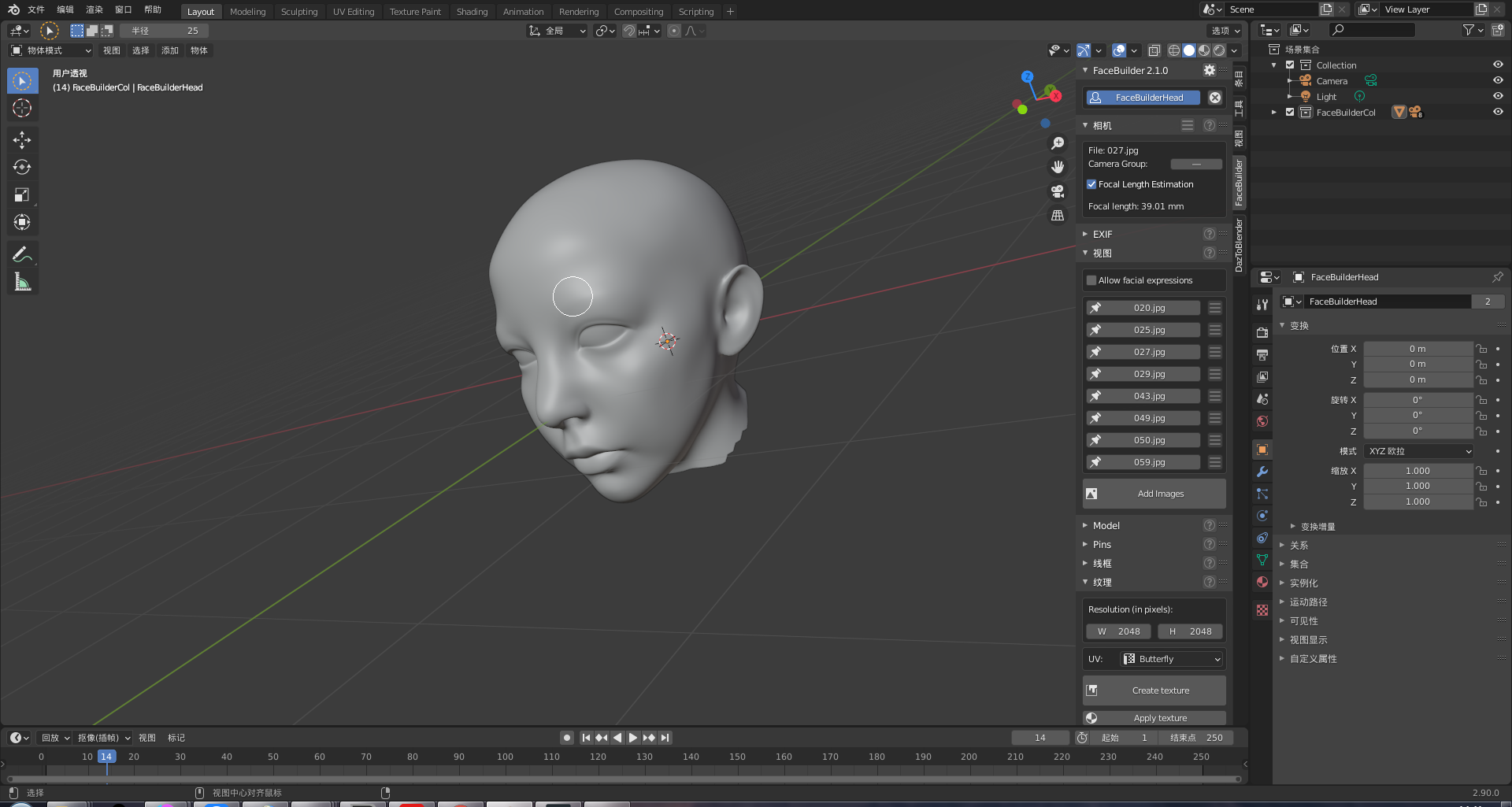
I want replace default genesis 8 male to this head or make a head morph to change default head,then move the full body with new head into daz.
I tried use "Daz to Blender" move genesis 8 male into Blender,but i don't known how mix the fullbody and this head
Is that possible? Is there a video tutorial?
I prefer blender because it can generate face data exactly
Are there any other ways to do replace head with face data exactly in daz studio?
how can i do,thx.
https://blendermarket.com/products/softwrap
This tool might help you. Use G8 as your base mesh. Or try Wrap from russian3dscanner. com, they're offering a 30 day test version of their wrap toolset.
Daz Studio Pro BETA - version 4.12.2.60! (*UPDATED*)If you check the change log http://docs.daz3d.com/doku.php/public/software/dazstudio/4/change_log#4_12_2_40 there is a fix for the saving issue listedWhat about the timeline? It will be fixed as well with these last changes?
I mean it will allow us to move, delete and copy-paste keyframes without crashes or never-moving situations?
That entry has nothing to do with the Timeline. have you reported your issues?
If you check the change log http://docs.daz3d.com/doku.php/public/software/dazstudio/4/change_log#4_12_2_40 there is a fix for the saving issue listed
I can see it here. But what is the context of this? I mean, this is a beta from I know, meaning it's probably no safe for normal use. And as DAZ normally doesn't release small incremental versions, means we have yet a long wait to see this released, unless there is a verion in schedule soon.
DAZ Studio : Incremented build number to 4.12.2.39
-
Source maintenance
-
Fixed an issue where (mesh) modifier animation data (e.g., morph, dForm, bulge, legacy joint bending, legacy rigging properties, etc) would be omitted when saving a scene
Beta doesn't necessarily mean unstable, the Public builds are released in the expectation that they are pretty stable as far as I know, but as yet those fixes (for 4.12.2.40 - the version number is after the changes) isn't available as a Public or Production Build.
Imported Obj - tri to quadsCould someone point me in the right direction - I'm on holiday and this in my project for the week

I downloaded a couple of free G8M clothes meshes from Artstation (a shirt and a top by No_Brand) to see if I can figure out the rigging in Daz Studio. I am very much a luddite at rigging but I can run the transfer utility and follow Sickleyield's instructions from her Genesis Rigging and Morphing templates to get a basic transfer which is a start.
So, I import the obj, match to G8M, set up Transfer utility - it gets to De-trangulate - DS crashes, every time in both 4.10 and 4.12 beta. Okay, problem is obviously the triangulations. Took it into Blender (even more of a luddite there) and managed to find and run 'tri to quads' - still seems to be allot of tris after that but... - save, open in DS, run transfer utility - crash.
Obviously I don't know what I am doing but I want to learn. I have Blender and Hexagon, pretty much lost in both but I can follow instructions if someone wants to point me a tutorials.
Anyone have any suggestions?
Are we (daz/poser, virtual photography, stories, comics) such a niche today?to speed things up. I guess that's what the sensible comic-makers do.
Yes, suppose a custom character is built from scratch within 1 month vs a similar custom character is created using morph within 10 minutes. Both will look similar.
The conclusion is if the creator is a comic maker it is foolish to not save time and create everything from scratch.
Due to limited lifetime of human life it is even unrealistic if he spend entire lifetime to create only one art or comics using every items created from scratch. If the creator is 3d artist only then it is reasonalble to create everything from scratch because this time his goal is create 3d assets only but not the end product for end users.
Sienna HD Leg Corruption when KneelingI found the problem.
The Flex Quad Left morph was set to 1300%.
I'm not sure how that could've happened. Any thoughts on how it happened would be appreciated!
GUIDE - What To Buy On The Daz Store?Figures
Not much to say here. Basically, most figures from these creators are top-notch:
- Mousso: https://www.daz3d.com/mousso
- Rayia: https://www.daz3d.com/raiya
- P3Design: https://www.daz3d.com/p3design
Morphs
Basic Ones
The following morphs were made by Daz itself, and they are used by many other products, so they're the first ones you should buy.
- Female head: https://www.daz3d.com/genesis-8-female-head-morphs
- Female body: https://www.daz3d.com/genesis-8-female-body-morphs
- Male head: https://www.daz3d.com/genesis-8-male-head-morphs
- Male body: https://www.daz3d.com/genesis-8-male-body-morphs
They have stuff like height, fitness, weight etc., so I can't imagine using Daz without them.
If the default range is not enough for you, you can always edit it (click on the wheel on the top right of that parameter->parameters settings->edit min and max values).RareStone's Face Morphs
Female: https://www.daz3d.com/rarestone-s-face-morphs-collection-for-genesis-8-female
Male: https://www.daz3d.com/rarestone-s-face-morphs-collection-for-genesis-8-maleThey're basically all you need to get almost any face you want. Best buy.
200 Plus Head And Face Morphs Bundle
Link: https://www.daz3d.com/200-plus-head-and-face-morphs-bundle-for-genesis-8-female-s-and-male-s
If you want even more morphs, this set from Zev0 is great as well.
If you already have the basic morphs, RareStone's, Zev0's and some figures you like, you probably don't need more for the head/face: remember the introduction about loading times.
Bend Control
Link: https://www.daz3d.com/bend-control-bundle-for-genesis-8-female-s-and-male-s
I use it to give a more realistic look to hips and knees when the character has an unusual pose.
Shape Shift
Link: https://www.daz3d.com/shape-shift-bundle-for-genesis-8-female-s-and-male-s
These morphs are for the whole body, and they have most of what you'll need.
Growing Up
Link: https://www.daz3d.com/growing-up-bundle-for-genesis-8-female-s-and-male-s
If you want to have a younger character, you don't need to buy specific figures: this set, always from Zev0, will allow you to apply youth morphs to any figure.
Aging Morphs
Link: https://www.daz3d.com/aging-morphs-bundle-for-genesis-8-female-s-and-male-s
They are the opposite of Growing Up, for your old characters!
Killer Legs Morphs
Link: https://www.daz3d.com/killer-legs-2-0-morphs-for-genesis-8-female
If you care about legs a lot, this is a great morph package.
Expressions
When it comes to expressions, a must for me is that they have to be sliders.
This way, I can mix multiple expressions as I like them.
And I can quickly zero an expression going to Posing->Currently Used while having the head selected (to quickly find the head, maybe because you want to frame the viewport/camera on it, select the figure in the Scene pane, and click on the head in the PowerPose pane), instead of resetting the pose normally, since, with many morphs installed, it takes an eternity to do that with the head.Then, I don't like it when PA include partial poses (either in expressions or body poses), because their only function is to disorganize my library.
I know expressions are technically poses, but I think they deserve their own category.
The most important products, once again, are those by Daz itself. They are used by many other products, they're amongst the most expressive ones, and you can zero them out very quickly:
- Female: https://www.daz3d.com/genesis-8-female-expressions
- Male: https://www.daz3d.com/genesis-8-male-expressions
My favorite products are (in order of what I like the most)
- 100 Must Have Expressions female: https://www.daz3d.com/100-must-have-expressions-volume-2-for-genesis-8-females
- 100 Must Have Expressions male: https://www.daz3d.com/100-must-have-expressions-for-genesis-8-males
- Expressions of Love and Hate: https://www.daz3d.com/ig-expressions-of-love-and-hate-for-genesis-8-female
- Sweet & Sassy: https://www.daz3d.com/ig-sweet--sassy-expressions-for-genesis-8-females
- Fashion Editorial Poses: https://www.daz3d.com/fashion-editorial-poses-and-expressions-for-genesis-8-female
- Sweet Seduction: https://www.daz3d.com/iv-sweet-seduction-expressions-for-genesis-8-females
- 100 Expressions The Gold Collection: https://www.daz3d.com/v-100-expressions-the-gold-collection-for-genesis-8-female
Then, basically anything from JWolf, the master of expressions: https://www.daz3d.com/jwolf
The only problem with JWolf is that they are the ones doing expressions for all those bundles, so every set is thought for a specific figure: they'll be usable on other ones as well, especially if you have that figure installed, and they'll look great too...most times. Because some times they look different, or they're not totally compatible, with other characters, especially if you used many morphs to create them.Poses
Interacting Figures
These sets of poses are useful if you want to have a "plug-n-play" pose for two/three different characters that are interacting.
Sadly, you'll still need to fix a lot of stuff yourself, because your characters will probably have different shapes than the ones used by the PA to make the poses.
By the way, to easily fix the hands and fingers pose, just frame the viewport/camera on the hand, and use the PowerPose pane.When you choose a pose package to buy, don't let yourself be fooled by the number of poses included: first of all, if they're not of proper quality, you don't need them; then, sometimes products may be inflated by mirror and partial poses, that you can easily apply yourself. Some products only flood your library, without adding any value.
I know that, because I had to check every single product I had installed, and delete most of them. That resulted in a snappier and easier experience.
If you want to apply a total-body pose to just part of the body, select that part, and CTRL+click on the pose you've chosen.My favorite are (in random order)
- Dreamy Honeymoon: https://www.daz3d.com/dreamy-honeymoon-poses-for-genesis-8-male-and-female
- Mad Love: https://www.daz3d.com/mad-love-couple-poses-for-genesis-8-male--genesis-8-female
- Fighting And Making Up Pose Mega Set: https://www.daz3d.com/z-fighting-and-making-up-pose-mega-set
- Make Up And Break Up: https://www.daz3d.com/z-make-up-and-break-up-couple-poses-and-expressions-for-genesis-3-8
- My Short Girlfriend: https://www.daz3d.com/z-my-short-girlfriend-shape-presets-and-poses-for-genesis-8
- My Short Boyfriend: https://www.daz3d.com/z-my-short-boyfriend-shape-presets-and-poses-for-genesis-8
- Wedding Photo Shoot Poses: https://www.daz3d.com/wedding-photo-shoot-poses-for-genesis-8-male-s-and-female-s
- Excuses And Apologies: https://www.daz3d.com/z-excuses-and-apologies-poses-for-genesis-3-and-8
- Romantic Poses: https://www.daz3d.com/romantic-poses-for-genesis-8-female-s-and-male-s
- Actions And Reactions: https://www.daz3d.com/z-actions-and-reactions-poses-and-bonus-expressions-for-genesis-3-and-8
- Love Is Love: https://www.daz3d.com/love-is-love-couple-poses-for-genesis-8
- In Love: https://www.daz3d.com/z-in-love-couple-poses-for-genesis-3-and-8
- Together Brotherhood: https://www.daz3d.com/together-brotherhood-poses-for-genesis-8-male-s
- Love Triangle: https://www.daz3d.com/z-love-triangle--romantic-poses-for-genesis-3--8
- Big Love: https://www.daz3d.com/big-love-poses-for-genesis-8
- My Friend: https://www.daz3d.com/my-friend--poses-and-expressions-for-genesis-8
Other Poses
I think this category is where the Daz Store could improve the most: it's not easy to find poses that look natural.
It's easy to find model poses for pinups, but I usually look for natural ones.These are my favorite (random order):
- Fighting: https://www.daz3d.com/fight-lab-poses-and-expressions-for-genesis-8-male
- Flying: https://www.daz3d.com/i-can-fly-poses-for-genesis-3--8
- Model 1: https://www.daz3d.com/fashion-editorial-poses-and-expressions-for-genesis-8-female
- Model 2: https://www.daz3d.com/dressup-collection-outfits-and-poses-for-genesis-8-female
- Jumping: https://www.daz3d.com/igd-motion-series-jump-poses-for-genesis-3-and-8
- Kneeling: https://www.daz3d.com/sorrowed-soul-poses-for-genesis-8-females
- Running: https://www.daz3d.com/igd-motion-series-run-poses-for-genesis-3-and-8
- Swimming: https://www.daz3d.com/underwater-poses-for-genesis-3--8
- Walking: https://www.daz3d.com/igd-motion-series-walk-poses-for-genesis-3-and-8
- Standing Unisex: https://www.daz3d.com/z-utility-series-simply-standing--poses-and-partials-for-genesis-3-and-8
- Standing Female: https://www.daz3d.com/iv-standing-pose-collection-for-genesis-8-females
- Standing Female 2: https://www.daz3d.com/boldly-whimsical-poses-for-aubrey-8-and-genesis-8-female
- Standing Female 3: https://www.daz3d.com/elegant--essential-poses-props--expressions-for-genesis-8-female
- Standing Female 4: https://www.daz3d.com/fg-pirate-poses
- Standing Male: https://www.daz3d.com/simply-standing-poses-for-genesis-8-male
- Standing Male 2: https://www.daz3d.com/casual-poses-for-vladimir-8-and-genesis-8-male
- Standing Male 3: https://www.daz3d.com/cdi-poses-for-dasan-8-and-genesis-8-male
- Standing Male 4: https://www.daz3d.com/fresh-attitude-poses-for-genesis-8-male
Environments
General Tips
There are no specific tips to give about environments: whatever you like and fits your needs is probably a good purchase.
The only products I regret buying are single rooms: when I create my stories, I need complete and cohesive houses. I have no use for a single bathroom, kitchen or bedroom: when you mix them together to create an actual home, it shows.
Even worse than those are sets with just part of a room.
There are, of course, exceptions if your goal is to render specific pinups.I'm generally not fond of using HDRIs instead of actual environments, because I think they look worse and less realistic in general.
So, I can't list for you everything that's worth buying, because that will depend on your needs and preferences, but I can list some of my favorite creators of environments: whenever they release something, it usually ends up in my wishlist, if not directly into my cart.
- Tesla3dCorp: https://www.daz3d.com/tesla3dcorp
- Stonemason: https://www.daz3d.com/stonemason
- Fugazi1968: https://www.daz3d.com/fugazi1968
- SloshWerks: https://www.daz3d.com/SloshWerks
- KindredArts: https://www.daz3d.com/kindredarts
- Dreamlight: https://www.daz3d.com/dreamlight
- Polish: https://www.daz3d.com/polish
- PerspectX: https://www.daz3d.com/perspectx
Specific Products
But there are some specific products that I really like, and that can be used multiple times
- Lakeside Folly: https://www.daz3d.com/lakeside-folly
- Ultimate Grass & Meadow Worldbuilder: https://www.daz3d.com/ultimate-grass--meadow-worldbuilder
- Techno Render Room: https://www.daz3d.com/techno-render-room
HDRIs
As I've said in the previous chapter, I don't use HDRIs as environments: that's very resource-efficient, but I don't think it gives good results.
Instead, I use them as skies and general light source. Indeed, I almost never use distant lights, spotlights, point lights etc.
And because of that, I don't use HDRIs that have some sort of background, but only skies.
I definitely dislike using flat planes with photos, a tendency that I notice is spreading in the store. Again, resource-efficient, but very poor results, in my opinion.Quick Iray Outdoor Presets
Link: https://www.daz3d.com/quick-iray-outdoor-presets
This set has two problems: the blur is too strong, so I deactivate it every time in Render Settings->Environment; it has no clouds.
But with it, you can quickly get appropriate general lighting, for every part of the day.
You can easily create great-looking clouds with this other product, but they are quite heavy, if you don't have high-end hardware: https://www.daz3d.com/cloudscape-creator--hero-clouds-for-iray
Cloudscape Creator - Bare Sky HDRIs For Iray
Link: https://www.daz3d.com/cloudscape-creator--bare-sky-hdris-for-iray
The creator of the previously mentioned clouds creator, has also made this cool skies packages.
They look completely neutral, so this is not the right package if you want to look at the sky. But if you have privacy glass on your windows, it's pretty good.
If you want to add already made clouds to it, DimensionTheory has also made this product: https://www.daz3d.com/cloudscape-creator--sky-cover-for-iray
SY Sky System Iray
Link: https://www.daz3d.com/sy-sky-system-iray
This set is not as good as the previous ones, but it's still one of the best!
Winter Moon
Link: https://www.daz3d.com/orestes-iray-hdri-skydomes--winter-moon
I like this set for night skies better than Quick Iray Outdoor Presets solution.
Abstract Style
Link: https://www.daz3d.com/orestes-iray-hdri-abstract-style
Orestes has made many great "surreal-looking" HDRIs, but this one is my favorite.
Lights
I've already talked about Ghost Lights in the Utilities chapter.
Now, let's talk about my favorite lighting sets. I've tested countless of them, and there are some nice options that I won't mention, because the following ones are my favorite.LI Incandescent
Link: https://www.daz3d.com/li-incandescent--portrait-lighting-for-iray
The only bad thing about this set, is that it makes everyone create gorgeous renders, being completely plug-n-play.
The set also includes a great camera and light props that you can use everywhere.iRadiance
Link: https://www.daz3d.com/iradiance--light-probe-hdr-lighting-for-iray--expansion-5
There are several slightly different sets with this name, they're all good, and you don't need them all.
LY Leonine Pro
Link: https://www.daz3d.com/ly-leonine-pro-hdr-lighting
This is another great set.
Film Noir Portraid Studio
Link: https://www.daz3d.com/film-noir-portrait-studio
If you're interested in making black and white artistic renders, this is the way to go!
Yes, you can get black and white renders lowering the saturation, but it won't produce the same results.Wow Lights
Link: https://www.daz3d.com/studio-light-pro-hdri-iray-wow-lights
This is a great set for outdoor lighting where you don't need to show the sky.
I have to say I completely disagree with the suggestion to remove the roof in indoor scenes.GUIDE - What To Buy On The Daz Store?It's been almost 3 years since I started using Daz Studio, and almost 2 years since my first purchase on the Daz Store.
During this time, I've spent maybe too much money there, sometimes with smart purchases, sometimes with dumb ones.
I've checked every single product of the last years, and I check the new releases every day.So, I thought it would have bee nice, both for new and for older users, to write this guide.
I hope it'll help you to spend your money in a wiser way, to see a real improvement in your workflow and in the quality of your art.If you're just starting to use Daz, my suggestion is to check freebies all around the web: you can learn with those, then choose if you'd like to make more with Daz!
This guide is about Iray, Genesis 8 and static renders, because that's what I've done thousands of times, while there surely are better users than me to talk about previous generations, 3Delight and animations.
Furthermore, I use Daz Studio to create stories set in a contemporary setting: that explains my focus on workflow and reusability of assets. I think that people interested in making a few artistic renders every once in a while may have a different opinion about some parts of the guide.It's hard to write such a long guide, and I've tried to keep it organized.
Sometimes I've stated my opinion as facts, and that was to not repeat every time that everything I've said is subjective and based on my personal experience.I've written a brief description of most products, because this is not a list of things to buy: read the description, and choose for yourself what you need and what you don't!
I hope you'll find this guide useful, and feel free to contribute in the comments if you think there are some great products I haven't listed here!
I care about your feedback and opinion, and I've already changed some parts of the guide based on that.INDEX
- General Tips
- Daz Deals
- Gift Cards
- Platinum Club
- Store Sales
- What Would I Avoid?
- Too Many Figures And Morph Packages
- Textures
- Too Heavy Products
- Bundles
- What Would I Buy?
- Utilities
- Shader Presets
- Figures
- Morphs
- Expressions
- Poses
- Environments
- HDRIs
- Lights
- Hair
- Wardrobe
- Accessories
- Props
GENERAL TIPS
Daz Deals
If you're interested in spending money on the Daz Store, the first thing you should do is to install the Daz Deals browser extension.
It will allow you to see if the current price is a good one (like Keepa or CamelCamelCamel for Amazon), and you can even set email notifications to be alerted when a specific product has reached the price you wanted, or when it's at his 1/3/6/12-months best price.
Keep in mind, that the price you could have reached special sales is not shown there. Indeed, to see those prices, you have to put some specific products in your cart at the same time.And one of its most useful features is that you can filter the store by wishlisted items, or by PC coupons.
You can also receive mails for flash sales (Daz doesn't send them).
Furthermore, you'll be notified about daily Daz sales hours before Daz will do it. To me, that means I can check new releases when I wake up, instead of maybe losing sight of them throughout the day.Plus, with Daz Deals you'll find, on every product page, links to gallery renders that have used it, and to forum threads where it has been mentioned. That will help you to clarify what the promos and description are not specifying.
It's free, so there's no reason not to install it!
Gift Cards
When I see a 10-20% gift card sale, I always buy some store credit, even if I'm not going to purchase anything in the near future.
This allows me to combine that discount with other sales.
Sometimes you'll be even able to purchase gift cards at a 30% discount: that's when you really want to stack up store credit.Gift card sales often need a new release in the cart.
To find the best item, just search for "new" in the store, and it'll show you every product considered new.
Then, you can filter it by wishlisted items, or just find one that you like. If they cost too much, just grab a 2$ texture set, and it'll probably be worth it thanks to the store credit discount.Platinum Club
If you regularly purchase products from the Daz Store, this is the best purchase you can make.
Every month, you'll get
- 6$ coupon to use on many products
- 6$ coupon to use on even more products, but only if you're spending at least 18$
- Freebies. Sometimes they're great (like an electronic store), other times it's stuff you don't have a use for. But it's always free stuff.
- A lot of relevant discounts on most products in the store.
- Often, there are specific sales for PC+ members.
Now that you want to join the PC club, what membership should you aim for?
The 3-months one makes little sense, unless you just want to try it out, because it's 8$/month, while the annual membership is 5.8$/month.
On top of that, there are sales when you can purchase the memberships with a 30-50% discount.
They're more frequent for people who don't currently have the PC+ membership, but sometimes (maybe every 6 months) there are also flash sales for already members.In the best-case scenario (50% discount on the annual PC+ membership, 30% gift card), that means you can get 12$ worth of coupons, freebies and a ton of sales and discounts for 2.04$/month.
Store Sales
Chance is you probably need a specific plugin ASAP, but you can wait to get that new hair.
Daz marketing stuff is seriously great: every day a new sale is on, with wonderful graphics etc.
But most of the sales are just not good in practice.If you can wait, it's best to wait for huge Store Sales, which usually happen 2/3 times per year.
On those occasions, the whole store can go on sale.
Some premium products won't be discounted by more than 50% in a small window of time, but that's still better than full price.
Other products, like i13's huge library, often reach something like 90-95% discount.Be aware when you spot a great gift card sale: a store sale is probably coming.
WHAT WOULD I AVOID?
Too Many Figures And Morph Packages
Something I've recently discovered is that, with Genesis 8, the more morphs you have installed in your library, the longer loading and clearing times will be.
It doesn't matter if you're not using them on a specific figure: it will take longer both to load it, and close Daz Studio (very important fact, now that we need a script to open more than a single instance)/clear the scene afterward.It's very sad to say, but I'm currently not using 2/3 of the figures and of the morph packages I had bought.
And I'd uninstall even more of them, if I hadn't already used them in story characters I still need.So, avoid figures who look very alike, and absolutely avoid morph packages you're not planning on using.
Textures
There are a lot of awesome texture packages around, but the chance is, you can apply shaders yourself for a fraction of the price.
Furthermore, you can use shaders everywhere, but you can only apply textures to the relative products. And you don't even see them, unless you're in Smart Content->Files. And trust me, as your library gets bigger, you'll forget about most products you have in it.Please note, this is a controversial thesis: some people have different opinions about textures for specific products, and they have expressed them in the comments.
Too Heavy Products
I'm a huge fan of SSDs, and I don't have a single HDD installed in my build. I've discussed this choice in other threads, and since this one is already going to be pretty long, I'm not going to discuss it further.
The problem is that SSDs cost a lot. Especially if you have your Daz library installed on an NVME one, like I do.
So, I have to think about storage space too.
In particular, this is one more reason why I'm not fond of texture packages.
And I'm not fond of dForce hair too, in general: they look great in the final renders, but sometimes they make my whole interface sluggish, they are not viewable in the Texture Shaded viewport, and, first of all, they sometimes can occupy more than 1GB of storage.Bundles
Almost every day there's a new bundle, both in its "Pro" and "Basic" version.
Honestly, since most products in those bundles are not useful to me, there was never a time when I've thought "this is a good purchase".
Plus, if you have already purchased a few products from that bundle, you'll still have to pay for the whole thing, differently to how bundles work on other platforms like Steam.The only bundles I've purchased are those for charity, and one with a male and one with a female figure, because it's the only way to receive the relative Anatomical Elements.
I've also purchased bundles that contained all products I needed, and I've regretted doing otherwise when, for example, I've purchased separately the male and female versions of the same addon: it would have been wiser to save for the relative bundle in that case.So, in the end, just wishlist the specific products you'd use, and don't let that majestic marketing techniques go to your mind.
For example, you need some specific figures to use other figures in the store.
The most important ones are Victoria, for females, and Michael, for Males.Please note, this is a controversial thesis: some people love to purchase pro/basic bundles.
200 Plus Head and Face morphs for Genesis 8 (Commercial)
Hi Zev0, so if I purchased both G8M and G3M versions (which I have just done so lol) and I dial the G8M and G3M morphs with the same names (which I also compared, most of them have the same morph names), then I should create basically the same character for both G8M and G3M (except the zero pose difference) ?Male and female have the same morphs. A preset on female should load on male and dial up the corresponding morphs. They all located in same place.
Introducing the all-new Daz to Unreal Bridge & native Unreal File FormatsI posted it on the Unreal forum.
https://forums.unrealengine.com/development-discussion/animation/1812263-daz-bridge-to-unreal-unreal-messes-the-face-animations-whats-going-on
Aswell as on the Unreal Discord.
And contacted Daz Support. And opened a ticket with them.
And submited a BUG SUBMISSION FORM on Unreal
https://epicsupport.force.com/unrealengine/s/?language=en_USHere the "ThirdPerson" project with the Original DAZ Animation, The pluguin Activated, and the NEW RECORDED Unreal Animated with the face broken.
https://drive.google.com/file/d/18dOUYJIQu_ygEhJyQp0V9jQtvUt-EPFX/view?usp=sharingAny else ideas, to get this fixed?
First, export the SKELETAL MESH without ANY animation (u can use morph ONLY in this case). Secound, export your animation (LIKE ANIMATION in TOP OPTION) WITHOUT any morph. Try it. And a link useful for u from DEV:
How to replace Head form Blender FaceBuilder dataI create a head which use blender fackbuilder https://keentools.io/download/facebuilder-for-blender
like this:
I want replace default genesis 8 male to this head or make a head morph to change default head,then move the full body with new head into daz.
I tried use "Daz to Blender" move genesis 8 male into Blender,but i don't known how mix the fullbody and this head
Is that possible? Is there a video tutorial?
I prefer blender because it can generate face data exactly
Are there any other ways to do replace head with face data exactly in daz studio?
how can i do,thx.
Daz Studio Pro BETA - version 4.12.2.60! (*UPDATED*)If you check the change log http://docs.daz3d.com/doku.php/public/software/dazstudio/4/change_log#4_12_2_40 there is a fix for the saving issue listed
I can see it here. But what is the context of this? I mean, this is a beta from I know, meaning it's probably no safe for normal use. And as DAZ normally doesn't release small incremental versions, means we have yet a long wait to see this released, unless there is a verion in schedule soon.
DAZ Studio : Incremented build number to 4.12.2.39
-
Source maintenance
-
Fixed an issue where (mesh) modifier animation data (e.g., morph, dForm, bulge, legacy joint bending, legacy rigging properties, etc) would be omitted when saving a scene
Genesis 3 Female Fails after following Daz to Unreal TutorialThose warnings are normal. It's because the ik bones don't have anything attached to them (they shouldnt').
I'd transfer a character without subdivision first since subdivision can be slow.
What looked wrong after the transfer?
Daz Animating/UE4 pipelineAnimating in Daz Studio is a struggle for many reasons. Some of the issues mentioned in the forum I have yet to encounter, but in my experience the Timeline is very buggy and will drop morph keyframes after you Save/Close/Reopen a file. You end up losing hours of work and the motivation to continue. There's also an issue I've encountered using Animate2 - after loading and editing an Aniblock, a character will seem to have feet that are properly animated/anchored with relation to the floor, but when you Save/Close/Reopen your file the feet are floating all over the place.
I'm sure others in the community will be happy to share their frustrations more articulately and in greater detail than I can manage.
This is a known issue, saving a preset is a workaround for now and the change log shows a fix in a recent build so with luck there will be an updated version of DS presently.
Thanks for the workaround. By "save a preset", you mean Save As > Properties Preset?
No Pose Controls on Import [SOLVED]I was referring to the pose morph controls after importing with Daz to Cinema 4D bridge. The tutorial videos I've seen have the models with pose morph tags after importing using bridge.
looks like u talk about RIG, that controls...IK called. have the option to set that but morph, i dont know if work right now, in this version of the bridge. Looks we have some insues about.
Khemsit 'normal' G8 female with improvements?Some of the core characters have especially good textures; it seems, however, that they don't always show off to their best at default.
so, in your opinion, there is no difference at all with any other G8 character?
Then why the much higher price tag?I have found Core Figures (Genesis 3 link) to be of a markedly higher skin and morph quality---in most cases---than PA characters, (...)
Can't say I agree. It's true that many Core Figures are of high quality (I think there's some duds amongst them too) and some PA characters aren't quite on that level, especially if you're going for photo realism. But just to give a few examples where I find a PA character to be as strong as - in some cases stronger than - their rough core character equivalent:
Don't get me wrong, I love many of the DAZ core figures! And I appreciate that the company is putting some effort into offering some diversity in ages and ethnicities.
But I think the price of DAZ core figures is inflated to make the inevitable discount look more juicy than it really is. It's just marketing. Better to think of their full price as about 20$ and mentally adjust the discount accordingly.
But I would also agree that some of the non-core characters are as good as any of Daz's and better at times.
I would also agree that they are priced out of proportion to the rest.
Khemsit 'normal' G8 female with improvements?so, in your opinion, there is no difference at all with any other G8 character?
Then why the much higher price tag?I have found Core Figures (Genesis 3 link) to be of a markedly higher skin and morph quality---in most cases---than PA characters, (...)
Can't say I agree. It's true that many Core Figures are of high quality (I think there's some duds amongst them too) and some PA characters aren't quite on that level, especially if you're going for photo realism. But just to give a few examples where I find a PA character to be as strong as - in some cases stronger than - their rough core character equivalent:
Don't get me wrong, I love many of the DAZ core figures! And I appreciate that the company is putting some effort into offering some diversity in ages and ethnicities.
But I think the price of DAZ core figures is inflated to make the inevitable discount look more juicy than it really is. It's just marketing. Better to think of their full price as about 20$ and mentally adjust the discount accordingly.
Thin back hair, How to fix that?Load it twice, and adjust the settings (morph, scale) so that it isn't quite lined up and it should help to "thicken" it.
Novica & Forum Members Tips & Product Reviews Pt 13One quick thing I noticed as I looked through the products- I hate men's pants that don't come to the ankle, aka short. I think it looks dorky. Maybe that's the look they're going for, but it keeps me from buying if there's not a morph listed to increase the pant length. (And I didn't have time to look as pages load too slowly using my phone connection, which is weak.)
I didn't buy that clothing either. It's nice enough but I have enough golf shirts & slacks & I didn't like the drape of the clothing either.
When we moving to Florida when I was a boy I found out folk in Florida have a special name for pants that are too short for the wearer when I walked into homeroom on my first day of school and the entire class said simultaneously "High Waters!" pointing at my ankles. I turned so red!

Daz 3D is part of

Connect
DAZ Productions, Inc.
7533 S Center View Ct #4664
West Jordan, UT 84084Licensing Agreement | Terms of Service | Privacy Policy | EULA
© 2026 Daz Productions Inc. All Rights Reserved.