-
What's up with VOOTW?
Also interested what is going on with products from this vendor:
Today, "Vo Mieko" was released with a rather high price tag for a charater.
Later, "Vo Xiao Mei" was released with the AAPI bundle as DAZ original. Got bundle and character. It reads "VO Xiao Mei for Genesis 8 and 8.1 Females" but the character does only support 8.1 as far as I can see. There is only one full MAT which does not properly apply to G8F. Also there is strangly just a full body morph no separate head and body morphs. Also I don't get near the promos with the character.
Earlier "Vo Rose for Genesis 8.1 Female" was relased. I bought that product and have it still in my library but it is gone from the store.
All in all a bit strange.
Daz to Cinema 4D Beta: How To Download Release Versions, Manually Install, and Replace Old Installswill2power said:
Is there any information on what's in this Beta Version?
Rezca said:
Oh yesss C4D Bridge news! Bookmarking this page since I find navigating GitHub confusing sometimes.
Mirroring what Will2 said, in that notes on what's changed in the versions would be fantastic. I'm sure we can find out on GitHub too though..
As I type this, we are putting together some finishing touches and final edits to the beta version of the C4D bridge update, and we will be publishing the full change log in a separate forum thread (as soon as these changes have been made)! Additionally, I will be sure to update my post above to reflect this information as well, and to link to the beta as soon as soon as we have completed these final adjustments.
While I unfortunately cannot offer a concrete time estimate for the release of this beta; I can say that it could be expected anytime from as soon as later tonight to sometime mid-week next week. Given that this upcoming Monday is Memorial Day, the timeframe for this update *could* shift around slightly, but this isn't currently something that we're anticipating.
In addition to the updates made in the Daz to Blender Morph Update, in the beta for this Cinema 4D update; we've fixed issues with Auto-IK, added support for importing enviroments and props, reworked the import loop process, added Bump Types, resolved Python script errors as well as errors with Redshift Normal Maps, and more. To review the Blender Morph update, please see the forum link below:
Name these two Models!They look a lot like photos. Could be face transfer models.
Celebrity Look-a-Likes for 3D figures part 3butterflyfish said:
Rebelmommy at Rendo has a decent Ali Larter for V4, if you use her.
Yeah, there's this one as well and the face morph is decent, but no dedicated textures.
Still, I'd love to see those three beauties ^ in HD - G8F, done by one of the masters! :)
The My Bucket's Got a Hole In It Complaint threadNon-complaint: Continuing saga of the unwanted motherboard. We last left the unwanted motherboard biding time, unopened, in a box gathering parts to create a new computer. Some parts are rescues from my salvage boxes, some are new parts that were never sold to a customer, I was still lacking RAM, CPU, power supply and case. I ended up buying a simple (i.e. non-modular) EVGA 500w power supply for it. I've ordered the CPU through ebay (new in box, cheap but ancient) but it's coming from Israel and isn't scheduled to arrive until mid June.

I've been pondering over RAM for the last year trying to get the most bang for my buck. I've wanted some RGB lights on my RAM in my current windowed computer. (Yeah, I know, bling, but screw it, I kinda like the bling look.) I couldn't justify replacing existing 32GB of RAM in that machine to get my bling but replacing just 16GB was do-able and I could transfer the two removed 8GB RAM sticks to the unwanted motherboard. Problem solved.
My new 2x8GB sticks of colorful RAM (Corsair Vengeance RGB Pro 2666) arrived today. Yay! Although, I did have a brief scare when I first tried it, lights came on but the computer display didn't.
 . So I removed all four RAM sticks again and very carefully reinserted them making doubly sure they were properly seated. Worked the 2nd time. Yay! Aye, admiral, thar be LEDs here.
Ooh, colors!
 Wheee...
Complaint: There is however, a remaining unknown. The RAM removed from my current machine and being awarded to the unwanted motherboard is Corsair Vengeance LPX 2666. The CPU on order is an AMD Ryzen 5 1400 which is apparently of the era when there were RAM compatability issues with AMD CPUs.
At best, the RAM will just work. More likely is that the RAM will work but not at full rated 2666 speed. But if the RAM doesn't work at all, then I could get 8GB (2x4GB) of cheap slow RAM marketed for AMD just to get the machine running.
 But I hope it doesn't come to that.Vintage Carriages 1 - Barouche & Police Wagon
Havos said:
NorthOf45 said:
The ancient Western Coaches have the sort of rig we could use, but it's only a portion of a single figure that includes everything, even the horses (low res, not rigged, only morph)
I have Western Coaches, but I think a carriage that attached to a DAZ Horse 2 harness would be more useful to most people.
Undoubtedly, I was just pointing out the kind of rig we could use. The amount of work required to extract, shape and rig those parts would be prohibitive for all but the most adept, and it couldn't be shared. Maybe @Faveral could be coaxed back to work on something. It's been almost three years since his last product.
Vintage Carriages 1 - Barouche & Police WagonNorthOf45 said:
The ancient Western Coaches have the sort of rig we could use, but it's only a portion of a single figure that includes everything, even the horses (low res, not rigged, only morph)
I have Western Coaches, but I think a carriage that attached to a DAZ Horse 2 harness would be more useful to most people.
Eye geograft not transforming with the eyes ?Okay. No gap is a good start.
When the morphs were made it would be to move around the original mesh which while your graft takes its place, it too would be moved in the same manner. Possibly making a replacement morph OR an additional morph could take care of the matter. And/or adjusting weight maps on the geograft. [I'm not the expert on these].
Vintage Carriages 1 - Barouche & Police WagonThe ancient Western Coaches have the sort of rig we could use, but it's only a portion of a single figure that includes everything, even the horses (low res, not rigged, only morph)
Eye geograft not transforming with the eyes ?As I see it, the graft is already working, because it gets the subd from the G8 figure without a gap. The distorted shape only occures when a morph is diald in. But anyway I'll start from scratch.
3D Art Freebie Challenge-May 2021-"May Mysteries" -Main Thread OnlyLast Entry.
Unexpected.
A treasure hunter spent years working out the clues, found the site, found the enterance, managed to make her way through the maze correctly. After entering the chamber the massive stone door fell closed, blocking the way out. But nothing had prepared her for this. All she had was an old legend. The legend said that if you got this far that you must choose to continue on. But you must choose wisely, as the true bottle will bring you sustanance, and the false bottles will take it from you. What does she do now? How will she know?
Items used in the render.
Free stuff:
Columns - https://www.sharecg.com/v/94481/related/21/DAZ-Studio/BronzeDragonsStuff
Potion Bottles (DS CREATIVE MAG - ISSUE 18) - 4eyes.code66.se/dsc/DSC_Potion_Bottles.zip
Sigil - https://www.deviantart.com/i-jay-cg/art/Sigil-845646712
Clothing - https://www.renderosity.com/freestuff/items/77959
Dirty skin - https://www.renderosity.com/freestuff/items/83623/swt-dirty-skins-version-a-for-genesis-8-females
Hair - https://www.deviantart.com/kayleyss/art/Gwennili-Hair-670556854
Phantom morph - https://www.deviantart.com/checkertoo/art/Phantom-For-G8f-858294456
Flame - https://sharecg.com/v/92198/gallery/21/DAZ-Studio/Fire-of-Magic
Floor Texture (very large 1.9 GB) - https://onedrive.live.com/?authkey=!AF5l3Fw-WgHzB6I&cid=AB095DD7B2CB4DCF&id=AB095DD7B2CB4DCF!20967&parId=root&action=locatePurchased stuff:
nothing
No count items:
DAZ3D - Genesis GF8
Modern art (appears it's not available) - www.most-digital-creations.com_modernart.zipPost processing software - ON1 Effects 2019
IRAY Render created in DAZ3D Studio 4.15
3D Art Freebie Challenge-May 2021-"May Mysteries" -Entries Thread OnlyPointing the way
They told me if I got this far I'd find the way. Well I did, but all I got was this damn glowing cube like thing and a small disgusting wiggly worm. Now what?
Free Items
Cheongsam - https://www.pretty3d.com/free-stuff.php?p=cheongsam-lingerie-for-genesis-8-females
Phantom Hair - https://www.deviantart.com/checkertoo/art/Phantom-For-G8f-858294456
Phantom morph - https://www.deviantart.com/checkertoo/art/Phantom-For-G8f-858294456
Pedestal - https://sharecg.com/v/94436/gallery/21/DAZ-Studio/General-miscellanous-prop-files
Cube - https://sharecg.com/v/97267/gallery/21/DAZ-Studio/A-cube
Dust - https://www.deviantart.com/squarepeg3d/art/Prop-Dust-Mote-Cloud-875458221
Godrays - https://www.deviantart.com/squarepeg3d/art/Prop-Morphing-Godrays-875530244
Dripster - https://sharecg.com/v/97202/browse/21/DAZ-Studio/Dripster
Shader used on dress - https://sharecg.com/v/95898/browse/21/DAZ-Studio/Shimmery-Sheer-Fabrics-IIPurchased Items
https://www.renderosity.com/rr/mod/bcs/jewelcrafter-iray-shaders/117892/
https://www.renderosity.com/rr/mod/bcs/sase-promo-lights-plus-extras/138498/
No Count ItemsG8F
Earrings - vyk-filigree-earrings-for-genesis-8-females - no longer available (freebie - Xmas 2019 - at DAZ)Unofficial Updates for DazToUnity Bridge (URP, Built-In, PBRSkin, Anims... dForce?)I've been reading several Daz Forum threads on geografting and how to access the combined mesh using DzShape::getAssemblyGeometry(). Then I read this thread here: https://www.daz3d.com/forums/discussion/45363/vertex-indices-on-geografted-figures which immediately made everything clear to me regarding the issue with DzFbxExporter not exporting morphs for genitals and other geografted parts.
I was wrong before: DzFbxExporter is completely aware of the existence of the geografted parts, but when it detects that those parts have been geografted onto a base figure like Genesis, the DzFbxExporter will disable exporting of the individual geograft object to avoid duplication of the mesh, because the mesh is already merged / baked into the a submesh as part of the base figure, using DzShape::getAssemblyGeometry().
Unfortunately, what it does not do (probably because there is no convenient library function to do this) is convert the morphs from the geograft part into a morph for the base figure. However, as long as the submesh in the merged base figure contains the exact same number of vertices and ordering, which I assume it does from the information from the thread that I linked above, then it should be a trivial alogrithm to create new Unity blendshapes by taking the resulting assembled geometry, then zero-ing out the base figure vertices (to make the vertex Delta be zero) and then copying the vertex Delta values from each morph into the correct location for the submesh vertices corresponding to the desired geograft.... I will definitely put this on the todo list to try out!
Here are the pieces to the solution:
- Background Info: https://www.daz3d.com/forums/discussion/185546/creating-a-morph-via-script-and-getting-clothing-to-conform-solved
- bool DzShape::hasAssemblyGeometry ( )
- DzGeometry * DzShape::getAssemblyGeometry ( )
- DzMorphDeltas * DzMorph::getDeltas ( )
- DzMorphDelta * DzMorphDeltas::getDeltas ( )
- https://docs.unity3d.com/ScriptReference/Mesh.AddBlendShapeFrame.html
Thanks for identifying your characters, Rarestone!Jan_Scrapper said:
Oh, my goodness!!! This has been a pet peeve of mine forever!! More products would be sold if there was more transparency of products used.
Of course, to do that, they would need to only use products from Daz3d...well, that is ok.
Please, PA's don't use products that we cannot purchase in your promos!!!
Let me change my statement! I do like transparency and it IS a pet peeve.
However, if a promo has something from another site, I wish the artist could let us know what it is. I do not know if Daz would allow that.
If the promo artist used something...such as a morph, that is their own, just say that!!
This is MY personal wish wanting to know what products are used.
I don't know if they would either, but I know that Renderosity PA's (those that list their assets) never have a problem mentioning that something they used is from DAZ.
I don't get that. Sold content is sold content. If it's on Rendo or DAZ, the money is going to get spent. I'm not going to buy something else here if what I want is on Renderosity...
Having to come to the forums to ask what it is just seems childish on the part of DAZ.
..Joe
3D Art Freebie Challenge-May 2021-"May Mysteries" -Main Thread OnlyBronzeDragon said:
Well, here is my second entry. A repost of the one I had to remove. Hope it is all ok now.
Pointing the way
They told me if I got this far I'd find the way. Well I did, but all I got was this damn glowing cube like thing and a small disgusting wiggly worm. Now what?
Free Items
Cheongsam - https://www.pretty3d.com/free-stuff.php?p=cheongsam-lingerie-for-genesis-8-females
Phantom Hair - https://www.deviantart.com/checkertoo/art/Phantom-For-G8f-858294456
Phantom morph - https://www.deviantart.com/checkertoo/art/Phantom-For-G8f-858294456
Pedestal - https://sharecg.com/v/94436/gallery/21/DAZ-Studio/General-miscellanous-prop-files
Cube - https://sharecg.com/v/97267/gallery/21/DAZ-Studio/A-cube
Dust - https://www.deviantart.com/squarepeg3d/art/Prop-Dust-Mote-Cloud-875458221
Godrays - https://www.deviantart.com/squarepeg3d/art/Prop-Morphing-Godrays-875530244
Dripster - https://sharecg.com/v/97202/browse/21/DAZ-Studio/Dripster
Shader used on dress - https://sharecg.com/v/95898/browse/21/DAZ-Studio/Shimmery-Sheer-Fabrics-IIPurchased Items
https://www.renderosity.com/rr/mod/bcs/jewelcrafter-iray-shaders/117892/
https://www.renderosity.com/rr/mod/bcs/sase-promo-lights-plus-extras/138498/
No Count ItemsG8F
Earrings - vyk-filigree-earrings-for-genesis-8-females - no longer available (freebie - Xmas 2019 - at DAZ)All The Links Check Out Plz Move To Entries Thread
Freezing Issues during render with the 4.12ahjelbel said:
Solution: ok this thread is a bit older but I'll give You some hints. I had the same problem. Everything worked fine until Yesterday when I tried to render a scene it frozed up to the point where I had to make a hard reset. I worked on DAZ in the beginning when coprocessors where more important than graphic cards. The most important thing was then AND now, save Your scenes and above that, save as a new scene.
I made some mistakes: 1. I made a mistake and made a change and a transform in Blender, I revised that (good intended but not successfull). Secondly I made a mistake whith a skin, I tried to change the clour of certain regions but did not respect the boundaries and shape of the skin. thirdly I used an unsupported Hair. I rvised all of that. The point is: You can save as many as needed but when there is something in the backyard DAZ will try and change the opened file, no matter what You saved. This leads to crashes and refrigeration of Your PC.
You need to know: saving saving and saving as new scene is very important but be mindfull of the changes You make. It might be small but DAZ tries to reload and render this minor change everytime You open a file, even an old one. In my case it increased the breasts everytime I opened the file until the point......ok I'll spare this. Mhm I like big ones but in that case I did not changed them.
That sounds as if you saved the morph as a morph asset with a non-zero value, which caused it to load that way. For Genesis 8 this is failr easy to fix - load the Dev Build version of the figure, zero the morph and its default value (click the gear icon on the slider>Parameter Settings), and use File>Save As>Support Assets>Save Modified Assets, which should just update your morph.
Another point is this: If You load and install certain unsupported items sometimes they come up with hidden cameras, light, propertys and what have Ya. I know, I know.....
The solution was: first delete the misfunctional Bodymorph, secondly reaname and change the changed skin to the original (You need to depend on the restraints of the skin), third save everything and reinstall DAZ3D
When You come to a point when it freezes you must make a cut.
I hope that helps ;-)
JoeQuick appreciation - simply the best.So I figured I would drop this here hoping to hear from the creator, I am testing out the Drago morph (https://www.daz3d.com/drago-for-genesis-8-males) and noticed that as I go between 0 and 100% the wings and horns do very undesired things, they don't remain at a good location, this behaviour strikes me as odd because if I use the hatchling version and do the samething with the drago morph, the wings remain in a good location but the horns still do undesired things, this seems like a bug to me due to this inconsistency when compared to the hatchling. Also considering that a previous figure (https://www.daz3d.com/gargoyle-hd-for-genesis-8-males) didn't display this quirk it seems like a bug to me.
How do I export morphs?I chose the standard Genesis 8.1 character, trying to export some morphs (physique, facial, emotions), but it doesn't work. As far as I understand, i need to write the required code word in the Morph Export Rules window. But none of the names fit, the exported model does not contain morphs. I've tried different names: "Ears", "Head", "Genesis 8.1 Female" etc.
Converting CO Ichigo Genesis 8 to Genesis 8.1 ProblemI used the method shown in this video first

Then I simplified it by just loading the Genesis 8.1 figure and applying the head morph for Ichigo, which yeilds the same results as the image attached above.
Also I have uninstalled and reinstalled the products. Tried to install the products through DAZ Central and smart content. Still have the same issues.
For me the messed up effects come up the moment the morph is loaded on, so there is no normal =[.
It is weird because most other face morphs work normally. The problem is seen from products created from Crocodile Liu. I have sent a ticket in to let DAZ know about it.
I am having similar issues converting other characters faces from Crocodile Liu:
https://www.daz3d.com/rera-and-rera-hair-for-genesis-8-females
https://www.daz3d.com/co-reine-and-co-reine-hair-for-genesis-8-females
https://www.daz3d.com/acicia-bundle-for-genesis-8-females
https://www.daz3d.com/ruyun-and-ruyun-hair-for-genesis-8-female-s
https://www.daz3d.com/ruo-xi-collection-for-genesis-8-females
Eye geograft not transforming with the eyes ?Thanks, that solved it (transfer did not create an eye weight map at all). Two separate geografts are not needed. It worked with individual left right maps.
But a new issue:
Eye morphs distort the geograft.
Example - eyes size morph used on Genesis 8 Female Dev Load:
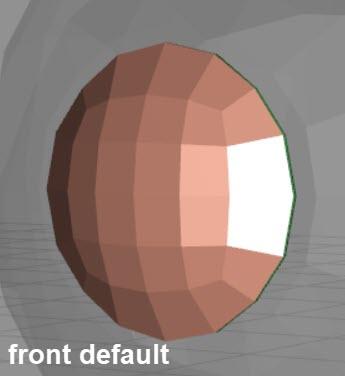
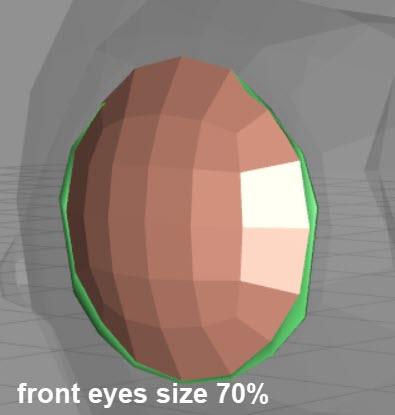
On the other hand the general scaling of G8F works correctly e.g. Full Body -> height
Any hint how to proceed from here is appreciated
A morph projection issue I assume, but I don't know enough about that yet. A tip about where / what to read would be nice.
Daz 3D is part of

Connect
DAZ Productions, Inc.
7533 S Center View Ct #4664
West Jordan, UT 84084Licensing Agreement | Terms of Service | Privacy Policy | EULA
© 2026 Daz Productions Inc. All Rights Reserved.