-
Did anyone do a Clothing Converter from V3,V4,M3,M4 to Genesis 3,8,9 M&F
richardandtracy said:
Yeah, I agree. I have tried, but GV3 doesn't seem to transfer well from Gen3 with GenX2.
I did it many years ago and as I recall the trick was to make a GenX clone of the base Victoria 3 and then a seperate Genx clone of the full Glamous Vicki verson, then remix the resulting morphs along with the commecial V3 to Genesis clone on the target figure.... a lot of tweeaking and side by side comparisons. That said, the issue I mainly recall running into was that the old V3 clothing wasn't built to genesis specs and had a tendency to come apart at the seems when autofitted.
Freebie Challenge February 2026 - "Stronger Than You Think" - Main Thread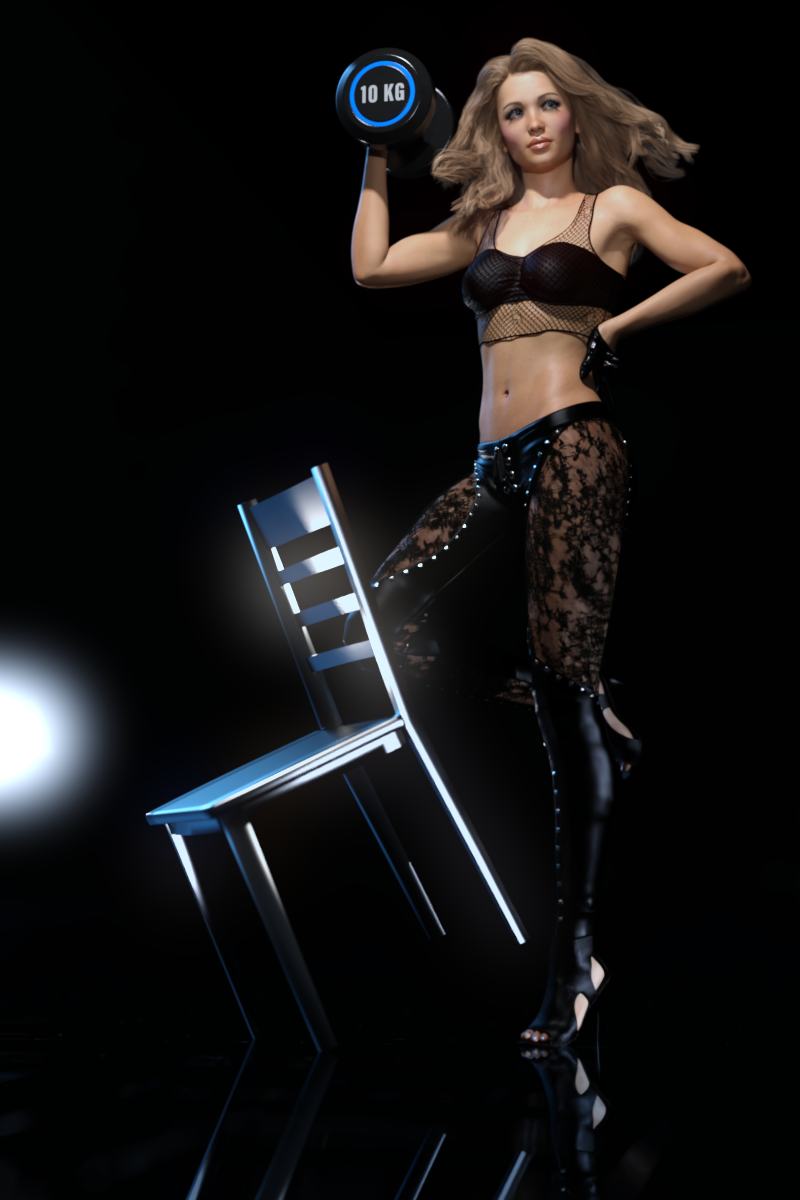
Are you feeling sad and powerless? Chin up, you got this - you're stronger than you think!
Do you need help carrying this up the stairs? No, it's ok, I'm stronger than you think!
Do you think she's going to get the position? Do not discount her - she's a stronger candidate than you think!
Do you think you can handle this Russian liqor? Be careful, it's stronger than you think!
Tell us a story about someone or something that showed unexpected strength.
Do you have what it takes to win 1st place in this challenge? Of course you do - you're stronger than you think!Some freebie suggestions to get you started. No obligation to use them, but perhaps you find them helpful!
https://lab108.x0.com/lab108/sports.html
https://www.renderosity.com/freestuff/items/75730/posable-punching-bag
https://www.renderosity.com/freestuff/items/64475/carnival-test-your-strength-game
https://www.renderosity.com/freestuff/items/79046/clothing-morphs-and-poses-fantasy-amazon-bundle-for-g8f
https://www.renderosity.com/freestuff/items/65400/20ft-easy-pose-chain
https://www.renderosity.com/freestuff/items/71281/kettlebell
https://www.most-digital-creations.com/g8f_warrior_outfit.php
https://www.patreon.com/posts/wonder-woman-for-47331825
https://www.patreon.com/posts/superman-for-g8m-49236362
https://3dshards.com/product/yara-flor-cosplay-outfit-for-genesis-8-8-1-female/
https://polyhaven.com/a/gym_01
https://www.deviantart.com/sedartonfokcaj/art/Mila-s-Headgear-for-Genesis-441118753
https://www.deviantart.com/sedartonfokcaj/art/Freebie-Crowd-Background-569639918
https://www.deviantart.com/sedartonfokcaj/art/Wrestling-Title-Belt-for-DAZ-Studio-516278782
https://www.renderosity.com/freestuff/items/69884/the-wrestling-set
https://www.renderosity.com/freestuff/items/73748/academy-in-the-roundBONUS RULE FOR FEBRUARY: You may use one of these six items and count it as a freebie:
https://www.daz3d.com/pyromantix--volumetric-infernos
https://www.daz3d.com/sci-fi-doomsday-device
https://www.daz3d.com/sci-fi-small-explosive
https://www.daz3d.com/sci-fi-explosives
https://www.daz3d.com/fireworks_19727
https://www.daz3d.com/explosives-packThe rules of the contest are:
-
Your entry must be a new render, especially made for this challenge.
-
Your entry must follow the DAZ TOS.
-
You may enter a maximum of 4 entries.
-
A minimum of five (5) Freebies must be included in your image
-
All Daz Bi-Weekly Freebies are allowed throughout the entire month in which they are free, as well as the following month (for a total of 2 months).
-
You may use a maximum of 5 paid items.
-
Base figures (Genesis 9, Genesis 8, etc.) as well as their basic morph packs may be used as needed. They do not count as either paid items or freebies.
-
DAZ Studio, Poser, Bryce, Carrara, Hexagon, and Blender are allowed.
-
DAZ AI Studio is not allowed. The use of image generating AI technology (midjourney, stable diffusion, etc.) is not allowed in any form.
-
Postwork is allowed. You must also include the raw render (before postwork) of your entry.
-
For a more detailed version of the rules see the PDF attached to this post; or ask your question in this thread, we're always happy to clarify!
-
Let's have fun and be creative with all the amazing resources that are available for free!
This contest ends on February 28th 2026.
Post your images and freebie links in this thread for link verification.
Once the links are verified, you can post your image and links in Entries Thread for judging.First Place: $15 store credit from KindredArts
Second Place: $10 store credit from KindredArts
Third Place: $5 store credit from KindredArtsPast Freebie Contests:
January 2022 - Around and around and around...
February 2022 - Mysteries of the heart
March 2022- Luck Of The Draw
April 2022 - New Beginnings
May 2022 - Cozy Corner
June/July 2022 - The Secret Life Of...
August 2022- Sniff, sniff... what's that smell?
September 2022-Cars Cars and More Cars
October 2022 - Horror Movies
November 2022 - Thieves, Robbers, and Fraudsters all around!
December 2022 - The Night is Darkest...
January 2023 Speed Demons and Slowpokes
February 2023- I See Red
March / April 2023 Magical
May 2023 - Sweet Music
June/July 2023 Holes, Gaps, Caves, Tunnels
August 2023 Fabulous Pink
September 2023 Gardening
October 2023 Hallowed Night
November 2023 Wobble, jiggle, sway, and shake
December 2023 / January 2024 Driving Home For...
February 2024 The Glow Up
March 2024 Power Source
April/Mai 2024 Soft as Plush, Smooth as Silk
June 2024 An Octopus' Garden
July/August 2024 Take A Break
September 2024 Fake Smiles and Real Joy
October 2024 "Monster Mash '24!"
November 2024 - Dreams
December 2024 - A Curious Christmas
January 2025 - Thank you, Saphirewild!
February 2025 - My Hallowed Valentine
March 2025 - Pride, Prejudice and other Shenanigans
April 2025 - The Little Ball of Calm
May 2025 - To Be Beautiful
June 2025 - Summer and Piracy
July 2025 - Design a Book Cover
August 2025 - Pure Cinema
September 2025 - Holiday Memories
October 2025 - Monster Mash!
November 2025 - The Winter Witch
December 2025 - Christmas!
January 2026 - When One Door Closes, Another Opens
g9 pupil size adjustment? in base essentials or require extra morph pakfelis said:
Parameters > Pose Controls > Head > Eyes
my bad, not path to look for the pupil morph to use.
Where should it be installed?
I install all items like that to the default location but lucky me at some time in the past daz decided I needed two "my daz libraries" One under user name Bard and the other in Public
I have no idea how dim chooses which one to use.
---
Ok, apparently duplicating the libraries into each other has allowed daz to post the morph so I now have matching pupils.
In appreciation of that fact and thankfulness for all help.
I will not rant about the fact that pupil size is in parameters and iris size is in shaping.
But I'm sure it will irritate me at some future time perhaps when I convert all the other g8s to g9s.
Now I'll just have to grab premier for a month somewhere.
The character head was created by headshop from a photo and the skin was done in skinbuilder
and since the prem trans doesn't do surface had to get the geoshell stuff working.
But overall working very well. The character thinks her nose has changed a little but I assured her it wouldn't show except in extreme closeups.Ice Dragon Art A Glimpse Into My WorldWell I think I finally have everything the way it should be. I did get 4.24 working again, the alpha is working and so is 4.10. I do want to comment on some things. Because I have a 5060 rtx card, I can only render with the cpu for 4.24 and 4.10. Can't use most of the scripts or plug ins in the Alpha. Again, no big deal, do it in 4.24 and move it over. Well.... its not quite so simple. The alpha is not recognizing the files for the skin builder when saved with a character in a scene subset. Also not a big deal but you do have to import your scene, then go to the materials folder where those skins are stored and re apply. Again, no big deal unless you don't know. So, now you know lol.
Also, none of the converted characters (G2f and g3f to G8F) will transfer to the Alpha. For me, this is not a big deal, my CPU will render most anything so I can render it in 4.24 it just takes a little bit longer, but it can definitely be a problem if you have a machine that struggles in CPU.
Why when I click on this teeth shape nothing happen? (have picture)Hey everyone.
Wanted to ask I try some new teeth morph and the color work perfect but the shape teeth don't . anyone know why? Thanks :3g9 pupil size adjustment? in base essentials or require extra morph pakcrosswind said:
You can increase G9's pupils size by using the morph property: Eye Pupils Dilate that comes from G9 Starter Essentials package ~~
dim says all 4 gen starters installed and no sign of it
closest I can find is " facs_bs_EyePupilsDilate" gen 9>gen9 eyes>morphs>FACS>facs_bs_EyePupilsDilate.
but it doesn't show up in parameters or shaping?
Can you find it and give me it's exact location where it's found?Daz to Blender HD morphsHi everyone, I've recently gotten into Daz (it's been really fun learning a lot of new things). I'm trying to add HD navel morphs to my G9 model. The morph looks best at viewport subdivision level 3. What would be the best way to export this into Blender using the Diffeomorphic addon? I've tried exporting normally, but the morph doesn't appear. If I export with the HD checkbox (without HD convention) checked, it just creates two models in Blender that look identical-and neither has the HD navel morphs(nor do they have MultiResolution modifier). I've read through many of the Diffeomorphic addon explanations on this topic, but most of them are outdated and werent clear enough atleast for me. I'd really appreciate any help, especially step-by-step guide, so that I can always revist it. if possible. Thanks in advance! Sorry, I'm sure this has been asked countless times.January 2026 - Daz 3D New User Challenge - Composition, Instancing, and DuplicationPoisoned Mind said:
I wanted to try this challenge to get some input. The character was instanced with the head gear attached. Daveyabbo's DA-15Y Lvl 4 HD Morph for Genesis 8 Female(s), Ansiko's Surgical Strike, Feng's Skyrail Bridge. Off set instances slightly.
that is a very good idea and I love the fade out into the background. I have the feeling the focus on the first one could be a bit sharper or give a little more free room without the green mist for the distance to the first one
g9 pupil size adjustment? in base essentials or require extra morph pakYou can increase G9's pupils size by using the morph property: Eye Pupils Dilate that comes from G9 Starter Essentials package ~~
g9 pupil size adjustment? in base essentials or require extra morph pakdoesn't seem to be in base morphs eyes>pupil slit is only one with pupil in it.
----
The 8 to 9 converter worked well, now just stuck on a couple detailsLet's appreciate/discuss today's new releases - more ongoinger threadNewGuy said:
Nice work @Matt_Castle and thank you for the support. I imagine they would port well to Genesis 8, especially if you are using Mattymanx's Genesis 9 Clones for All.
Well, my methods are more robust than regular autofit clones (I can actually convert/transfer bend correctives), but yeah, as a general thing I imagine that these wouldn't auto-fit too badly (the main trouble areas with autofit tend to be the armpits, groin and sometimes collars, and these aren't in those areas.
The fit shapes are definitely the most time consuming part of the process. I can see why most PAs don't produce an exhaustive list of supported shapes.
I have methods I'm working on that *mostly* auto-generate fits, but I need to update my templates for tighter fitting clothes, so that's on my to-do list first.
What is doing this?The issues looks like the partial influence on the vertices of toes coming from a full body morph or partial body morphs ~ I used to encounter the similar issues on some products coming from 3rd-parties sites...
You can easily test it by zeroing out the FBMs or PBMs that you dialed on the character, one by one ~~ If you can identify the culprit morph, you can fix it by Geometry Editor > Vertext Selection mode > Clear Selected Deltas from Favorites ~
Eduardo 9I also thought him to be be Edward Norton ((Eduardo) from Fight Club & Primal Fear (Twilight). He's spot on and earlier forum post description of him looking like a whiner that's exactly his personality in the opening of Fight Club. I have never heard of Diego Luna mentioned earlier so I looked up his photos and he looks similar to Edward Norton too, so I see why some think Eduardo was modelled after Diego Luna as well. In any case, this is a unique DAZ character, it lists an asymmmetry morph so that's not a usual thing either in the character bundles, quite different, but I'll get it next month, unless a Toon 9 or Girl 9 bundle comes in before March as this month I'm getting Wendy 9 HD Character Bundle | Daz 3D before she's removed from the Premeire list.
Eduardo 9Skin looks 8.1. And his morph has an unfinished, uncanny nature (somewhat stylistic?) that reminds me of Jazz 8.1, Pablo 8.1, or Hans 8.1. Not even the excellent Daz promo artists were able to consistently bring him to verisimilitude (although a couple did); so, I probably won't be able to either.
Subject: Missing "Clear Selected Deltas from Selected Morph(s)" in latest DS version?Thank you for the clarification! I might have misremembered how the menu worked in my older version. I will try adding the morph to "Favorites" first and then see if I can clear the deltas. Your advice was very helpful. Thank you again!
Looking for help saving Face Transfer 2 texturesHello. Here is what I do when creating new characters (YMMV). I have a long, complicated process that is beyond your initial question ("Where are my texture files?"), so I'll go through what I do, to the point where your files are saved in a permanent form.
Step 1. Create your new Face Transfer 2 figure from your source image. Here, I'm adding a new character from my cast.
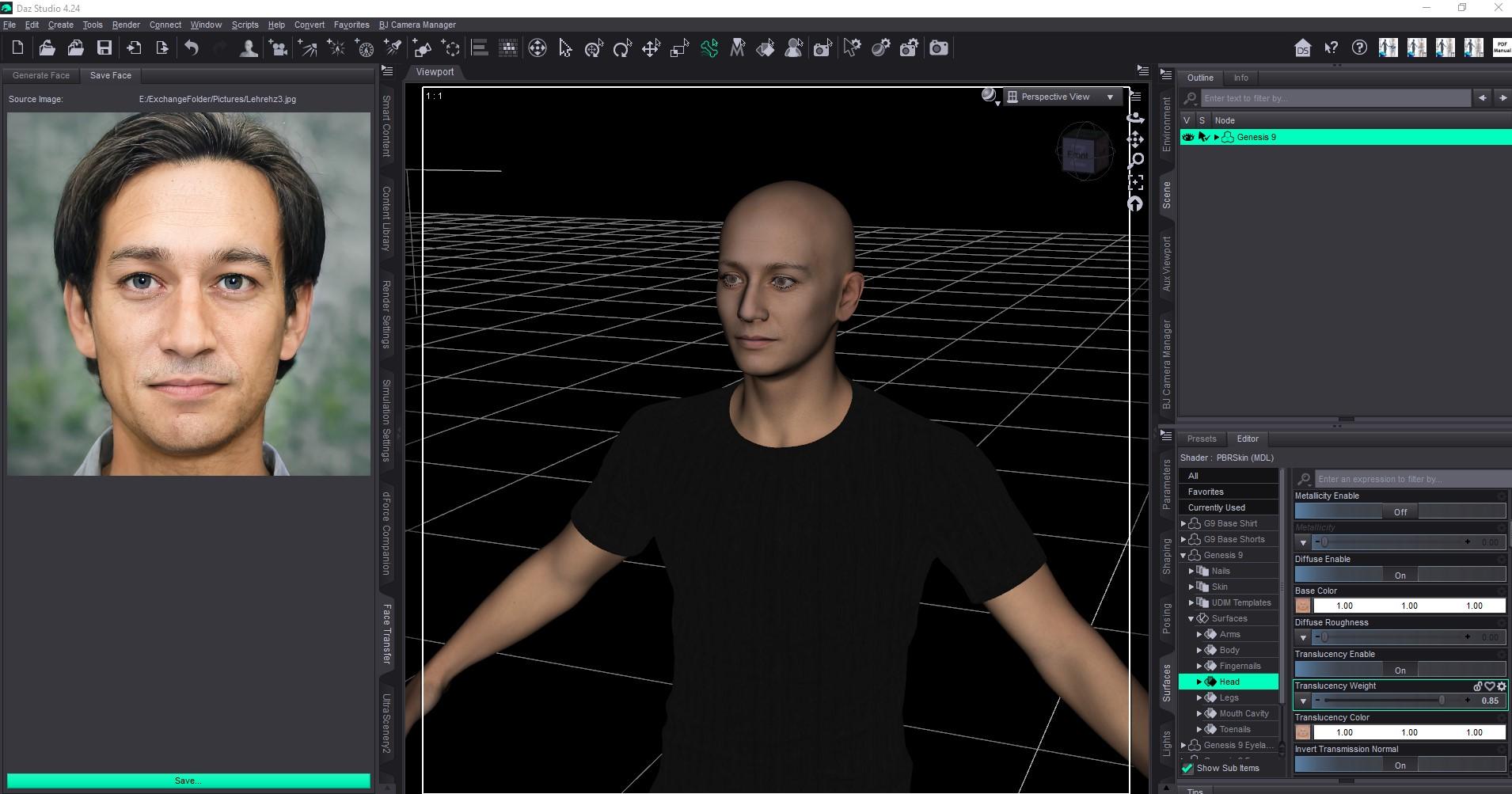
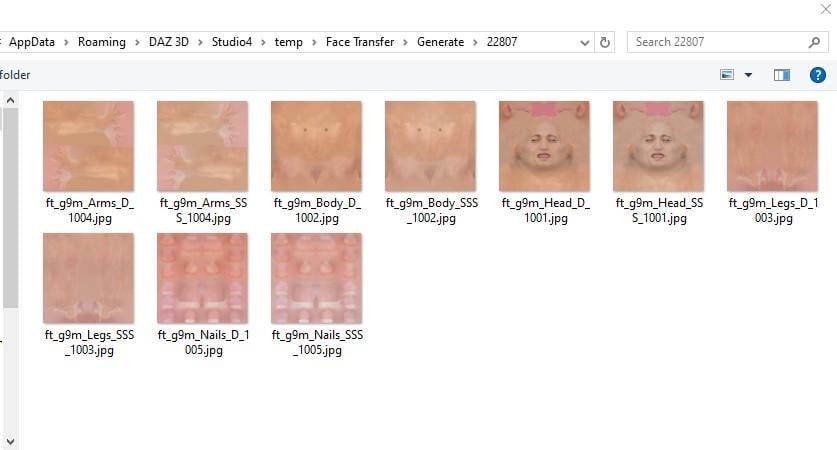
Step 2. If you select your Genesis 9 figure in the Scene (upper right) and go to the Surfaces tab and go to the path seen in my first screen shot (Genesis 9 -> Surfaces -> a body part: Arms, Body, Head, Legs, Fingernails/Toenails), you'll find all the items related to that surface. If you look in Base Color or Translucency color, there's a map showing the texture, but if you hover over it, or click on it, you'll see that it goes to a temp location. Here's mine - yours will be specific to your Daz installation. These are temp files and will disappear shortly.
Step 3. My next step when creating a new character, is to Save. You may need to click "More" (where it says "Less" in this screen shot) to see all these options, but it's clear what's going on here. I'm telling it where to save the textures (a custom folder on my E drive) and I've provided a name that I use for various purposes - naming the texture and other tasks further downstream in my character creation. What you - or anyone else - would select here will vary depending on your Daz installation and your preferences, but you can see where this is going.
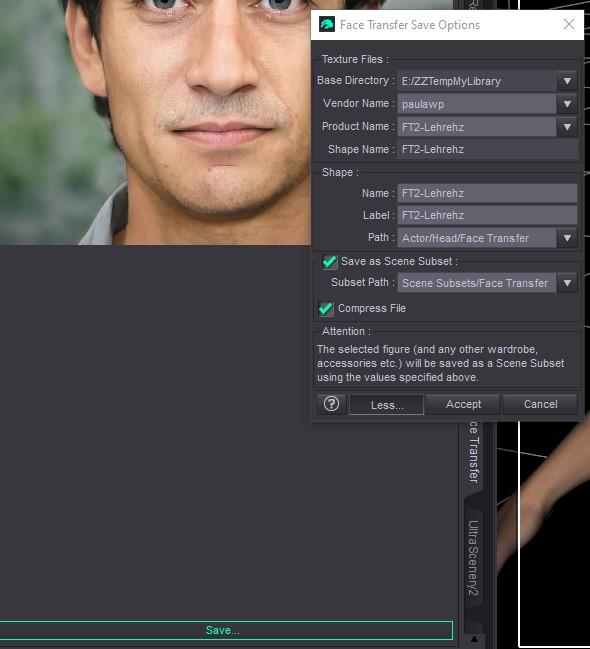
Step 4. Once I set this up and save it, the texture files are saved in the folder as configured, and the textures on the Genesis 9 figure now reference the permanently named files.

Test it out and see what works for your needs. If you get into character creation with FT2, there's lots more you could do, but I'll just stop here to make sure that helps out with your actual question.
Feel free to visit my "Marahzen's Musings" thread linked in my signature if you want the grand tour and endless minutiae from the beginning (my beginning) in terms of creating characters.
Looking for help saving Face Transfer 2 texturesHello. I use FT2 frequently. I'm not able to get to my art computer right now, but can provide steps later today.
It sounds like you might not be saving the transfer. The textures are only temp files until you do.
Looking for help saving Face Transfer 2 texturesHi everyone, I’m hoping someone more experienced with Face Transfer 2 might be able to help me, as I’m a bit stuck and would be extremely grateful for any guidance. I’m having trouble permanently saving the textures generated by Face Transfer 2. At the moment, no matter what I try, the textures don’t seem to persist — only the morphs are saved, and the images appear to remain temporarily associated with the figure rather than being written out and reusable. Here’s what I’ve already tried: Saving via the Save option under the Image tab in the Face Transfer 2 pane Save As → Figure/Prop Asset Save As → Material Preset Save As → Character Preset Save As → Scene Subset In all cases, the morphs save correctly, but the textures do not seem to be preserved in a way that survives loading into a new scene. I’ve also tested this on both: DAZ Studio Premier 4.24.0.4 DAZ Studio Premier 2025 Alpha Unfortunately, the behavior is the same in both versions. I’m sure I’m either missing a step or misunderstanding how Face Transfer 2 is intended to handle texture saving, so if anyone could point me in the right direction — or let me know if this is expected behavior and how others work around it — I would truly appreciate it. Thank you very much for taking the time to read this, and thanks in advance for any help or insight you’re willing to share.Looking for help saving Face Transfer 2 texturesHi everyone, I’m hoping someone more experienced with Face Transfer 2 might be able to help me, as I’m a bit stuck and would be extremely grateful for any guidance. I’m having trouble permanently saving the textures generated by Face Transfer 2. At the moment, no matter what I try, the textures don’t seem to persist — only the morphs are saved, and the images appear to remain temporarily associated with the figure rather than being written out and reusable. Here’s what I’ve already tried: Saving via the Save option under the Image tab in the Face Transfer 2 pane Save As → Figure/Prop Asset Save As → Material Preset Save As → Character Preset Save As → Scene Subset In all cases, the morphs save correctly, but the textures do not seem to be preserved in a way that survives loading into a new scene. I’ve also tested this on both: DAZ Studio Premier 4.24.0.4 DAZ Studio Premier 2025 Alpha Unfortunately, the behavior is the same in both versions. I’m sure I’m either missing a step or misunderstanding how Face Transfer 2 is intended to handle texture saving, so if anyone could point me in the right direction — or let me know if this is expected behavior and how others work around it — I would truly appreciate it. Thank you very much for taking the time to read this, and thanks in advance for any help or insight you’re willing to share.January 2026 - Daz 3D New User Challenge - Composition, Instancing, and DuplicationI wanted to try this challenge to get some input. The character was instanced with the head gear attached. Daveyabbo's DA-15Y Lvl 4 HD Morph for Genesis 8 Female(s), Ansiko's Surgical Strike, Feng's Skyrail Bridge. Off set instances slightly.
Daz 3D is part of

Connect
DAZ Productions, Inc.
7533 S Center View Ct #4664
West Jordan, UT 84084Licensing Agreement | Terms of Service | Privacy Policy | EULA
© 2026 Daz Productions Inc. All Rights Reserved.