-
Why doesn't Daz do updates of old actors?
richardandtracy said:
@omvendt, I have taken a fair bit of time to 'update' a Victoria 3 character. This was to convert to Iray and TriAx rigging along with adding some clothing clones. The rigging after the process was no better because I didn't update the joint correctives. Take a look at the process in the 68 page tutorial I wrote to allow others to do it for themselves: https://www.daz3d.com/forums/discussion/655676/tutorial-making-triax-figures-from-old-parametric-characters/p1
The tutorial covers probably under half of the total updating process you're asking for. If you read the tutorial, you'll see why it takes a long time. It's also error prone and easy enough to get wrong. It is possible, but you are really creating a new figure from scratch, only re-using the mesh and out of date textures. It's almost certainly easier to start again unless you have an emotional tie to the character you're updating.
Regards,
Richard
I dont know about converting to various kinds of rigging, but the process for converting old shapes and textures to G9 is like only 1 page of instructions covering:
1. Convert shape to new figure (i.e., us Faceform Wrap or use a Clone)- morph loader
- adjust rigging to shape
- ERC freeze
2. Convert texture to new UVs (i.e., use Faceform Wrap texture transfer, or baking process)
3. Export correctives
4. Load correctives
5. Set up correctives
The real question is is there anything in older generations worth converting anyway?
Usually it is only the shape that is worth converting, which means step 2 can be skipped.
Most characters do not have 100s of correctives to fix. They only have like 5-20 max. Also they are symmetrical, so it's not like those are all "unique" and require much thought to set up after doing it for other side.
The value in having Daz or Daz vendors do this is that they can bring over HD morphs from previous generations.
Remove an anchor point in the laidback dude bathrobeIf the bathrobe has a morph making it further away from the legs, you can try to check it.
Considering that the lower legs don't seem to interact with anything during the simulation, you can also simply try to hide it during simulation.
Fabiana Appreciation Thread
Thank you so much for the beautiful comment and for sharing your creation!SapphireBlue said:I was working on a little song for a music challenge over the week-end. I was looking to do some light and sweet renders to go with it, and Umbrelli Girls popped up as I browsed my library. Though I've got most of Fabiana's store items here, I've still been super slow in putting things to use. (I was so happy to see her in the DAZ store and all her lovely things, as I only shop here at present.)
Thought I'd share the video in this thread - just 6 simple renders, but fitting the atmosphere. I really appreciated the morph to shorten (and lengthen) the umbrella stick, as I was using the prop and many of the poses with a shorter G9 figure. I batch converted the poses from G8 first. It's a very sweet set! Thanks to Fabiana for her artistry.
 Fabiana Appreciation Thread
I was working on a little song for a music challenge over the week-end. I was looking to do some light and sweet renders to go with it, and Umbrelli Girls popped up as I browsed my library. Though I've got most of Fabiana's store items here, I've still been super slow in putting things to use. (I was so happy to see her in the DAZ store and all her lovely things, as I only shop here at present.)
Thought I'd share the video in this thread - just 6 simple renders, but fitting the atmosphere. I really appreciated the morph to shorten (and lengthen) the umbrella stick, as I was using the prop and many of the poses with a shorter G9 figure. I batch converted the poses from G8 first. It's a very sweet set! Thanks to Fabiana for her artistry.
Freebie Challenge February 2026 - "Stronger Than You Think" - Entry ThreadCan't Hold Me Back
This little faerie will NOT be restrained!
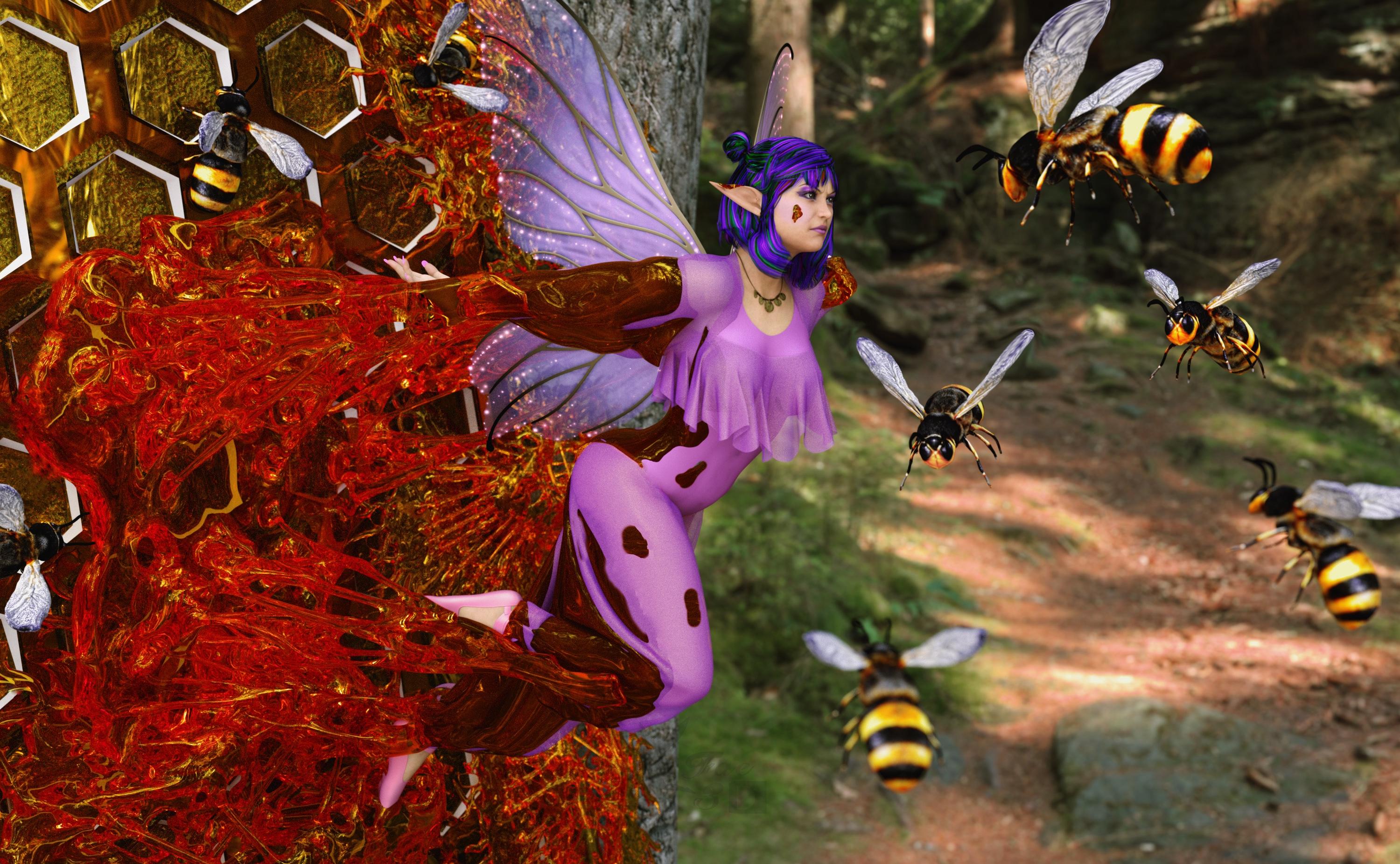
Free:
VFox Sarah for Genesis 8 Female - https://www.renderhub.com/vfoxgames/vfox-sarah-for-genesis-8-female
Flowerbell dForce Top G8F - https://www.renderosity.com/freestuff/items/96573/flowerbell-dforce-top-g8f
Three More Wishes G8F - https://www.renderhub.com/excessive/three-more-wishes-g8f
PSR Ballet Combo for GF8 - https://www.renderhub.com/pushee-ri/psr-ballet-combo-for-gf8
Pirate Outfit for Genesis 8/8.1 Female (necklace) - https://www.renderosity.com/freestuff/items/96578/pirate-outfit-for-genesis-881-female
eGirl Hair for Genesis 8 Female - https://www.renderhub.com/checkertoo/egirl-hair-for-genesis-8-female
Bikdingle Dark Elf Ears Morph for Genesis 8 Female - https://www.renderhub.com/bikdingle/bikdingle-dark-elf-ears-morph-for-genesis-8-female
FREE AGD Simple Face Jewelry (not sure this really showed up, ear studs) - https://www.renderhub.com/aglassdarkly/agd-simple-jewelry
Iray Shimmery Sheer Fabrics II - https://www.renderosity.com/freestuff/items/93778/iray-shimmery-sheer-fabrics-ii
AA Jewelry Iray Materials - https://www.renderosity.com/freestuff/items/99318/aa-jewelry-iray-materials
Bob Hair for Genesis 8 Females and DAZ Studio Free - https://www.renderhub.com/rango2001/bob-hair-for-genesis-8-females-and-daz-studio-free
Chameleon ROse2 for Genesis 8 Female (Materials) - https://www.renderosity.com/freestuff/items/85859/chameleon-rose2-for-genesis-8-female
Tree 01 - https://www.renderosity.com/freestuff/items/94781/tree-01
SY 200 Free Morphs Genesis 8 - https://www.deviantart.com/sickleyield/art/SY-200-Free-Morphs-Genesis-8-756465264
Bee Animal free 3D model - www.cgtrader.com/free-3d-models/animal/insect/bee-animal-66403bb0-eada-4d81-8133-99e4ac259466
Raumteiler04 Hexagon (deviantart) - https://www.deviantart.com/tinasbastelstube/art/Raumteiler04-Hexagon-802488069
Freegia for Genesis 8 Female (Skin) - https://www.renderhub.com/lias/freegia-for-genesis-8-female-free
No Count:
72 Funky Madness Hair Shaders - Used to be free on Renderosity, now appears to be gone
Paid:
Slime Attack - Vol.1 - https://www.daz3d.com/slime-attack-vol-1
Lumino Wings for G3F & G8F - https://www.renderosity.com/marketplace/products/128420/lumino-wings-for-g3f-g8f
Mesh Grabber (Mac) - https://www.daz3d.com/mesh-grabber-mac
SY Invisilights Iray - https://www.daz3d.com/sy-invisilights-iray
Set up and rendered within Daz Studio Iray. Postwork in Pixelmator. No AI used.
I’ve attached the before post render (the one that says Raw Render) and the finished image file.
Custom Gens Morph... HELP!lilweep said:
1. Load in the geograft to new scene by itself - Do not export it attached to the figure which is clearly what you are doing hence vertex count does not match.
2. Put it into its default shape (as per attached). It will not load in like this.
3. Set to Base Res
4. Select object in Daz Studio scene then Export (Filter Objects (✔) : Select Root)
5. Scale: Whatever, just leave as 100%
6. Import to Blender - sculpt without changing geometry
7. Export as obj.
- Scale : just leave as 100%.
- Note if you are using a recent version of Blender, vert order is preserved by default when exporting anyway
8. Morph loaded pro: Leave as default with default scale
- Name: blahblahblah
- Delta tolerance: 0.001
- Property group: blahblah
- Create Control Property: No
- Reverse Deformations: No (assuming you followed what I said in 1 and 2)*
- Overwrite Existing: Make Unique
- Morph mirroing: None
- Attenuate by: None
* If you have sculpted on top of a non-default shape, then you can make this Yes
If it's resizing on morph then you messed up 5,7,8 scaling. Leaving at 100% on each step is fine and works.
Thank you SO MUCH for this!!! All the help, from each commentor is greatly appreciated!
G8F model thumb segments bend sidewaysI found the culprit. "SY 200 Morphs for G8F", the "SY200 Fingers Length" morph. As soon as I reset it to 0 the issue goes away. Strange.
That is a freebie collection, I thing it was on DeviantArt once..? Not sure exactly. Sickleyield, if you happen to read this, any idea what do do about it? It's not something I'm dependent on, would just like to solve the riddle.
Convert Geometry Shells to (normal) Daz ClothingWell, you can export the geoshell, import and use transfer rigging, and save as Support Asset.
Then you will have a conforming clothing.
Should prefeably be done on the base character.
You might end up with a lot of excess geometry, so before import you could clean the mesh up.
Let's appreciate/discuss today's new releases - more ongoinger threadmemcneil70 said:
WendyLuvsCatz said:
I am guessing Male-M3dia is the PA behind it as looks like his style
it's appropriately priced for a morph
I have bought six of these characters and looking at them in D|S and checking the Artist name on the Info panel there have been two: 'jjanzer' and 'Josh Darling'. Garrett for Genesis 9 has jjanzer in the artist's name. Now, I realize that this often does not have any relationship to the actual PA name we see in the store, so take that for what it is worth. The characters I have are: Malik, Lucas, Garrett, Darius, Leila, and Victor.
definitely different PAs so maybe a DO buyout thing where they supply shapes for the DAZ textures
not a bad idea as I myself swap out the materials on many of my own character renders anyway and one only needs so many unless unique
Freebie Challenge March 2026 - "The Big Blue" - Main Thread
What is "the Big Blue"? Is it the ocean, vast and deep and full of secrets? Is it the sky, and the endless freedom it represents? Is it the precious blue planet we call home, so majestic and yet so fragile? Is it that one blue note that the Jazz trumpeter plays, the one in which he pours all his heartbreak? Did you know that in the German language "being blue" means being drunk, but "making blue" means skipping school? Tell us what "the Big Blue" is to you!
Some freebie suggestions to get you started. No obligation to use them, but perhaps you find them helpful!
https://www.renderosity.com/freestuff/items/82773/underwater-hdri
https://www.renderhub.com/shredder/ocean-3d
https://polyhaven.com/hdris/skies/pure skies
https://www.renderosity.com/freestuff/items/73937/drakelots-earth-for-poser
https://www.renderosity.com/freestuff/items/99388/kigurumi-for-g8f
https://www.renderosity.com/freestuff/items/95866/30-eyes-for-g3-and-g8-pack-1
https://www.patreon.com/posts/police-uniform-8-49242409
https://www.patreon.com/posts/korra-for-g8f-g8-120175402
https://www.patreon.com/posts/superman-131799923The rules of the contest are:
-
Your entry must be a new render, especially made for this challenge.
-
Your entry must follow the DAZ TOS.
-
You may enter a maximum of 4 entries.
-
A minimum of five (5) Freebies must be included in your image
-
All Daz Bi-Weekly Freebies are allowed throughout the entire month in which they are free, as well as the following month (for a total of 2 months).
-
You may use a maximum of 5 paid items.
-
Base figures (Genesis 9, Genesis 8, etc.) as well as their basic morph packs may be used as needed. They do not count as either paid items or freebies.
-
DAZ Studio, Poser, Bryce, Carrara, Hexagon, and Blender are allowed.
-
DAZ AI Studio is not allowed. The use of image generating AI technology (midjourney, stable diffusion, etc.) is not allowed in any form.
-
Postwork is allowed. You must also include the raw render (before postwork) of your entry.
-
For a more detailed version of the rules see the PDF attached to this post; or ask your question in this thread, we're always happy to clarify!
-
Let's have fun and be creative with all the amazing resources that are available for free!
This contest ends on March 31st 2026.
Post your images and freebie links in this thread for link verification.
Once the links are verified, you can post your image and links in Entries Thread for judging.First Place: $15 store credit from KindredArts
Second Place: $10 store credit from KindredArts
Third Place: $5 store credit from KindredArtsPast Freebie Contests:
January 2022 - Around and around and around...
February 2022 - Mysteries of the heart
March 2022- Luck Of The Draw
April 2022 - New Beginnings
May 2022 - Cozy Corner
June/July 2022 - The Secret Life Of...
August 2022- Sniff, sniff... what's that smell?
September 2022-Cars Cars and More Cars
October 2022 - Horror Movies
November 2022 - Thieves, Robbers, and Fraudsters all around!
December 2022 - The Night is Darkest...
January 2023 Speed Demons and Slowpokes
February 2023- I See Red
March / April 2023 Magical
May 2023 - Sweet Music
June/July 2023 Holes, Gaps, Caves, Tunnels
August 2023 Fabulous Pink
September 2023 Gardening
October 2023 Hallowed Night
November 2023 Wobble, jiggle, sway, and shake
December 2023 / January 2024 Driving Home For...
February 2024 The Glow Up
March 2024 Power Source
April/Mai 2024 Soft as Plush, Smooth as Silk
June 2024 An Octopus' Garden
July/August 2024 Take A Break
September 2024 Fake Smiles and Real Joy
October 2024 "Monster Mash '24!"
November 2024 - Dreams
December 2024 - A Curious Christmas
January 2025 - Thank you, Saphirewild!
February 2025 - My Hallowed Valentine
March 2025 - Pride, Prejudice and other Shenanigans
April 2025 - The Little Ball of Calm
May 2025 - To Be Beautiful
June 2025 - Summer and Piracy
July 2025 - Design a Book Cover
August 2025 - Pure Cinema
September 2025 - Holiday Memories
October 2025 - Monster Mash!
November 2025 - The Winter Witch
December 2025 - Christmas!
January 2026 - When One Door Closes, Another Opens
February 2026 - Stronger Than You Think
Let's appreciate/discuss today's new releases - more ongoinger threadWendyLuvsCatz said:
I am guessing Male-M3dia is the PA behind it as looks like his style
it's appropriately priced for a morph
I have bought six of these characters and looking at them in D|S and checking the Artist name on the Info panel there have been two: 'jjanzer' and 'Josh Darling'. Garrett for Genesis 9 has jjanzer in the artist's name. Now, I realize that this often does not have any relationship to the actual PA name we see in the store, so take that for what it is worth. The characters I have are: Malik, Lucas, Garrett, Darius, Leila, and Victor.
G8F model thumb segments bend sidewayslilweep said:
I dont know where this character came from, how youve been saving it, etc. But however you ended up here, the thumb bone rigging is wrong.
use joint editor tool to adjust orientation of faulty thumb bone in Tool Options pane.
As for how to save out permanent fix... you would usually update rigging by going to Paramaters>Edit Mode>click relevant morph with linked rigging changes > ERC Bake add etc > (this unlinks the rigging changes from your character morph) -> correct the rigging -> ERC Freeze (this links the rigging adjustments to your morph so theyre dialled in with morph)
Well, about permanent fixes, like said: an earlier version work alright. If all else fails I'll simply copy the shaping params onto that and save a new subset, I suspect a hand pose might have done this. I'll run some tests.
Freebie Challenge February 2026 - "Stronger Than You Think" - Entry ThreadI'm stronger than you think
Don't touch my bag, I'm stronger than you think.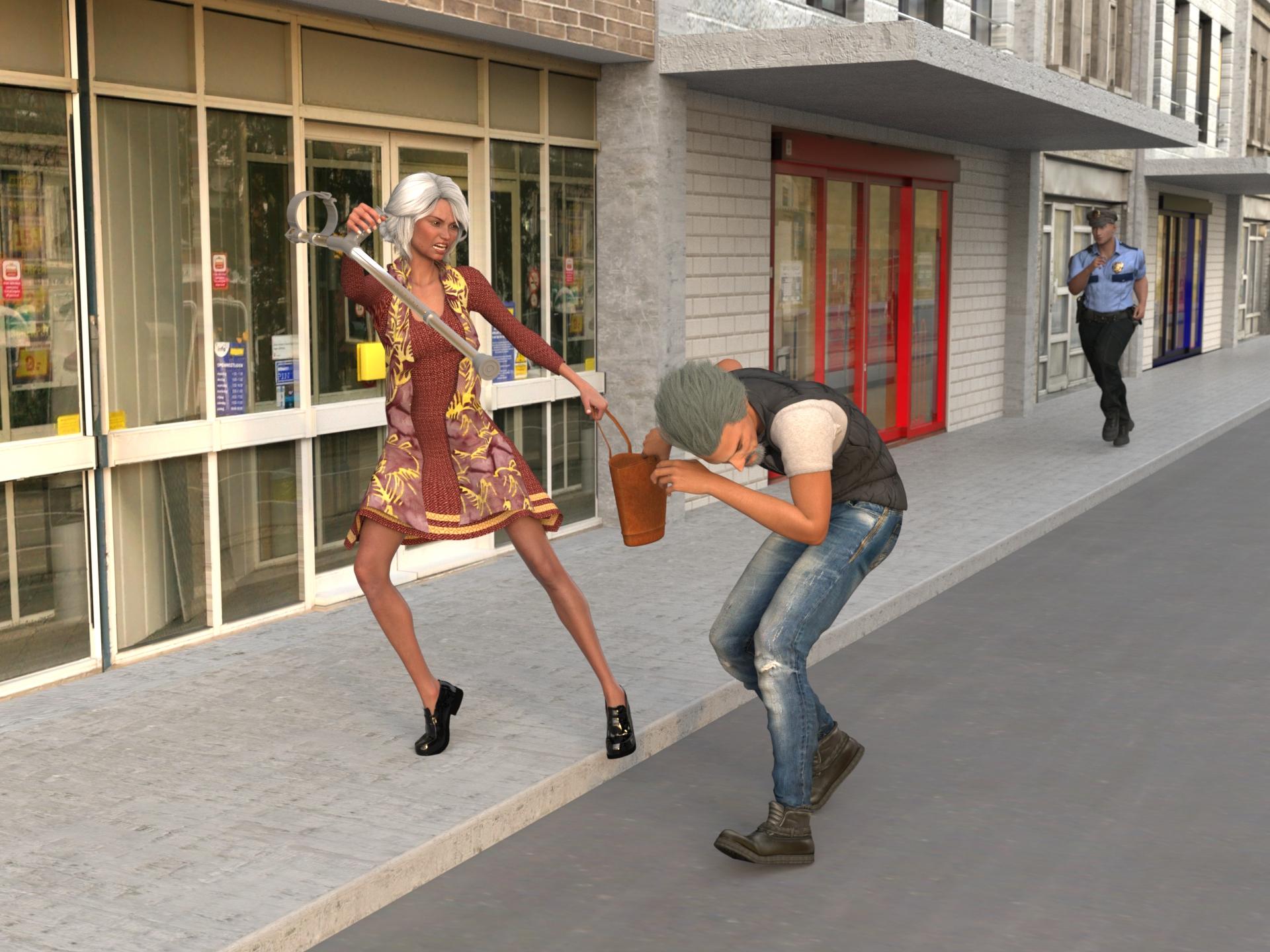
Freebies
TaylorLasha For Genesis 8 Female by MagicMaiden
https://www.renderosity.com/freestuff/items/92992/taylorlasha-for-genesis-8-femaleCorina Dress G8 by teknology3d
https://www.renderosity.com/freestuff/items/83749/corina-dress-g8Gwennili Hair for Genesis 3 female by kayleyss
https://www.renderosity.com/freestuff/items/77151/gwennili-hair-for-genesis-3-femaleTouchable Gwennili by -Wolfie-
https://www.renderosity.com/freestuff/items/78267/touchable-gwenniliTelescopic Aluminium Crutch by richardandtracy
https://www.renderosity.com/freestuff/items/92481/telescopic-aluminium-crutchDavid10 for G8M by RKane_1
https://www.renderosity.com/freestuff/items/83886/david10-for-g8mJamesF for Genesis 8 Male (skin)
https://www.renderhub.com/ohnomen/jamesf-for-genesis-8-male-1Vergil DMC5 Hair For Genesis 8 Male
https://www.renderhub.com/intheflesh/vergil-dmc5-hair-for-genesis-8-maleModular Facial Hair G8M by Dingo
https://www.renderosity.com/freestuff/items/87014/modular-facial-hair-g8mUrban Metro Outfit for Genesis 2 Male(s)(DAZ biweekly freebies 20-02-2026)
https://www.daz3d.com/urban-metro-outfit-for-genesis-2-male-sRadek Character Morph For G8 and G8.1 Male
https://www.renderhub.com/humanxystudio/radek-character-morph-for-g8-and-g8-1-maleMarvin Branagh for G8M and G8.1M By Shinteo (outfit)
https://www.deviantart.com/shinteo/art/Marvin-Branagh-for-G8M-and-G8-1M-968268584
https://www.patreon.com/posts/84938703Streets and shops by petege (days 15, 20, 26, 31) still available
https://www.thefantasiesattic.net/halloween/2025/2025.htmlHDRI
Drackenstein Quarry
https://polyhaven.com/a/drackenstein_quarryCan Mesh Grabber be keyframed?Yes, as long as you save the delta in Tool Settings of Mesh Grabber as a Morph.
Freebie Challenge February 2026 - "Stronger Than You Think" - Main ThreadCan't Hold Me Back
This little faerie will NOT be restrained!
Free:
VFox Sarah for Genesis 8 Female - https://www.renderhub.com/vfoxgames/vfox-sarah-for-genesis-8-female
Flowerbell dForce Top G8F - https://www.renderosity.com/freestuff/items/96573/flowerbell-dforce-top-g8f
Three More Wishes G8F - https://www.renderhub.com/excessive/three-more-wishes-g8f
PSR Ballet Combo for GF8 - https://www.renderhub.com/pushee-ri/psr-ballet-combo-for-gf8
Pirate Outfit for Genesis 8/8.1 Female (necklace) - https://www.renderosity.com/freestuff/items/96578/pirate-outfit-for-genesis-881-female
eGirl Hair for Genesis 8 Female - https://www.renderhub.com/checkertoo/egirl-hair-for-genesis-8-female
Bikdingle Dark Elf Ears Morph for Genesis 8 Female - https://www.renderhub.com/bikdingle/bikdingle-dark-elf-ears-morph-for-genesis-8-female
FREE AGD Simple Face Jewelry (not sure this really showed up, ear studs) - https://www.renderhub.com/aglassdarkly/agd-simple-jewelry
Iray Shimmery Sheer Fabrics II - https://www.renderosity.com/freestuff/items/93778/iray-shimmery-sheer-fabrics-ii
AA Jewelry Iray Materials - https://www.renderosity.com/freestuff/items/99318/aa-jewelry-iray-materials
Bob Hair for Genesis 8 Females and DAZ Studio Free - https://www.renderhub.com/rango2001/bob-hair-for-genesis-8-females-and-daz-studio-free
Chameleon ROse2 for Genesis 8 Female (Materials) - https://www.renderosity.com/freestuff/items/85859/chameleon-rose2-for-genesis-8-female
Tree 01 - https://www.renderosity.com/freestuff/items/94781/tree-01
SY 200 Free Morphs Genesis 8 - https://www.deviantart.com/sickleyield/art/SY-200-Free-Morphs-Genesis-8-756465264
Bee Animal free 3D model - www.cgtrader.com/free-3d-models/animal/insect/bee-animal-66403bb0-eada-4d81-8133-99e4ac259466
Raumteiler04 Hexagon (deviantart) - https://www.deviantart.com/tinasbastelstube/art/Raumteiler04-Hexagon-802488069
Freegia for Genesis 8 Female (Skin) - https://www.renderhub.com/lias/freegia-for-genesis-8-female-free
No Count:
72 Funky Madness Hair Shaders - Used to be free on Renderosity, now appears to be gone
Paid:
Slime Attack - Vol.1 - https://www.daz3d.com/slime-attack-vol-1
Lumino Wings for G3F & G8F - https://www.renderosity.com/marketplace/products/128420/lumino-wings-for-g3f-g8f
Mesh Grabber (Mac) - https://www.daz3d.com/mesh-grabber-mac
SY Invisilights Iray - https://www.daz3d.com/sy-invisilights-iray
Set up and rendered within Daz Studio Iray. Postwork in Pixelmator. No AI used.
I’ve attached the before post render (the one that says Raw Render) and the finished image file.
Everett 9 HD - Discussion Threadsid said:
I also got some Tommy Lee Jones vibes from some of the promos.
Some play renders, with the big versions attached.
His HD:
Eric for Everett next to Walter 9 HD. I've applied Walter's age spots to both. Walter here is wearing the hair that came with the bundle but I think that was a 3rd party omni shader I rendered it with. I doesn't appear to have any movement morphs, but the groom is nice enough.
Everett in the the suit! The few simple poses I tried it in simulated well with no dforce explosions. I haven't tried it with a character sitting down yet.
Walter 9 HD in background withs his own materials and a 3rd party tattoo layer applied. (Eyebrows swapped out). In the foreground is a 50% mix of John 9 and Walter 9 with John's base material. Hey presto, an almost Javier Bardem inspired charactere. Walter seems to work ok as an age morph.
Compliments to the people that worked on him. It's rare to get wrinkles that render without immediately looking uncanny.
@sid your renders are always so crisp and clean. Very professional. Do you use custom Render Settings? And what lighting product do you use? If you wouldn't mind sharing your secrets. It would be much appreciated!
Geometry Shell breaking after rigging❗Padone said:
For that error you can try to scale up the whole figure, autoweight in blender expects a low poly geometry and too close vertices can confuse it, scaling up we increase the vertices distance. Then you can scale back down after autoweight. However, autoweight will be different than daz so not sure it's a solution for the shell, unless you autoweight everything thus losing the daz weights.
p.s. Or you can also try to transfer the weightmaps from the figure to the shell, if the shell has no weightmaps. But from your description I'm not sure it is a weightmap problem, it may be something else as a limitation in the rig conversion.
object > transfer data > mesh data > vertex groups
Yeah, it's like you said; there's something else causing the problem. I tried both of your suggestions, and still got the same error. I'll figure something out... ¯\_(-_-)_/¯
Thanks for trying to help.
Freebie Challenge February 2026 - "Stronger Than You Think" - Main ThreadI'm stronger than you think
Don't touch my bag, I'm stronger than you think.
Freebies
TaylorLasha For Genesis 8 Female by MagicMaiden
https://www.renderosity.com/freestuff/items/92992/taylorlasha-for-genesis-8-femaleCorina Dress G8 by teknology3d
https://www.renderosity.com/freestuff/items/83749/corina-dress-g8Gwennili Hair for Genesis 3 female by kayleyss
https://www.renderosity.com/freestuff/items/77151/gwennili-hair-for-genesis-3-femaleTouchable Gwennili by -Wolfie-
https://www.renderosity.com/freestuff/items/78267/touchable-gwenniliTelescopic Aluminium Crutch by richardandtracy
https://www.renderosity.com/freestuff/items/92481/telescopic-aluminium-crutchDavid10 for G8M by RKane_1
https://www.renderosity.com/freestuff/items/83886/david10-for-g8mJamesF for Genesis 8 Male (skin)
https://www.renderhub.com/ohnomen/jamesf-for-genesis-8-male-1Vergil DMC5 Hair For Genesis 8 Male
https://www.renderhub.com/intheflesh/vergil-dmc5-hair-for-genesis-8-maleModular Facial Hair G8M by Dingo
https://www.renderosity.com/freestuff/items/87014/modular-facial-hair-g8mUrban Metro Outfit for Genesis 2 Male(s)(DAZ biweekly freebies 20-02-2026)
https://www.daz3d.com/urban-metro-outfit-for-genesis-2-male-sRadek Character Morph For G8 and G8.1 Male
https://www.renderhub.com/humanxystudio/radek-character-morph-for-g8-and-g8-1-maleMarvin Branagh for G8M and G8.1M By Shinteo (outfit)
https://www.deviantart.com/shinteo/art/Marvin-Branagh-for-G8M-and-G8-1M-968268584
https://www.patreon.com/posts/84938703Streets and shops by petege (days 15, 20, 26, 31) still available
https://www.thefantasiesattic.net/halloween/2025/2025.htmlHDRI
Drackenstein Quarry
https://polyhaven.com/a/drackenstein_quarryCustom Gens Morph... HELP!1. Load in the geograft to new scene by itself - Do not export it attached to the figure which is clearly what you are doing hence vertex count does not match.
2. Put it into its default shape (as per attached). It will not load in like this.
3. Set to Base Res
4. Select object in Daz Studio scene then Export (Filter Objects (✔) : Select Root)
5. Scale: Whatever, just leave as 100%
6. Import to Blender - sculpt without changing geometry
7. Export as obj.
- Scale : just leave as 100%.
- Note if you are using a recent version of Blender, vert order is preserved by default when exporting anyway
8. Morph loaded pro: Leave as default with default scale
- Name: blahblahblah
- Delta tolerance: 0.001
- Property group: blahblah
- Create Control Property: No
- Reverse Deformations: No (assuming you followed what I said in 1 and 2)*
- Overwrite Existing: Make Unique
- Morph mirroing: None
- Attenuate by: None
* If you have sculpted on top of a non-default shape, then you can make this Yes
If it's resizing on morph then you messed up 5,7,8 scaling. Leaving at 100% on each step is fine and works.
G9 character Rigging randomly brokeRichard Haseltine said:
Duck Dumble said:
Okay, I found out what it was. Totally my mistake (shocker.) For whatever reason I tried to save a character morph the other day and for whatever reason it overwrote all the base morphs for G9. Many of them translated just fine, but a good few were completely broken like the ones I was having issues with. Going in and deleting them seems to have fixed it. Hope this helps whoever makes the same mistake!
Had you perhaps used File>Save As>Support Assets>Save Modified Assets, instead of File>Save As>Suport Assets>Save Modifier Asset? I think that is an easy misfire, but it will save everything that has been altered from its default state (potentially including stock morphs) rather than just the new morph you wanted.
I easily could have, yeah. I believe I also just saved the morph in the wrong way as well. I was trying to skirt around having to export as an OBJ and reimport it and I think I just saved every morph on the character because I didn't really know what I was doing there.
Daz 3D is part of

Connect
DAZ Productions, Inc.
7533 S Center View Ct #4664
West Jordan, UT 84084Licensing Agreement | Terms of Service | Privacy Policy | EULA
© 2026 Daz Productions Inc. All Rights Reserved.