
Daz 3D is part of 
Connect
DAZ Productions, Inc.
7533 S Center View Ct #4664
West Jordan, UT 84084
Licensing Agreement | Terms of Service | Privacy Policy | EULA
© 2026 Daz Productions Inc. All Rights Reserved.
Comments
So...how's 6 on Apple Silicone?
Much more stable than 4.24 so far.
I've been gone for a long while...despite the total embrace of nvida and cuda...is it running well?
Been running well on macOS ( still _x64 code but from the evergreen thread that is about to change )
"... about to change" sound imminent. Have there been any hints if that means days, weeks or months away?
After many failed attempts to install DAZ on my iMac, I finally installed DAZ!
all I had to do was install the latest macOS before Tahoe came around, wiped my hard drive clean (I did, however, had back up on my Time Machine hard drive.), Installed Sequoia, and, after reinstalling my other apps that I use and adding back documents, I installed DIM, and this time, it worked!
Sounds like permissions on the drive was screwed up.
Looks like it. I'm already having a good time with Daz on my iMac, and thanks to the 32 GB RAM and SDD hard drive, rendering is a lot faster compared to my Windows Laptop and my previous HDD and 16 GB RAM.
Now, I have to convert my Victoria 4/Girl 4/Aiko 4 figures to DUF...
Is there any further info on when Daz will have native support for silicon macs? I'm about to update from my aging Intel, and it would be disappointing if I could no longer use the program once Rosetta is gone. I've searched around and assume the answer is "nobody knows" but figured I'd check.
In the "evergreen thread" there is a statement that it will be done, and I guess that DIM will be first and DS comin along after. I'm certain it will happen, and the deadline is like a year ahead from now,
Thanks.
Apologies if this has been asked/resolved before (but this is a really massive thread!). tl;dr: Trying to install DS 6.
So I've been running 4.24 on my M1 Mac (Tahoe 26.2) with Daz running off an external hard drive, and it's been okay, but today it crashed and took the Mac with it, and when I restarted, I got the dreaded 'valid Postgresql...whatever cannot be found'. Now, me and CMS are old enemies and in the past I've had to jury-rig it by copy/pasting an old version of it from a previous installation. Trying to install it via DIM hasn't worked ever since I transferred to the external drive, and the same goes for installing new versions of DS. Content installs just fine, but actual software? No. Screenshot attached of what happens when I attempt DIM installation. Can't seem to upload screenshot but it basically says it's installed both DS6 & CMS but they're -1 bytes, and there's no link to open DS6 from DIM.
So two questions really: does anyone know why it doesn't work via DIM and how to fix it, and/or does anyone known how to install DS6 manually? I can't find a download file in my account.
Stuff I've tried: restarting DS, restarting iMac, reinstalling DIM (So. Many. Times), uninstalling and reinstalling DS6 & CMS via DIM. Installing on ext. drive via Macbook (same problem).
(Incidentally, the Daz website does not work on my iMac. Macbook, phone & ipad, yes; but it freezes on my Mac. Tried a different browser, no dice)
TBH I'd happily go back to 4.24 but it's not playing with CMS, which is what set me down this path.
Help!
I've been running DS 6 since first betas on my three machines; M1Max. M4Max and M5 and everything works, and has been running all different 4 and 6 build channels in parallel.
So, First, check your DIM settings that you have the new Studio enabled in it.
If DIM Says a packagesize is -1, remove the package from the downkload folder and download again, internet issues can cause things like that.
The website works here so either that was a temporary issue or some strange issues related to your ISP or internet connection.
The postgres issue is usually related to either configurations, where does DS 6 think the CMS is installed, but there are some other things that can trigger the problem, like there is no Connect Library found.
Totte, I was using the Legacy Set Converter and Advanced Set Converter without issue up to early 8 Aug 2026. But later that day Apple OS pushed a macOS update Tahoe 26.6.1 for bugs and stuff and I just tried to use the Legacy Set Converter today and it and other scripts are crashing Das Studio. Do you know if there is an issue with that update to the MacOS?
Mary
DS 4 I assume, I can test to see if something is weird.
Works perfectly on macOS 26.6.1 in DS 4!
Sorry, I had to run to get my car from the mechanics and pick-up my flatmate.
Thanks I will keep trying.
Edit to add: I feel real stupid. Right click the mouse and select 'Load' from the pop-up menu. It has been that kind of a week.
Big question: if I have Daz and DIM installed on more than one machine, is there someway I can make the CMS db file (expecially for DIM) available to all of them by keeping the file on a shared volume (say, a NAT hard-disk) so the apps have consistent informations about what's installed and where? At the moment I have DAZ on an old Mac Pro, a Mac Mini and a Windows 10 laptop. The library for the macs are on two usb drives attached to the machines, for the laptop on an internal drive. All are shared locally.
Usually that is a bad idea, I've tried with both two and three machines, but it'd very prome to issues and errors n the CMS side, so I always install content on all three macs, two using fast SSD drives, which really makes a huge difference in speed. Even mounting a test library over 10GBit switch is slow compared to run it locally.
Thank you Totte. Do you think finding a way to keep the CMS db files synced (if I discover how to manually open and edit them) could be a valid alternative?
Might be, but even though I've programmed using for postgres for 15+ years, I've never went down that route as I do not know exactly how things are written, too much risk of things breaking.
Why not sync DIM download folder (and only that one) then use DIM on one computer to download and install, then the other one only to install?
You won't get a perfectly synchronised database (saved files will only appear as such on the computer used to save them), but two different databases that will have the same metadata (at least as long as you don't change them on one computer of course).
Thanks Elor, that seems a good idea!
I did this for a couple of years carrying my assets drive back and forth between my home and work computers.
The home computer had the files downloaded to an external drive with the DIM files on the home computer. I copied the DIM Manifest folder to the external drive and synced to that with the work computer where I'd installed DAZ 3D and DIM.
Whenever I downloaded new files on the home computer, I updated the Manifest folder on the portable drive by copying over only the new files to that it saw the updates at the other end.
The only issues I ever had were with a small set of files that downloaded some files to the DAZ application folder (like PW Toon, if I remember correctly). Anytime I found something that worked on the home computer but not the work computer, I simple used DIM on the work computer (linked to the Manifest folder on the portable drive) to uninstall it at work and re-install it. This didn't affect the home computer at all.
I tried all that before posting here. I've uninstalled and reinstalled and deleted and re-downloaded until I'm cross-eyed. Every time I launch DIM it tries to install Studio 6 and CMS, and every time it fails. I've posted on these forums about it before, but no one ever seems to have any idea why.
The website works on my other devices. Just not my desktop, which has identical settings to my laptop, where it works. I've given up trying to figure out why. Just like I've given up on Studio 6. CMS started working again, probably for the same mysterious reason it stopped in the first place. So I'll stick with 4.24--until the next inexplicable issue breaks it, anyway.
What macOS version, and what does the DIM log says?
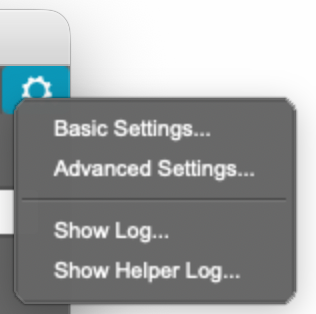
You see the logs here:
Have others had success using Daz 6's strand based hair tool on their Mac? I used the old system with moderate success, but cannot figure out how to get the new one to work. I will open the tool, create a new strand based hair item, and my character will get the grey skin on them. However, from that point, I cannot figure out how to "paint" the hair to my character. There is likely a simple solution here, but I'm lost.
Does anyone know if macOS 27 Golden Gate supports Daz 6? I occasionally get the message on 26.6.2 that some component of Daz will stop working in a future macOS, but I wasn't sure if this update coming out today was going to break things.
The warning is for macOS 28, which will no longer support Rosetta2, which will arrive in about a year.
Thanks, Totte. That's what I was thinking but I wasn't sure. Do we have any notion from Daz about whether there will be a Apple Silicon-native version before next year?