

I finally picked up SE Car Fantom after having it on my wishlist for ages. Also picked up Z Smoke Break from Zeddicus recently.
I forgot your render yesterday evening: it's very nice and I like the way you lighted the whole scene.
Oh, and the car should have know better: smoking kills, and what did the car? Its smoked and it's now dead
@daveso > Colm Jackson has a lot of characters for Genesis 9 sold as Daz+.
Is it intended for the woman wearing the red/orange/yellow top to not have brows?
@Elor I agree that @Blando_Calrissian did a great render and clicked the link for the car and weirdness insued. Instead of taking me to the store page, it took longer and I ended up in my Product Library with the SE Car Fantom off to the right of my listing! When did that start? At least I know I own it.
I thnk I've purchased somewhere in the region of 1200 assets in the last month so this will take some thinking about I'll have a go when I get back from holiday next weekend.
@nemesis10 > When he was released, I was tempted to see how he looked, because the description showed his creation took a lot of care and work, and I'm intrigged by Omniskin. Did you use it on this render?
You should be able to use Omniskin without having the product (you can search OmniSurfaceBase on these forums for some idea of how to implement) but it may take some time to set up and results will vary with other skin textures that were not made for OmniSurfaceBase (aka OmniSkin). Most existing textures will be calibrated for either PBRskin or Iray Uber, so Surface settings may need fine tuning. Generally, as long as the textures have decent color values and detail they should be able to be used on the shader by simply adding the textures to the Diffuse Reflection Color slot. I attached two examples of using the default Masc01 and Masc02 head texture maps that come with Genesis 9.
Thank you
I saved both the pictures and your message to try it myself later.
I thnk I've purchased somewhere in the region of 1200 assets in the last month so this will take some thinking about I'll have a go when I get back from holiday next weekend.
I saw 1200 and thought wow, that's a lot. I thought i spent a lot but 1200 has to be next level, right? So, I went into pgAdmin3 and ran a query to see what I'd bought since March 1: 1175 rows returned. Oh, 1200 doesn't seem so high any more.
I wanted to see how Finger focus looked (I included a second render in the gallery, which is the same render except Finger focus is not enabled) and I also wanted to test the expressions. On top of that, I'm hitting a wall trying to do a render with Hanako 9 wearing the same clothes (only 18k iterations for the other render… and I want to try to see if they are ways to reduce that number, instead of brute forcing with a full night render) so it was easy to load that personna and apply the pose
About Finger Focus, I may remember wrongly, but I think @Silvergirl was not sure about it: if you have yet to buy it, once the dial is activated (I set it at 100%), everything is automatically done. A nice idea is having a script to open the Parameters tab where it needed to have a easy access to the dial in question.
It's available cheap, and like all of Merlin Studio's work, really well-made!
Speed vs reach, a classic. The shield may tilt the chances in favor of your next creature though or maybe I'm biased as a fan of shield bearer fighter (there is something very satisfying about crushing an opponend face with a shield bash , in a video game at least).
The product by Merlin looks nice, and the way you framed the render, give a 'Fight happening in the Colosseum' vibe.
@jmucchiello > It looks nice, as expected from a Stonemason's product. Did you check the VRAM consumption? Usually Stonemason's products are great on that front.
@nemesis10 > When he was released, I was tempted to see how he looked, because the description showed his creation took a lot of care and work, and I'm intrigged by Omniskin. Did you use it on this render?
Sorry, I didn't see your question. This is the conventional PBR skin shader. I have used the Omniskin one (it also came with the artist's character Vadim) and they do look very similar with high quality skin effects. I will do a render so that you can see the difference.
@jmucchiello > It looks nice, as expected from a Stonemason's product. Did you check the VRAM consumption? Usually Stonemason's products are great on that front.
Sorry I didn't see this. I didn't look at consumption... One sec....
I added the street Set to an existing scene, hid all the other stuff and hit render. My Env settings were dark and foreboding, it stlll looks cool.
Before hitting render Details for GPU memory said Daz was using 4.5 GB. During Render it was 6.9 GB. It took 2 minutes on my 4090.
2026-04-05 19:04:48.440 Iray [INFO] - IRAY:RENDER :: 1.0 IRAY rend progr: 95.04% of image converged
2026-04-05 19:04:48.440 Iray [INFO] - IRAY:RENDER :: 1.0 IRAY rend info : Received update to 02872 iterations after 01:48.366.
2026-04-05 19:04:48.463 Iray [INFO] - IRAY:RENDER :: 1.0 IRAY rend progr: Convergence threshold reached.
2026-04-05 19:04:50.253 [INFO] :: Saved image: D:\Daz3D-Install\Daz-Temp\render\r.png
2026-04-05 19:04:50.277 [INFO] :: Finished rendering.
2026-04-05 19:04:50.359 [INFO] :: Total Rendering Time: 1 minutes 56.58 seconds
@nemesis10 > When he was released, I was tempted to see how he looked, because the description showed his creation took a lot of care and work, and I'm intrigged by Omniskin. Did you use it on this render?
A quick incomplete render.... The skin is subtly paler, renders slower than the standard PBR shader, and is bit better at showing nuances like skin imperfections.
@nemesis10 > When he was released, I was tempted to see how he looked, because the description showed his creation took a lot of care and work, and I'm intrigged by Omniskin. Did you use it on this render?
A quick incomplete render.... The skin is subtly paler, renders slower than the standard PBR shader, and is bit better at showing nuances like skin imperfections.
I can't help looking at his nips and thinking the poor boy needs a hot shower and some warm clothes stat
I was thrilled to get DA Arion so I decided to mix a few of those character shape products (Andy for Genesis 9 and Andrew for Genesis 9 in the case of DA Arion) and include DA Belle.
@nemesis10 > When he was released, I was tempted to see how he looked, because the description showed his creation took a lot of care and work, and I'm intrigged by Omniskin. Did you use it on this render?
A quick incomplete render.... The skin is subtly paler, renders slower than the standard PBR shader, and is bit better at showing nuances like skin imperfections.
I kind of liked Holden Fits right into a trailer park scene.
I mentioned Tiana in the new releases appreciation thread as she caught my eye, but I also mused at the slightly mismatched description of the character that suggested "youthful" and "playful" while those sunken eyes made her anything but. I got her anyway, and I joyfully made her into an old lady: all it took was Minerva's skin, a bit of a nudge of an aging morph for the face, and a little bit more to adjust the body to be elderly as well.
She's perfect and expressions seem to work quite well on her too. And since I was playing around already, I made a quick render. The other not-exactly-new-anymore item (bought later November last year) is the Southern Gothic Dress which simulated nicely, but got some weird triangles in front. Not sure if it's from the simulation or lighting, and since it was a quickie, I didn't investigate.
Those little triangles are a nuisance, and most rendering systems will sometimes create those when lighting is at a grazing angle to some of the polygons in the mesh being rendered. Things you can try that often fix the problem in Blender, in my order of preference, are:
Edit the material on that surface, lowering the bump height (NOT usually the bump strength which should almost always be set to 1) or if it is a normal map lower the strength setting of the normal map node.
If the mesh is subdivision friendly add a subdivision surface modifier. This works best with all-quad meshes but will often still work with meshes that contain triangles or n-gons.
Make a subtle change to the angle of the light or rotate the item being rendered very slightly. Often slight movements are enough, so this should not spoil your lighting or composition.
If lowering the bump height removes the triangle artefacts but spoils the appearance of the material you can try feeding the bump map into the specular IOR amount in the BSDF material. In the case of normal maps it is harder to fix if the material looks too flat when you lower the normal map strength and you find a method to fix that please share it!
Thanks for the detailed response, and I hope it'll help others. I, unfortunately, am not well versed enough in Blender to even attempt what you're saying. On the bright side, small issues like that are easily enough in postwork. One day, though, maybe I'll get around to learning Blender enough to make use of it!
My interpretation of Fire Angel's post was "these things work in Blender, you might try them in DAZ to see if they work"? Though some of those settings might not be in DAZ, so I might be wrong.
Comments
I've a;ways liked Colm Jackson's work. These women I just bought today. CJ Iris 8K HD For Genesis 9 | Daz 3D and CJ Camile 8K HD For Genesis 9 | Daz 3D
both are DAZ+ characters,. Hard to believe.
I forgot your render yesterday evening: it's very nice and I like the way you lighted the whole scene.
Oh, and the car should have know better: smoking kills, and what did the car? Its smoked and it's now dead
@daveso > Colm Jackson has a lot of characters for Genesis 9 sold as Daz+.
Is it intended for the woman wearing the red/orange/yellow top to not have brows?
@Elor I agree that @Blando_Calrissian did a great render and clicked the link for the car and weirdness insued. Instead of taking me to the store page, it took longer and I ended up in my Product Library with the SE Car Fantom off to the right of my listing! When did that start? At least I know I own it.
Mary
The link is pointing to the product library, not the product page.
Ah, thanks felis, that explains it.
she looks great without, but not my intent, an oversight.
Probably helps that she is Blonde, there are some out there with eyebrows so light, they almost look nonexistant.
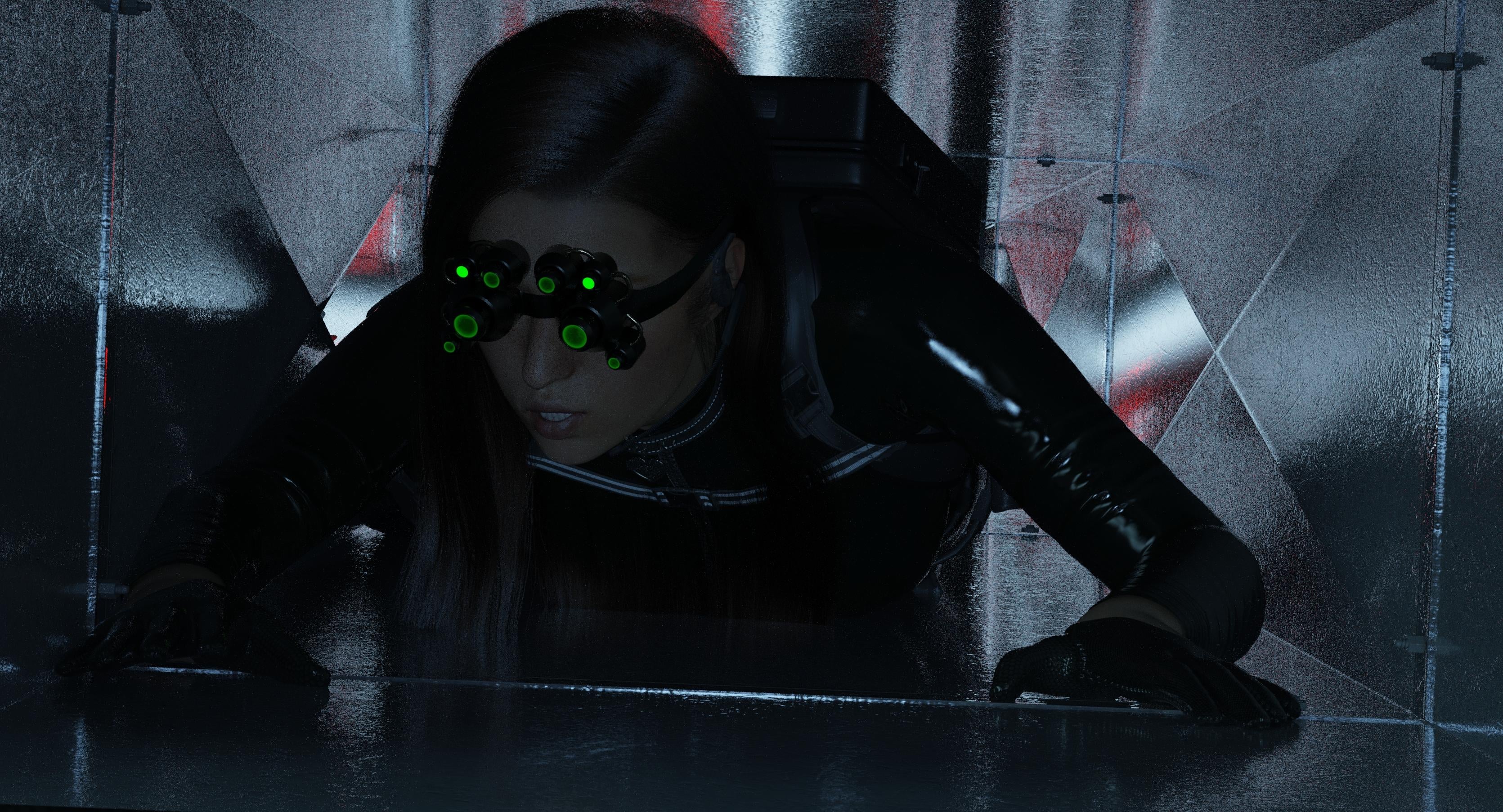
In the Vents:
Current/Previous Month:
Nightvision Goggles: https://www.daz3d.com/sci-fi-sniper-outfit-for-genesis-8-female
Boots (present but unseen): https://www.daz3d.com/girls-baseball-style-boots-for-genesis-8-and-81-females
Hair: https://www.daz3d.com/dforce-strand-based-fe-side-part-straight-hair-for-genesis-9-8-and-81
Prior months:
Harness: https://www.daz3d.com/tactical-belts-for-genesis-3-and-8-females
Vent: https://www.daz3d.com/fm-claustrophobia-shafts
Gloves: https://www.daz3d.com/x-fashion-dark-cat-outfit-for-genesis-8-female-s
I thnk I've purchased somewhere in the region of 1200 assets in the last month so this will take some thinking about
I'll have a go when I get back from holiday next weekend.
You should be able to use Omniskin without having the product (you can search OmniSurfaceBase on these forums for some idea of how to implement) but it may take some time to set up and results will vary with other skin textures that were not made for OmniSurfaceBase (aka OmniSkin). Most existing textures will be calibrated for either PBRskin or Iray Uber, so Surface settings may need fine tuning. Generally, as long as the textures have decent color values and detail they should be able to be used on the shader by simply adding the textures to the Diffuse Reflection Color slot. I attached two examples of using the default Masc01 and Masc02 head texture maps that come with Genesis 9.
Thank you
I saved both the pictures and your message to try it myself later.
I saw 1200 and thought wow, that's a lot. I thought i spent a lot but 1200 has to be next level, right? So, I went into pgAdmin3 and ran a query to see what I'd bought since March 1: 1175 rows returned. Oh, 1200 doesn't seem so high any more.
Sorry, I didn't see your question. This is the conventional PBR skin shader. I have used the Omniskin one (it also came with the artist's character Vadim) and they do look very similar with high quality skin effects. I will do a render so that you can see the difference.
Sorry I didn't see this. I didn't look at consumption... One sec....
I added the street Set to an existing scene, hid all the other stuff and hit render. My Env settings were dark and foreboding, it stlll looks cool.
Before hitting render Details for GPU memory said Daz was using 4.5 GB. During Render it was 6.9 GB. It took 2 minutes on my 4090.
2026-04-05 19:04:48.440 Iray [INFO] - IRAY:RENDER :: 1.0 IRAY rend progr: 95.04% of image converged
2026-04-05 19:04:48.440 Iray [INFO] - IRAY:RENDER :: 1.0 IRAY rend info : Received update to 02872 iterations after 01:48.366.
2026-04-05 19:04:48.463 Iray [INFO] - IRAY:RENDER :: 1.0 IRAY rend progr: Convergence threshold reached.
2026-04-05 19:04:50.253 [INFO] :: Saved image: D:\Daz3D-Install\Daz-Temp\render\r.png
2026-04-05 19:04:50.277 [INFO] :: Finished rendering.
2026-04-05 19:04:50.359 [INFO] :: Total Rendering Time: 1 minutes 56.58 seconds
A quick incomplete render.... The skin is subtly paler, renders slower than the standard PBR shader, and is bit better at showing nuances like skin imperfections.
I can't help looking at his nips and thinking the poor boy needs a hot shower and some warm clothes stat
It is cold in Eastern Europe!
Renders of a couple of sets I got over the last few days.
The first is https://www.daz3d.com/ajc-boogie-roller-girl-outfit-and-boombox-for-genesis-8-and-81-females This was annoying...the jacket collar folded onto itself and unlike the shirt had no morph to move it so got ditched. The boots are so high poly, 525,611 EACH! at base level. The pose is from https://www.daz3d.com/igd-flow-poses-for-genesis-8-female And Silas3D's https://www.daz3d.com/pearly-whites-teeth-materials used on teeth, REALLY happy with them.
And the other https://www.daz3d.com/dforce-ballet-dreams-for-genesis-81-female a freebie I got during the MM Easter weekend. Another annoyance...the skirt persisted in poking out over the edge of the corset until I made the fit over skirt morph to 200%. Pose from https://www.daz3d.com/classical-dance-poses-for-genesis-3-female-s
,
It was a furtastic day yesterday
Mackenzie Iglesias undercover as a Impel Energy grid girl.
Previous Month: https://www.daz3d.com/super-hero-suit-for-genesis-8-females
Before:
https://www.daz3d.com/dforce-rock-on-outfit-for-genesis-8-females
https://www.daz3d.com/wedge-sneakers-for-g8f-and-g9f
https://www.daz3d.com/dforce-junia-hair-for-genesis-9
Cloudflare induced double post.
I was thrilled to get DA Arion so I decided to mix a few of those character shape products (Andy for Genesis 9 and Andrew for Genesis 9 in the case of DA Arion) and include DA Belle.
I kind of liked Holden Fits right into a trailer park scene.
Eve Serafína's Dream (a recreation of a shot from 2008's The Spirit)
This Month:
https://www.daz3d.com/hid-trish-for-genesis-9
https://www.daz3d.com/dforce-su-sexy-latex-for-genesis-9
https://www.daz3d.com/full-diving-equipment-for-genesis-9
Previous:
https://www.daz3d.com/valacta-brutalist-hair-for-genesis-8-81-and-9-females
Before:
https://www.daz3d.com/unusual-short-glove-set-for-genesis-9-female
https://www.daz3d.com/fm-claustrophobia-shafts
https://www.daz3d.com/silent-killer-woman-outfit-and-poses-genesis-9-female
Those little triangles are a nuisance, and most rendering systems will sometimes create those when lighting is at a grazing angle to some of the polygons in the mesh being rendered. Things you can try that often fix the problem in Blender, in my order of preference, are:
If lowering the bump height removes the triangle artefacts but spoils the appearance of the material you can try feeding the bump map into the specular IOR amount in the BSDF material. In the case of normal maps it is harder to fix if the material looks too flat when you lower the normal map strength and you find a method to fix that please share it!
I hope that helps.
Thanks for the detailed response, and I hope it'll help others. I, unfortunately, am not well versed enough in Blender to even attempt what you're saying. On the bright side, small issues like that are easily enough in postwork. One day, though, maybe I'll get around to learning Blender enough to make use of it!