Render up some "character"

1235789

Comments

  • AllenArtAllenArt Posts: 7,175
    edited February 2019

    The Super Natural Brows are in the Hair folder and are an "attachment". If it doesn't say "attachment" over the thumbnail, hover over the thumb until the info comes up where you will see towards the bottom: File/type: wearable.

    The brows are right inside the Super Natural Brows folder.

    Laurie

    Capture.JPG
    486 x 805 - 49K
    Post edited by AllenArt on
  • nonesuch00nonesuch00 Posts: 18,781

    They are in Anatomical Elements if you are looking in the Smart Content tab. Make sure you have a Genesis 8/Genesis 3 Female/Male character selected though. And there are two Super Natural Brows products, one for G8F/G3F and the other for G8M/G3M. 

  • takezo_3001takezo_3001 Posts: 2,027
    AllenArt said:

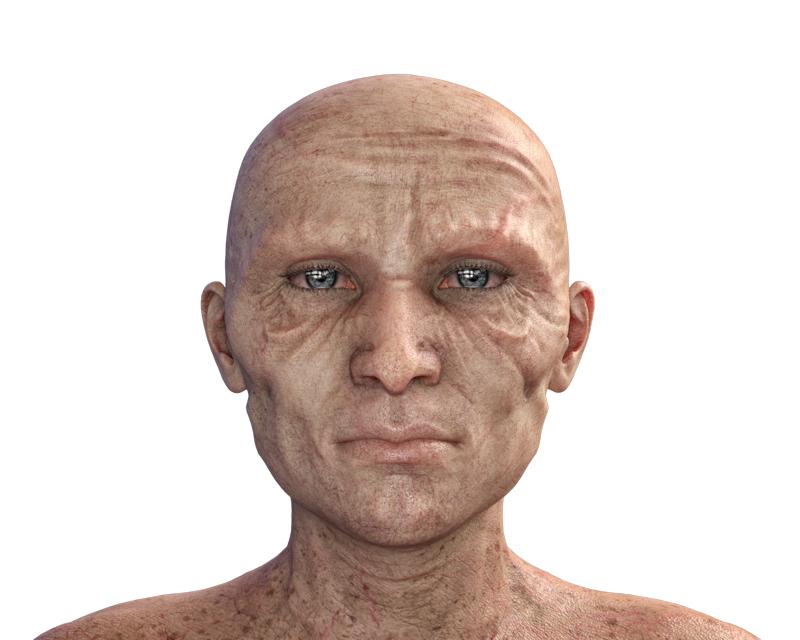
    One more...then I'm fresh out of characters. LOL.

    This is G3, some character morphs, some Hellfish morphs IIRC, some aging morphs...

    Laurie

    Dodgamn that some magnificent lighting you got going on there! The character's unique too!

  • jukingeojukingeo Posts: 757
    AllenArt said:

    The Super Natural Brows are in the Hair folder and are an "attachment". If it doesn't say "attachment" over the thumbnail, hover over the thumb until the info comes up where you will see towards the bottom: File/type: wearable.

    The brows are right inside the Super Natural Brows folder.

    Laurie

    Hello Laurie,

    Yes, that is what I was looking for, but couldn't find it.  I opened up my Content tab where everything is alphabetical and went straight to 'S' and found the Super Natural Brows folder, but I couldn't find that 'attachment' item.  I found that weird as everything related to Super Natural Brows should have been together.  Also it would be green and I didn't see anything green.  But now that you provided what the thumbnail looks like, I just will over over everyone that looks like that and see if the 'wearable' shows up at the bottom.   I am not in Daz right now, but I will check this out later.

    Thanks!

  • AllenArtAllenArt Posts: 7,175
    edited February 2019
    jukingeo said:
    AllenArt said:

    The Super Natural Brows are in the Hair folder and are an "attachment". If it doesn't say "attachment" over the thumbnail, hover over the thumb until the info comes up where you will see towards the bottom: File/type: wearable.

    The brows are right inside the Super Natural Brows folder.

    Laurie

    Hello Laurie,

    Yes, that is what I was looking for, but couldn't find it.  I opened up my Content tab where everything is alphabetical and went straight to 'S' and found the Super Natural Brows folder, but I couldn't find that 'attachment' item.  I found that weird as everything related to Super Natural Brows should have been together.  Also it would be green and I didn't see anything green.  But now that you provided what the thumbnail looks like, I just will over over everyone that looks like that and see if the 'wearable' shows up at the bottom.   I am not in Daz right now, but I will check this out later.

    Thanks!

    Are you using the Content Library or Smart Content? I never use Smart Content...because it's not very. LOL If you are using the Content Library, how did you install Super Natural Brows? Manually? Thru DIM? Thru Connect?

    Laurie

    Post edited by AllenArt on
  • davesodaveso Posts: 7,885
    jukingeo said:
    daveso said:

    Sydney 8 using Edie 8 HD ... did some face adjust to chin, brows, face overall. Brows are the Super Natural Brows Merchant Resource for Genesis 8 and 3 Female


    Daveso, stupid question...I just bought the Super Natural Brows Merchant Resourse pack myself.  The strange thing is, I don't know how to use it!  I thought there would be some kind of 'base' eyebrow that has to be set in place first and then use materials to change the shape and color.  However, I can't find that 'base' eyebrow.  In my content library for that pack, I only see shapes and colors.  Clicking on any of them does nothing.  Perhaps you could give me some insight on how to use this pack?

    Thank you,

    Geo

    just to respond... i see you are now on the right path for this from super good help alreadysmiley but ... in smart content .. mine is in Anatomy ... it is the brow at least for G3 or G3F as nonesuch00 stated. Materials and shaping morphs are in there as well.... 

  • AllenArtAllenArt Posts: 7,175
    edited February 2019
    daveso said:
    jukingeo said:
    daveso said:

    Sydney 8 using Edie 8 HD ... did some face adjust to chin, brows, face overall. Brows are the Super Natural Brows Merchant Resource for Genesis 8 and 3 Female


    Daveso, stupid question...I just bought the Super Natural Brows Merchant Resourse pack myself.  The strange thing is, I don't know how to use it!  I thought there would be some kind of 'base' eyebrow that has to be set in place first and then use materials to change the shape and color.  However, I can't find that 'base' eyebrow.  In my content library for that pack, I only see shapes and colors.  Clicking on any of them does nothing.  Perhaps you could give me some insight on how to use this pack?

    Thank you,

    Geo

    just to respond... i see you are now on the right path for this from super good help alreadysmiley but ... in smart content .. mine is in Anatomy ... it is the brow at least for G3 or G3F as nonesuch00 stated. Materials and shaping morphs are in there as well.... 

    The individual DO character eyebrows are in there, but not Super Natural Brows by Redz...those are in Hair :). Well, maybe in Smart Content they are...I never use that. LOL

    Laurie

    Post edited by AllenArt on
  • davesodaveso Posts: 7,885
    edited February 2019
    AllenArt said:
    daveso said:
    jukingeo said:
    daveso said:

    Sydney 8 using Edie 8 HD ... did some face adjust to chin, brows, face overall. Brows are the Super Natural Brows Merchant Resource for Genesis 8 and 3 Female


    Daveso, stupid question...I just bought the Super Natural Brows Merchant Resourse pack myself.  The strange thing is, I don't know how to use it!  I thought there would be some kind of 'base' eyebrow that has to be set in place first and then use materials to change the shape and color.  However, I can't find that 'base' eyebrow.  In my content library for that pack, I only see shapes and colors.  Clicking on any of them does nothing.  Perhaps you could give me some insight on how to use this pack?

    Thank you,

    Geo

    just to respond... i see you are now on the right path for this from super good help alreadysmiley but ... in smart content .. mine is in Anatomy ... it is the brow at least for G3 or G3F as nonesuch00 stated. Materials and shaping morphs are in there as well.... 

    The individual DO character eyebrows are in there, but not Super Natural Brows by Redz...those are in Hair :). Well, maybe in Smart Content they are...I never use that. LOL

    Laurie

    weird...mine is installed in smart content
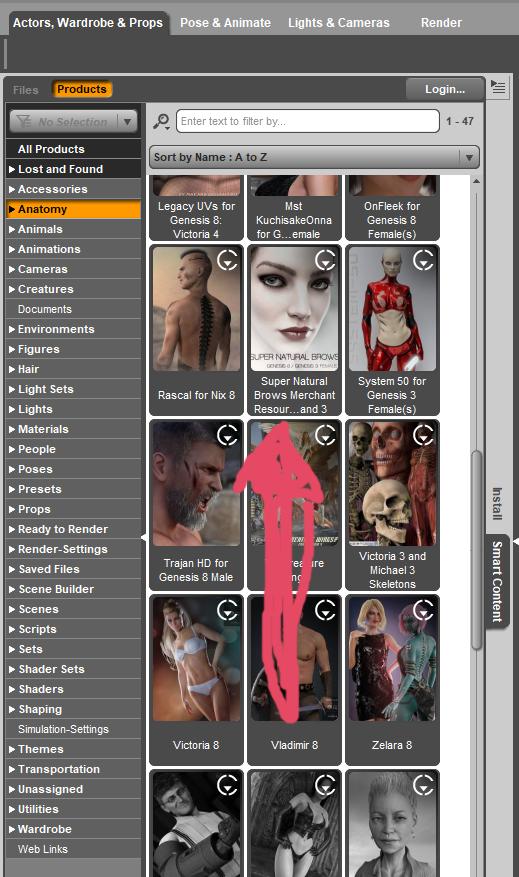
    brows.jpg
    519 x 877 - 404K
    Post edited by daveso on
  • AllenArtAllenArt Posts: 7,175

    Yeah, they're in Smart Content on my machine too...I just never look in there. In fact, most of the time I forget it exists. LOL. I can find anything thru the regular Content Library and that's what I always use ;).

    Laurie

  • davesodaveso Posts: 7,885
    AllenArt said:

    Yeah, they're in Smart Content on my machine too...I just never look in there. In fact, most of the time I forget it exists. LOL. I can find anything thru the regular Content Library and that's what I always use ;).

    Laurie

    i dislike that content libray a lot. i can never find anything in there. its like looking for a needle in a haystack. A lot of stuff I just end up importing and doing stuff basically manually. 

  • AllenArtAllenArt Posts: 7,175
    daveso said:
    AllenArt said:

    Yeah, they're in Smart Content on my machine too...I just never look in there. In fact, most of the time I forget it exists. LOL. I can find anything thru the regular Content Library and that's what I always use ;).

    Laurie

    i dislike that content libray a lot. i can never find anything in there. its like looking for a needle in a haystack. A lot of stuff I just end up importing and doing stuff basically manually. 

    I was so used to looking for things I wanted to use in Poser that it became second nature. Smart Content is hit or miss....at least with the Content Libraries I know where to go ;).

    Laurie

  • DarkSpartanDarkSpartan Posts: 1,096
    AllenArt said:
    daveso said:
    AllenArt said:

    Yeah, they're in Smart Content on my machine too...I just never look in there. In fact, most of the time I forget it exists. LOL. I can find anything thru the regular Content Library and that's what I always use ;).

    Laurie

    i dislike that content libray a lot. i can never find anything in there. its like looking for a needle in a haystack. A lot of stuff I just end up importing and doing stuff basically manually. 

    I was so used to looking for things I wanted to use in Poser that it became second nature. Smart Content is hit or miss....at least with the Content Libraries I know where to go ;).

    Laurie

    That makes (at least) two of us. I used Poser for a lot of years. At some point I decided I needed to use Genesis 2... You can guess how well that worked out. I also use the content library, albeit mildly rearranged so i can select a figure or a type of prop and find what I'm looking for even when rushed or stressed out.

  • FSMCDesignsFSMCDesigns Posts: 12,846
    AllenArt said:

    Yeah, they're in Smart Content on my machine too...I just never look in there. In fact, most of the time I forget it exists. LOL. I can find anything thru the regular Content Library and that's what I always use ;).

    Laurie

    Same here. I install manually and can see the file path from the install, so I know exactly where to look in the content library to find it after that.

  • davesodaveso Posts: 7,885
    AllenArt said:

    Yeah, they're in Smart Content on my machine too...I just never look in there. In fact, most of the time I forget it exists. LOL. I can find anything thru the regular Content Library and that's what I always use ;).

    Laurie

    Same here. I install manually and can see the file path from the install, so I know exactly where to look in the content library to find it after that.

    apparently my Content Library is a mess then ... i can;t find stuff from one day to the next..its like stuff comes and goes at will.  Its everywhere..nothing makes sense .. i mostly use DIM to install .. but stuff from alternate stores gets manually installed. I can never find that stuff. 

  • AllenArtAllenArt Posts: 7,175

    I couldn't find a darn thing in DS for at least a year after I first started using it. But it's funny how that sort of stuff starts to sink in without your even realizing it ;). I tried the Smart Content early on and always ended up exasperated. Was just easier to go and look for it myself.

    Laurie

    daveso said:
    AllenArt said:

    Yeah, they're in Smart Content on my machine too...I just never look in there. In fact, most of the time I forget it exists. LOL. I can find anything thru the regular Content Library and that's what I always use ;).

    Laurie

    Same here. I install manually and can see the file path from the install, so I know exactly where to look in the content library to find it after that.

    apparently my Content Library is a mess then ... i can;t find stuff from one day to the next..its like stuff comes and goes at will.  Its everywhere..nothing makes sense .. i mostly use DIM to install .. but stuff from alternate stores gets manually installed. I can never find that stuff. 


  • XtroXtro Posts: 39

    work still in progress still. ive based the characters on the 80s kids tv show ulysses 31. still got a lot of work to do especially on the robot.

    yumi and nono.jpg
    1497 x 843 - 546K
  • nonesuch00nonesuch00 Posts: 18,781
    Xtro said:

    work still in progress still. ive based the characters on the 80s kids tv show ulysses 31. still got a lot of work to do especially on the robot.

    nice

  • XtroXtro Posts: 39
    Xtro said:

    work still in progress still. ive based the characters on the 80s kids tv show ulysses 31. still got a lot of work to do especially on the robot.

    nice

    thanks :)

  • XpiderManXpiderMan Posts: 426
    edited April 2019

    Some of my "Gian and friends" series while trying to create my version of Gianni 8.

    Silent Tears...

    Post edited by Chohole on
  • WonderlandWonderland Posts: 7,137
    edited April 2019

    A couple of recent ones. Instagram style postwork.. The top one kind of looks like a friend of mine lol, very similar smile!


    2E141D67-302F-4B3B-B5C5-CA330AE9BB3F.jpeg
    993 x 1366 - 562K
    A8AAAE81-C887-4B38-9CB1-85104307E7F3.jpeg
    960 x 1200 - 421K
    Post edited by Wonderland on
  • davesodaveso Posts: 7,885

    nice works :)

  • MazhMazh Posts: 499
    edited April 2019


    Gen X accident... :)


    Gen_X_Acc.jpg
    1080 x 1440 - 1M
    Post edited by Mazh on
  • MazhMazh Posts: 499
    edited April 2019

    double post sry

    Post edited by Mazh on
  • JamesJABJamesJAB Posts: 1,766

    Here are a few of my custom characters.


    She's based off the singer/guitar from a Japanese indie band. (GO!GO!7188)

    Here are a couple of characters that I came up with for a web comic that I have been slacking off on...

  • Sven DullahSven Dullah Posts: 7,621
    Mazh said:


    Gen X accident... :)


    Haha very cool!

    dForce accident (not really, it was quite intentional)

    Random character

  • davesodaveso Posts: 7,885
    edited April 2019

    been awhile for me ... 

    dolb1 small.jpg
    800 x 640 - 247K
    Post edited by daveso on
  • AllenArtAllenArt Posts: 7,175

    My lastest dial spin. Trying to use the ladies more since I have so freakin' many of them ;). Sooo many morphs in this one, I couldn't even begin to list them all. The skin is Zelara's and the eye textures are Kala's.

    Laurie

  • xyer0xyer0 Posts: 6,360
    AllenArt said:

    My lastest dial spin. Trying to use the ladies more since I have so freakin' many of them ;). Sooo many morphs in this one, I couldn't even begin to list them all. The skin is Zelara's and the eye textures are Kala's.

    Laurie

    STUNNING!

  • Her eyes have a ton of character... she's beautiful!

  • algovincianalgovincian Posts: 2,670
    AllenArt said:

    My lastest dial spin. Trying to use the ladies more since I have so freakin' many of them ;). Sooo many morphs in this one, I couldn't even begin to list them all. The skin is Zelara's and the eye textures are Kala's.

    Laurie

    She’s incredible, Laurie!

    - Greg

Sign In or Register to comment.